Try the sheet here, on the example
The sheet is open below with sample numbers. Change any white cell and watch the results update, or press the blank-copy button to type your own data from scratch. Nothing you type leaves your browser.
Example from the sheet
| الاسم | حاضر | غائب | متأخر | نسبة الحضور | الحالة |
|---|---|---|---|---|---|
| أحمد سالم | 16 | 3 | 1 | 85.0% | تجاوز حد الغياب |
| محمد عادل | 18 | 2 | 0 | 90.0% | قريب من الحد |
| سارة حسن | 17 | 0 | 0 | 85.0% | منتظم |
| ليلى فؤاد | 16 | 0 | 4 | 100.0% | منتظم |
| يوسف كمال | 18 | 1 | 1 | 95.0% | منتظم |
| مريم نبيل | 20 | 0 | 0 | 100.0% | منتظم |
| عمر ياسر | 17 | 1 | 1 | 90.0% | منتظم |
Example from the “الحضور” tab (Arabic), with the numbers and formulas that are in the file.
What is inside
- "الإعدادات" (Settings): School and class name, the date of the first day of the month, the limit for unexcused absences, and the meaning of the attendance codes.
- "الطلاب" (Students): Each student's number, name and parent's phone. It holds up to 60 students.
- "الحضور" (Attendance): A monthly grid with the days of the month and their names. You pick each student's code from a list, and the sheet counts the days, the percentage and the status for each student, plus the number of students absent each day.
- "ملخص الشهر" (Monthly summary): School days, the class's average attendance, how many students passed the limit, the day with the most absences, and the five students with the most absences.
The file opens on a start tab (“ابدأ هنا”, Start here) that explains how to use it.
What makes it different
An empty cell means a day off, so it is not counted. An excused absence does not count toward the absence limit, so a student who was absent with permission is not flagged. Rows of students who passed the limit turn red.
Ready-made student attendance register: how to use it month by month
This is a ready-made Excel student attendance register for one class and one month at a time. At the start of the month, enter the date of the first day in "الإعدادات" (Settings). The days of the month and their names appear in the "الحضور" (Attendance) sheet, and days after the end of the month are greyed out.
On each school day, pick a code from the list for each student:
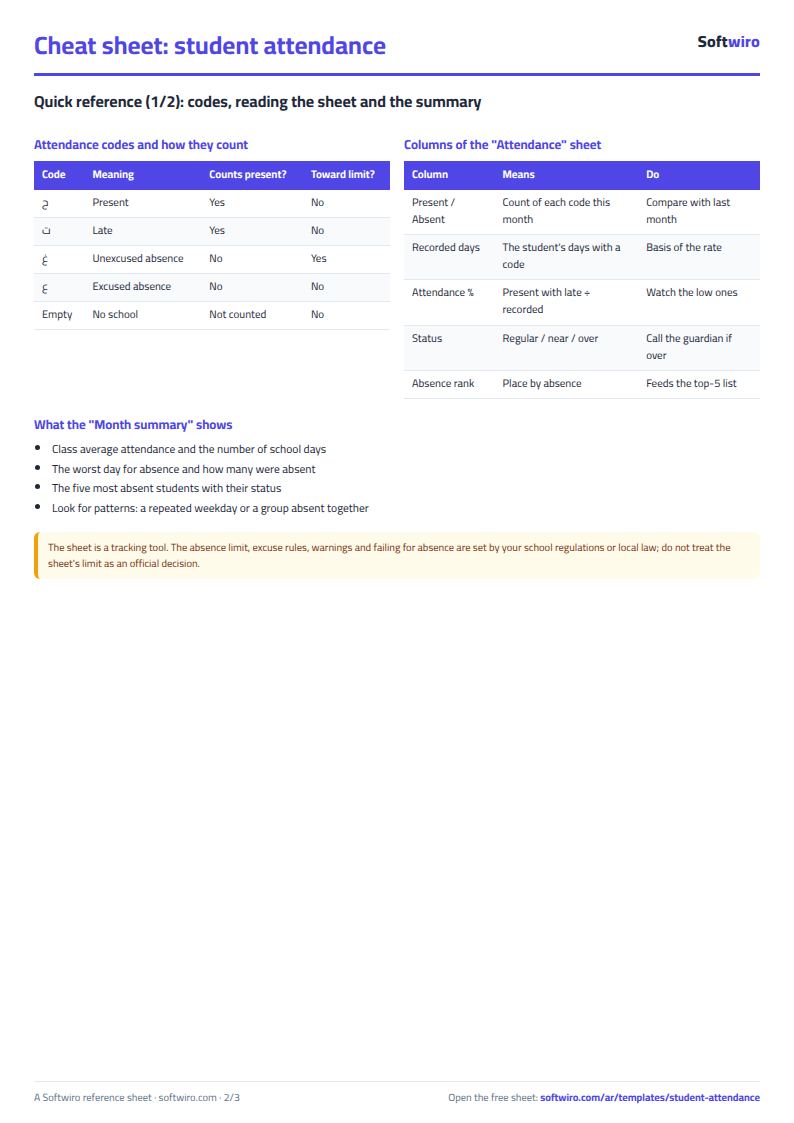
- ح present
- غ absent without excuse
- ت late
- ع absent with excuse
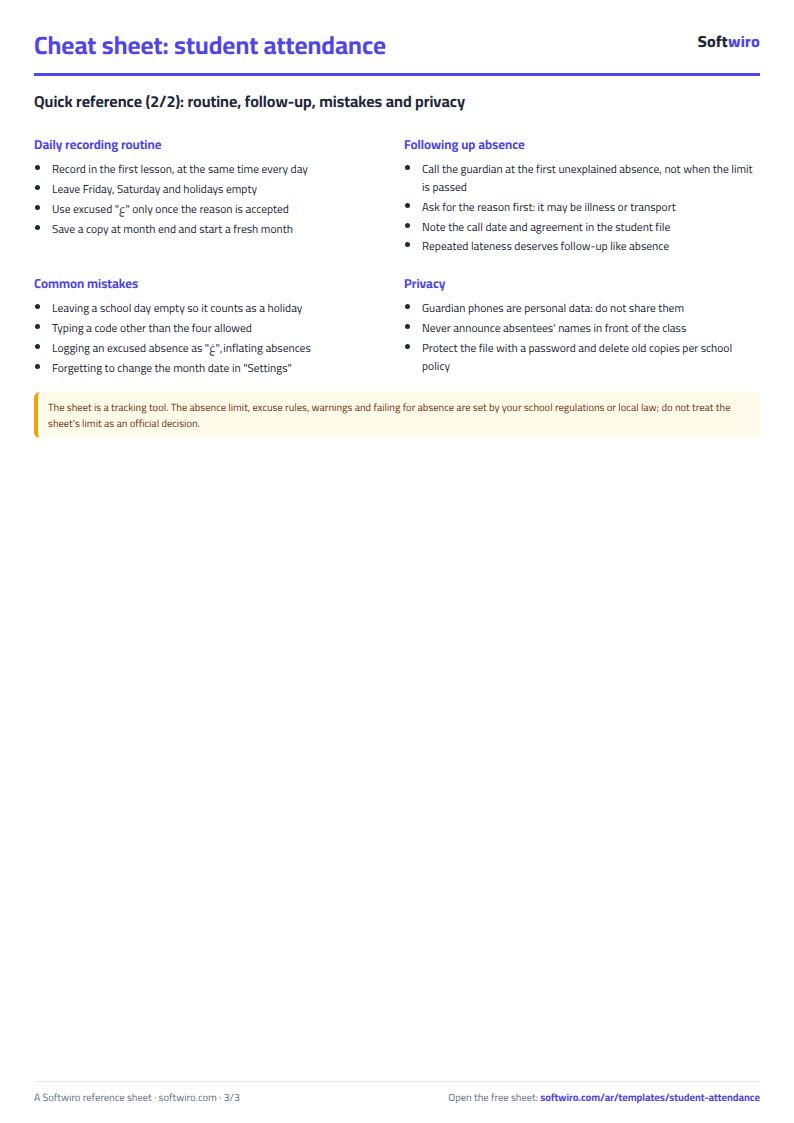
Leave Friday, Saturday and holiday cells empty. A day counts as a school day once at least one student has a code on it, and the number of students absent each day is shown at the bottom of the grid.
How the sheet flags students who are often absent
You enter the limit for unexcused absences in "الإعدادات" (Settings) (3 days in the example). The sheet puts each student in one of three statuses: "منتظم" (regular), "قريب من الحد" (near the limit) when the student is one day short of the limit, and "تجاوز حد الغياب" (over the absence limit) when the student has reached the limit or gone past it. Rows are colored so you can spot whose parent to call, and the parent's phone number is in the "الطلاب" (Students) sheet.
At the end of the month, the "ملخص الشهر" (Monthly summary) sheet saves you counting by hand: the class's average attendance, how many students passed the limit, the day with the most absences, and the five students with the most absences. For staff, use the employee attendance sheet, and to track homework and behavior see the teacher's sheet. Details are in the guide.
How to use it
- In the "الإعدادات" (Settings) sheet, enter the school and class name, the date of the first day of the month, and the unexcused-absence limit at which you want to be warned.
- In the "الطلاب" (Students) sheet, enter each student's number, name and parent's phone number.
- In the "الحضور" (Attendance) sheet, pick one of the codes from the list for each student on each school day: ح present, غ absent, ت late, ع absent with excuse. Leave the cell empty on Friday, Saturday and holidays so that day is not counted.
- The sheet counts each student's present, absent, late and excused days, the attendance percentage and the status, and colors the students who passed the limit.
- Open the "ملخص الشهر" (Monthly summary) sheet to see the average attendance, the day with the most absences, and the five students with the most absences.
- To keep a new month, copy the "الحضور" (Attendance) sheet or save a copy of the file each month, then change the month's date and clear the codes.
Before you start:
- The sheet holds 60 students. An excused absence does not count toward the absence limit, but it does count among the student's recorded days.
- Attendance percentage = (present + late) ÷ the student's recorded days. A late student counts as present in this percentage.
- A day counts as a school day if at least one student has a code on it. Days after the end of the month appear grey.
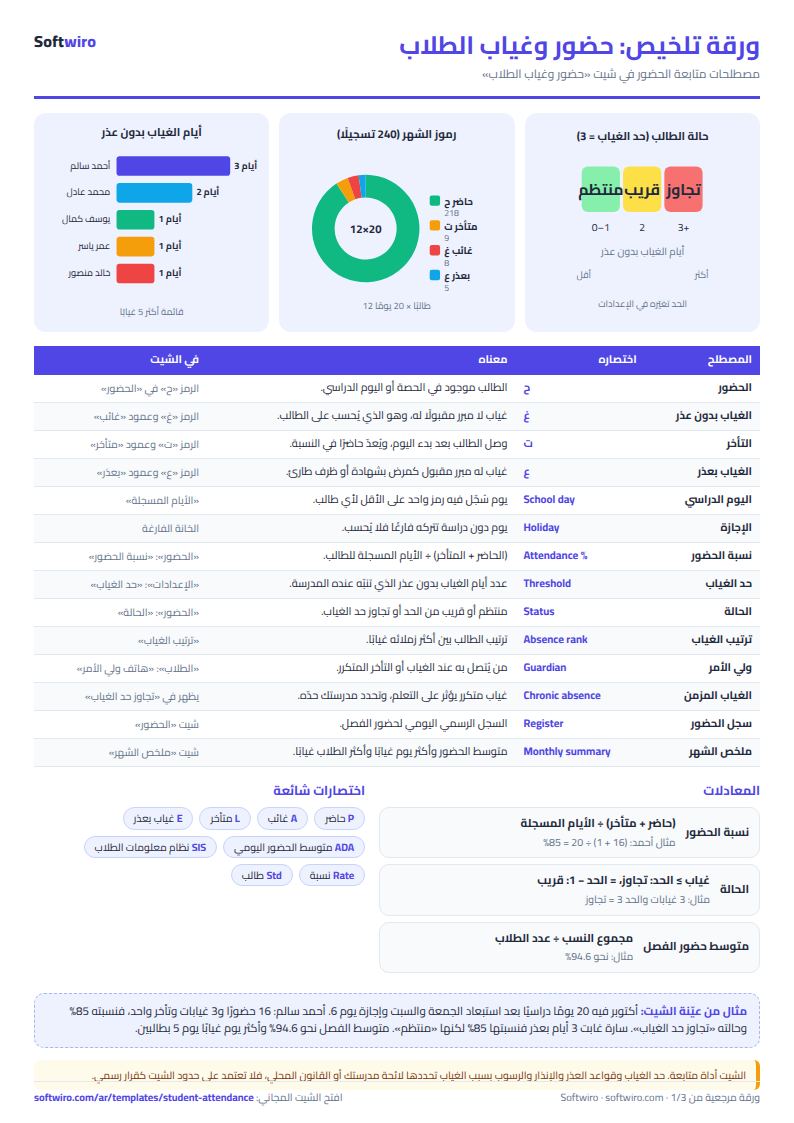
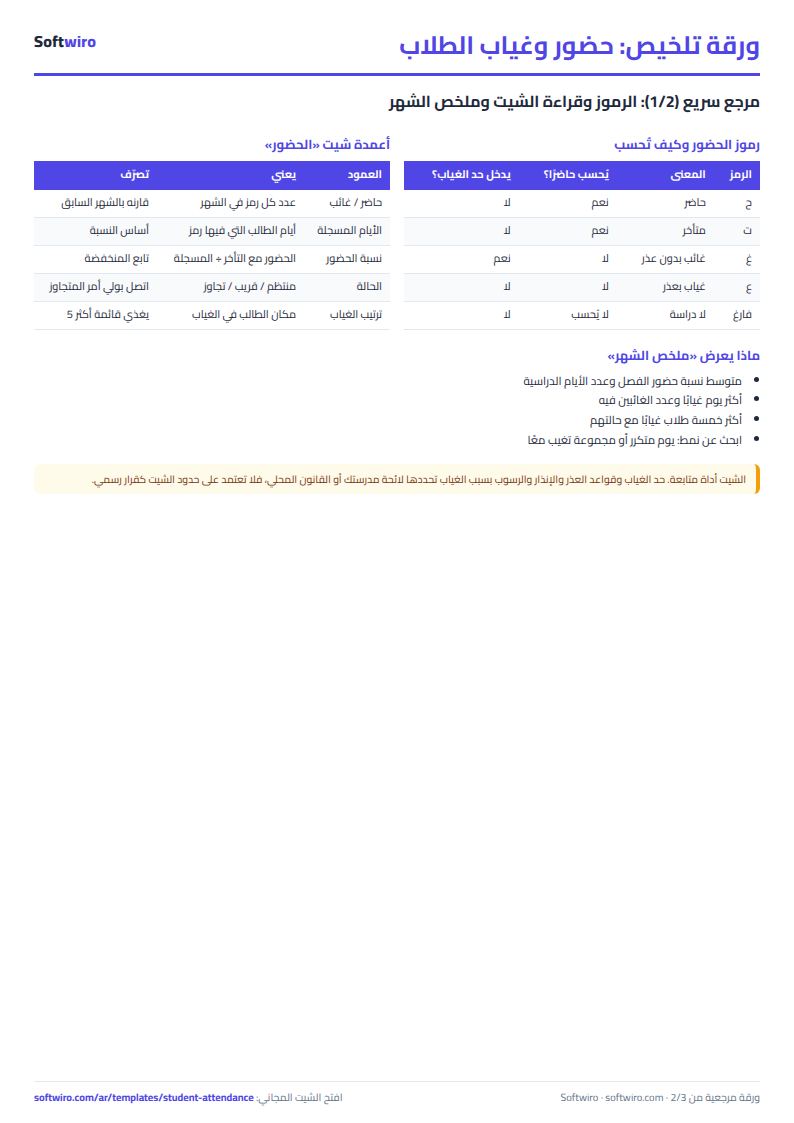
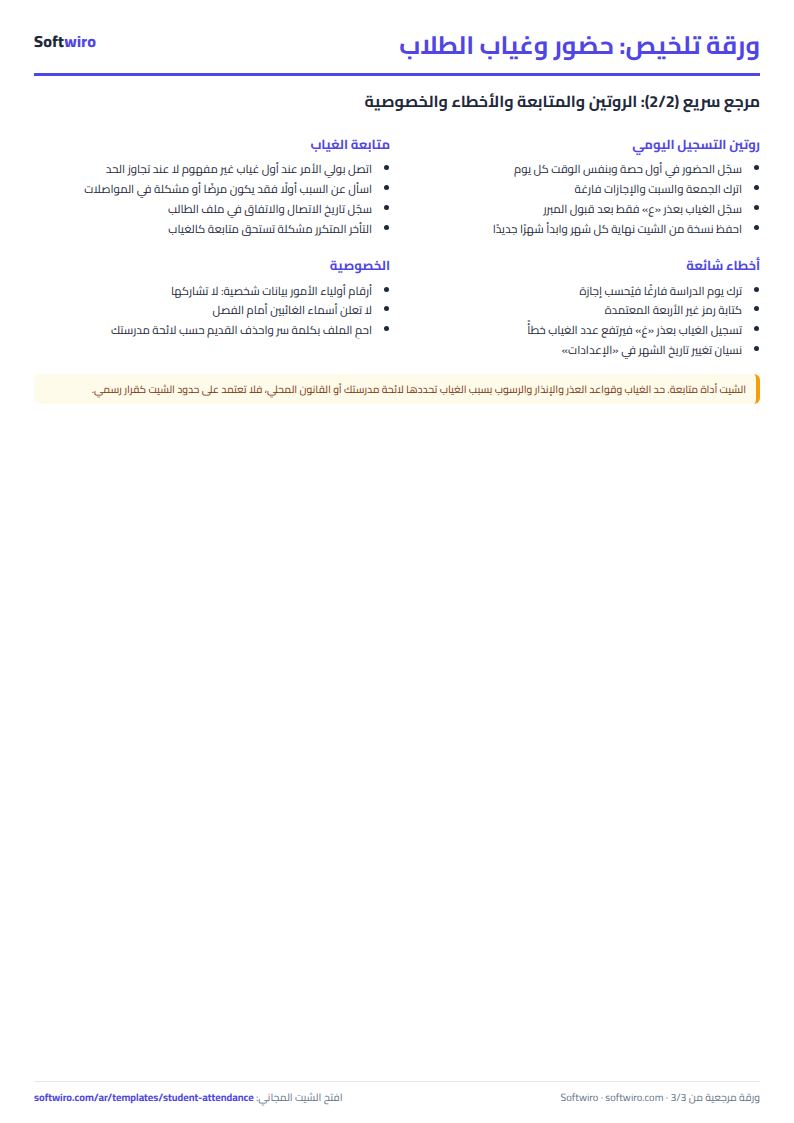
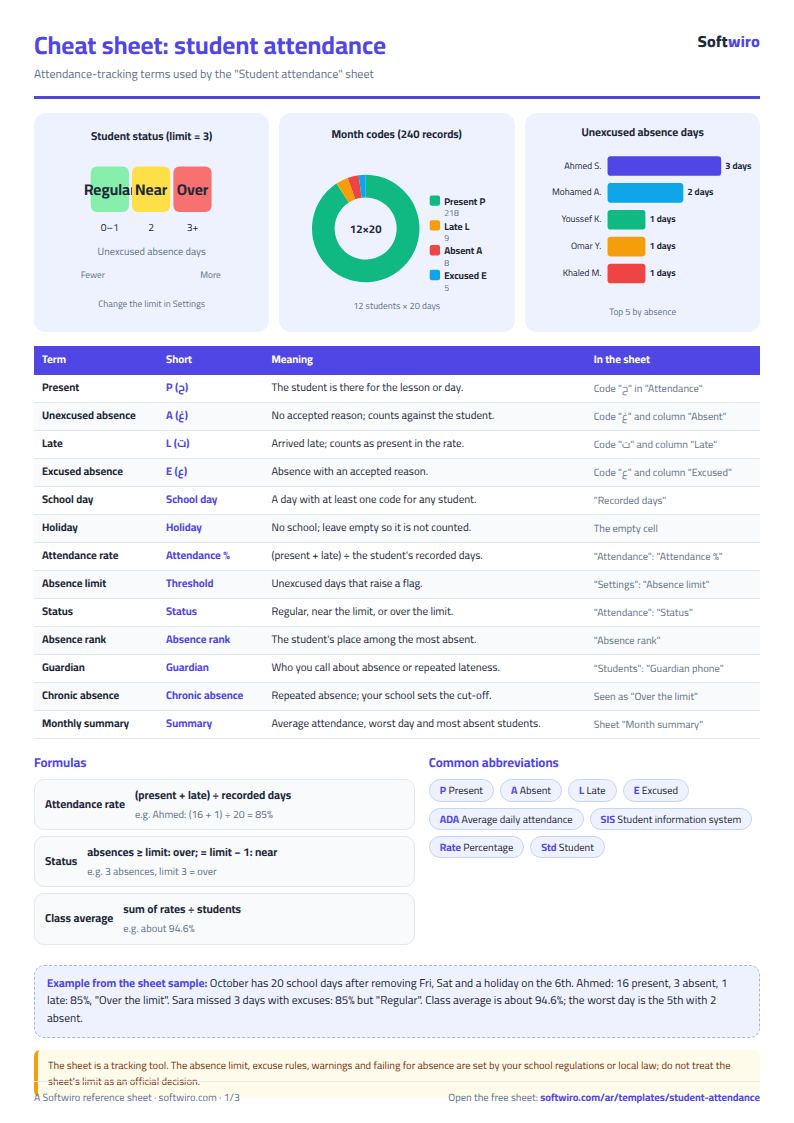
Free cheat sheet for this field
Terms, abbreviations, tables and diagrams over several pages, in Arabic and English. Download it as a PDF or images, including a phone-size version.
Still running this on Excel?
This sheet holds the numbers of one class, typed in by one teacher. In the School Performance Management Platform, each student's grades, attendance and teacher notes come together, and reports reach parents.
| In this sheet | In School Performance Management Platform |
|---|---|
| Every teacher has a sheet, and the administration collects the files. | One dashboard for students, teachers and classes, with exam results tracking and a comparison of performance across terms. |
| A student's decline shows up in the end-of-term result. | AI analyzes the student's grades, attendance and teacher notes, warns early about a possible decline, and suggests a development plan that the teacher decides on. |
| The parent learns about the problem late. | Regular reports to parents on the student's level, teacher notes and the attendance record, plus direct contact with the school through the app. |
| Attendance lives in a notebook or a sheet per class. | Attendance, absence and lateness are recorded for each student and turned into attendance reports and rates that the administration follows for each class. |
Frequently asked questions
How do I use the sheet for a new month?
Copy the "الحضور" (Attendance) sheet, or save a copy of the file before you start. Then change the month's date in "الإعدادات" (Settings) and clear the codes.
What do I enter on weekends and holidays?
Leave the cell empty. A day with no code is not counted, so it does not affect the attendance percentage.
How do I make a student attendance register in Excel with this sheet?
Enter the students' names in the "الطلاب" (Students) sheet, and the date of the first day of the month and the absence limit in "الإعدادات" (Settings). Then pick each student's code for each day in the "الحضور" (Attendance) sheet. The sheet counts present, absent and late days and the attendance percentage for each student, and summarizes the month in "ملخص الشهر" (Monthly summary).
Is the template free?
Yes, with no sign-up and no email address. Use it, edit it and share it as you like.
Does it work in Google Sheets and on mobile?
The sheet uses formulas supported by Excel 2016 and later, Google Sheets and LibreOffice, so you can upload it to Google Drive and open it with Google Sheets on a computer or a phone.
What is the difference between the white and the gray cells?
You type in the white cells; the gray cells are calculated automatically. Don't type in a gray cell, or you will erase its formula.
Can I use the sheet from an AI assistant?
Yes. Add our MCP server (URL https://softwiro.com/api/mcp, no key needed) to your assistant and ask it to do the calculation in this template. The numbers come from the sheet's own formulas, and we do not store your data. The steps and a ready-made prompt are in this article: https://softwiro.com/blog/mcp-excel-templates-ai-agent-guide.html
All the templates in this group: Excel templates for Al-Azhar students and teachers
More free templates for: Schools and students
More free templates
- Gradebook Template for Excel (Weighted Categories, Letter Grades)
- Study planner and lesson tracker
- Weekly study routine sheet
- Nursery and school fees tracker (Excel)
- Tutoring center manager (Excel)
- School class timetable (Excel)
- Exam schedule with committees and invigilators (Excel)
- Homework and behavior tracker for teachers (Excel)
- School bus subscriptions tracker (Excel)
- University applications tracker (Excel)
- Complete nursery management sheet
- Private school management sheet
- Lending library management sheet
- Graduation project manager sheet: tasks, team, phases and deliverables
- Journal entries, trial balance and financial statements sheet
- Online store orders and profit sheet
- Real estate leads and units tracker
- Installments and collection tracker
- Rental portfolio tracker: properties, units, tenants and contracts
- Pharmacy expiry and stock tracking sheet
- Rent collection tracker for properties
- Business expenses and monthly budget sheet