Try the sheet here, on the example
The sheet is open below with sample numbers. Change any white cell and watch the results update, or press the blank-copy button to type your own data from scratch. Nothing you type leaves your browser.
Example from the sheet
| الكود | الطالب | الفصل | الصف | الصافي بعد الخصم | المستحق حتى اليوم | المدفوع | المتأخر | الموقف |
|---|---|---|---|---|---|---|---|---|
| S001 | أحمد محمود | KG1 أ | KG1 | 18,000.00 | 12,600.00 | 12,600.00 | 0.00 | مسدد |
| S002 | محمد هشام | KG1 أ | KG1 | 18,000.00 | 12,600.00 | 12,600.00 | 0.00 | مسدد |
| S003 | يوسف سامح | KG1 أ | KG1 | 18,000.00 | 12,600.00 | 12,600.00 | 0.00 | مسدد |
| S004 | عمر هاني | KG1 أ | KG1 | 16,500.00 | 11,550.00 | 11,550.00 | 0.00 | مسدد |
| S005 | زياد تامر | KG1 أ | KG1 | 18,000.00 | 12,600.00 | 12,600.00 | 0.00 | مسدد |
| S006 | كريم إسلام | KG1 أ | KG1 | 18,000.00 | 12,600.00 | 7,200.00 | 5,400.00 | متأخر |
| S007 | آدم أيمن | KG1 أ | KG1 | 18,000.00 | 12,600.00 | 7,200.00 | 5,400.00 | متأخر |
| S008 | مصطفى وائل | KG1 أ | KG1 | 18,000.00 | 12,600.00 | 3,600.00 | 9,000.00 | متأخر |
| S009 | ياسين ياسر | KG1 أ | KG1 | 18,000.00 | 12,600.00 | 14,400.00 | -1,800.00 | دفع مقدمًا |
| S010 | حمزة رضا | KG1 أ | KG1 | 18,000.00 | 12,600.00 | 0.00 | 12,600.00 | متأخر |
| S011 | ليلى ناصر | KG2 أ | KG2 | 18,500.00 | 12,950.00 | 12,950.00 | 0.00 | مسدد |
| S012 | مريم خالد | KG2 أ | KG2 | 20,000.00 | 14,000.00 | 14,000.00 | 0.00 | مسدد |
| S013 | سلمى طارق | KG2 أ | KG2 | 20,000.00 | 14,000.00 | 14,000.00 | 0.00 | مسدد |
Example from the “الطلاب” tab (Arabic), with the numbers and formulas that are in the file.
What is inside
- الإعدادات: Settings: today's date, the report month, the first month of the income table, the teacher's required load and the low-attendance threshold, the instalment schedule (date and percentage), the grade levels with their annual fees and the expense categories.
- الفصول: Classes: each class with its grade, capacity and teacher. The sheet shows the number of students, seats available, occupancy and status (available, full or over capacity) and weekly lessons. Holds up to 20 classes.
- الطلاب: Students: student code, name, class, parent, mobile, status and discount. The sheet shows the grade, annual fees and net fees, the amount due to date, the amount paid, the overdue amount and the position. Holds up to 300 students.
- المدفوعات: Payments: each payment with its date, student code, amount, payment method and receipt number. The student's name appears automatically. Holds up to 2,000 payments.
- المعلمون: Teachers: each teacher's name, subject, mobile and salary. The sheet shows weekly lessons, their share of the required load and the position (over, adequate or low). Holds up to 40 teachers.
- توزيع الحصص: Lesson allocation: for each class and subject, the teacher and number of lessons per week, with a warning for a class or teacher that does not exist. Holds up to 300 rows.
- الحضور الشهري: Monthly attendance: for each class and month, the school days and total days of absence. The sheet shows the attendance rate and a warning if it falls below the threshold.
- المصروفات: Expenses: each payment with its date, category (from a list), description and amount, such as salaries, rent, utilities, books, transport and maintenance.
- الملخص: Summary: students, occupancy and classes over capacity, tuition fees, overdue amounts and collection rate, the month's income, expenses and net, attendance rate, teachers and their loads, expenses by grade, instalment position and income against expenses for six months, with four charts.
The file opens on a start tab (“ابدأ هنا”, Start here) that explains how to use it.
What makes it different
Students, classes, instalments and teachers in one file. The sheet links each student to their class, grade and fees, and each teacher to their lessons, so occupancy, overdue fees and teaching load all come from the same figures.
How to use it
- In "الإعدادات" (Settings) enter today's date, the report month, the first month of the income table, the weekly teacher load and the low-attendance threshold. Then add the instalment schedule (date and percentage of each), the grade levels with annual fees and the expense categories.
- In "الفصول" (Classes) enter each class with its grade, capacity and class teacher.
- In "الطلاب" (Students) enter each student's code, name, class, parent and mobile, and any discount as an amount. Enter "منسحب" (withdrawn) for a student who has left, and their fees become zero.
- Record in "المدفوعات" (Payments) every amount a parent pays, with the date and the student code.
- In "المعلمون" (Teachers) enter each teacher's subject and salary. In "توزيع الحصص" (Lesson allocation) enter, for each class and subject, the teacher and lessons per week, and each teacher's load appears.
- In "الحضور الشهري" (Monthly attendance) enter, for each class and month, the school days and total student absences, and record spending in "المصروفات" (Expenses). Open "الملخص" (Summary) to see occupancy, collection, overdue fees and income against expenses.
Before you start:
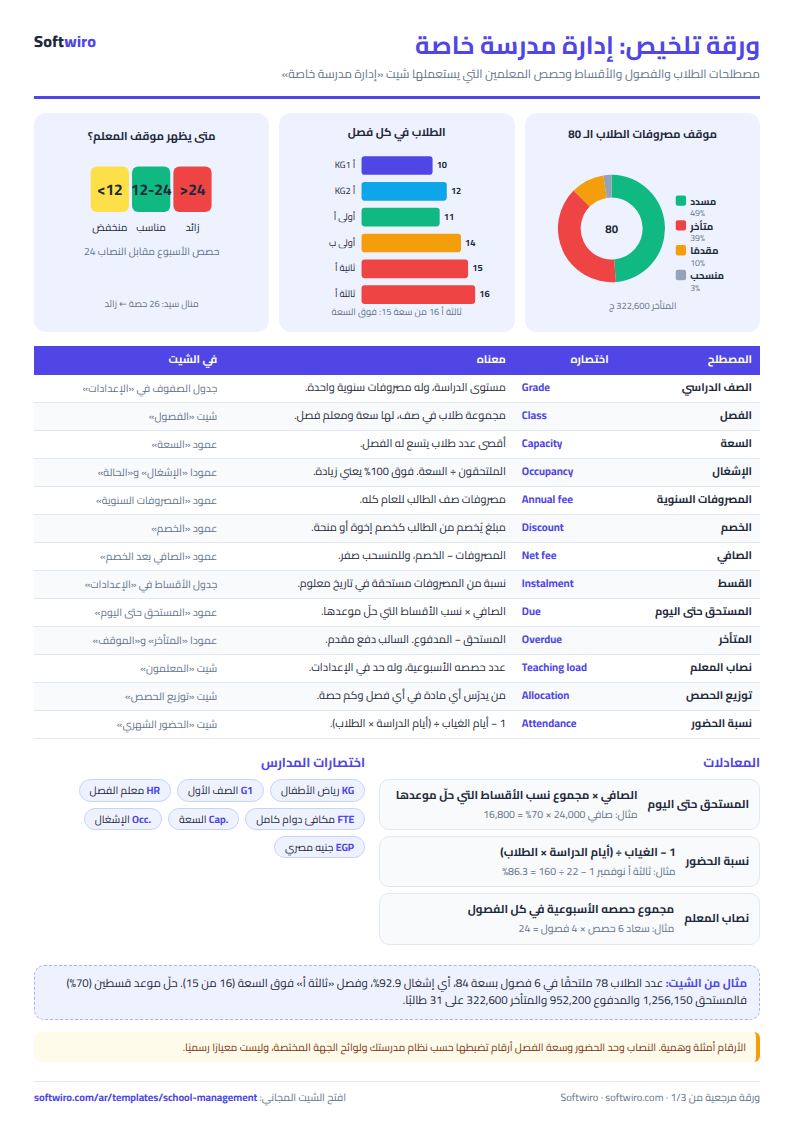
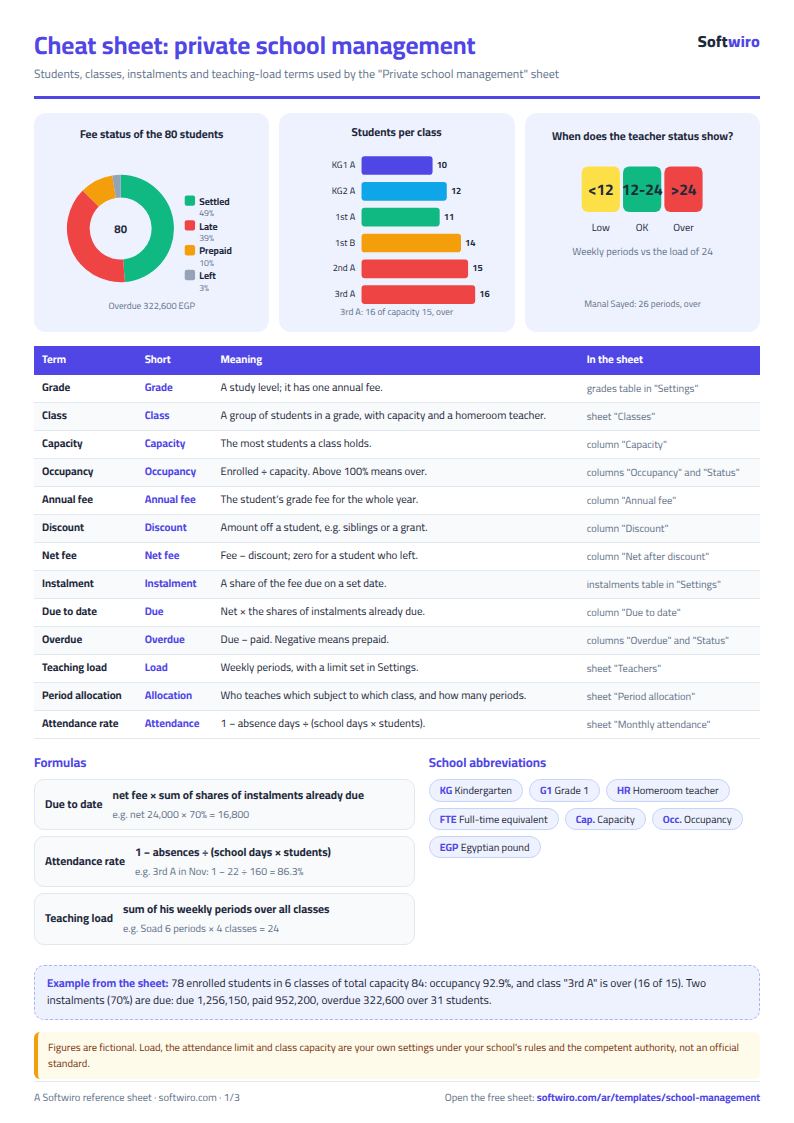
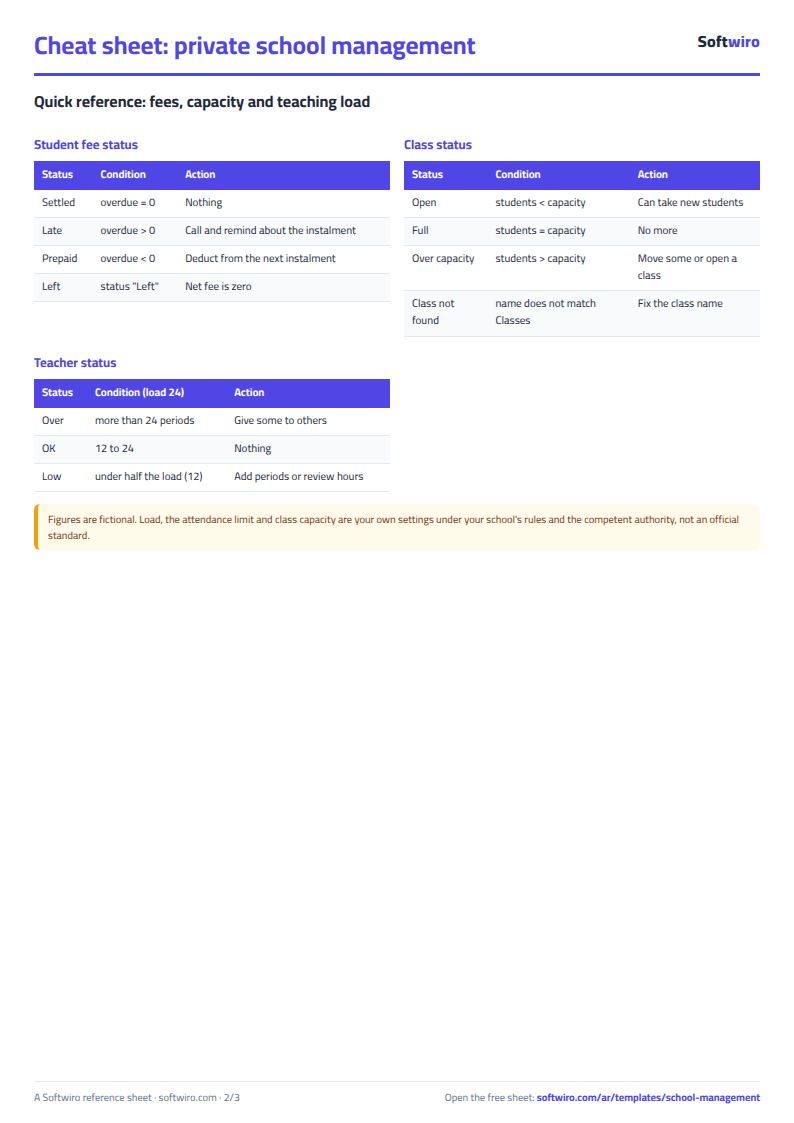
- Amount due to date = the student's net fees x the total percentage of instalments already due (dated today or earlier). Overdue = amount due - amount paid. A negative figure means paid in advance.
- Net fees = the annual fees for the student's grade - discount, never less than zero, and zero for a withdrawn student. The instalment percentages must add up to 100%, otherwise the total cell turns red.
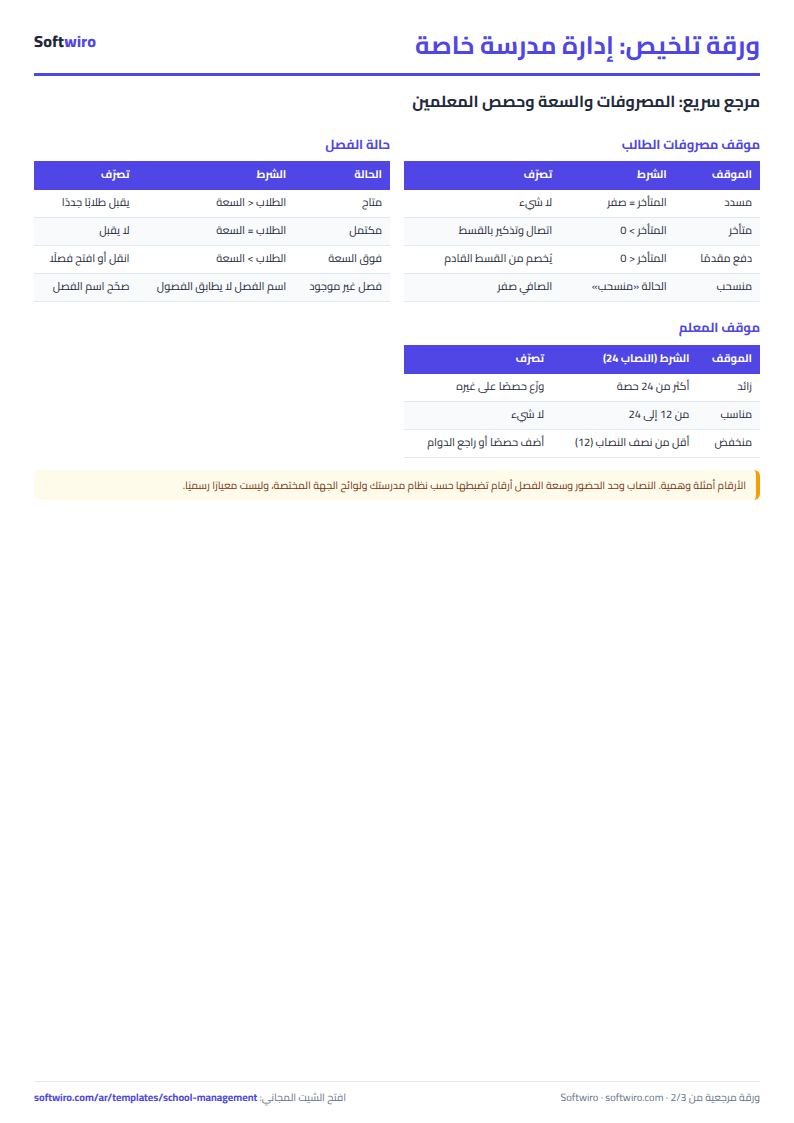
- Class occupancy = students enrolled in it / its capacity. If the count exceeds capacity, its status shows "over capacity".
- A teacher's load = the total of their weekly lessons in "توزيع الحصص" (Lesson allocation). It shows "over" if it exceeds the load in the settings and "low" if it is under half of it. The required load is a number you set to match your school's system.
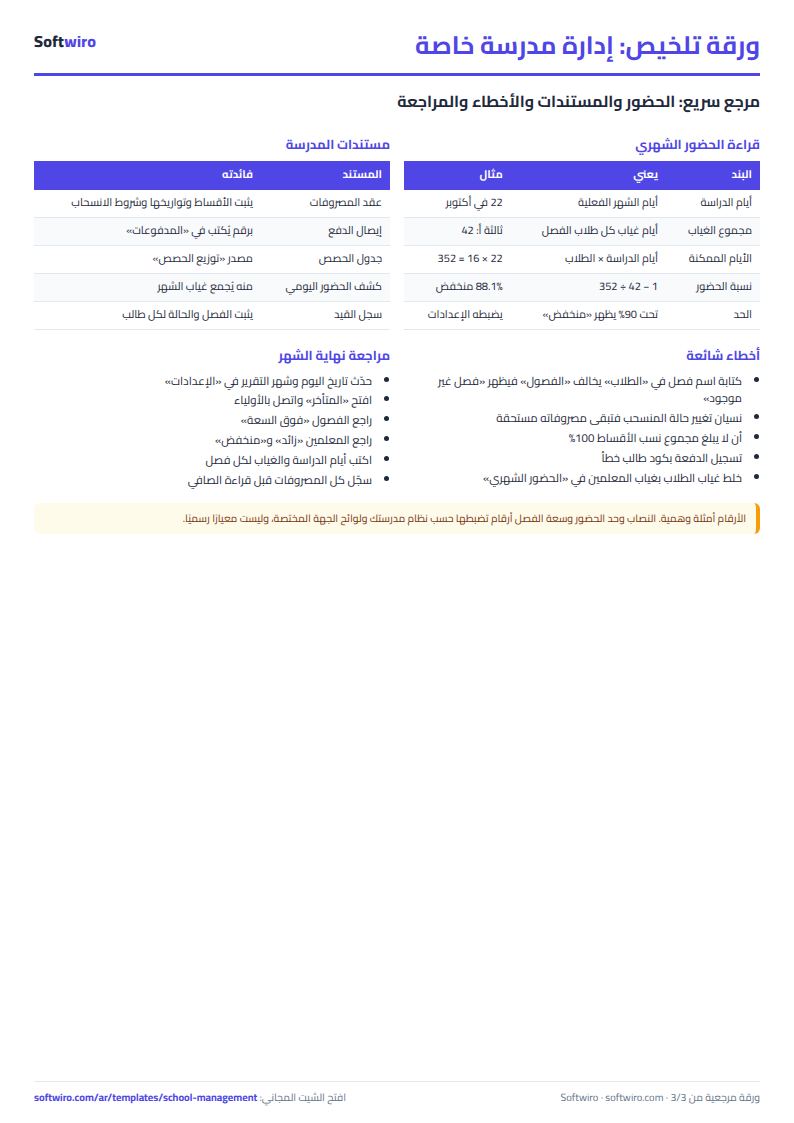
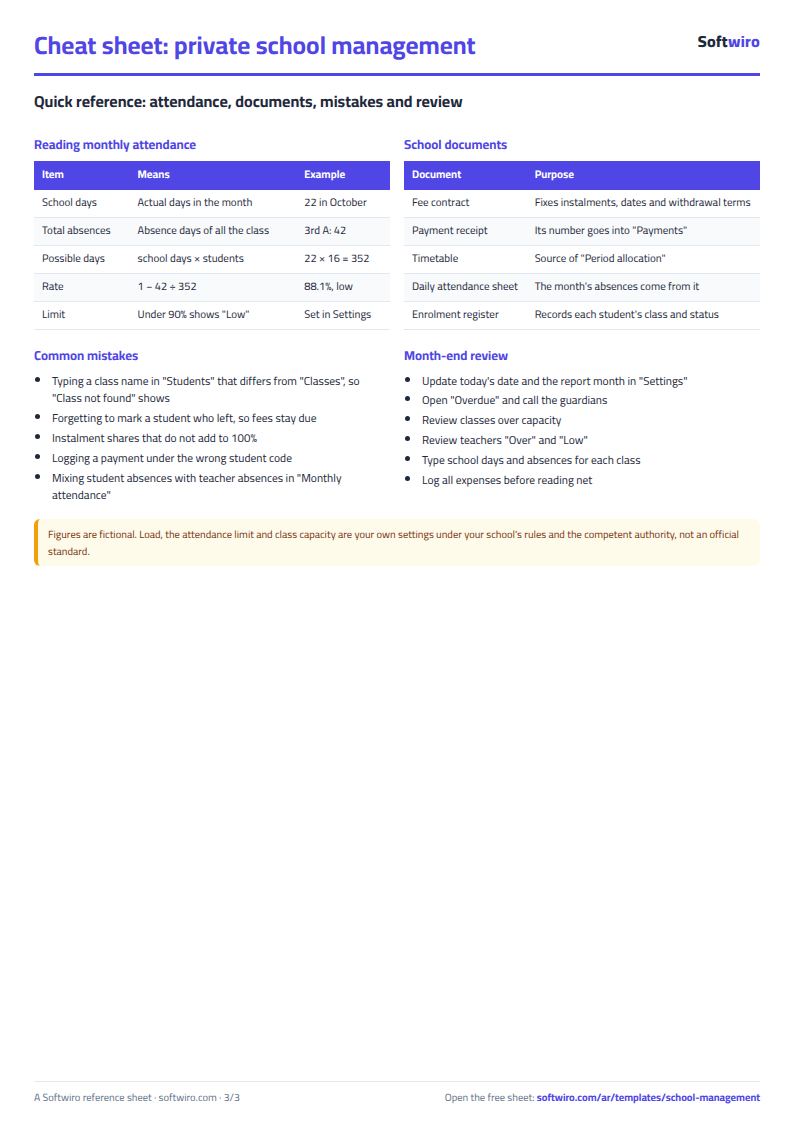
- Attendance rate in "الحضور الشهري" (Monthly attendance) = 1 - absence days / (school days x number of students in the class). For daily attendance of each student, use a student attendance sheet.
- The sheet holds 300 students, 20 classes, 8 grades, 8 instalments, 2,000 payments, 40 teachers, 300 lesson-allocation rows, 200 monthly attendance rows and 1,000 expenses. The names and numbers are made-up examples.
Free cheat sheet for this field
Terms, abbreviations, tables and diagrams over several pages, in Arabic and English. Download it as a PDF or images, including a phone-size version.
Still running this on Excel?
This sheet holds the numbers of one class, typed in by one teacher. In the School Performance Management Platform, each student's grades, attendance and teacher notes come together, and reports reach parents.
| In this sheet | In School Performance Management Platform |
|---|---|
| Every teacher has a sheet, and the administration collects the files. | One dashboard for students, teachers and classes, with exam results tracking and a comparison of performance across terms. |
| A student's decline shows up in the end-of-term result. | AI analyzes the student's grades, attendance and teacher notes, warns early about a possible decline, and suggests a development plan that the teacher decides on. |
| The parent learns about the problem late. | Regular reports to parents on the student's level, teacher notes and the attendance record, plus direct contact with the school through the app. |
| Attendance lives in a notebook or a sheet per class. | Attendance, absence and lateness are recorded for each student and turned into attendance reports and rates that the administration follows for each class. |
Frequently asked questions
How do I know if a class is over capacity?
Enter each class's capacity in "الفصول" (Classes). The sheet counts the students enrolled in each class and compares them with the capacity, showing the status "available", "full" or "over capacity".
How do I track overdue instalments?
Enter each instalment's date and percentage in "الإعدادات" (Settings). Amount due to date = the student's net fees x the percentages of instalments already due. Overdue = amount due - amount paid in "المدفوعات" (Payments).
How do I work out a teacher's teaching load?
In "توزيع الحصص" (Lesson allocation) enter, for each class and subject, the teacher and weekly lessons. The sheet totals each teacher's lessons and compares them with the required load in "الإعدادات" (Settings), showing "over", "adequate" or "low".
Does it record daily attendance for each student?
No. It takes the school days and total absences for each class in a month. For daily attendance use a student attendance sheet and copy the totals here.
Is the template free?
Yes, with no sign-up and no email address. Use it, edit it and share it as you like.
Does it work in Google Sheets and on mobile?
The sheet uses formulas supported by Excel 2016 and later, Google Sheets and LibreOffice, so you can upload it to Google Drive and open it with Google Sheets on a computer or a phone.
What is the difference between the white and the gray cells?
You type in the white cells; the gray cells are calculated automatically. Don't type in a gray cell, or you will erase its formula.
Can I use the sheet from an AI assistant?
Yes. Add our MCP server (URL https://softwiro.com/api/mcp, no key needed) to your assistant and ask it to do the calculation in this template. The numbers come from the sheet's own formulas, and we do not store your data. The steps and a ready-made prompt are in this article: https://softwiro.com/blog/mcp-excel-templates-ai-agent-guide.html
More free templates for: Schools and students
More free templates
- Gradebook Template for Excel (Weighted Categories, Letter Grades)
- Student attendance sheet
- Study planner and lesson tracker
- Weekly study routine sheet
- Nursery and school fees tracker (Excel)
- Tutoring center manager (Excel)
- School class timetable (Excel)
- Exam schedule with committees and invigilators (Excel)
- Homework and behavior tracker for teachers (Excel)
- School bus subscriptions tracker (Excel)
- University applications tracker (Excel)
- Complete nursery management sheet
- Lending library management sheet
- Graduation project manager sheet: tasks, team, phases and deliverables
- Complete clinic management sheet
- Medical lab management sheet
- Pharmacy management sheet: sales, purchases, shortages and suppliers
- Small hospital management sheet: departments, beds, admissions and revenue
- Metal and turning workshop job sheet in Excel: job orders, materials and labor
- Glass and aluminium workshop sheet in Excel: orders by square metre, cutting and waste
- Carpentry workshop sheet: cutting list, boards, cost and delivery
- Garment printing shop sheet in Excel: DTF and screen print orders and cost