Try the sheet here, on the example
The sheet is open below with sample numbers. Change any white cell and watch the results update, or press the blank-copy button to type your own data from scratch. Nothing you type leaves your browser.
Example from the sheet
| اليوم | الفترة | كود الفصل | المادة | اسم المعلم | الحالة |
|---|---|---|---|---|---|
| الأحد | 1 | ف1 | رياضيات | أ. نهى فؤاد | تعارض معلم |
| الأحد | 2 | ف1 | علوم | أ. وائل صبحي | سليم |
| الأحد | 3 | ف1 | إنجليزي | أ. دينا عادل | سليم |
| الأحد | 4 | ف1 | دراسات | أ. ماجد سعيد | سليم |
| الاثنين | 1 | ف1 | علوم | أ. وائل صبحي | سليم |
| الاثنين | 2 | ف1 | إنجليزي | أ. دينا عادل | سليم |
| الاثنين | 3 | ف1 | دراسات | أ. ماجد سعيد | سليم |
| الاثنين | 4 | ف1 | عربي | أ. سامي رضا | سليم |
Example from the “الحصص” tab (Arabic), with the numbers and formulas that are in the file.
What is inside
- الإعدادات (Settings): School name, number of school days per week and number of periods per day (5 days and 6 periods in the example). The number of slots for each class is calculated from these.
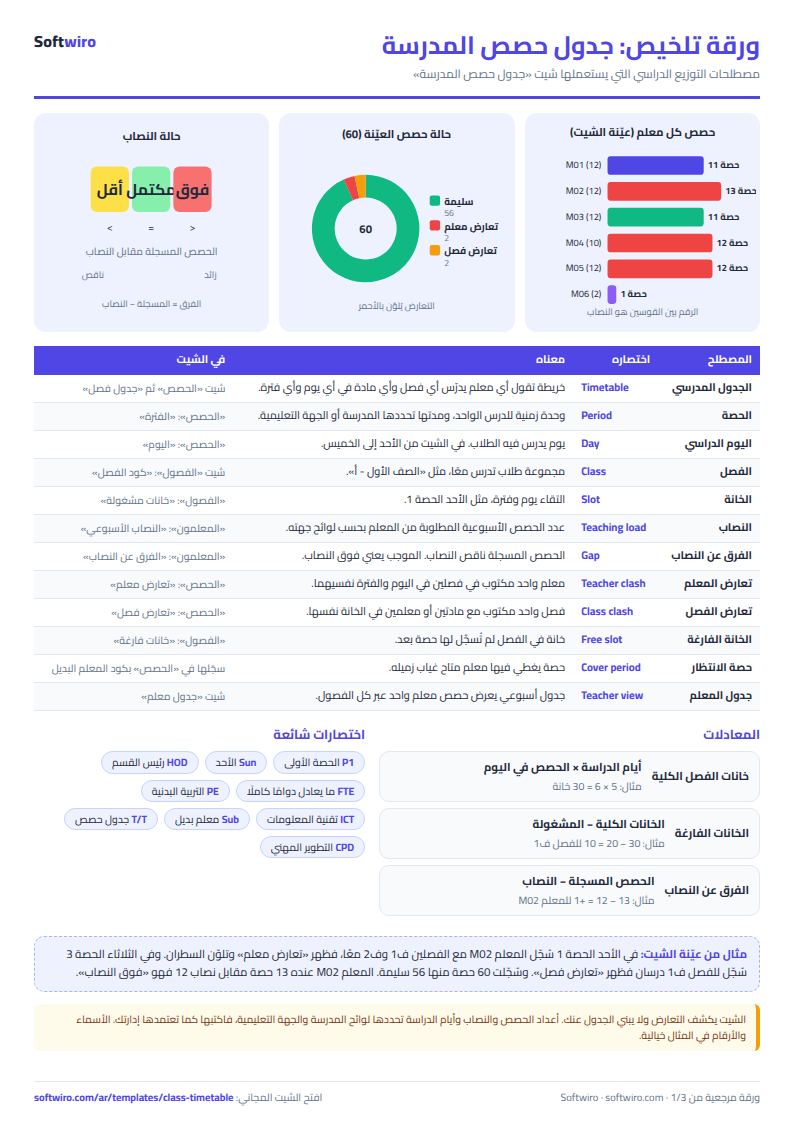
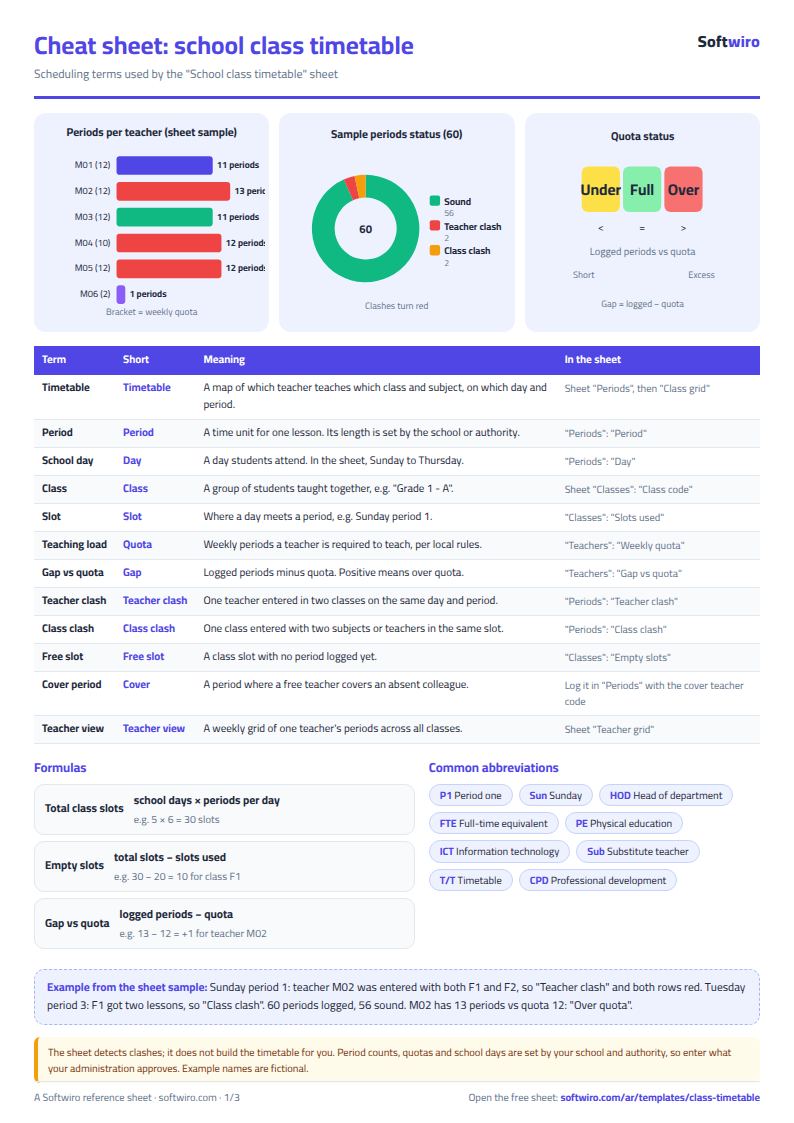
- المعلمون (Teachers): For each teacher: code, name, subject and weekly quota. The sheet then shows the number of periods recorded, the difference from the quota, the status (over quota, under quota or complete) and the number of conflicting periods.
- الفصول (Classes): For each class: code and name. The sheet then shows the number of periods recorded, slots filled, empty slots, conflicting periods and the class status.
- الحصص (Periods): The periods log: day, slot, class, subject and teacher on each row. Next to it appear the teacher's name, teacher conflict, class conflict and the period status, and a conflicting row is colored red.
- جدول فصل (Class timetable): You pick a class code and it shows that class's timetable: days in the columns and slots in the rows, with the subject and teacher name in each cell, and the word "conflict" if the cell is duplicated.
- جدول معلم (Teacher timetable): You pick a teacher code and it shows that teacher's weekly timetable: the class and subject in each day and slot, with the word "conflict" if the teacher is booked in more than one class.
- الملخص (Summary): The number of periods recorded, valid periods, teacher-conflict periods and class-conflict periods; empty slots; the number of teachers over and under quota; and the number of periods on each day and how many have a conflict.
The file opens on a start tab (“ابدأ هنا”, Start here) that explains how to use it.
What makes it different
Instead of discovering a conflict on Sunday morning when the math teacher is standing between two classes, you open the "الحصص" (Periods) tab as you build the timetable and see the two conflicting rows in red. From "المعلمون" (Teachers) you see who is over quota and who is under, from "الفصول" (Classes) you see where the empty slots are, and then you print a timetable for each class and each teacher from two ready-made tabs.
Ready-made school class timetable in Excel: where to start
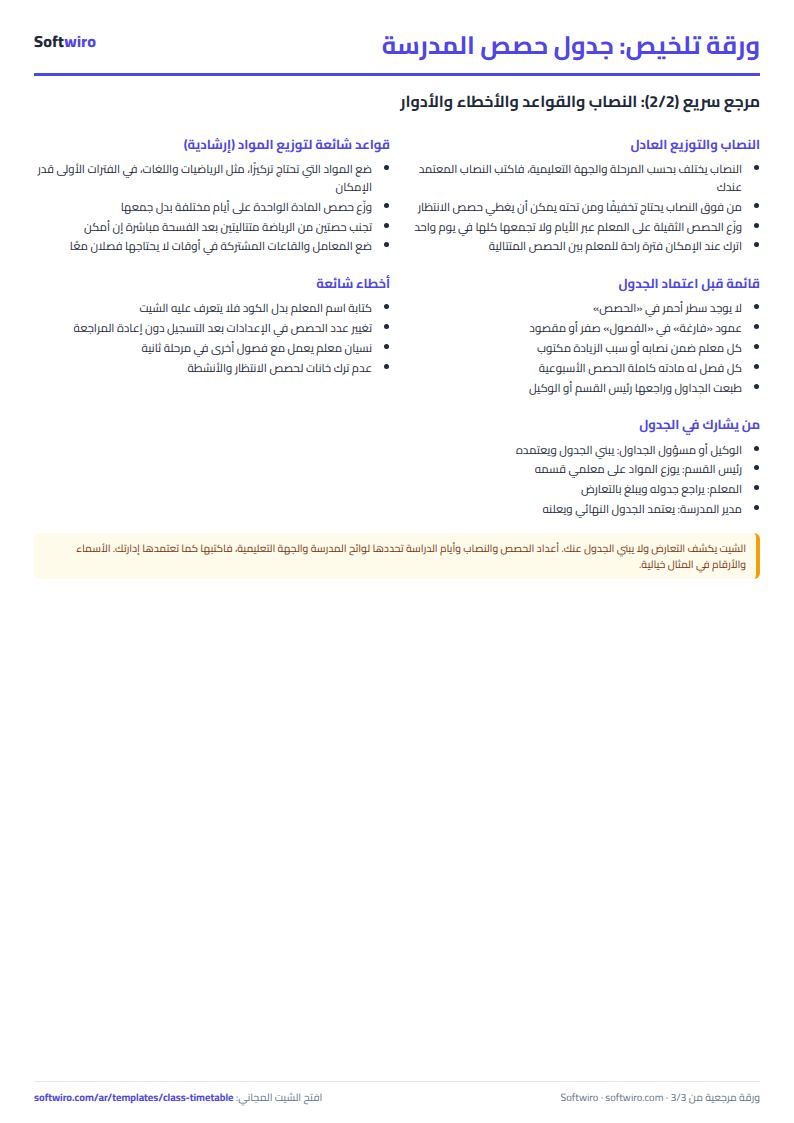
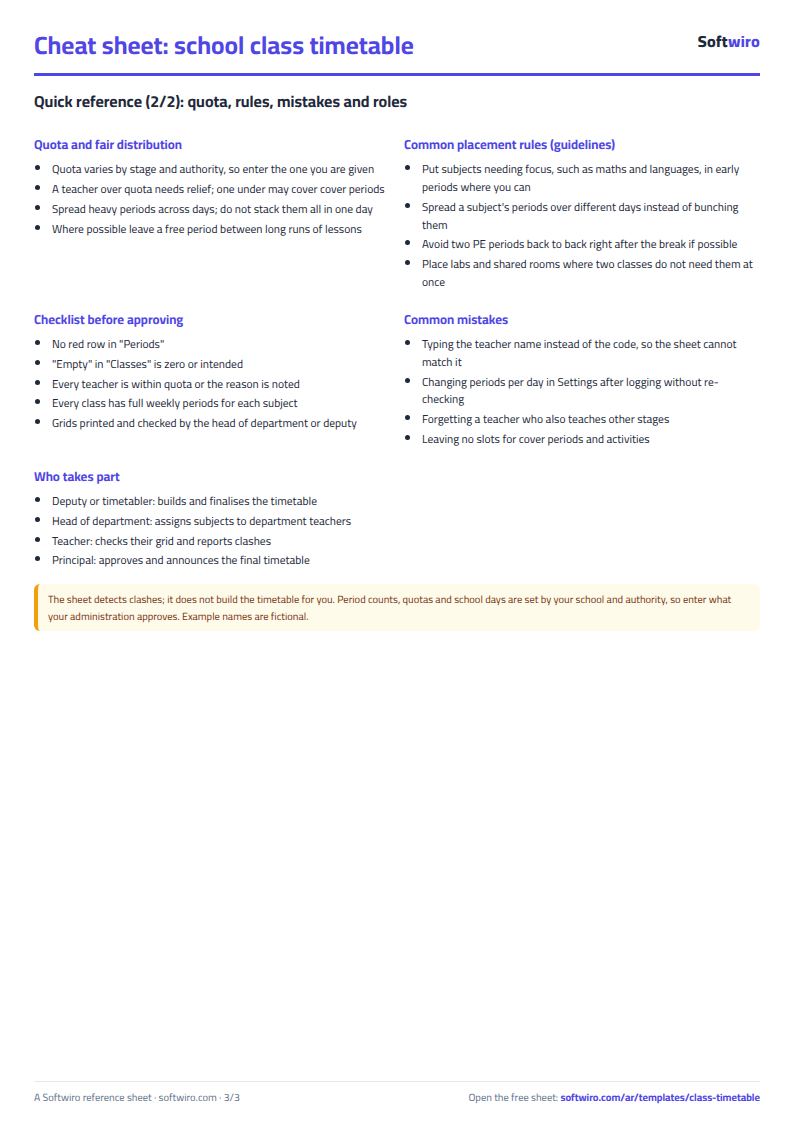
To get a ready school class timetable in Excel without conflicts, start with what does not change. In "الإعدادات" (Settings) enter the number of school days and periods per day (5 days and 6 periods in the example), in "المعلمون" (Teachers) enter each teacher's code, subject and weekly quota, and in "الفصول" (Classes) enter each class's code and name.
The sheet fills in the weekly slots for each class from the settings, that is school days × periods per day, so you know how many slots you must fill for each class before you start allocating.
How to build a timetable without a teacher repeated in one period
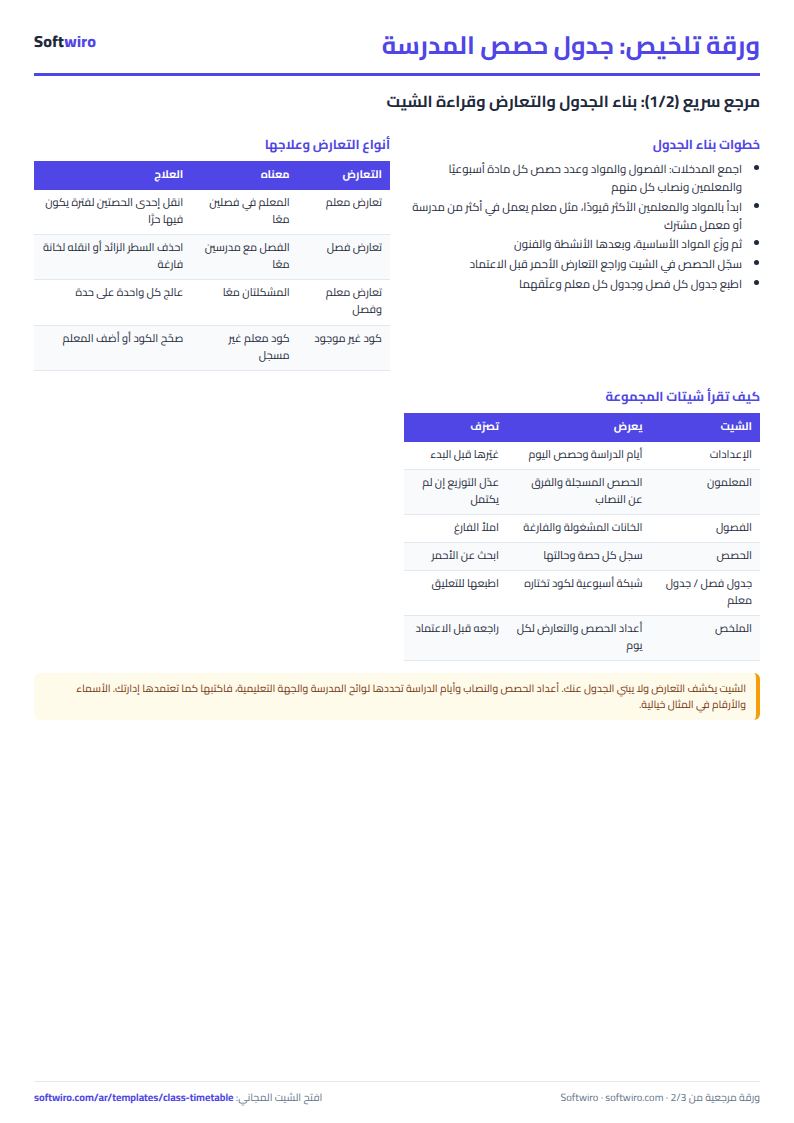
The sheet does not assign periods by itself, but it checks what you assign as you go. Record each period on a row of the "الحصص" (Periods) tab: day, slot, class, subject and teacher, choosing the values from the lists.
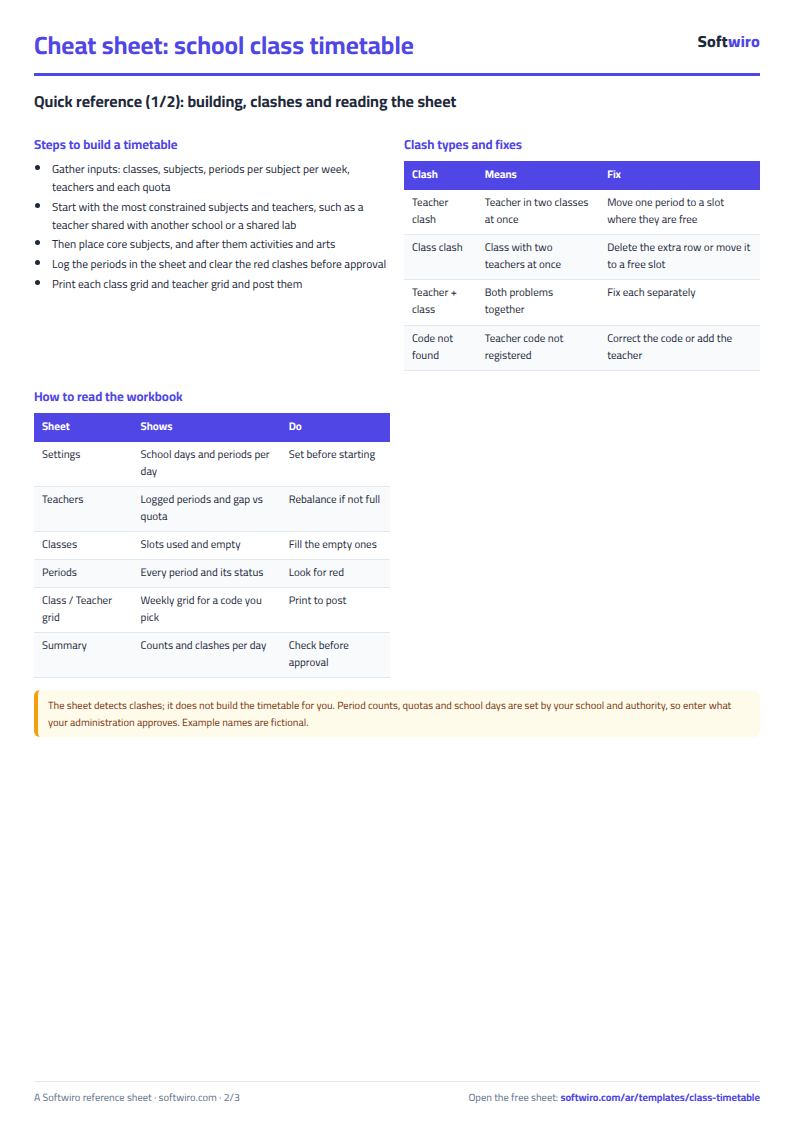
- If you enter the same teacher in two classes on the same day and slot, both rows are colored red and marked "teacher conflict".
- If you enter the same class with two teachers in the same slot, it is marked "class conflict".
- Check Teachers to see who is over quota and who is still under, and Classes to see the slots not yet filled.
When the conflicts are cleared, pick the class code in "جدول فصل" (Class timetable) and the teacher code in "جدول معلم" (Teacher timetable) to print each timetable. For the exam timetable, committees and invigilators, use the exam schedule sheet. The fuller walkthrough is in the guide.
How to use it
- In the "الإعدادات" (Settings) tab, enter the school name, the number of school days per week and the number of periods per day.
- In the "المعلمون" (Teachers) tab, enter each teacher's code, name, subject and weekly quota of periods.
- In the "الفصول" (Classes) tab, enter each class's code and name.
- In the "الحصص" (Periods) tab, record each period on a row: day, slot, class, subject and teacher, choosing the value from the list.
- Next to each period the sheet writes "teacher conflict" or "class conflict" if the same period is duplicated, and colors the row red.
- Check Teachers to see who is over or under quota and Classes to see the empty slots, then open "جدول فصل" (Class timetable) and "جدول معلم" (Teacher timetable) and pick a code to print its timetable.
Before you start:
- A conflict means the same teacher (or the same class) is entered on more than one row on the same day and in the same slot, so both rows are colored and you can choose which to change.
- Enter slots as numbers from 1 to 8, and school days from Sunday to Thursday as in the list.
- Empty slots for a class = school days × periods per day (from Settings) − the class's filled slots. A duplicated period is not counted twice.
- Difference from quota = the teacher's recorded periods − their weekly quota. Positive means over quota and negative means under quota.
- The class and teacher timetables show the first period recorded in a cell, and write "conflict" next to it if it is duplicated.
- The sheet holds 200 teachers, 200 classes and 400 periods. The names and numbers in the example are fictional.
Free cheat sheet for this field
Terms, abbreviations, tables and diagrams over several pages, in Arabic and English. Download it as a PDF or images, including a phone-size version.
Still running this on Excel?
This sheet suits a start and a limited amount of data. If your way of working grows, or you need more than one person working on it at the same time, Softwiro can build you a program that fits the way you work.
| In this sheet | In Custom Software from Softwiro |
|---|---|
| One file that one person edits at a time, and copies reach you on WhatsApp. | A program with a login for each user and permissions you define, and everyone sees the same data. |
| You type everything and check the numbers by hand. | We design the screens around your work steps, so each person records only what concerns them. |
| Columns and formulas are fixed as the sheet was designed. | We build what you need: reports, alerts and screens your way. |
| Backups and security are your own responsibility. | The program runs on a secured server with regular backups. |
Frequently asked questions
How does the sheet know a teacher is double-booked?
For each period it builds a key from the teacher code, day and slot. If the same key appears on more than one row, each of those rows is marked "teacher conflict". In the same way it detects a class conflict using a key of class, day and slot.
How is a teacher's quota calculated?
The quota is a number you enter for each teacher. The sheet counts their periods recorded in the periods log, and the difference = recorded − quota. Positive means "over quota", negative means "under quota" and zero means "complete".
Does the sheet assign periods by itself?
No. You write the timetable and the sheet checks it, detecting conflicts, period counts and empty slots. It does not suggest an allocation or arrange periods automatically.
How many periods does it hold?
It holds 400 periods, 200 teachers and 200 classes. You change the number of days and periods per day in the Settings tab, and you choose the slot from 1 to 8.
Does it give me a printable school timetable?
Yes, once you have recorded the periods. The "جدول فصل" (Class timetable) tab shows the timetable of any class you choose, with days in the columns, slots in the rows, and the subject and teacher in each cell. The "جدول معلم" (Teacher timetable) tab shows any teacher's weekly timetable. You print either one from Excel.
Is the template free?
Yes, with no sign-up and no email address. Use it, edit it and share it as you like.
Does it work in Google Sheets and on mobile?
The sheet uses formulas supported by Excel 2016 and later, Google Sheets and LibreOffice, so you can upload it to Google Drive and open it with Google Sheets on a computer or a phone.
What is the difference between the white and the gray cells?
You type in the white cells; the gray cells are calculated automatically. Don't type in a gray cell, or you will erase its formula.
Can I use the sheet from an AI assistant?
Yes. Add our MCP server (URL https://softwiro.com/api/mcp, no key needed) to your assistant and ask it to do the calculation in this template. The numbers come from the sheet's own formulas, and we do not store your data. The steps and a ready-made prompt are in this article: https://softwiro.com/blog/mcp-excel-templates-ai-agent-guide.html
All the templates in this group: Excel templates for teachers: gradebook, lesson planning and follow-up
More free templates for: Schools and students
More free templates
- Gradebook Template for Excel (Weighted Categories, Letter Grades)
- Student attendance sheet
- Study planner and lesson tracker
- Weekly study routine sheet
- Nursery and school fees tracker (Excel)
- Tutoring center manager (Excel)
- Exam schedule with committees and invigilators (Excel)
- Homework and behavior tracker for teachers (Excel)
- School bus subscriptions tracker (Excel)
- University applications tracker (Excel)
- Complete nursery management sheet
- Private school management sheet
- Lending library management sheet
- Graduation project manager sheet: tasks, team, phases and deliverables
- American diploma GPA calculator: unweighted, weighted and cumulative (Excel)
- IGCSE subject tracker with mock scores and target grades (Excel)
- IGCSE past papers log and error tracker (Excel)
- AP, SAT and ACT prep planner (Excel)
- Al-Azhar student grades sheet (Excel)
- Quran memorization and review tracker (Excel)
- Teacher weighted gradebook (Excel)
- Lesson plan and curriculum coverage tracker for teachers (Excel)