Try the sheet here, on the example
The sheet is open below with sample numbers. Change any white cell and watch the results update, or press the blank-copy button to type your own data from scratch. Nothing you type leaves your browser.
Example from the sheet
| الكود | اسم الطفل | العمر (شهر) | المجموعة | الرسوم الشهرية | المستحق | المدفوع | الرصيد | الحالة المالية |
|---|---|---|---|---|---|---|---|---|
| C01 | آدم محمود | 15 | الرضّع | 2,800.00 | 5,600.00 | 5,600.00 | 0.00 | مسدد |
| C02 | ليلى حسن | 19 | المشي | 2,600.00 | 5,200.00 | 5,200.00 | 0.00 | مسدد |
| C03 | يوسف كريم | 26 | المشي | 2,600.00 | 5,200.00 | 3,900.00 | 1,300.00 | متأخر |
| C04 | مريم أحمد | 23 | المشي | 2,600.00 | 5,200.00 | 2,600.00 | 2,600.00 | متأخر |
| C05 | عمر خالد | 35 | الصغار | 2,300.00 | 4,600.00 | 4,600.00 | 0.00 | مسدد |
| C06 | جنى ياسر | 32 | الصغار | 2,300.00 | 4,600.00 | 4,600.00 | 0.00 | مسدد |
| C07 | سليم هاني | 38 | الصغار | 2,300.00 | 4,600.00 | 3,500.00 | 1,100.00 | متأخر |
| C08 | هبة مصطفى | 45 | الكبار | 2,100.00 | 4,200.00 | 4,200.00 | 0.00 | مسدد |
| C09 | زياد وائل | 48 | الكبار | 2,100.00 | 4,200.00 | 4,700.00 | -500.00 | دفع مقدمًا |
| C10 | ريتاج أيمن | 50 | الكبار | 1,900.00 | 3,800.00 | 3,800.00 | 0.00 | مسدد |
| C11 | كرم أيمن | 28 | المشي | 2,400.00 | 4,800.00 | 4,800.00 | 0.00 | مسدد |
| C12 | نور صلاح | 13 | الرضّع | 2,800.00 | 2,800.00 | 2,800.00 | 0.00 | مسدد |
| C13 | فرح طارق | 43 | الكبار | 2,100.00 | 2,100.00 | 2,100.00 | 0.00 | مسدد |
Example from the “الأطفال” tab (Arabic), with the numbers and formulas that are in the file.
What is inside
- الإعدادات: Settings: today's date, the report month, the first month of the income table, the nursery closing time and the day whose attendance you want to view. It also holds the age-group table (starting age, fee and capacity) and the expense categories.
- الأطفال: Children: the register with code, name, birth date, enrolment date, parent, mobile, allergies and status. The sheet shows age, group, monthly fee, amount due, amount paid, balance and payment status. Holds up to 100 children.
- المدفوعات: Payments: each payment with its date, child code, amount, payment method and receipt number. The child's name appears automatically. Holds up to 1,500 payments.
- سجل الحضور: Attendance log: one row per child per day with the status (present, absent or excused), arrival and departure times. It shows hours stayed and flags duplicate or incomplete rows. Holds up to 4,000 rows.
- حضور اليوم: Today's attendance: pick a day in the settings and the sheet lists the children with their status, times and hours stayed, plus the number present, absent and not yet recorded.
- شبكة الحضور: Attendance grid: the chosen month with a row per child and a column per day, marked ✔, ✘ or excused (ع), with days present, days absent and attendance rate.
- المفوضون بالاستلام: Authorised pick-up list: for each child, the people allowed to collect them, with name, relationship and mobile. Holds up to 400 rows.
- سجل الاستلام: Pick-up log: who collected the child and when. The sheet shows "authorised" or "unauthorised" (مصرّح / غير مصرّح) and the minutes late after closing time. Holds up to 1,000 rows.
- الموظفون: Staff: each employee's name, job, group, mobile, hire date and salary, plus the number of children in their group.
- المصروفات: Expenses: each payment with its date, category (from a list), description, amount and payment method.
- الملخص: Summary: enrolled children and occupancy, the month's collection, spending and net, overdue fees and collection rate, attendance rate, unauthorised and late pick-ups, the group table, income against spending for six months and the month's expenses by category, with three charts.
The file opens on a start tab (“ابدأ هنا”, Start here) that explains how to use it.
What makes it different
Children, attendance, pick-up and fees in one file. Enter a child once and the sheet works out their group, fees and overdue balance. At pick-up, each collector's name is checked against the authorised list for that child.
How to use it
- In "الإعدادات" (Settings) enter today's date, any date inside the report month, the first month of the income and expense table, the nursery closing time and the day whose attendance you want to review. Then add the age groups with their fees and capacity, and the expense categories.
- In "الأطفال" (Children) enter each child's code, name, birth date, enrolment date, parent, mobile and any allergy. The group, fee, amount due and balance appear automatically.
- In "المفوضون بالاستلام" (Authorised pick-up) list the people allowed to collect each child (father, mother and others) with their relationship and mobile.
- Every day, add a row per child to "سجل الحضور" (Attendance log) (present, absent or excused) with arrival and departure times, and record who collected each child, and when, in "سجل الاستلام" (Pick-up log).
- Record every payment from a parent in "المدفوعات" (Payments), every expense in "المصروفات" (Expenses), and staff names and their classes in "الموظفون" (Staff).
- Open "حضور اليوم" (Today's attendance) and "شبكة الحضور" (Attendance grid) to review attendance, and "الملخص" (Summary) for occupancy, collection, overdue fees and income against spending.
Before you start:
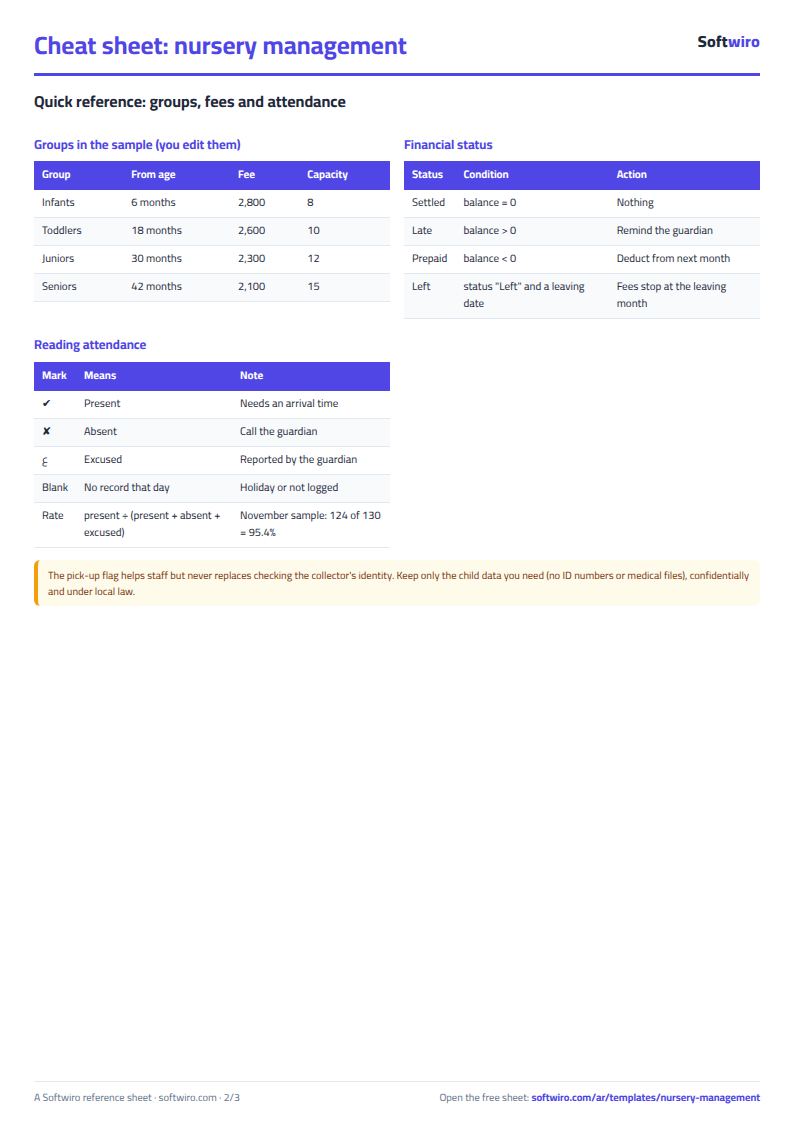
- A child's group comes from their age in months today. Order the groups in "الإعدادات" (Settings) by starting age, ascending. The child goes in the last group whose starting age is at or below their age.
- Monthly fee = group fee - monthly discount (such as a sibling discount), and never less than zero. Amount due runs from the enrolment month to the report month, including the current month.
- For a child who has left, enter "منسحب" (withdrawn) and the leaving date. Their fees stop at the leaving month.
- Balance = amount due - amount paid up to the end of the report month. Positive means "overdue" and negative means "paid in advance".
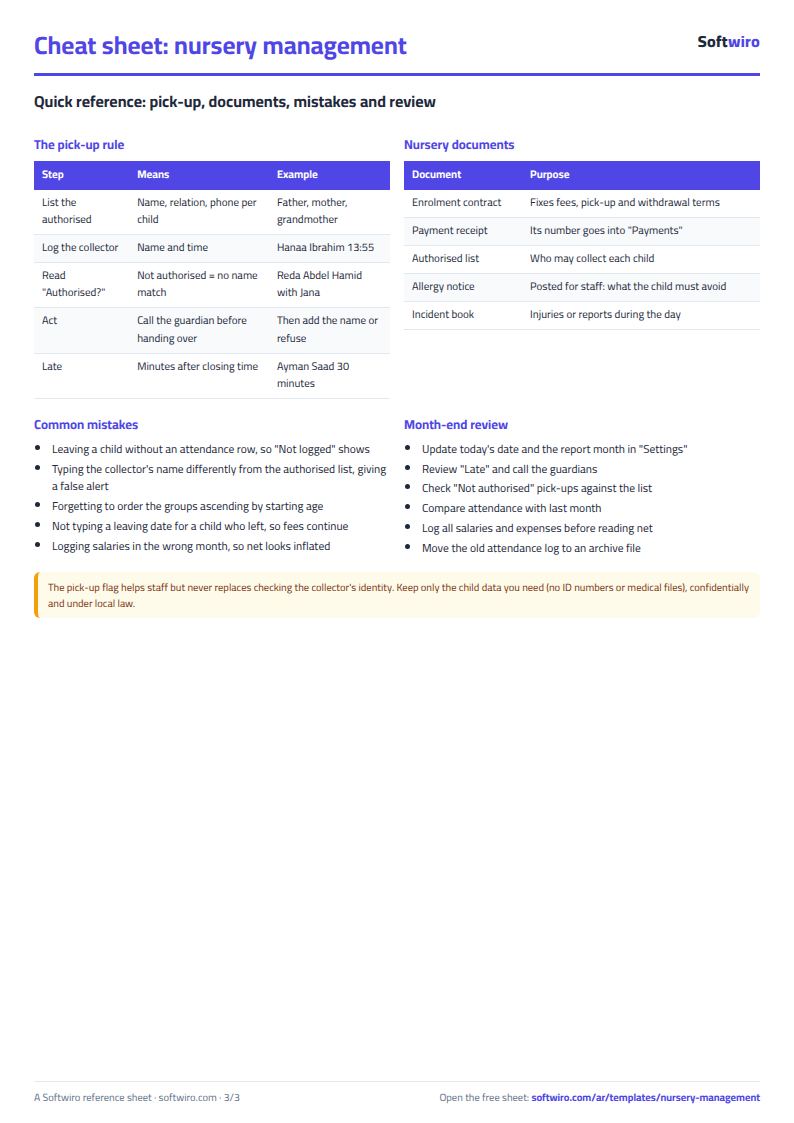
- A pick-up shows "unauthorised" if the name entered matches no name in "المفوضون بالاستلام" (Authorised pick-up) for that child. Write the name the same way in both sheets. The alert helps staff and does not replace checking the collector's identity.
- Keep as little child data as you can. Do not enter ID card numbers or detailed medical information, and treat the file as confidential under local law.
- The sheet holds 100 children, 4,000 attendance rows (about a month and a half for 100 children, so move old rows to an archive file each term), 1,500 payments, 400 authorised people, 1,000 pick-up rows, 40 staff, 1,000 expenses and 6 age groups. The names and numbers are made-up examples.
Free cheat sheet for this field
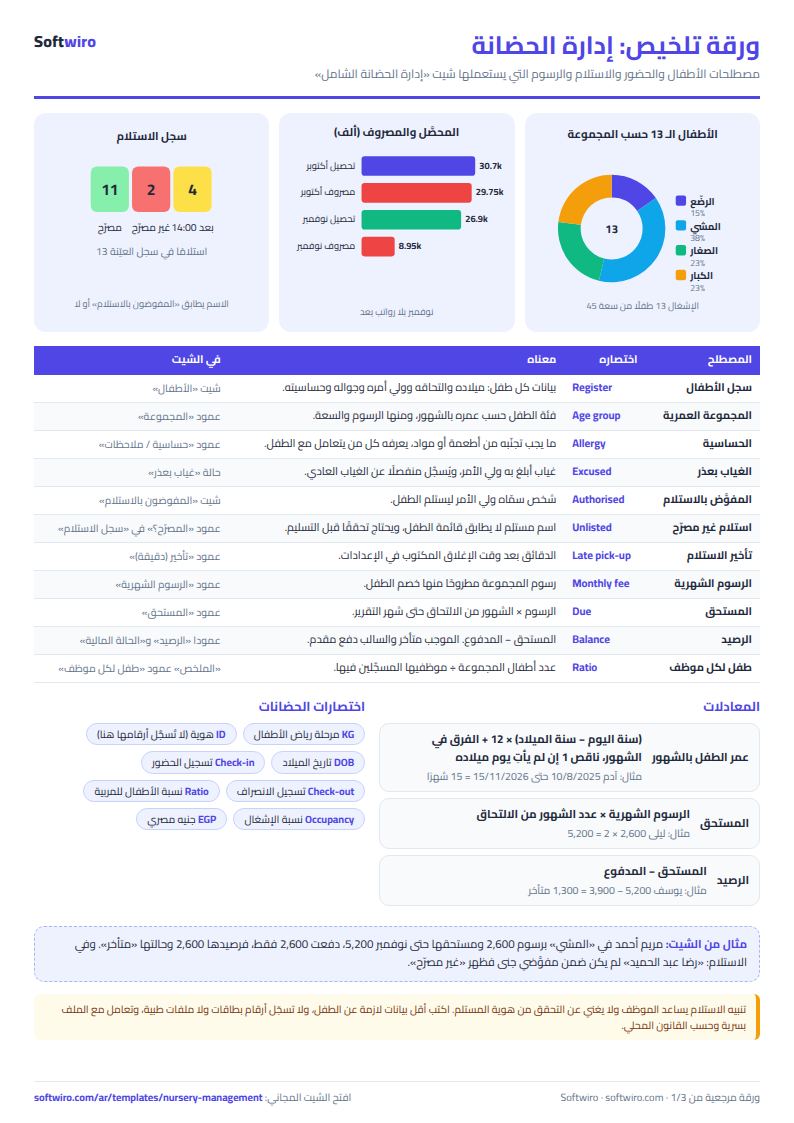
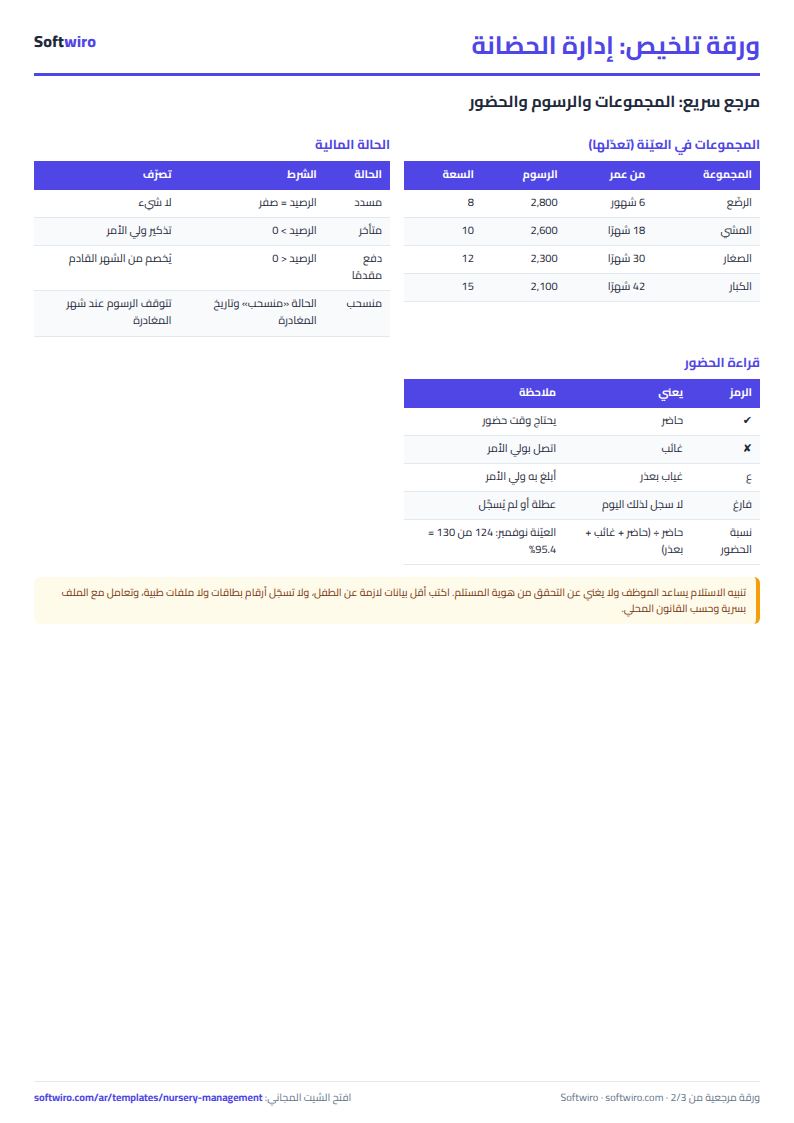
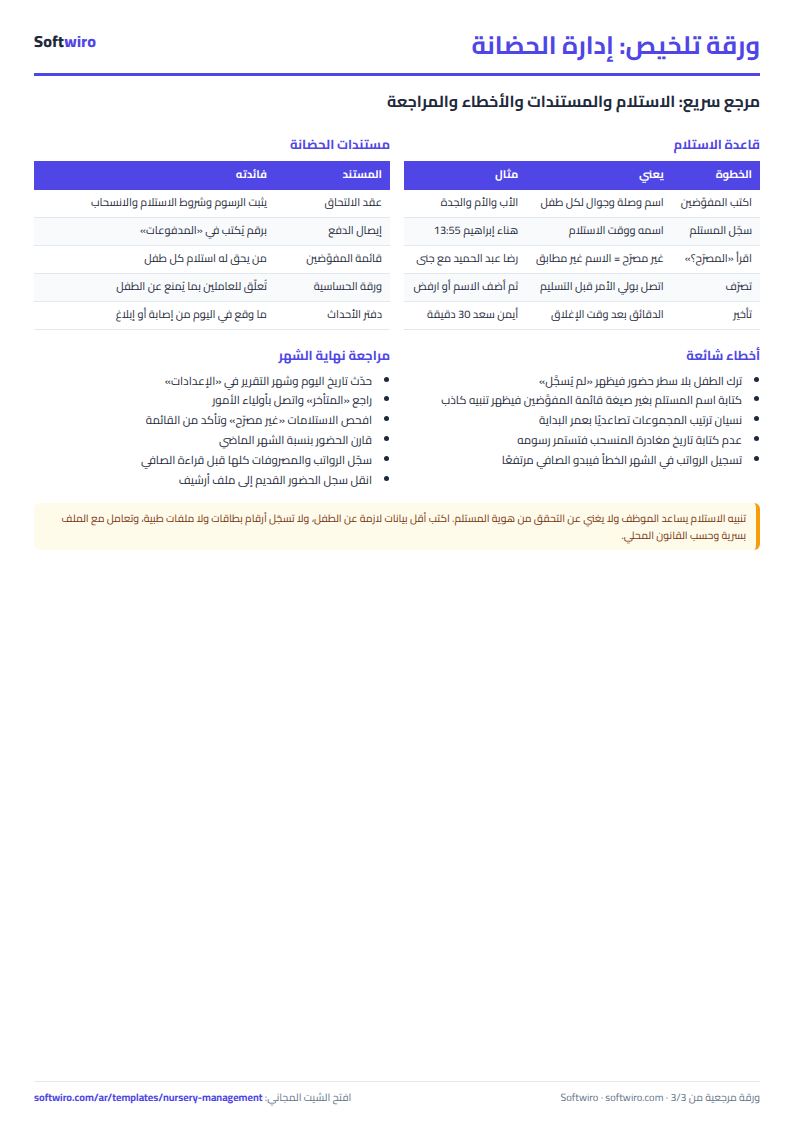
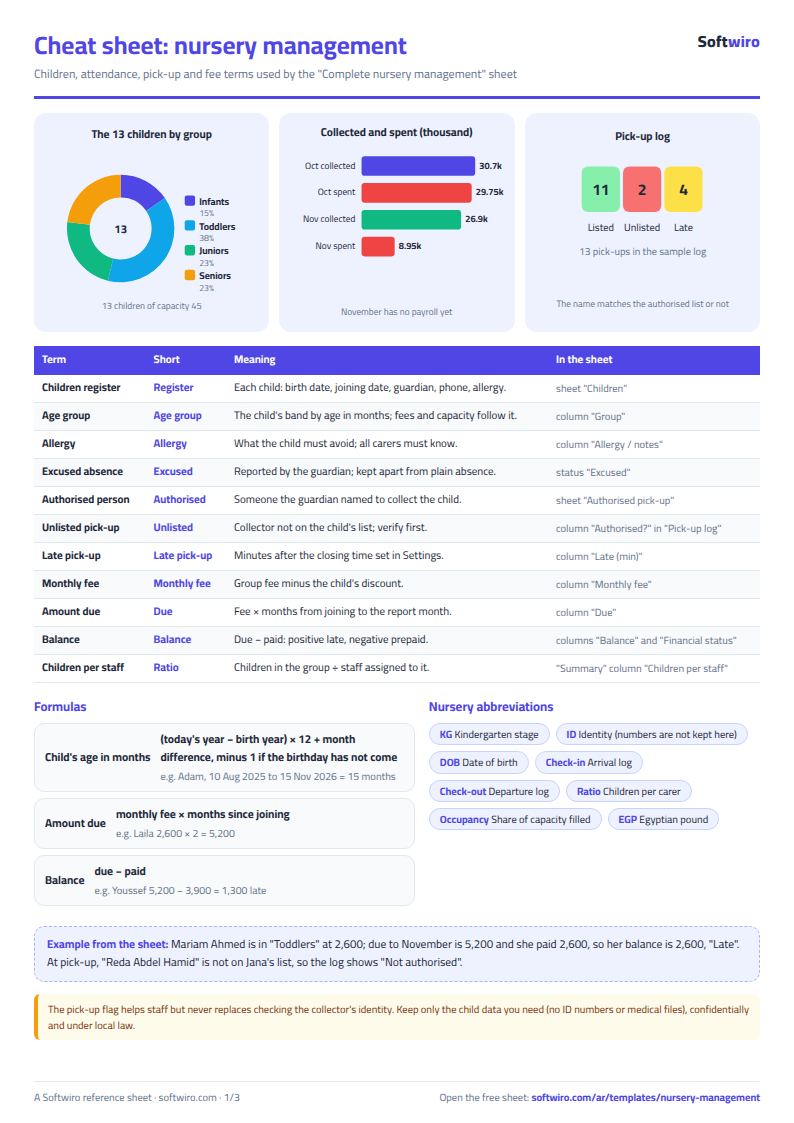
Terms, abbreviations, tables and diagrams over several pages, in Arabic and English. Download it as a PDF or images, including a phone-size version.
Still running this on Excel?
This sheet suits a start and a limited amount of data. If your way of working grows, or you need more than one person working on it at the same time, Softwiro can build you a program that fits the way you work.
| In this sheet | In Custom Software from Softwiro |
|---|---|
| One file that one person edits at a time, and copies reach you on WhatsApp. | A program with a login for each user and permissions you define, and everyone sees the same data. |
| You type everything and check the numbers by hand. | We design the screens around your work steps, so each person records only what concerns them. |
| Columns and formulas are fixed as the sheet was designed. | We build what you need: reports, alerts and screens your way. |
| Backups and security are your own responsibility. | The program runs on a secured server with regular backups. |
Frequently asked questions
How do I work out a child's group and fee in a nursery sheet?
Enter the birth date in "الأطفال" (Children). The sheet calculates the child's age in months today, places them in a group from the "الإعدادات" (Settings) table and takes the group fee minus the child's discount.
How does the sheet know a pick-up is unauthorised?
List the permitted people for each child in "المفوضون بالاستلام" (Authorised pick-up) and enter the person who collected in "سجل الاستلام" (Pick-up log). If the name matches no name on that child's list, it shows "unauthorised". It is a helpful alert and does not replace checking ID.
How do I track overdue fees?
Amount due = monthly fee x months from enrolment to the report month. Balance = amount due - amount paid. A positive balance is "overdue" and a negative one is "paid in advance".
Should I enter medical data or ID card numbers?
No. Enter only what a nursery normally needs: name, birth date, parent, mobile and any allergy. Keep the file confidential and follow local law.
Is the template free?
Yes, with no sign-up and no email address. Use it, edit it and share it as you like.
Does it work in Google Sheets and on mobile?
The sheet uses formulas supported by Excel 2016 and later, Google Sheets and LibreOffice, so you can upload it to Google Drive and open it with Google Sheets on a computer or a phone.
What is the difference between the white and the gray cells?
You type in the white cells; the gray cells are calculated automatically. Don't type in a gray cell, or you will erase its formula.
Can I use the sheet from an AI assistant?
Yes. Add our MCP server (URL https://softwiro.com/api/mcp, no key needed) to your assistant and ask it to do the calculation in this template. The numbers come from the sheet's own formulas, and we do not store your data. The steps and a ready-made prompt are in this article: https://softwiro.com/blog/mcp-excel-templates-ai-agent-guide.html
More free templates for: Schools and students
More free templates
- Gradebook Template for Excel (Weighted Categories, Letter Grades)
- Student attendance sheet
- Study planner and lesson tracker
- Weekly study routine sheet
- Nursery and school fees tracker (Excel)
- Tutoring center manager (Excel)
- School class timetable (Excel)
- Exam schedule with committees and invigilators (Excel)
- Homework and behavior tracker for teachers (Excel)
- School bus subscriptions tracker (Excel)
- University applications tracker (Excel)
- Private school management sheet
- Lending library management sheet
- Graduation project manager sheet: tasks, team, phases and deliverables
- Complete clinic management sheet
- Medical lab management sheet
- Pharmacy management sheet: sales, purchases, shortages and suppliers
- Small hospital management sheet: departments, beds, admissions and revenue
- Metal and turning workshop job sheet in Excel: job orders, materials and labor
- Glass and aluminium workshop sheet in Excel: orders by square metre, cutting and waste
- Carpentry workshop sheet: cutting list, boards, cost and delivery
- Garment printing shop sheet in Excel: DTF and screen print orders and cost