Try the sheet here, on the example
The sheet is open below with sample numbers. Change any white cell and watch the results update, or press the blank-copy button to type your own data from scratch. Nothing you type leaves your browser.
Example from the sheet
| العميل | القسط الشهري | المدفوع | المتبقي | أيام التأخير | الحالة |
|---|---|---|---|---|---|
| محمد السيد | 2,500.00 | 10,000.00 | 20,000.00 | منتظم | |
| هالة فتحي | 1,500.00 | 4,500.00 | 4,500.00 | 38 | متأخر |
| ياسر منصور | 2,500.00 | 10,000.00 | 0.00 | مسدد بالكامل | |
| منى إبراهيم | 2,000.00 | 4,000.00 | 12,000.00 | 0 | مستحق اليوم |
| أيمن رضوان | 1,500.00 | 3,600.00 | 2,400.00 | 9 | متأخر |
| سمير عبد الحميد | 1,500.00 | 1,500.00 | 13,500.00 | 232 | متأخر |
Example from the “العقود” tab (Arabic), with the numbers and formulas that are in the file.
What is inside
- "الإعدادات" (Settings): The date used to work out due and late installments. It updates by itself, and you can replace it with a date you type.
- "العقود" (Contracts): For each contract: price, down payment, number of installments and first installment date. The sheet calculates the monthly installment, amount paid, remaining balance, amount late, days late and contract status, with a list to pick the collection status.
- "الدفعات" (Payments): Record everything customers pay, with the date, contract code and amount. The customer name appears automatically, and you get a warning if you type a code that does not exist.
- "متابعة اليوم" (Today's follow-up): An automatic list of every contract that is late or due today, most overdue first, with the late amount, days late and collection status.
- "الملخص" (Summary): Total down payments, collected, remaining and late amounts, contracts by status, late amounts by how long they are late, and the number of late customers in each collection status.
The file opens on a start tab (“ابدأ هنا”, Start here) that explains how to use it.
What makes it different
Open the "متابعة اليوم" (Today's follow-up) sheet each morning and you know whom to call first without going through the contracts one by one. The summary shows how many customers are late and for how long.
How to use it
- In the "الإعدادات" (Settings) sheet, today's date appears automatically. You can type another date if you want to review a particular day.
- In the "العقود" (Contracts) sheet, log each installment contract: code, customer, item, price, down payment, number of installments and first installment date.
- In the "الدفعات" (Payments) sheet, log each amount a customer pays: date, contract code and amount.
- The "العقود" (Contracts) sheet automatically calculates the monthly installment, amount paid, remaining balance, amount late, days late and each contract's status.
- Pick the "حالة التحصيل" (Collection status) for each late customer after you contact them, and write your note.
- Open the "متابعة اليوم" (Today's follow-up) sheet each morning to see who is due today and who is late, most overdue first.
Before you start:
- Monthly installment = (price - down payment) ÷ number of installments, due on the same day of each month as the first installment. If the first installment falls after the 28th, the due day is the 28th.
- Payments are applied in order, oldest installment first. If a customer pays less than an installment, the rest shows as late from the date of the oldest incomplete installment.
- The down payment is recorded in the contract and not in the "الدفعات" (Payments) sheet.
- The sheet holds 200 contracts and 2000 payments, and the "متابعة اليوم" (Today's follow-up) list shows the first 50 contracts.
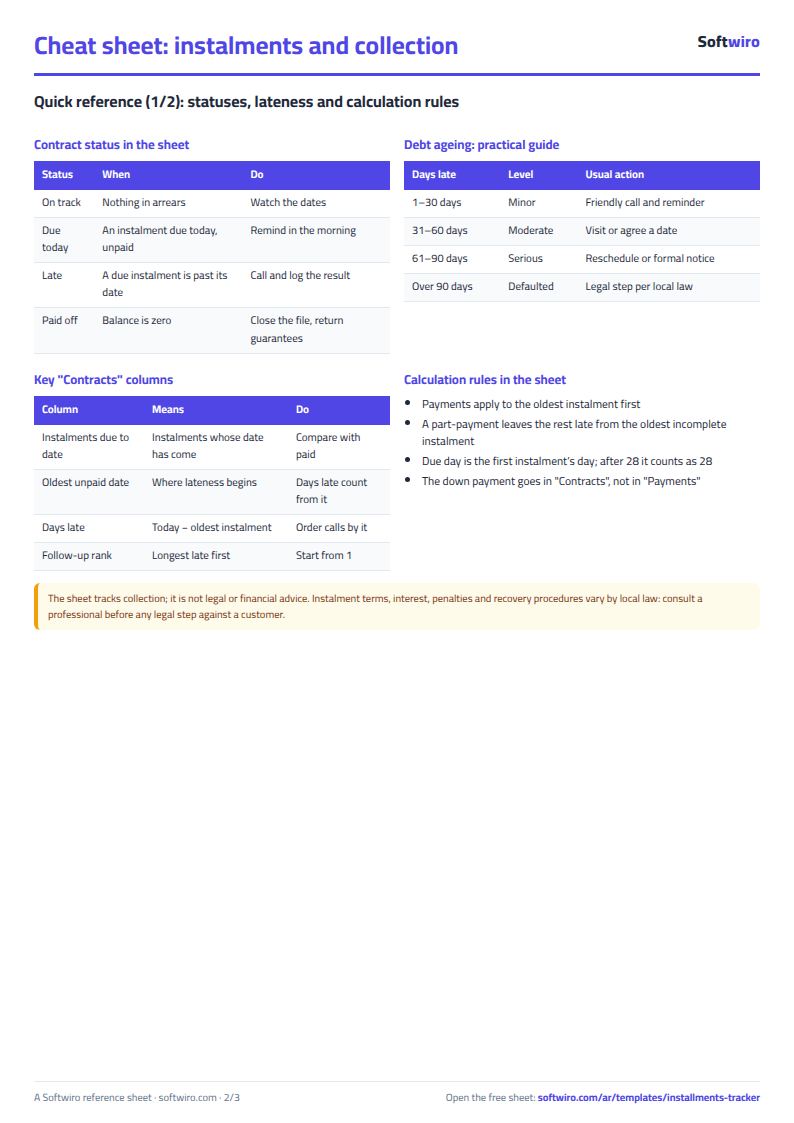
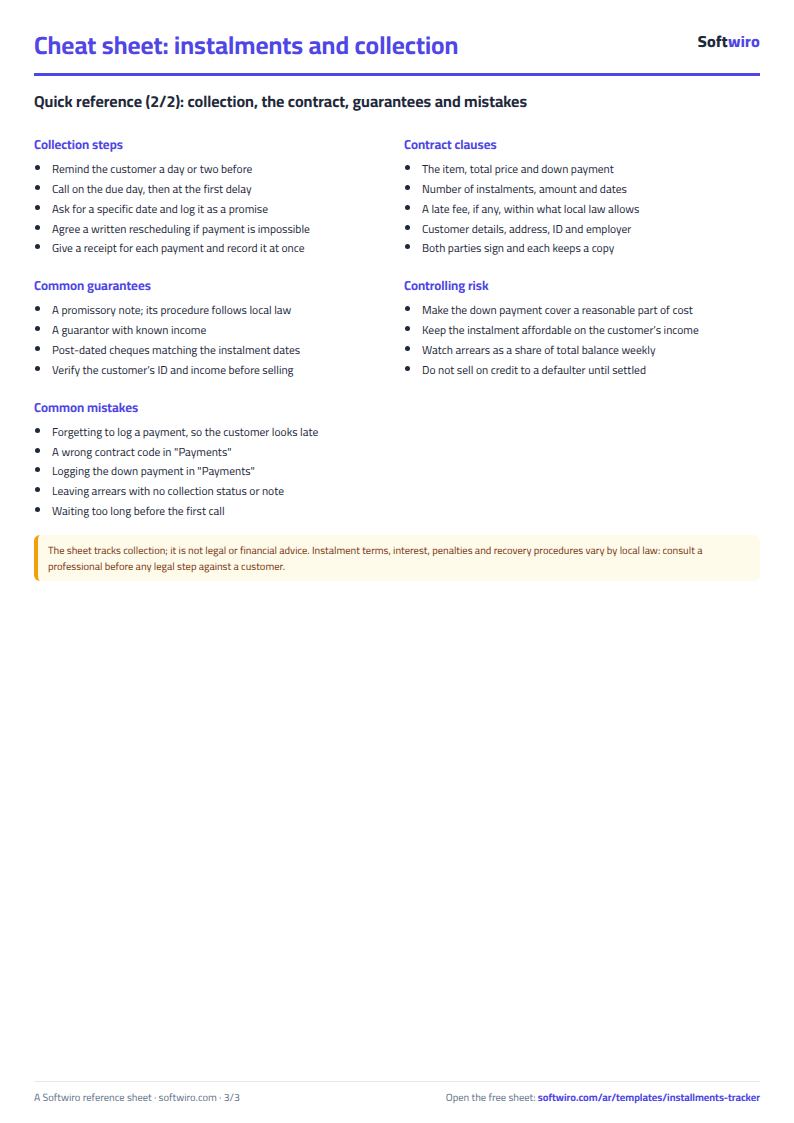
Free cheat sheet for this field
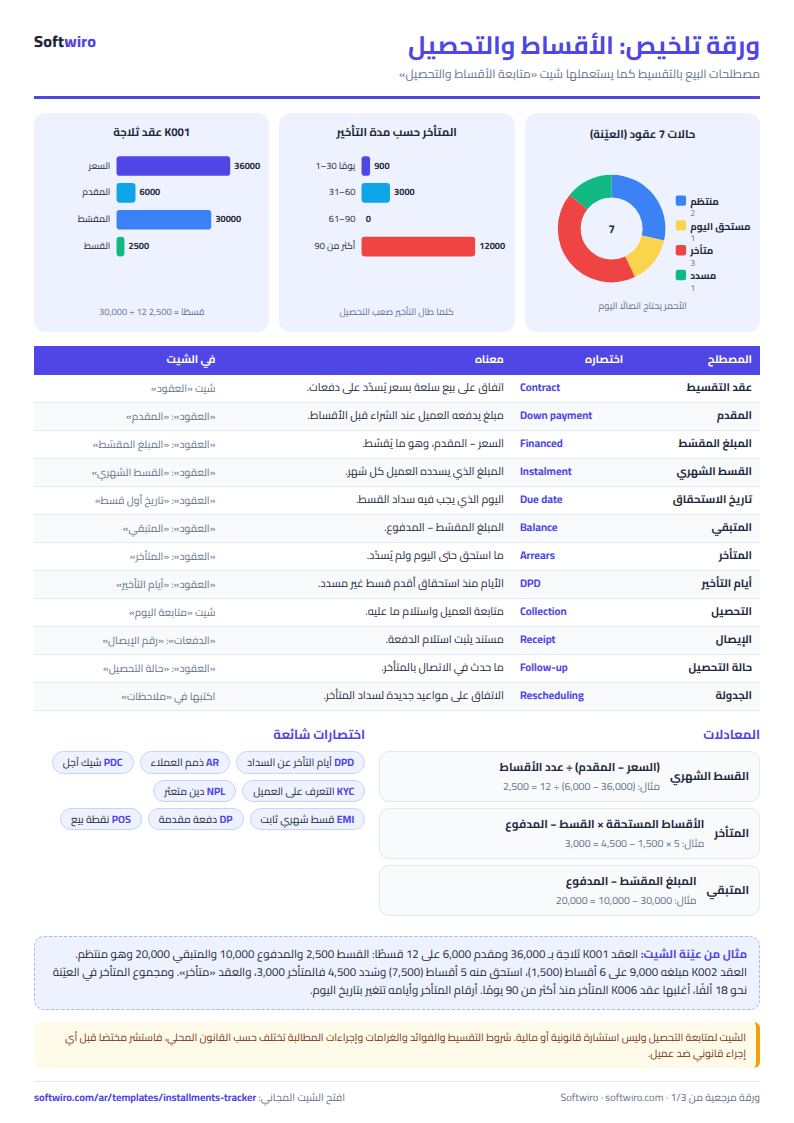
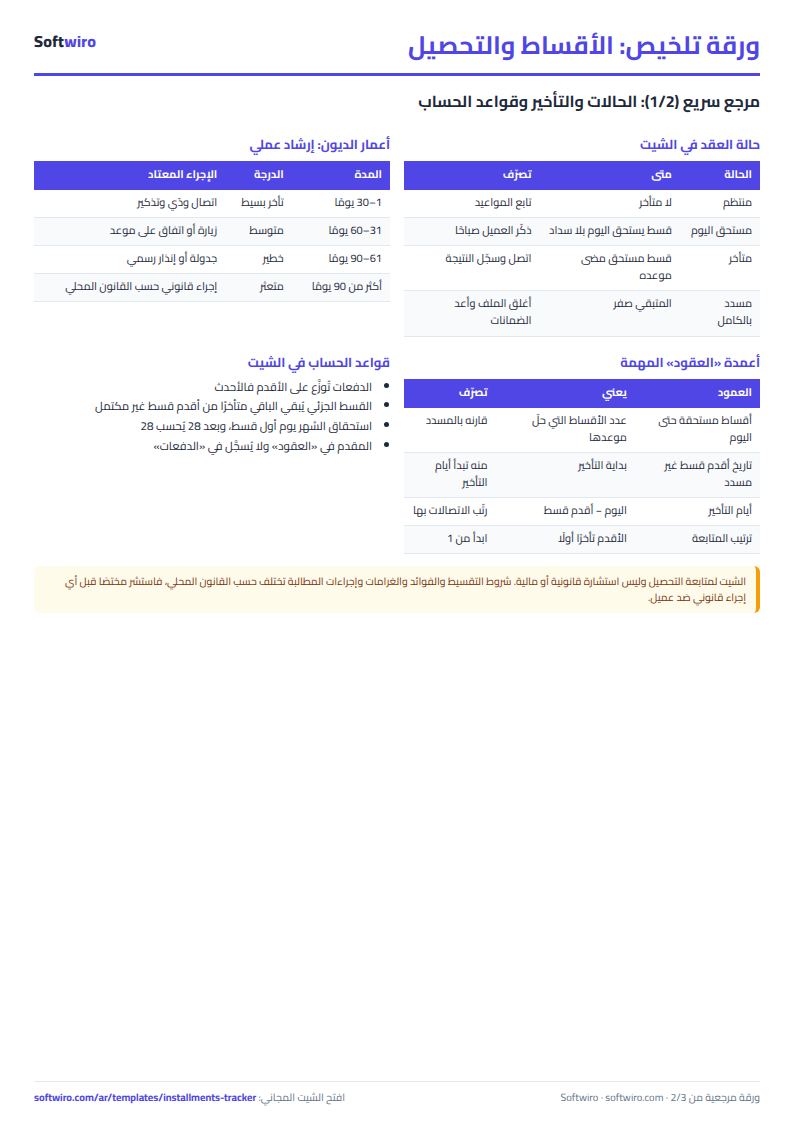
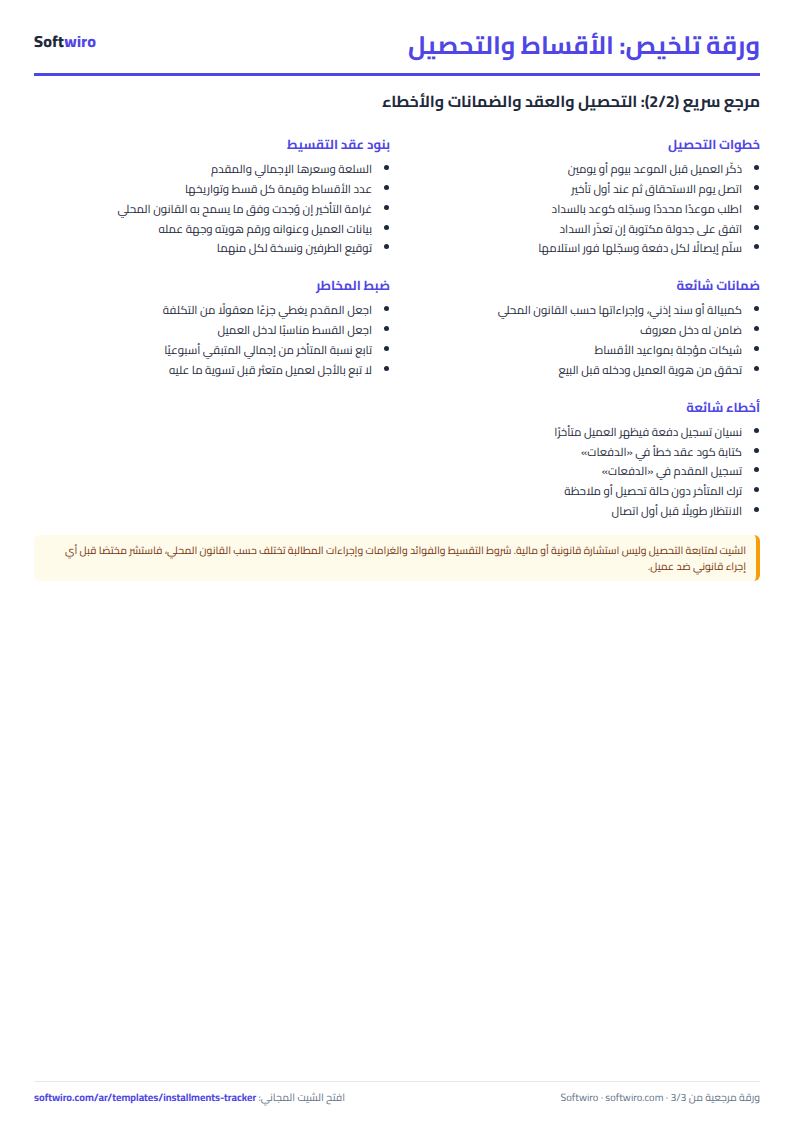
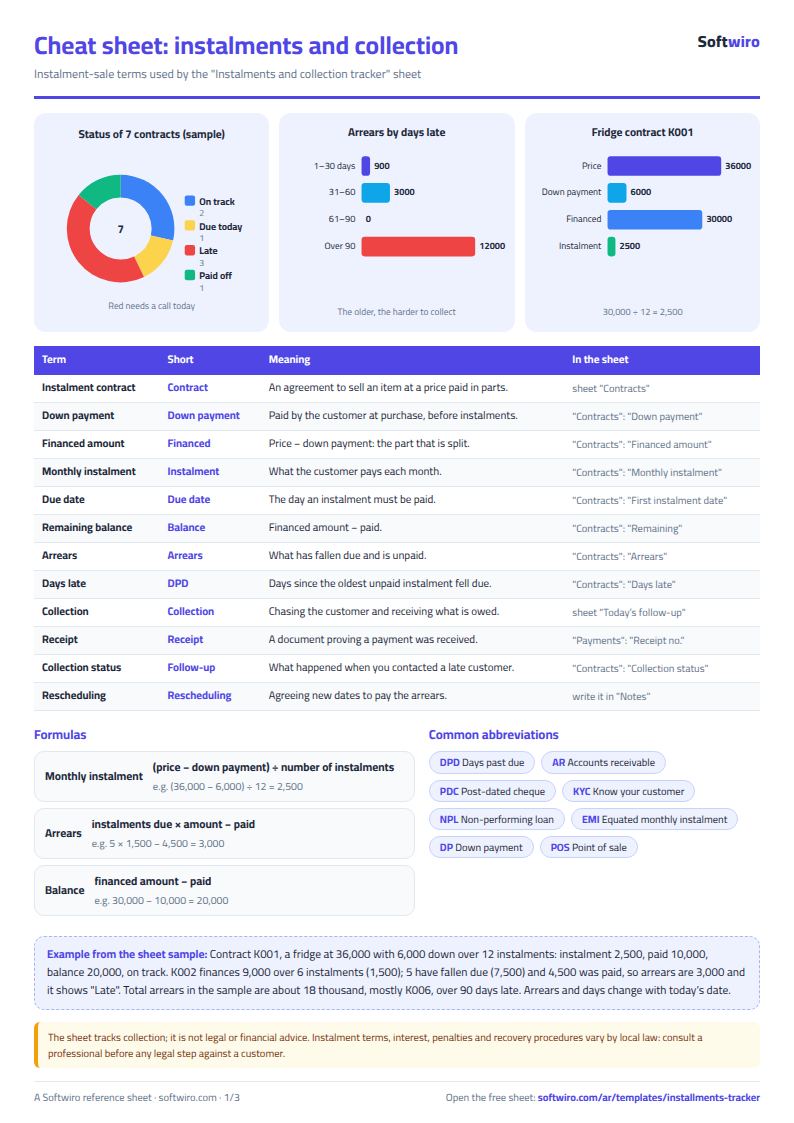
Terms, abbreviations, tables and diagrams over several pages, in Arabic and English. Download it as a PDF or images, including a phone-size version.
Still running this on Excel?
This sheet needs someone to copy every invoice and payment into it. In Accountwiro an invoice and a payment are recorded the moment they happen, and the customer's balance shows in a single statement of account.
| In this sheet | In Accountwiro |
|---|---|
| You copy every invoice and payment into the sheet by hand. | It shows the customer's invoices, payments and outstanding balance in a single statement of account. |
| Invoices are typed or copied by hand. | It creates an invoice by scanning a barcode or searching by product name, calculates discounts and taxes, and sends it to the customer over WhatsApp. |
| Stock shortages are discovered late. | It updates quantities after every sale and alerts you when a product drops below the required level. |
| Anyone who opens the sheet sees every number. | Permissions per user: the sales employee issues invoices, and the warehouse employee manages stock without access to financial data. |
Frequently asked questions
How does the sheet decide a customer is late?
It counts the installments whose due date has passed by today's date and compares their value with what the customer has paid. If the amount paid is less, the difference shows as late, and days late are counted from the due date of the oldest installment that is not fully paid.
What happens if a customer pays part of an installment?
Payments are applied from the oldest installment to the newest. The unpaid part stays late, days late are counted from the due date of the installment that is not complete, and the customer appears in the "متابعة اليوم" (Today's follow-up) list.
Where do I record the down payment?
In the "المقدم" (Down payment) column of the "العقود" (Contracts) sheet. It is deducted from the price before the rest is divided by the number of installments, and it is not recorded in the "الدفعات" (Payments) sheet.
Is the template free?
Yes, with no sign-up and no email address. Use it, edit it and share it as you like.
Does it work in Google Sheets and on mobile?
The sheet uses formulas supported by Excel 2016 and later, Google Sheets and LibreOffice, so you can upload it to Google Drive and open it with Google Sheets on a computer or a phone.
What is the difference between the white and the gray cells?
You type in the white cells; the gray cells are calculated automatically. Don't type in a gray cell, or you will erase its formula.
Can I use the sheet from an AI assistant?
Yes. Add our MCP server (URL https://softwiro.com/api/mcp, no key needed) to your assistant and ask it to do the calculation in this template. The numbers come from the sheet's own formulas, and we do not store your data. The steps and a ready-made prompt are in this article: https://softwiro.com/blog/mcp-excel-templates-ai-agent-guide.html
More free templates for: Shops and stores
More free templates
- Cash Book Template for Excel
- Invoice Template with Invoice Log (Excel)
- Clothing shop inventory sheet by colour and size
- Customer accounts, credit sales and customer statement sheet
- Cash book and customer accounts sheet
- General shop inventory tracker (stock in/out, reorder, slow movers)
- Supplier purchase orders and payables tracker
- Multi-warehouse and branch inventory sheet with transfers
- Periodic stock count and count-difference reconciliation sheet
- Barcode, batch and expiry inventory sheet
- Grocery store management sheet
- Stationery shop and photocopy management sheet
- Electronics shop sheet: serials, warranty and repairs
- Wholesale clothing trade sheet: traders, stock and collection
- Food wholesale and distribution sheet in Excel: routes, expiry and collection
- Rental portfolio tracker: properties, units, tenants and contracts
- Pharmacy expiry and stock tracking sheet
- Rent collection tracker for properties
- Business expenses and monthly budget sheet
- Lead and deal pipeline tracker
- Employee attendance sheet
- Employee payroll and attendance
- Monthly savings circle (gamaeya) tracker