Try the sheet here, on the example
The sheet is open below with sample numbers. Change any white cell and watch the results update, or press the blank-copy button to type your own data from scratch. Nothing you type leaves your browser.
Example from the sheet
| كود العقار | اسم العقار | الوحدات | مؤجرة | الإشغال | الإيجار الشهري الحالي | المتأخر | الصافي (محصّل − مصروفات) |
|---|---|---|---|---|---|---|---|
| P01 | عمارة النيل | 3 | 2 | 66.7% | 10,500.00 | 10,000.00 | 103,500.00 |
| P02 | برج الياسمين | 2 | 1 | 50.0% | 6,000.00 | 19,500.00 | 117,850.00 |
| P03 | مجمع الورود التجاري | 3 | 2 | 66.7% | 17,000.00 | 8,000.00 | 57,000.00 |
Example from the “العقارات” tab (Arabic), with the numbers and formulas that are in the file.
What is inside
- "الإعدادات" (Settings): Today's date, the number of days before a contract ends at which you get an alert (60 days in the example), and the month you want reported.
- "العقارات" (Properties): For each property: number of units, rented and vacant units, occupancy rate, current monthly rent, and amounts due, collected, overdue, expenses and net.
- "الوحدات" (Units): For each unit: its property, type, area and suggested rent, then its status (rented or vacant), current tenant name and rent.
- "المستأجرون" (Tenants): Each tenant's name, phone and ID, with the number of their contracts and what they owe in arrears.
- "العقود" (Contracts): One contract per unit and tenant with start and end dates, monthly rent and deposit, then its status (active, ending soon, expired or not started) and installments due, paid and overdue.
- "الدفعات" (Payments): A record of each payment with the contract number, amount and the month it covers. The property, unit and tenant appear automatically.
- "المصروفات" (Expenses): Expenses for each property (maintenance, electricity, water, taxes and security) with date and type.
- "المتأخرون" (Overdue tenants): An automatic list of every contract in arrears, largest first, with the tenant's name, phone, property, unit, months overdue and amount.
- "التجديدات" (Renewals): A list of contracts that will end within the alert period, soonest first, with the tenant, phone, end date and days remaining.
- "التقرير الشهري" (Monthly report): For each property in the month you choose: expected rent, collected rent, collection rate, expenses and net, with a total for all properties.
- "الملخص" (Summary): Rented and vacant units and occupancy, contracts by status, monthly rent, collected, overdue, expenses and net, and the property with the highest net.
The file opens on a start tab (“ابدأ هنا”, Start here) that explains how to use it.
What makes it different
You open the "المتأخرون" (Overdue tenants) sheet and see who is in arrears by name and phone, without adding up payments and subtracting them from rents. You open "التجديدات" (Renewals) and know which contract is ending before it surprises you. From "التقرير الشهري" (Monthly report) you see how much each property earned and how much was spent on it, and which vacant unit is costing you lost rent.
How to use it
- In the "الإعدادات" (Settings) sheet, enter today's date (or =TODAY() so it updates by itself), the number of days before contract end for an alert, and the month you want reported.
- In the "العقارات" (Properties) sheet, enter each property once with a unique code (such as P01), its name and address.
- In the "الوحدات" (Units) sheet, enter each unit with its code (such as P01-01) and choose its property from the list, with its type, area and suggested rent.
- In the "المستأجرون" (Tenants) sheet, enter each tenant once with a code (such as T001), name, phone and ID number.
- In the "العقود" (Contracts) sheet, open a row for each contract: choose the unit and the tenant, and enter the start and end dates, monthly rent and deposit.
- In the "الدفعات" (Payments) sheet, record each payment you receive: its date, the contract number, the amount and the month it covers.
- Open "المتأخرون" (Overdue tenants) to see who is in arrears by name and phone, "التجديدات" (Renewals) to see contracts about to end, "التقرير الشهري" (Monthly report) for each property, and "الملخص" (Summary) for the full picture.
Before you start:
- Rent falls due monthly on the contract's start day. A contract that starts on January 15 has its first installment due on January 15 and the second on February 15, and so on up to today or the contract end, whichever is earlier.
- Overdue = installments due up to today - total contract payments. If a tenant pays in advance the figure is negative and is not counted as arrears.
- Contract status: "active", or "ending soon" if the days left until its end are the number in the settings or fewer, or "expired", or "not started". A unit is "rented" while it has an active or ending-soon contract, otherwise "vacant".
- The monthly report calculates expected rent from contracts that cover the chosen month, collected rent from payments dated in that same month (which may include arrears from earlier months), and expenses by their date.
- The sheet holds 50 properties, 500 units, 500 tenants, 500 contracts, 2000 payments and 1000 expenses, and the "المتأخرون" (Overdue tenants) and "التجديدات" (Renewals) lists show the first 50 rows.
- The sheet does not calculate late fees or annual rent increases; enter the new rent in a new contract when you renew.
Free cheat sheet for this field
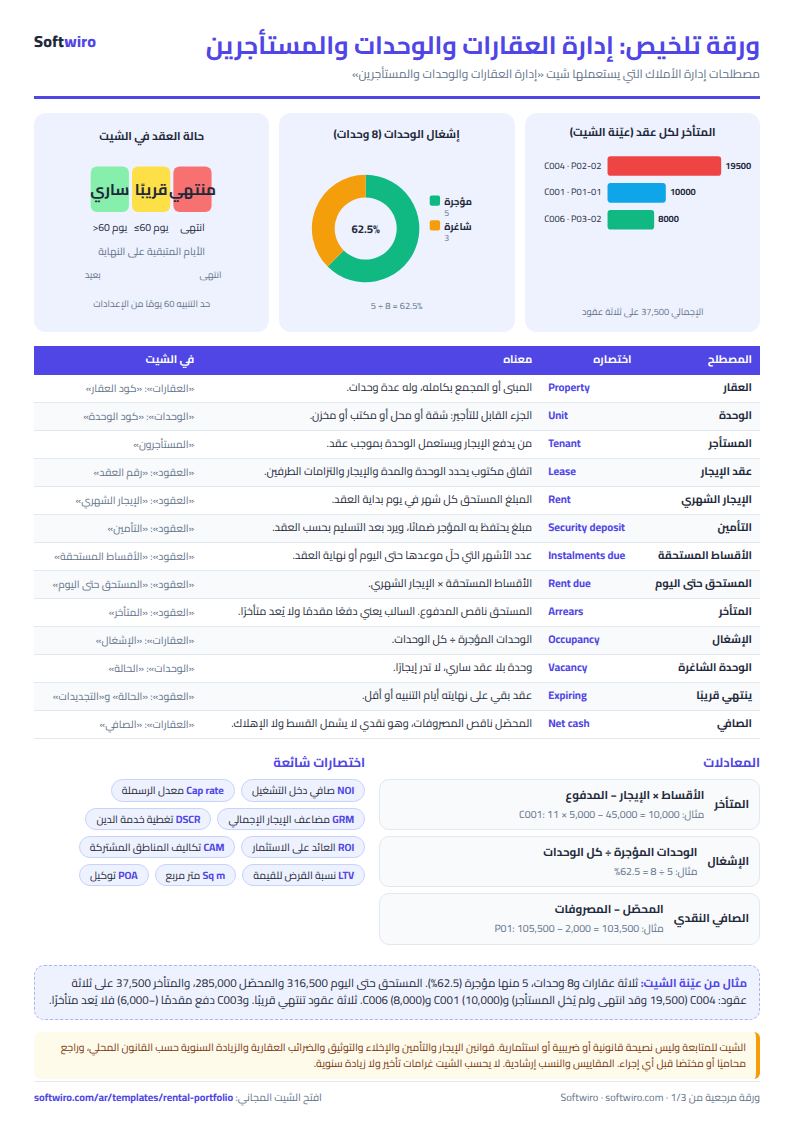
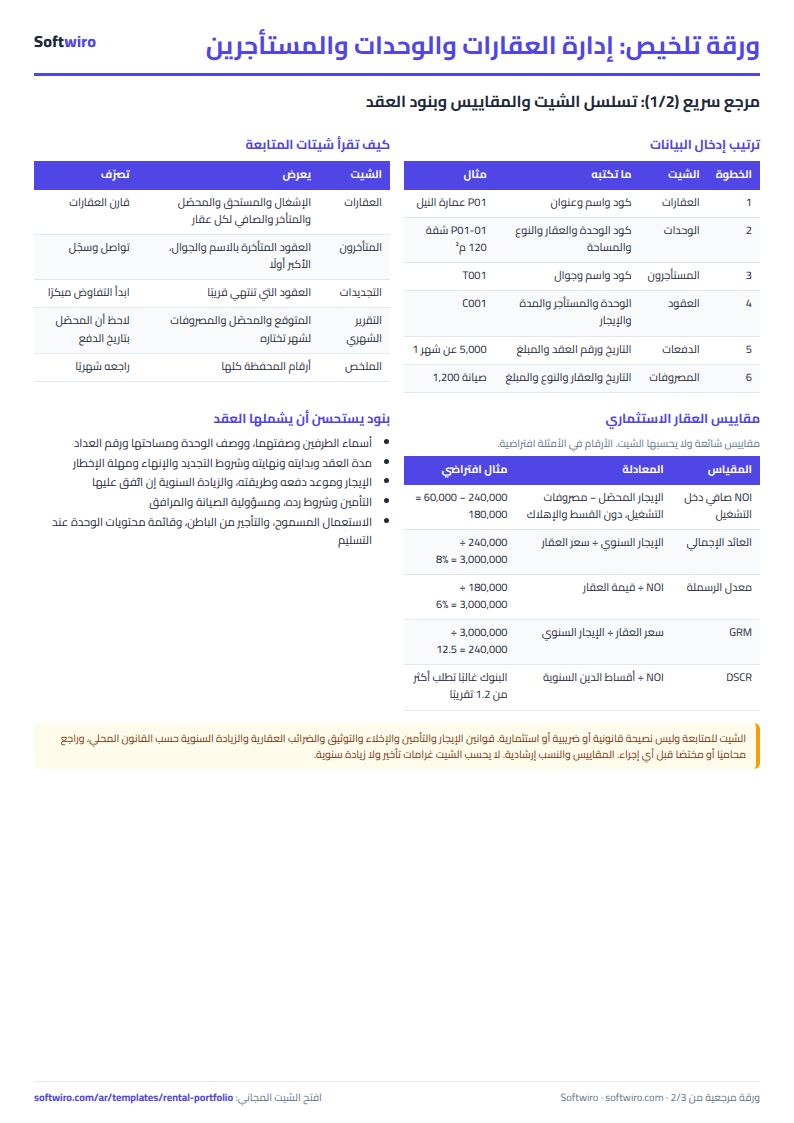
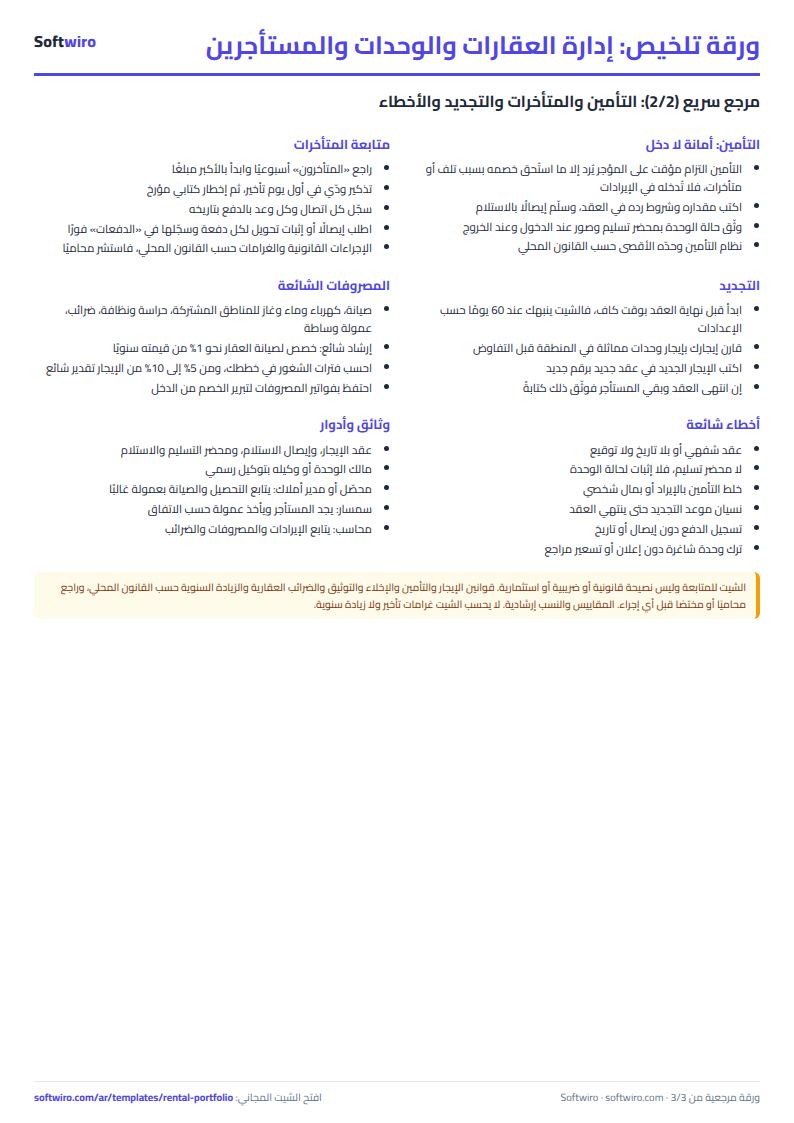
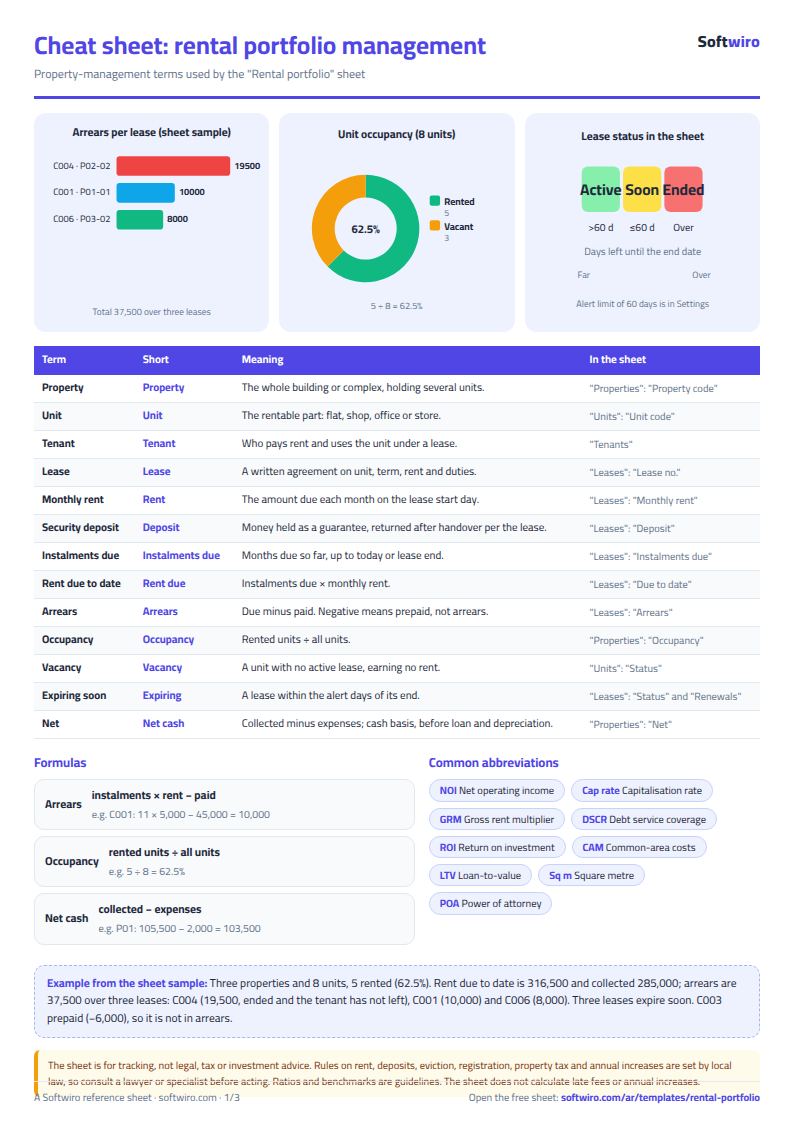
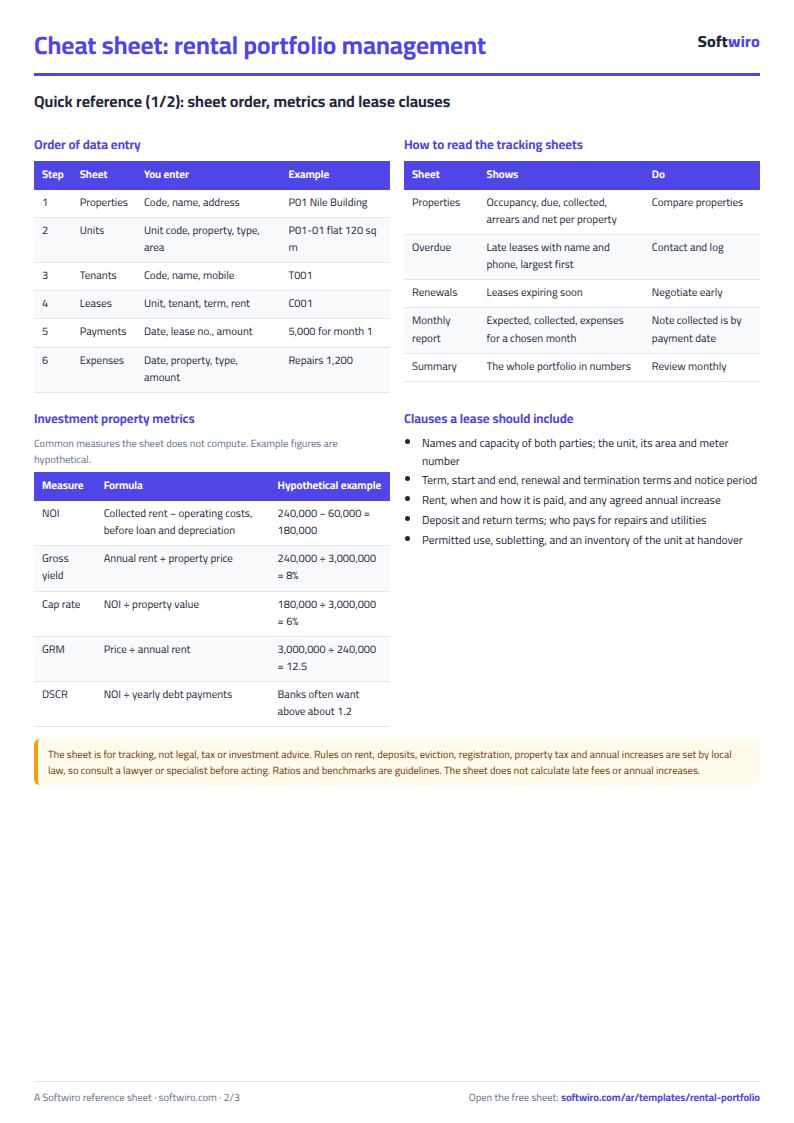
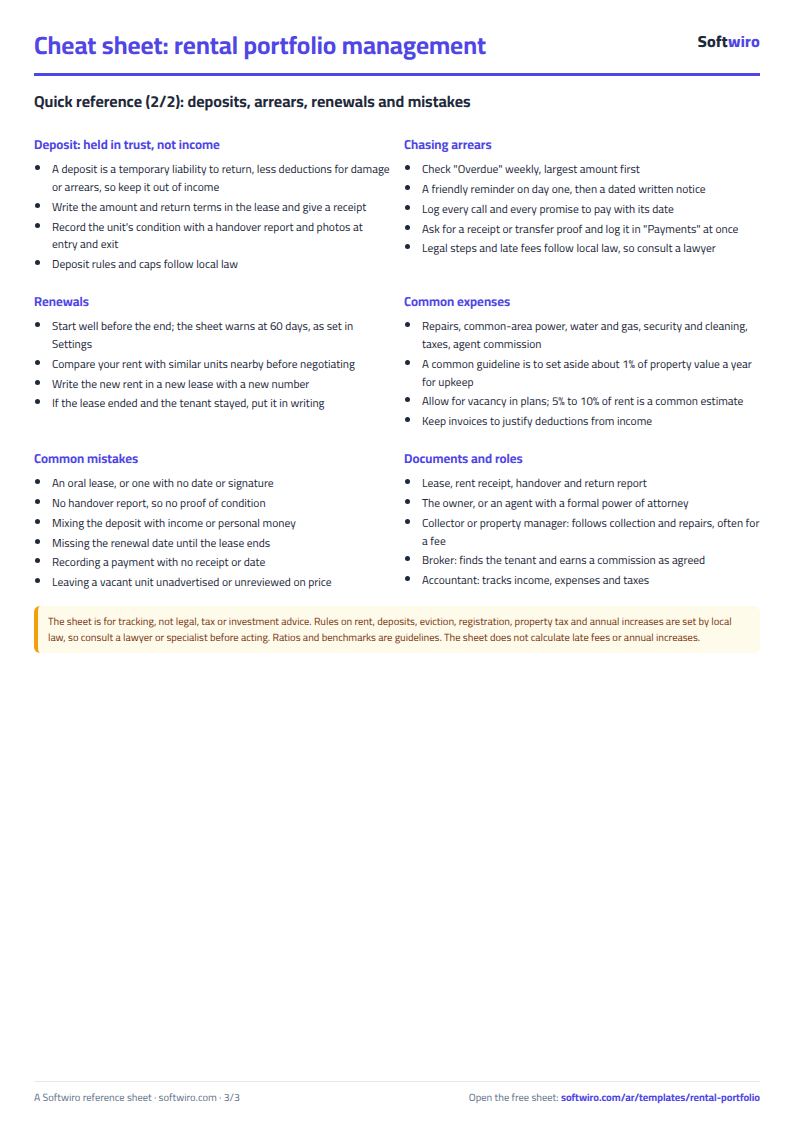
Terms, abbreviations, tables and diagrams over several pages, in Arabic and English. Download it as a PDF or images, including a phone-size version.
Still running this on Excel?
This sheet suits a start and a limited amount of data. If your way of working grows, or you need more than one person working on it at the same time, Softwiro can build you a program that fits the way you work.
| In this sheet | In Custom Software from Softwiro |
|---|---|
| One file that one person edits at a time, and copies reach you on WhatsApp. | A program with a login for each user and permissions you define, and everyone sees the same data. |
| You type everything and check the numbers by hand. | We design the screens around your work steps, so each person records only what concerns them. |
| Columns and formulas are fixed as the sheet was designed. | We build what you need: reports, alerts and screens your way. |
| Backups and security are your own responsibility. | The program runs on a secured server with regular backups. |
Frequently asked questions
How are the due installments calculated?
An installment falls due on the contract's start day each month. A contract that starts on January 15 has its first installment due on January 15 and its second on February 15. The sheet counts the installments whose date has come, up to today or the contract end, whichever is earlier, then multiplies them by the monthly rent.
What if a tenant pays in advance?
The overdue amount becomes negative (a credit for the tenant) and it is not included in the "المتأخرون" (Overdue tenants) list or in the total overdue.
What happens when a contract is renewed?
Add a new contract row for the same unit and tenant with its date and the new rent. The old contract stays "expired" with its dates and payments, and the unit shows as rented under the new contract.
How many properties and units does the sheet hold?
50 properties, 500 units, 500 tenants, 500 contracts, 2000 payments and 1000 expenses. The overdue and renewals lists show the first 50 rows.
Does it calculate late fees or annual rent increases?
No. Enter the annual increase in a new contract when you renew, and record any late fee outside the sheet.
Is the template free?
Yes, with no sign-up and no email address. Use it, edit it and share it as you like.
Does it work in Google Sheets and on mobile?
The sheet uses formulas supported by Excel 2016 and later, Google Sheets and LibreOffice, so you can upload it to Google Drive and open it with Google Sheets on a computer or a phone.
What is the difference between the white and the gray cells?
You type in the white cells; the gray cells are calculated automatically. Don't type in a gray cell, or you will erase its formula.
Can I use the sheet from an AI assistant?
Yes. Add our MCP server (URL https://softwiro.com/api/mcp, no key needed) to your assistant and ask it to do the calculation in this template. The numbers come from the sheet's own formulas, and we do not store your data. The steps and a ready-made prompt are in this article: https://softwiro.com/blog/mcp-excel-templates-ai-agent-guide.html
All the templates in this group: Compound and owners' association sheets: dues, maintenance and property
More free templates for: Real estate
More free templates
- Real estate leads and units tracker
- Rent collection tracker for properties
- Serviced apartments and short-stay bookings sheet
- Pharmacy expiry and stock tracking sheet
- Business expenses and monthly budget sheet
- Lead and deal pipeline tracker
- Employee attendance sheet
- Employee payroll and attendance
- General shop inventory tracker (stock in/out, reorder, slow movers)
- Monthly savings circle (gamaeya) tracker
- Clinic appointments tracker (Excel)