Video walkthrough
A 8-minute walkthrough of the sheet. The narration is in Arabic; the screen shows every step.

Video chapters
- 0:00 Introduction: an entry's journey through the sheet
- 0:14 The online sheet and downloading the Excel file
- 0:36 "Start here" and what the colors mean
- 0:52 Chart of accounts and opening balances
- 2:04 Adding a new account
- 2:23 The journal: how to write an entry
- 2:56 The three error alerts
- 3:24 Recording a cash sale with tax
- 4:28 An unbalanced entry: how to find the mistake
- 4:58 The general ledger
- 5:22 The trial balance
- 5:58 The income statement
- 6:18 The balance sheet
- 6:47 Start with your own numbers and save your work
- 7:16 15 solved journal entry examples for practice
Try the sheet here, on the example
The sheet is open below with sample numbers. Change any white cell and watch the results update, or press the blank-copy button to type your own data from scratch. Nothing you type leaves your browser.
Example from the sheet
| الكود | اسم الحساب | رصيد ختامي مدين | رصيد ختامي دائن |
|---|---|---|---|
| 1101 | الصندوق | 32,350.00 | 0.00 |
| 1102 | البنك | 60,630.00 | 0.00 |
| 1103 | العملاء | 20,000.00 | 0.00 |
| 1104 | المخزون | 35,200.00 | 0.00 |
| 1201 | المعدات والآلات | 52,000.00 | 0.00 |
| 1202 | مجمع إهلاك المعدات | 0.00 | 9,500.00 |
| 2101 | الموردون | 0.00 | 33,000.00 |
| الإجمالي | 233,750.00 | 233,750.00 |
Example from the “ميزان المراجعة” tab (Arabic), with the numbers and formulas that are in the file.
What is inside
- "دليل الحسابات" (Chart of accounts): Up to 200 accounts, each with a code, name, type (assets, liabilities, equity, revenue, expenses) and a statement group, plus the opening balance. It warns you if the group does not fit the account type.
- "اليومية" (Journal): Up to 3000 lines with date, entry number, account, description, debit and credit, with a check on every line and on every entry. The number of unbalanced entries is shown at the top of the sheet.
- "دفتر الأستاذ" (General ledger): Pick an account code and its transactions appear in order with the balance after each one, starting from the opening balance.
- "ميزان المراجعة" (Trial balance): For each account: opening balance, period movement and closing balance as debit or credit, with totals and a check showing whether the trial balance balances.
- "قائمة الدخل" (Income statement): From revenue to gross profit, operating profit and net profit, with each item as a percentage of revenue.
- "المركز المالي" (Balance sheet): Current and fixed assets, liabilities, equity and the period's profit, with a check showing whether the balance sheet balances.
The file opens on a start tab (“ابدأ هنا”, Start here) that explains how to use it.
What makes it different
The sheet flags an unbalanced entry by its number and the difference before the error reaches the statements. Accounts such as accumulated depreciation are deducted from assets correctly, because they are assets with a credit balance. All the statements are calculated from the same trial balance, so their figures never disagree.
How to write journal entries in an Excel sheet
To record journal entries in this sheet, write each entry on two or more lines with the same entry number. On each line enter the date, entry number, account code and description, then the amount in the debit or credit column. Type the code as a number, exactly as it is in the "دليل الحسابات" (Chart of accounts), and the account name appears next to it.
Example: a cash sale of 9000 is entered like this.
- First line: code 1101 (Cash), debit 9000.
- Second line: code 4101 (Sales), credit 9000.
If an entry's debits differ from its credits, "القيد غير متوازن" (entry unbalanced) appears in the "فحص القيد" (Entry check) column, and the number of unbalanced entries is shown at the top of the sheet.
From journal entry to general ledger and trial balance
You never post anything by hand. In the "دفتر الأستاذ" (General ledger), pick an account code such as 1101 and its transactions appear in order with the balance after each one, starting from the opening balance (20000 in the sample data). After the sales entry above, the balance becomes 29000 debit.
In the "ميزان المراجعة" (Trial balance), the sheet adds each account's movement from the journal to its opening balance to give the closing balance as debit or credit, and shows whether the trial balance balances. The "قائمة الدخل" (Income statement) and "المركز المالي" (Balance sheet) come from it, so the Sales account in the example appears under revenue.
For examples of common journal entry mistakes, read journal entry examples, and for a walkthrough of the sheet see the full guide. To track customers who buy on credit, use the customer ledger sheet.
How to use it
- In the "دليل الحسابات" (Chart of accounts) sheet, enter each account's code and name, pick its type and statement group, then enter its opening balance as debit or credit.
- In the "اليومية" (Journal) sheet, record each entry line by line: date, entry number, account code, description, and the amount in the debit or credit column.
- Check the "فحص السطر" (Line check) and "فحص القيد" (Entry check) columns, and correct every line or entry that shows a warning until debits equal credits.
- To view an account ledger, pick the account code at the top of the "دفتر الأستاذ" (General ledger) sheet and its transactions and the balance after each one appear.
- In the "ميزان المراجعة" (Trial balance) sheet, confirm that it balances, then read the result in the "قائمة الدخل" (Income statement) and "المركز المالي" (Balance sheet).
Before you start:
- The sheet holds 200 accounts and 3000 journal lines, and the general ledger shows the first 200 lines for each account.
- To try the unbalanced-entry alert, change the credit of entry 21 in the journal to 340. "القيد غير متوازن" (entry unbalanced) appears and the trial balance is off by 60. Then change it back to 400.
- In the chart of accounts, the account "مصروفات الصيانة" (Maintenance expenses) has a wrong group on purpose so that the group warning appears. The offending account stays out of the statements until you correct its group.
- Enter opening balances for balance sheet accounts only, and enter account codes as numbers. Accumulated depreciation accounts take a credit balance and are deducted from assets.
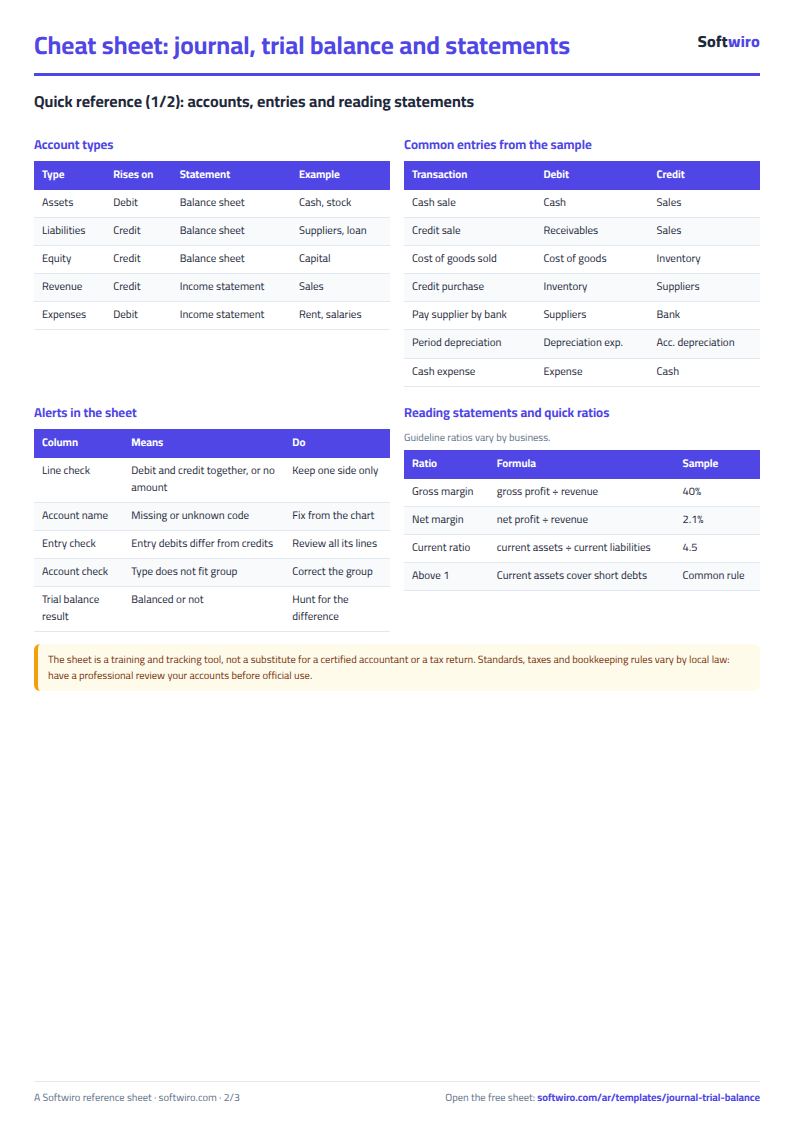
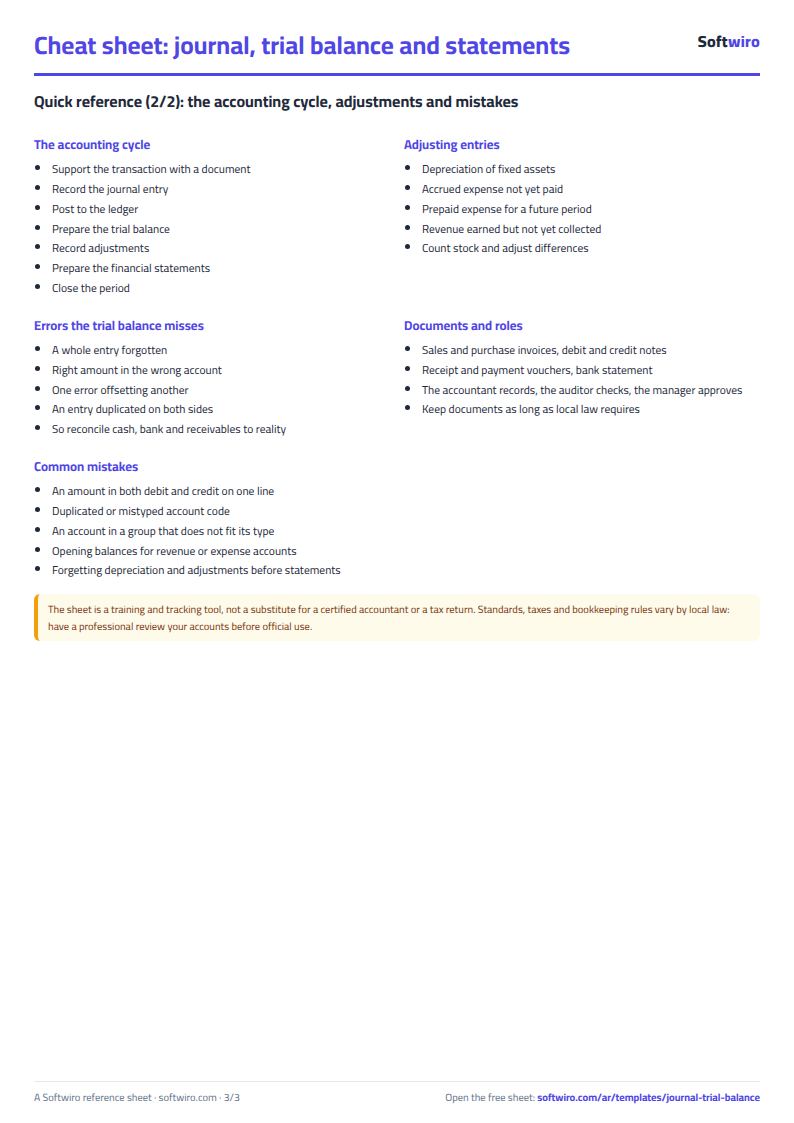
Free cheat sheet for this field
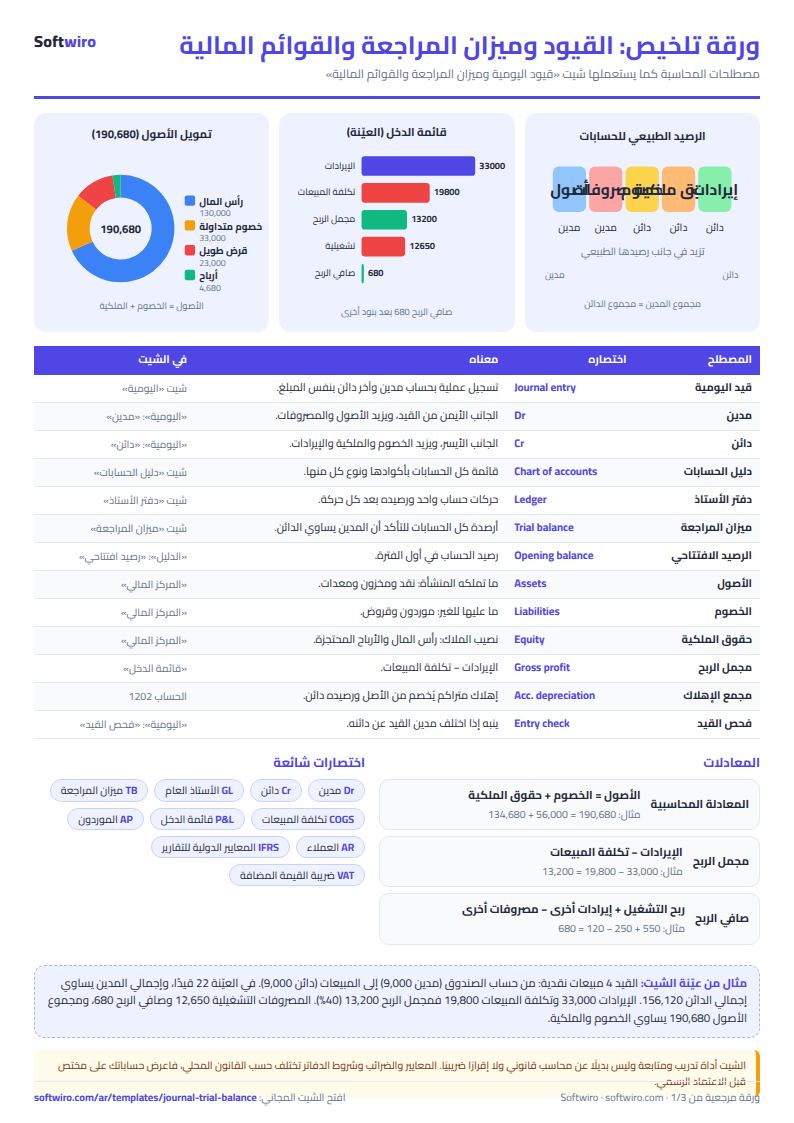
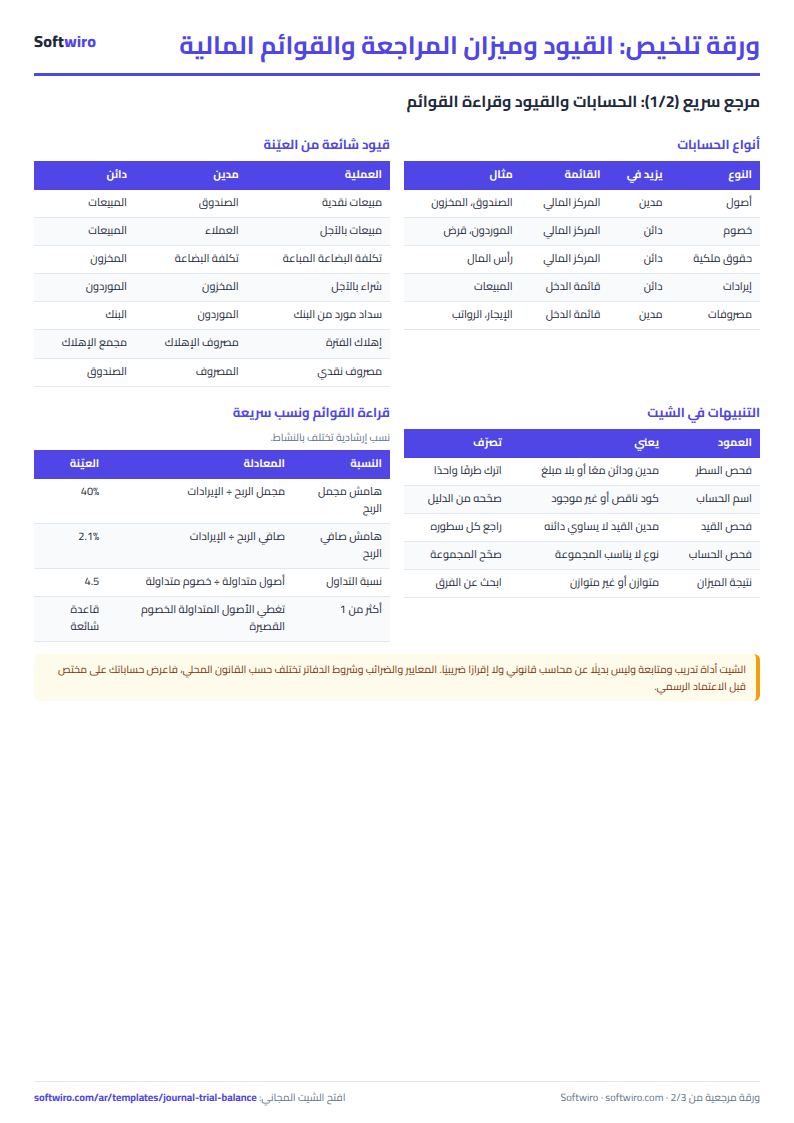
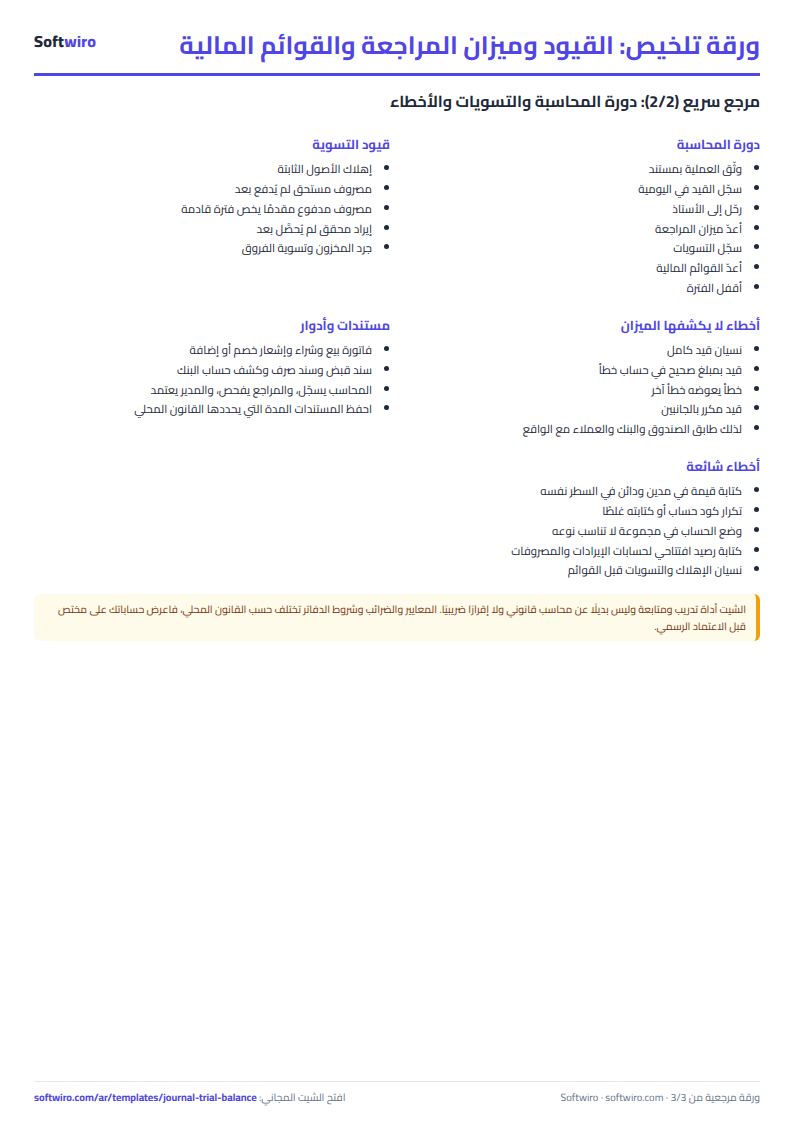
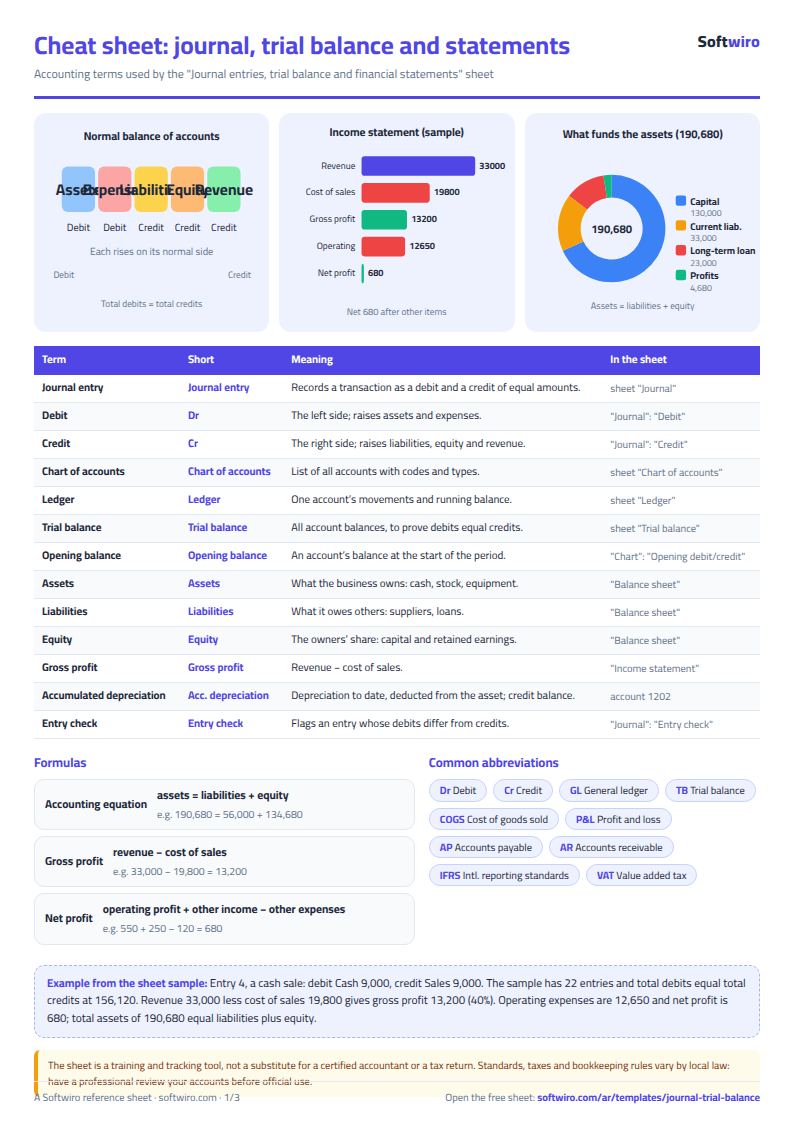
Terms, abbreviations, tables and diagrams over several pages, in Arabic and English. Download it as a PDF or images, including a phone-size version.
Still running this on Excel?
This sheet depends on someone entering journal entries accurately and reviewing them. In ProfAcc, double-entry postings are made automatically, periods are closed, and the financial statements are produced directly from the entries.
| In this sheet | In ProfAcc — Manufacturing Accounts |
|---|---|
| Changing any cell can alter the numbers of a period that has ended. | Correct double-entry from day one, with automatic posting and period closing that locks what has been closed. |
| Tax is calculated in one place and invoices live in another. | Every sales invoice calculates VAT within the journal entry that records it. |
| You only learn the stock balance after the month-end count. | Stock balances are live and move with every posting. |
| One file per company you serve, and the files can get mixed up. | Each company is created from a Google account in about a minute with nothing to install, its data is kept separate, and it is reached through its own link. |
Frequently asked questions
How do I make a trial balance in Excel?
Record the entries with their debits and credits. The sheet posts them to the general ledger and then to the trial balance, and the income statement and balance sheet come from it. It alerts you to any entry where debits do not equal credits.
What do I do if it says the trial balance is out of balance?
In the "اليومية" (Journal) sheet, look in the "فحص القيد" (Entry check) column for the entry that shows "القيد غير متوازن" (entry unbalanced), and make its debit total equal its credit total. If you find no unbalanced entry, check the lines that show "كود غير موجود" (code not found), because their amounts are not included in the trial balance.
How do I add a new account?
Enter its code and name in the first empty row of the "دليل الحسابات" (Chart of accounts) sheet and pick its type and group. It then appears automatically in the trial balance and in the code drop-down list in the journal.
Where do I enter opening balances?
In the "دليل الحسابات" (Chart of accounts) sheet, in the opening debit and opening credit columns, for balance sheet accounts only. Their totals must be equal.
How do I record journal entries in this Excel sheet?
In the "اليومية" (Journal) sheet, enter on each line the date, entry number, account, description, and the amount in the debit or credit column. Lines of the same entry share the same entry number. The sheet checks every entry and counts the unbalanced ones, and posts the figures to the general ledger, the trial balance and the financial statements.
Is the template free?
Yes, with no sign-up and no email address. Use it, edit it and share it as you like.
Does it work in Google Sheets and on mobile?
The sheet uses formulas supported by Excel 2016 and later, Google Sheets and LibreOffice, so you can upload it to Google Drive and open it with Google Sheets on a computer or a phone.
What is the difference between the white and the gray cells?
You type in the white cells; the gray cells are calculated automatically. Don't type in a gray cell, or you will erase its formula.
Can I use the sheet from an AI assistant?
Yes. Add our MCP server (URL https://softwiro.com/api/mcp, no key needed) to your assistant and ask it to do the calculation in this template. The numbers come from the sheet's own formulas, and we do not store your data. The steps and a ready-made prompt are in this article: https://softwiro.com/blog/mcp-excel-templates-ai-agent-guide.html
More free templates for: Accounting
More free templates
- Business expenses and monthly budget sheet
- Cash flow forecast sheet
- Annual budget by department: plan vs actual
- Fixed assets register and depreciation sheet
- Accounting rules and equations summary sheet: double entry, statements and financial ratios
- Weekly study routine sheet
- Online store orders and profit sheet
- Real estate leads and units tracker
- Installments and collection tracker
- Rental portfolio tracker: properties, units, tenants and contracts
- Pharmacy expiry and stock tracking sheet
- Rent collection tracker for properties
- Lead and deal pipeline tracker