Try the sheet here, on the example
The sheet is open below with sample numbers. Change any white cell and watch the results update, or press the blank-copy button to type your own data from scratch. Nothing you type leaves your browser.
Example from the sheet
| الشهر | مسلَّم | نسبة التسليم | الربح قبل الإعلانات | الإنفاق الإعلاني | صافي الربح بعد الإعلانات |
|---|---|---|---|---|---|
| سبتمبر | 36 | 87.8% | 7,295.00 | 2,550.00 | 4,745.00 |
| أكتوبر | 13 | 92.9% | 2,290.00 | 2,200.00 | 90.00 |
| إجمالي السنة | 49 | 89.1% | 9,585.00 | 4,750.00 | 4,835.00 |
Example from the “الملخص الشهري” tab (Arabic), with the numbers and formulas that are in the file.
What is inside
- "المنتجات" (Products): Each product's cost, price and stock, how much is tied up in open orders, and a warning when stock falls below the reorder level.
- "المحافظات" (Governorates): For each zone: the shipping fee charged to the customer, and what the shipping company charges you for a delivered order and for a return.
- "الطلبات" (Orders): Each order with its value, shipping, product cost, shipping cost and profit. Returns and losing orders are colored, and errors are flagged.
- "الإعلانات" (Ads): What you spent on each ad platform and on which day.
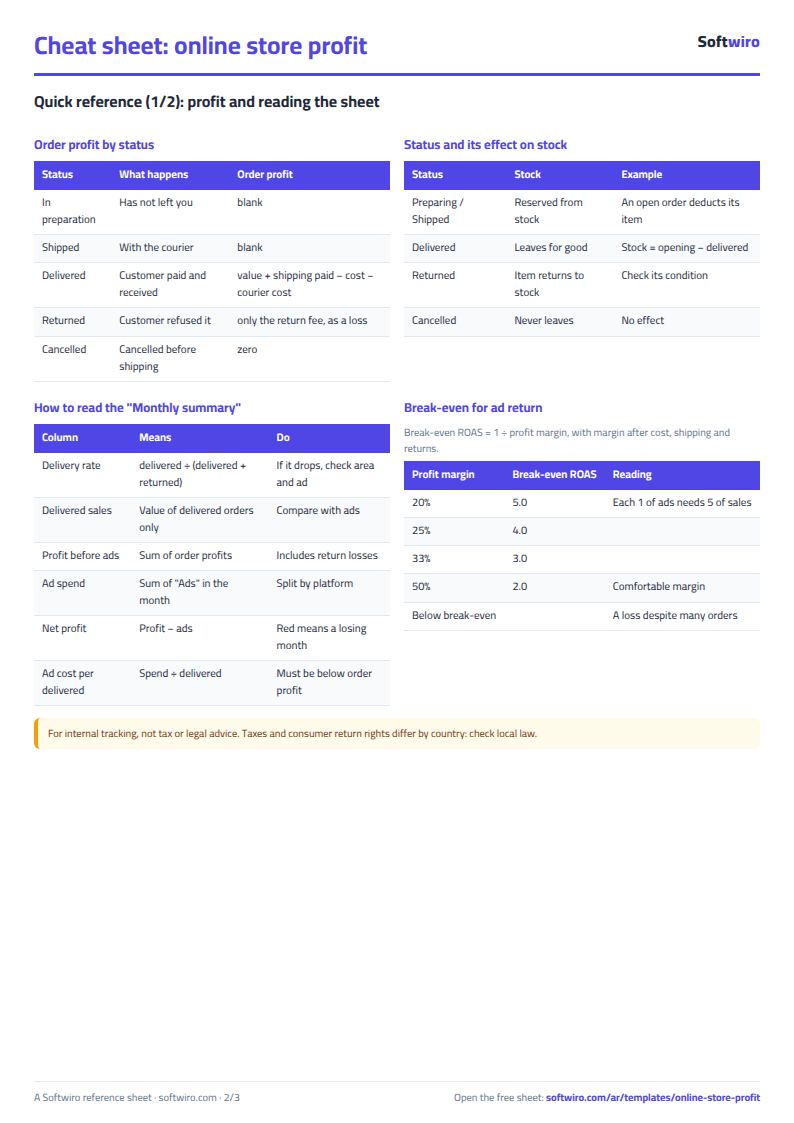
- "الملخص الشهري" (Monthly summary): For each month: number of orders, delivery rate, profit before ads, net profit after ads, and ad cost per delivered order.
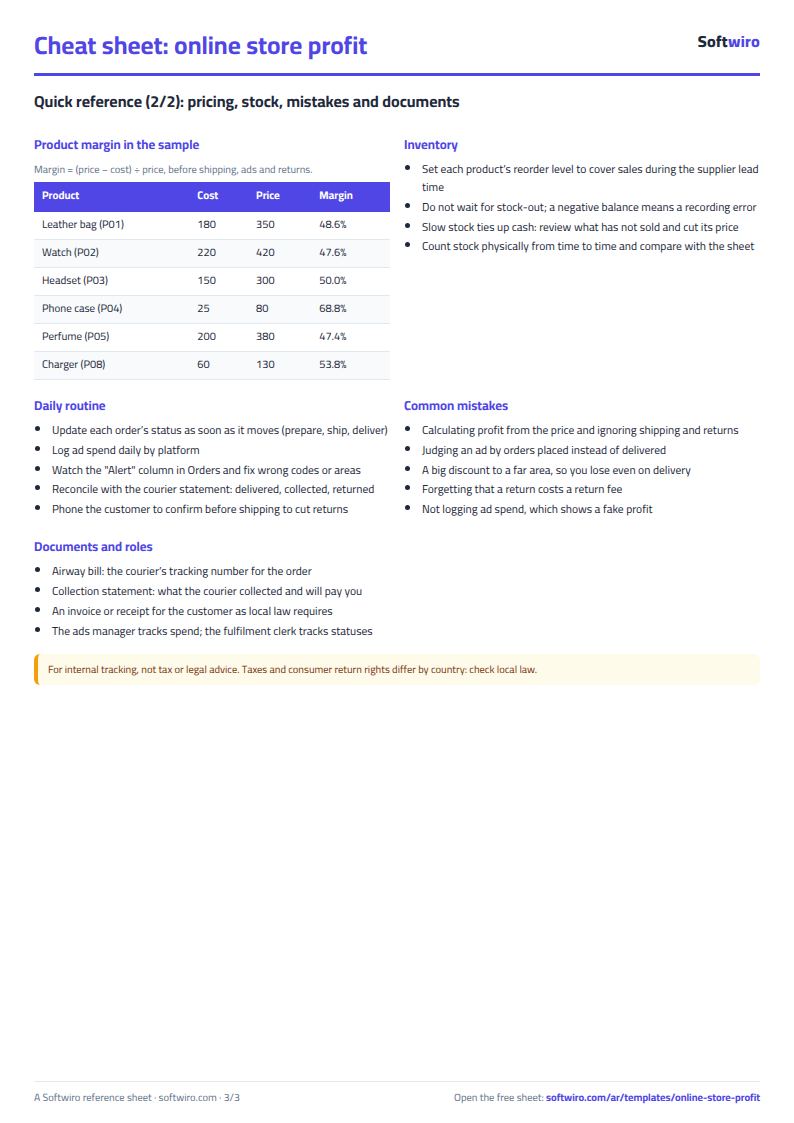
- "أرباح المنتجات" (Product profits): Each product's return rate, its profit and its loss from returns, and a ranking of products from most to least profitable.
The file opens on a start tab (“ابدأ هنا”, Start here) that explains how to use it.
What makes it different
Profit is calculated only when an order is closed. A returned order shows a loss equal to the return fee, and a delivered order that lost money because of a discount or a distant zone shows in red. Ad spend is then deducted so you know each month's net profit.
How to use it
- In the "المنتجات" (Products) sheet, enter for each product the code, name, unit cost, selling price, opening stock and reorder level.
- In the "المحافظات" (Governorates) sheet, enter for each zone the shipping fee the customer pays, and what the shipping company charges you for a delivered order and for a return.
- In the "الطلبات" (Orders) sheet, log each order: date, number, customer, zone, product code, quantity, discount and status. Update the status as the order progresses.
- In the "الإعلانات" (Ads) sheet, log what you spent on each platform and on which day.
- Enter the year in the "الملخص الشهري" (Monthly summary) sheet to see profit before ads and net profit after ads for each month.
- Open "أرباح المنتجات" (Product profits) to see which products make money and which lose it because of returns.
Before you start:
- Profit is calculated only when an order is closed: a delivered order carries its profit, a returned order carries the loss of the return fee, and a cancelled order is zero. An order that is being prepared or shipped stays blank.
- Product stock = opening stock - delivered - items in open orders. Returns go back into stock, and cancelled orders never leave it.
- Type the product code and zone name exactly as they appear in their own sheets. If they do not match, a warning appears in the "تنبيه" (Alert) column and the shipping fee is not calculated.
- The sheet holds 200 products, 40 zones, 3000 orders and 1000 ad rows. To extend it, copy the last row of formulas down in the relevant sheets.
Free cheat sheet for this field
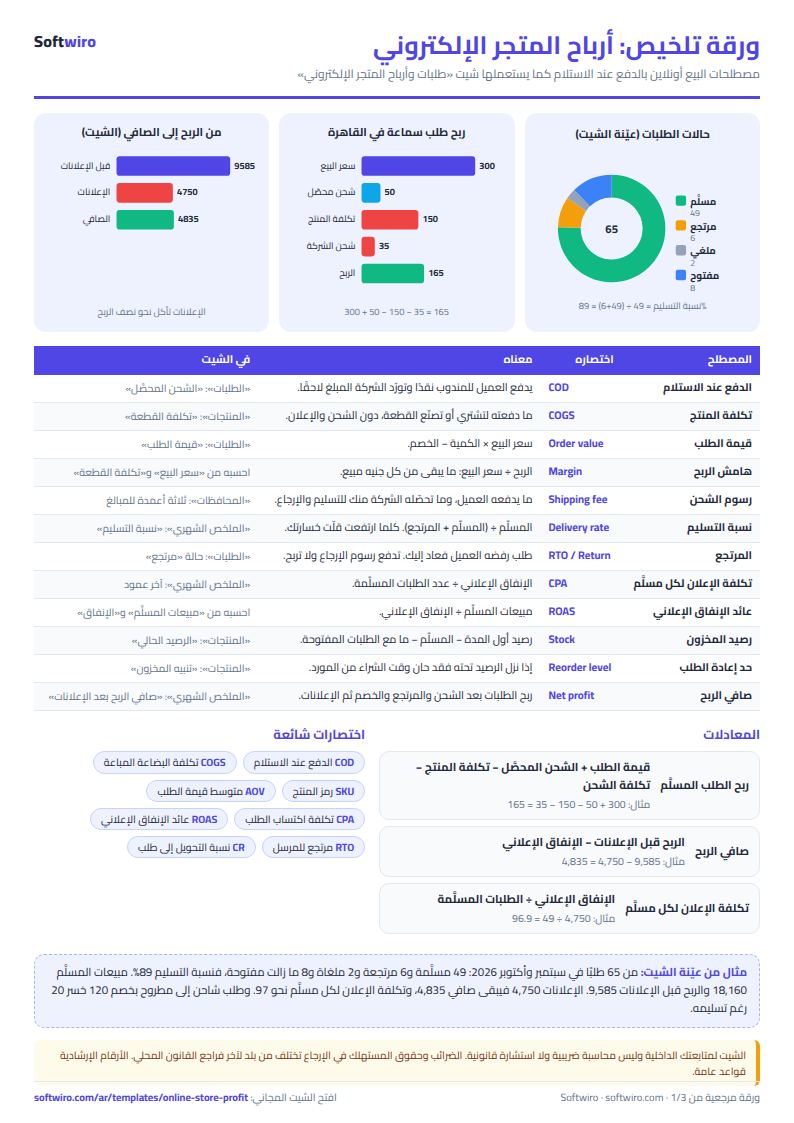
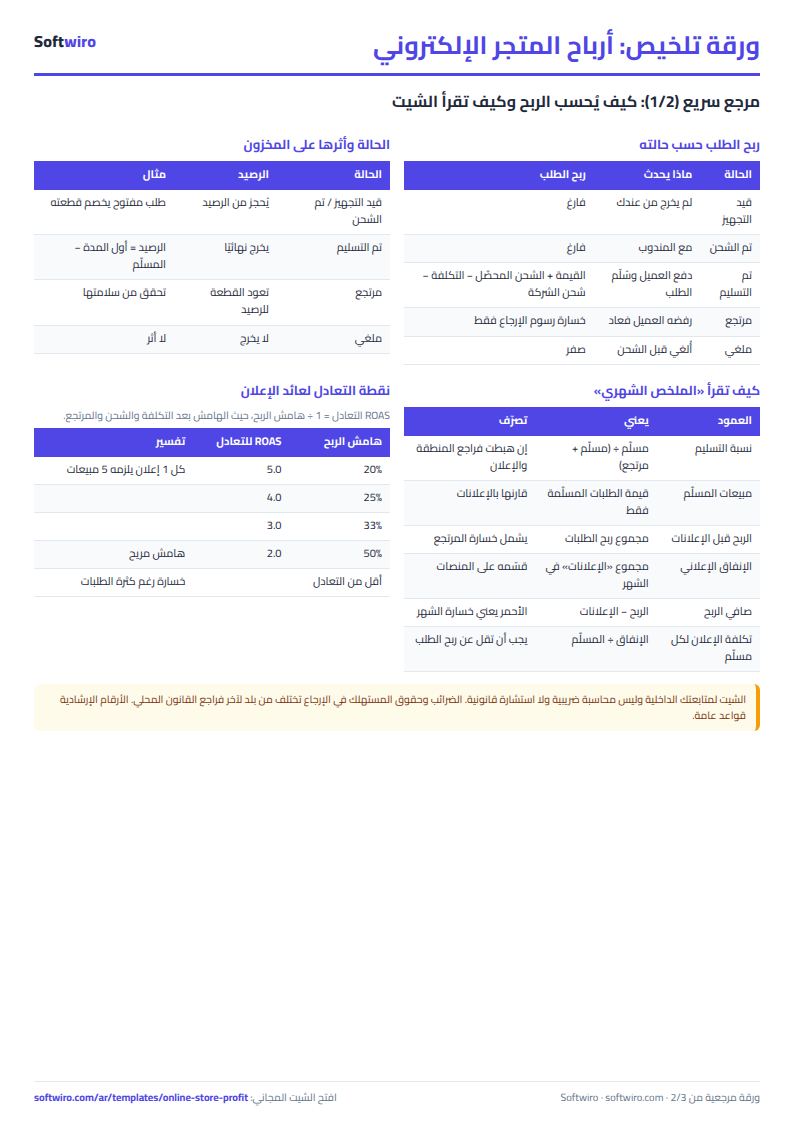
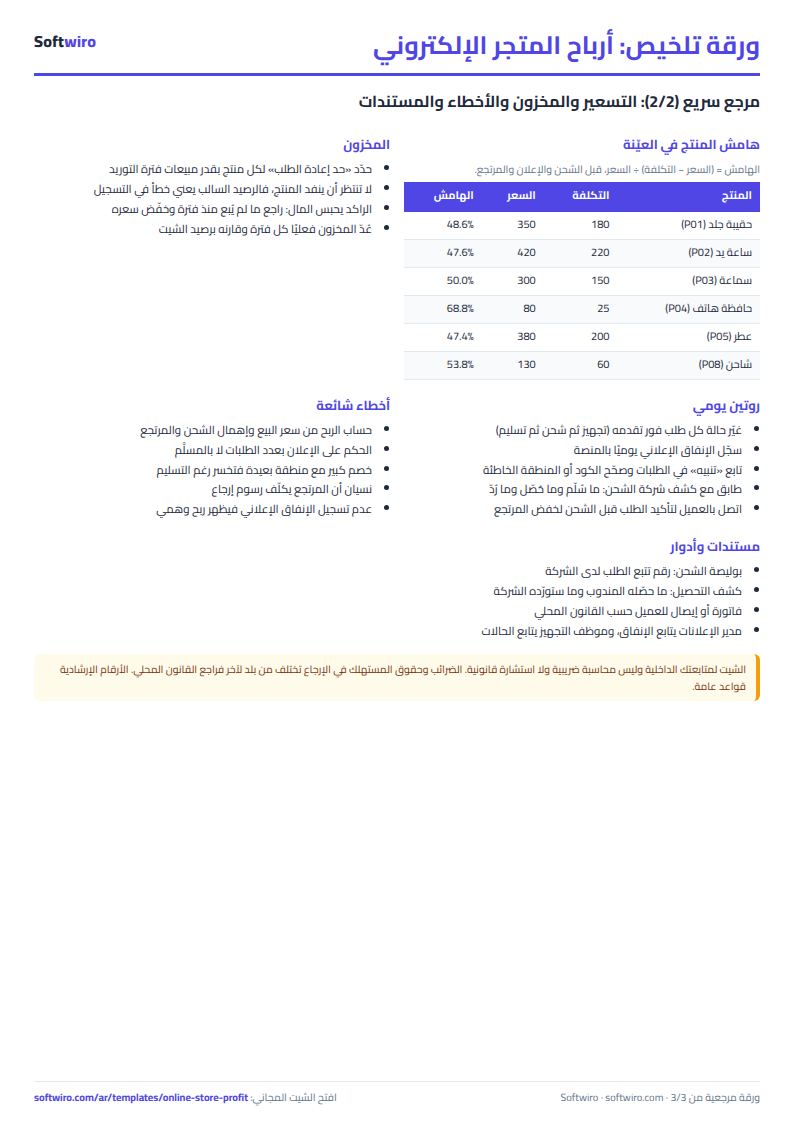
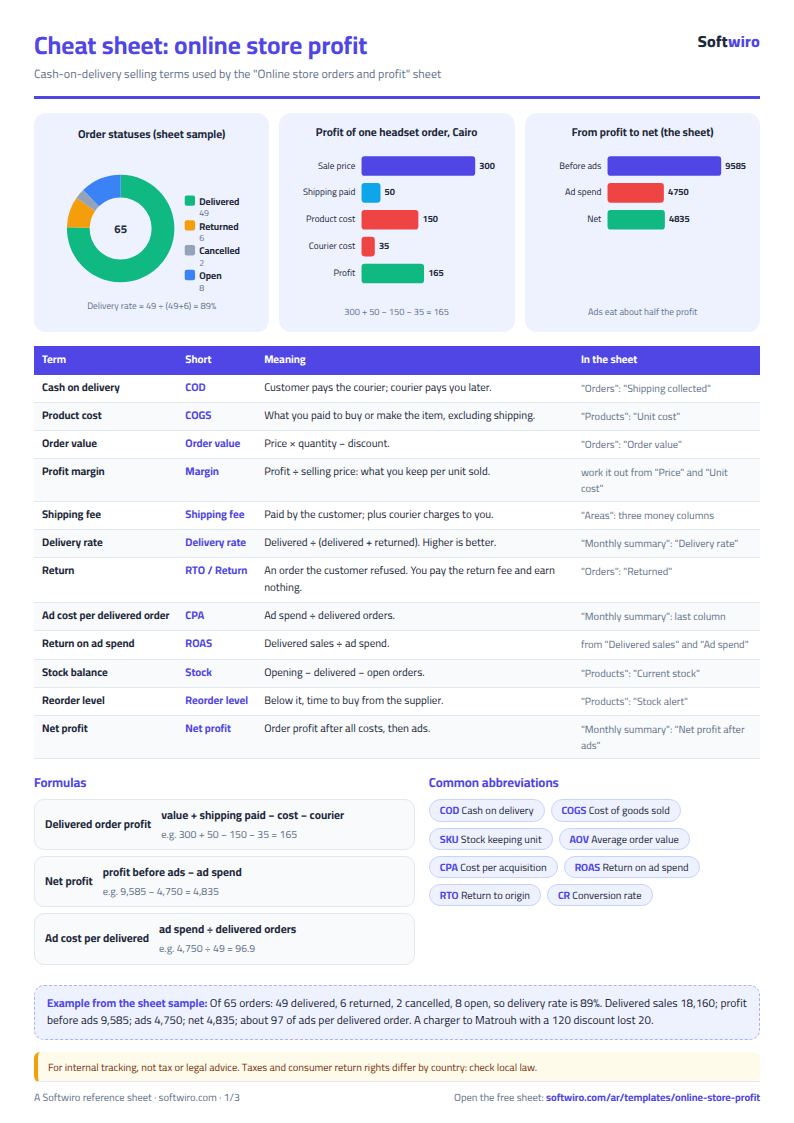
Terms, abbreviations, tables and diagrams over several pages, in Arabic and English. Download it as a PDF or images, including a phone-size version.
Still running this on Excel?
This sheet needs someone to transfer every order into it. In a Softwiro E-Commerce store, the order is recorded the moment of purchase and followed through to delivery, with shipping costs you set for each governorate.
| In this sheet | In Integrated E-Commerce Platform |
|---|---|
| You move orders from messages and comments into the sheet. | A store of your own that follows every order from creation to delivery, with a shipping cost you set separately for each governorate. |
| You find out a product is out of stock after you've sold it. | It tracks the available quantity in each warehouse and alerts you when any product runs low. |
| Payment only on delivery. | It accepts Visa cards and other payment methods, and you manage the available payment methods from the dashboard. |
| Every offer or coupon needs manual follow-up. | You manage products, categories, offers, discount coupons and site content from the dashboard, without a developer. |
Frequently asked questions
Does the sheet calculate profit for an order that has not arrived yet?
No. An order marked "قيد التجهيز" (being prepared) or "تم الشحن" (shipped) keeps its profit blank until you change its status to delivered, returned or cancelled. The items in it are counted against the product's stock balance.
How does the sheet calculate the loss from a return?
It deducts the return fee the shipping company charges you, and the item goes back into the product's stock. This loss shows in the month's profit and in the "أرباح المنتجات" (Product profits) sheet.
What if I type a wrong product code or zone?
A warning appears in the "تنبيه" (Alert) column next to the order, and the shipping fee for that zone is not calculated until you correct the name.
Is the template free?
Yes, with no sign-up and no email address. Use it, edit it and share it as you like.
Does it work in Google Sheets and on mobile?
The sheet uses formulas supported by Excel 2016 and later, Google Sheets and LibreOffice, so you can upload it to Google Drive and open it with Google Sheets on a computer or a phone.
What is the difference between the white and the gray cells?
You type in the white cells; the gray cells are calculated automatically. Don't type in a gray cell, or you will erase its formula.
Can I use the sheet from an AI assistant?
Yes. Add our MCP server (URL https://softwiro.com/api/mcp, no key needed) to your assistant and ask it to do the calculation in this template. The numbers come from the sheet's own formulas, and we do not store your data. The steps and a ready-made prompt are in this article: https://softwiro.com/blog/mcp-excel-templates-ai-agent-guide.html
More free templates for: Online selling
More free templates
- Real estate leads and units tracker
- Installments and collection tracker
- Rental portfolio tracker: properties, units, tenants and contracts
- Pharmacy expiry and stock tracking sheet
- Rent collection tracker for properties
- Business expenses and monthly budget sheet
- Lead and deal pipeline tracker
- Employee attendance sheet