Try the sheet here, on the example
The sheet is open below with sample numbers. Change any white cell and watch the results update, or press the blank-copy button to type your own data from scratch. Nothing you type leaves your browser.
Example from the sheet
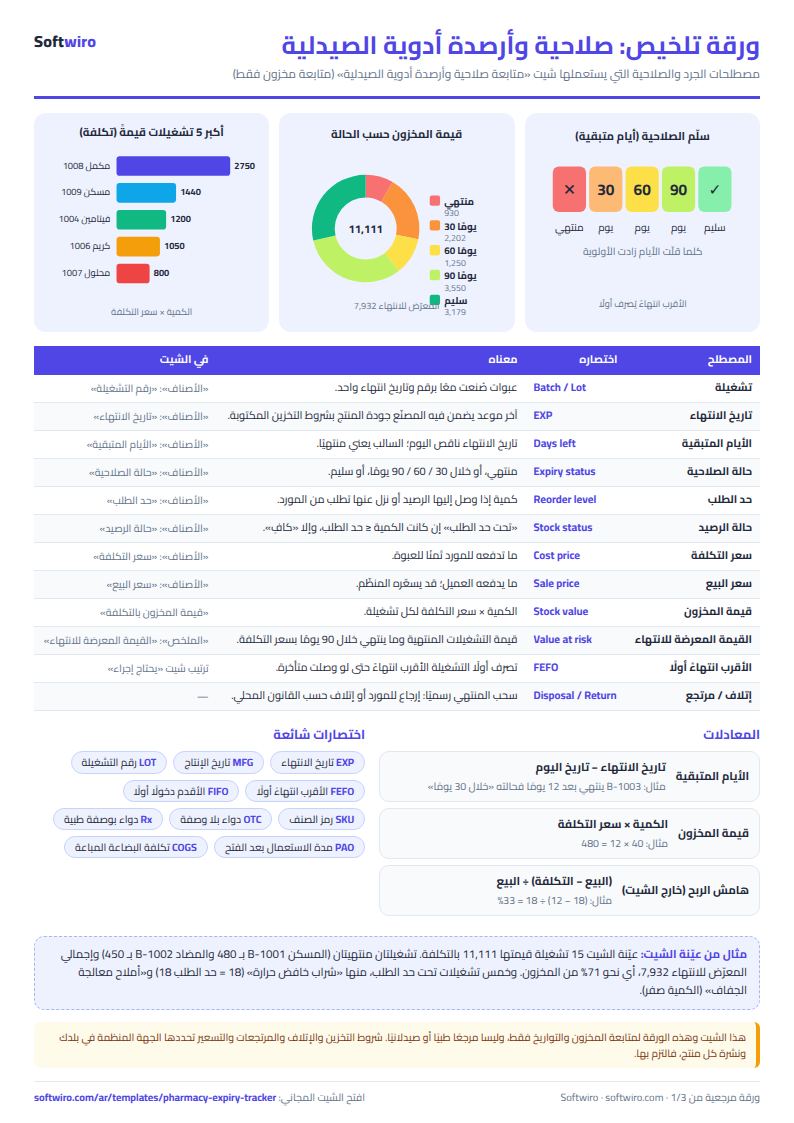
| الحالة | عدد التشغيلات | قيمتها بالتكلفة |
|---|---|---|
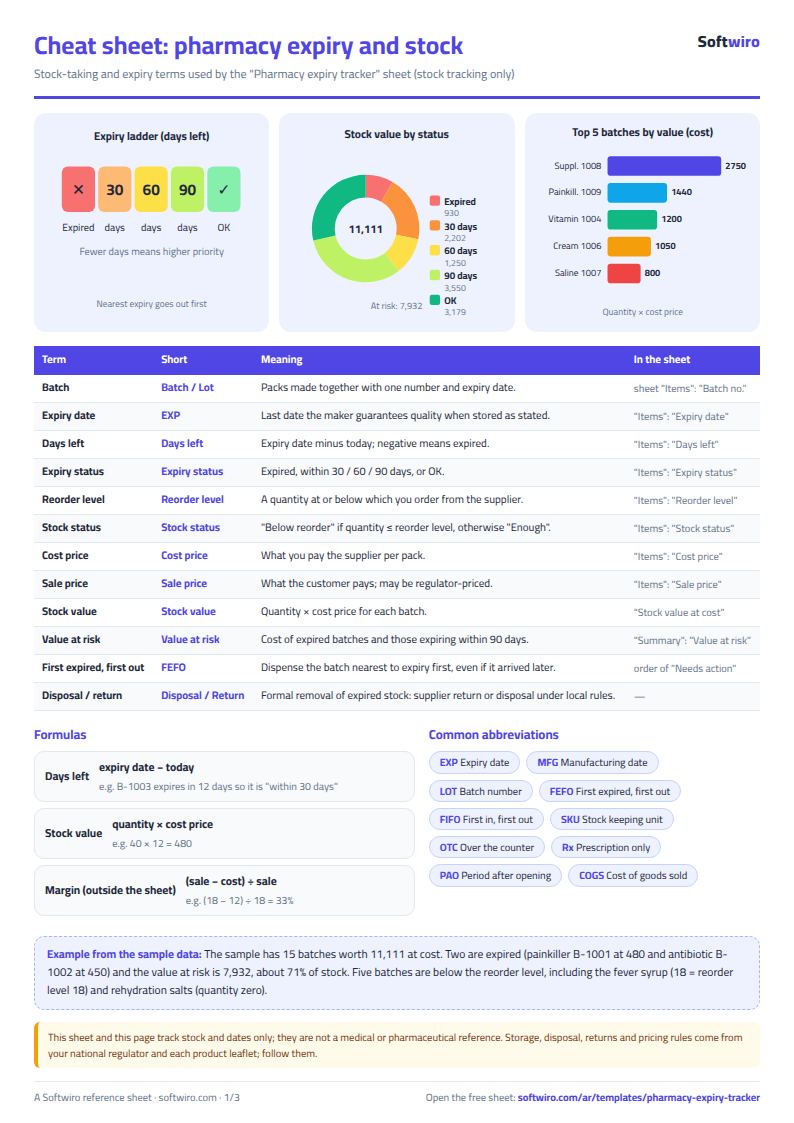
| منتهي | 2 | 930.00 |
| خلال 30 يومًا | 3 | 2,202.00 |
| خلال 60 يومًا | 2 | 1,250.00 |
| خلال 90 يومًا | 2 | 3,550.00 |
| سليم | 6 | 3,179.00 |
Example from the “الملخص” tab (Arabic), with the numbers and formulas that are in the file.
What is inside
- "الإعدادات" (Settings): Today's date, which the days-left count starts from. It updates automatically, or you can type a date of your own.
- "الأصناف" (Items): One batch per row: item, batch, expiry date, quantity, reorder level, cost and price. The sheet shows days left, expiry status, stock status, stock value and value at risk of expiring.
- "يحتاج إجراء" (Needs action): An automatic list of batches that are expired, close to expiring or below reorder level, sorted by nearest expiry first.
- "الملخص" (Summary): The number of batches and their value at cost for each expiry status, total stock value, value at risk of expiring, and the number of items below reorder level.
The file opens on a start tab (“ابدأ هنا”, Start here) that explains how to use it.
What makes it different
A stock count by item alone does not show that part of it is about to expire. This sheet tracks every batch by its date, so you know what to display, return or pull from the shelf before it expires, and how much it is worth.
How to use it
- In the "الإعدادات" (Settings) sheet, today's date appears automatically. You can type a different date instead.
- In the "الأصناف" (Items) sheet, enter each batch on its own row: item name, batch number, expiry date, quantity, reorder level, cost price and selling price.
- Days left, expiry status, stock status and stock value appear automatically in the grey cells.
- Open the "يحتاج إجراء" (Needs action) sheet to see what has expired, is close to expiring or is below reorder level, sorted by nearest expiry first.
- Check the "الملخص" (Summary) sheet for the number of batches and their value in each status, and the value at risk of expiring.
Before you start:
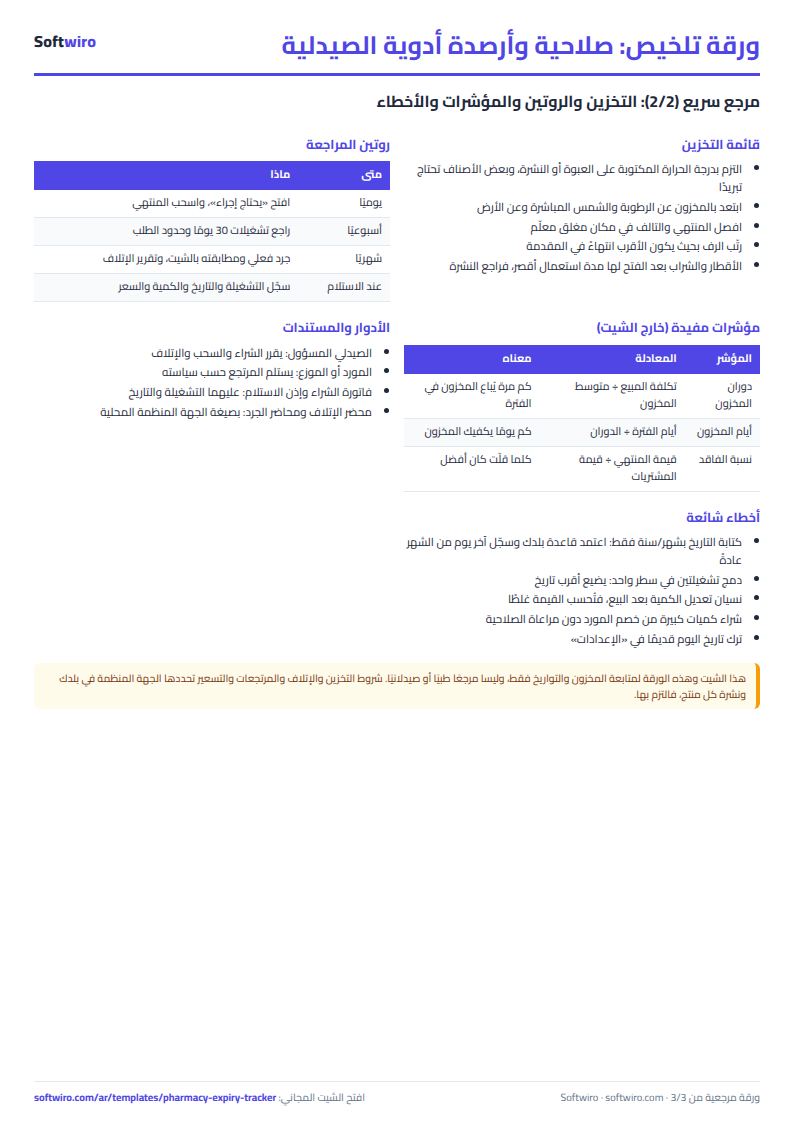
- This sheet tracks stock and dates only. It is not a medical reference and contains no treatment information.
- The sheet holds up to 500 batches, and the "Needs action" list shows the first 60 rows.
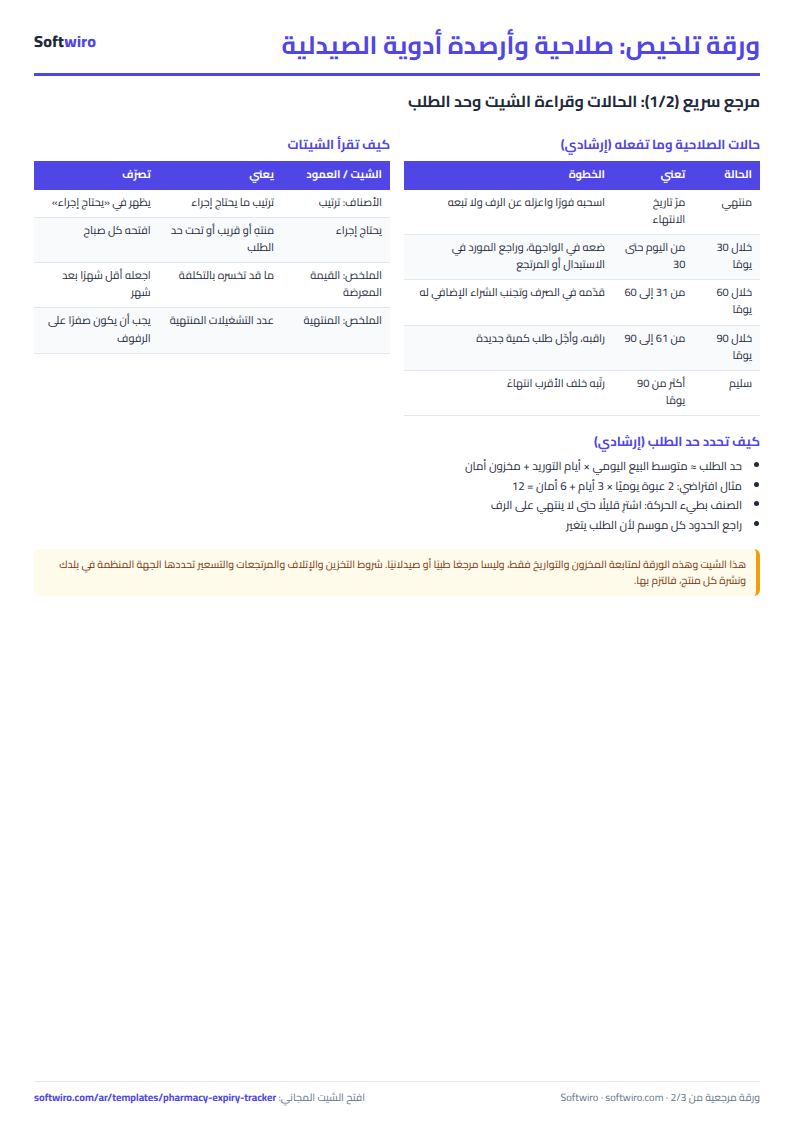
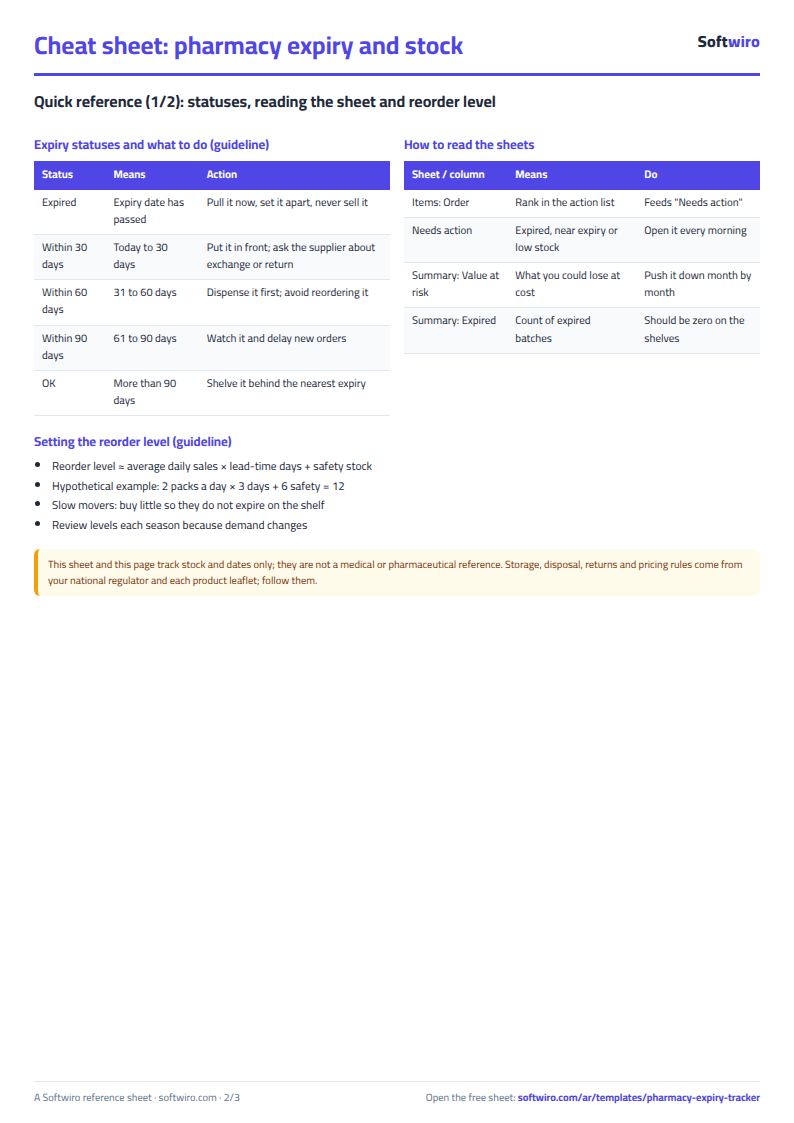
- Statuses: "expired" if the expiry date has passed; "within 30 days" up to 30 days (including today); "within 60 days" from 31 to 60; "within 90 days" from 61 to 90; anything later is "safe".
- An item counts as "below reorder level" when its quantity is equal to or lower than the reorder level.
- Value at risk of expiring is the value, at cost price, of batches that are expired or expire within 90 days.
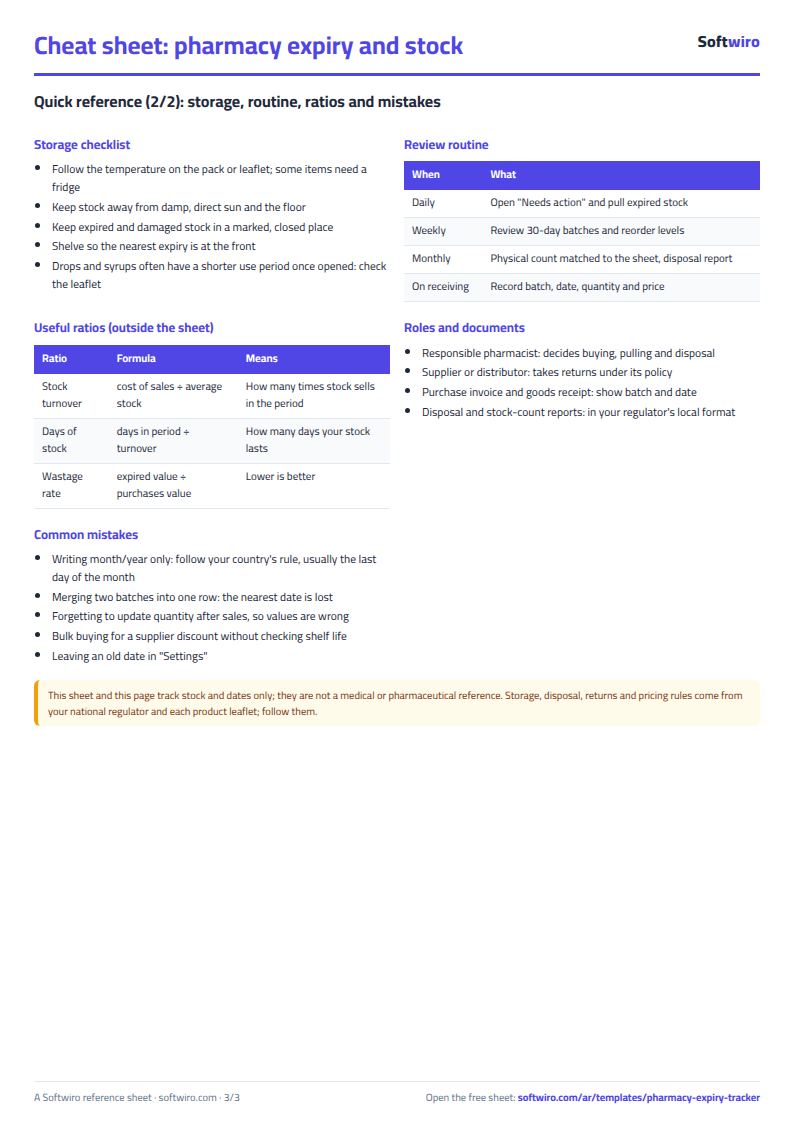
Free cheat sheet for this field
Terms, abbreviations, tables and diagrams over several pages, in Arabic and English. Download it as a PDF or images, including a phone-size version.
Still running this on Excel?
This sheet depends on someone checking the shelves and typing in the items by hand. Sehaty tracks the pharmacy's stock item by item, warns you before an item runs out rather than after, and records dispensing against the e-prescription itself.
| In this sheet | In MyClinic (Sehaty) — Clinic, Pharmacy and Supplier Platform |
|---|---|
| You discover an item is short when a patient asks for it. | Sehaty tracks stock item by item and warns you before an item runs out, not after. |
| The prescription is a paper that can get lost or be hard to read, and no trace of dispensing remains. | The consultation produces an e-prescription in the patient's medical file, and the pharmacy records dispensing against that same prescription. |
| You learn what pharmacies need late, through reports and phone calls. | The supplier sees a digital catalog that reaches pharmacies and warehouses, and sees demand as it comes in. |
| The patient phones several clinics to book. | The patient searches for appointments by specialty and location and books without a phone call. |
See MyClinic (Sehaty) — Clinic, Pharmacy and Supplier Platform · Ask for a demo
Frequently asked questions
What is the difference between "within 30 days" and "within 60 days"?
Each status covers one range. "Within 30 days" runs from today up to 30 days, "within 60 days" covers days 31 to 60, and "within 90 days" covers days 61 to 90. A batch becomes "expired" once its expiry date has passed.
How is the value at risk of expiring calculated?
It is the sum of quantity x cost price for batches that are expired or expire within 90 days. Batches that are still safe are not included.
If an item has more than one batch, how do I record it?
Enter each batch on its own row with the same item, its own batch number, expiry date and quantity. Each batch then shows its own status.
Is the template free?
Yes, with no sign-up and no email address. Use it, edit it and share it as you like.
Does it work in Google Sheets and on mobile?
The sheet uses formulas supported by Excel 2016 and later, Google Sheets and LibreOffice, so you can upload it to Google Drive and open it with Google Sheets on a computer or a phone.
What is the difference between the white and the gray cells?
You type in the white cells; the gray cells are calculated automatically. Don't type in a gray cell, or you will erase its formula.
Can I use the sheet from an AI assistant?
Yes. Add our MCP server (URL https://softwiro.com/api/mcp, no key needed) to your assistant and ask it to do the calculation in this template. The numbers come from the sheet's own formulas, and we do not store your data. The steps and a ready-made prompt are in this article: https://softwiro.com/blog/mcp-excel-templates-ai-agent-guide.html
More free templates for: Pharmacies and clinics
More free templates
- Clinic appointments tracker (Excel)
- Dental clinic treatment plans tracker (Excel)
- Complete clinic management sheet
- Medical lab management sheet
- Pharmacy management sheet: sales, purchases, shortages and suppliers
- Small hospital management sheet: departments, beds, admissions and revenue
- Rent collection tracker for properties
- Business expenses and monthly budget sheet
- Lead and deal pipeline tracker
- Employee attendance sheet
- Employee payroll and attendance
- General shop inventory tracker (stock in/out, reorder, slow movers)
- Monthly savings circle (gamaeya) tracker
- Recipe costing for restaurants and cafes (Excel)