Try the sheet here, on the example
The sheet is open below with sample numbers. Change any white cell and watch the results update, or press the blank-copy button to type your own data from scratch. Nothing you type leaves your browser.
Example from the sheet
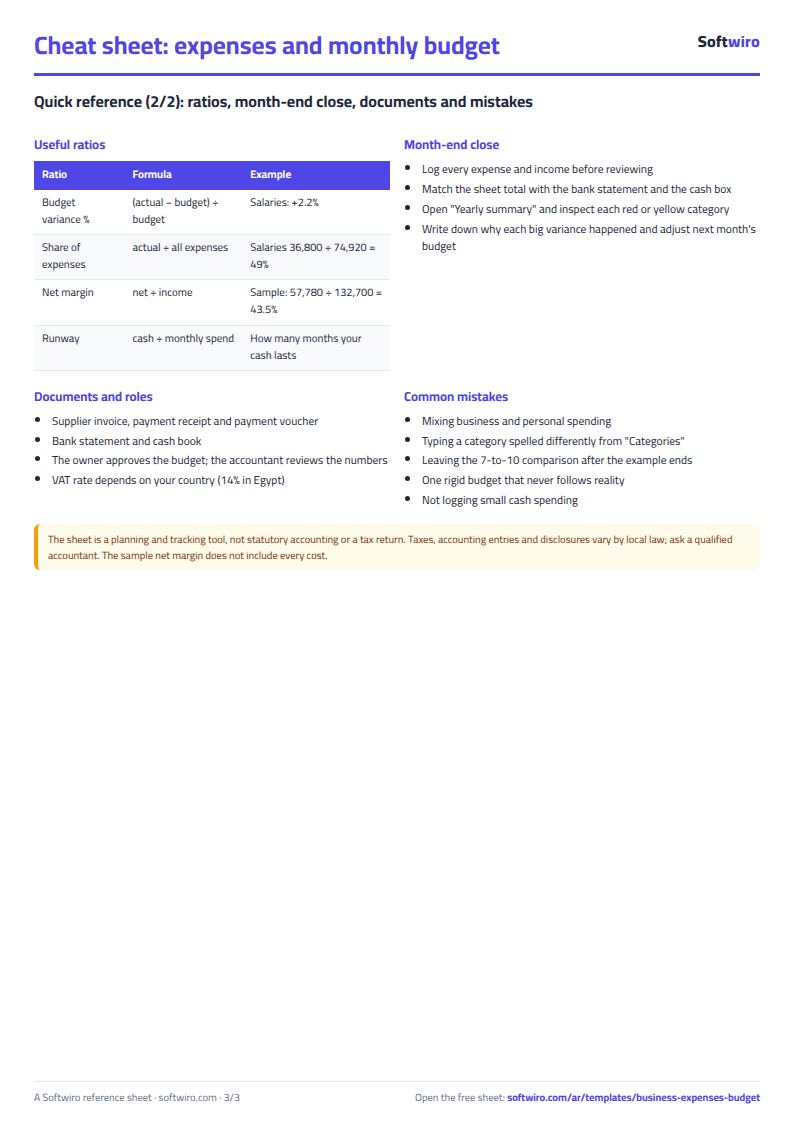
| التصنيف | ميزانية الفترة | الفعلي في الفترة | الانحراف (ميزانية - فعلي) | الحالة |
|---|---|---|---|---|
| إيجار | 16,000.00 | 16,000.00 | 0.00 | قريب من الحد |
| مرتبات | 36,000.00 | 36,800.00 | -800.00 | تجاوز الميزانية |
| مستلزمات ومواد | 12,000.00 | 10,150.00 | 1,850.00 | ضمن الميزانية |
| نقل وشحن | 2,400.00 | 1,950.00 | 450.00 | ضمن الميزانية |
| تسويق وإعلان | 6,500.00 | 6,100.00 | 400.00 | قريب من الحد |
| كهرباء ومياه وإنترنت | 2,600.00 | 2,340.00 | 260.00 | قريب من الحد |
| صيانة | 1,200.00 | 950.00 | 250.00 | ضمن الميزانية |
| مصروفات إدارية | 1,200.00 | 630.00 | 570.00 | ضمن الميزانية |
| الإجمالي | 77,900.00 | 74,920.00 | 2,980.00 |
Example from the “ملخص سنوي” tab (Arabic), with the numbers and formulas that are in the file.
What is inside
- "الإعدادات" (Settings): The year, the month the comparison starts from and the month it ends at, and the warning percentage for a category nearing its budget.
- "التصنيفات" (Categories): The expense categories and payment methods that appear in the drop-down lists.
- "المصروفات" (Expenses): Each expense with its date, category, payee, amount and payment method, plus a warning if the category is not in the list.
- "الإيرادات" (Income): Money coming into the business, with date, description and amount.
- "الميزانية الشهرية" (Monthly budget): The amount allowed for each category in each month of the year, with the total budget for each category and each month.
- "الفعلي مقابل الميزانية" (Actual vs budget): Actual spending for each category in each month, then the variance from budget. Categories over budget turn red.
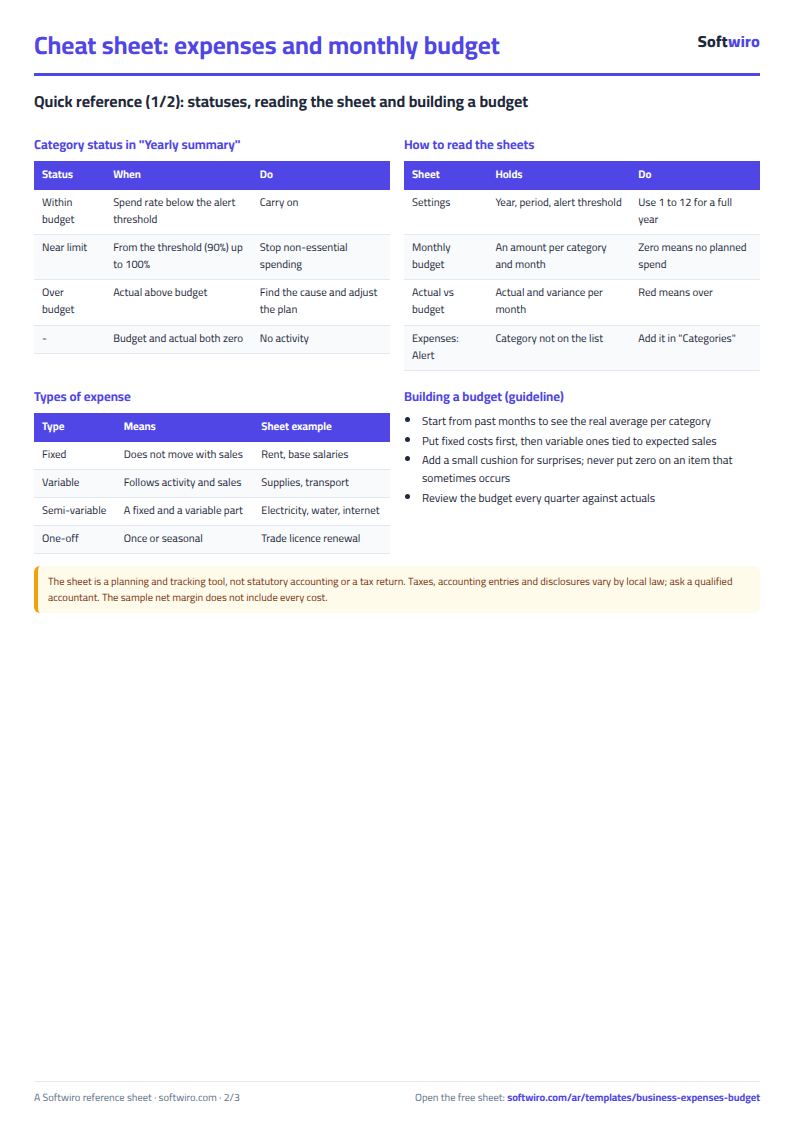
- "ملخص سنوي" (Annual summary): The status of each category (within budget, near the limit or over), the top five categories by spending, and income, expenses and net for each month.
The file opens on a start tab (“ابدأ هنا”, Start here) that explains how to use it.
What makes it different
You enter each expense once. The sheet then shows which category and which month went over budget, how much of the budget is left, and what the net was for each month.
How to use it
- In the "الإعدادات" (Settings) sheet, enter the year, the month the comparison starts from, the month it ends at, and the warning percentage.
- In the "التصنيفات" (Categories) sheet, enter the expense categories and payment methods you use.
- In the "الميزانية الشهرية" (Monthly budget) sheet, enter the amount allowed for each category in each month.
- In the "المصروفات" (Expenses) sheet, log each expense: date, category, payee, amount and payment method. In the "الإيرادات" (Income) sheet, log money received.
- Open "الفعلي مقابل الميزانية" (Actual vs budget) to see actual spending and variance for each category and month, and "ملخص سنوي" (Annual summary) to see each category's status, the top categories and the net for each month.
Before you start:
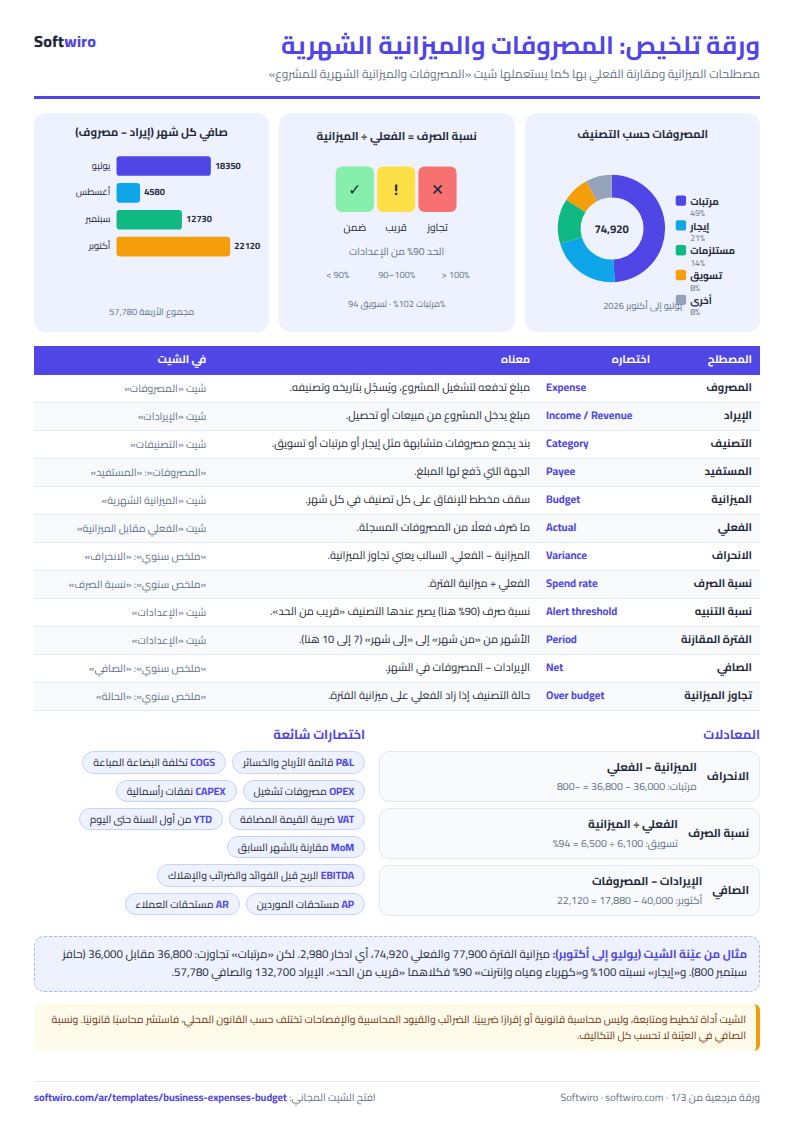
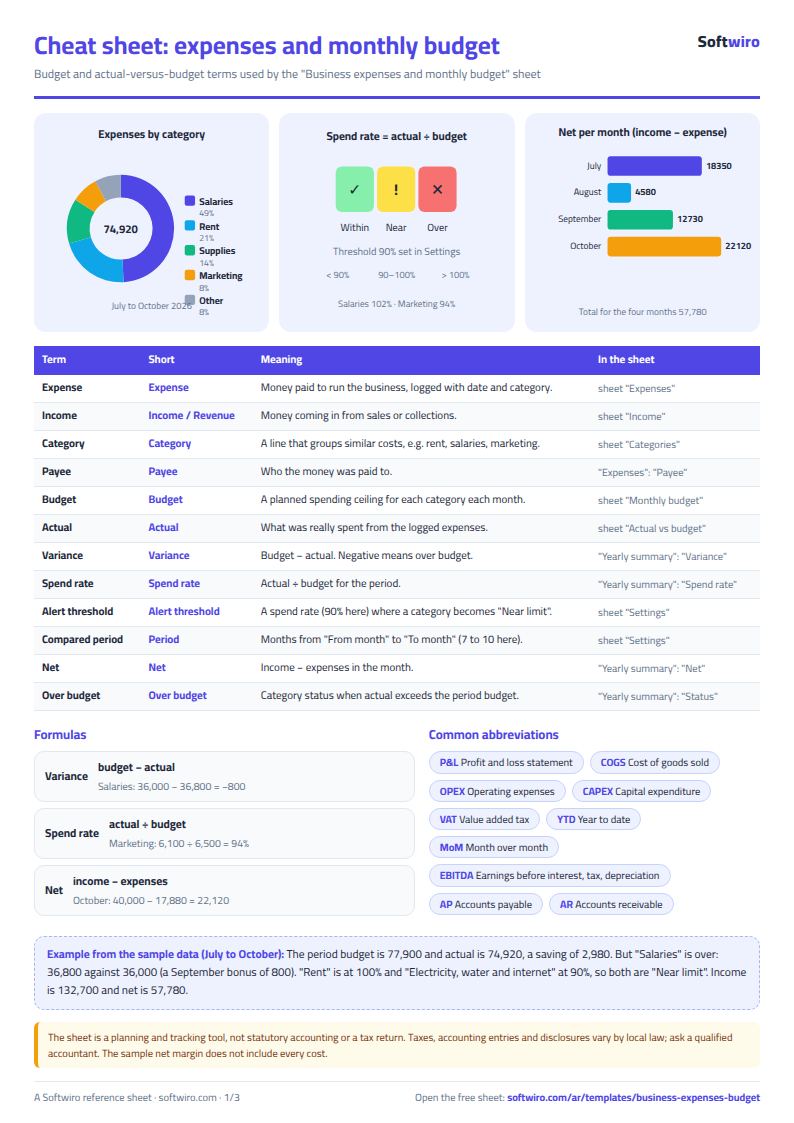
- Variance = budget - actual. A negative number (in red) means the category went over its budget.
- The sheets compare only the months from "from month" to "to month" in Settings. The examples here run from July to October. Set it to 1 through 12 for a full year.
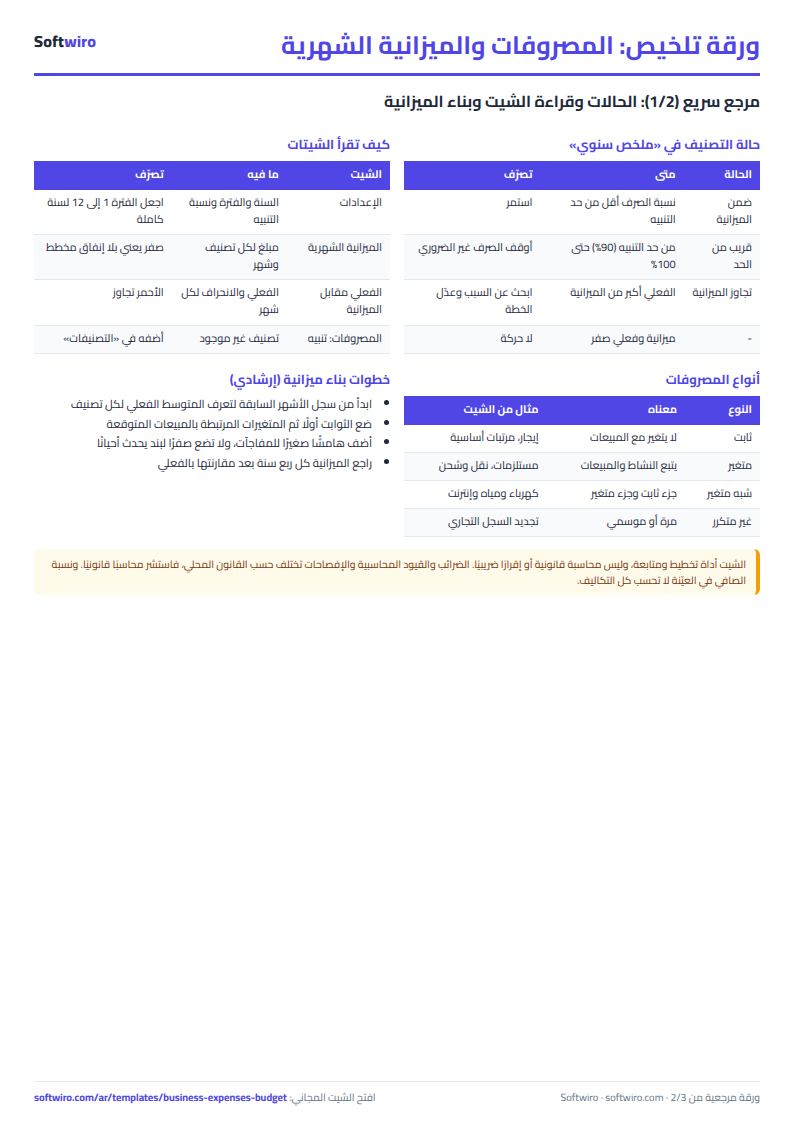
- Category status: "over budget" if actual spending exceeds the budget, and "near the limit" if it has reached the warning percentage or more.
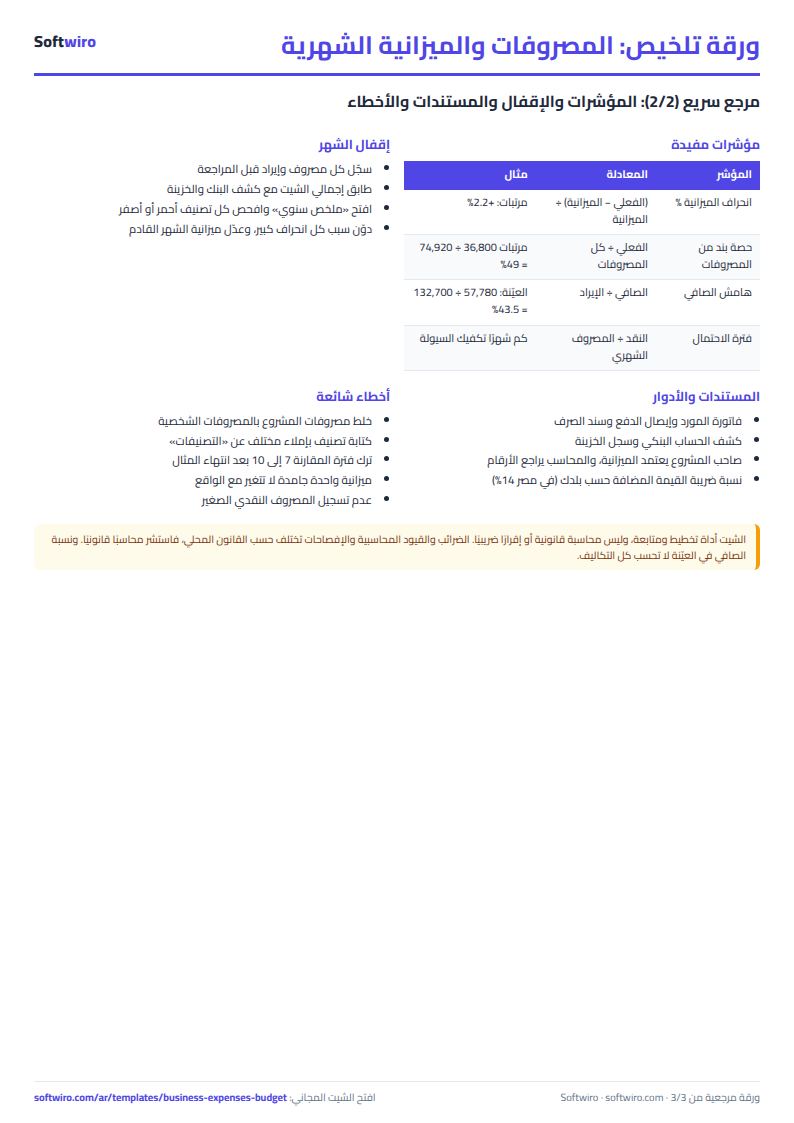
- An expense whose category is not in the "التصنيفات" (Categories) sheet shows a warning and is left out of the category tables, but it still counts in that month's expenses and net.
- The sheet holds up to 20 categories, 1,000 expenses and 500 income entries. It calculates only the transactions of the year entered in Settings.
Free cheat sheet for this field
Terms, abbreviations, tables and diagrams over several pages, in Arabic and English. Download it as a PDF or images, including a phone-size version.
Still running this on Excel?
This sheet needs someone to copy every invoice and payment into it. In Accountwiro an invoice and a payment are recorded the moment they happen, and the customer's balance shows in a single statement of account.
| In this sheet | In Accountwiro |
|---|---|
| You copy every invoice and payment into the sheet by hand. | It shows the customer's invoices, payments and outstanding balance in a single statement of account. |
| Invoices are typed or copied by hand. | It creates an invoice by scanning a barcode or searching by product name, calculates discounts and taxes, and sends it to the customer over WhatsApp. |
| Stock shortages are discovered late. | It updates quantities after every sale and alerts you when a product drops below the required level. |
| Anyone who opens the sheet sees every number. | Permissions per user: the sales employee issues invoices, and the warehouse employee manages stock without access to financial data. |
Frequently asked questions
How is this different from the cash book and daily expenses sheet?
The cash book sheet tracks the cash balance after every transaction. This sheet starts from a budget you set for each category in each month, compares actual spending against it and shows the variance. It does not calculate a running balance.
How do I compare a full year or a single quarter?
In the "الإعدادات" (Settings) sheet, change "compare from month" and "to month". The example runs from July to October. Set it to 1 through 12 for a full year, or 1 through 3 for the first quarter.
What happens to an expense whose category is not in the categories list?
A red warning appears next to it. It is left out of the category tables, but it still counts in that month's expenses and net in the "ملخص سنوي" (Annual summary). Add the category to the "التصنيفات" (Categories) sheet to include it in the comparison.
Is the template free?
Yes, with no sign-up and no email address. Use it, edit it and share it as you like.
Does it work in Google Sheets and on mobile?
The sheet uses formulas supported by Excel 2016 and later, Google Sheets and LibreOffice, so you can upload it to Google Drive and open it with Google Sheets on a computer or a phone.
What is the difference between the white and the gray cells?
You type in the white cells; the gray cells are calculated automatically. Don't type in a gray cell, or you will erase its formula.
Can I use the sheet from an AI assistant?
Yes. Add our MCP server (URL https://softwiro.com/api/mcp, no key needed) to your assistant and ask it to do the calculation in this template. The numbers come from the sheet's own formulas, and we do not store your data. The steps and a ready-made prompt are in this article: https://softwiro.com/blog/mcp-excel-templates-ai-agent-guide.html
More free templates for: Accounting
More free templates
- Journal entries, trial balance and financial statements sheet
- Cash flow forecast sheet
- Annual budget by department: plan vs actual
- Fixed assets register and depreciation sheet
- Accounting rules and equations summary sheet: double entry, statements and financial ratios
- Lead and deal pipeline tracker
- Employee attendance sheet
- Employee payroll and attendance
- General shop inventory tracker (stock in/out, reorder, slow movers)
- Monthly savings circle (gamaeya) tracker
- Clinic appointments tracker (Excel)
- Recipe costing for restaurants and cafes (Excel)
- Finishing and contracting projects tracker