Try the sheet here, on the example
The sheet is open below with sample numbers. Change any white cell and watch the results update, or press the blank-copy button to type your own data from scratch. Nothing you type leaves your browser.
Example from the sheet
| الاسم | الحضور | الغياب | السيك ليف | التأخير | نسبة الغياب | نسبة السيك ليف |
|---|---|---|---|---|---|---|
| محمد علي | 17 | 2 | 1 | 1 | 10.0% | 5.0% |
| هبة سمير | 17 | 0 | 3 | 0 | 0.0% | 15.0% |
| كريم عادل | 17 | 3 | 0 | 0 | 15.0% | 0.0% |
| نادية فتحي | 20 | 0 | 0 | 4 | 0.0% | 0.0% |
| عمرو حسني | 18 | 1 | 1 | 1 | 5.0% | 5.0% |
| ياسر منصور | 20 | 0 | 0 | 0 | 0.0% | 0.0% |
| دينا ماهر | 18 | 1 | 1 | 1 | 5.0% | 5.0% |
Example from the “الحضور” tab (Arabic), with the numbers and formulas that are in the file.
What is inside
- "الإعدادات" (Settings): The company name, the date of the first day of the month and the meaning of the attendance codes.
- "الموظفون" (Employees): Each employee's number, name and job title. It holds 60 employees.
- "الحضور" (Attendance): A monthly grid by day of the month, where you choose each employee's code from a list. Beside the name are present, absent, sick leave and late, and at the end are the absence rate and the sick-leave rate.
- "ملخص الشهر" (Monthly summary): Working days, totals for present, absent, sick leave and late, the overall rates, and the five employees with the most absences.
The file opens on a start tab (“ابدأ هنا”, Start here) that explains how to use it.
What makes it different
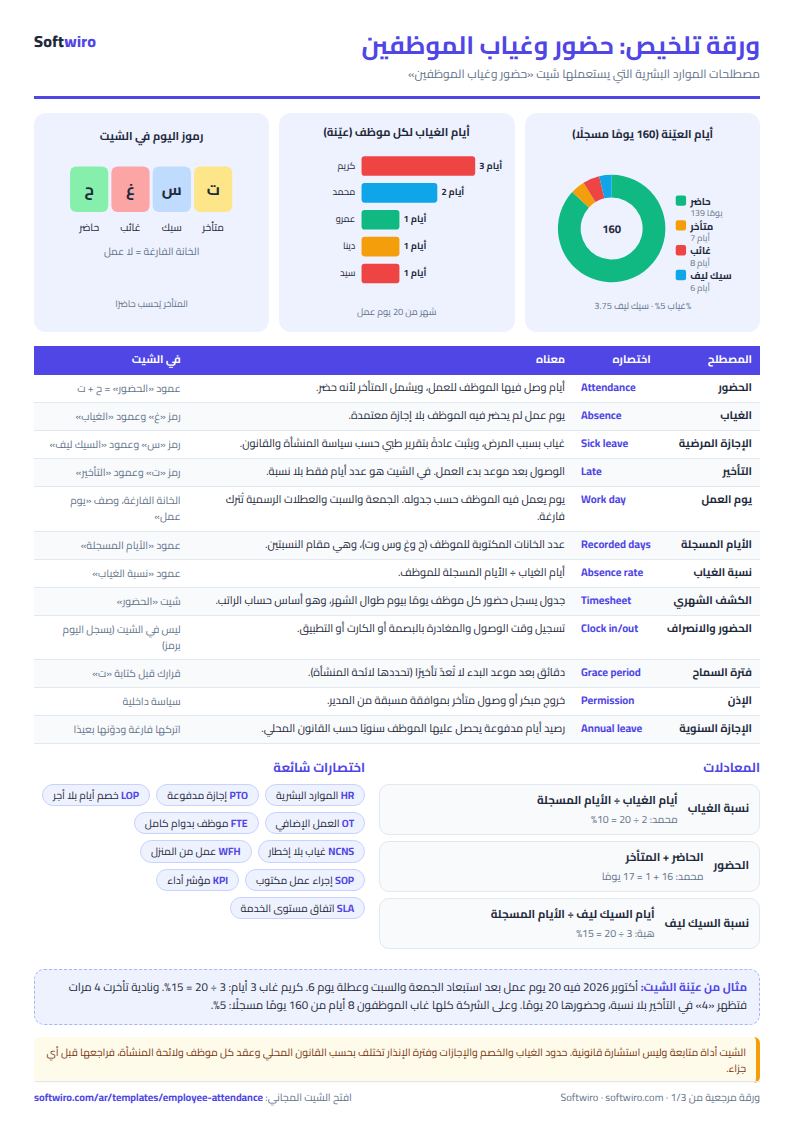
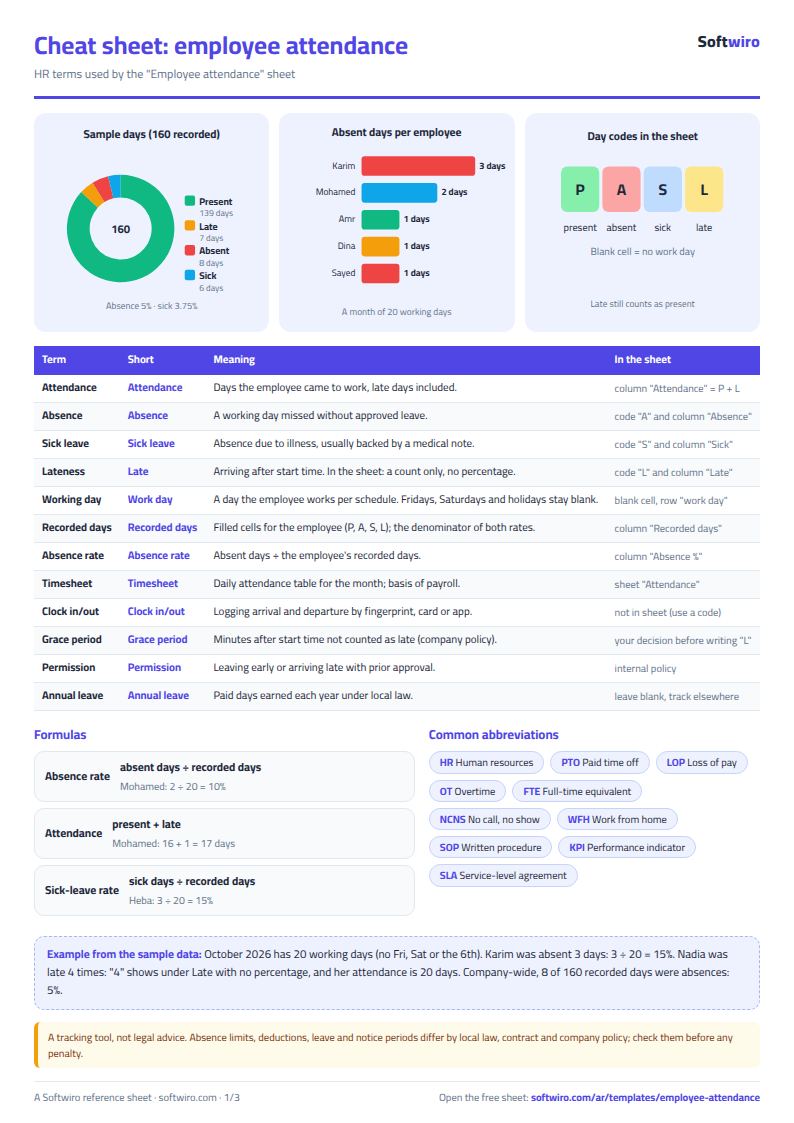
A late employee counts as present and adds to their lateness count, but lateness gets no percentage. Percentages are for absence and sick leave only. An empty cell means a day off, so it is not counted.
How to use it
- In the "الإعدادات" (Settings) sheet, enter the company name and the date of the first day of the month.
- In the "الموظفون" (Employees) sheet, enter each employee's number, name and job title.
- In the "الحضور" (Attendance) sheet, choose one of the codes from the list for each employee on each working day: ح present, غ absent, س sick leave, ت late. Leave the cell empty on Fridays, Saturdays and public holidays so that day is not counted.
- Beside each name you will find present, absent, sick leave and late, and at the end the absence rate and the sick-leave rate.
- Open the "ملخص الشهر" (Monthly summary) sheet to see the totals and the five employees with the most absences.
- To keep a past month, save a copy of the file, then change the month date and clear the codes.
Before you start:
- The sheet holds 60 employees.
- Present = present + late, because a late employee did attend. Lateness is a count of days only, with no percentage.
- Absence rate = absent days / the employee's recorded days. Sick-leave rate = sick-leave days / the employee's recorded days.
- An employee's recorded days = the number of cells filled in for them (ح, غ, س and ت). An empty cell is not counted.
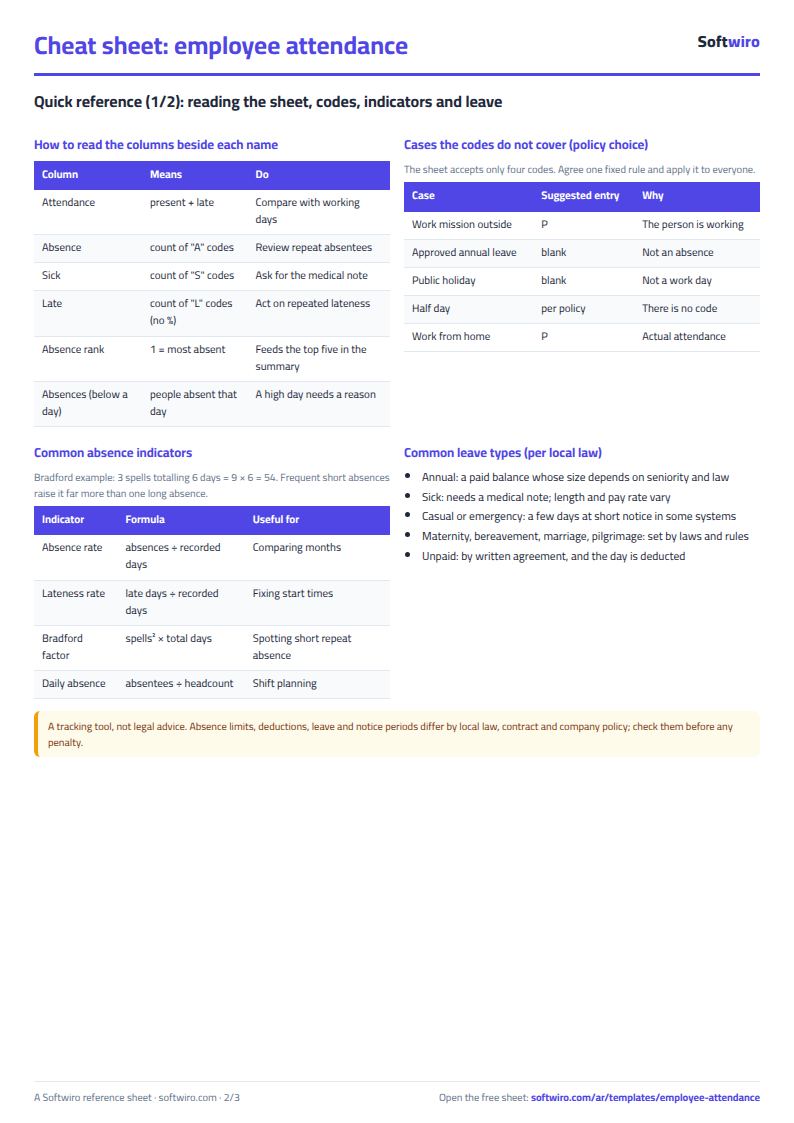
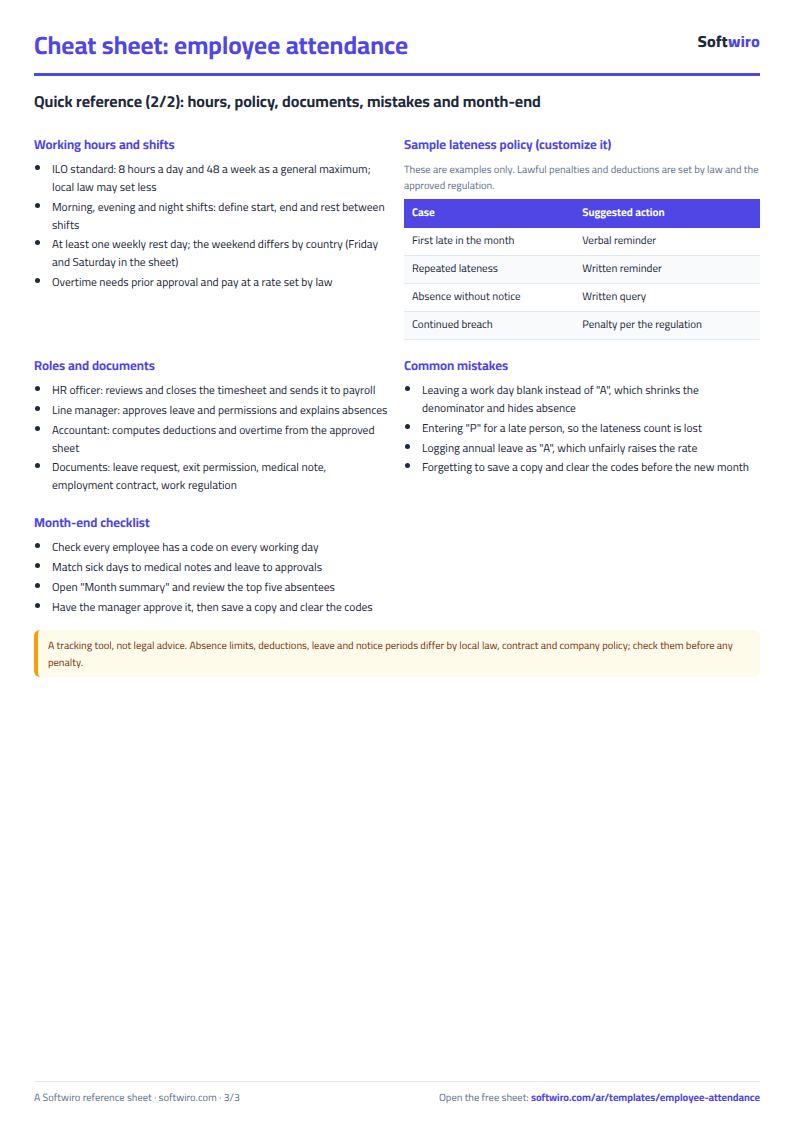
Free cheat sheet for this field
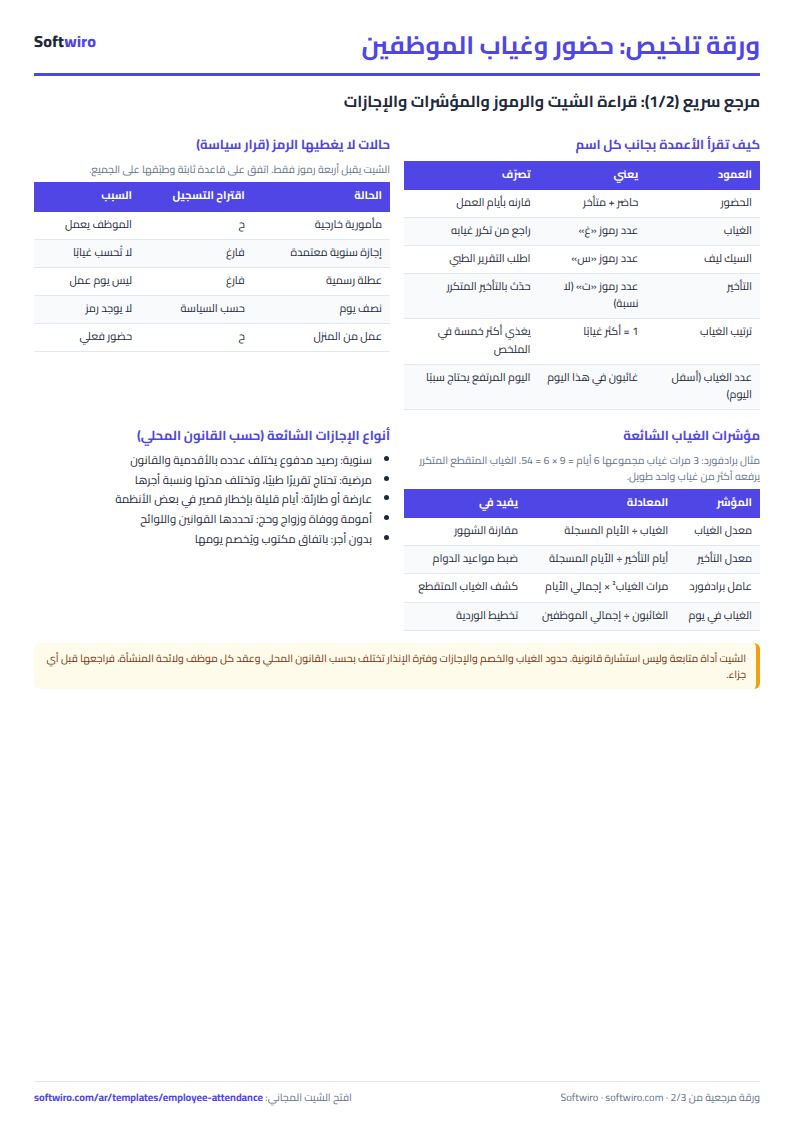
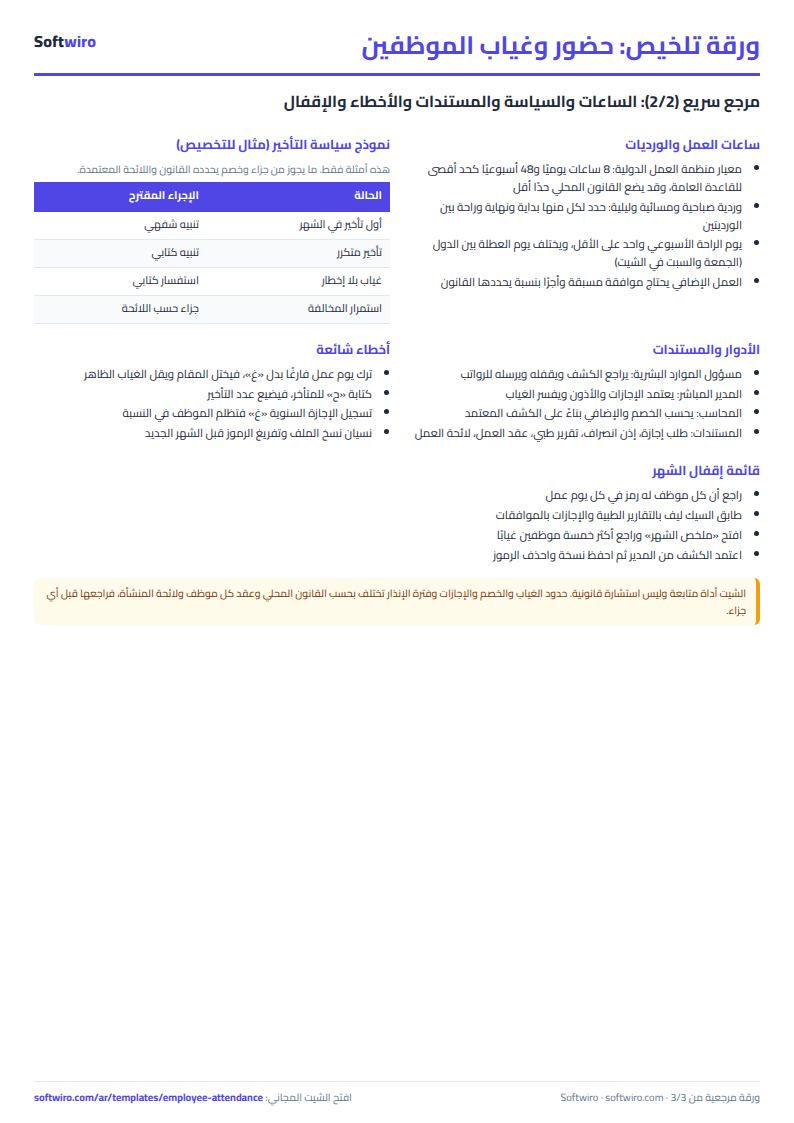
Terms, abbreviations, tables and diagrams over several pages, in Arabic and English. Download it as a PDF or images, including a phone-size version.
Still running this on Excel?
This sheet suits a start and a limited amount of data. If your way of working grows, or you need more than one person working on it at the same time, Softwiro can build you a program that fits the way you work.
| In this sheet | In Custom Software from Softwiro |
|---|---|
| One file that one person edits at a time, and copies reach you on WhatsApp. | A program with a login for each user and permissions you define, and everyone sees the same data. |
| You type everything and check the numbers by hand. | We design the screens around your work steps, so each person records only what concerns them. |
| Columns and formulas are fixed as the sheet was designed. | We build what you need: reports, alerts and screens your way. |
| Backups and security are your own responsibility. | The program runs on a secured server with regular backups. |
Frequently asked questions
Is lateness counted in the absence rate?
No. A late employee is present, so they count in attendance and in the lateness column only, with no percentage.
How are the absence rate and sick-leave rate calculated?
Absence (or sick-leave) days / the employee's recorded days, meaning the cells filled in for them. An empty cell is not counted.
How do I use the sheet for a new month?
Save a copy of the file, then change the month date in "الإعدادات" (Settings) and clear the codes.
Is the template free?
Yes, with no sign-up and no email address. Use it, edit it and share it as you like.
Does it work in Google Sheets and on mobile?
The sheet uses formulas supported by Excel 2016 and later, Google Sheets and LibreOffice, so you can upload it to Google Drive and open it with Google Sheets on a computer or a phone.
What is the difference between the white and the gray cells?
You type in the white cells; the gray cells are calculated automatically. Don't type in a gray cell, or you will erase its formula.
Can I use the sheet from an AI assistant?
Yes. Add our MCP server (URL https://softwiro.com/api/mcp, no key needed) to your assistant and ask it to do the calculation in this template. The numbers come from the sheet's own formulas, and we do not store your data. The steps and a ready-made prompt are in this article: https://softwiro.com/blog/mcp-excel-templates-ai-agent-guide.html
More free templates for: Human resources
More free templates
- Employee payroll and attendance
- General shop inventory tracker (stock in/out, reorder, slow movers)
- Monthly savings circle (gamaeya) tracker
- Clinic appointments tracker (Excel)
- Recipe costing for restaurants and cafes (Excel)
- Finishing and contracting projects tracker
- Household budget and savings sheet
- Owners' association dues collection tracker
- Owners' association budget and expenses sheet