Try the sheet here, on the example
The sheet is open below with sample numbers. Change any white cell and watch the results update, or press the blank-copy button to type your own data from scratch. Nothing you type leaves your browser.
Example from the sheet
| اسم الطالب | كود المجموعة | الاشتراك الصافي | المسدد عن الشهر | المتبقي | الحالة المالية |
|---|---|---|---|---|---|
| يوسف سمير | G01 | 400.00 | 400.00 | 0.00 | مسدد |
| مريم عادل | G01 | 350.00 | 350.00 | 0.00 | مسدد |
| كريم حسام | G01 | 400.00 | 200.00 | 200.00 | جزئي |
| ندى أشرف | G01 | 0.00 | 0.00 | 0.00 | متوقف |
| آدم ياسر | G01 | 400.00 | 0.00 | 400.00 | لم يدفع |
| كريم حسام | G02 | 350.00 | 350.00 | 0.00 | مسدد |
| لينا مجدي | G02 | 350.00 | 350.00 | 0.00 | مسدد |
| عمر خالد | G02 | 350.00 | 0.00 | 350.00 | لم يدفع |
| جنى هاني | G03 | 250.00 | 250.00 | 0.00 | مسدد |
Example from the “الطلاب” tab (Arabic), with the numbers and formulas that are in the file.
What is inside
- "الإعدادات" (Settings): Any date in the month you are reviewing (the sheet derives the first day of that month and of the next one from it), and the number of absences at which it raises a warning.
- "المجموعات" (Groups): Each group's code, subject, grade level, teacher, class days, monthly fee and the teacher's percentage of collections. The sheet calculates active students, amount due, collected, remaining, teacher pay and the center's net for each group. Room for 100 groups.
- "الطلاب" (Students): Each row is one student in one group: student code, name, parent's phone, group code, monthly discount and status (active or stopped). The sheet calculates the net fee, amount paid for the month, remaining, sessions attended, absences, excused absences, attendance rate, financial status, absence alert and a follow-up rank. Room for 500 rows.
- "الحضور" (Attendance): One entry per student per session: date, group code, student code and status (present, absent or excused). The student's name fills in automatically, and the sheet warns you if the student is not registered in that group. Room for 3,000 entries.
- "الدفعات" (Payments): Every amount a student pays, with the date, student code, group code, the month it covers and the payment method. The student's name fills in automatically, and the sheet warns you if the student is not registered in that group. Room for 2,000 payments.
- "المدرسون" (Teachers): The teachers' names. For each one the sheet calculates the number of groups, active students, amount collected in their groups for the month, pay due, pay already made and the balance still owed to them.
- "أجور المدرسين" (Teacher payments): Every amount you pay a teacher, with the date, the teacher's name and the month it relates to. Room for 300 payments.
- "للمتابعة" (Follow-up): Students who have not paid the month's fee in full, sorted by largest balance, with their code, parent's phone, group, status (unpaid or partial) and absence alert. Shows the first 50 students.
- "الملخص" (Summary): The number of groups, active and stopped enrollments, amount due, collected, remaining and collection rate, teacher pay due, paid and remaining, the center's net after teacher pay, sessions attended and missed with the attendance rate, and a table of enrollments by financial status.
- "ابدأ هنا" (Start here): How to use the sheet, what the colors mean and notes on the calculations.
The file opens on a start tab (“ابدأ هنا”, Start here) that explains how to use it.
What makes it different
At the end of the month, open "للمتابعة" (Follow-up) to see which parents to call and how much each one owes. Open "المدرسون" (Teachers) to see what to pay each teacher and what is still owed to them, without adding up payments from a notebook, a wallet app and bank transfers by hand. The "الملخص" (Summary) shows what the center actually collected and what is left after teacher pay.
How to use it
- In the "الإعدادات" (Settings) sheet, enter any date in the month you want to review and the number of absences at which you want a warning.
- In the "المدرسون" (Teachers) sheet, enter your teachers' names. Then in the "المجموعات" (Groups) sheet, enter each group's code, subject, grade level, teacher, monthly fee and the teacher's percentage of collections.
- In the "الطلاب" (Students) sheet, enter each student in every group they attend: student code, name, parent's phone, group code and a monthly discount if there is one. Write "متوقف" (stopped) as the status for anyone who has stopped attending.
- In the "الحضور" (Attendance) sheet, record every session: date, group code, student code and status (present, absent or excused).
- In the "الدفعات" (Payments) sheet, record every amount a student pays along with the month it covers. In the "أجور المدرسين" (Teacher payments) sheet, record what you pay each teacher.
- The "الطلاب" (Students) sheet calculates what each student owes for the month, what they paid, the balance and their attendance. "للمتابعة" (Follow-up) lists who has not paid, and "الملخص" (Summary) shows collections, teacher pay and the center's net.
Before you start:
- Each row in the "الطلاب" (Students) sheet is one student in one group. A student who attends two groups goes in two rows with the same student code and a different group code.
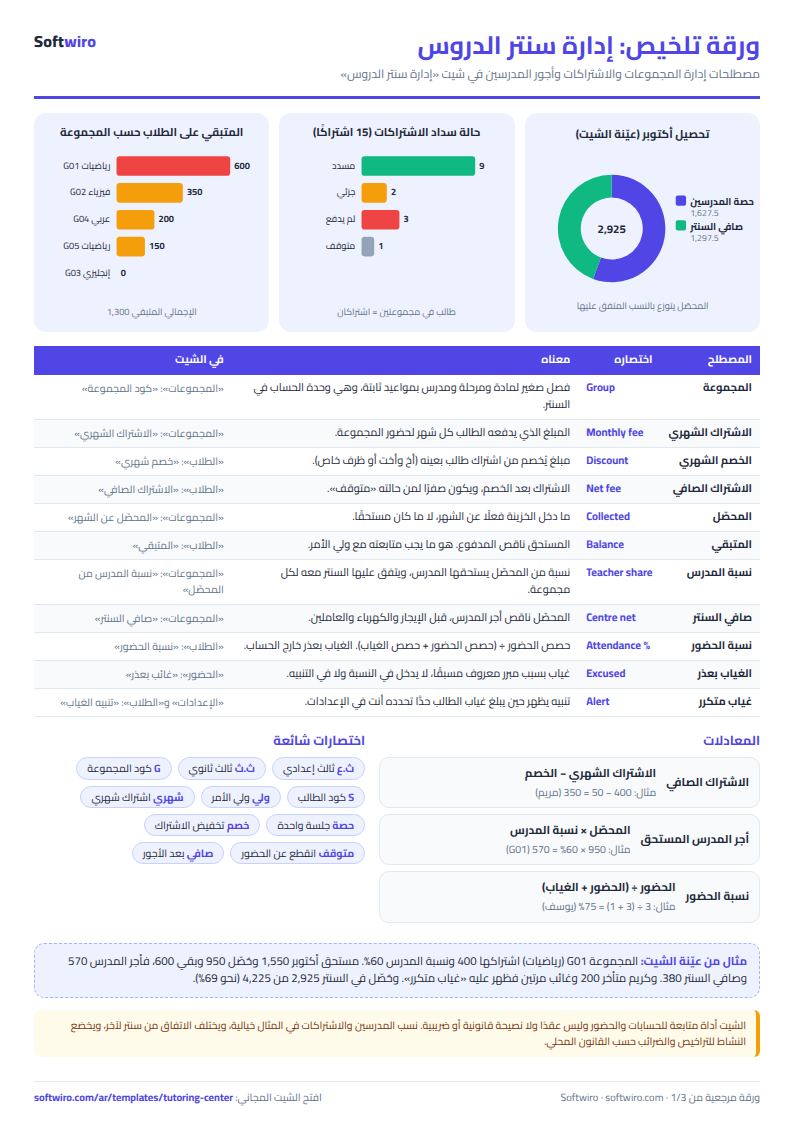
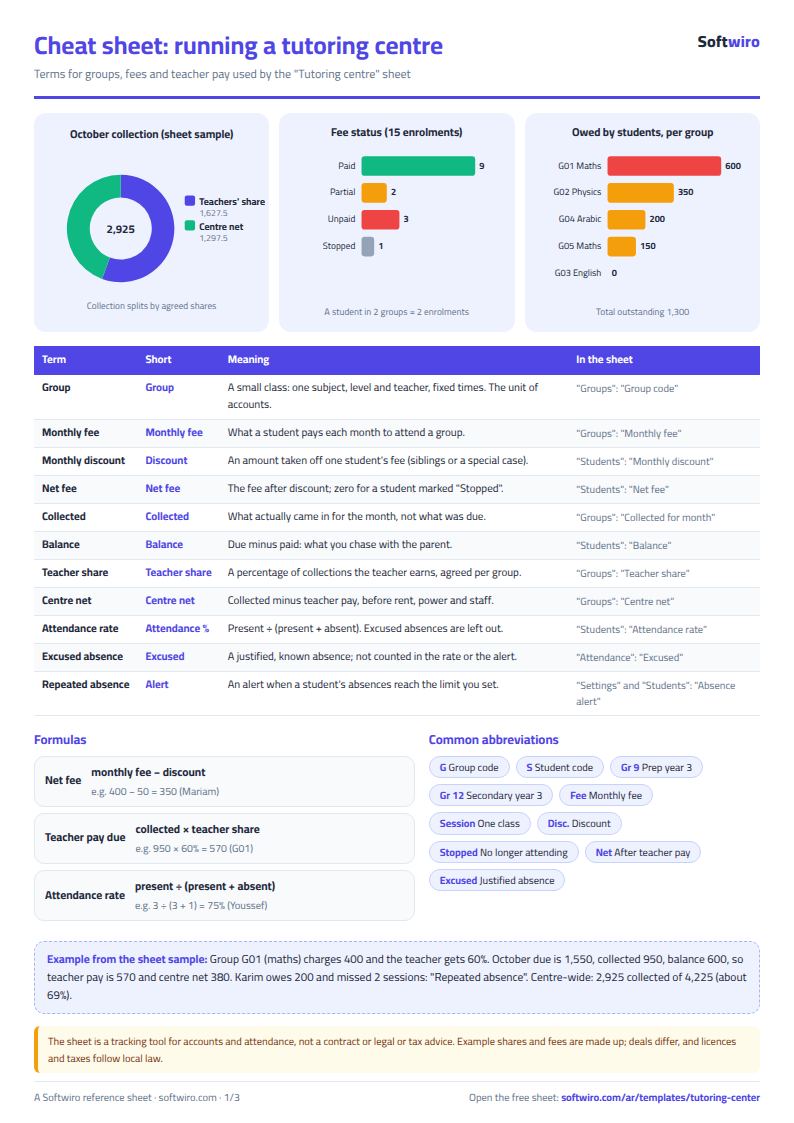
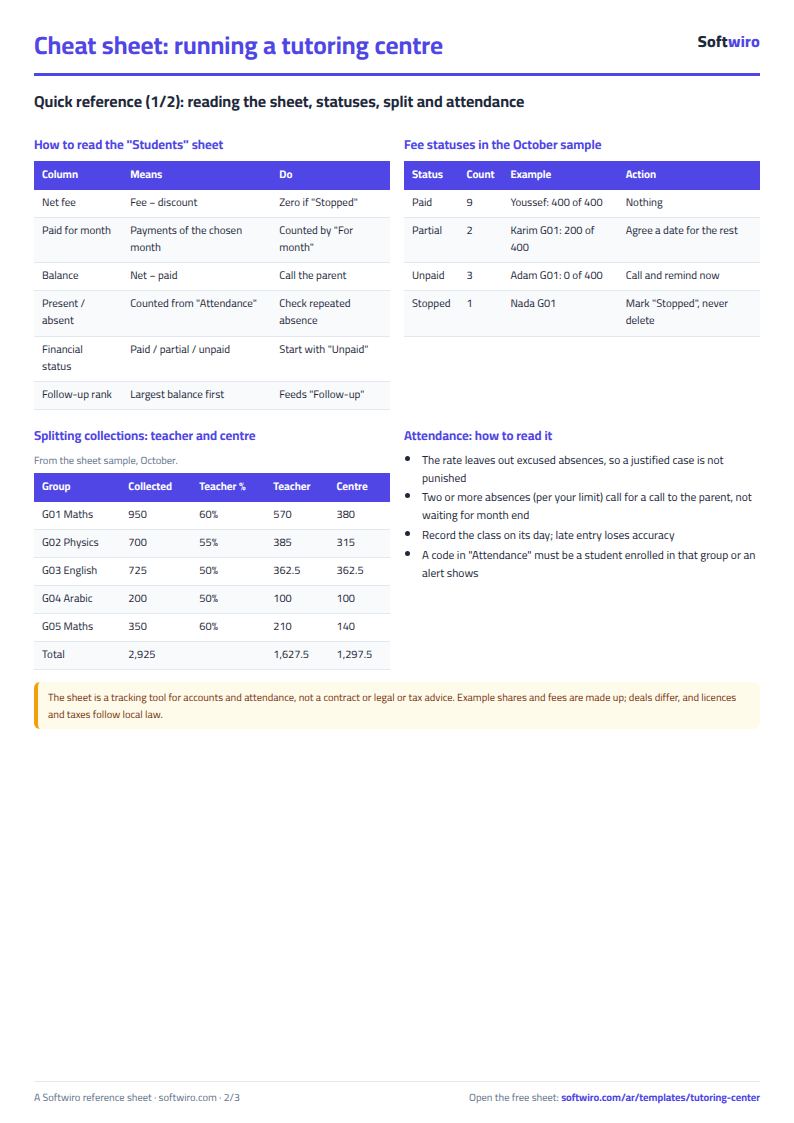
- Net fee = the group's monthly fee - the student's monthly discount, and it is zero for a student whose status is "متوقف" (stopped).
- Collected for the month is the total of payments whose "عن شهر" (For month) cell holds a date inside the selected month, regardless of the day of payment.
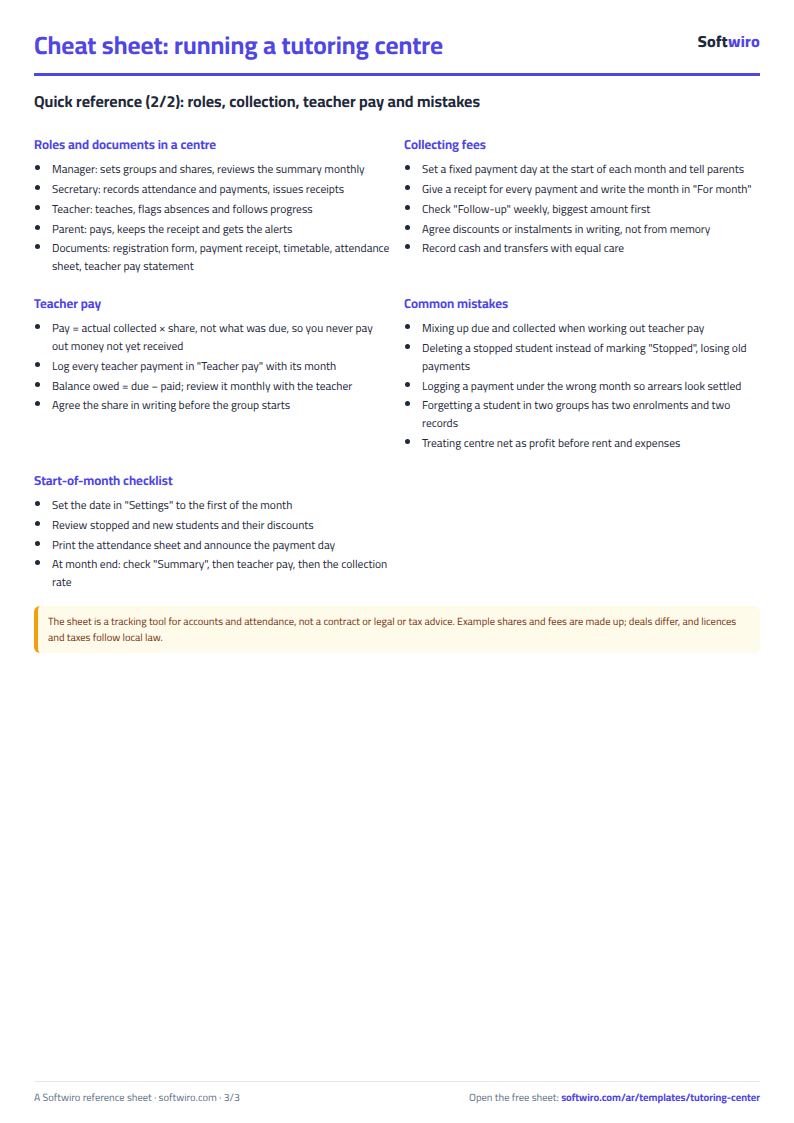
- Teacher pay due = collected for the month in their groups x their percentage of collections in each group. Balance owed to them = pay due - paid to them for the month.
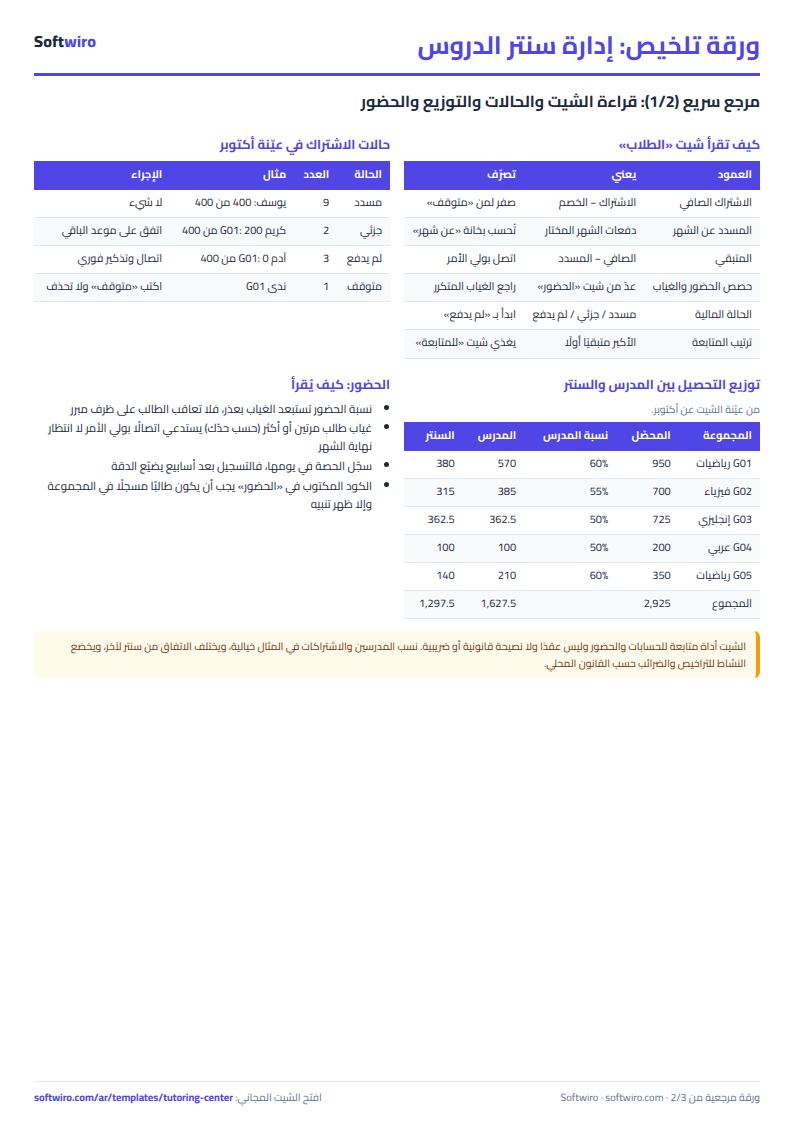
- Attendance rate = sessions attended / (sessions attended + sessions missed). Excused absences are not counted in the rate or in the absence alert.
- The sheet has room for 100 groups, 500 student rows, 3,000 attendance entries and 2,000 payments, and the "للمتابعة" (Follow-up) list shows the first 50 students who have not paid.
Free cheat sheet for this field
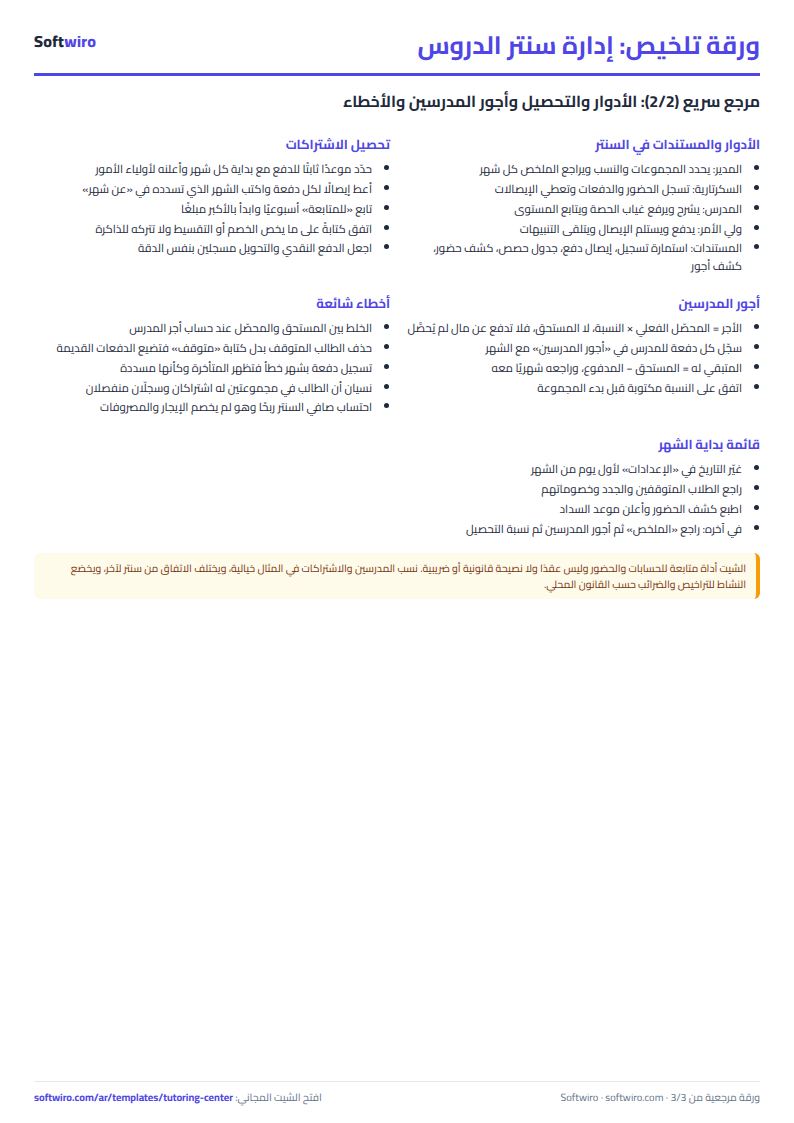
Terms, abbreviations, tables and diagrams over several pages, in Arabic and English. Download it as a PDF or images, including a phone-size version.
Still running this on Excel?
This sheet suits a start and a limited amount of data. If your way of working grows, or you need more than one person working on it at the same time, Softwiro can build you a program that fits the way you work.
| In this sheet | In Custom Software from Softwiro |
|---|---|
| One file that one person edits at a time, and copies reach you on WhatsApp. | A program with a login for each user and permissions you define, and everyone sees the same data. |
| You type everything and check the numbers by hand. | We design the screens around your work steps, so each person records only what concerns them. |
| Columns and formulas are fixed as the sheet was designed. | We build what you need: reports, alerts and screens your way. |
| Backups and security are your own responsibility. | The program runs on a secured server with regular backups. |
Frequently asked questions
How is the amount collected for the month calculated?
It is the total of the payments whose "عن شهر" (For month) cell holds a date inside the month chosen in the "الإعدادات" (Settings) sheet, regardless of the day the money was actually received. A payment you received at the start of the next month for the previous month counts toward the previous month if you entered it that way.
How is a teacher's pay calculated?
Teacher pay for the month = amount collected for the month in each of their groups x their percentage of collections in that group, added up across their groups. You record what you pay them in the "أجور المدرسين" (Teacher payments) sheet, and the balance still owed to them appears.
How do I record a student who attends two groups?
Enter them in two rows of the "الطلاب" (Students) sheet with the same student code and a different group code on each row. The fee, attendance and payments are calculated for each row separately, because the sheet matches the student to the group.
What happens to a student who stops attending?
Write "متوقف" (stopped) in their status cell. Their net fee becomes zero and their status shows "متوقف", while their earlier payments and attendance stay on record. They are left out of the remaining balance and the follow-up list.
Is the template free?
Yes, with no sign-up and no email address. Use it, edit it and share it as you like.
Does it work in Google Sheets and on mobile?
The sheet uses formulas supported by Excel 2016 and later, Google Sheets and LibreOffice, so you can upload it to Google Drive and open it with Google Sheets on a computer or a phone.
What is the difference between the white and the gray cells?
You type in the white cells; the gray cells are calculated automatically. Don't type in a gray cell, or you will erase its formula.
Can I use the sheet from an AI assistant?
Yes. Add our MCP server (URL https://softwiro.com/api/mcp, no key needed) to your assistant and ask it to do the calculation in this template. The numbers come from the sheet's own formulas, and we do not store your data. The steps and a ready-made prompt are in this article: https://softwiro.com/blog/mcp-excel-templates-ai-agent-guide.html
All the templates in this group: Excel templates for teachers: gradebook, lesson planning and follow-up
More free templates for: Schools and students
More free templates
- Gradebook Template for Excel (Weighted Categories, Letter Grades)
- Student attendance sheet
- Study planner and lesson tracker
- Weekly study routine sheet
- Nursery and school fees tracker (Excel)
- School class timetable (Excel)
- Exam schedule with committees and invigilators (Excel)
- Homework and behavior tracker for teachers (Excel)
- School bus subscriptions tracker (Excel)
- University applications tracker (Excel)
- Complete nursery management sheet
- Private school management sheet
- Lending library management sheet
- Graduation project manager sheet: tasks, team, phases and deliverables
- Poultry farm cycle tracker (Excel)
- Crop season expenses and revenue tracker (Excel)
- Racing pigeon loft sheet
- Wedding and event budget planner (Excel)
- Car rental fleet tracker (Excel)
- Fleet fuel and maintenance tracker (Excel)
- Car showroom accounts sheet
- Freelancer projects, hours and invoices tracker