Try the sheet here, on the example
The sheet is open below with sample numbers. Change any white cell and watch the results update, or press the blank-copy button to type your own data from scratch. Nothing you type leaves your browser.
Example from the sheet
| الكود | الموديل | اللون | المقاس | الرصيد الحالي | الحالة |
|---|---|---|---|---|---|
| TS-RED-S | تيشيرت قطن | أحمر | S | 0 | نفد |
| TS-RED-M | تيشيرت قطن | أحمر | M | 13 | متوفر |
| TS-RED-L | تيشيرت قطن | أحمر | L | 5 | متوفر |
| TS-BLK-S | تيشيرت قطن | أسود | S | 3 | اطلب |
| TS-BLK-M | تيشيرت قطن | أسود | M | 14 | متوفر |
| TS-BLK-L | تيشيرت قطن | أسود | L | 9 | متوفر |
| SH-RED-S | قميص كلاسيك | أحمر | S | 3 | اطلب |
| SH-RED-M | قميص كلاسيك | أحمر | M | 16 | متوفر |
Example from the “الأصناف” tab (Arabic), with the numbers and formulas that are in the file.
What is inside
- "الأصناف" (Items): Each code with its style, colour, size, prices and reorder point, plus its current stock, value and status: in stock, reorder or out of stock.
- "الحركة" (Movements): Every receipt, sale, return or adjustment with its date, choosing the code from a list.
- "ملخص" (Summary): The number of items, total pieces, stock value, and the number of items that need reordering or are out of stock.
The file opens on a start tab (“ابدأ هنا”, Start here) that explains how to use it.
What makes it different
Counting by style alone hides what is missing: a style may be in stock while one size of it has run out. So the sheet tracks every colour and size combination under its own code.
How to use it
- In the "الأصناف" (Items) sheet, enter a code for each colour and size combination, with the style, colour, size, purchase price, selling price, reorder point and opening stock.
- In the "الحركة" (Movements) sheet, record each transaction in a line: date, code, movement type and quantity. Choose the code and movement type from the list.
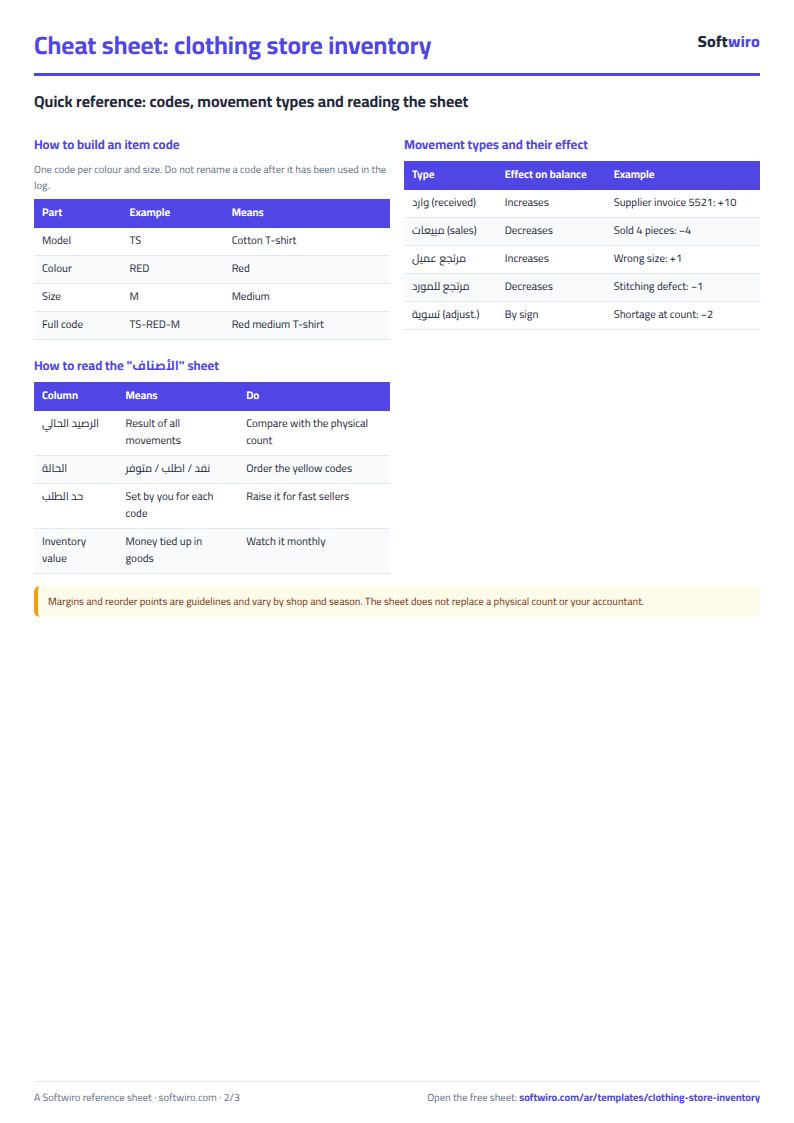
- Always enter the quantity as a positive number, except for "تسوية" (Adjustment), which you enter as negative to reduce stock after a count and positive to increase it.
- The "الأصناف" (Items) sheet calculates the current stock, value and status automatically: "نفد" (Out of stock), "اطلب" (Reorder) or "متوفر" (In stock).
- The "ملخص" (Summary) sheet shows the number of codes, the stock value and the number of items that need reordering.
Before you start:
- Current stock = opening stock + receipts + customer returns - sales - returns to supplier + adjustments.
- The status shows "اطلب" (Reorder) when stock reaches the reorder point or falls below it.
Free cheat sheet for this field
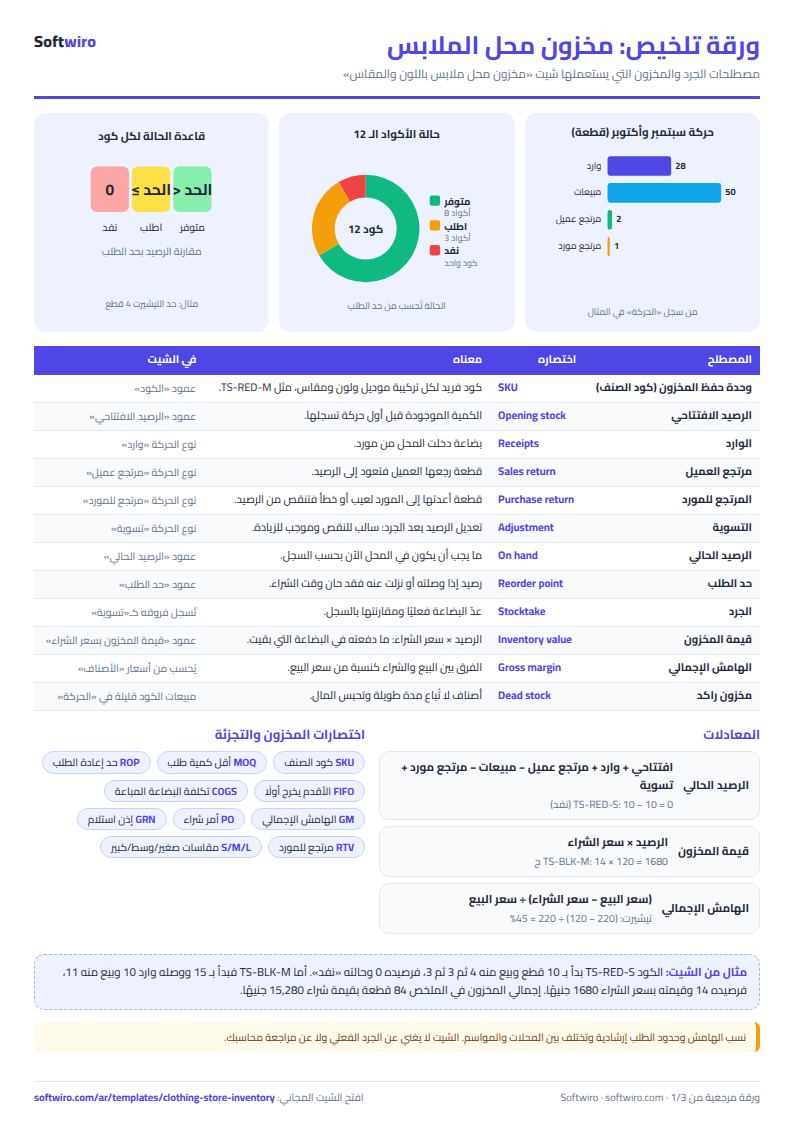
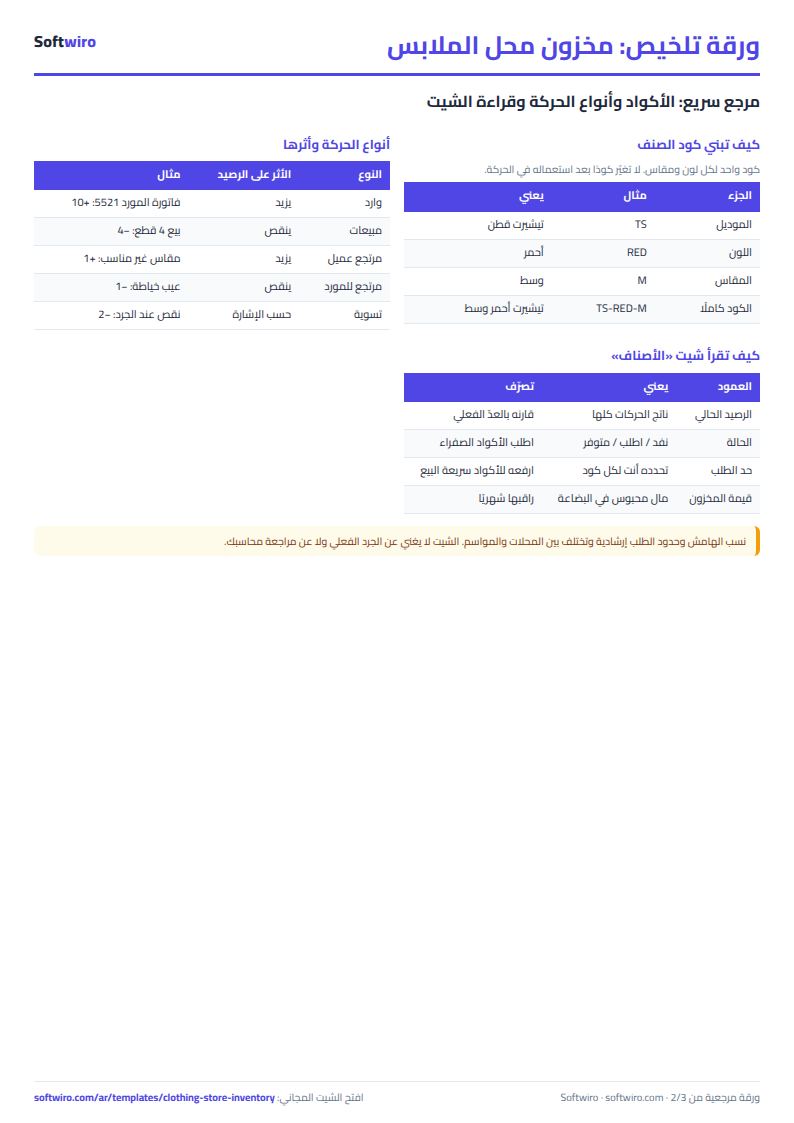
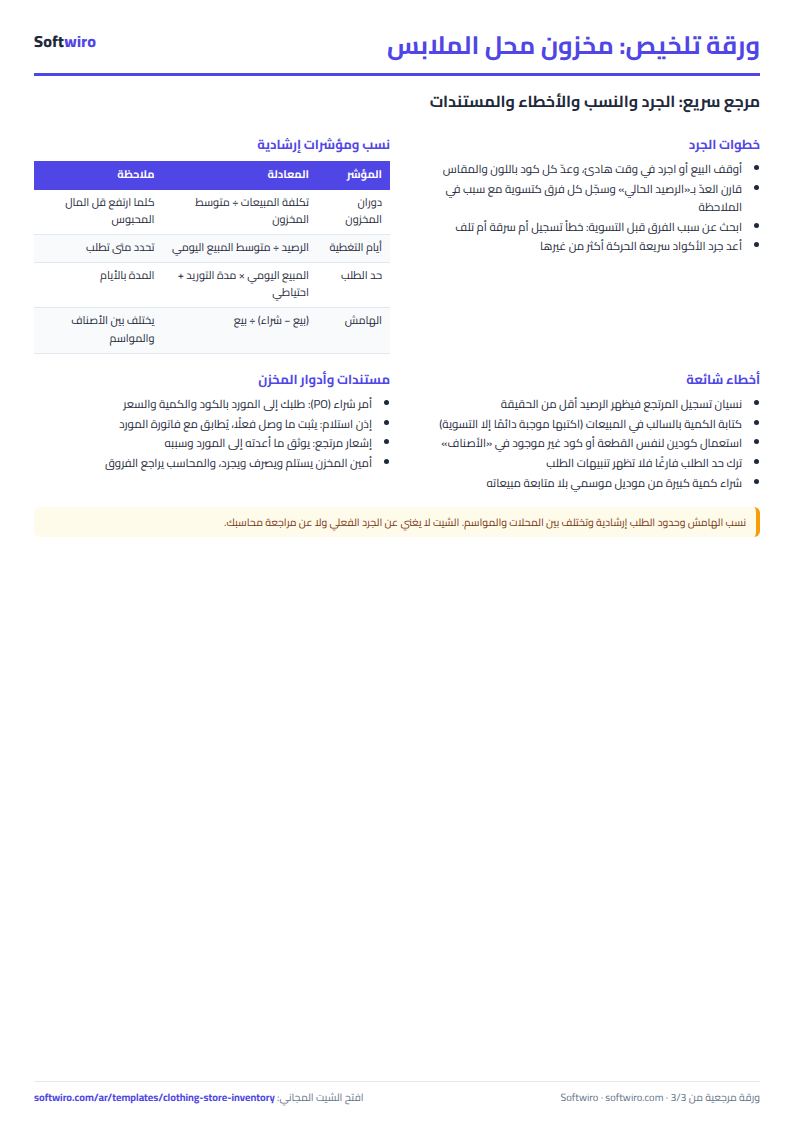
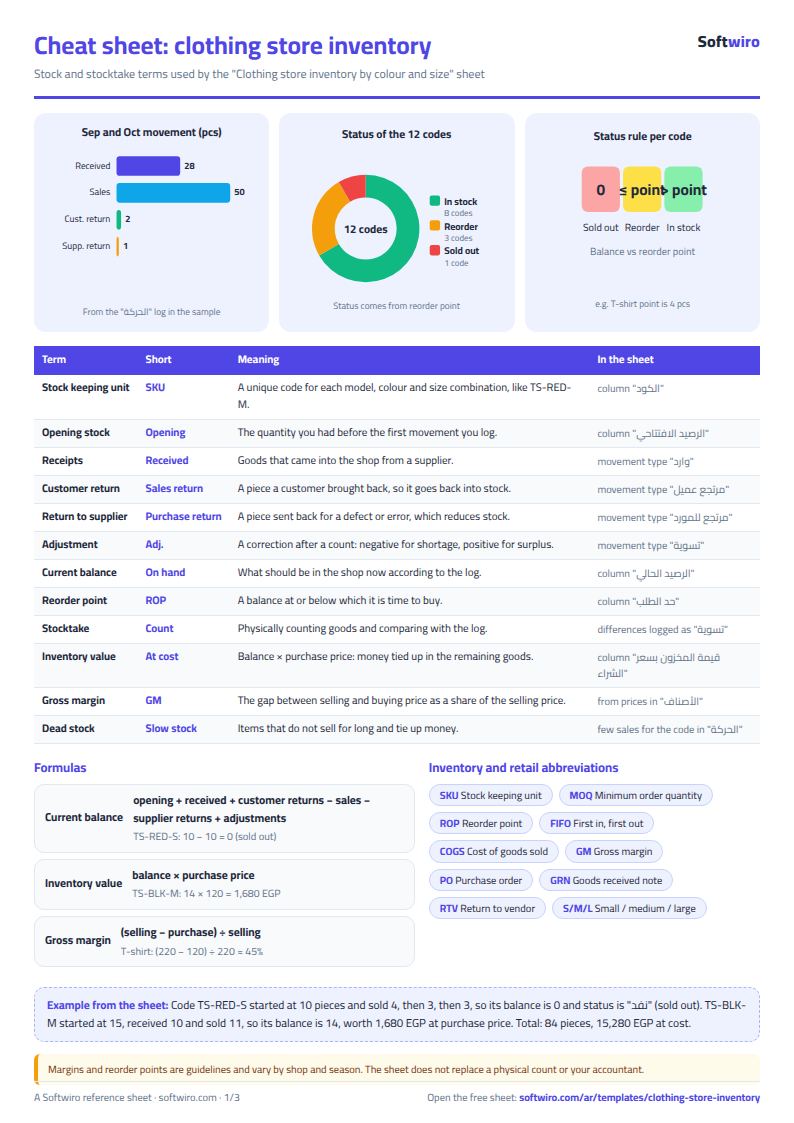
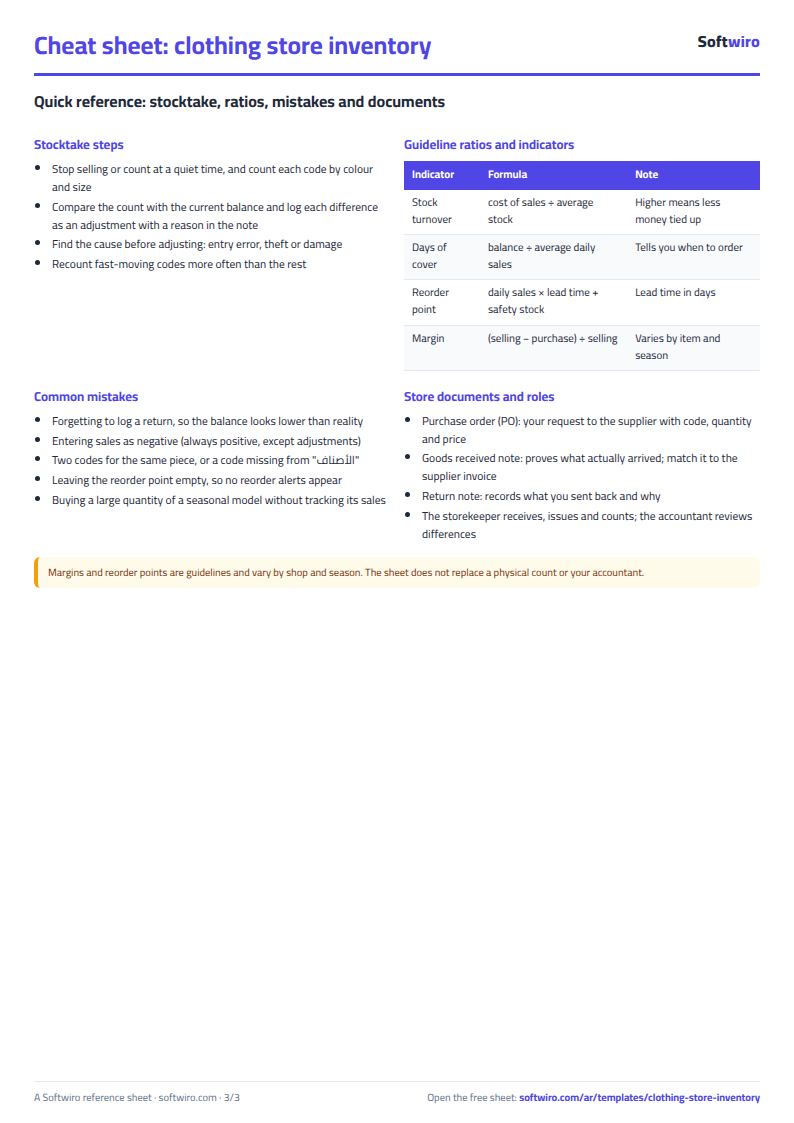
Terms, abbreviations, tables and diagrams over several pages, in Arabic and English. Download it as a PDF or images, including a phone-size version.
Still running this on Excel?
This sheet needs someone to type in every transaction. Accsys deducts the quantity at every sale and works across all the shop's devices at once, even without internet.
| In this sheet | In Accsys |
|---|---|
| You type in every sale and every purchase by hand. | Each color and size combination has its own barcode, which is deducted from stock at the sale and returned to stock on a return. |
| The e-invoice for the tax authority lives in a different system. | It issues e-invoices compatible with the Egyptian Tax Authority's ETA system, and sends the invoice on WhatsApp with a payment link. |
| The sheet sits on one device, and whoever edits it last wins. | It works offline, then syncs data across all the shop's devices when the connection returns. |
| Total sales doesn't tell you how much you earned. | A tiered income statement from revenue down to net profit, plus profit and margin for each item. |
Frequently asked questions
How do I record a physical stock count that differs from the sheet?
Record the difference in the "الحركة" (Movements) sheet with the type "تسوية" (Adjustment): positive if you found more, negative if you found less.
Is the template free?
Yes, with no sign-up and no email address. Use it, edit it and share it as you like.
Does it work in Google Sheets and on mobile?
The sheet uses formulas supported by Excel 2016 and later, Google Sheets and LibreOffice, so you can upload it to Google Drive and open it with Google Sheets on a computer or a phone.
What is the difference between the white and the gray cells?
You type in the white cells; the gray cells are calculated automatically. Don't type in a gray cell, or you will erase its formula.
Can I use the sheet from an AI assistant?
Yes. Add our MCP server (URL https://softwiro.com/api/mcp, no key needed) to your assistant and ask it to do the calculation in this template. The numbers come from the sheet's own formulas, and we do not store your data. The steps and a ready-made prompt are in this article: https://softwiro.com/blog/mcp-excel-templates-ai-agent-guide.html
More free templates for: Shops and stores
More free templates
- Cash Book Template for Excel
- Invoice Template with Invoice Log (Excel)
- Customer accounts, credit sales and customer statement sheet
- Cash book and customer accounts sheet
- Installments and collection tracker
- General shop inventory tracker (stock in/out, reorder, slow movers)
- Supplier purchase orders and payables tracker
- Multi-warehouse and branch inventory sheet with transfers
- Periodic stock count and count-difference reconciliation sheet
- Barcode, batch and expiry inventory sheet
- Grocery store management sheet
- Stationery shop and photocopy management sheet
- Electronics shop sheet: serials, warranty and repairs
- Wholesale clothing trade sheet: traders, stock and collection
- Food wholesale and distribution sheet in Excel: routes, expiry and collection
- Delivery company sheet: shipments and cash collection
- Student attendance sheet
- Study planner and lesson tracker
- Journal entries, trial balance and financial statements sheet
- Weekly study routine sheet
- Online store orders and profit sheet
- Real estate leads and units tracker
- Rental portfolio tracker: properties, units, tenants and contracts