Try the sheet here, on the example
The sheet is open below with sample numbers. Change any white cell and watch the results update, or press the blank-copy button to type your own data from scratch. Nothing you type leaves your browser.
Example from the sheet
| الكود | اسم الصنف | المخزن الرئيسي - القاهرة | فرع مدينة نصر | فرع الجيزة | فرع الإسكندرية | الإجمالي | قيمة المخزون | فروع تحت الحد |
|---|---|---|---|---|---|---|---|---|
| P01 | أرز كيس 5 كجم | 90 | 16 | 8 | 15 | 129 | 25,800.00 | 1 |
| P02 | سكر | 280 | 60 | 32 | 13 | 385 | 9,625.00 | 1 |
| P03 | زيت عباد الشمس 1 لتر | 150 | 22 | 20 | 8 | 200 | 12,000.00 | 1 |
| P04 | مكرونة | 560 | 60 | 75 | 50 | 745 | 5,960.00 | 0 |
| P05 | صابون | 150 | 25 | 10 | 22 | 207 | 2,484.00 | 3 |
| P06 | منظف أرضيات | 80 | 10 | 8 | 1 | 99 | 3,465.00 | 1 |
| P07 | مناديل ورقية | 200 | 10 | 25 | 14 | 249 | 4,482.00 | 1 |
| P08 | بطاريات قلم | 60 | 4 | -2 | 6 | 68 | 2,040.00 | 2 |
| P09 | لمبة LED | 100 | 14 | 4 | 8 | 126 | 3,150.00 | 1 |
| P10 | شاي علبة | 130 | 20 | 7 | 6 | 163 | 7,335.00 | 2 |
Example from the “الأرصدة” tab (Arabic), with the numbers and formulas that are in the file.
What is inside
- "الإعدادات" (Settings): The surplus multiplier, which decides when a warehouse's balance counts as more than it needs and can be a source for a transfer.
- "المخازن" (Warehouses): Names of the warehouses and branches (up to 6), the type of each and who is in charge. Beside each warehouse: its stock value and share of the total, the number of items below minimum, items out of stock and negative balances.
- "الأصناف" (Items): Code, name, category, unit and unit cost, then a separate minimum level for each warehouse, because a small branch does not need what the main warehouse needs. It holds 150 items.
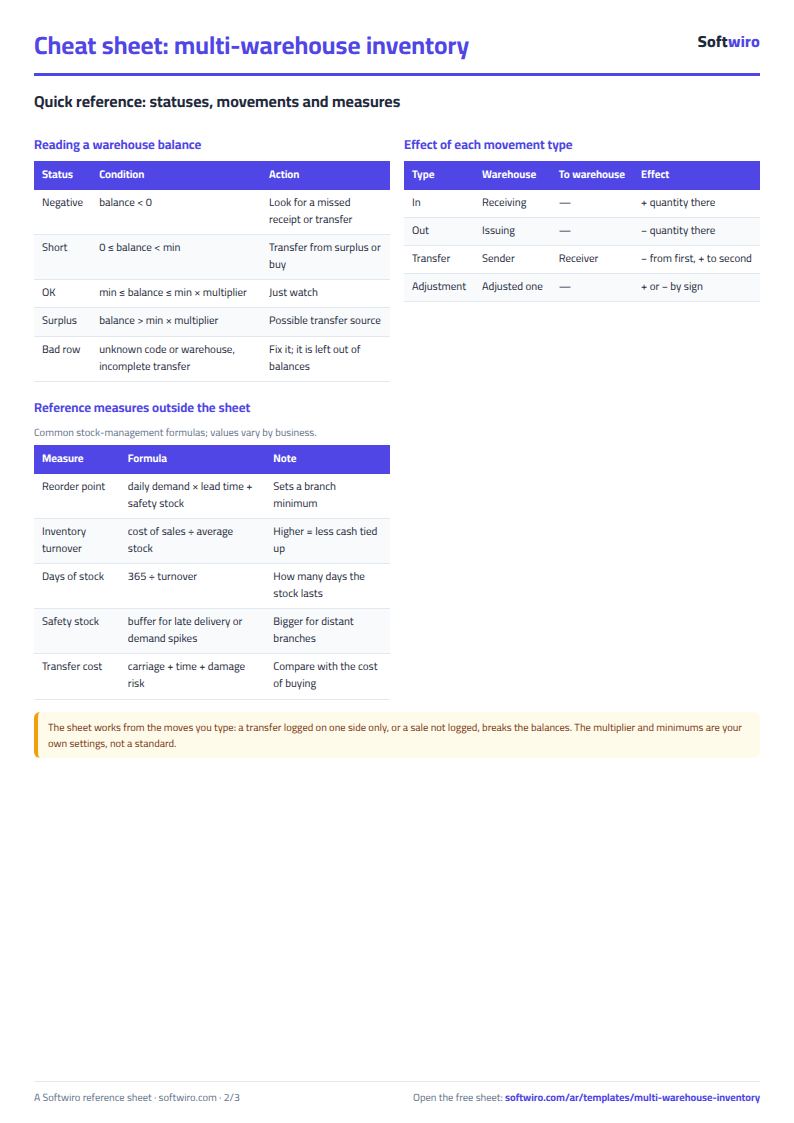
- "الحركات" (Movements): One log with four types: stock in, stock out, transfer and adjustment. For a transfer you choose the sending and receiving warehouse, and the quantity leaves the first and enters the second. The item name and movement value appear, and a check column highlights an unknown code, an unknown warehouse or an incomplete transfer. It holds 1,500 movements.
- "الأرصدة" (Balances): A matrix with items in the rows and warehouses in the columns, then the total, stock value, the value of each warehouse, and the number of branches where the item is below its minimum. Negative balances show in red.
- "النواقص" (Shortages): For each item and branch: the shortfall below minimum and the surplus available to transfer, then the biggest shortage and where it is, the biggest surplus and where it is, the suggested transfer quantity, and the purchase quantity after deducting surplus.
- "اقتراحات التحويل" (Transfer Suggestions): A sorted list of items whose shortage can be covered from another warehouse: from where, to where and how many, with both balances and the transfer value at cost.
- "إعادة الطلب" (Reorder): Items that the surplus in other warehouses cannot cover: the suggested purchase quantity and its cost.
- "الملخص" (Summary): The number of warehouses and items, total stock value, number of transfers, alerts for shortages, negative balances and wrong movements, with charts of each warehouse's value, the top items by value, items below minimum in each warehouse, and movements by type.
The file opens on a start tab (“ابدأ هنا”, Start here) that explains how to use it.
What makes it different
A transfer is a single movement that takes the quantity out of one warehouse and puts it into another, so the item's total does not change and no quantity gets lost between two books. With a minimum level for each branch, the owner sees the branch in need and the warehouse with surplus on one line, and transfers stock instead of buying.
How to use it
- In the "المخازن" (Warehouses) sheet, enter the names of your warehouses and branches (up to 6). These are the names you choose from the list in every movement, so do not change them after you have recorded movements.
- In the "الأصناف" (Items) sheet, enter each item's code, name, category, unit and unit cost, then the right minimum level for each warehouse in the six columns.
- In the "الحركات" (Movements) sheet, record each transaction on a line: date, movement type (stock in, stock out, transfer or adjustment), item code, quantity and warehouse. For a transfer, choose the sending warehouse in the "المخزن" (Warehouse) column and the receiving warehouse in the "إلى مخزن" (To warehouse) column.
- Enter each warehouse's opening balance as a "وارد" (Stock in) movement dated the start of the period.
- The "الأرصدة" (Balances) sheet calculates each item's balance in each warehouse, its total and its value, and colors negative balances red.
- The "النواقص" (Shortages) sheet shows each item below its minimum in a branch and the surplus available elsewhere. "اقتراحات التحويل" (Transfer Suggestions) then lists what can be transferred first, and "إعادة الطلب" (Reorder) lists what you have to buy.
- The "الملخص" (Summary) sheet shows each warehouse's value, the top items by value and the number of alerts on one page, with charts.
Before you start:
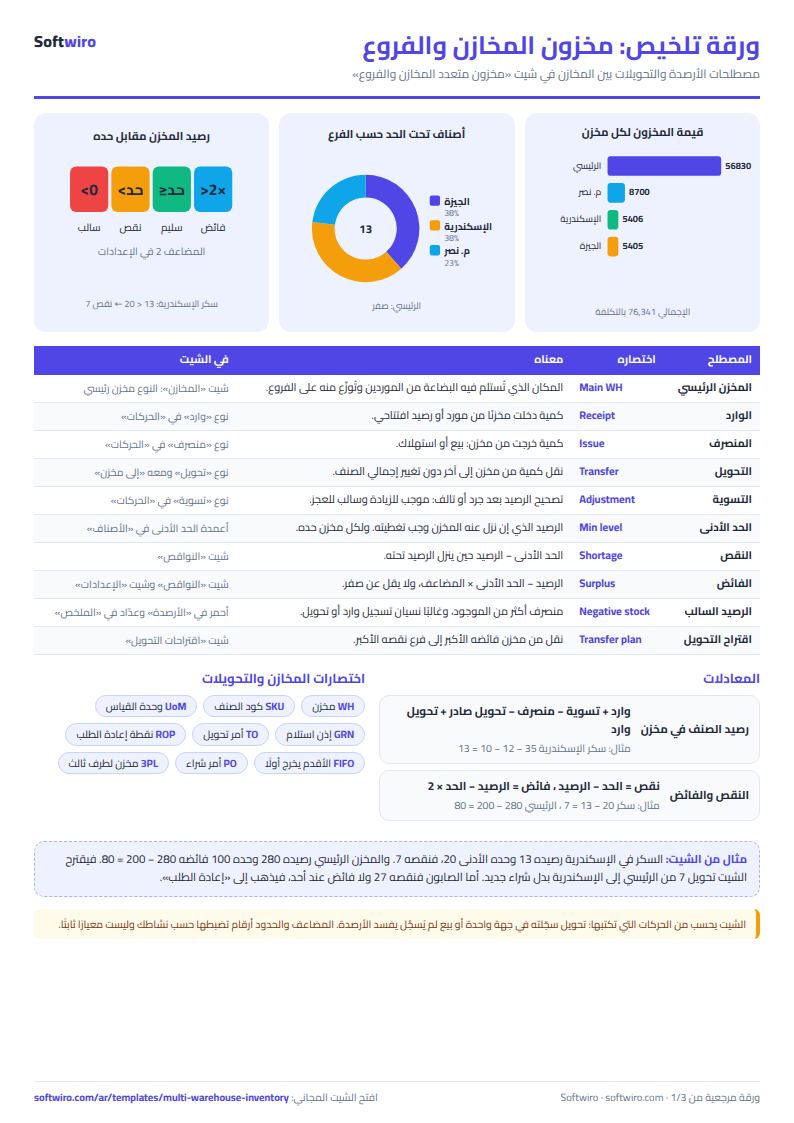
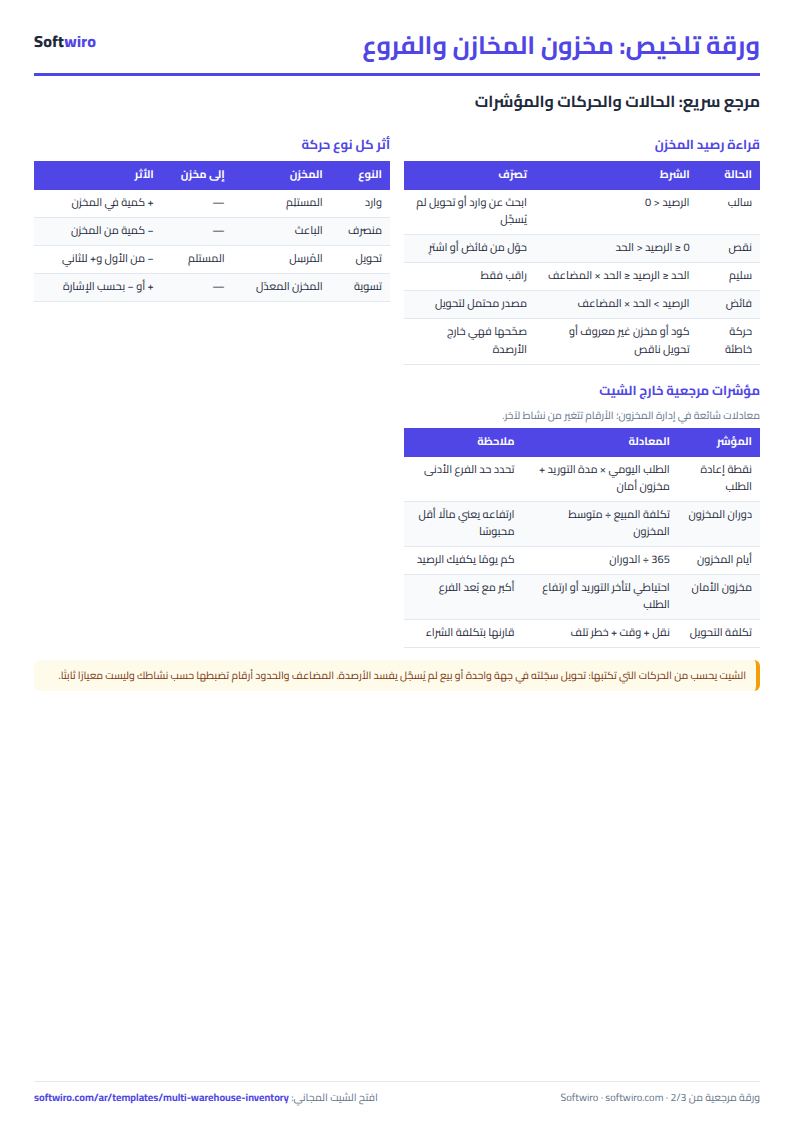
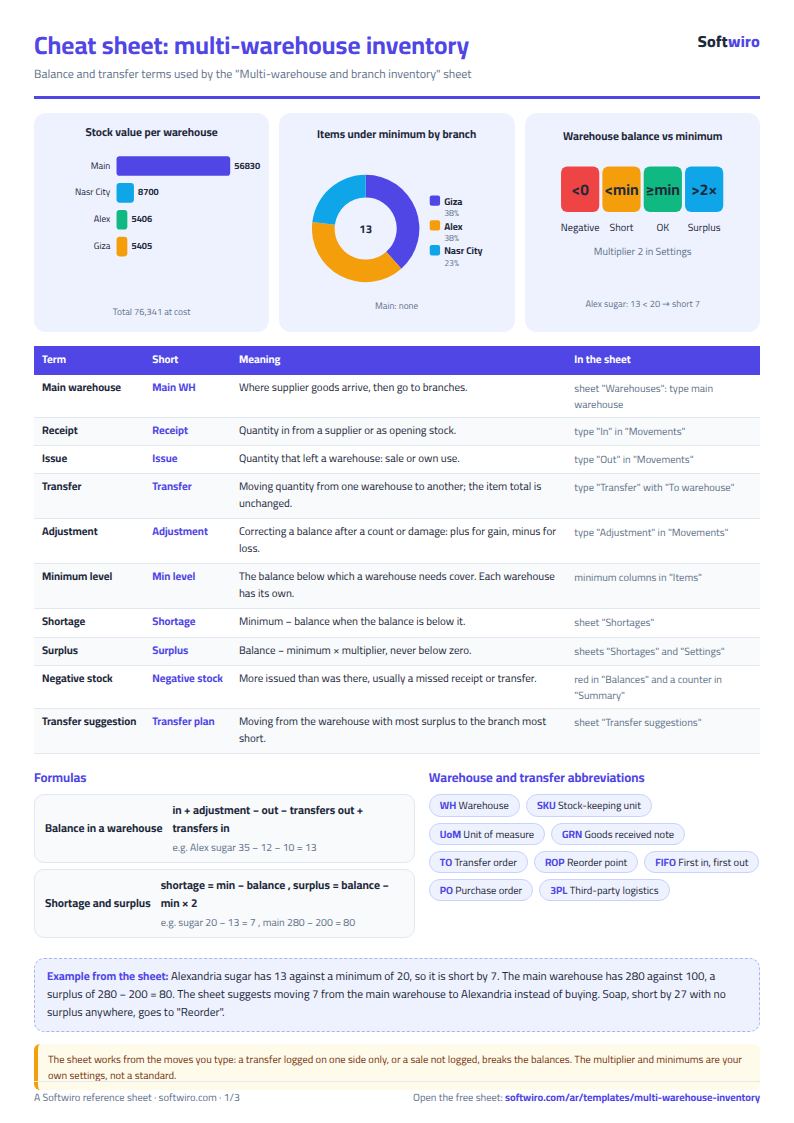
- Balance in any warehouse = stock in + adjustments - stock out - outgoing transfers + incoming transfers. A transfer deducts the quantity from the sending warehouse and adds it to the receiving warehouse in one movement, so the item's total does not change.
- Write an adjustment as positive for a gain and negative for a shortage or damaged goods (for example -3). The other types are always entered with a positive quantity.
- Shortage = warehouse minimum - balance, if the balance is below it. Surplus available to transfer = balance - (minimum x the surplus multiplier in "الإعدادات" (Settings)), and never less than zero. If you leave a warehouse's minimum at zero, its whole balance counts as surplus.
- For each item the sheet suggests the single biggest transfer: from the warehouse with the most surplus to the branch with the biggest shortage. Carry it out and record it in "الحركات" (Movements), and the next suggestion appears. The suggested purchase quantity = total shortage - total available surplus.
- A movement with a code that is not in "الأصناف" (Items), a warehouse that is not in "المخازن" (Warehouses), or an incomplete transfer shows a red message in the check column and is not counted in any balance.
- The sheet holds 6 warehouses, 150 items and 1,500 movements, and the transfer suggestions and reorder lists show the first 30 items.
Free cheat sheet for this field
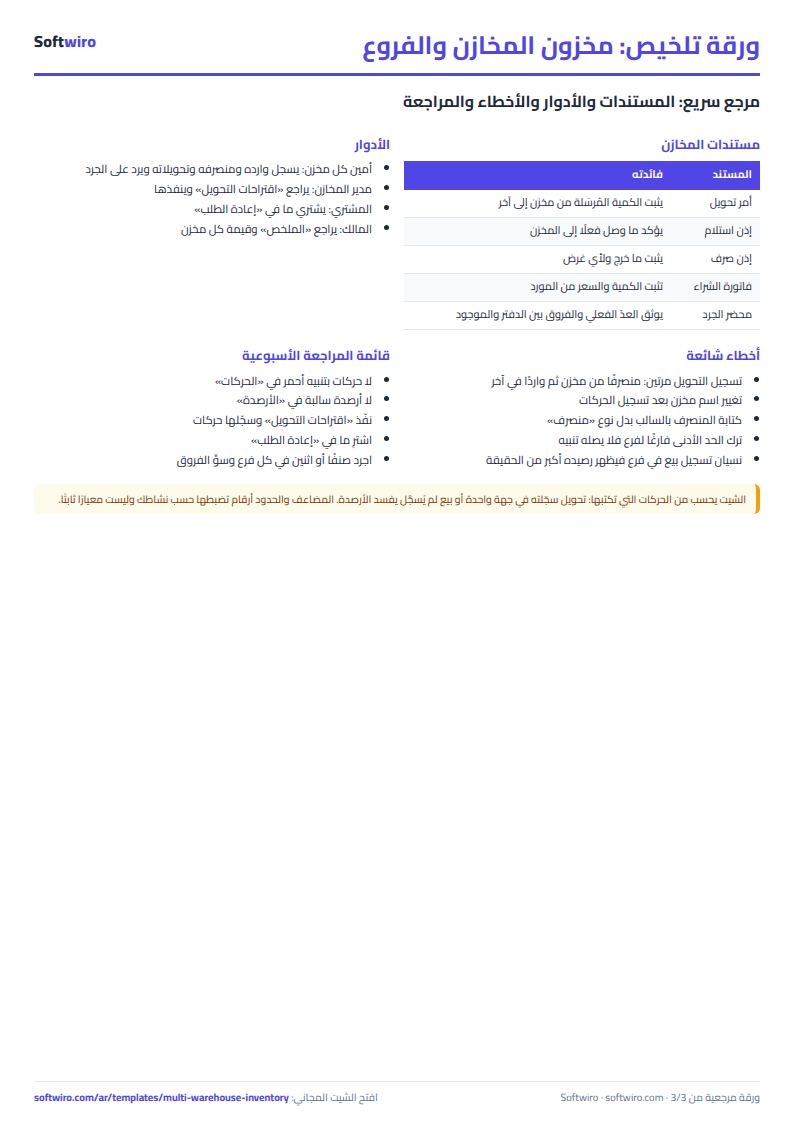
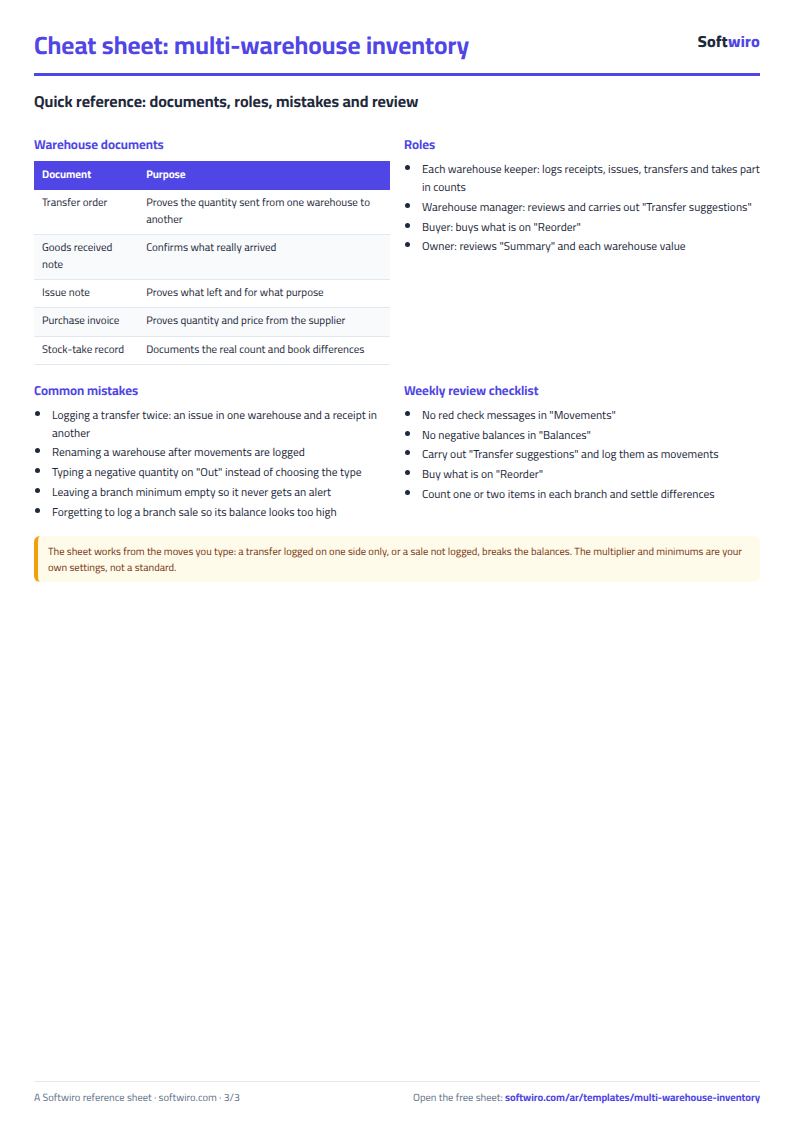
Terms, abbreviations, tables and diagrams over several pages, in Arabic and English. Download it as a PDF or images, including a phone-size version.
Still running this on Excel?
This sheet suits a start and a limited amount of data. If your way of working grows, or you need more than one person working on it at the same time, Softwiro can build you a program that fits the way you work.
| In this sheet | In Custom Software from Softwiro |
|---|---|
| One file that one person edits at a time, and copies reach you on WhatsApp. | A program with a login for each user and permissions you define, and everyone sees the same data. |
| You type everything and check the numbers by hand. | We design the screens around your work steps, so each person records only what concerns them. |
| Columns and formulas are fixed as the sheet was designed. | We build what you need: reports, alerts and screens your way. |
| Backups and security are your own responsibility. | The program runs on a secured server with regular backups. |
Frequently asked questions
How do I record a transfer of goods from the main warehouse to a branch?
In the "الحركات" (Movements) sheet, choose the movement type "تحويل" (Transfer), enter the code and quantity, and choose the sending warehouse in the "المخزن" (Warehouse) column and the receiving warehouse in the "إلى مخزن" (To warehouse) column. The quantity is deducted from the first and added to the second in one line.
How do I enter the opening balance for each branch?
For each item in each warehouse, record a "وارد" (Stock in) movement dated the start of the period, with the note "رصيد افتتاحي" (Opening balance). The sheet then calculates every balance from the movements.
When does the sheet treat a warehouse balance as surplus?
Surplus = balance - (warehouse minimum x surplus multiplier), and never less than zero. You enter the multiplier in "الإعدادات" (Settings), and if you leave a warehouse's minimum at zero, its whole balance counts as surplus.
Can I use more than 6 warehouses?
This sheet holds 6 warehouses and branches. If you need more, you can copy the sheet for another group of branches, or request a custom sheet for free from the request page.
Is the template free?
Yes, with no sign-up and no email address. Use it, edit it and share it as you like.
Does it work in Google Sheets and on mobile?
The sheet uses formulas supported by Excel 2016 and later, Google Sheets and LibreOffice, so you can upload it to Google Drive and open it with Google Sheets on a computer or a phone.
What is the difference between the white and the gray cells?
You type in the white cells; the gray cells are calculated automatically. Don't type in a gray cell, or you will erase its formula.
Can I use the sheet from an AI assistant?
Yes. Add our MCP server (URL https://softwiro.com/api/mcp, no key needed) to your assistant and ask it to do the calculation in this template. The numbers come from the sheet's own formulas, and we do not store your data. The steps and a ready-made prompt are in this article: https://softwiro.com/blog/mcp-excel-templates-ai-agent-guide.html
More free templates for: Shops and stores
More free templates
- Cash Book Template for Excel
- Invoice Template with Invoice Log (Excel)
- Clothing shop inventory sheet by colour and size
- Customer accounts, credit sales and customer statement sheet
- Cash book and customer accounts sheet
- Installments and collection tracker
- General shop inventory tracker (stock in/out, reorder, slow movers)
- Supplier purchase orders and payables tracker
- Periodic stock count and count-difference reconciliation sheet
- Barcode, batch and expiry inventory sheet
- Grocery store management sheet
- Stationery shop and photocopy management sheet
- Electronics shop sheet: serials, warranty and repairs
- Wholesale clothing trade sheet: traders, stock and collection
- Food wholesale and distribution sheet in Excel: routes, expiry and collection
- Restaurant and cafe inventory and waste sheet
- Spare parts inventory sheet
- Fixed assets register and depreciation sheet
- Padel and 5-a-side court booking sheet (hourly)
- Wedding and event hall booking sheet
- Serviced apartments and short-stay bookings sheet
- Restaurant and cafe table reservations sheet
- Photo studio bookings sheet