Try the sheet here, on the example
The sheet is open below with sample numbers. Change any white cell and watch the results update, or press the blank-copy button to type your own data from scratch. Nothing you type leaves your browser.
Example from the sheet
| اسم الصنف | رقم التشغيلة | تاريخ الانتهاء | الكمية | رصيد التشغيلة | أيام للانتهاء | الحالة | القيمة المعرضة |
|---|---|---|---|---|---|---|---|
| كريم ترطيب اليدين | CR-0326 | 46387 | 30 | 7 | 48 | قريب الانتهاء | 280.00 |
| شامبو للشعر 400 مل | SH-0526 | 46883 | 48 | 0 | 544 | نفد | 0.00 |
| تونة معلبة 185 جم | T-0626 | 46905 | 240 | 7 | 566 | سليم | 0.00 |
| زيت ذرة 1 لتر | OIL-0626 | 46552 | 60 | 0 | 213 | نفد | 0.00 |
| بسكويت شوكولاتة | B-0726 | 46325 | 90 | 20 | -14 | منتهي | 90.00 |
| لبن كامل الدسم 1 لتر | L2608A | 46331 | 120 | 20 | -8 | منتهي | 570.00 |
| صابون سائل 500 مل | LS-0826 | 46619 | 60 | 0 | 280 | نفد | 0.00 |
| زيت ذرة 1 لتر | OIL-0926 | 46631 | 120 | 65 | 292 | سليم | 0.00 |
| شاي أخضر 20 كيس | GT-0926 | 46392 | 40 | 16 | 53 | قريب الانتهاء | 608.00 |
| كريم ترطيب اليدين | CR-0926 | 46813 | 24 | 24 | 474 | سليم | 0.00 |
| شامبو للشعر 400 مل | SH-1026 | 47027 | 36 | 31 | 688 | سليم | 0.00 |
Example from the “الاستلام” tab (Arabic), with the numbers and formulas that are in the file.
What is inside
- "الإعدادات" (Settings): Today's date, the number of days that counts as "near expiry", the first month in the monthly movement chart, and the category list (8).
- "الأصناف" (Items): Barcode, name, category, unit and minimum level. The sheet calculates received, issued, total balance and its value, number of batches, nearest expiry, oldest batch, expired and near-expiry quantity, value at risk and status. It holds 200 items.
- "الاستلام" (Receipts): One line per batch: date, barcode, batch number, expiry date, quantity, cost and supplier. The sheet calculates how much has been issued from it, its balance, days left, status (expired, near expiry, OK or sold out), value and value at risk. It holds 400 batches.
- "الصرف" (Issues): Every sale, write-off or adjustment with barcode, batch and quantity. It suggests the batch that expires first, flags "خالف FEFO" (FEFO violated), checks for errors and calculates the cost of what was issued. It holds 1,000 transactions.
- "مسح باركود" (Scan Barcode): Scan a barcode and the sheet shows the item's name, total balance and value, oldest batch with its expiry date and days left, and the issue order of its batches.
- "التنبيهات" (Alerts): Expired and near-expiry batches, sorted with the nearest expiry first, with their balance and value at risk (first 60 batches).
- "الملخص" (Summary): Stock value, expired and near-expiry value and the percentage at risk, the number of items below minimum, issues that violated FEFO, tables by status, category and month, and three charts.
The file opens on a start tab (“ابدأ هنا”, Start here) that explains how to use it.
What makes it different
The sheet keeps receipts separate from issues and ties every issue to its batch number, so you know the exact balance of each batch instead of one balance and one date per item. It suggests issuing the oldest stock first, and warns you if you sold a newer batch while an older one is still in the warehouse. You see what the at-risk stock is worth before it expires, not after you throw it away.
How to use it
- In the "الإعدادات" (Settings) sheet, enter today's date, the number of days after which a batch counts as "near expiry", the first month of the monthly movement chart, and your category names.
- In the "الأصناف" (Items) sheet, record each item: barcode, name, category, unit and minimum level. Click the barcode cell and scan it with a USB reader or your phone's barcode reader, or type it by hand.
- When goods arrive, add a line per batch in the "الاستلام" (Receipts) sheet: date, barcode, batch number, expiry date, quantity and unit cost. The batch balance, days left, status and value appear.
- For a sale or write-off, enter the date, barcode, batch, quantity and type in the "الصرف" (Issues) sheet. The sheet suggests the batch closest to expiry (oldest first, FEFO) and warns you if you issue another batch while an older one is in stock.
- For a quick lookup, scan any barcode in the white cell of the "مسح باركود" (Scan Barcode) sheet. It shows the item's name, total balance, oldest batch, when it expires and the order of its batches.
- The "التنبيهات" (Alerts) sheet lists expired and near-expiry batches, nearest expiry first, with their value, and "الملخص" (Summary) shows stock value and the value at risk, with charts.
Before you start:
- This sheet is for any shop, grocery, food warehouse, cosmetics store or consumables stock. If you run a pharmacy, use the pharmacy expiry and stock balance sheet, which tracks each batch on one line with a reorder level and cost and selling value. This sheet keeps receipts separate from issues, so it calculates each batch's balance exactly and suggests issuing the oldest stock first.
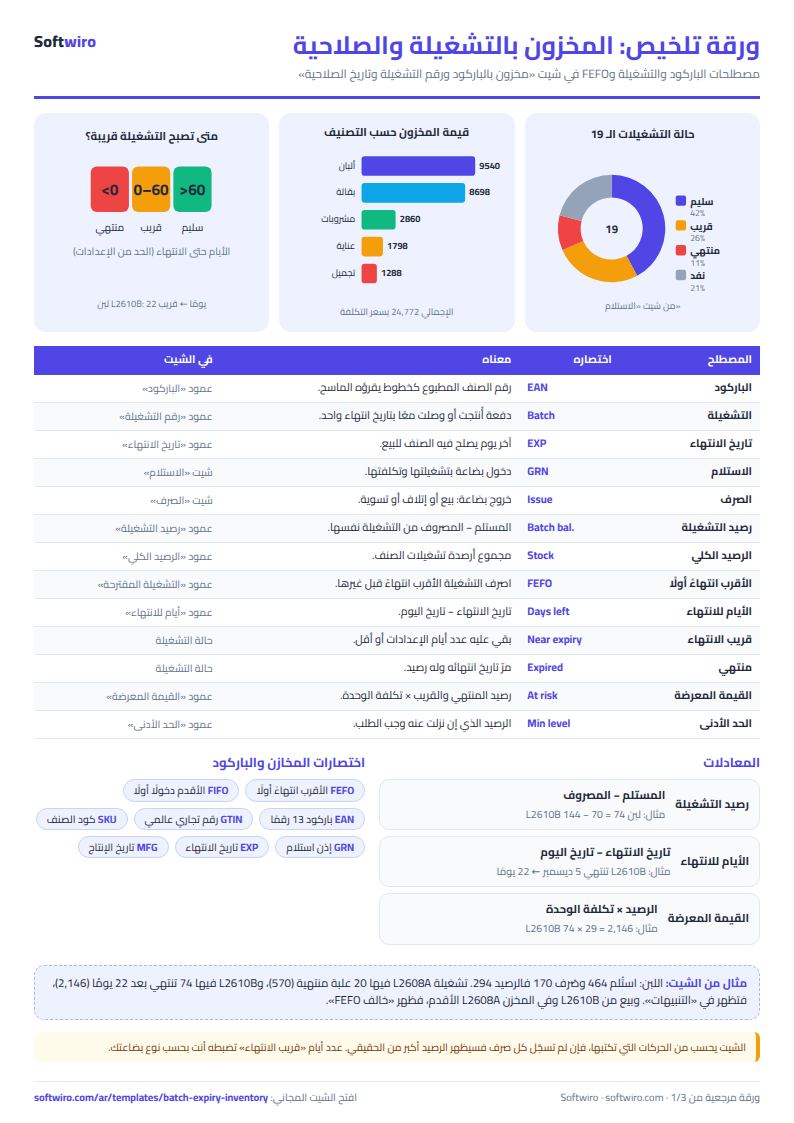
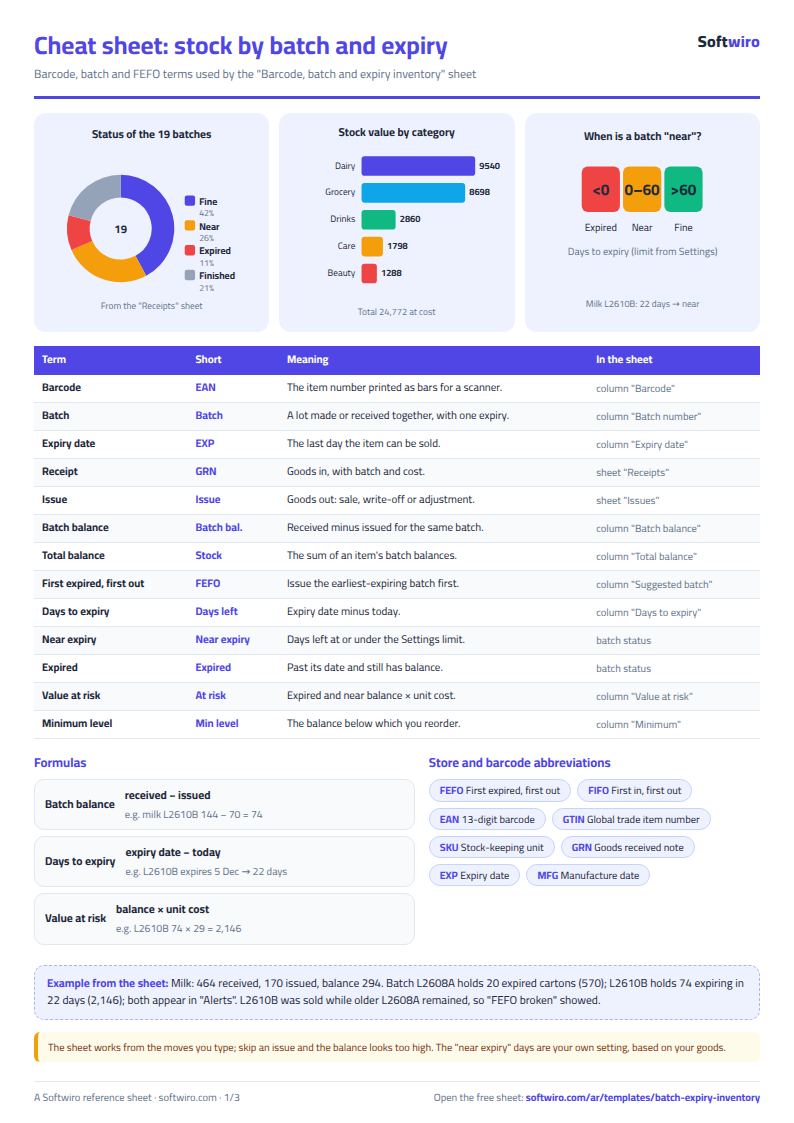
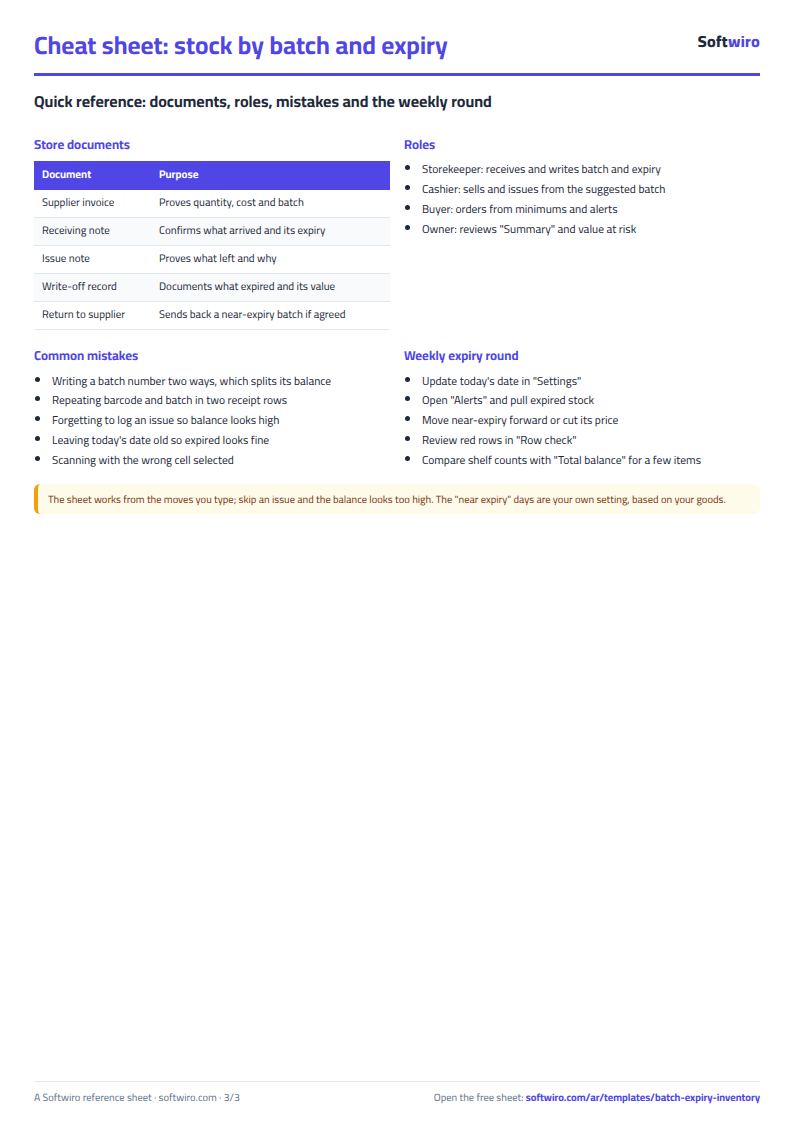
- Batch balance = quantity received - quantity issued with the same barcode and the same batch number. Do not repeat the same barcode and batch number on two lines in the "الاستلام" (Receipts) sheet. If another delivery arrives with the same batch, add its quantity to the first line.
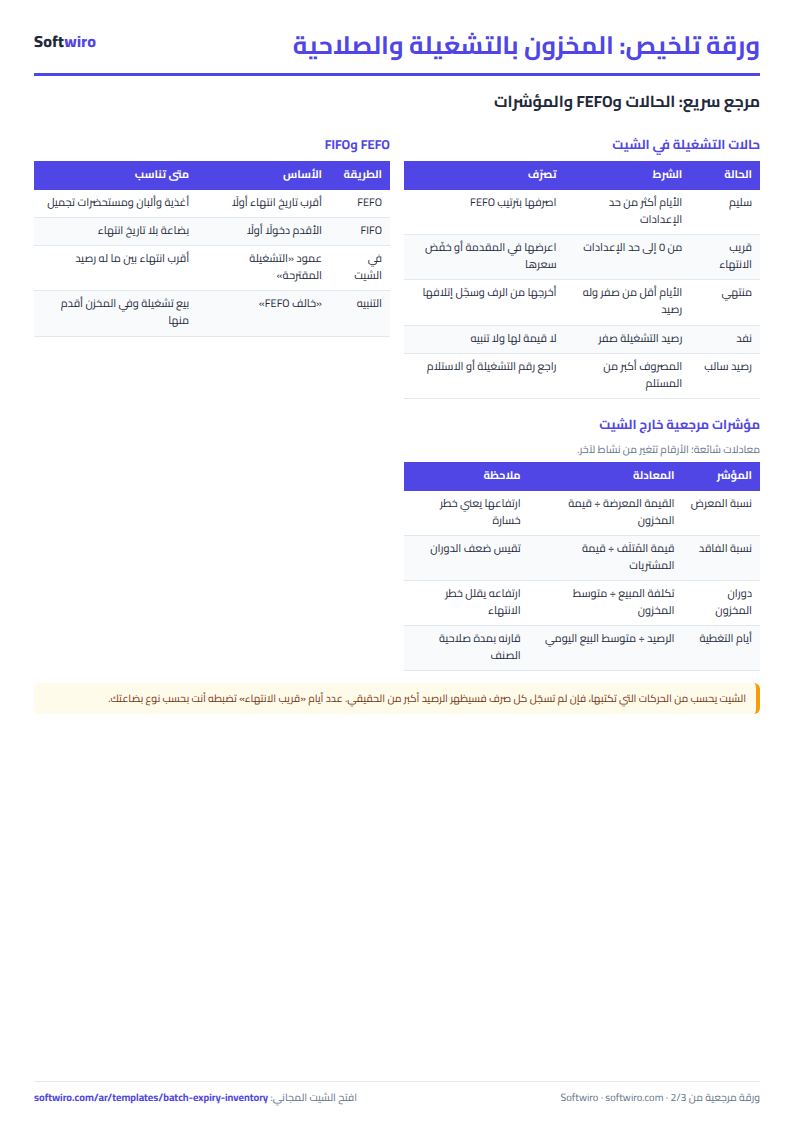
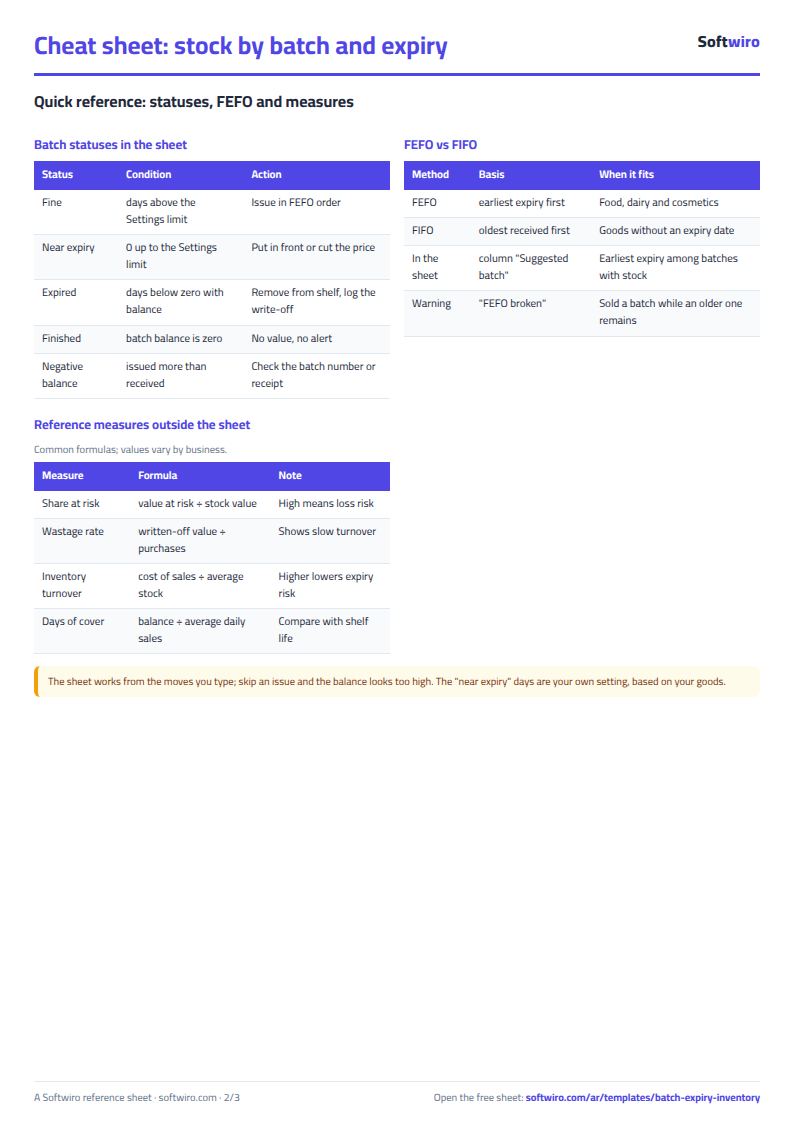
- Batch status: "منتهي" (Expired) if the expiry date has passed, "قريب الانتهاء" (Near expiry) if it has the number of days set in Settings or fewer left (including the day itself), "سليم" (OK) after that, and "نفد" (Sold out) if its balance is zero.
- Value at risk = balance of expired and near-expiry batches x their unit cost.
- The FEFO order suggests the nearest expiry date among batches that have a balance. The "خالف FEFO" (FEFO violated) warning appears on a sale issued from one batch while an older-expiry batch that arrived before the transaction date still has a balance.
- Barcode cells are formatted as text so Excel does not strip leading zeros. The reader works because it types the digits into the selected cell and then presses Enter.
- The sheet holds 200 items, 400 batches and 1,000 issue transactions, and the alerts list shows the first 60 batches.
Free cheat sheet for this field
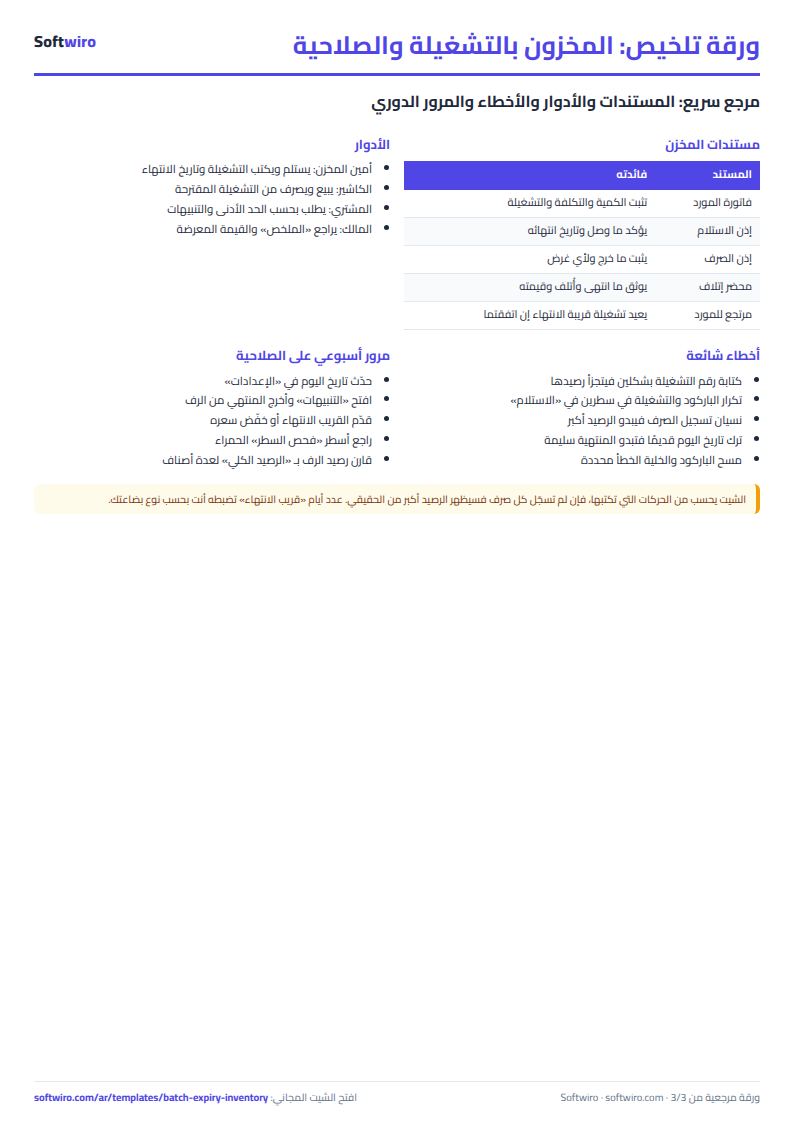
Terms, abbreviations, tables and diagrams over several pages, in Arabic and English. Download it as a PDF or images, including a phone-size version.
Still running this on Excel?
This sheet needs someone to copy every invoice and payment into it. In Accountwiro an invoice and a payment are recorded the moment they happen, and the customer's balance shows in a single statement of account.
| In this sheet | In Accountwiro |
|---|---|
| You copy every invoice and payment into the sheet by hand. | It shows the customer's invoices, payments and outstanding balance in a single statement of account. |
| Invoices are typed or copied by hand. | It creates an invoice by scanning a barcode or searching by product name, calculates discounts and taxes, and sends it to the customer over WhatsApp. |
| Stock shortages are discovered late. | It updates quantities after every sale and alerts you when a product drops below the required level. |
| Anyone who opens the sheet sees every number. | Permissions per user: the sales employee issues invoices, and the warehouse employee manages stock without access to financial data. |
Frequently asked questions
How do I scan a barcode into an Excel cell?
Click the barcode cell and scan with a USB reader. It types the number like a keyboard and presses Enter. Some phone apps do the same, or copy the number so you can paste it. The cells are formatted as text, so Excel does not drop leading zeros.
What does FEFO mean and how does the sheet apply it?
FEFO means first expired, first out: the batch closest to its expiry date leaves first. For each barcode, the "الصرف" (Issues) sheet suggests the batch with the nearest expiry date among batches that still have a balance, and flags "خالف FEFO" (FEFO violated) if you sold a different batch while an older one is in stock.
How is it different from the pharmacy expiry tracking sheet?
The pharmacy sheet tracks each batch on one line with its current quantity and reorder level. This sheet works for any shop or warehouse, keeps receipts separate from issues, uses barcodes, suggests issuing the oldest stock first, and calculates each batch's balance from its movements.
Can I change the number of days for "near expiry"?
Yes, enter the number in the "الإعدادات" (Settings) sheet. A batch is near expiry if it has that many days or fewer left before it expires, including the day itself.
Is the template free?
Yes, with no sign-up and no email address. Use it, edit it and share it as you like.
Does it work in Google Sheets and on mobile?
The sheet uses formulas supported by Excel 2016 and later, Google Sheets and LibreOffice, so you can upload it to Google Drive and open it with Google Sheets on a computer or a phone.
What is the difference between the white and the gray cells?
You type in the white cells; the gray cells are calculated automatically. Don't type in a gray cell, or you will erase its formula.
Can I use the sheet from an AI assistant?
Yes. Add our MCP server (URL https://softwiro.com/api/mcp, no key needed) to your assistant and ask it to do the calculation in this template. The numbers come from the sheet's own formulas, and we do not store your data. The steps and a ready-made prompt are in this article: https://softwiro.com/blog/mcp-excel-templates-ai-agent-guide.html
More free templates for: Shops and stores
More free templates
- Cash Book Template for Excel
- Invoice Template with Invoice Log (Excel)
- Clothing shop inventory sheet by colour and size
- Customer accounts, credit sales and customer statement sheet
- Cash book and customer accounts sheet
- Installments and collection tracker
- General shop inventory tracker (stock in/out, reorder, slow movers)
- Supplier purchase orders and payables tracker
- Multi-warehouse and branch inventory sheet with transfers
- Periodic stock count and count-difference reconciliation sheet
- Grocery store management sheet
- Stationery shop and photocopy management sheet
- Electronics shop sheet: serials, warranty and repairs
- Wholesale clothing trade sheet: traders, stock and collection
- Food wholesale and distribution sheet in Excel: routes, expiry and collection
- Padel and 5-a-side court booking sheet (hourly)
- Wedding and event hall booking sheet
- Serviced apartments and short-stay bookings sheet
- Restaurant and cafe table reservations sheet
- Photo studio bookings sheet
- General appointments scheduler sheet
- Electronics factory sheet: BOM, production and quality
- Periodic table in Excel (Arabic names): lookup, molar mass calculator and quiz