Try the sheet here, on the example
The sheet is open below with sample numbers. Change any white cell and watch the results update, or press the blank-copy button to type your own data from scratch. Nothing you type leaves your browser.
Example from the sheet
| رقم الاستلام | تاريخ الاستلام | المورد | قيمة المستلم | المتبقي | فئة العمر |
|---|---|---|---|---|---|
| R-001 | 46246 | مورد الأرز والسكر | 25,000.00 | 5,000.00 | أكثر من 60 يوم |
| R-002 | 46254 | مورد الأرز والسكر | 15,000.00 | 5,000.00 | من 31 إلى 60 يوم |
| R-003 | 46273 | مورد الأرز والسكر | 35,000.00 | 15,000.00 | من 31 إلى 60 يوم |
| R-004 | 46280 | مورد المنظفات | 12,000.00 | 0.00 | مسدد |
| R-005 | 46287 | مورد الألبان | 8,000.00 | 5,000.00 | من 31 إلى 60 يوم |
| R-006 | 46309 | مورد الألبان | 9,000.00 | 5,000.00 | من 1 إلى 30 يوم |
| R-007 | 46321 | مورد الأدوات المنزلية | 30,000.00 | 30,000.00 | لم يحن |
| R-008 | 46324 | مورد المنظفات | 5,000.00 | 5,000.00 | لم يحن |
| R-009 | 46325 | مورد التغليف | 2,000.00 | -500.00 | مسدد |
Example from the “الاستلامات” tab (Arabic), with the numbers and formulas that are in the file.
What is inside
- "الإعدادات" (Settings): Today's date (enter =TODAY() so it updates itself).
- "الموردون" (Suppliers): For each supplier: code, name, phone, payment terms in days and what they supply. The sheet then calculates the number of orders and their value, the amount received and paid, the amount owed to the supplier, the number of incomplete orders and the status.
- "أوامر الشراء" (Purchase orders): Each order with its number, date, supplier code, value, expected delivery date and a note. The sheet then calculates the supplier name, the amount received, what is still to be received, the status and the days the delivery is late.
- "الاستلامات" (Receipts): Each receipt with its number, date, purchase order number, value received and a note. The sheet then calculates the supplier, payment terms, due date, amount paid, balance, days overdue and aging bucket.
- "المدفوعات" (Payments): Each payment with its date, the number of the receipt it settles, the amount, the payment method (cash, bank transfer or check) and a note. The supplier code and name fill in.
- "أعمار الديون" (Debt aging): One row per supplier showing what you owe split into buckets: not yet due, 1 to 30 days, 31 to 60 days and over 60 days, with the number of unpaid receipts and the total of each bucket at the top of the table.
- "الملخص" (Summary): The number of suppliers and of orders by status, the value of goods ordered but not yet received, total orders, received, paid and owed to suppliers including the overdue part, received and paid this month, and the debt aging table with each bucket's percentage.
The file opens on a start tab (“ابدأ هنا”, Start here) that explains how to use it.
What makes it different
Open "أعمار الديون" (Debt aging) to see how much you owe each supplier, how much of it is past due and for how long. Open "أوامر الشراء" (Purchase orders) to see which deliveries are late, without comparing supplier invoices against a notebook by hand.
How to use it
- In the "الإعدادات" (Settings) sheet, enter today's date (or =TODAY() so it updates itself).
- In the "الموردون" (Suppliers) sheet, enter each supplier's code, name, phone and the number of payment days you agreed.
- In the "أوامر الشراء" (Purchase orders) sheet, record each order: its number, date, supplier code, value and expected delivery date.
- When the goods arrive, record in the "الاستلامات" (Receipts) sheet the receipt number, date, purchase order number and the value of what you actually received.
- When you pay a supplier, record in the "المدفوعات" (Payments) sheet the date, the number of the receipt you are settling, the amount and the payment method.
- The sheet calculates each order's status, each receipt's due date, what is left on it, the days overdue and the debt's aging bucket.
- Open the "أعمار الديون" (Debt aging) sheet to see what you owe each supplier split into buckets, and the "الملخص" (Summary) sheet for the full picture.
Before you start:
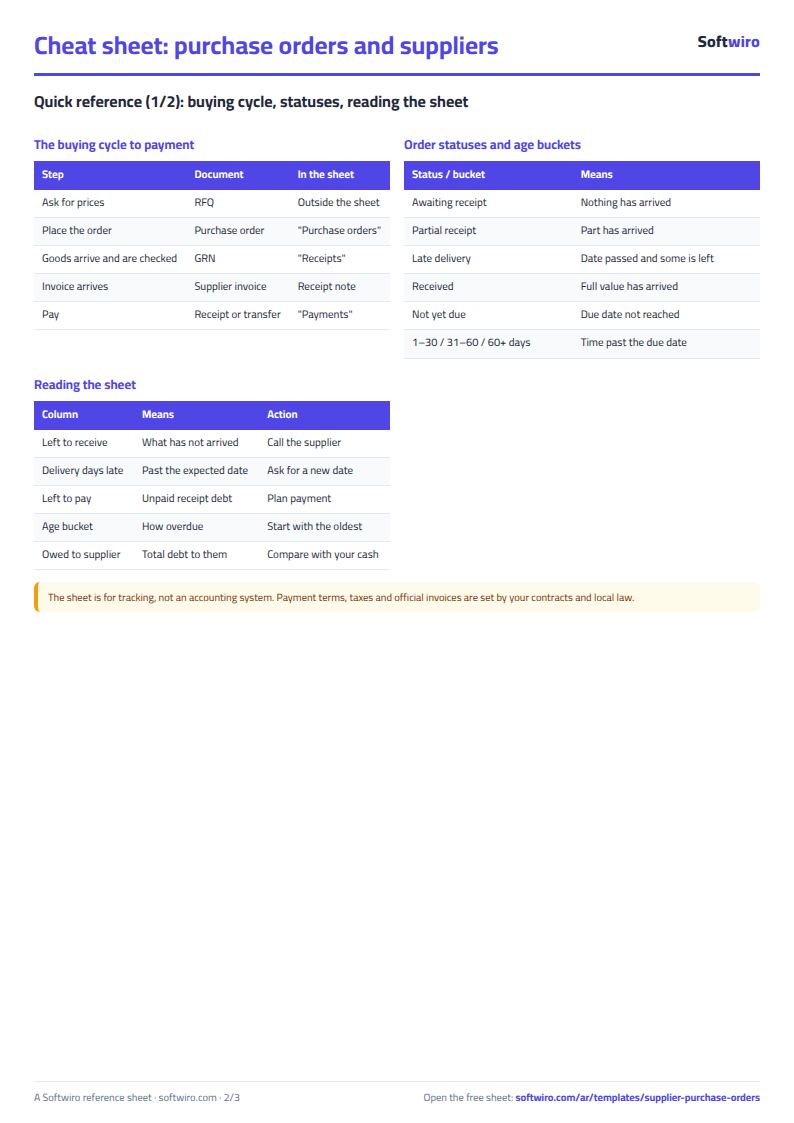
- What you owe a supplier arises from the receipt, not from the purchase order. An order whose goods you have not received does not appear as a debt.
- Receipt due date = receipt date + the payment terms in days entered for the supplier in the "الموردون" (Suppliers) sheet.
- Purchase order statuses: awaiting receipt, partly received, received, and late delivery (the expected delivery date has passed and part of the order is still outstanding).
- Aging buckets: not yet due, 1 to 30 days, 31 to 60 days, and over 60 days, counted after the due date.
- Record each payment against the number of the receipt it settles. If you pay one amount for several receipts, enter one row per receipt.
- The sheet has room for 200 suppliers, 1,000 purchase orders, 1,000 receipts and 1,000 payments.
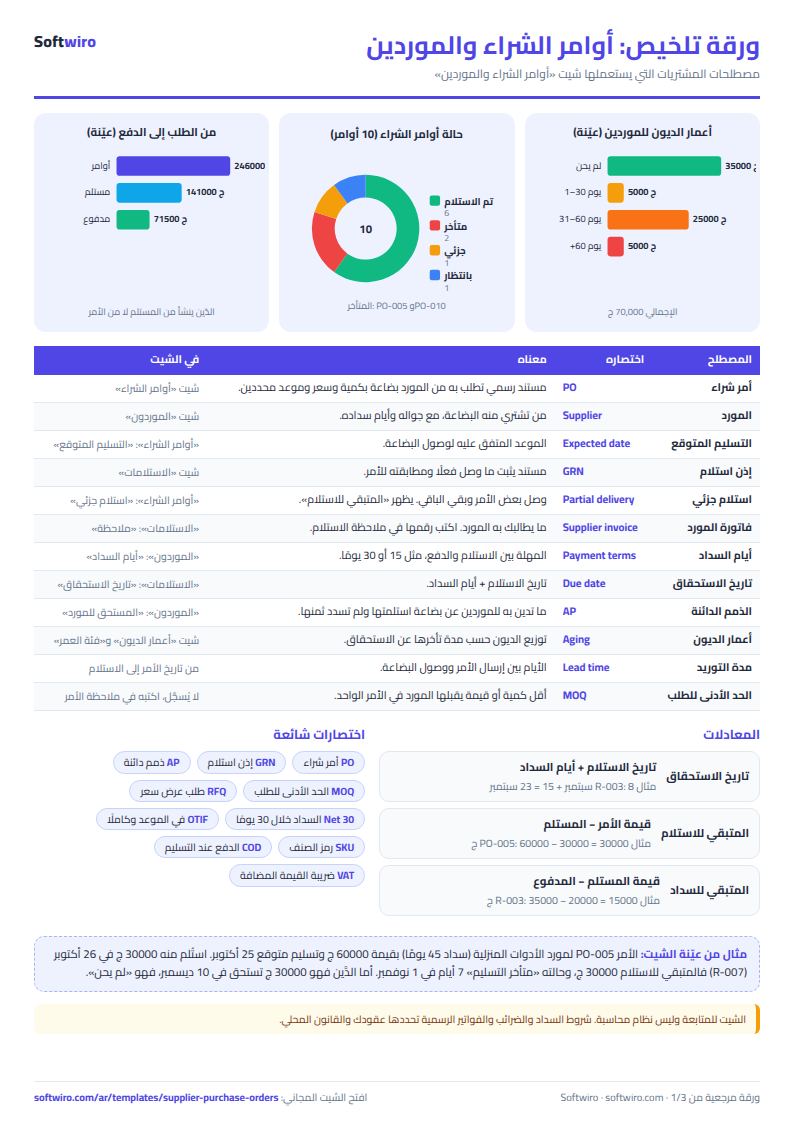
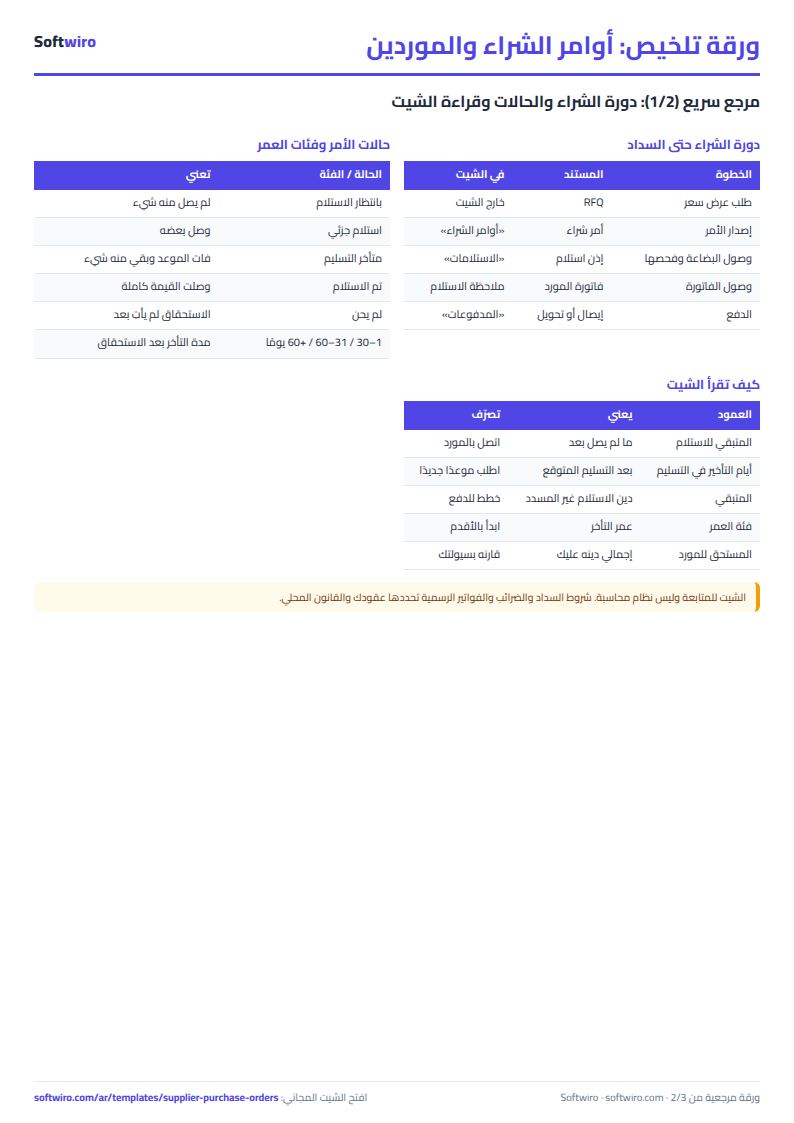
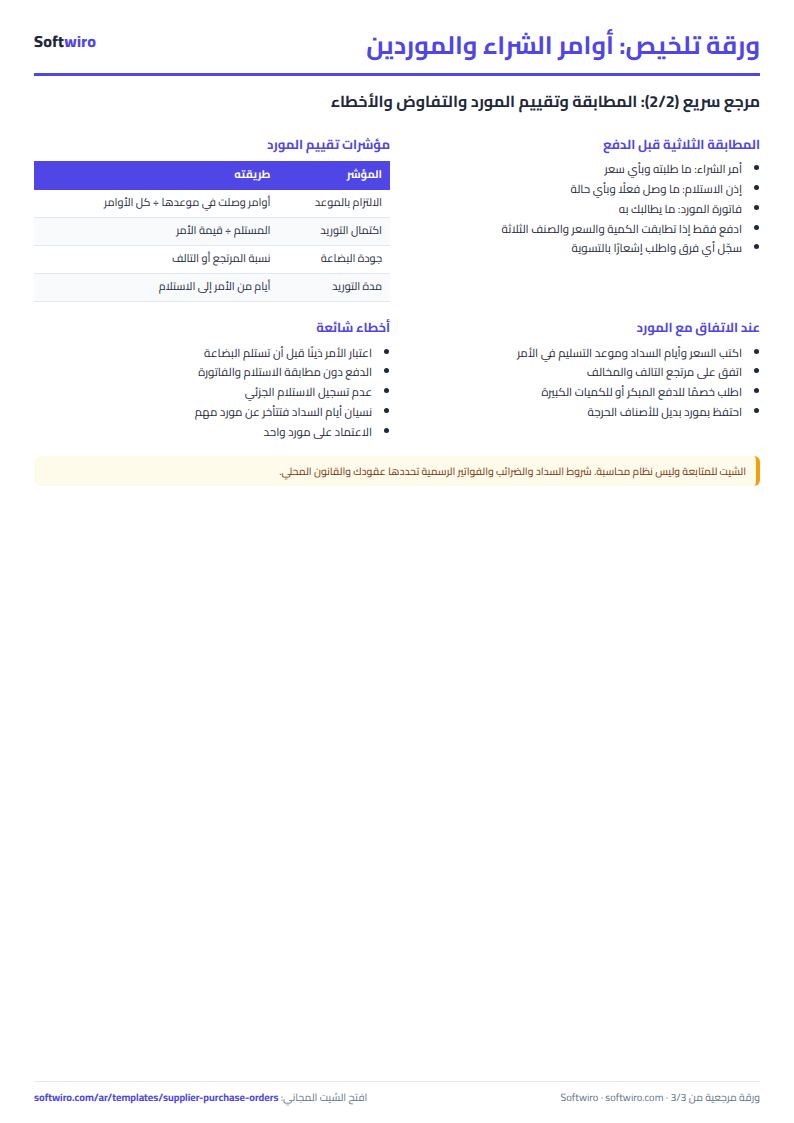
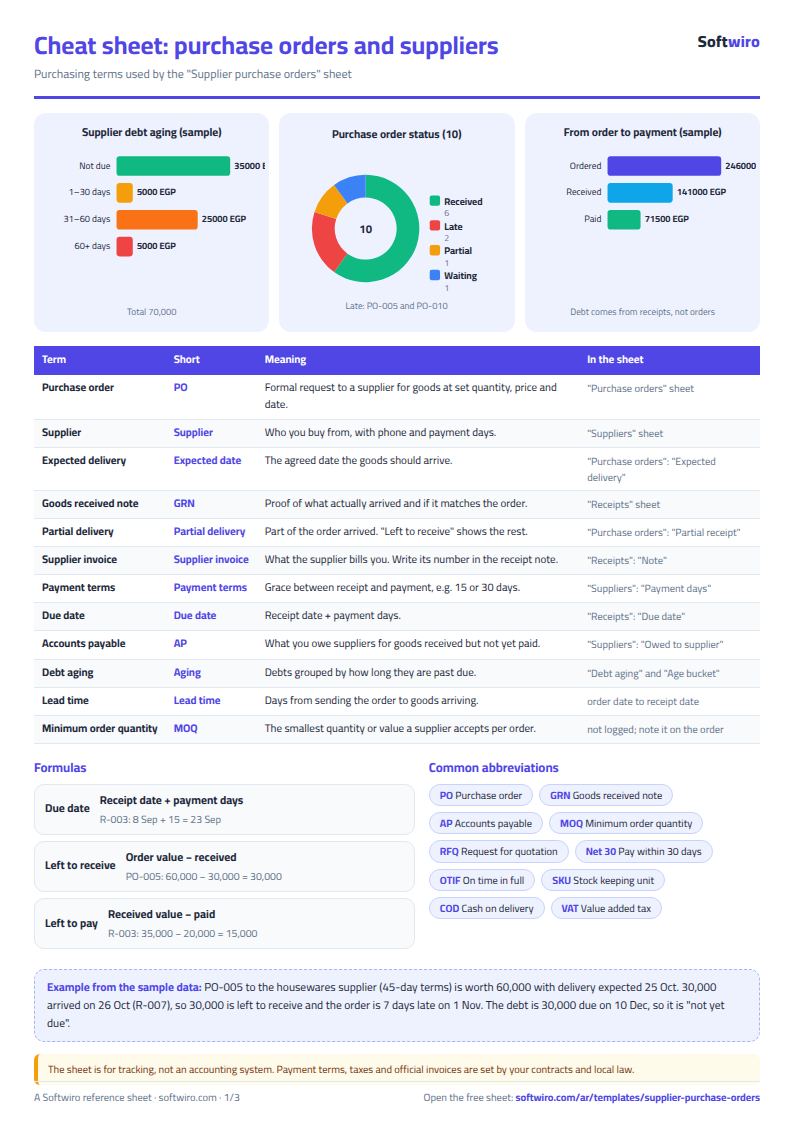
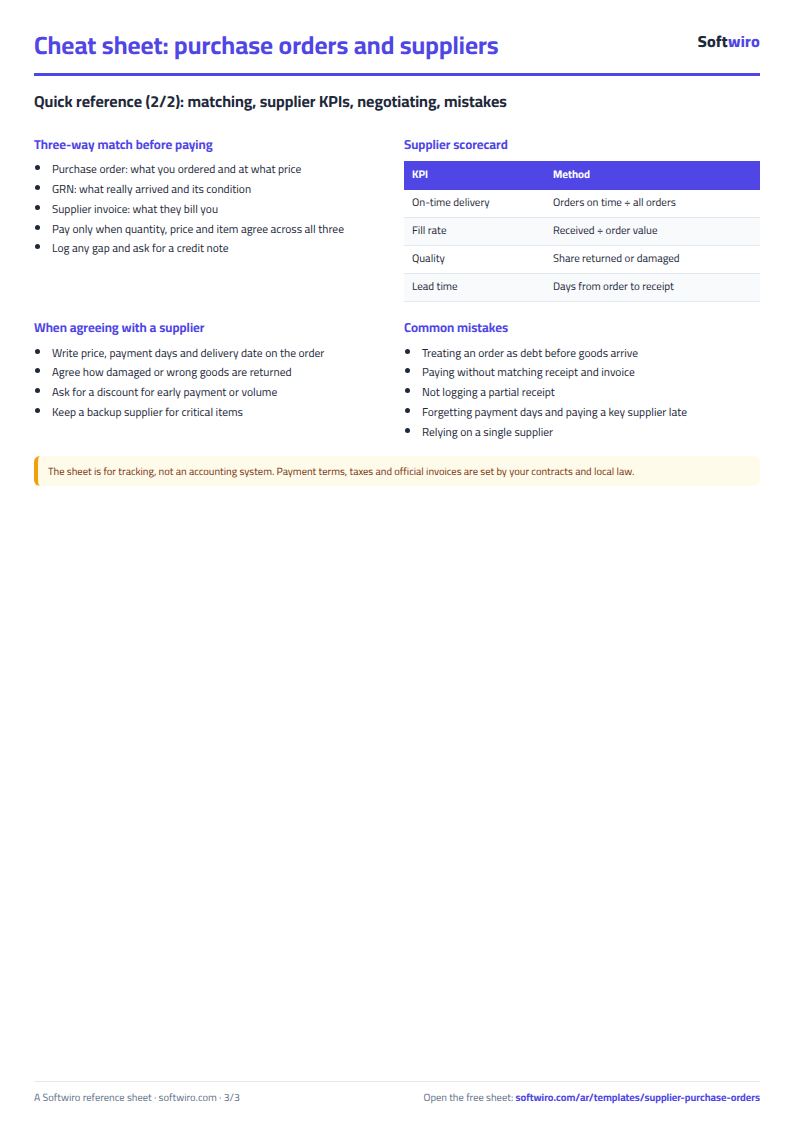
Free cheat sheet for this field
Terms, abbreviations, tables and diagrams over several pages, in Arabic and English. Download it as a PDF or images, including a phone-size version.
Still running this on Excel?
This sheet suits a start and a limited amount of data. If your way of working grows, or you need more than one person working on it at the same time, Softwiro can build you a program that fits the way you work.
| In this sheet | In Custom Software from Softwiro |
|---|---|
| One file that one person edits at a time, and copies reach you on WhatsApp. | A program with a login for each user and permissions you define, and everyone sees the same data. |
| You type everything and check the numbers by hand. | We design the screens around your work steps, so each person records only what concerns them. |
| Columns and formulas are fixed as the sheet was designed. | We build what you need: reports, alerts and screens your way. |
| Backups and security are your own responsibility. | The program runs on a secured server with regular backups. |
Frequently asked questions
Why does the debt come from the receipt and not from the purchase order?
Because what you owe is what has actually reached you. A purchase order whose goods you have not received shows as "بانتظار الاستلام" (awaiting receipt) or "متأخر التسليم" (late delivery), and it is not counted in what you owe the supplier until you record a receipt.
How is the due date of a receipt calculated?
Receipt date + the payment terms in days entered for the supplier in the "الموردون" (Suppliers) sheet. If you change a supplier's payment terms, the due dates of all of its receipts change.
How are the debt aging buckets calculated?
From the difference between today's date and the due date, applied to the unpaid balance of each receipt: "لم يحن" (not yet due) if the due date has not passed, then 1 to 30 days, 31 to 60 days, and over 60 days. A receipt paid in full falls in no bucket.
What if I pay one amount for several receipts?
Enter one row per receipt in "المدفوعات" (Payments), with the portion of the amount that belongs to that receipt, so that each receipt's balance and bucket come out right. A supplier you have overpaid shows as overpaid in the "الموردون" (Suppliers) sheet.
Is the template free?
Yes, with no sign-up and no email address. Use it, edit it and share it as you like.
Does it work in Google Sheets and on mobile?
The sheet uses formulas supported by Excel 2016 and later, Google Sheets and LibreOffice, so you can upload it to Google Drive and open it with Google Sheets on a computer or a phone.
What is the difference between the white and the gray cells?
You type in the white cells; the gray cells are calculated automatically. Don't type in a gray cell, or you will erase its formula.
Can I use the sheet from an AI assistant?
Yes. Add our MCP server (URL https://softwiro.com/api/mcp, no key needed) to your assistant and ask it to do the calculation in this template. The numbers come from the sheet's own formulas, and we do not store your data. The steps and a ready-made prompt are in this article: https://softwiro.com/blog/mcp-excel-templates-ai-agent-guide.html
More free templates for: Shops and stores
More free templates
- Cash Book Template for Excel
- Invoice Template with Invoice Log (Excel)
- Clothing shop inventory sheet by colour and size
- Customer accounts, credit sales and customer statement sheet
- Cash book and customer accounts sheet
- Installments and collection tracker
- General shop inventory tracker (stock in/out, reorder, slow movers)
- Multi-warehouse and branch inventory sheet with transfers
- Periodic stock count and count-difference reconciliation sheet
- Barcode, batch and expiry inventory sheet
- Grocery store management sheet
- Stationery shop and photocopy management sheet
- Electronics shop sheet: serials, warranty and repairs
- Wholesale clothing trade sheet: traders, stock and collection
- Food wholesale and distribution sheet in Excel: routes, expiry and collection
- Charity donations and disbursements tracker
- Travel agency bookings tracker
- Laundry orders tracker (Excel)
- Dental clinic treatment plans tracker (Excel)
- School class timetable (Excel)
- Exam schedule with committees and invigilators (Excel)
- Homework and behavior tracker for teachers (Excel)
- School bus subscriptions tracker (Excel)