Try the sheet here, on the example
The sheet is open below with sample numbers. Change any white cell and watch the results update, or press the blank-copy button to type your own data from scratch. Nothing you type leaves your browser.
Example from the sheet
| الكود | اسم الصنف | الرصيد الدفتري | الكمية النهائية | الفرق (كمية) | الفرق (قيمة) | نسبة الفرق | الحالة |
|---|---|---|---|---|---|---|---|
| S01 | أرز كيس 5 كجم | 100 | 100 | 0 | 0.00 | 0.0% | مطابق |
| S02 | سكر | 120 | 118 | -2 | -50.00 | -1.7% | فرق مقبول |
| S03 | زيت عباد الشمس 1 لتر | 45 | 38 | -7 | -420.00 | -15.6% | فرق مؤكد |
| S04 | مكرونة | 300 | لم يُجرد | ||||
| S05 | شاي علبة | 30 | 27 | -3 | -135.00 | -10.0% | فرق مؤكد |
| S06 | صابون | 150 | 156 | 6 | 72.00 | 4.0% | إعادة عد |
| S07 | منظف أرضيات | 24 | 24 | 0 | 0.00 | 0.0% | مطابق |
| S08 | مناديل ورقية | 80 | 79 | -1 | -18.00 | -1.3% | فرق مقبول |
| S09 | بطاريات قلم | 40 | 34 | -6 | -180.00 | -15.0% | فرق مؤكد |
| S10 | لمبة LED | 60 | لم يُجرد | ||||
| S11 | كابل USB | 25 | لم يُجرد | ||||
| S12 | قلم حبر | 400 | 392 | -8 | -24.00 | -2.0% | فرق مقبول |
| S13 | دفتر 100 ورقة | 100 | 101 | 1 | 15.00 | 1.0% | فرق مقبول |
| S14 | مشبك ورق | 50 | 41 | -9 | -45.00 | -18.0% | فرق مؤكد |
Example from the “المطابقة” tab (Arabic), with the numbers and formulas that are in the file.
What is inside
- الإعدادات: Today's date, the tolerance percentage and value (2% and 100 EGP in the example), the cut-offs for classes A and B, the number of days between counts for each class, and the list of categories.
- الأصناف: Code, name, category, unit and unit cost, then opening balance, receipts and issues, or a typed book balance that takes priority over the calculation, and the date of the previous count. The sheet calculates the book balance, its value and the ABC class of each item. Holds up to 300 items.
- الجرد: The count sheet: item code, count date, counter's name and counted quantity, then recount date, counter and quantity, an "اعتماد التسوية" (approve adjustment) column (yes or no), the approver's name and a note. A check column flags a code that does not exist or is duplicated.
- المطابقة: For each item: book balance, first count, recount and final quantity, the difference in quantity, value and percent, the status (matched, acceptable difference, recount, confirmed difference, not counted), the approved adjustment quantity and the new balance, shrinkage and overage in value, and the required action.
- إعادة العد: A list of items whose difference exceeded the tolerance and have not been recounted yet, sorted by the largest difference value, with the counter's name and count date.
- العجز حسب التصنيف: For each category: number of items, book value, count value, shrinkage, overage, net difference and shrinkage as a percentage of the value counted.
- خطة الجرد: For each item, its class (A, B or C), the number of days between counts, the last count, the next count date, the days remaining and the status: upcoming, this week, overdue or never counted.
- الملخص: The number of items counted and matched and the percentage within tolerance, book value, count value, shrinkage and overage, approved adjustments and those awaiting approval, ABC classes and overdue items, with four charts.
The file opens on a start tab (“ابدأ هنا”, Start here) that explains how to use it.
What makes it different
A difference is judged by its percentage and its value together, so you do not waste time recounting paper clips or let a small difference slide on an expensive item. An adjustment does not enter the balance without a written approval under the approver's name, so the ledger stays clean and the reason for every change stays on record.
How to use it
- In "الإعدادات" (Settings) enter today's date, the tolerance percentage and value, the ABC cut-offs and the number of days between counts for each class, then enter your item categories.
- In "الأصناف" (Items) enter for each item the code, name, category, unit and unit cost, then the opening balance, receipts and issues for the period. If you already have the book balance written down, enter it in the "رصيد دفتري مكتوب" (typed book balance) column and it takes priority over the calculation. Enter the date of the previous count if there is one.
- Print the "الجرد" (Count) sheet or open it on a phone, and record for each item counted: code, count date, counter's name and counted quantity. The count is done without looking at the book balance.
- The "المطابقة" (Reconciliation) sheet calculates the difference in quantity, value and percent, and gives each item a status: matched, acceptable difference, recount, confirmed difference, or not counted.
- Open "إعادة العد" (Recount) to find the items whose difference exceeded the tolerance, sorted by difference value, recount them with another counter and enter the quantity in the recount column of the "الجرد" (Count) sheet. The recount is used instead of the first count.
- After investigating the differences, enter "نعم" (yes) in the "اعتماد التسوية" (approve adjustment) column for the item whose adjustment you agree to. The counted balance then becomes the "new balance" in the reconciliation, and these balances are carried into the opening balance of the next period.
- "العجز حسب التصنيف" (Shrinkage by category) shows the shrinkage and overage value for each category, "خطة الجرد" (Count plan) sets each item's class and next count date, and "الملخص" (Summary) brings together the figures and charts.
Before you start:
- Book balance = opening + receipts - issues, unless you enter a balance in the "رصيد دفتري مكتوب" (typed book balance) column, in which case that is used.
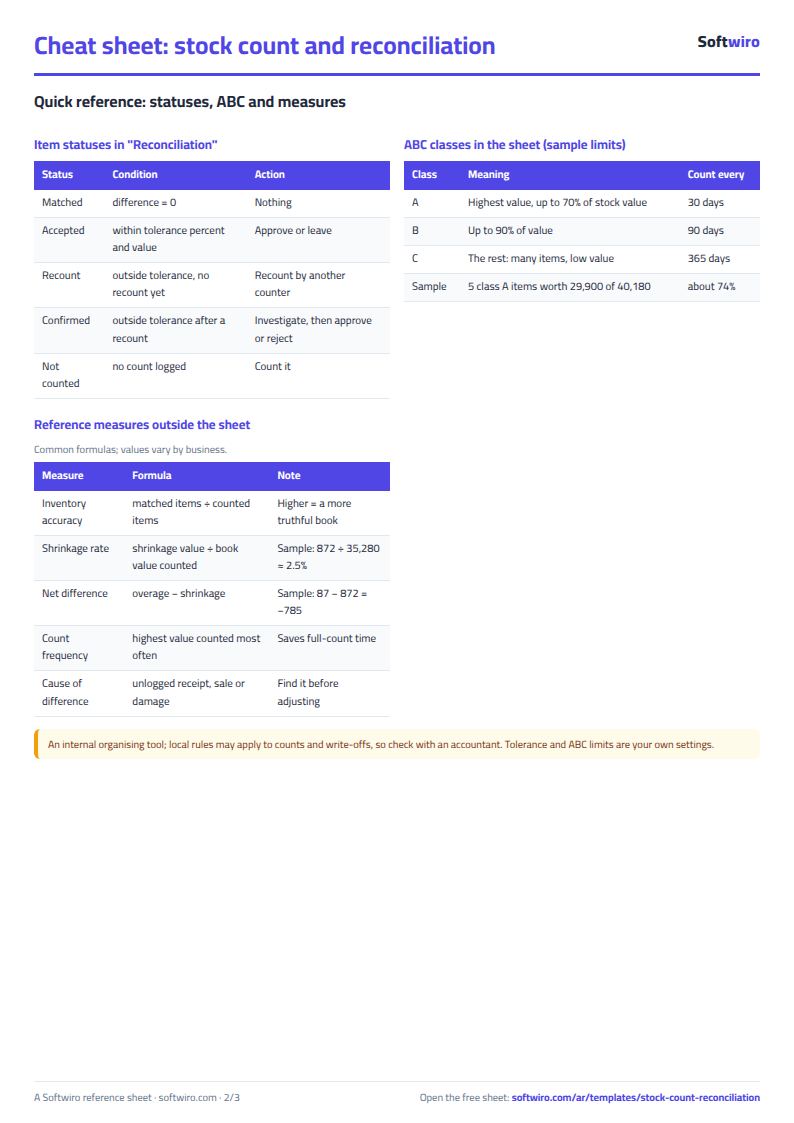
- Difference = final quantity - book balance, where the final quantity is the recount if there is one, otherwise the first count. A negative difference is shrinkage and a positive one is overage. Difference percent = difference / book balance.
- A difference is "acceptable" if its percentage does not exceed the tolerance percentage and its value does not exceed the tolerance value, both together. If either is exceeded the status is "recount", and if the item is recounted and the difference is still outside tolerance, the status is "confirmed difference".
- Balances do not change automatically with the adjustment: the "new balance" equals the counted balance for items marked "نعم" (yes) in the approval column, and stays at the book balance for the rest. The tolerance percentage, value and ABC cut-offs are numbers you set to suit your business.
- ABC class is by book balance value: class A holds the highest-value items until their cumulative share reaches the cut-off in Settings, then B up to its cut-off, and the rest are C. Next count date = last count + the number of days for the item's class.
- The sheet holds 300 items and 300 count lines, and the recount list shows the first 30 items. A code that does not exist in "الأصناف" (Items) or is duplicated in "الجرد" (Count) shows a red alert.
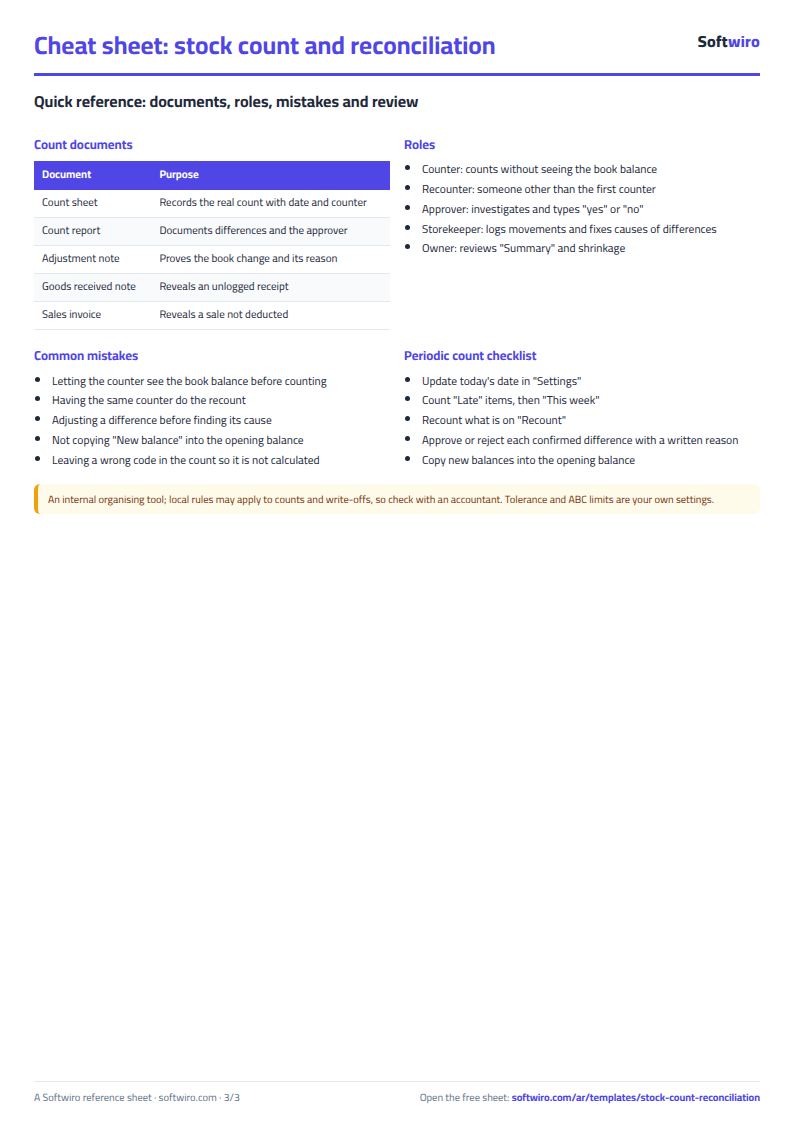
Free cheat sheet for this field
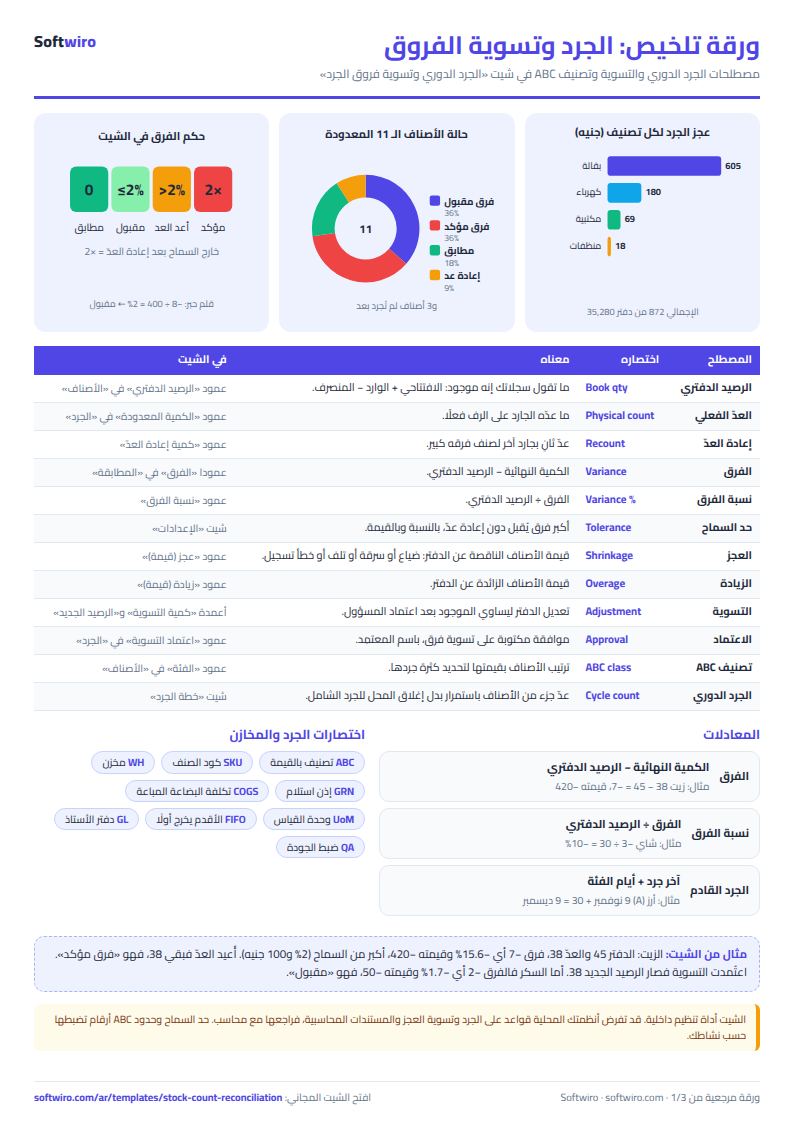
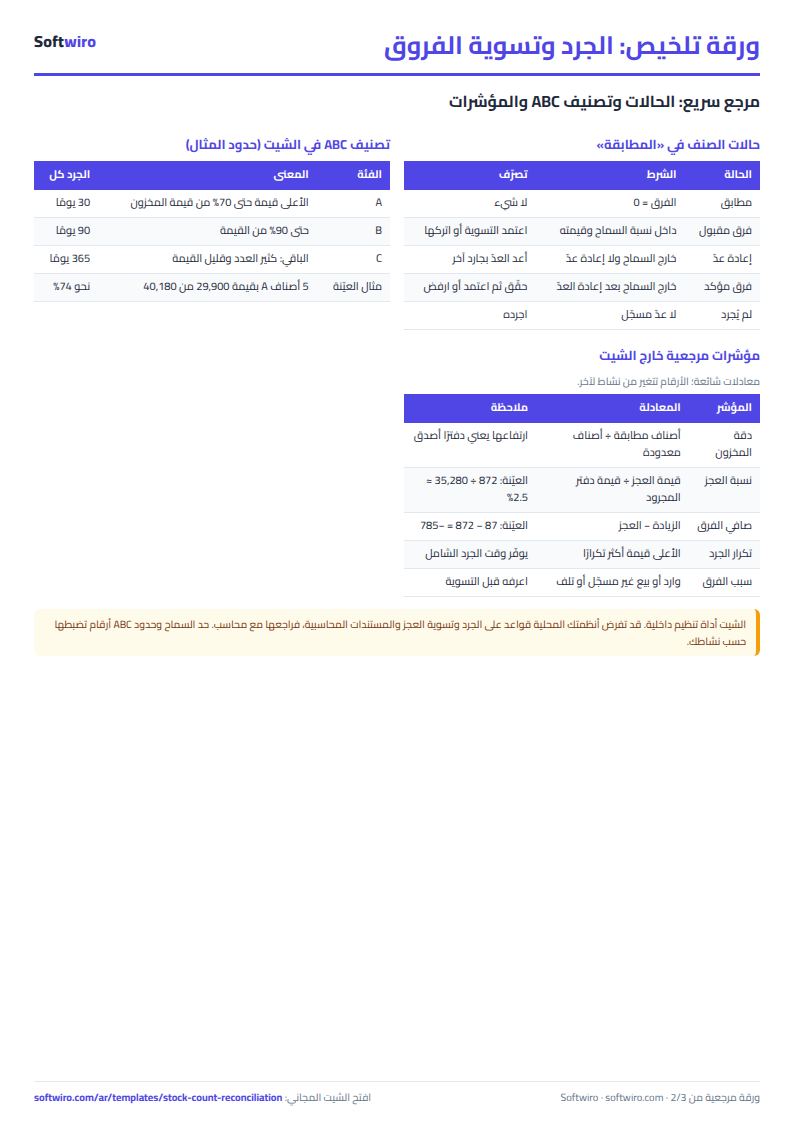
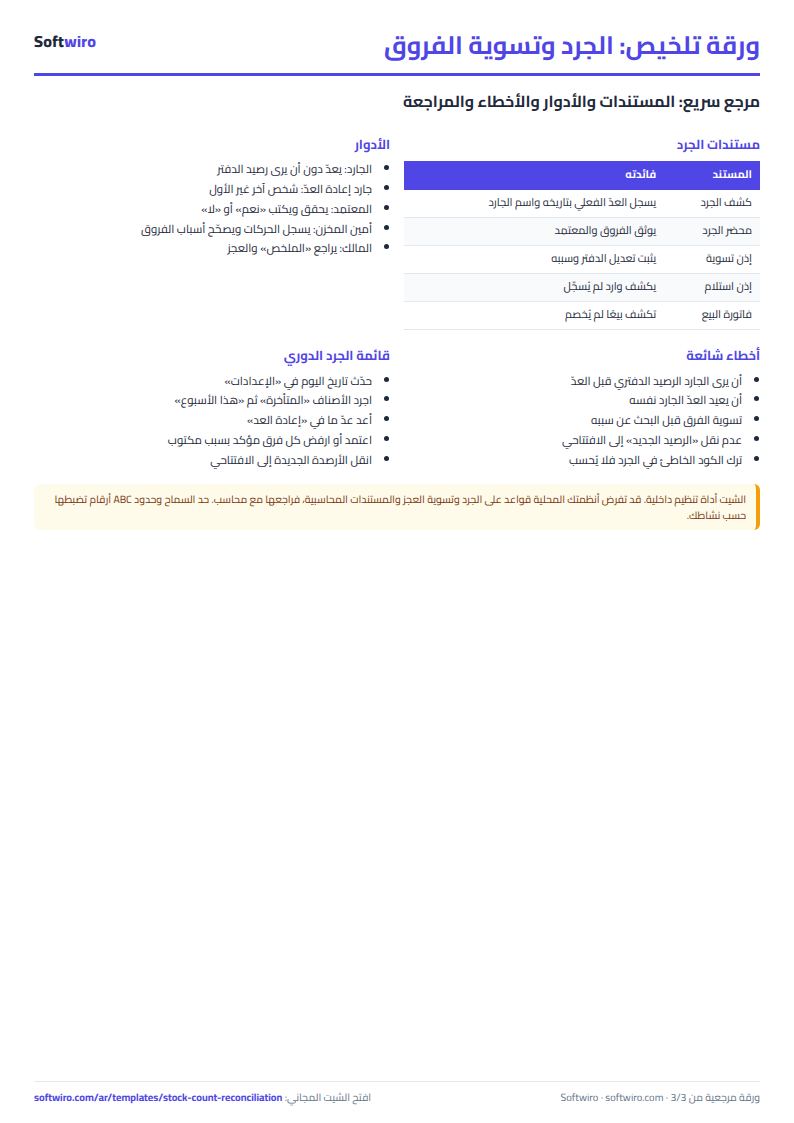
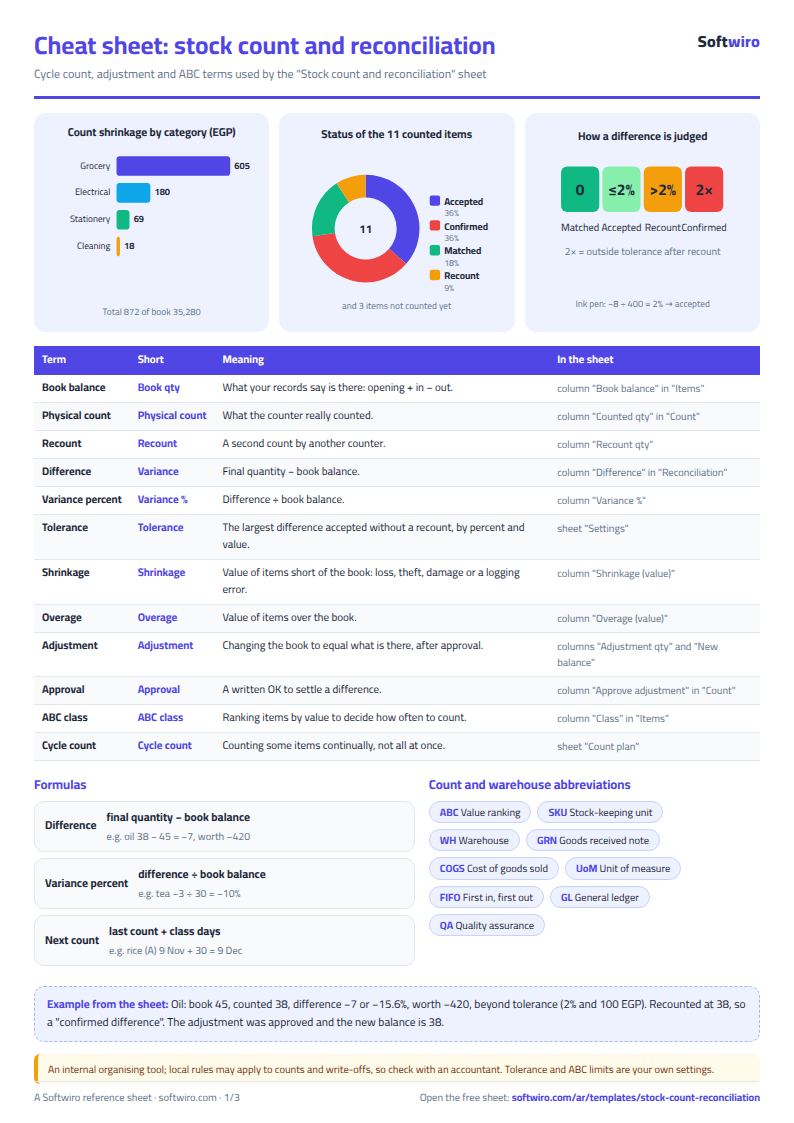
Terms, abbreviations, tables and diagrams over several pages, in Arabic and English. Download it as a PDF or images, including a phone-size version.
Still running this on Excel?
This sheet suits a start and a limited amount of data. If your way of working grows, or you need more than one person working on it at the same time, Softwiro can build you a program that fits the way you work.
| In this sheet | In Custom Software from Softwiro |
|---|---|
| One file that one person edits at a time, and copies reach you on WhatsApp. | A program with a login for each user and permissions you define, and everyone sees the same data. |
| You type everything and check the numbers by hand. | We design the screens around your work steps, so each person records only what concerns them. |
| Columns and formulas are fixed as the sheet was designed. | We build what you need: reports, alerts and screens your way. |
| Backups and security are your own responsibility. | The program runs on a secured server with regular backups. |
Frequently asked questions
When is a stock count difference acceptable in the sheet?
When its percentage does not exceed the tolerance percentage and its value does not exceed the tolerance value, both set in "الإعدادات" (Settings). If either is exceeded, the status shows "إعادة عدّ" (recount).
How do I record a recount?
Enter the quantity in the "كمية إعادة العدّ" (recount quantity) column next to the item in the "الجرد" (Count) sheet, with the counter and date. The recount is used instead of the first count, and if the difference is still outside tolerance, the status becomes "فرق مؤكد" (confirmed difference).
Do balances change automatically after the count?
No. Enter "نعم" (yes) in "اعتماد التسوية" (approve adjustment) for the item whose adjustment you agree to, and the "new balance" becomes the counted quantity. Then carry the new balances into the opening balance of the next period.
How does the sheet decide ABC classes?
It ranks items by book balance value. An item goes in A if the share of total value held by the items above it is below the cut-off set in Settings, and likewise for B and C. The next count date is the last count plus the number of days for its class.
Is the template free?
Yes, with no sign-up and no email address. Use it, edit it and share it as you like.
Does it work in Google Sheets and on mobile?
The sheet uses formulas supported by Excel 2016 and later, Google Sheets and LibreOffice, so you can upload it to Google Drive and open it with Google Sheets on a computer or a phone.
What is the difference between the white and the gray cells?
You type in the white cells; the gray cells are calculated automatically. Don't type in a gray cell, or you will erase its formula.
Can I use the sheet from an AI assistant?
Yes. Add our MCP server (URL https://softwiro.com/api/mcp, no key needed) to your assistant and ask it to do the calculation in this template. The numbers come from the sheet's own formulas, and we do not store your data. The steps and a ready-made prompt are in this article: https://softwiro.com/blog/mcp-excel-templates-ai-agent-guide.html
More free templates for: Shops and stores
More free templates
- Cash Book Template for Excel
- Invoice Template with Invoice Log (Excel)
- Clothing shop inventory sheet by colour and size
- Customer accounts, credit sales and customer statement sheet
- Cash book and customer accounts sheet
- Installments and collection tracker
- General shop inventory tracker (stock in/out, reorder, slow movers)
- Supplier purchase orders and payables tracker
- Multi-warehouse and branch inventory sheet with transfers
- Barcode, batch and expiry inventory sheet
- Grocery store management sheet
- Stationery shop and photocopy management sheet
- Electronics shop sheet: serials, warranty and repairs
- Wholesale clothing trade sheet: traders, stock and collection
- Food wholesale and distribution sheet in Excel: routes, expiry and collection
- Restaurant and cafe inventory and waste sheet
- Spare parts inventory sheet
- Fixed assets register and depreciation sheet
- Padel and 5-a-side court booking sheet (hourly)
- Wedding and event hall booking sheet
- Serviced apartments and short-stay bookings sheet
- Restaurant and cafe table reservations sheet
- Photo studio bookings sheet