Try the sheet here, on the example
The sheet is open below with sample numbers. Change any white cell and watch the results update, or press the blank-copy button to type your own data from scratch. Nothing you type leaves your browser.
Example from the sheet
| الكود | الاسم | عدد الشحنات | إجمالي التحصيل | إجمالي الرسوم | صافي المستحق للتاجر |
|---|---|---|---|---|---|
| الإجمالي | 20 | 8,990.00 | 740.00 | 8,250.00 | |
| T01 | متجر النيل للأزياء | 8 | 2,860.00 | 265.00 | 2,595.00 |
| T02 | بيت الأناقة | 6 | 1,450.00 | 180.00 | 1,270.00 |
| T03 | مخزن الأمل | 6 | 4,680.00 | 295.00 | 4,385.00 |
Example from the “تسوية التجار” tab (Arabic), with the numbers and formulas that are in the file.
What is inside
- "المناطق" (Zones): For each zone: the delivery fee and the return fee charged to the merchant, and the courier's commission for a delivery and for a return.
- "الشحنات" (Shipments): Each shipment with its merchant, courier, zone, collection amount and status. The sheet calculates its fees, the amount due to the merchant and the courier's commission.
- "تسوية التجار" (Merchant settlement): For each merchant, in the period you choose: shipments, delivered, returned, cash collected, fees and net amount due.
- "حساب المناديب" (Courier accounts): For each courier: delivered, returned, the cash collected that they hand over, and their commission.
The file opens on a start tab (“ابدأ هنا”, Start here) that explains how to use it.
What makes it different
The merchant settlement and the courier account come straight from the shipment log, for any period you pick, instead of adding them up by hand every week.
How to use it
- In the "الإعدادات" (Settings) sheet, enter the start and end dates of the period.
- In the "المناطق" (Zones) sheet, enter the delivery fee and return fee charged to the merchant, and the courier commission, for each zone.
- In the "التجار" (Merchants) and "المناديب" (Couriers) sheets, give each merchant and courier a code and a name.
- In the "الشحنات" (Shipments) sheet, log every shipment: date, number, merchant, courier, zone, collection amount and status.
- Open "تسوية التجار" (Merchant settlement) and "حساب المناديب" (Courier accounts) to see the figures for the selected period.
Before you start:
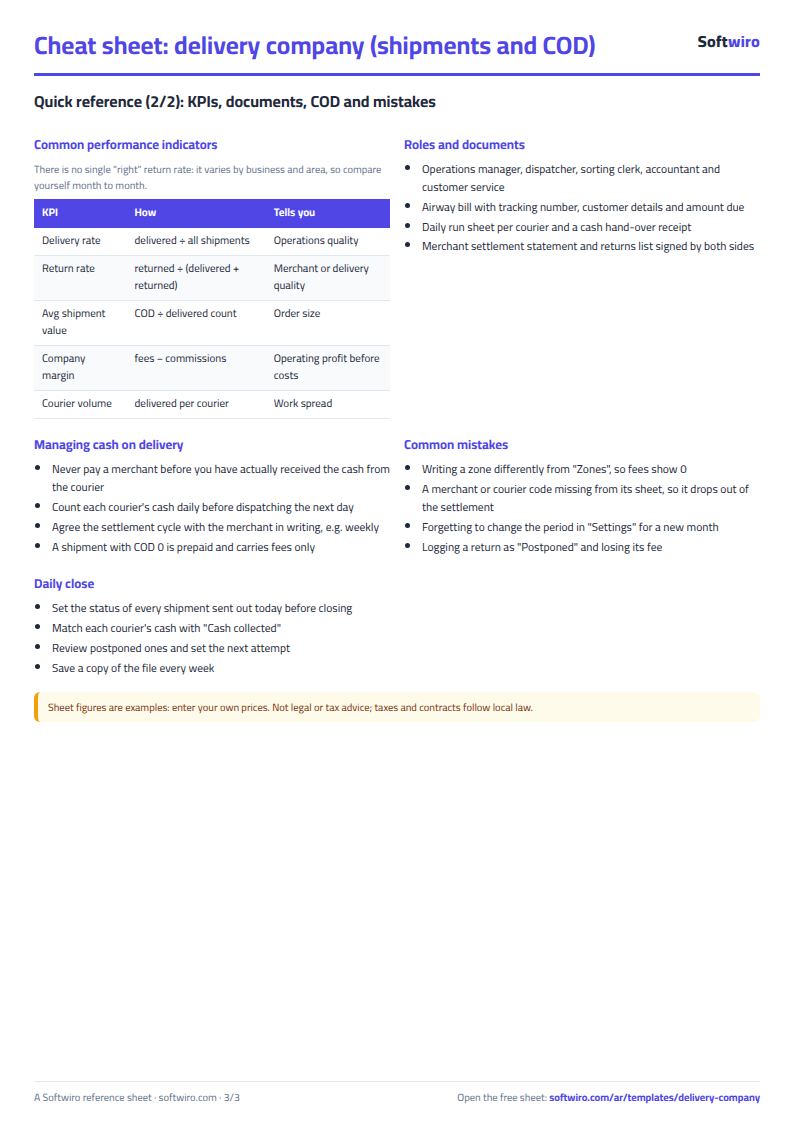
- In "الشحنات" (Shipments), type each code exactly as it appears in the merchant or courier sheet, and type the zone exactly as it appears in "المناطق" (Zones).
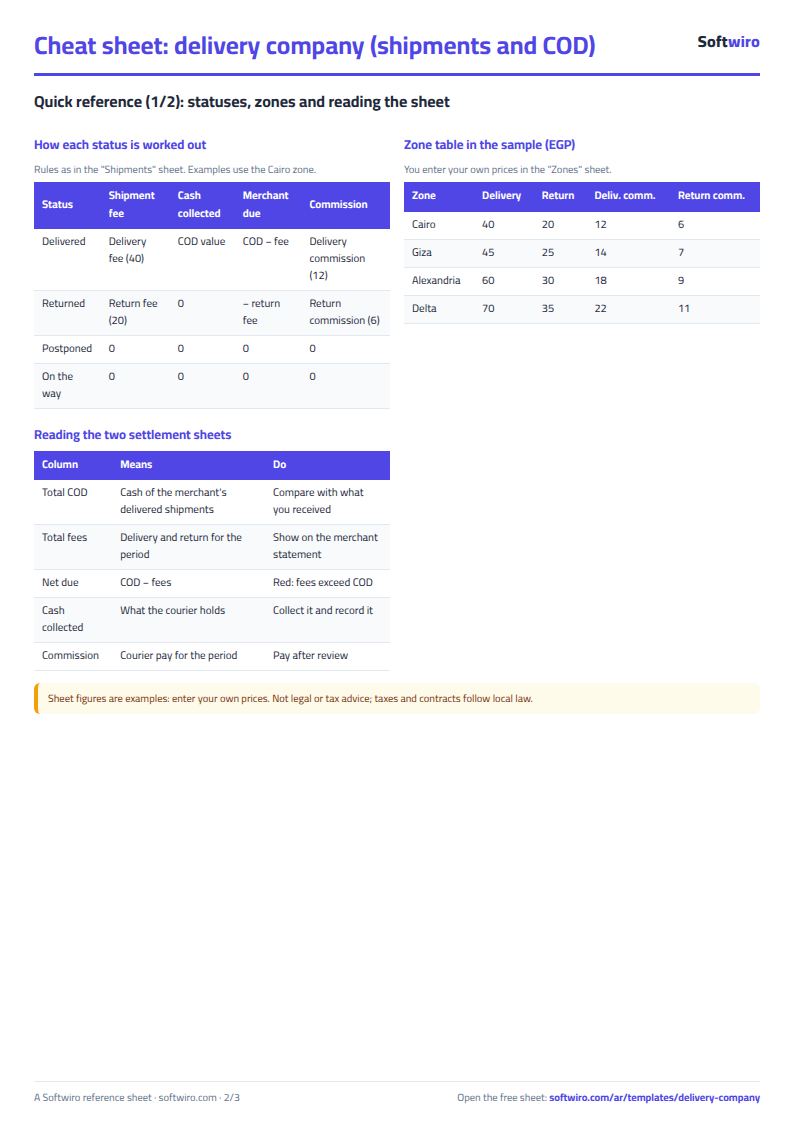
- A delivered shipment is charged the delivery fee and a returned one the return fee. Postponed shipments and those still out for delivery get no fee and no commission.
- The amount due to the merchant turns negative if the return fees are larger than the collection, and it shows in red in the settlement.
Free cheat sheet for this field
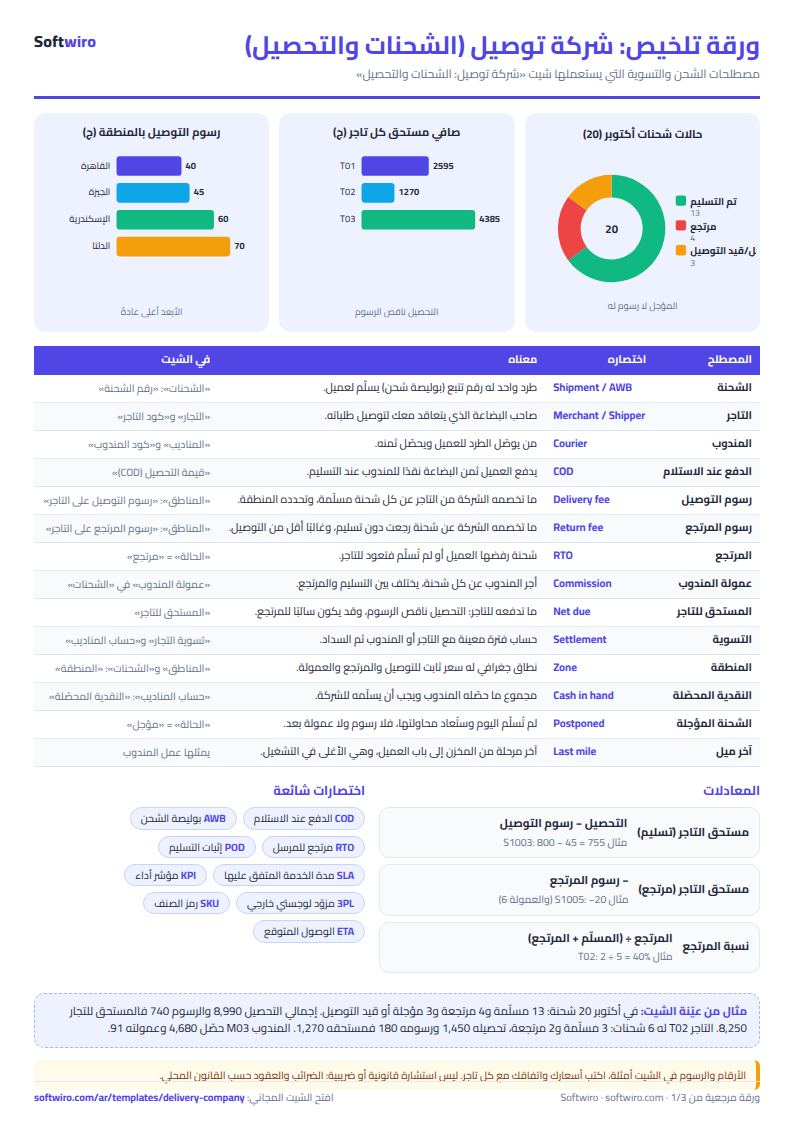
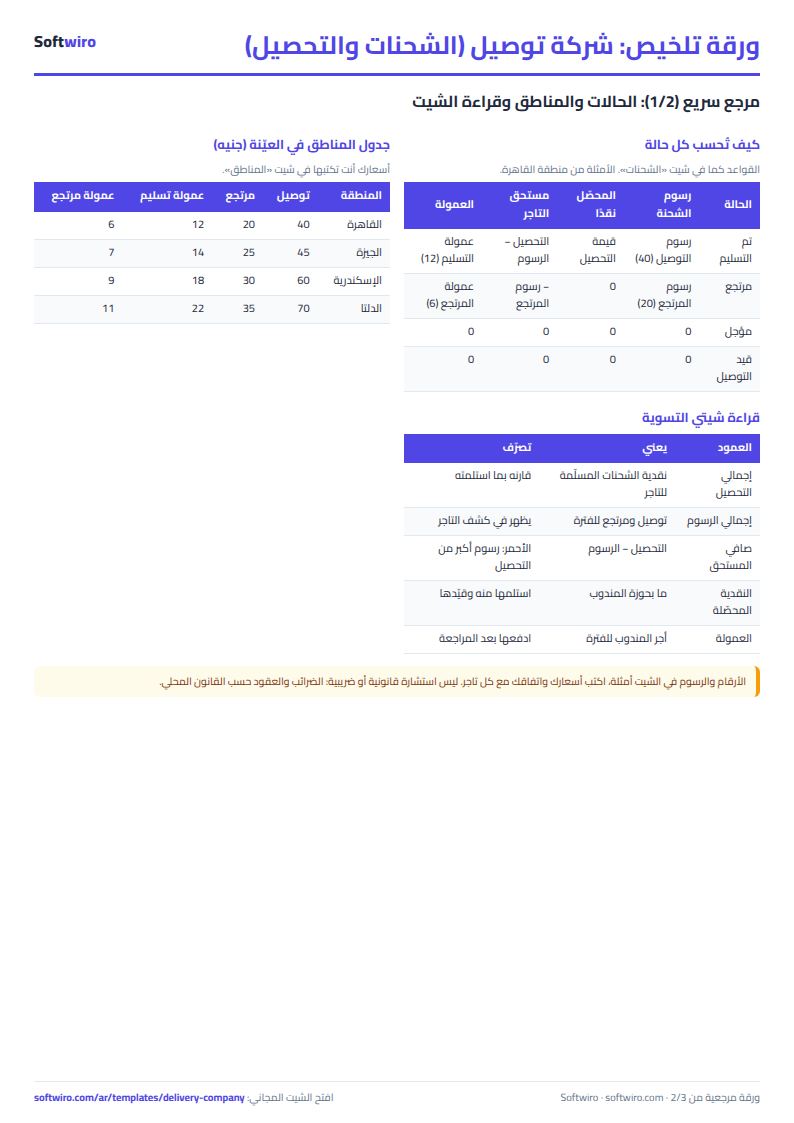
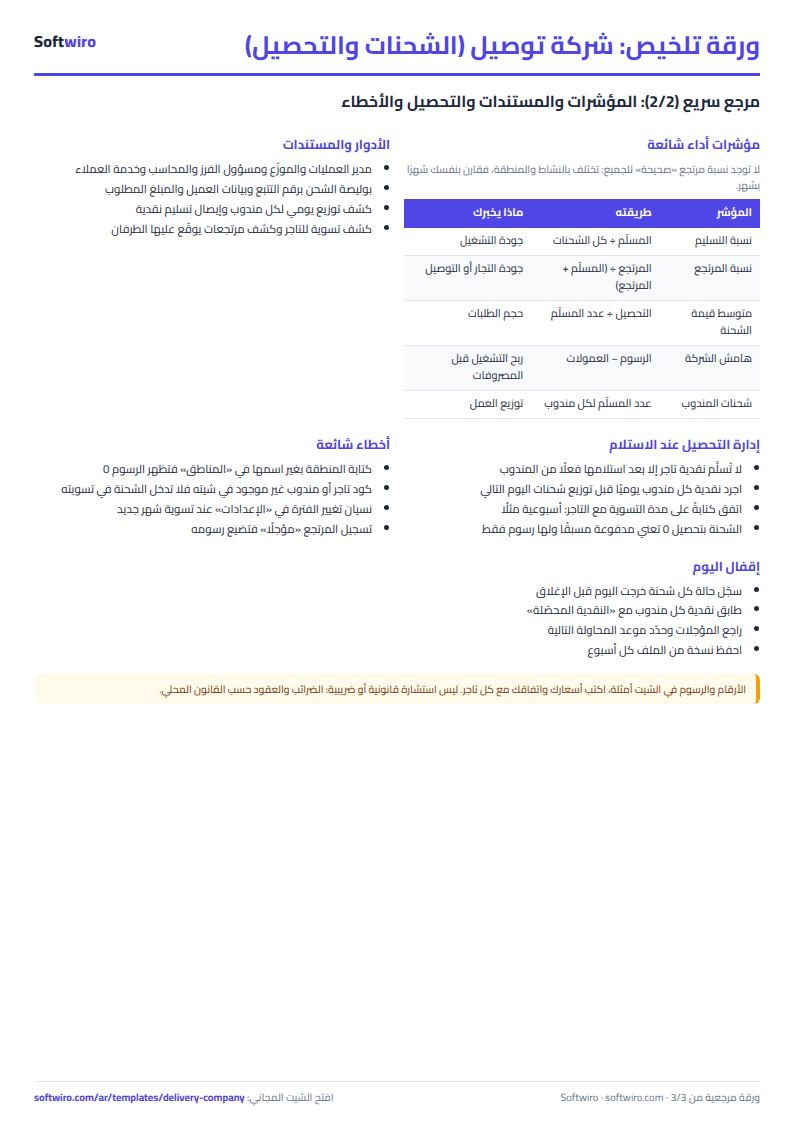
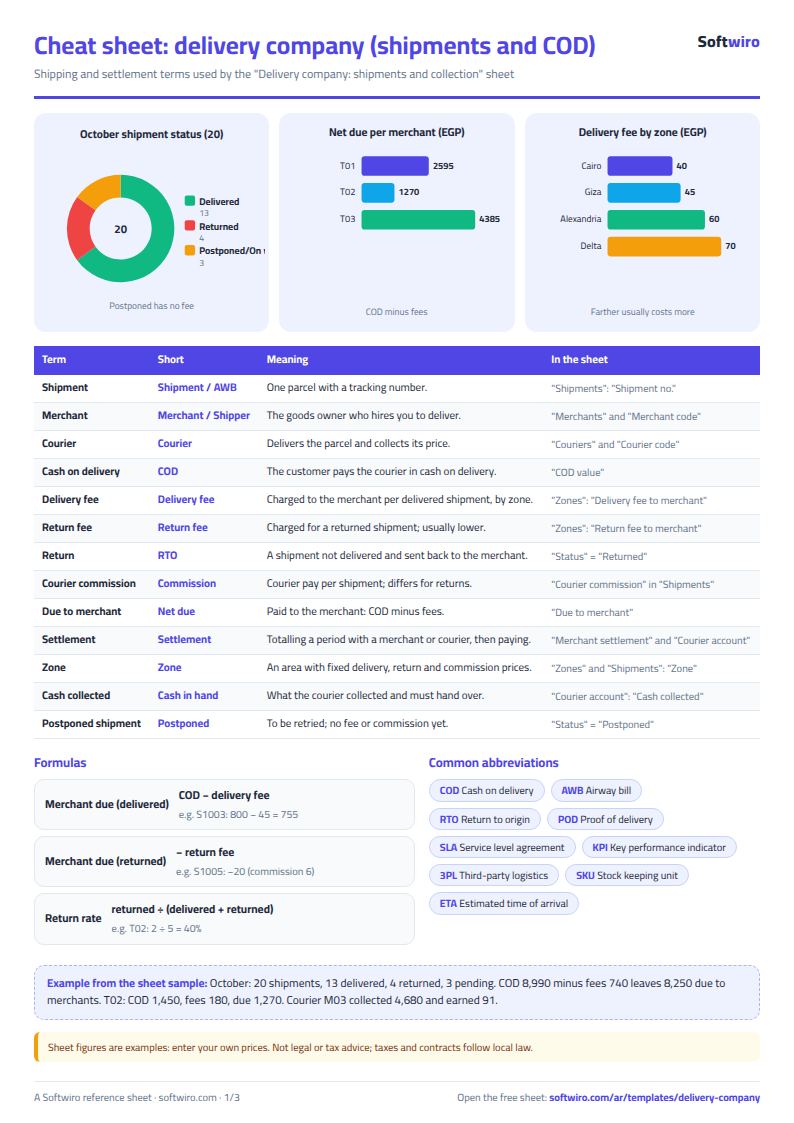
Terms, abbreviations, tables and diagrams over several pages, in Arabic and English. Download it as a PDF or images, including a phone-size version.
Still running this on Excel?
This sheet needs someone to type in every shipment and every collection. In Wassalni, the merchant creates their own shipments and the courier updates their status from the courier app.
| In this sheet | In Wassalni — Shipping & Delivery Management Platform |
|---|---|
| Every merchant phones to ask about their shipments and collections. | Each merchant has an app to create shipments and follow their collections. |
| The courier gets orders on paper or on WhatsApp. | Each courier has an app for the day's orders, and management gets reports per merchant, on courier performance and on collections. |
| The customer keeps calling to ask about their order. | Tracking for every status, courier location sharing via GPS, and a tracking link sent to the customer on WhatsApp. |
| Online store orders are transferred by hand. | A ready-made WooCommerce plugin and an API, so delivery is requested automatically with every order. |
See Wassalni — Shipping & Delivery Management Platform · Ask for a demo
Frequently asked questions
Can I change the fees for each zone?
Yes. Enter the delivery fee, the return fee and the courier commission for each zone in the "المناطق" (Zones) sheet. Every shipment takes the fees of its zone.
Is the template free?
Yes, with no sign-up and no email address. Use it, edit it and share it as you like.
Does it work in Google Sheets and on mobile?
The sheet uses formulas supported by Excel 2016 and later, Google Sheets and LibreOffice, so you can upload it to Google Drive and open it with Google Sheets on a computer or a phone.
What is the difference between the white and the gray cells?
You type in the white cells; the gray cells are calculated automatically. Don't type in a gray cell, or you will erase its formula.
Can I use the sheet from an AI assistant?
Yes. Add our MCP server (URL https://softwiro.com/api/mcp, no key needed) to your assistant and ask it to do the calculation in this template. The numbers come from the sheet's own formulas, and we do not store your data. The steps and a ready-made prompt are in this article: https://softwiro.com/blog/mcp-excel-templates-ai-agent-guide.html
More free templates for: Delivery companies
More free templates
- Student attendance sheet
- Study planner and lesson tracker
- Journal entries, trial balance and financial statements sheet
- Weekly study routine sheet
- Online store orders and profit sheet
- Real estate leads and units tracker
- Installments and collection tracker
- Rental portfolio tracker: properties, units, tenants and contracts