Baqalti: the same sheet as an app on your phone
The grocery store notebook on your phone, free: sales, the customers' credit notebook, stock, shortages and the daily cash-drawer close. It works without internet, your data stays on your device only, and you can save it as an Excel file at any time.
Try the sheet here, on the example
The sheet is open below with sample numbers. Change any white cell and watch the results update, or press the blank-copy button to type your own data from scratch. Nothing you type leaves your browser.
Example from the sheet
| الكود | اسم الصنف | الفئة | سعر الشراء | سعر البيع | الرصيد | قيمة المخزون | الحالة |
|---|---|---|---|---|---|---|---|
| G01 | أرز مصري | بقالة جافة | 28.00 | 33.00 | 114 | 3,192.00 | متوفر |
| G02 | سكر | بقالة جافة | 30.00 | 35.00 | 117 | 3,510.00 | متوفر |
| G03 | مكرونة 400 جم | بقالة جافة | 9.00 | 11.00 | 203 | 1,827.00 | متوفر |
| G04 | عدس أصفر | بقالة جافة | 55.00 | 65.00 | 1 | 55.00 | اطلب |
| G05 | زيت عباد الشمس 1 لتر | زيوت وسمن | 62.00 | 72.00 | 82 | 5,084.00 | متوفر |
| G06 | سمن نباتي 1 كجم | زيوت وسمن | 70.00 | 82.00 | 23 | 1,610.00 | متوفر |
| G07 | لبن كامل الدسم 1 لتر | ألبان وجبن | 38.00 | 44.00 | 56 | 2,128.00 | متوفر |
| G08 | جبنة بيضاء 500 جم | ألبان وجبن | 55.00 | 65.00 | 6 | 330.00 | اطلب |
| G09 | مياه معدنية 1.5 لتر | مشروبات | 6.00 | 8.00 | 162 | 972.00 | متوفر |
| G10 | مشروب غازي 1 لتر | مشروبات | 14.00 | 18.00 | 154 | 2,156.00 | متوفر |
Example from the “الأصناف” tab (Arabic), with the numbers and formulas that are in the file.
What is inside
- الإعدادات (Settings): Today's date for the daily close, any date within the summary month, the multiplier for minimum order quantity, the number of days after which a notebook account counts as late, and the list of item categories.
- الأصناف (Items): Code, name, category, unit, purchase price, sale price, minimum level, opening stock and usual supplier. The sheet calculates purchases, sales, stock, stock value, profit margin, status (in stock, order, out of stock or negative stock) and the suggested order quantity. It holds 300 items.
- المشتريات (Purchases): One row per delivery: date, item code, quantity, purchase price, supplier and amount paid. The item name, total and amount still owed to the supplier appear automatically, with an alert if the price differs from the list. It holds 1,500 deliveries.
- المبيعات (Sales): One row per sale: date, item code, quantity, sale type (cash or notebook) and the customer name for notebook sales. The price, total, cost, profit and category appear automatically, with an optional cell for a custom price. It holds 2,500 rows.
- النوتة (Notebook): Each credit customer with mobile number, previous balance and credit limit. Beside each one: notebook purchases, payments, amount due, last payment, days late and status (paid, due, late or over limit). It holds 200 customers.
- الدفعات (Payments): Customer payments: date, customer, amount and payment method (cash or wallet), with an alert if the customer name does not exist. It holds 1,000 payments.
- الموردون (Suppliers): Each supplier with your purchases from them, what you paid on invoices and in later payments, the amount you owe, this month's purchases, and the number of short items and their cost. It holds 50 suppliers.
- دفعات الموردين (Supplier payments): What you pay each supplier outside invoices. It reduces the amount owed to that supplier and is included in the drawer close.
- النواقص (Shortages): A list of items that ran out or fell below their minimum, sorted by largest quantity, with the suggested quantity, its cost and the usual supplier. It shows the first 50 items.
- اليوميات (Daily): For each day of the chosen month: cash sales, notebook sales, total, profit, notebook payments and number of sales rows. The sales curve is drawn from it.
- قفل اليوم (Daily close): Opening drawer balance, cash sales, cash notebook payments, supplier payments and expenses. The sheet shows the expected drawer amount, compares it with the cash you counted and writes the difference.
- الملخص (Summary): The month's cash and notebook sales, their cost, gross profit and margin, stock and shortage values, notebook amounts due from customers and amounts owed to suppliers, a profit-by-category table and three charts.
The file opens on a start tab (“ابدأ هنا”, Start here) that explains how to use it.
What makes it different
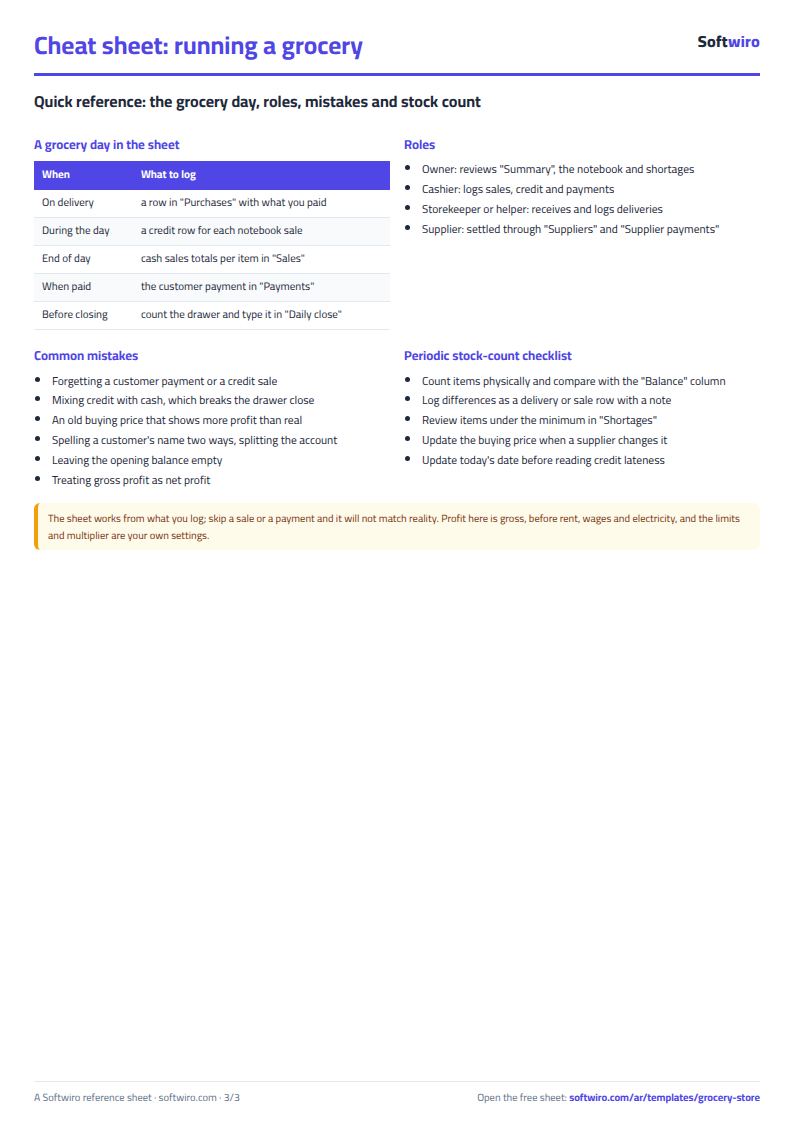
The notebook, the cash drawer and the stock are in one file. A notebook sale counts in sales and profit but not in the drawer. A customer payment reduces what they owe and adds to the drawer if paid in cash. A delivery adds to stock and to the amount owed to the supplier. So at the end of the day you know where every pound went.
How to use it
- In the «الإعدادات» (Settings) tab, enter today's date (for the daily close) and any date within the month you want summarised, and review the item categories.
- In «الأصناف» (Items), enter for each item: code, name, category, unit, purchase price, sale price, minimum level, opening stock and usual supplier.
- In «الموردون» (Suppliers) and «النوتة» (Notebook), enter the names of suppliers and of customers who buy on credit (with any previous balance and credit limit).
- Record each delivery in «المشتريات» (Purchases) (code, quantity, purchase price, supplier and amount paid), and each payment to a supplier in «دفعات الموردين» (Supplier payments).
- Record sales in «المبيعات» (Sales): add up each item's cash sales for the day into one row, and write one row per notebook sale with the customer's name. Record what customers pay in «الدفعات» (Payments).
- At the end of the day open «قفل اليوم» (Daily close): enter the opening drawer balance, expenses and the cash you counted, and the difference appears. Check «النواقص» (Shortages) to see what to order and «الملخص» (Summary) for the month's profit.
Before you start:
- Item stock = opening stock + purchases - sales. Enter the opening stock once in the Items tab; the other records handle the rest.
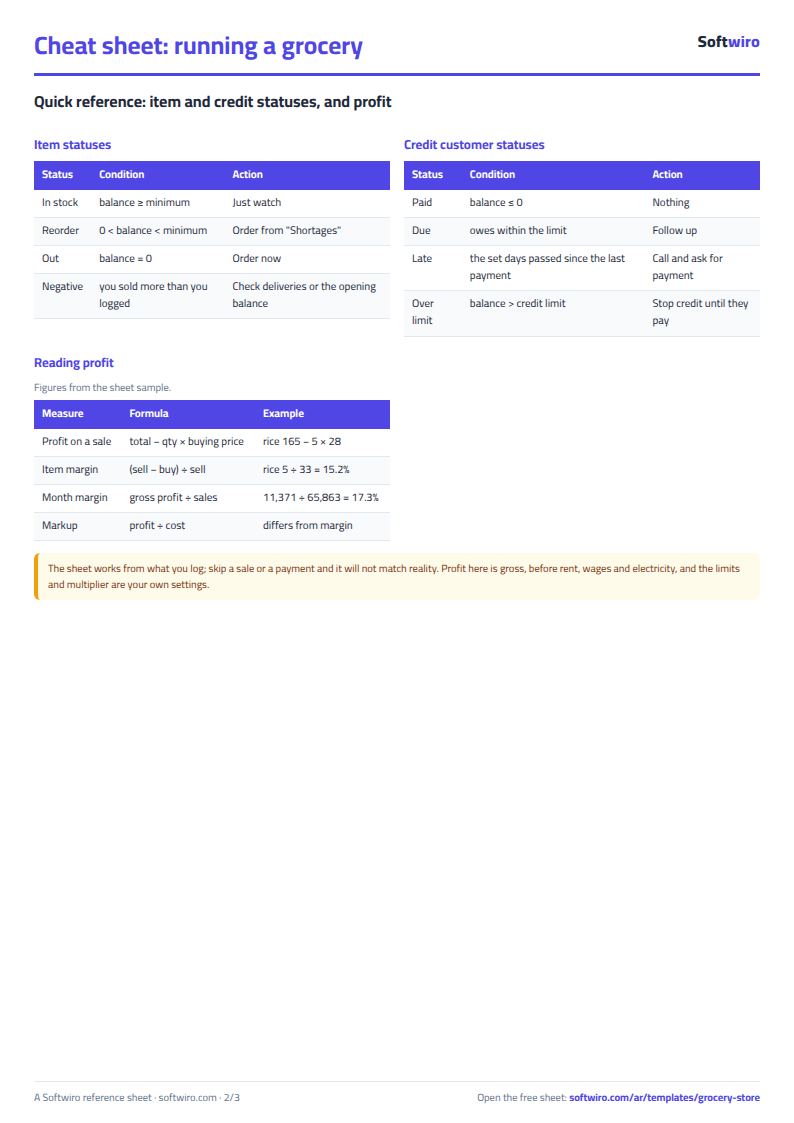
- Status: "out of stock" if stock is zero, "order" if it is below the minimum, and "negative stock" if you sold more than you recorded (a recording error you need to review).
- Profit on a sale = total - (quantity x the purchase price written in the Items tab), so update the purchase price there when a supplier's price changes. In the Purchases tab the sheet warns you if a delivery's price differs from the list price.
- A notebook sale counts in sales and profit but not in the drawer. When the customer pays, the amount goes into Payments and adds to the drawer cash if the method is "cash".
- Customer amount due = previous balance + notebook purchases - payments. "Over limit" if it exceeds the credit limit, and "late" if the number of days set in Settings has passed since the last payment.
- The sheet holds 300 items, 1,500 deliveries, 2,500 sales rows, 200 notebook customers, 1,000 payments and 50 suppliers. Shortages shows the first 50 short items.
Free cheat sheet for this field
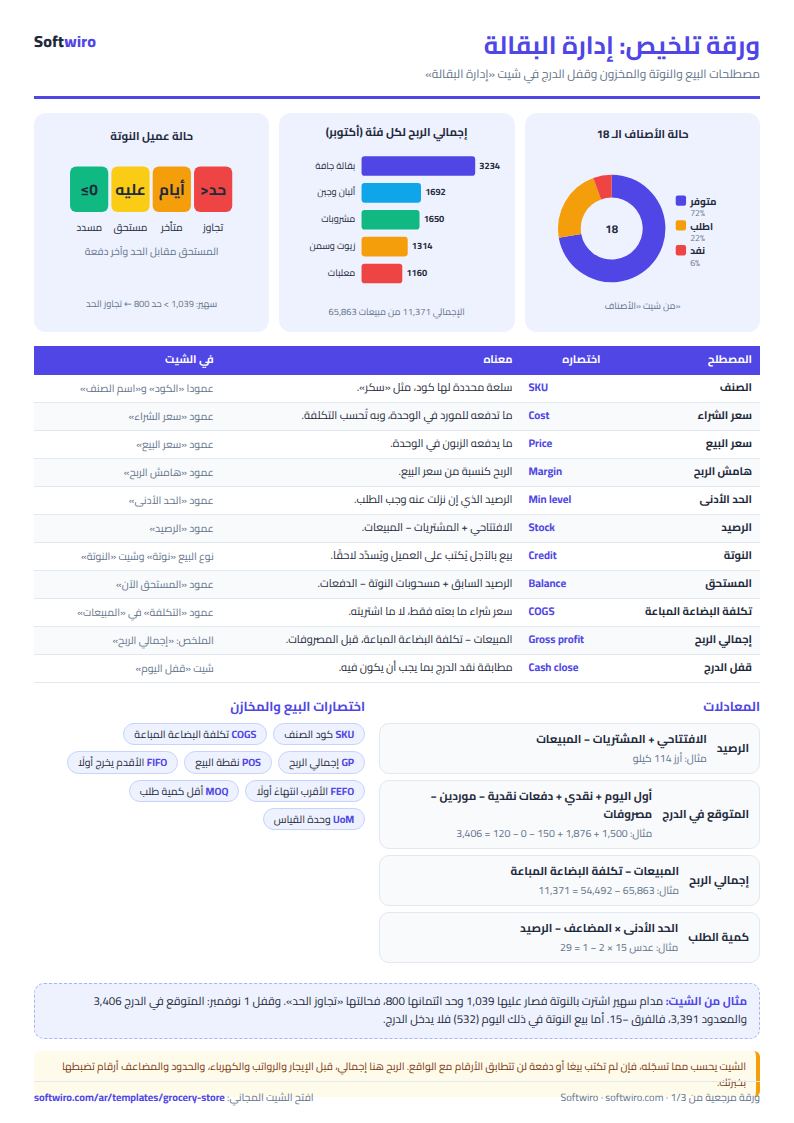
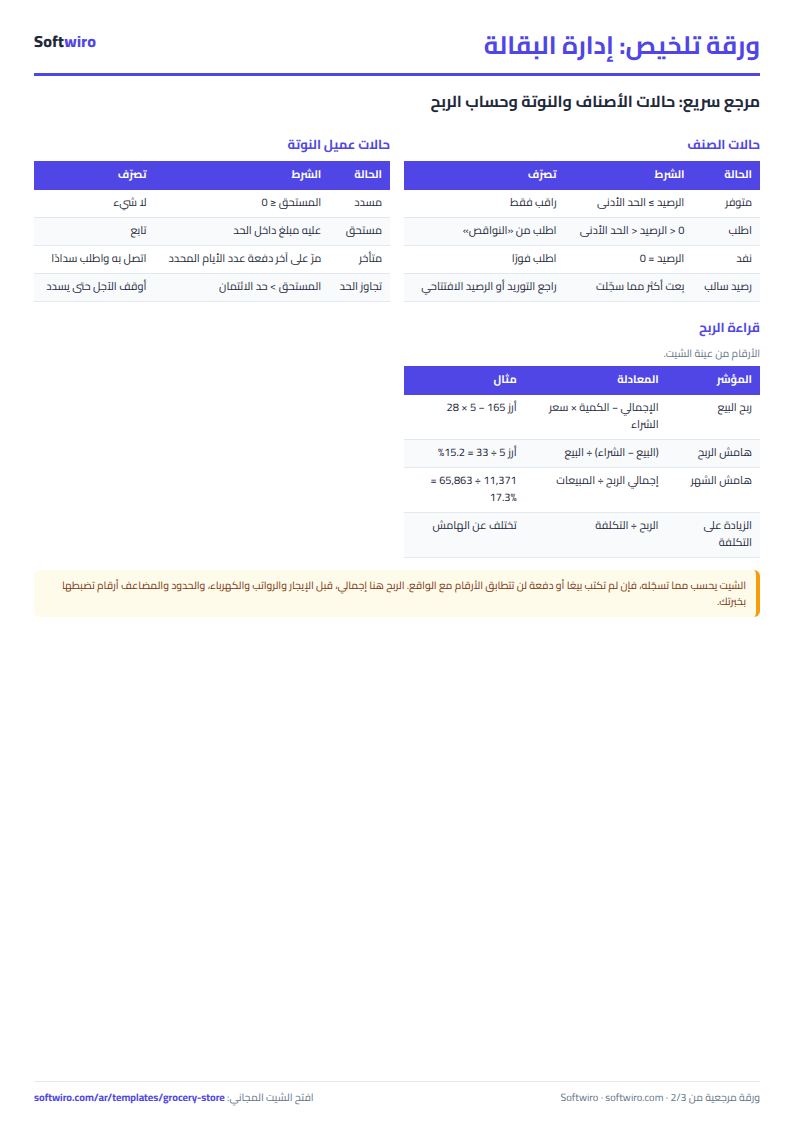
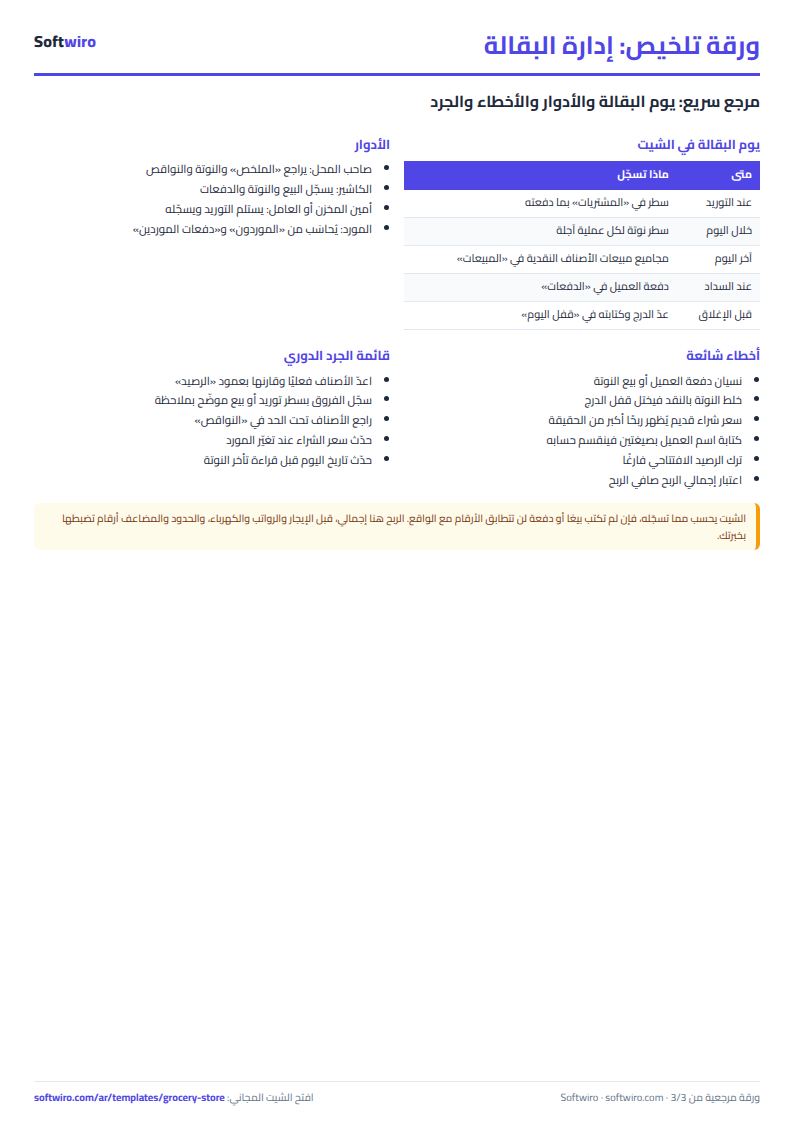
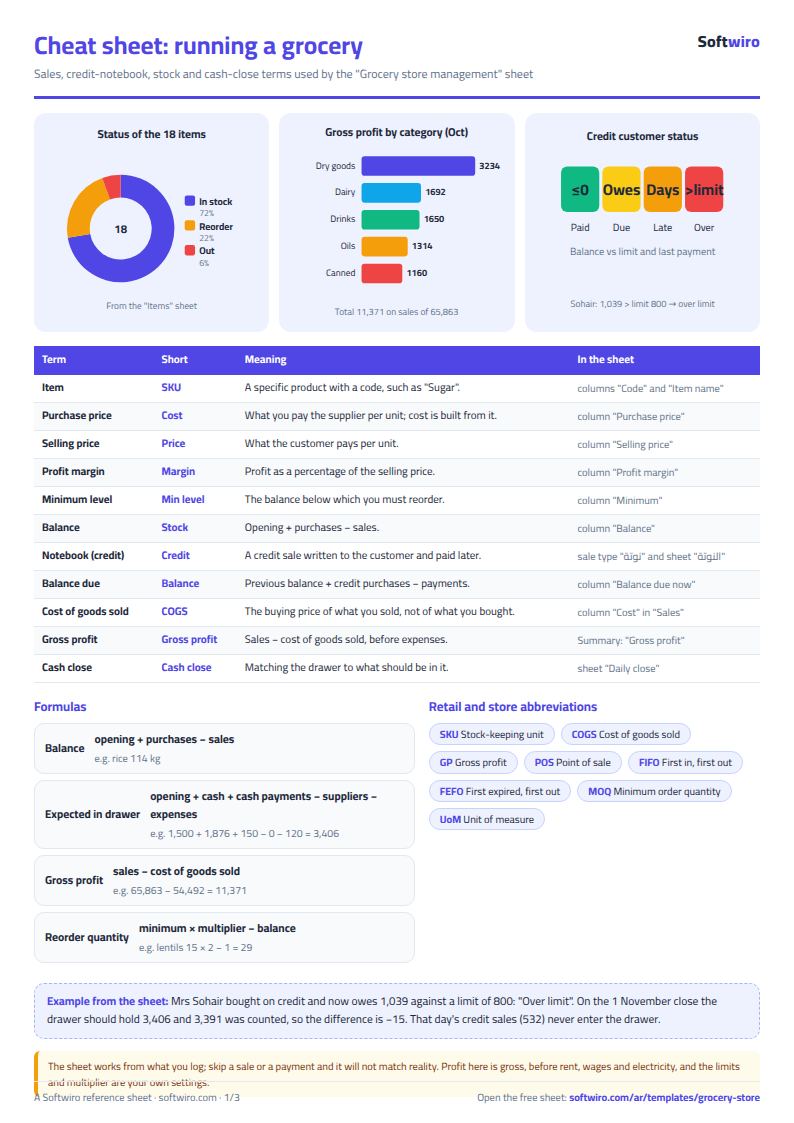
Terms, abbreviations, tables and diagrams over several pages, in Arabic and English. Download it as a PDF or images, including a phone-size version.
Still running this on Excel?
This sheet suits a start and a limited amount of data. If your way of working grows, or you need more than one person working on it at the same time, Softwiro can build you a program that fits the way you work.
| In this sheet | In Custom Software from Softwiro |
|---|---|
| One file that one person edits at a time, and copies reach you on WhatsApp. | A program with a login for each user and permissions you define, and everyone sees the same data. |
| You type everything and check the numbers by hand. | We design the screens around your work steps, so each person records only what concerns them. |
| Columns and formulas are fixed as the sheet was designed. | We build what you need: reports, alerts and screens your way. |
| Backups and security are your own responsibility. | The program runs on a secured server with regular backups. |
Frequently asked questions
How do I record a notebook (credit) sale in the sheet?
In «المبيعات» (Sales), set the sale type to "notebook" and pick the customer's name. The amount goes into the day's sales and profit and is added to the customer's balance in the Notebook tab, but it does not go into the drawer. When the customer pays, record the payment in «الدفعات» (Payments).
How does the sheet calculate the cash-drawer difference?
Expected = opening drawer balance + cash sales + cash notebook payments - supplier payments - expenses. You enter the cash you counted, and the difference = actual - expected. It turns red if it is not zero.
When does the sheet mark a notebook customer as "late" or "over limit"?
"Over limit" means the amount due is above the customer's credit limit. "Late" means the number of days you set in Settings has passed since their last payment and they still owe money.
How does the sheet calculate a grocery store's profit?
Profit on each sale = total - (quantity x purchase price in the Items tab). Gross profit = sales - cost of goods sold, before rent, salaries and electricity. Update the purchase price in the Items tab when your supplier's price changes.
Is the template free?
Yes, with no sign-up and no email address. Use it, edit it and share it as you like.
Does it work in Google Sheets and on mobile?
The sheet uses formulas supported by Excel 2016 and later, Google Sheets and LibreOffice, so you can upload it to Google Drive and open it with Google Sheets on a computer or a phone.
What is the difference between the white and the gray cells?
You type in the white cells; the gray cells are calculated automatically. Don't type in a gray cell, or you will erase its formula.
Can I use the sheet from an AI assistant?
Yes. Add our MCP server (URL https://softwiro.com/api/mcp, no key needed) to your assistant and ask it to do the calculation in this template. The numbers come from the sheet's own formulas, and we do not store your data. The steps and a ready-made prompt are in this article: https://softwiro.com/blog/mcp-excel-templates-ai-agent-guide.html
More free templates for: Shops and stores
More free templates
- Cash Book Template for Excel
- Invoice Template with Invoice Log (Excel)
- Clothing shop inventory sheet by colour and size
- Customer accounts, credit sales and customer statement sheet
- Cash book and customer accounts sheet
- Installments and collection tracker
- General shop inventory tracker (stock in/out, reorder, slow movers)
- Supplier purchase orders and payables tracker
- Multi-warehouse and branch inventory sheet with transfers
- Periodic stock count and count-difference reconciliation sheet
- Barcode, batch and expiry inventory sheet
- Stationery shop and photocopy management sheet
- Electronics shop sheet: serials, warranty and repairs
- Wholesale clothing trade sheet: traders, stock and collection
- Food wholesale and distribution sheet in Excel: routes, expiry and collection
- Electronics factory sheet: BOM, production and quality
- Periodic table in Excel (Arabic names): lookup, molar mass calculator and quiz
- Science formulas cheat sheet: physics, chemistry and biology with examples
- Complete nursery management sheet
- Private school management sheet
- Complete clinic management sheet
- Medical lab management sheet
- Pharmacy management sheet: sales, purchases, shortages and suppliers