Try the sheet here, on the example
The sheet is open below with sample numbers. Change any white cell and watch the results update, or press the blank-copy button to type your own data from scratch. Nothing you type leaves your browser.
Example from the sheet
| الإجمالي | 12,954 | 368,111.00 | ||||||||
|---|---|---|---|---|---|---|---|---|---|---|
| الكود | اسم الصنف | التصنيف | وحدات الكرتونة | تكلفة الكرتونة | سعر الكرتونة | الرصيد (وحدات) | كراتين كاملة | قيمة المخزون | أقرب انتهاء | الحالة |
| OIL-01 | زيت عباد الشمس 1 لتر | زيوت وسمن | 12 | 780.00 | 860.00 | 1,464 | 122 | 95,760.00 | 46487 | متوفر |
| SUG-01 | سكر أبيض 1 كجم | بقالة جافة | 12 | 540.00 | 600.00 | 2,760 | 230 | 124,700.00 | 46661 | متوفر |
| RIC-01 | أرز 1 كجم | بقالة جافة | 12 | 600.00 | 660.00 | 0 | 0 | 0.00 | نفد | |
| PST-01 | مكرونة 400 جم | بقالة جافة | 20 | 190.00 | 215.00 | 14 | 0 | 133.00 | 46447 | اطلب |
| TEA-01 | شاي 100 جم | بقالة جافة | 40 | 1,200.00 | 1,320.00 | 40 | 1 | 1,200.00 | 46402 | اطلب |
| JUC-01 | عصير 250 مل | مشروبات | 24 | 156.00 | 180.00 | 2,184 | 91 | 14,316.00 | 46361 | متوفر |
| MLK-01 | لبن طويل الأجل 1 لتر | ألبان وأجبان | 12 | 420.00 | 468.00 | 948 | 79 | 33,530.00 | 46336 | متوفر |
| BIS-01 | بسكويت بالشوكولاتة | معلبات وبسكويت | 36 | 270.00 | 306.00 | 1,968 | 54 | 14,760.00 | 46537 | متوفر |
| CHE-01 | جبنة مطبوخة | ألبان وأجبان | 24 | 336.00 | 384.00 | 1,368 | 57 | 19,312.00 | 46368 | متوفر |
| TUN-01 | تونة 185 جم | معلبات وبسكويت | 48 | 1,400.00 | 1,560.00 | 2,208 | 46 | 64,400.00 | 46874 | متوفر |
Example from the “الأصناف” tab (Arabic), with the numbers and formulas that are in the file.
What is inside
- "الملخص" (Summary): Purchases, sales, cost, profit and margin, collections and the collection rate, shop receivables and their aging, the value of stock, expired stock and near-expiry stock, and a monthly table for six months, with four charts.
- "الإعدادات" (Settings): Today's date, the number of days that counts as "near expiry", the first month in the summary, the month used to assess reps, and the item categories.
- "الأصناف" (Items): Code, name, category, units per carton, carton cost and price, and the minimum level in cartons. The sheet works out unit price, margin, received, sold, balance in cartons and units, stock value, expired and near-expiry stock, value at risk, nearest expiry, sales, profit and status. It holds 200 items.
- "المشتريات" (Purchases): One line per lot: date, supplier, code, lot number, expiry date, cartons and cost. The sheet works out how much of it has been sold, its balance, days to expiry, its status (good, near expiry, expired or sold out), its value and the value at risk. It holds 500 lots.
- "المبيعات" (Sales): Date, invoice, shop, item, lot, cartons, loose units and discount. The sheet shows the route, the rep, the suggested lot, the value, the cost taken from the lot's cost, and the profit, with an alert for an expired lot, a lot that is not the one expiring first, or an unrecorded lot. It holds 1200 lines.
- "التحصيل" (Collections): Each payment from a shop with the receipt number and payment method. The shop's route and rep appear. It holds 800 payments.
- "المحلات" (Shops): Shop, phone, route, credit limit and opening balance. The sheet works out sales, paid, balance due, profit, debt aging and status. It holds 300 shops.
- "الخطوط والمندوبين" (Routes and reps): Route, its rep, monthly target and commission rate. The sheet works out the number of shops, total sales, the month's sales, the target rate, the month's collection and its rate, profit, the balances of the route's shops, commission and ranking. It holds 20 routes.
- "تنبيه الصلاحية" (Expiry alert): Expired and near-expiry lots, nearest first, with their balance in units and cartons, value at risk and supplier (first 60 lots).
The file opens on a start tab (“ابدأ هنا”, Start here) that explains how to use it.
What makes it different
The sheet keeps purchases by lot separate from sales and ties every sale to its lot number, so you know the balance of each lot, its real cost and its expiry date. It ties each shop to its route and each route to its rep, so a rep's performance, collection and commission come from the same data with no extra tables. Before the shelf life runs out you can see what the exposed stock is worth and where to move it, who owes how much, and which route is falling short on sales or collection.
How to use it
- In the "الإعدادات" (Settings) sheet, enter today's date, the number of days for "near expiry", the first month in the summary, the month in which you assess reps, and your categories.
- In "الخطوط والمندوبين" (Routes and reps), enter each route, its rep's name, its monthly target and its commission rate. In "المحلات" (Shops), enter each shop, its route, its credit limit and any opening balance.
- In "الأصناف" (Items), record each item: code, name, category, units per carton, carton cost and price, and the minimum level in cartons.
- When goods arrive, enter one line per lot in "المشتريات" (Purchases): date, supplier, code, lot number, expiry date, number of cartons and cost. The lot's balance, days, status and value appear.
- When you sell, enter in "المبيعات" (Sales) the date, invoice, shop, code, lot, number of cartons and any loose units. The sheet suggests the lot that expires first, and the route, rep, value and profit appear.
- Record each payment from a shop in "التحصيل" (Collections). Open "المحلات" (Shops) to see each shop's balance and debt aging, and "تنبيه الصلاحية" (Expiry alert) to see what to clear first.
- "الخطوط والمندوبين" (Routes and reps) shows each rep's sales against target, what they collected and their commission, and "الملخص" (Summary) gathers the figures and charts.
Before you start:
- Quantities are calculated in the smallest unit inside the sheet: cartons × units per carton + loose units. The items sheet shows the balance in cartons and units.
- Lot balance = its cartons × its units − what has been sold from it. A lot is "near expiry" when the set number of days or fewer remain before its expiry, and "expired" after the expiry date.
- Enter the lot number in sales exactly as you entered it in purchases. The cost of a sale is taken from the cost of that lot itself, so the real profit appears.
- Rep commission = what they collected in the selected month × their rate. It is a calculation example, so set the rate according to your agreement.
- Debt aging assumes payments settle the oldest debt first. The opening balance is counted in "more than 60 days".
- The sheet is for recording accounts and stock. Food storage, shelf-life and handling conditions follow the requirements of the competent authority.
- Capacity: 200 items, 500 lots, 1200 sales rows, 800 payments, 300 shops and 20 routes.
- The numbers and names in the sheet are fictional examples for illustration.
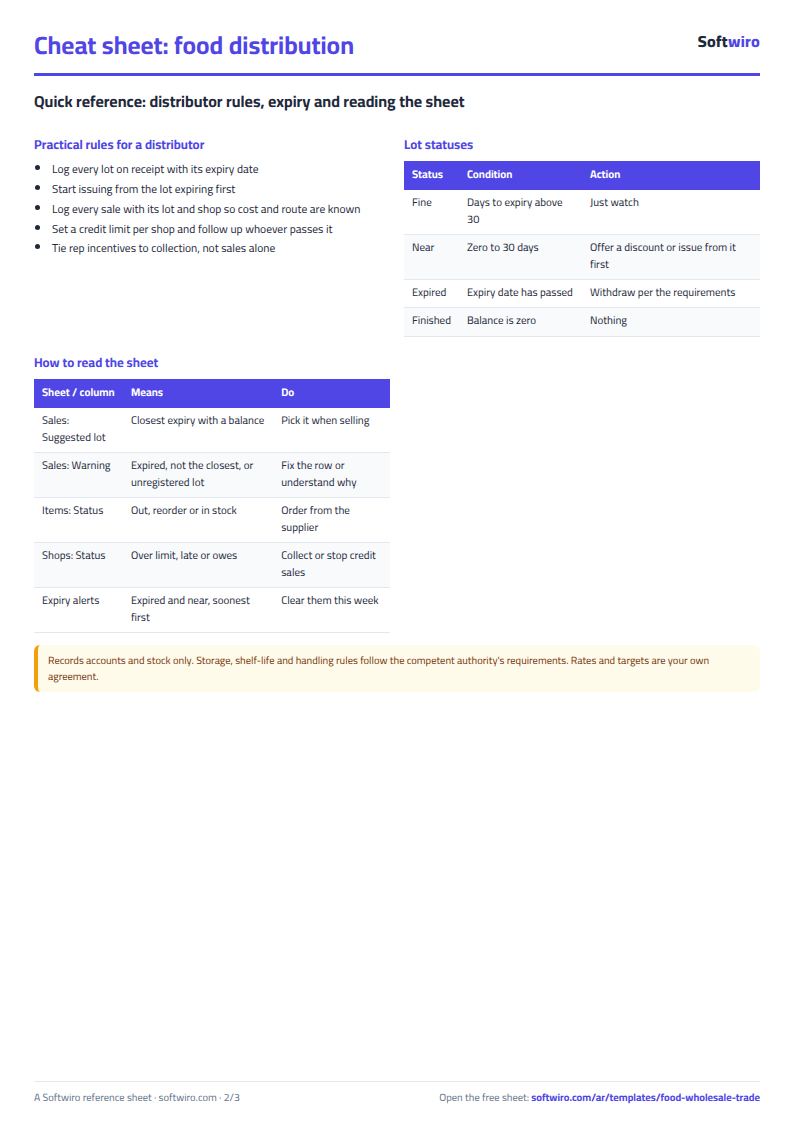
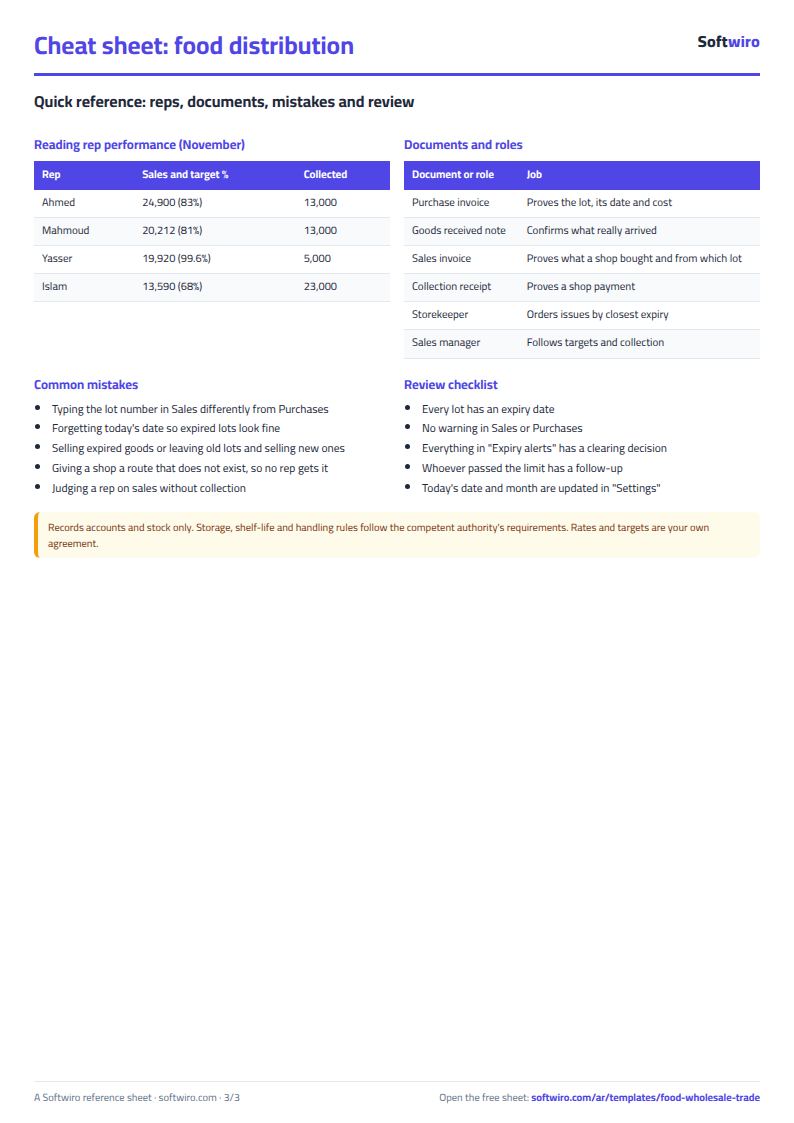
Free cheat sheet for this field
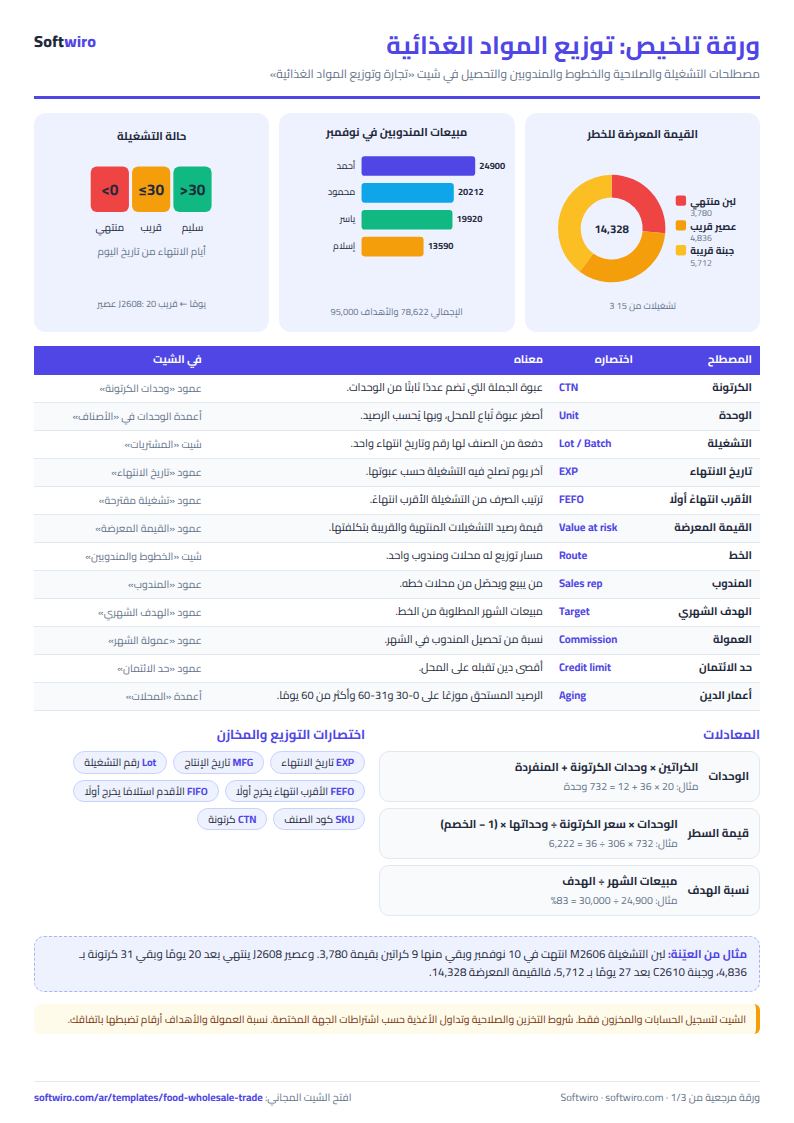
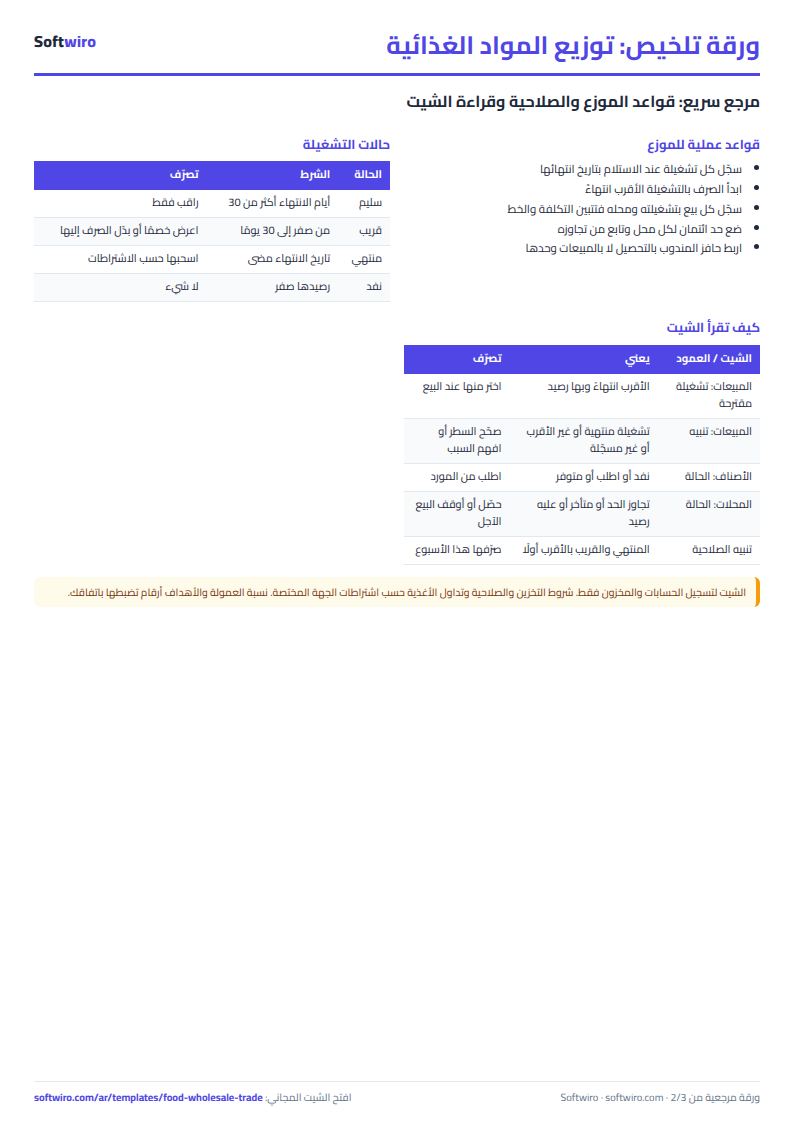
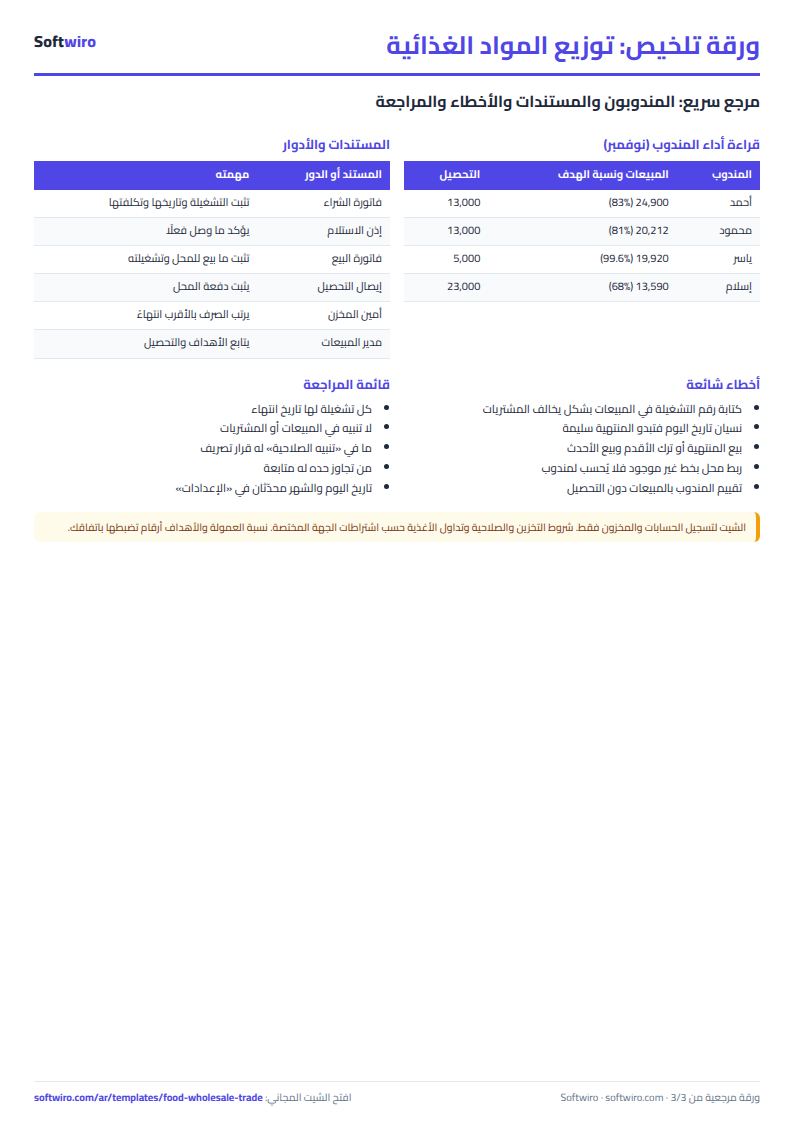
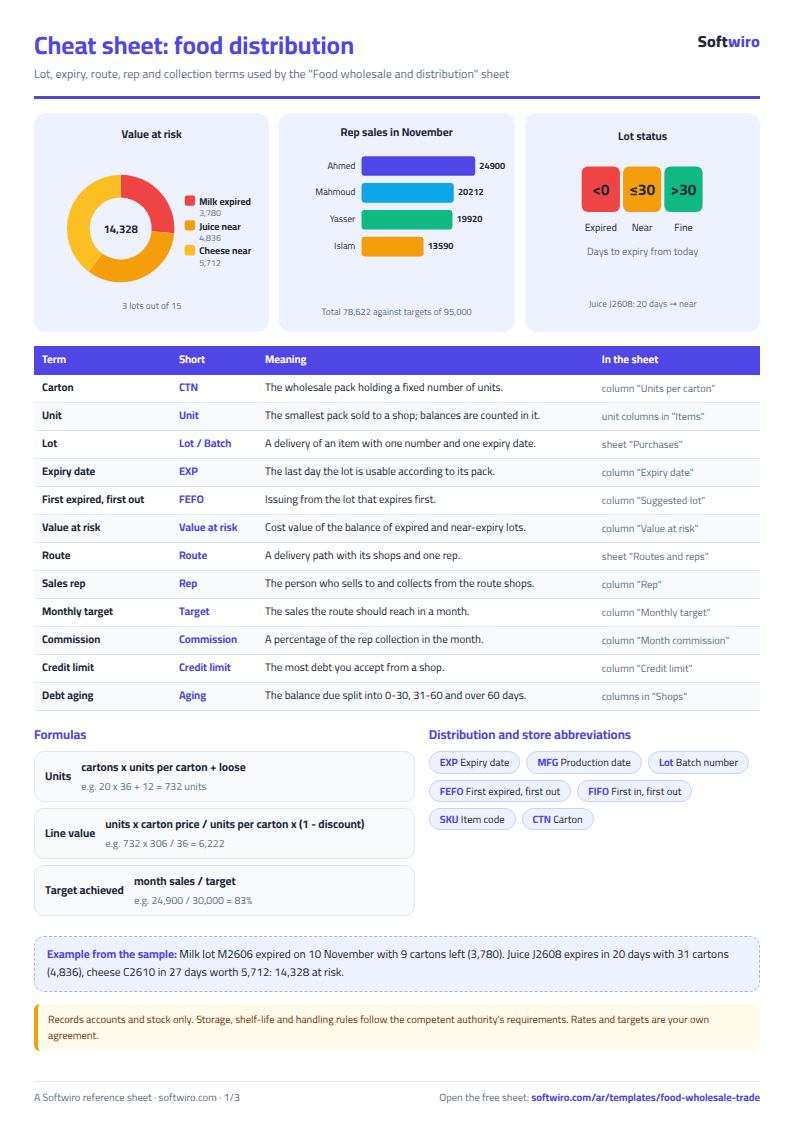
Terms, abbreviations, tables and diagrams over several pages, in Arabic and English. Download it as a PDF or images, including a phone-size version.
Still running this on Excel?
This sheet needs someone to copy every invoice and payment into it. In Accountwiro an invoice and a payment are recorded the moment they happen, and the customer's balance shows in a single statement of account.
| In this sheet | In Accountwiro |
|---|---|
| You copy every invoice and payment into the sheet by hand. | It shows the customer's invoices, payments and outstanding balance in a single statement of account. |
| Invoices are typed or copied by hand. | It creates an invoice by scanning a barcode or searching by product name, calculates discounts and taxes, and sends it to the customer over WhatsApp. |
| Stock shortages are discovered late. | It updates quantities after every sale and alerts you when a product drops below the required level. |
| Anyone who opens the sheet sees every number. | Permissions per user: the sales employee issues invoices, and the warehouse employee manages stock without access to financial data. |
Frequently asked questions
How does the sheet track expiry?
Each lot in "المشتريات" (Purchases) has an expiry date, and its days are counted from today's date in "الإعدادات" (Settings). A lot is "near expiry" when it has the set number of days or fewer left, and "expired" after the date. It appears in "تنبيه الصلاحية" (Expiry alert), nearest first, with its value.
How do I sell by the carton and by the unit?
In "الأصناف" (Items), enter the number of units in a carton. In "المبيعات" (Sales), enter the cartons and any loose units. Total units and value are calculated at unit price = carton price ÷ units per carton. The items sheet shows the balance in cartons and units.
How are a rep's performance and commission calculated?
Each shop has a route and each route has a rep. "الخطوط والمندوبين" (Routes and reps) adds up the sales for the month set in "الإعدادات" (Settings) and compares them with the target. It also adds up what was collected from the route's shops in that month, and commission = collections × the rate you enter. The rate is an example, so set it according to your agreement.
How is this different from the batch and expiry stock sheet?
That sheet focuses on stock, barcodes and issuing. This one is for a distributor who sells to shops along routes: it has each shop's account, debt aging, collections, and rep performance and commission, as well as lot and expiry tracking.
Is the template free?
Yes, with no sign-up and no email address. Use it, edit it and share it as you like.
Does it work in Google Sheets and on mobile?
The sheet uses formulas supported by Excel 2016 and later, Google Sheets and LibreOffice, so you can upload it to Google Drive and open it with Google Sheets on a computer or a phone.
What is the difference between the white and the gray cells?
You type in the white cells; the gray cells are calculated automatically. Don't type in a gray cell, or you will erase its formula.
Can I use the sheet from an AI assistant?
Yes. Add our MCP server (URL https://softwiro.com/api/mcp, no key needed) to your assistant and ask it to do the calculation in this template. The numbers come from the sheet's own formulas, and we do not store your data. The steps and a ready-made prompt are in this article: https://softwiro.com/blog/mcp-excel-templates-ai-agent-guide.html
More free templates for: Shops and stores
More free templates
- Cash Book Template for Excel
- Invoice Template with Invoice Log (Excel)
- Clothing shop inventory sheet by colour and size
- Customer accounts, credit sales and customer statement sheet
- Cash book and customer accounts sheet
- Installments and collection tracker
- General shop inventory tracker (stock in/out, reorder, slow movers)
- Supplier purchase orders and payables tracker
- Multi-warehouse and branch inventory sheet with transfers
- Periodic stock count and count-difference reconciliation sheet
- Barcode, batch and expiry inventory sheet
- Grocery store management sheet
- Stationery shop and photocopy management sheet
- Electronics shop sheet: serials, warranty and repairs
- Wholesale clothing trade sheet: traders, stock and collection
- Periodic table in Excel (Arabic names): lookup, molar mass calculator and quiz
- Science formulas cheat sheet: physics, chemistry and biology with examples
- Complete nursery management sheet
- Private school management sheet
- Complete clinic management sheet
- Medical lab management sheet
- Pharmacy management sheet: sales, purchases, shortages and suppliers
- Small hospital management sheet: departments, beds, admissions and revenue