Try the sheet here, on the example
The sheet is open below with sample numbers. Change any white cell and watch the results update, or press the blank-copy button to type your own data from scratch. Nothing you type leaves your browser.
Example from the sheet
| الحملة | الإنفاق | عملاء | مؤهلون | مبيعات | تكلفة العميل CPL | نسبة الإغلاق | CAC | ROI |
|---|---|---|---|---|---|---|---|---|
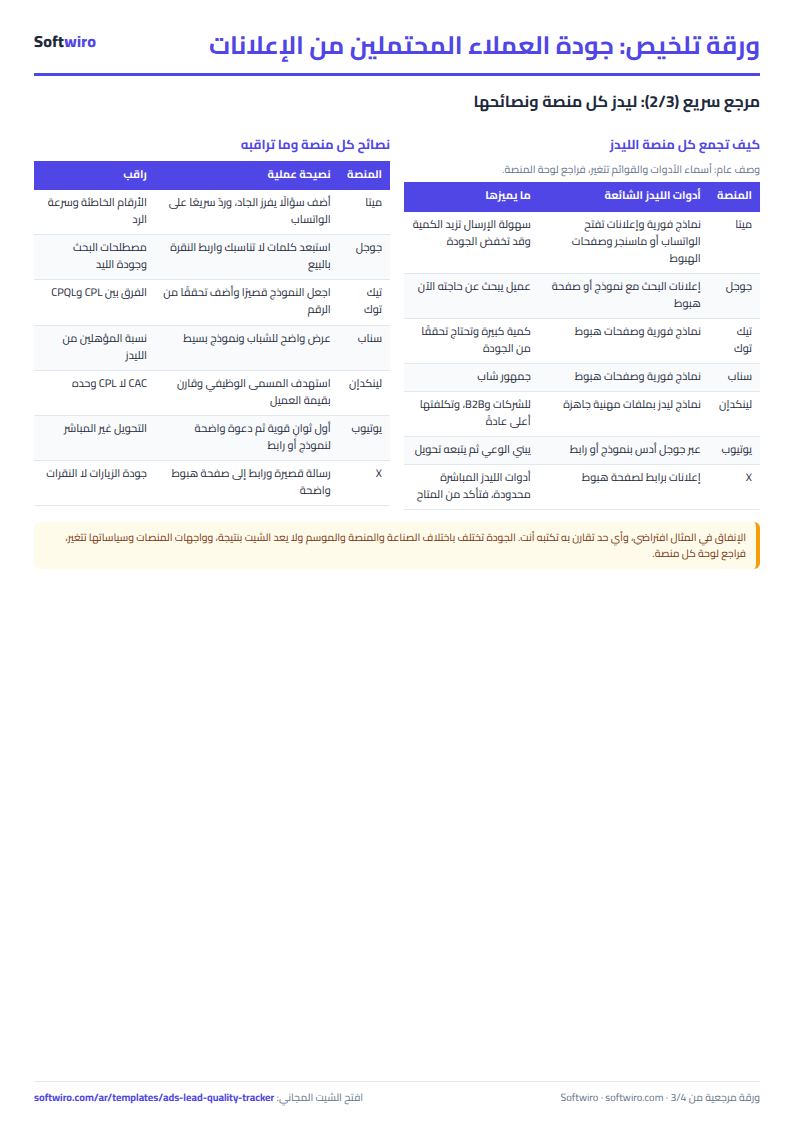
| فيسبوك - عرض الدورة الصيفية | 12,000.00 | 22 | 10 | 3 | 545.45 | 13.6% | 4,000.00 | 8.3% |
| انستجرام - ريلز المدرسين | 8,000.00 | 14 | 8 | 1 | 571.43 | 7.1% | 8,000.00 | -37.5% |
| بحث جوجل - كلمات الخدمة | 15,000.00 | 18 | 13 | 5 | 833.33 | 27.8% | 3,000.00 | -6.7% |
| تيك توك - فيديو التجربة | 6,000.00 | 20 | 5 | 0 | 300.00 | 0.0% | -100.0% | |
| سناب - عرض الطلاب | 5,000.00 | 11 | 2 | 1 | 454.55 | 9.1% | 5,000.00 | -50.0% |
| لينكدإن - الشركات | 9,000.00 | 6 | 4 | 1 | 1,500.00 | 16.7% | 9,000.00 | -27.8% |
| يوتيوب - إعلان قصير | 4,000.00 | 8 | 2 | 1 | 500.00 | 12.5% | 4,000.00 | 25.0% |
| إكس - حملة التوعية | 2,000.00 | 4 | 0 | 0 | 500.00 | 0.0% | -100.0% | |
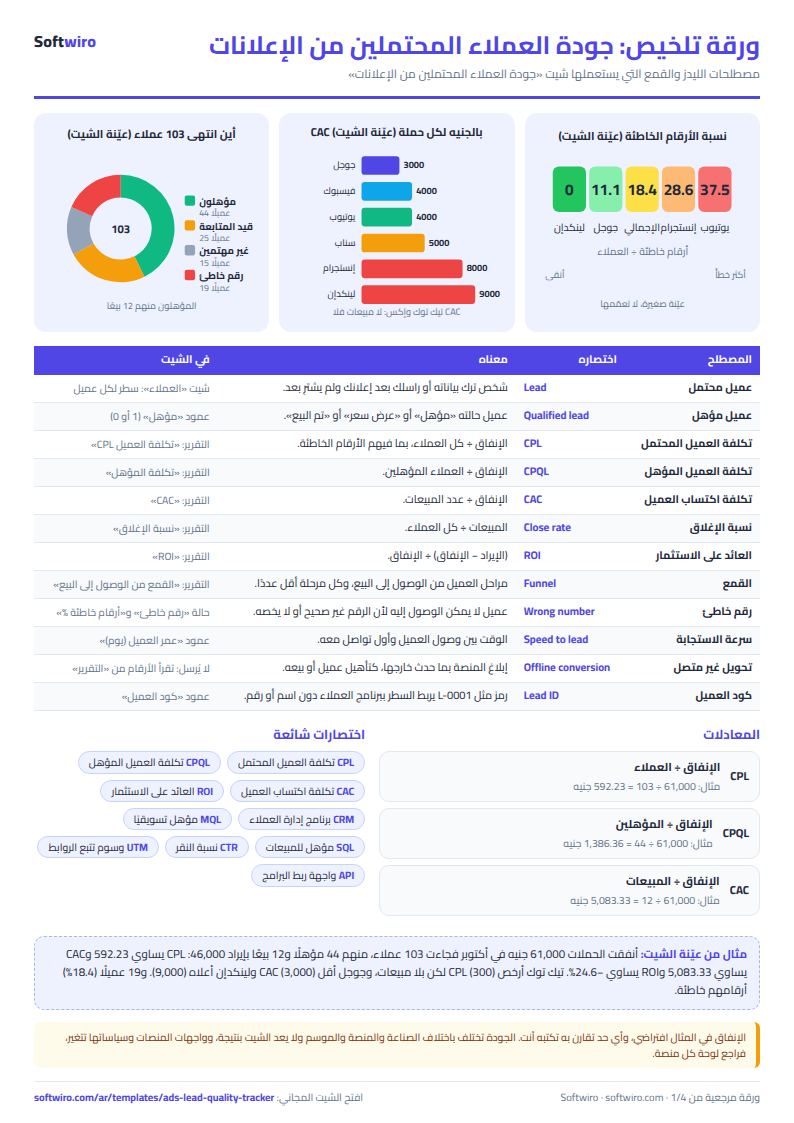
| الإجمالي | 61,000.00 | 103 | 44 | 12 | 592.23 | 11.7% | 5,083.33 | -24.6% |
Example from the “التقرير” tab (Arabic), with the numbers and formulas that are in the file.
What is inside
- الإعدادات (Settings): Business name, today's date, the start and end of the report period and its number of months, your campaigns (up to 15) with the platform and monthly spend of each, and the seven lead statuses.
- العملاء (Leads): One row per lead: arrival date, campaign from the list, a code such as L-0001, status, sale value in EGP and a note. For each row it works out whether the lead is qualified, whether it sold, its age in days, and an error alert (a sale with no value, a duplicate code or an unregistered campaign). It holds 1,500 leads.
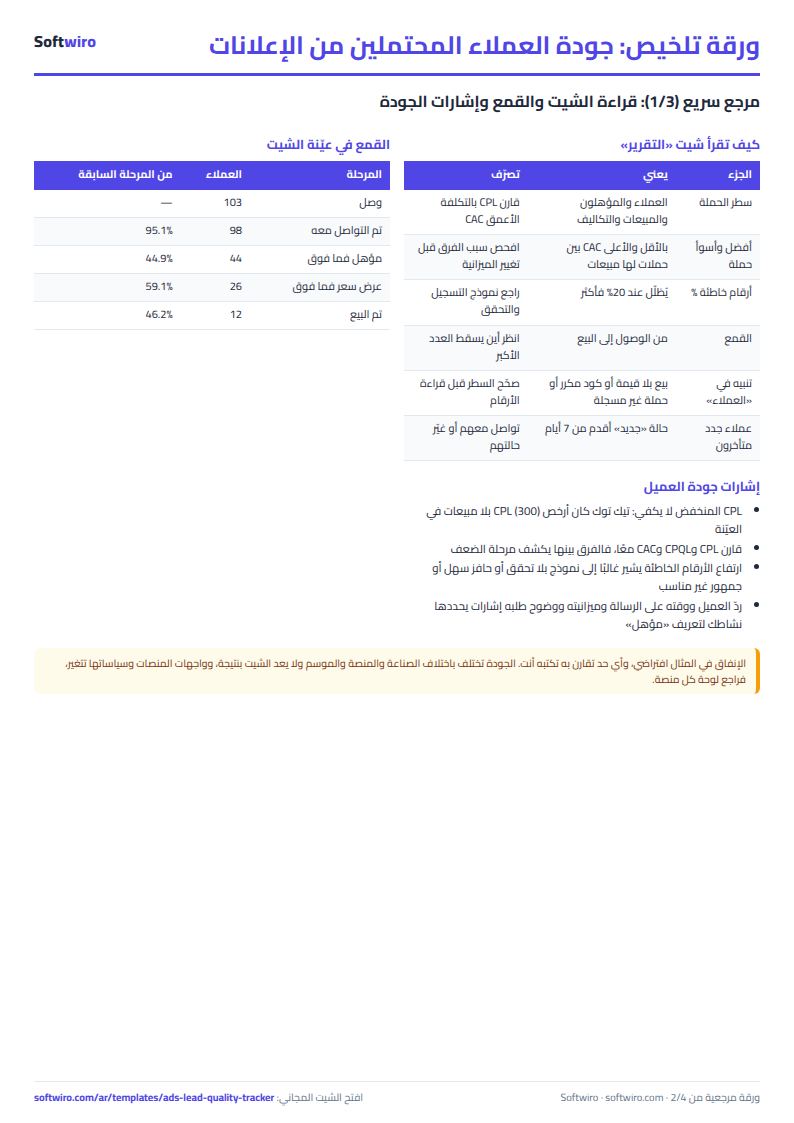
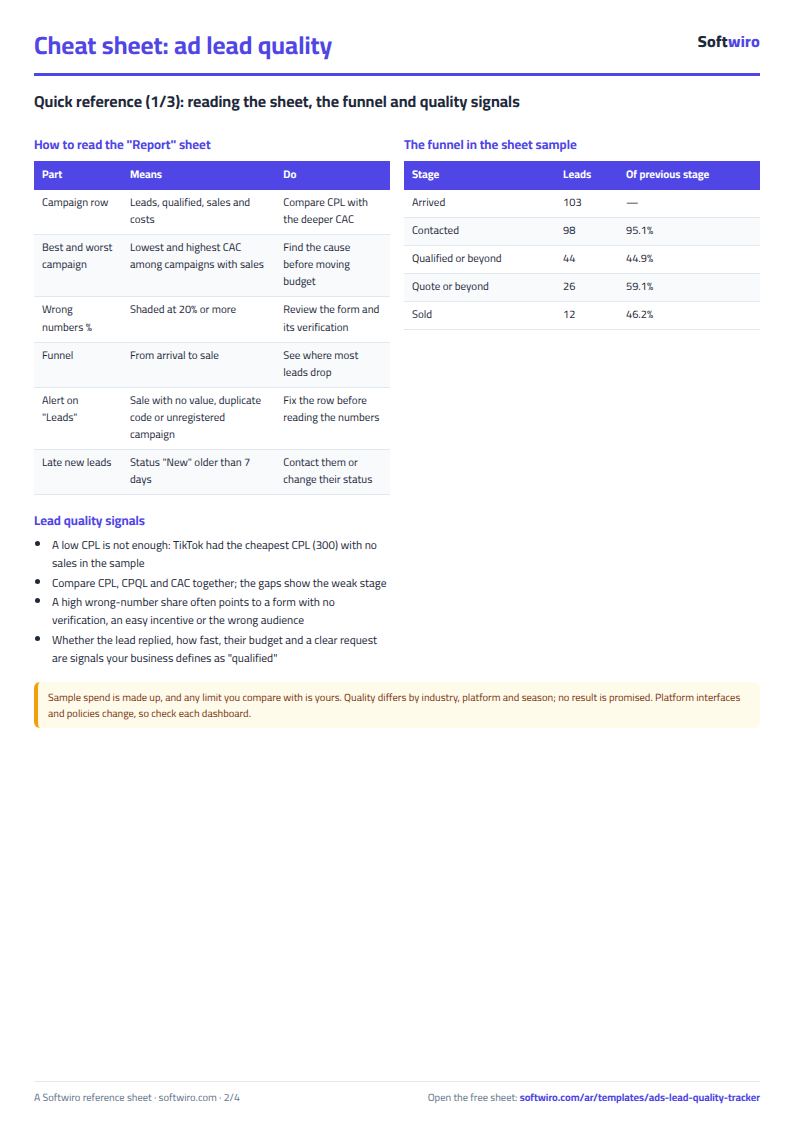
- التقرير (Report): Per campaign: leads, qualified leads, sales, wrong numbers, CPL, cost per qualified lead, qualification and close rates, wrong-number rate, CAC, revenue and ROI. Then the best and worst campaign by CAC, lead counts by status, the funnel from arrival to sale, and the number of new leads that were contacted late.
The file opens on a start tab (“ابدأ هنا”, Start here) that explains how to use it.
What makes it different
You log each lead once and see the difference between a campaign that brings cheap numbers and one that brings actual sales. You no longer judge your ad by cost per lead alone, as the platform dashboard shows it.
How to use it
- In the "الإعدادات" (Settings) sheet, enter the start and end of the period and its number of months, then enter your campaigns (up to 15) with their platform and monthly spend.
- In the "العملاء" (Leads) sheet, record each lead in a row: arrival date, the campaign from the list, and a code that holds no name or number, such as L-0001.
- Update the lead's status from the list as it progresses, and if it sells, enter the sale value in EGP.
- Leave the grey columns alone: qualified, sold, lead age in days and the alert are calculated for you.
- Open the "التقرير" (Report) sheet to find the cost, close rate, CAC and ROI for each campaign, the best and worst campaign, the funnel stages and the wrong-number rate.
- Check the alert column in the leads sheet. It warns you about a sale with no value, a duplicate code or an unregistered campaign.
Before you start:
- A qualified lead is one whose status is "مؤهل" (Qualified), "عرض سعر" (Quote sent) or "تم البيع" (Sold). This definition is fixed in the formulas, so do not rename the seven statuses in Settings.
- Cost = monthly spend × number of months in the period. CPL = spend ÷ leads, CAC = spend ÷ sales, ROI = (revenue − spend) ÷ spend, and close rate = sales ÷ leads.
- The report counts only leads whose date falls between the period start and end, and revenue is attributed to the date the lead arrived, not the date of sale.
- The spend figures in the example are placeholders. Enter your actual spend from each platform's dashboard, and write any threshold you compare yourself against.
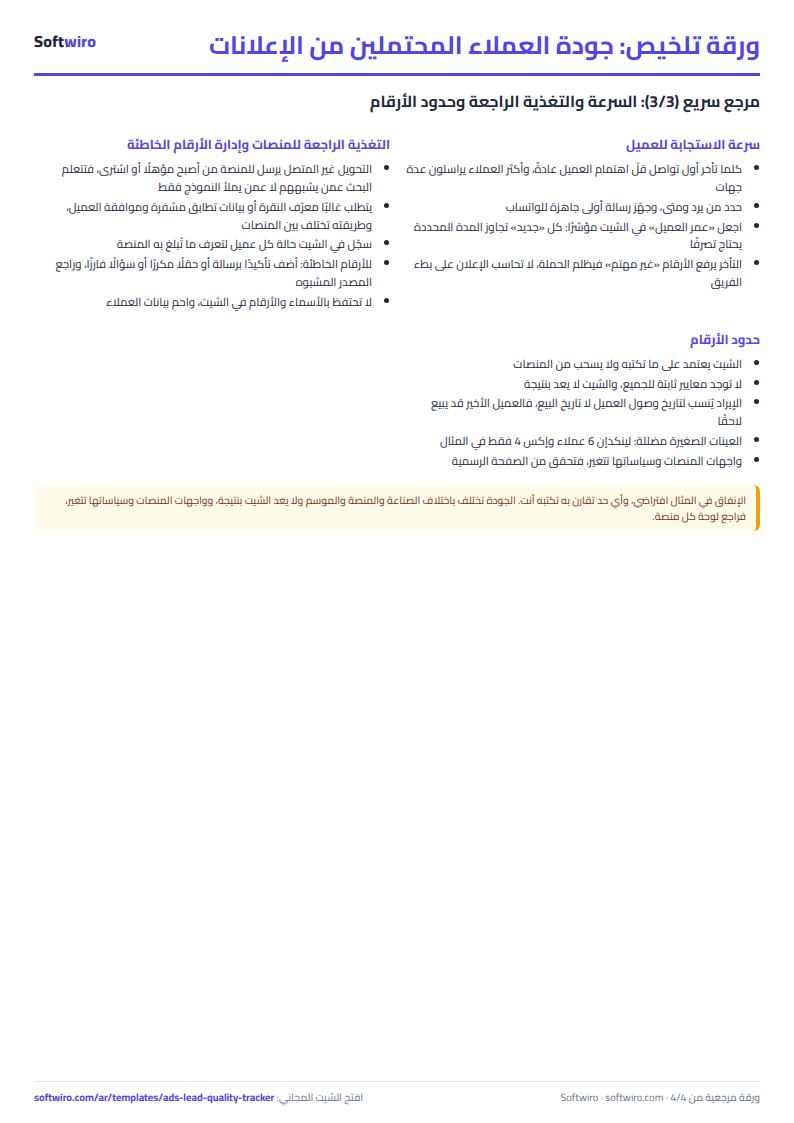
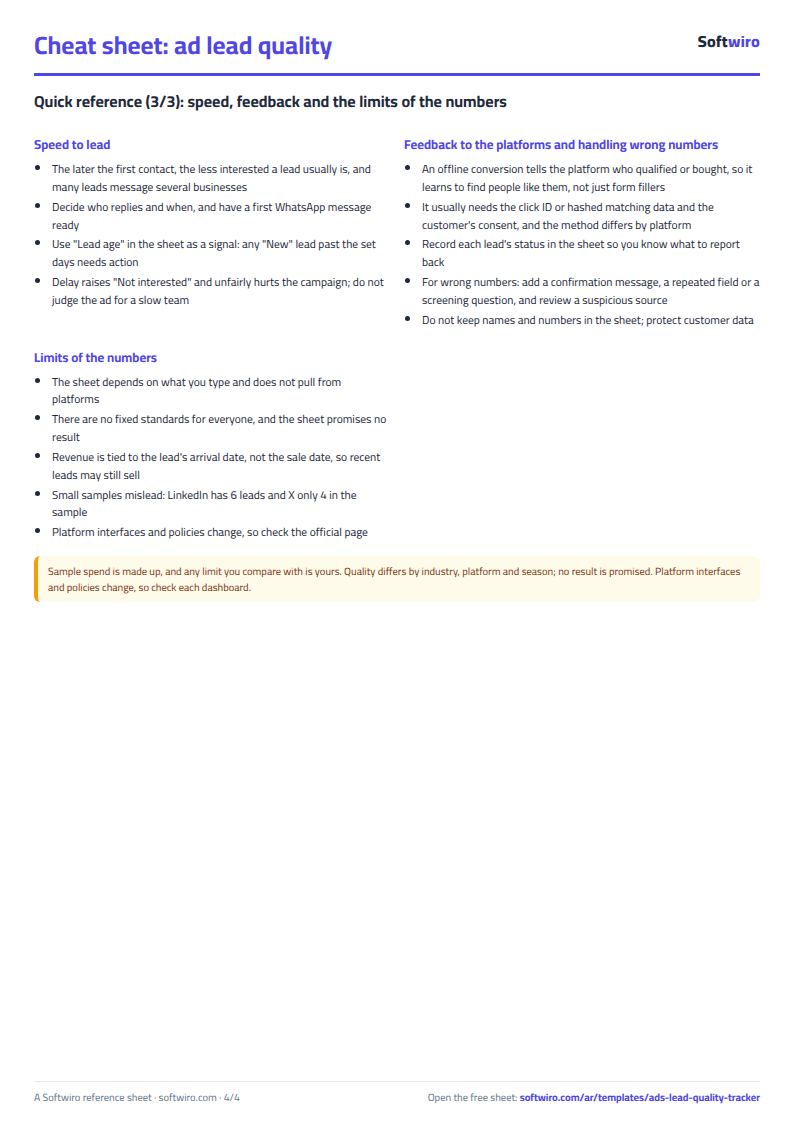
- Keep real phone numbers and names in your customer management system (CRM), not in the sheet, and link a row to its lead by code only.
- The sheet holds 1,500 leads and 15 campaigns. A campaign that is not in Settings still counts in the totals but gets no row of its own, and appears in an "unregistered campaigns" row.
Free cheat sheet for this field
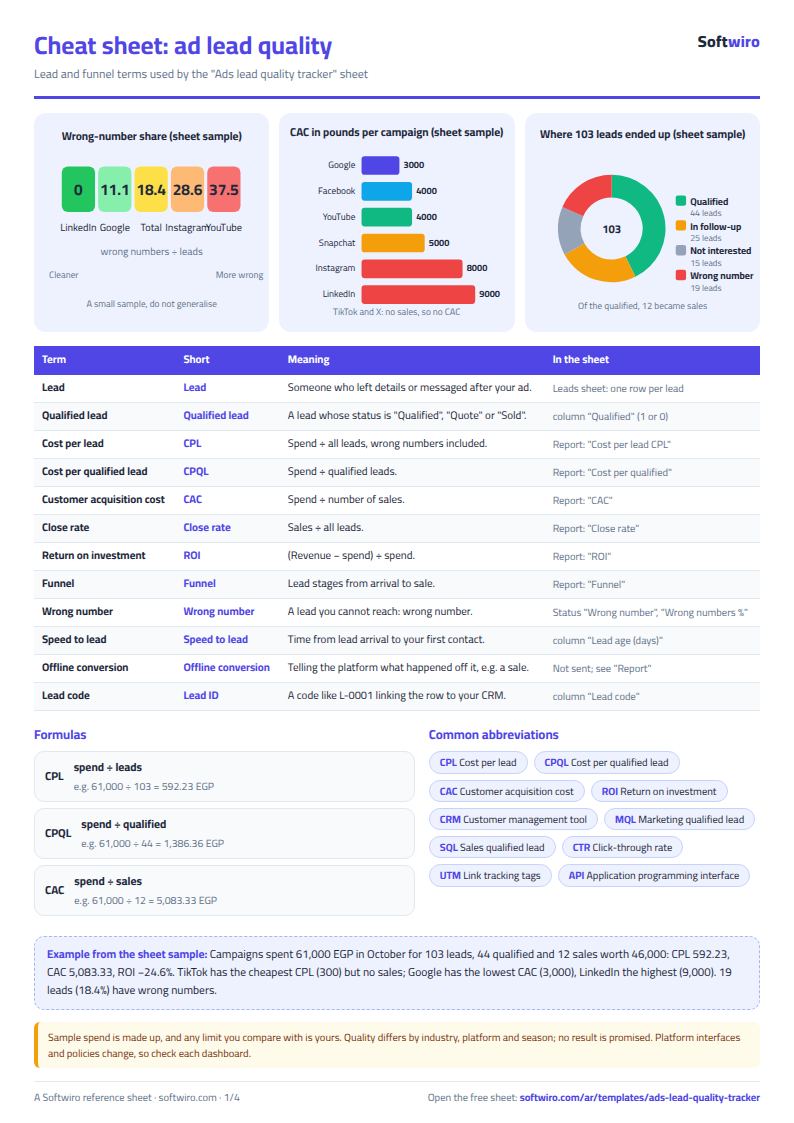
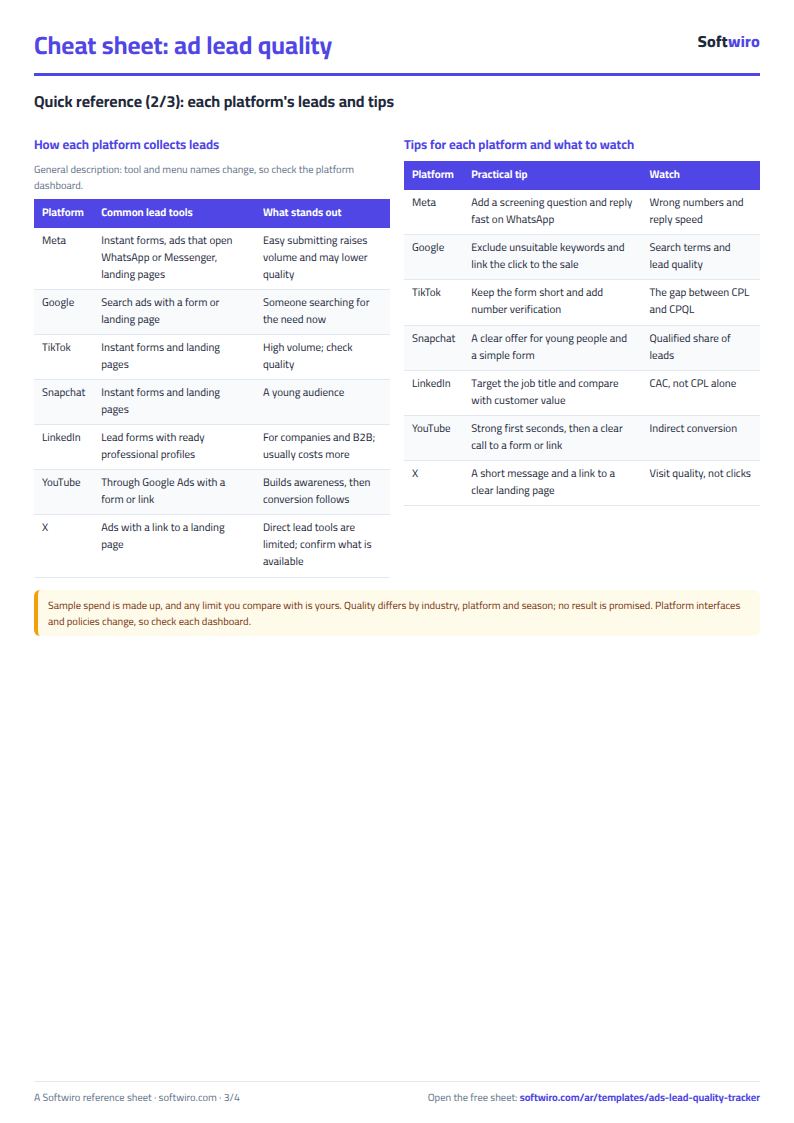
Terms, abbreviations, tables and diagrams over several pages, in Arabic and English. Download it as a PDF or images, including a phone-size version.
Still running this on Excel?
This sheet suits a start and a limited amount of data. If your way of working grows, or you need more than one person working on it at the same time, Softwiro can build you a program that fits the way you work.
| In this sheet | In Custom Software from Softwiro |
|---|---|
| One file that one person edits at a time, and copies reach you on WhatsApp. | A program with a login for each user and permissions you define, and everyone sees the same data. |
| You type everything and check the numbers by hand. | We design the screens around your work steps, so each person records only what concerns them. |
| Columns and formulas are fixed as the sheet was designed. | We build what you need: reports, alerts and screens your way. |
| Backups and security are your own responsibility. | The program runs on a secured server with regular backups. |
Frequently asked questions
What is the difference between cost per lead (CPL), cost per qualified lead and CAC?
CPL = spend ÷ all leads, cost per qualified lead = spend ÷ qualified leads, and CAC = spend ÷ sales. In the sample sheet, the overall CPL is EGP 592.23, cost per qualified lead is 1,386.36 and CAC is 5,083.33. The deeper you go into the funnel, the higher the cost, and the real quality shows.
Who counts as a "qualified" lead in the sheet?
A lead whose status is "مؤهل" (Qualified), "عرض سعر" (Quote sent) or "تم البيع" (Sold). This definition is fixed in the formulas, so do not rename the seven statuses in Settings. If your own definition of qualified is different, use the statuses to express it.
How do I deal with wrong numbers in ads?
Set the lead's status to "رقم خاطئ" (Wrong number). The sheet calculates the share for each campaign and highlights anything at 20% or more. It is often a sign of a form with no validation, an easy incentive or the wrong audience, so try adding a confirmation message or a question that filters out people who are not serious. The sheet does not replace checking the lead source at the platform.
Should I write customer names and phone numbers in the sheet?
No. Write only a code such as L-0001 and keep names and numbers in your customer management system (CRM). This protects your customers' data and still lets you match a row to its owner when needed.
Is the template free?
Yes, with no sign-up and no email address. Use it, edit it and share it as you like.
Does it work in Google Sheets and on mobile?
The sheet uses formulas supported by Excel 2016 and later, Google Sheets and LibreOffice, so you can upload it to Google Drive and open it with Google Sheets on a computer or a phone.
What is the difference between the white and the gray cells?
You type in the white cells; the gray cells are calculated automatically. Don't type in a gray cell, or you will erase its formula.
Can I use the sheet from an AI assistant?
Yes. Add our MCP server (URL https://softwiro.com/api/mcp, no key needed) to your assistant and ask it to do the calculation in this template. The numbers come from the sheet's own formulas, and we do not store your data. The steps and a ready-made prompt are in this article: https://softwiro.com/blog/mcp-excel-templates-ai-agent-guide.html
All the templates in this group: Excel templates for paid ads: budget, performance and reports
More free templates for: Marketing and advertising
More free templates
- Ad budget media plan across platforms
- Ad campaign performance tracker
- Ads A/B test log
- Ads break-even and unit economics sheet
- Ad agency client management and reports
- UTM link builder and campaign naming
- Ad account audit checklist
- Ads creative production calendar
- Media buyer rules sheet: ad formulas, scaling rules and testing discipline
- Cash flow forecast sheet
- Annual budget by department: plan vs actual
- Project budget vs actual sheet
- Simple daily expense sheet (phone-first)
- Multi-warehouse and branch inventory sheet with transfers
- Periodic stock count and count-difference reconciliation sheet
- Restaurant and cafe inventory and waste sheet
- Spare parts inventory sheet