Try the sheet here, on the example
The sheet is open below with sample numbers. Change any white cell and watch the results update, or press the blank-copy button to type your own data from scratch. Nothing you type leaves your browser.
Example from the sheet
| الكود | البند | الميزانية | الملتزم به | المدفوع | نسبة الإنجاز | التوقع عند الإنجاز | الحالة |
|---|---|---|---|---|---|---|---|
| B01 | تكسير وبناء قواطع | 54,000.00 | 52,000.00 | 52,000.00 | 100% | 52,000.00 | منجز |
| B02 | لياسة جدران وأسقف | 108,000.00 | 112,000.00 | 112,000.00 | 90% | 112,000.00 | تجاوز |
| E01 | نقاط كهرباء وتمديدات | 55,250.00 | 55,250.00 | 55,250.00 | 70% | 55,250.00 | قرب الحد |
| P01 | نقاط سباكة وصرف | 27,000.00 | 29,500.00 | 25,000.00 | 80% | 29,500.00 | تجاوز |
| F01 | سيراميك وبورسلين | 197,600.00 | 190,000.00 | 60,000.00 | 25% | 197,600.00 | قرب الحد |
| F02 | دهانات | 133,000.00 | 120,000.00 | 36,000.00 | 0% | 133,000.00 | قرب الحد |
| F03 | أرضيات باركيه | 105,000.00 | 0.00 | 0.00 | 0% | 105,000.00 | ضمن الميزانية |
| W01 | أبواب خشب | 66,000.00 | 66,000.00 | 20,000.00 | 15% | 66,000.00 | قرب الحد |
| W02 | شبابيك ألوميتال | 126,000.00 | 126,000.00 | 40,000.00 | 10% | 126,000.00 | قرب الحد |
| X01 | مطبخ كامل | 85,000.00 | 0.00 | 0.00 | 0% | 85,000.00 | ضمن الميزانية |
| X02 | وحدات إضاءة | 48,000.00 | 4,000.00 | 4,000.00 | 0% | 48,000.00 | ضمن الميزانية |
| M01 | إشراف هندسي شهري | 48,000.00 | 12,000.00 | 12,000.00 | 25% | 48,000.00 | ضمن الميزانية |
Example from the “البنود” tab (Arabic), with the numbers and formulas that are in the file.
What is inside
- الإعدادات: Project name, tracking date, start month, contingency reserve and alert percentage, and the list of item categories (up to 8 categories).
- البنود: The BOQ table: item code, category, name, unit, quantity and unit price, from which the budget is calculated. Beside it are the start month, end month and percent complete, then committed, paid, remaining to pay, earned value, forecast at completion, expected overrun and status. Holds up to 100 items.
- الالتزامات: The log of contracts and purchase orders: date, number, item code, supplier and value. It shows the item name, the amount paid on each contract, what remains and its status, and warns you about a code that does not exist, a duplicate number or a payment larger than the contract. Holds up to 500 commitments.
- المدفوعات: The log of actual payments: date, the contract number it belongs to (or the item code for a direct purchase with no contract), amount and description. The sheet links each payment to its item. Holds up to 1500 payments.
- المنحنى الشهري: For 12 months from the project start: planned, paid and committed amounts for each month, the cumulative of each, and the difference between cumulative paid and planned.
- الملخص: Project budget, committed, paid and remaining, earned value and the cost and schedule performance indexes, forecast at completion, contingency use, the number of items over budget, the five biggest overruns and a table by category, with five charts.
The file opens on a start tab (“ابدأ هنا”, Start here) that explains how to use it.
What makes it different
This tracking separates what you signed, what you paid and what you actually completed: three numbers many people blur into one "spent" figure. You learn an item has gone over budget the day its contract is signed, not after the last payment, you see whether you are paying faster than the contractor is delivering, and the sheet deducts expected overruns from the contingency reserve to tell you whether it is enough.
How to use it
- In "الإعدادات" (Settings) enter the project name, tracking date (today), project start month, contingency reserve amount and alert percentage, and the item categories (for example civil works, electrical, finishes).
- In "البنود" (Items) enter the budget items: code, category, item, unit, quantity and unit price, and the planned start and end month numbers (1 = first month of the project). The budget is calculated automatically by multiplication.
- In "الالتزامات" (Commitments) log every contract or purchase order you signed: date, number, item code, supplier and value.
- In "المدفوعات" (Payments) log every actual payment: date, the contract number it belongs to (or the item code for a direct purchase with no contract) and the amount.
- Update the "نسبة الإنجاز" (percent complete) column in "البنود" (Items) as work progresses, based on what has actually been completed on site.
- Open "الملخص" (Summary) to see the budget, committed, paid, earned value, forecast at completion, contingency use and the biggest overruns, and "المنحنى الشهري" (Monthly curve) to see actual spending against the plan.
Before you start:
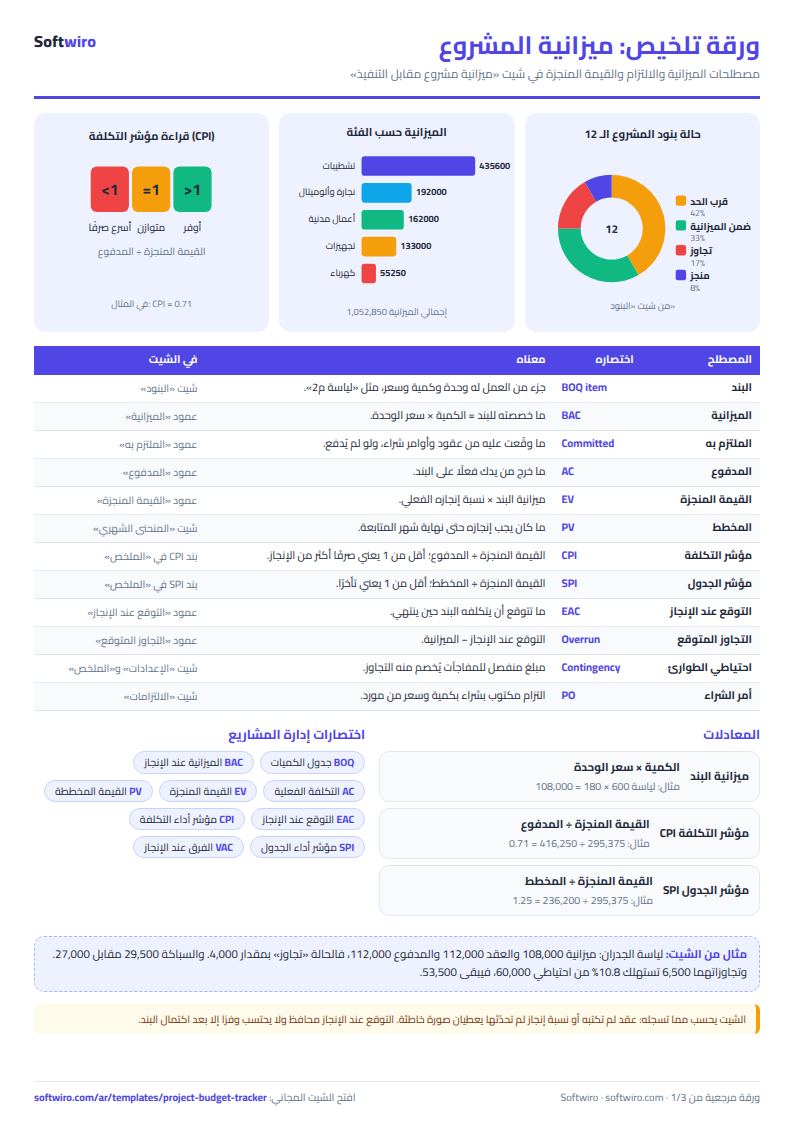
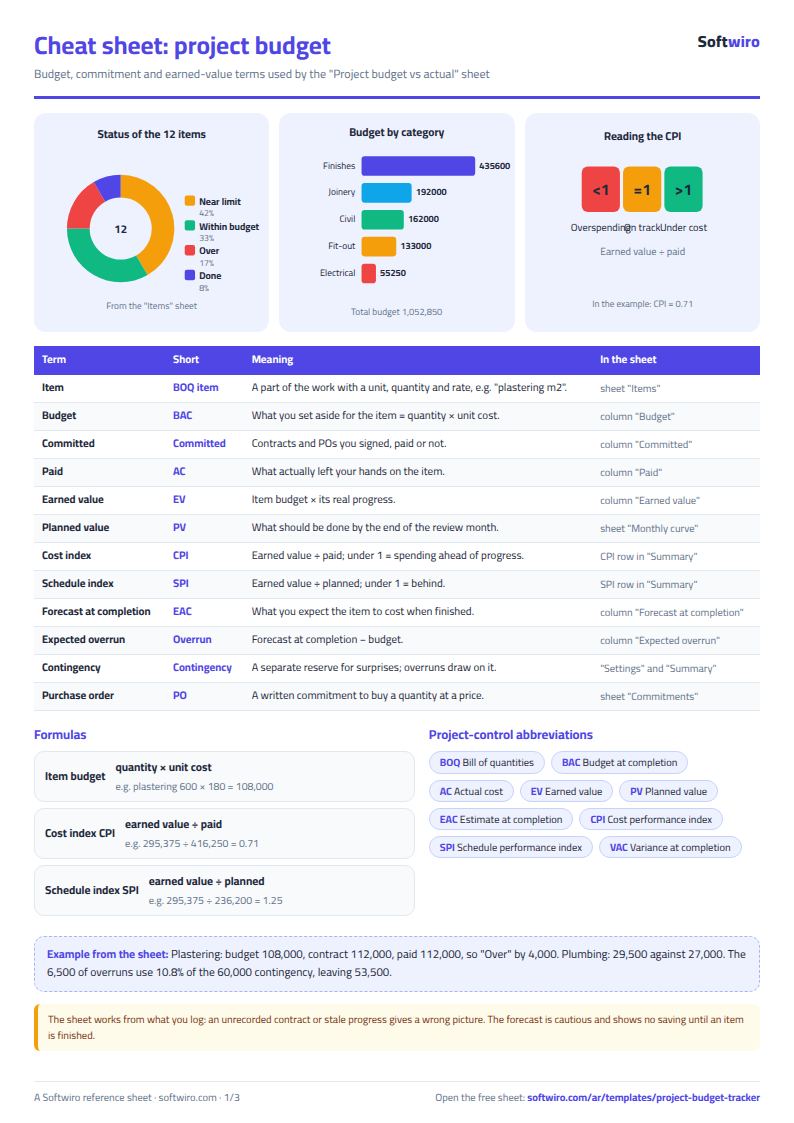
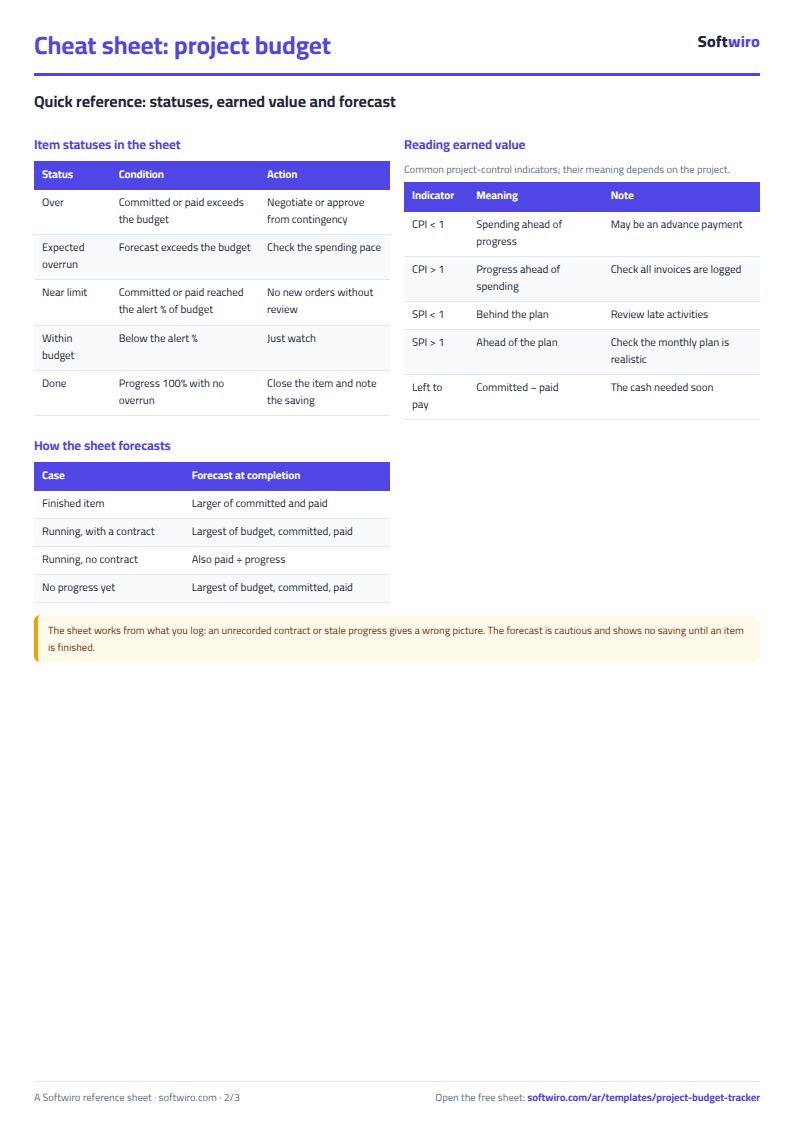
- Budget = quantity x unit price. Committed = total of contracts and purchase orders on the item + direct payments with no contract. Paid = all payments recorded against the item.
- Earned value = item budget x percent complete. Cost performance index (CPI) = earned value / actual paid; below 1 means you have paid more than you have completed. Schedule performance index (SPI) = earned value / planned through the end of the tracking month. An advance payment lowers CPI temporarily.
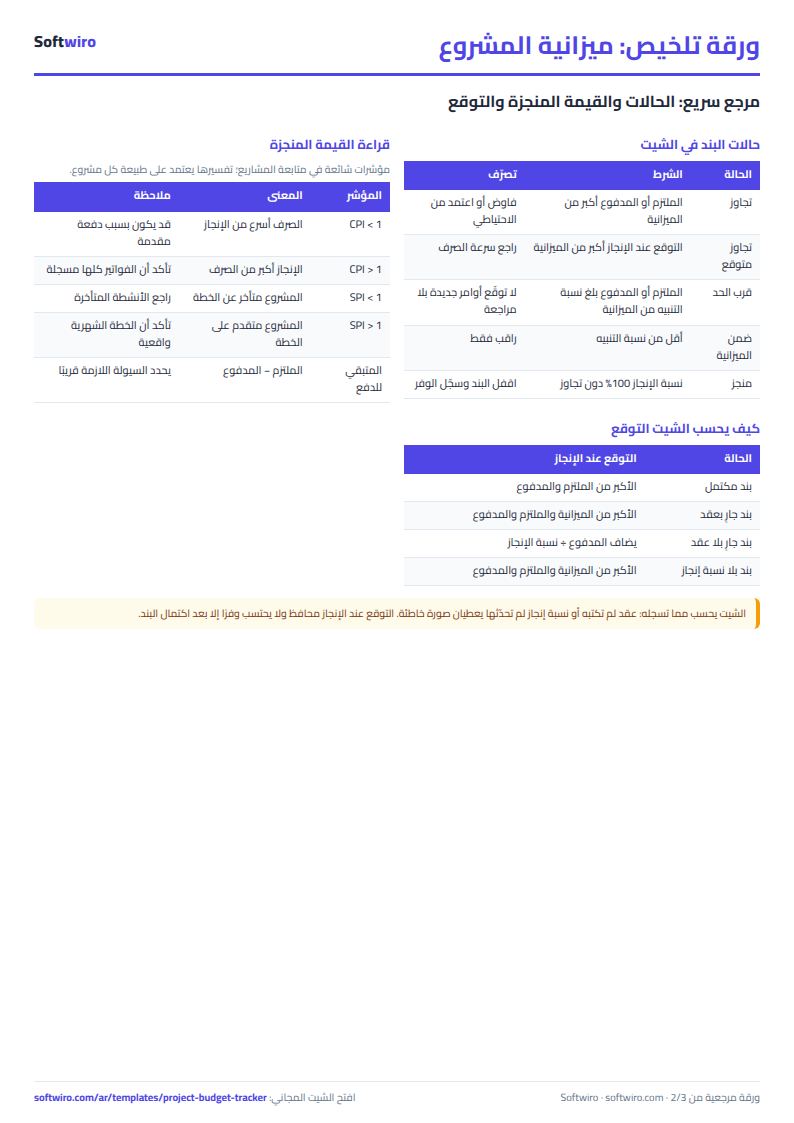
- Forecast at completion for an item: if the item is complete, it is the larger of committed and paid. If not, it is the largest of its budget, committed and paid, and for an item with no contract paid / percent complete is also considered. The forecast is conservative: it shows the expected overrun and counts savings only once the item is complete.
- Expected overrun is deducted from the contingency reserve in the summary. If total overruns exceed the reserve, the cell turns red.
- The monthly plan spreads each item's budget evenly across its months, from the start month to the end month. The "المنحنى الشهري" (Monthly curve) table holds 12 months from the project start.
- The sheet holds 100 items, 500 contracts and purchase orders, and 1500 payments. It is for one project; to track several projects and their profits, use the "متابعة مشاريع التشطيب والمقاولات" (finishing and contracting projects tracking) sheet.
Free cheat sheet for this field
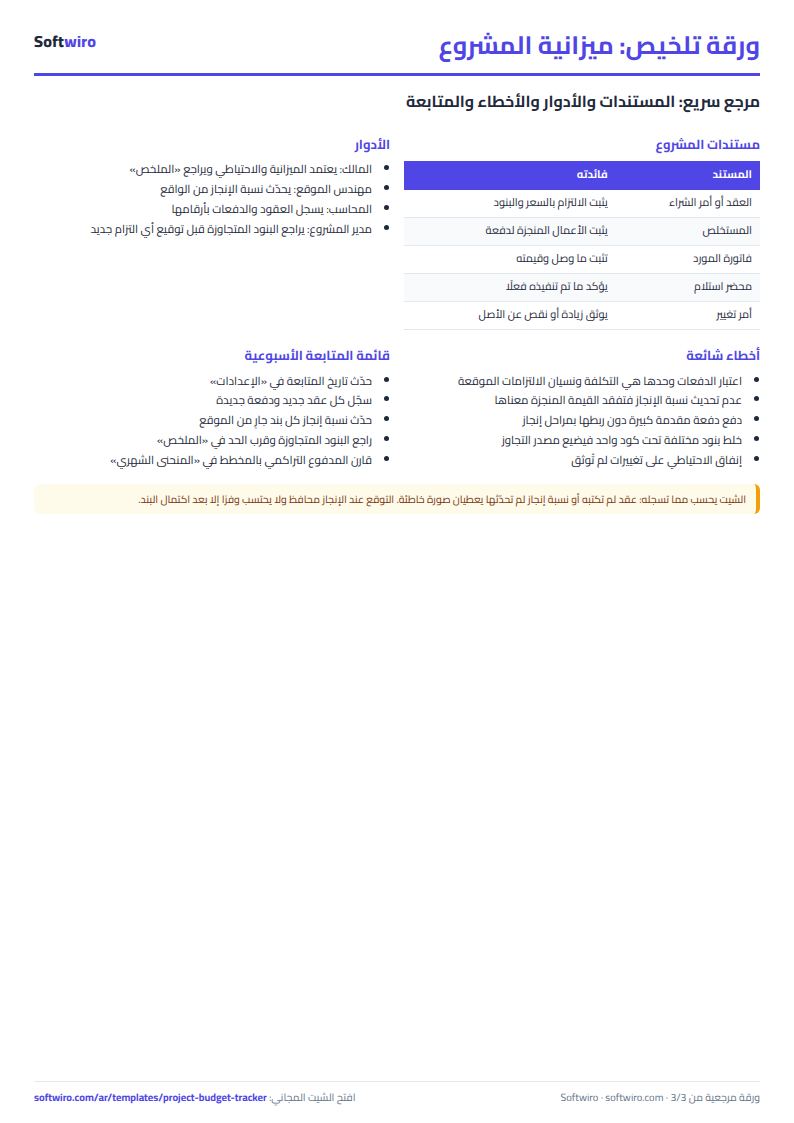
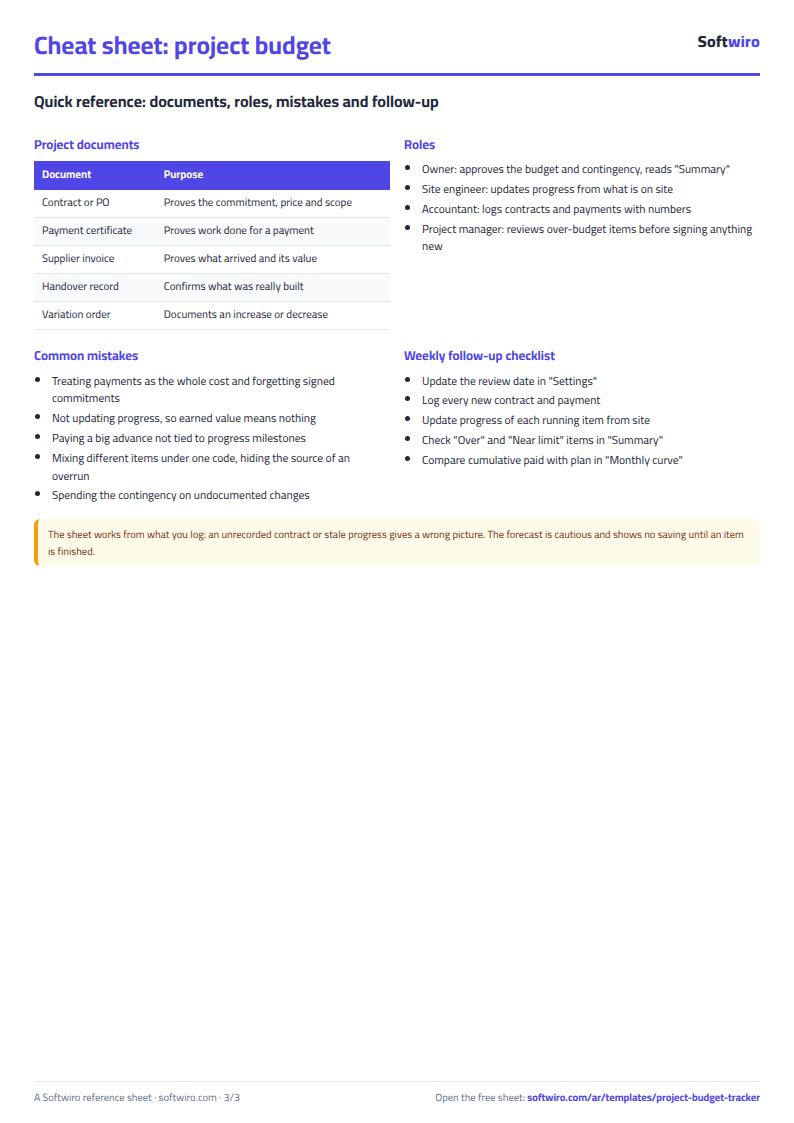
Terms, abbreviations, tables and diagrams over several pages, in Arabic and English. Download it as a PDF or images, including a phone-size version.
Still running this on Excel?
This sheet suits a start and a limited amount of data. If your way of working grows, or you need more than one person working on it at the same time, Softwiro can build you a program that fits the way you work.
| In this sheet | In Custom Software from Softwiro |
|---|---|
| One file that one person edits at a time, and copies reach you on WhatsApp. | A program with a login for each user and permissions you define, and everyone sees the same data. |
| You type everything and check the numbers by hand. | We design the screens around your work steps, so each person records only what concerns them. |
| Columns and formulas are fixed as the sheet was designed. | We build what you need: reports, alerts and screens your way. |
| Backups and security are your own responsibility. | The program runs on a secured server with regular backups. |
Frequently asked questions
What is the difference between committed and paid?
Committed is what you have signed for in contracts and purchase orders (plus any direct purchases with no contract). Paid is what has actually left your hands. A contract may be 100 thousand with 40 thousand paid, leaving 60 thousand still to pay.
How does the sheet calculate forecast at completion?
If the item is complete, the forecast is the larger of committed and paid. If it is not complete, it is the largest of its budget, committed and paid, and for an item with no contract it also takes paid divided by percent complete. This is a conservative forecast: it shows overruns and does not count savings before the item is finished.
Does it work for projects other than construction?
Yes. An item can be a venue, an advertisement, a software license or a designer's fee. Enter the unit, quantity and unit price to suit your project, and change the category list in Settings.
What if I have more than one project?
This sheet is for one project, so copy the file for each project. To track several projects and their profits together, use the finishing and contracting projects tracking sheet.
Is the template free?
Yes, with no sign-up and no email address. Use it, edit it and share it as you like.
Does it work in Google Sheets and on mobile?
The sheet uses formulas supported by Excel 2016 and later, Google Sheets and LibreOffice, so you can upload it to Google Drive and open it with Google Sheets on a computer or a phone.
What is the difference between the white and the gray cells?
You type in the white cells; the gray cells are calculated automatically. Don't type in a gray cell, or you will erase its formula.
Can I use the sheet from an AI assistant?
Yes. Add our MCP server (URL https://softwiro.com/api/mcp, no key needed) to your assistant and ask it to do the calculation in this template. The numbers come from the sheet's own formulas, and we do not store your data. The steps and a ready-made prompt are in this article: https://softwiro.com/blog/mcp-excel-templates-ai-agent-guide.html
More free templates for: Contracting and finishing
More free templates
- Finishing and contracting projects tracker
- Simple daily expense sheet (phone-first)
- Multi-warehouse and branch inventory sheet with transfers
- Periodic stock count and count-difference reconciliation sheet
- Restaurant and cafe inventory and waste sheet
- Spare parts inventory sheet
- Fixed assets register and depreciation sheet
- Barcode, batch and expiry inventory sheet
- Padel and 5-a-side court booking sheet (hourly)