Try the sheet here, on the example
The sheet is open below with sample numbers. Change any white cell and watch the results update, or press the blank-copy button to type your own data from scratch. Nothing you type leaves your browser.
Example from the sheet
| الكود | الخامة | المشتريات (استعمال) | المنصرف للمطبخ | الهالك | الرصيد الدفتري | قيمة الرصيد | الحالة | نسبة الهالك من المشتريات |
|---|---|---|---|---|---|---|---|---|
| R01 | صدور فراخ | 219,000 | 218,360 | 3,700 | 4,940 | 741.00 | اطلب | 1.7% |
| R02 | لحم مفروم | 116,000 | 119,412 | 1,800 | 4,788 | 1,340.64 | اطلب | 1.5% |
| R03 | جبنة موزاريلا | 72,000 | 68,432 | 2,400 | 6,168 | 1,110.24 | متوفر | 3.3% |
| R04 | دقيق بيتزا | 75,000 | 71,400 | 3,000 | 50,600 | 1,315.60 | متوفر | 4.0% |
| R05 | زيت قلي | 36,000 | 37,080 | 3,600 | 31,320 | 1,914.00 | متوفر | 10.0% |
| R06 | طماطم | 90,000 | 80,640 | 8,800 | 10,560 | 190.08 | متوفر | 9.6% |
| R07 | بطاطس | 150,000 | 139,050 | 9,000 | 41,950 | 503.40 | متوفر | 6.0% |
| R08 | خس | 51,000 | 45,344 | 5,400 | 4,256 | 106.40 | متوفر | 10.6% |
| R09 | بن قهوة | 28,000 | 28,274 | 240 | 5,486 | 2,852.72 | متوفر | 0.9% |
| R10 | لبن | 288,000 | 284,280 | 13,000 | 14,720 | 515.20 | متوفر | 4.5% |
| R11 | سكر | 20,000 | 10,608 | 0 | 29,392 | 646.62 | متوفر | 0.0% |
Example from the “الخامات” tab (Arabic), with the numbers and formulas that are in the file.
What is inside
- الإعدادات: Period start and end, target food cost percentage, the par multiplier for order quantity, the alert thresholds for variance and waste, and the lists of categories, waste reasons and issue destinations.
- الخامات: Each item's card: code, category, purchase unit, usage unit, conversion factor, purchase price, opening balance and par level. The sheet calculates usage unit cost, purchases, issued, waste, book balance and its value, status, order quantity, last count and its variance. Holds up to 60 items.
- المشتريات: One line per delivery: date, code, supplier, quantity in purchase units, price and invoice number. The quantity in usage units and the total appear. Holds up to 300 deliveries.
- الصرف للمطبخ: What left the store for the kitchen, bar or cold prep, in usage units, and its value. Holds up to 600 movements.
- الهالك: Everything thrown away, with date, quantity and reason; its value and the item's category appear. Holds up to 300 entries.
- الجرد اليومي: The quantity you counted at the end of the day. The book balance on that day, the variance and its value appear. Holds up to 400 entries.
- الأطباق: The price of each dish and the number sold, so sales, the dish cost from its recipe, its percentage and a comparison with the target appear. Holds up to 30 dishes.
- الوصفات: One line per ingredient in a dish with its quantity in usage units, so its cost and the theoretical usage for what was sold appear. Holds up to 150 lines.
- الفعلي والنظري: For each item, what should have been issued according to sales and recipes, what was actually issued, and the difference in quantity, value and percentage, with a verdict of "ضمن الحد" (within limit) or "راجع" (review).
- طلب الشراء: Items that fell below par, sorted by order cost, with the suggested quantity in purchase units and its cost.
- الملخص: Sales, actual and theoretical food cost and the target, purchases, waste and its percentage, stock and count variance, waste by reason, category and week, with four charts.
The file opens on a start tab (“ابدأ هنا”, Start here) that explains how to use it.
What makes it different
Issues, waste, counts and dish recipes in one file, so you know how much the kitchen should have used, how much it actually used, and where the difference went.
How to use it
- In "الإعدادات" (Settings) enter the period start and end (for example a month), the target food cost percentage, the order multiplier and the alert thresholds.
- In "الخامات" (Items) enter for each item: code, name, category, purchase unit (a carton, for example), usage unit (gram), the factor between them, the price per purchase unit, the opening balance and the par level.
- Record each delivery in "المشتريات" (Purchases) in purchase units with its price, and in "الصرف للمطبخ" (Kitchen issues) what left the store for the kitchen or bar, in usage units.
- Record everything thrown away with its reason in "الهالك" (Waste), and in "الجرد اليومي" (Daily count) the quantity you actually counted at the end of the day, so differences from the book balance appear.
- Enter each dish's price and the number sold in "الأطباق" (Dishes), and the quantity of each ingredient in the dish in "الوصفات" (Recipes), so the dish cost and theoretical usage appear.
- Review "الفعلي والنظري" (Actual vs theoretical), "طلب الشراء" (Purchase order) and "الملخص" (Summary) for food cost percentage, waste by reason, category and week, and what you need to buy.
Before you start:
- Book balance = opening balance + purchases - issued to the kitchen - waste, all in usage units. Count variance = actual count - book balance on the count day.
- Actual food cost = value issued to the kitchen + value of waste, and its percentage = that divided by the dish sales recorded in "الأطباق" (Dishes). Theoretical = recipe quantities x number of dishes sold.
- Item status: "نفد" (out of stock) if the balance is zero or less, and "اطلب" (order) if it fell below par. Order quantity = (par x multiplier - balance) / factor, rounded up in purchase units.
- The value of issues, waste and balance is calculated at the purchase unit price entered in "الخامات" (Items) divided by the factor, while the value of purchases uses the price you enter on each delivery.
- This sheet tracks inventory and waste. To calculate dish cost and a suggested selling price, use the dish costing and recipes sheet.
- Capacity: 60 items, 300 deliveries, 600 issue movements, 300 waste entries, 400 count entries, 30 dishes and 150 recipe lines. The purchase order list shows the first 40 items.
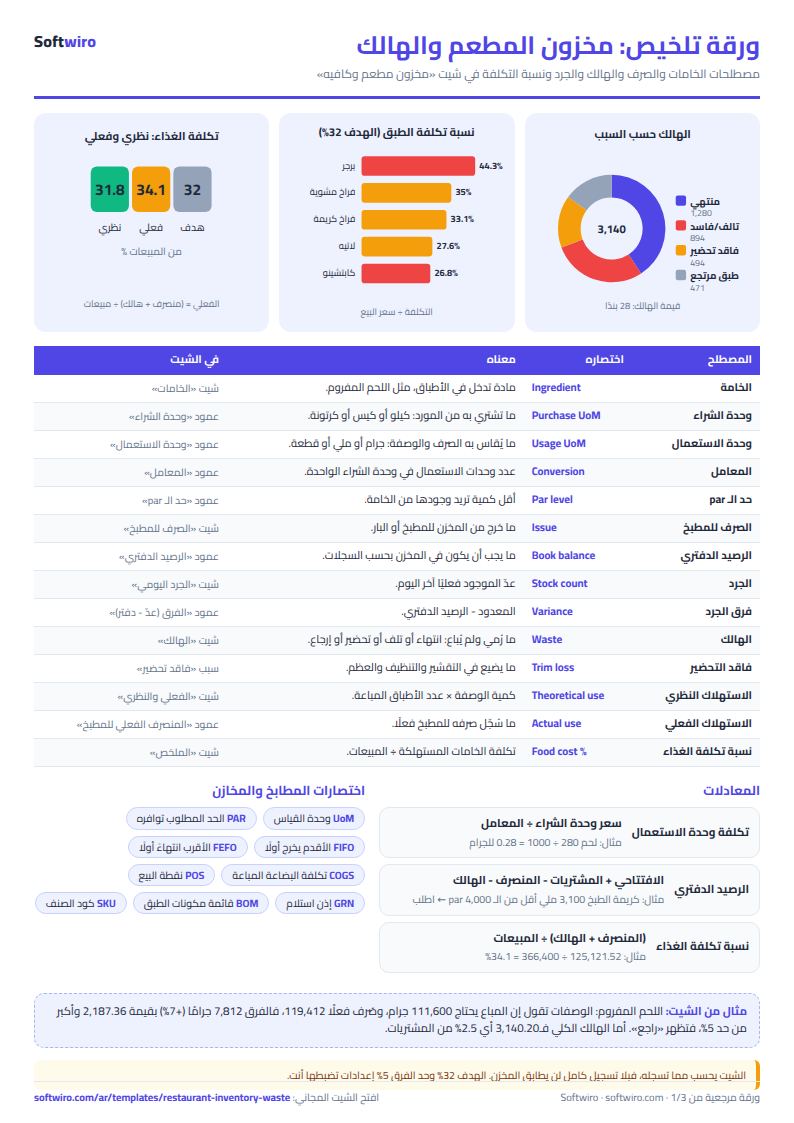
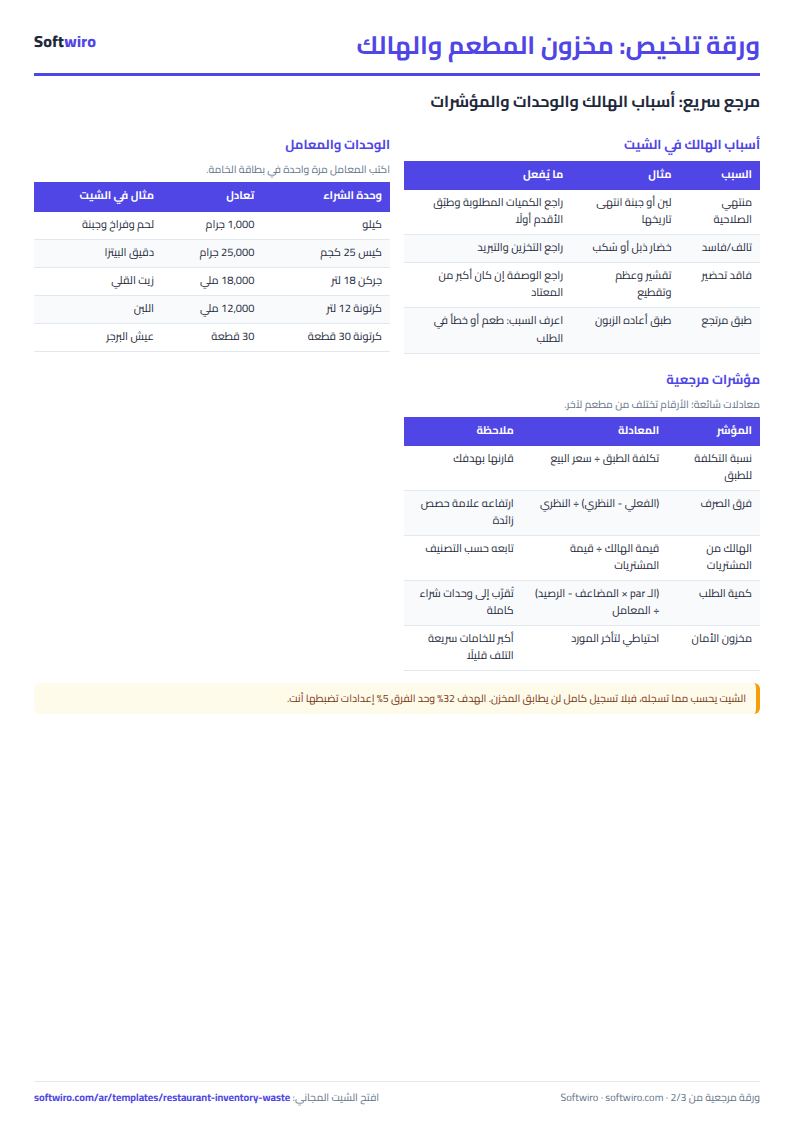
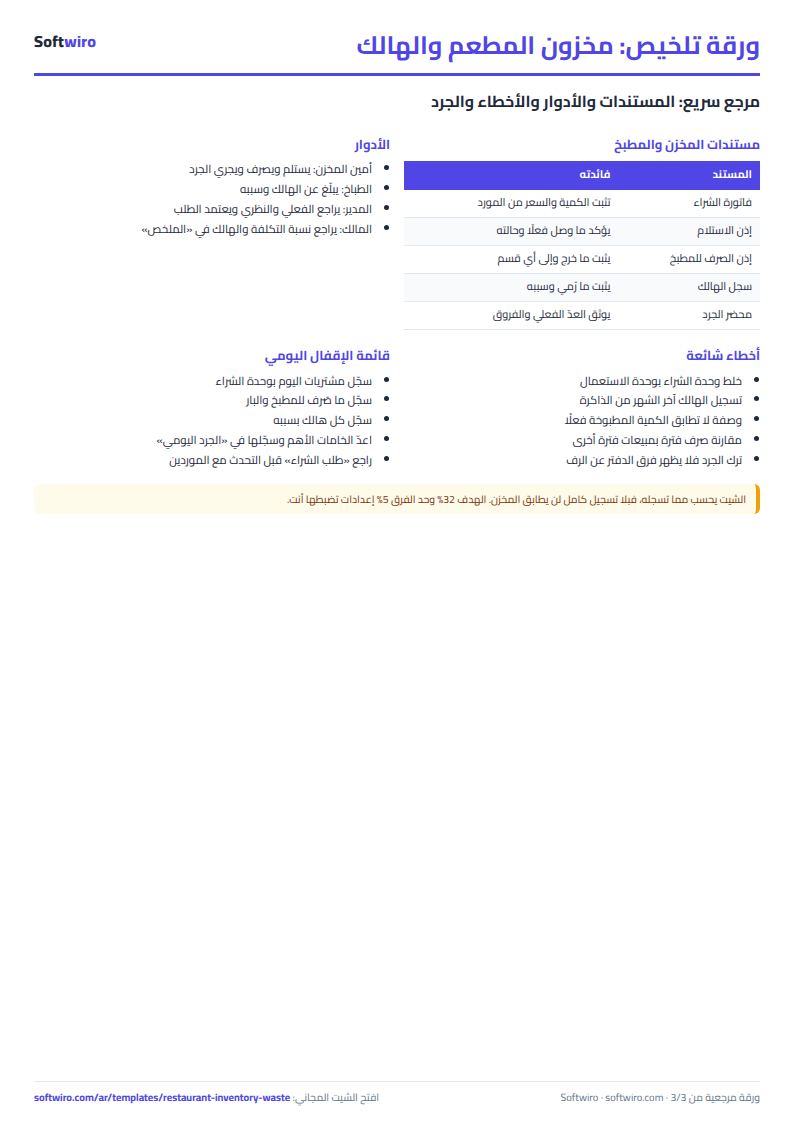
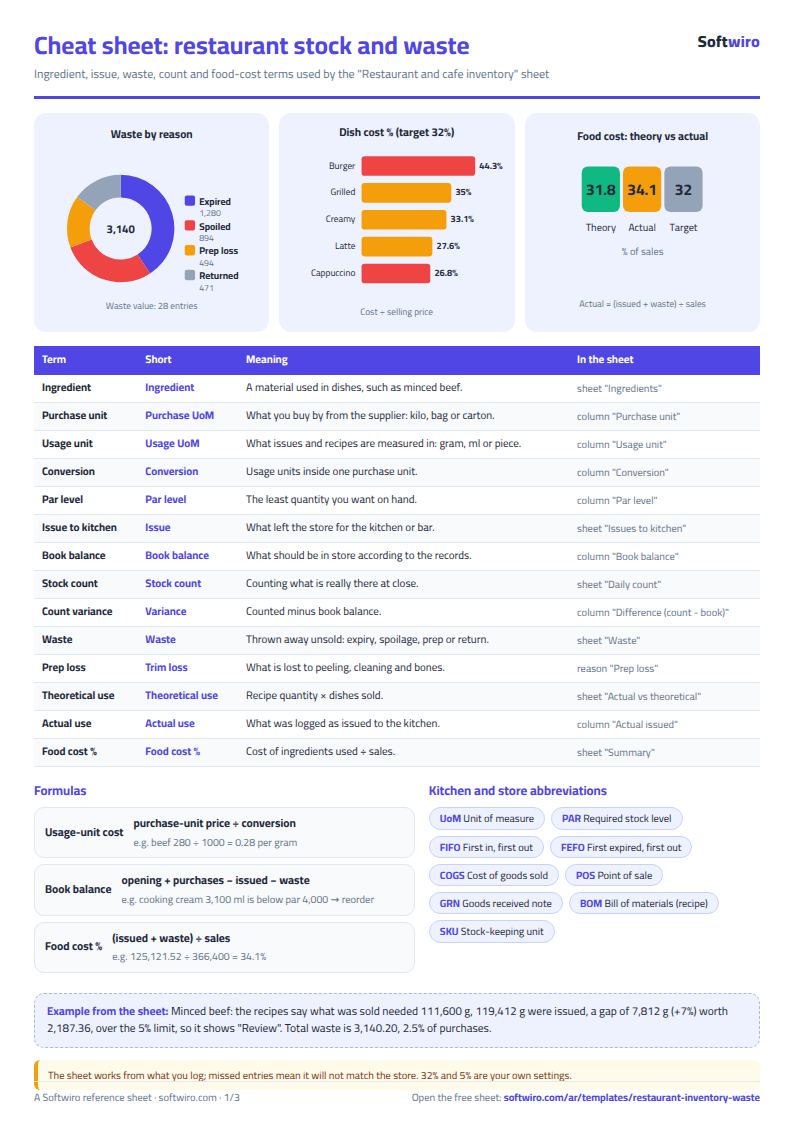
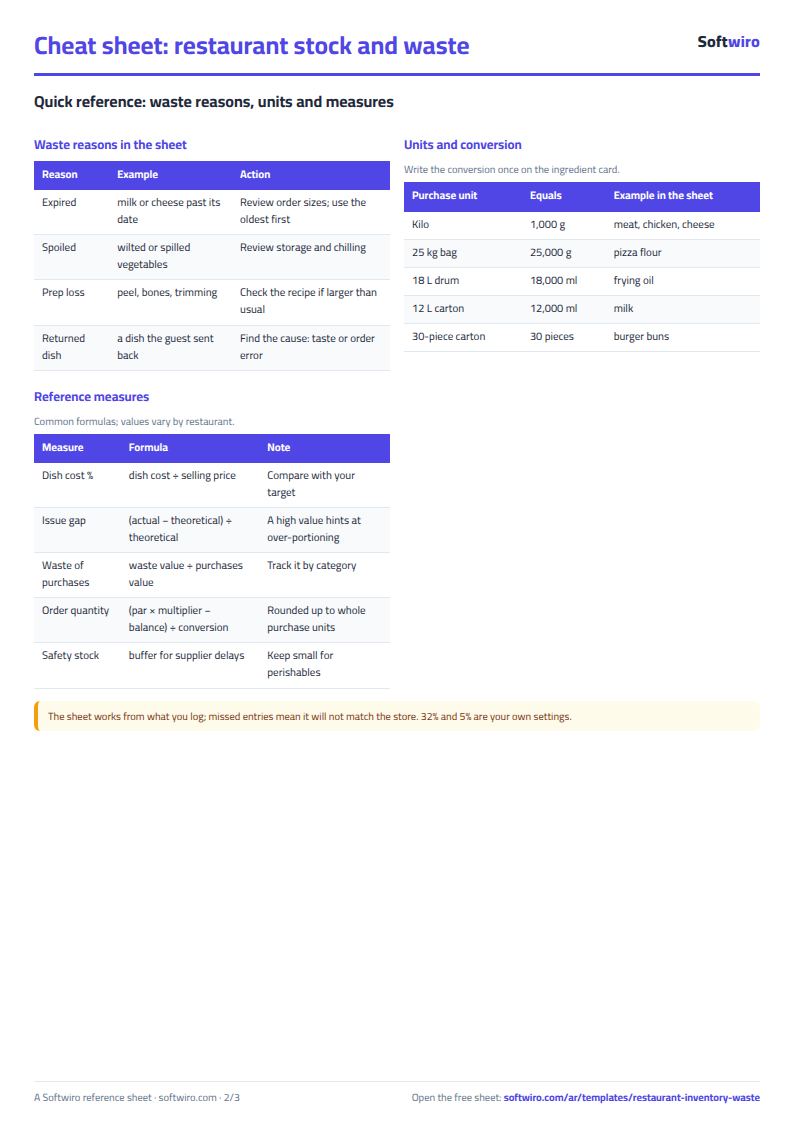
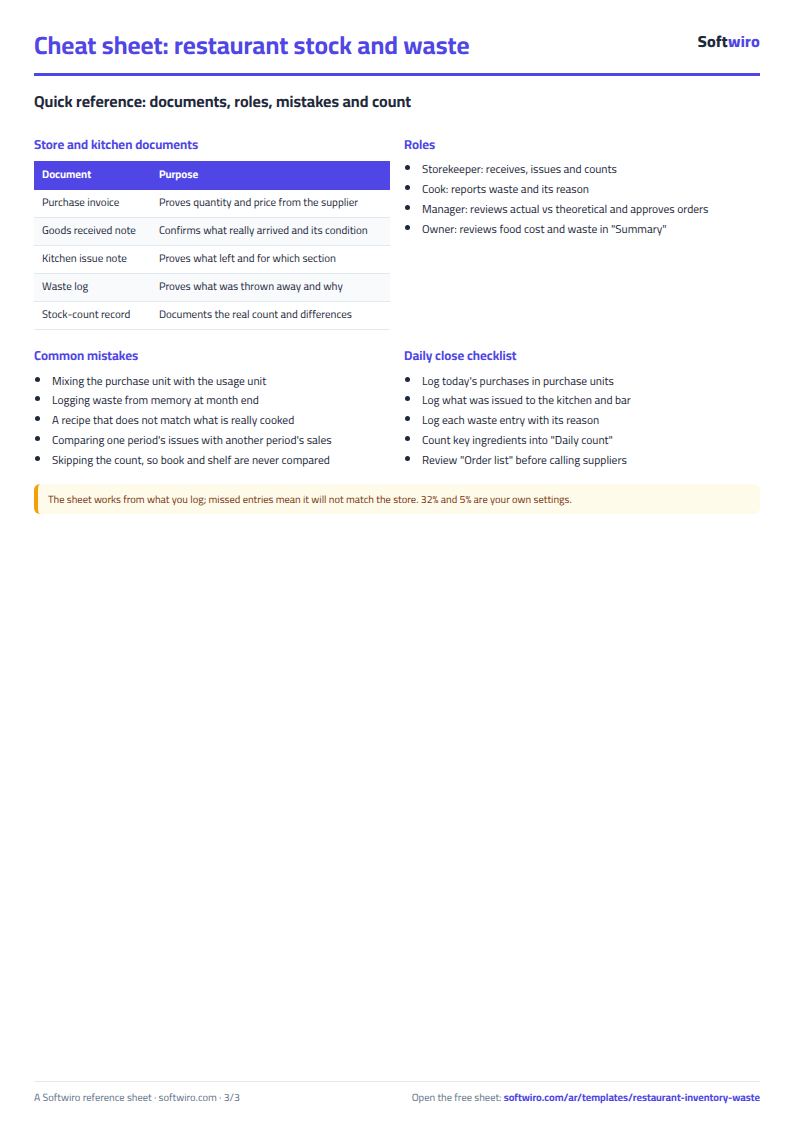
Free cheat sheet for this field
Terms, abbreviations, tables and diagrams over several pages, in Arabic and English. Download it as a PDF or images, including a phone-size version.
Still running this on Excel?
This sheet suits a start and a limited amount of data. If your way of working grows, or you need more than one person working on it at the same time, Softwiro can build you a program that fits the way you work.
| In this sheet | In Custom Software from Softwiro |
|---|---|
| One file that one person edits at a time, and copies reach you on WhatsApp. | A program with a login for each user and permissions you define, and everyone sees the same data. |
| You type everything and check the numbers by hand. | We design the screens around your work steps, so each person records only what concerns them. |
| Columns and formulas are fixed as the sheet was designed. | We build what you need: reports, alerts and screens your way. |
| Backups and security are your own responsibility. | The program runs on a secured server with regular backups. |
Frequently asked questions
How do I calculate food cost percentage for a restaurant in Excel?
Add the value issued to the kitchen and the value of waste, then divide by dish sales. The sheet does this in "الملخص" (Summary) and compares it with the theoretical percentage from the recipes and with your target.
What is the difference between actual and theoretical usage?
Theoretical usage is the recipe quantities multiplied by the number of dishes sold, that is, what should have left the store. Actual usage is what was recorded as issued to the kitchen. A difference points to oversized portions, unrecorded waste or a recipe error.
How do I record an item I buy by the carton and use by the gram?
Enter the purchase unit, the usage unit and the factor between them (for example 1000 grams per kilo). Record purchases in the purchase unit and issues and waste in the usage unit; the sheet converts between them.
What is par level and how do I use it?
Par is the minimum quantity of an item you want to find in the store. If the balance falls below it, "اطلب" (order) appears in the purchase order, with a quantity that brings you up to a multiple you set in Settings.
Is the template free?
Yes, with no sign-up and no email address. Use it, edit it and share it as you like.
Does it work in Google Sheets and on mobile?
The sheet uses formulas supported by Excel 2016 and later, Google Sheets and LibreOffice, so you can upload it to Google Drive and open it with Google Sheets on a computer or a phone.
What is the difference between the white and the gray cells?
You type in the white cells; the gray cells are calculated automatically. Don't type in a gray cell, or you will erase its formula.
Can I use the sheet from an AI assistant?
Yes. Add our MCP server (URL https://softwiro.com/api/mcp, no key needed) to your assistant and ask it to do the calculation in this template. The numbers come from the sheet's own formulas, and we do not store your data. The steps and a ready-made prompt are in this article: https://softwiro.com/blog/mcp-excel-templates-ai-agent-guide.html
More free templates for: Restaurants and cafes
More free templates
- Recipe costing for restaurants and cafes (Excel)
- Restaurant and cafe table reservations sheet
- Canteen management sheet
- Spare parts inventory sheet
- Fixed assets register and depreciation sheet
- Barcode, batch and expiry inventory sheet
- Padel and 5-a-side court booking sheet (hourly)
- Wedding and event hall booking sheet
- Serviced apartments and short-stay bookings sheet
- Photo studio bookings sheet
- General appointments scheduler sheet