Try the sheet here, on the example
The sheet is open below with sample numbers. Change any white cell and watch the results update, or press the blank-copy button to type your own data from scratch. Nothing you type leaves your browser.
Example from the sheet
| رقم القطعة | الوصف | مكان التخزين | الرصيد | قيمة الرصيد | الحالة |
|---|---|---|---|---|---|
| 6205-2RS | رولمان بلى 6205 بمانع تسرب | A-01-03 | 18 | 1,530.00 | متوفر |
| 6308-2Z | رولمان بلى 6308 | A-01-04 | 13 | 2,470.00 | متوفر |
| OF-2310 | فلتر زيت محرك | B-02-01 | 8 | 3,360.00 | متوفر |
| AF-5521 | فلتر هواء | B-02-02 | 7 | 4,550.00 | متوفر |
| HF-9008 | فلتر هيدروليك | B-02-04 | 2 | 1,560.00 | اطلب |
| FF-1142 | فلتر سولار | B-02-03 | 20 | 4,200.00 | فائض |
| VB-A52 | سير V مقاس A52 | C-01-01 | 7 | 665.00 | اطلب |
| VB-B68 | سير V مقاس B68 | C-01-02 | 4 | 560.00 | اطلب |
| CH-RC80 | سلسلة رولر رقم 80 | C-02-01 | 6 | 1,560.00 | متوفر |
| FU-30A | فيوز 30 أمبير | D-01-01 | 135 | 1,620.00 | متوفر |
| CT-40A | كونتاكتور 40 أمبير | D-01-05 | 5 | 2,700.00 | متوفر |
Example from the “القطع” tab (Arabic), with the numbers and formulas that are in the file.
What is inside
- الإعدادات: Today's date, the number of days after which a part counts as slow-moving, the first month of the monthly summary, and the list of part categories.
- الموردون: Each supplier's name, phone and lead time in days, with the value received from them, their number of deliveries and the number of parts they supply. Holds up to 40 suppliers.
- الآلات: Your machines and vehicles, with the number of issues to each, the value issued and returned, net consumption, its percentage and rank. Holds up to 40 machines.
- القطع: Each part's card: number, alternate number, description, compatible machine, category, unit, bin location, cost, opening balance, minimum and maximum levels, and supplier. The sheet calculates received, issued, returned, balance, its value, status, order quantity, last issue and slow-moving flag. Holds up to 200 parts.
- الاستلام: One line per delivery: date, part number, supplier, quantity, cost and purchase order number; the description and total appear. Holds up to 600 deliveries.
- الصرف: One line per issue: date, part number, quantity, who took it, the machine and the work order; the value appears. It warns you if you enter a number that does not exist. Holds up to 800 transactions.
- المرتجعات: What the workshop returned to the store: the part, quantity, who returned it, the machine and the reason. The balance rises and the machine's consumption falls. Holds up to 200 returns.
- بحث: Type a part number, part of it, the alternate number, a model name or a word from the description, and the first 10 matching parts appear with their balance, location, status and supplier.
- إعادة الطلب: Parts that reached their minimum or ran out, sorted by order cost, with the suggested quantity (maximum - balance), supplier, lead time and the expected arrival date if ordered today.
- الراكد: Parts with a balance that have not been issued for the period you set, or never issued, sorted by value.
- الملخص: Stock value, number of parts in each status, slow-moving value and percentage, and received, issued and returned totals, with charts for stock value by category, statuses, monthly movement and consumption per machine.
The file opens on a start tab (“ابدأ هنا”, Start here) that explains how to use it.
What makes it different
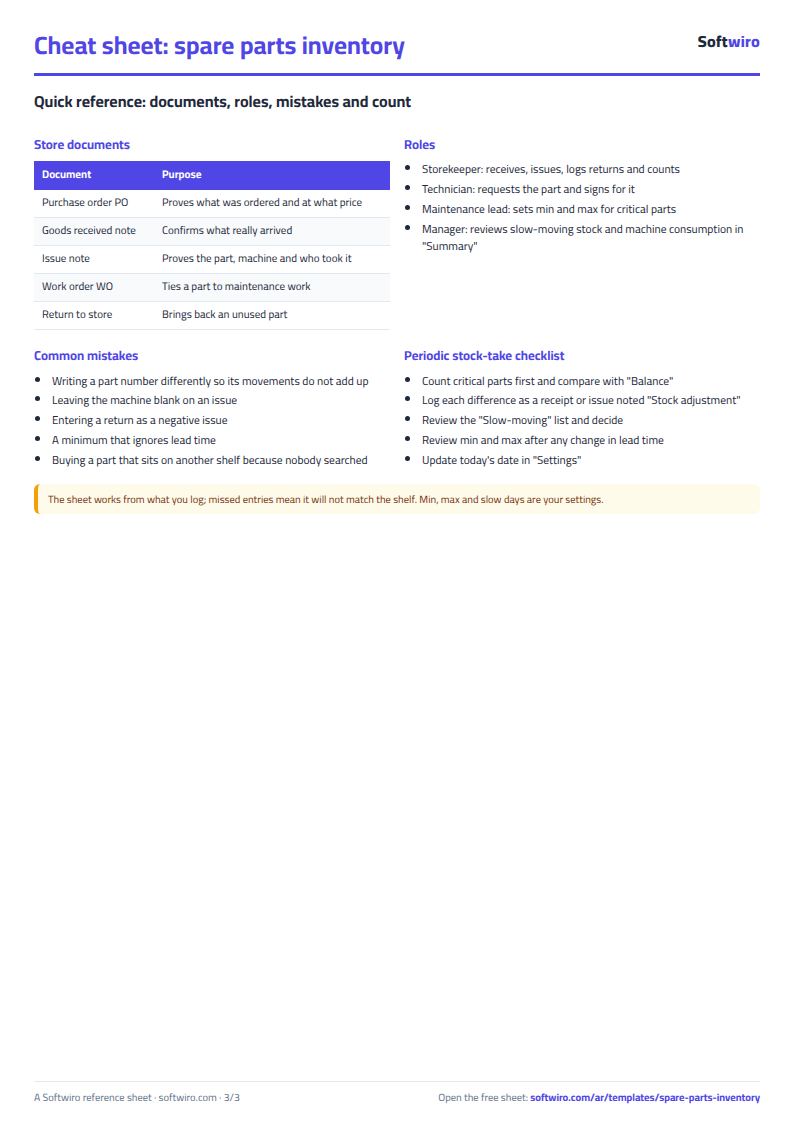
Balance, location and the issue of each part to its machine and work order in one file: you record an issue once, the part's balance drops, the machine's consumption rises, and you can see who took it.
How to use it
- In "الإعدادات" (Settings) enter today's date and the number of days for slow-moving parts, then in "الموردون" (Suppliers) enter each supplier and lead time in days, and in "الآلات" (Machines) enter your machines and vehicles.
- In "القطع" (Parts) enter each part's card: number, alternate or OEM number, description, compatible machine, bin location, cost, minimum and maximum levels, and supplier.
- Record every delivery from suppliers in "الاستلام" (Receipts), every part that left the store in "الصرف" (Issues) with who took it, the machine and the work order number, and what came back to the store in "المرتجعات" (Returns).
- The "القطع" (Parts) sheet calculates received, issued, returned, balance, its value, each part's status and last issue on its own.
- Type a part number, part of it or a model name in "بحث" (Search), and the balance, bin location and status of each matching part appear.
- Open "إعادة الطلب" (Reorder) for what fell below the minimum with its supplier and lead time, "الراكد" (Slow-moving) for what has not moved, "الآلات" (Machines) for each machine's consumption, and "الملخص" (Summary) for value and charts.
Before you start:
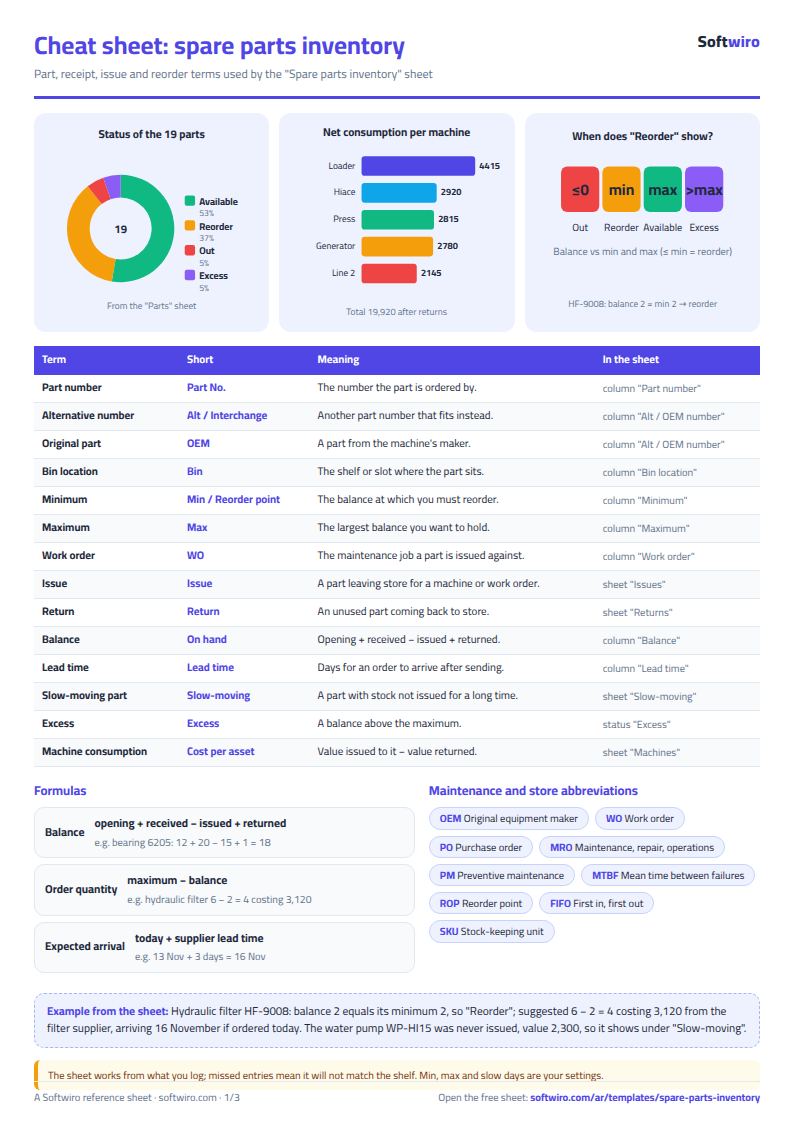
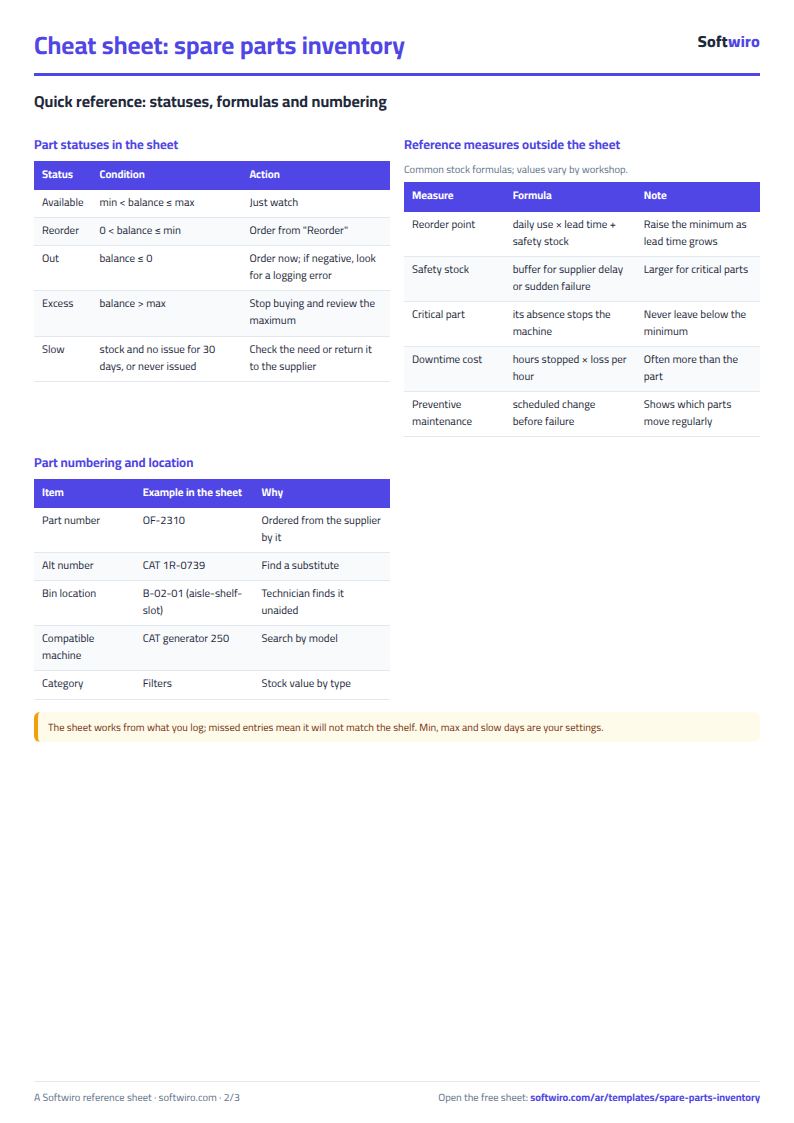
- Balance = opening balance + received - issued + returned. Balance value = balance x the cost entered in the part's card.
- Status: "نفد" (out of stock) if the balance is zero or less, "اطلب" (order) if it reached the minimum or fell below it, "فائض" (excess) if it exceeds the maximum, otherwise "متوفر" (available).
- Reorder quantity = maximum - balance, and expected arrival date = today's date + the supplier's lead time in days.
- A slow-moving part is one with a balance that has had nothing issued for the number of days in Settings or more, or has never been issued.
- Machine consumption = value issued to it - value returned from it, at the part's cost in its card. Choose the machine's name from the list on each issue so its consumption adds up.
- Capacity: 200 parts, 40 suppliers, 40 machines, 600 receipts, 800 issues and 200 returns. "إعادة الطلب" (Reorder) shows the first 50 parts, "الراكد" (Slow-moving) the first 40 and "بحث" (Search) the first 10 results.
Free cheat sheet for this field
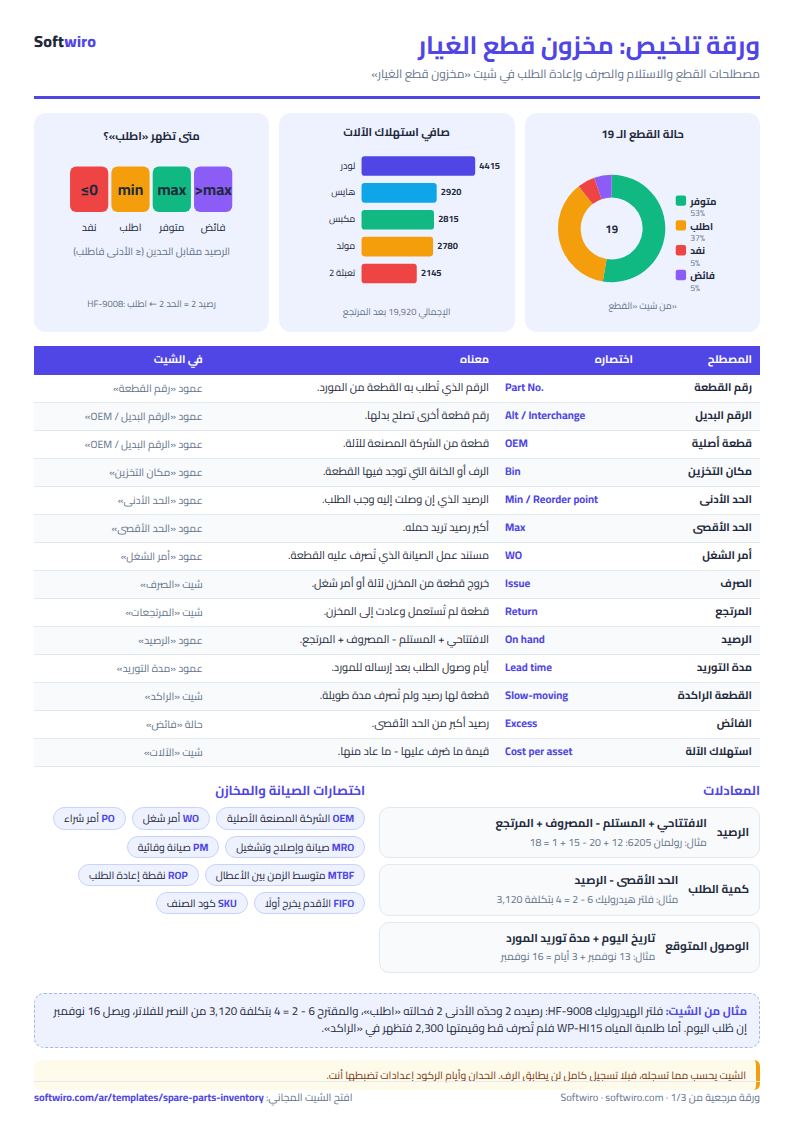
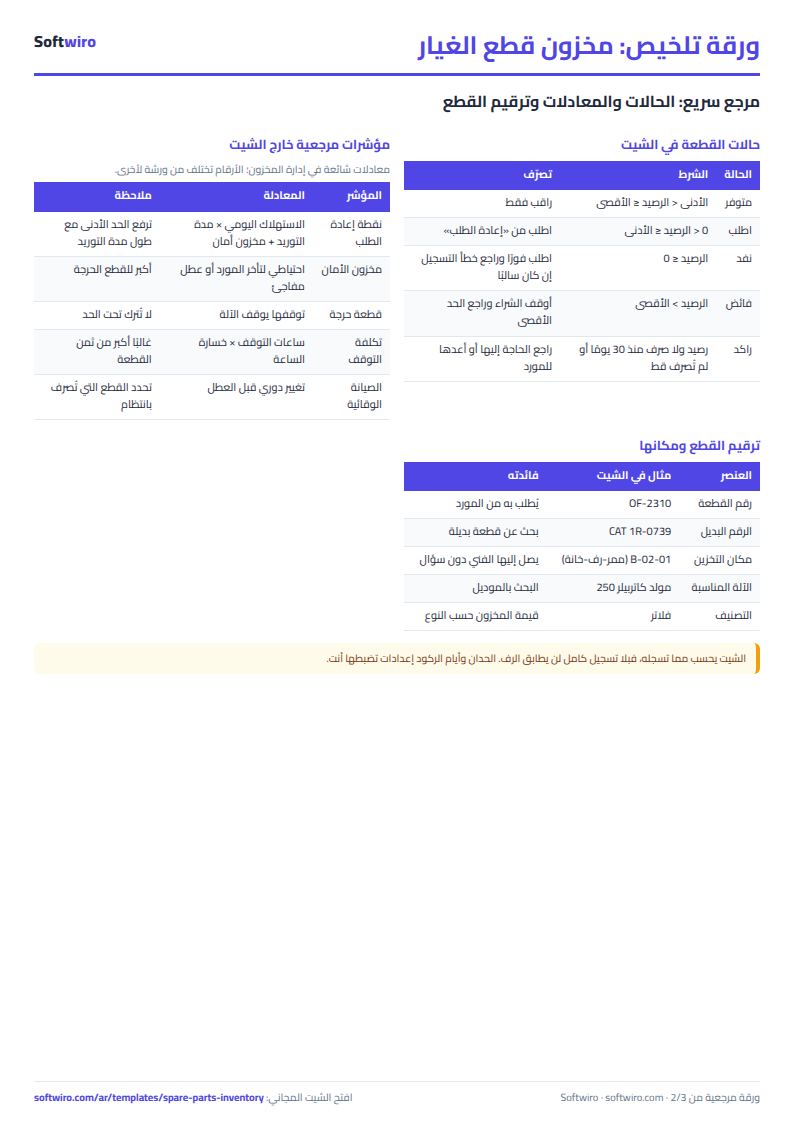
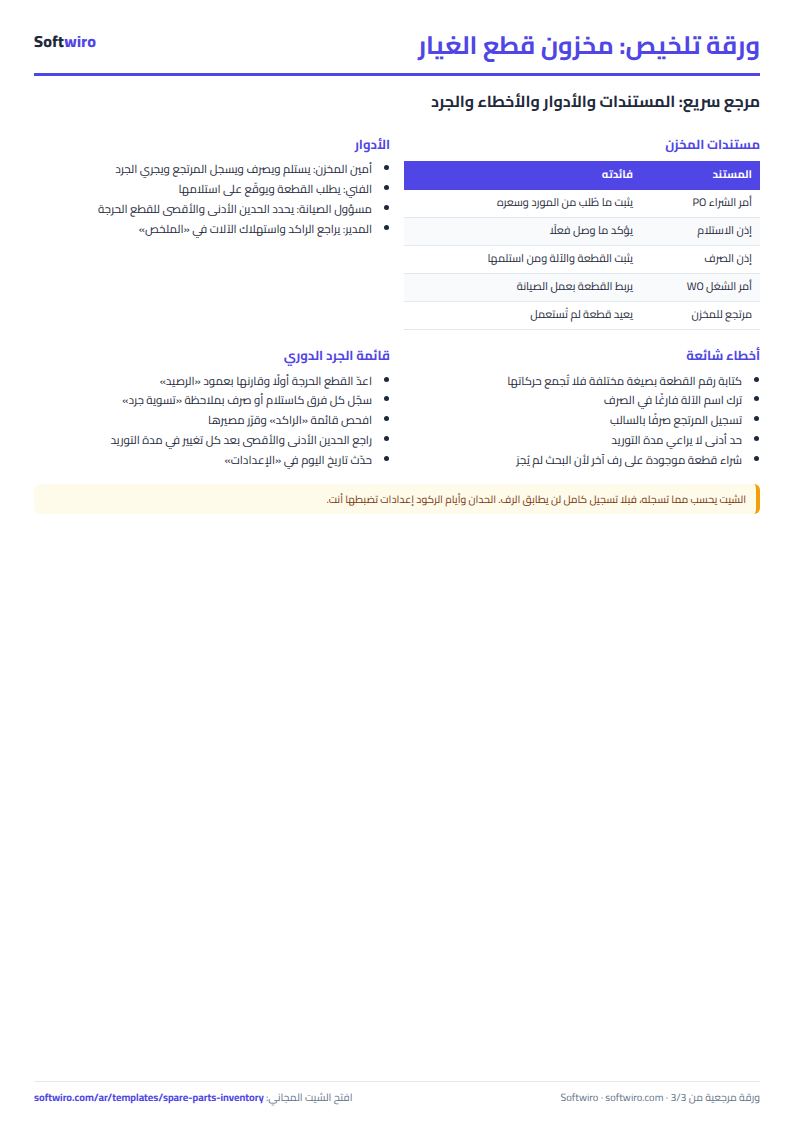
Terms, abbreviations, tables and diagrams over several pages, in Arabic and English. Download it as a PDF or images, including a phone-size version.
Still running this on Excel?
This sheet suits a start and a limited amount of data. If your way of working grows, or you need more than one person working on it at the same time, Softwiro can build you a program that fits the way you work.
| In this sheet | In Custom Software from Softwiro |
|---|---|
| One file that one person edits at a time, and copies reach you on WhatsApp. | A program with a login for each user and permissions you define, and everyone sees the same data. |
| You type everything and check the numbers by hand. | We design the screens around your work steps, so each person records only what concerns them. |
| Columns and formulas are fixed as the sheet was designed. | We build what you need: reports, alerts and screens your way. |
| Backups and security are your own responsibility. | The program runs on a secured server with regular backups. |
Frequently asked questions
How do I quickly find a part's location and balance in Excel?
Type the part number, part of it, the alternate number or the model name in the "بحث" (Search) sheet, and the matching parts appear with their balance, bin location, status and supplier.
When do "اطلب", "نفد" and "فائض" appear?
"نفد" (out of stock) appears if the balance is zero or less, "اطلب" (order) if the balance reached the minimum or fell below it, and "فائض" (excess) if it exceeds the maximum. Otherwise the part is "متوفر" (available).
How is each machine's consumption calculated?
Choose the machine's name from the list on every issue. The "الآلات" (Machines) sheet calculates the value issued to it, then subtracts the value of what was returned to the store from it to give its net consumption.
What is a slow-moving part?
It is a part with a balance that has had nothing issued for the number of days you enter in Settings, or has never been issued. The "الراكد" (Slow-moving) sheet lists it with its value.
Is the template free?
Yes, with no sign-up and no email address. Use it, edit it and share it as you like.
Does it work in Google Sheets and on mobile?
The sheet uses formulas supported by Excel 2016 and later, Google Sheets and LibreOffice, so you can upload it to Google Drive and open it with Google Sheets on a computer or a phone.
What is the difference between the white and the gray cells?
You type in the white cells; the gray cells are calculated automatically. Don't type in a gray cell, or you will erase its formula.
Can I use the sheet from an AI assistant?
Yes. Add our MCP server (URL https://softwiro.com/api/mcp, no key needed) to your assistant and ask it to do the calculation in this template. The numbers come from the sheet's own formulas, and we do not store your data. The steps and a ready-made prompt are in this article: https://softwiro.com/blog/mcp-excel-templates-ai-agent-guide.html
More free templates for: Workshops and maintenance
More free templates
- Car workshop job orders tracker (Excel)
- Metal and turning workshop job sheet in Excel: job orders, materials and labor
- Glass and aluminium workshop sheet in Excel: orders by square metre, cutting and waste
- Carpentry workshop sheet: cutting list, boards, cost and delivery
- Fixed assets register and depreciation sheet
- Barcode, batch and expiry inventory sheet
- Padel and 5-a-side court booking sheet (hourly)
- Wedding and event hall booking sheet
- Serviced apartments and short-stay bookings sheet
- Restaurant and cafe table reservations sheet
- Photo studio bookings sheet
- General appointments scheduler sheet