Try the sheet here, on the example
The sheet is open below with sample numbers. Change any white cell and watch the results update, or press the blank-copy button to type your own data from scratch. Nothing you type leaves your browser.
Example from the sheet
| 1) مؤشرات حملتك | |
|---|---|
| الإنفاق | 5000 |
| الظهور | 400000 |
| الوصول | 250000 |
| النقرات | 6000 |
| التحويلات (الطلبات) | 150 |
| الإيراد | 30000 |
| هامش الربح الإجمالي | 40.0% |
| CPM | 12.50 |
Example from the “حاسبات” tab (Arabic), with the numbers and formulas that are in the file.
What is inside
- المرجع (Reference): 61 rules in 8 sections: core metrics, relationships between them, profitability and breakeven, decision rules, scaling and budget, testing and creative fatigue, the funnel, and naming. Each has a formula, an example with trial numbers and a note.
- بحث عن قاعدة (Rule lookup): Pick a metric or rule name from the list and its formula, example, note and section appear.
- حاسبات (Calculators): Five calculators: your campaign's metrics from raw numbers; breakeven ROAS, max CPA and LTV:CAC; a budget funnel through to revenue and expected profit; spend pacing; and converting CPM, CTR and CVR into CPC, CPA and ROAS.
- قرار الإعلانات (Ad decisions): Enter your targets in the settings (target ROAS, minimum acceptable ROAS, minimum spend before judging, minimum conversions, maximum frequency, minimum CTR and scaling step), then the numbers for up to 10 ad sets. The sheet suggests scale, keep and watch, kill, or wait, with a creative fatigue alert and a suggested budget.
- قوائم التشغيل (Operating checklists): 28 items in four lists: before launch, daily, weekly and monthly. You mark ✔ against what you have done, and there are spare rows for your own items.
- اختبار ذاتي (Self-test): 40 questions in four branches, answered with a number without a unit or by choosing from a list. A ✔ or ✘ appears and the score shows at the top. The answer key is in hidden columns.
- المتابعة (Tracker): The topic, the date you reviewed it and your score. The sheet works out the next review date from the score and highlights topics that are due, with a chart of your scores.
- الملخص (Summary): Your score, the number of rules in each section, the number of ad sets in each decision, total spend, revenue, ROAS, current and suggested budget, and the share of checklist items done, with six charts.
The file opens on a start tab (“ابدأ هنا”, Start here) that explains how to use it.
What makes it different
The sheet does not hand you benchmark numbers to follow. It teaches you to work out your own limits: breakeven ROAS from your product margin, and max CPA. Then you enter your targets and your limits for spend and conversions, and the decision helper applies your rules to every ad set the same way each time. That means fewer hasty decisions on thin data, and your rules stay written down and open to review.
How to use it
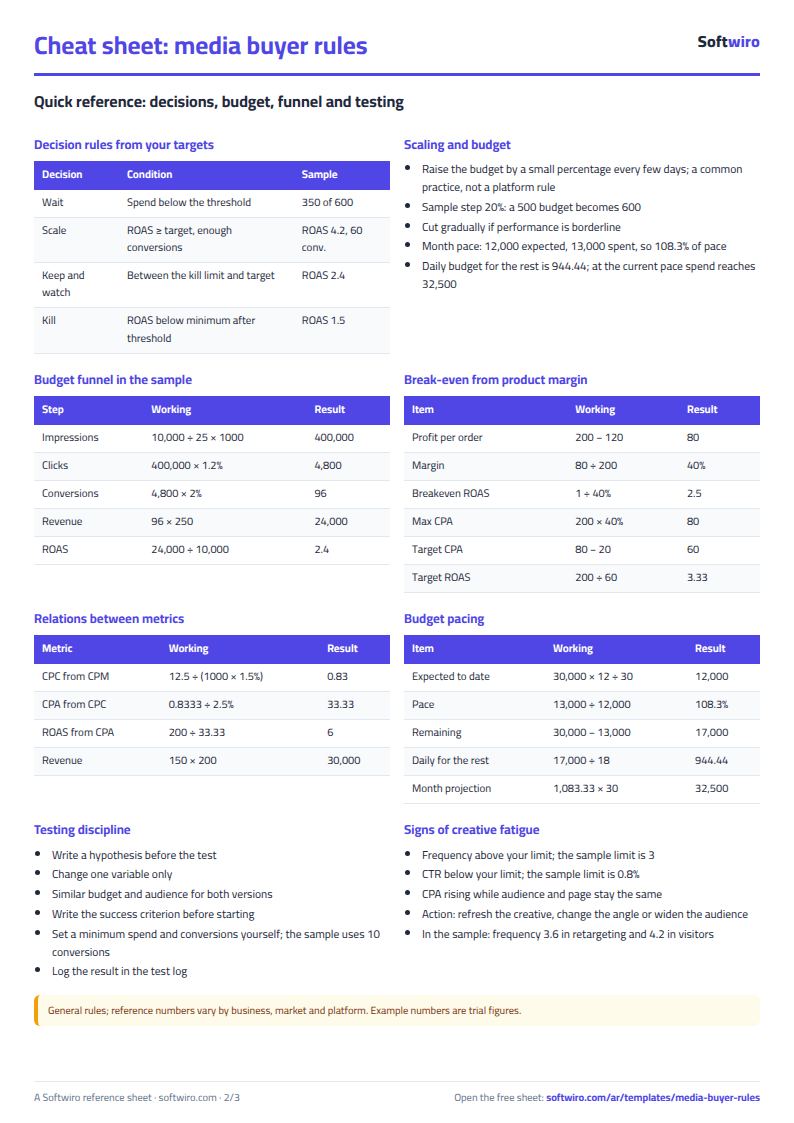
- Open the «المرجع» (Reference) tab and review the rules by section: each metric has its formula, an example from the sample numbers and a note. You can filter the table by the section column. In «بحث عن قاعدة» (Rule lookup), pick a name and its formula appears.
- In «حاسبات» (Calculators), enter your campaign numbers to see its metrics, your product numbers to see breakeven ROAS and max CPA, funnel numbers (budget, CPM, CTR, CVR and AOV) to see expected sales, and the month's numbers to see spend pacing.
- In «قرار الإعلانات» (Ad decisions), enter your targets in the settings (target ROAS, minimum acceptable ROAS, minimum spend before judging and so on), then the numbers for up to 10 ad sets, and the sheet suggests: scale, keep and watch, kill, or wait.
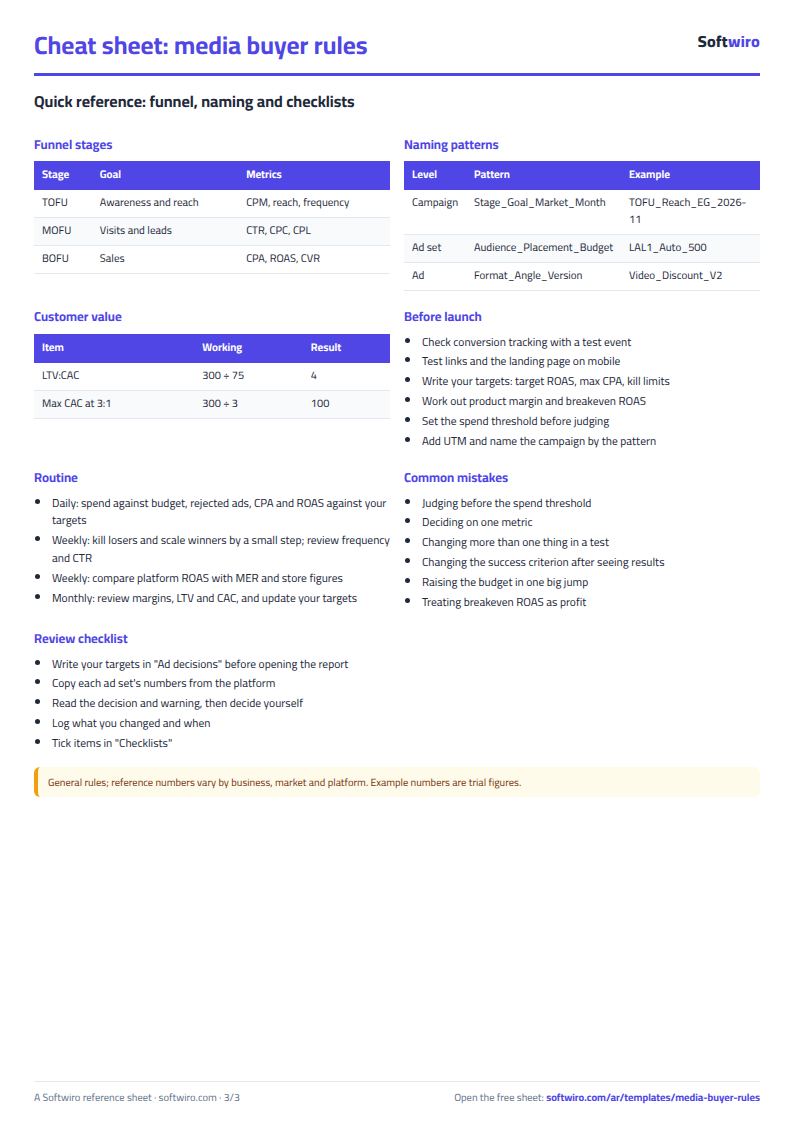
- Use «قوائم التشغيل» (Operating checklists) before launch and daily, weekly and monthly, and put a ✔ against what you have done.
- Answer «اختبار ذاتي» (Self-test) and record your score in «المتابعة» (Tracker), then open «الملخص» (Summary) to see your decisions and score with the charts.
Before you start:
- These are general rules; reference numbers vary by business, market and platform. The sheet gives no benchmark numbers for CTR, CPM or CPA: you enter every decision threshold (target ROAS, spend, conversions, frequency) in the settings.
- The examples in Reference and the calculators are trial numbers for illustration only, not market figures or platform averages. Definitions of clicks, conversions and rates can differ between platforms, so use one definition when comparing.
- The gradual scaling rule (increasing by a small percentage every few days) is a common practice, not a rule of any platform, and you set the step (20% in the sample) yourself.
- Breakeven ROAS = 1 / gross profit margin. It is breakeven at the ad level only, before fixed costs and labour, so set your target above it.
- Ad decisions holds 10 ad sets (8 in the sample), Operating checklists holds 35 items (28 in the sample), Tracker holds 20 topics, and the quiz holds 45 questions (40 in the sample).
- In the quiz, a numeric answer is accepted within a tolerance of 0.01, so enter the number as it is (such as 2.5 or 1.5) with no unit or % sign. Multiple-choice questions are answered from the drop-down list.
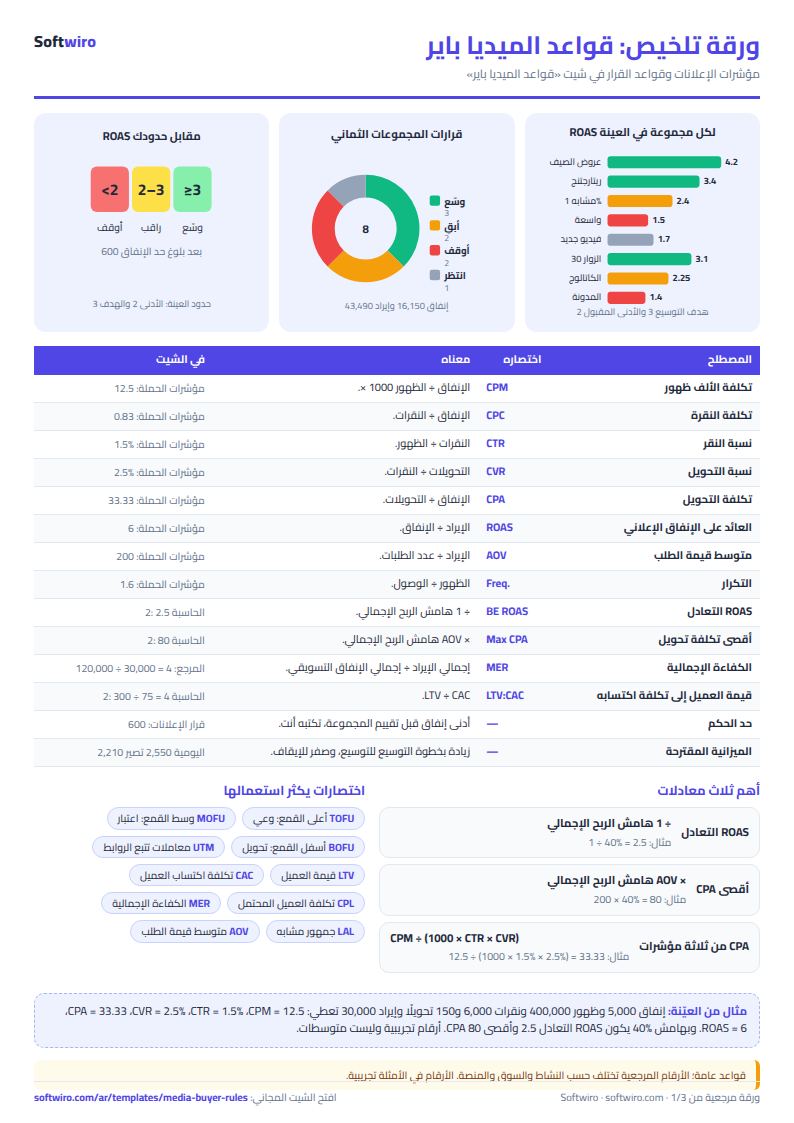
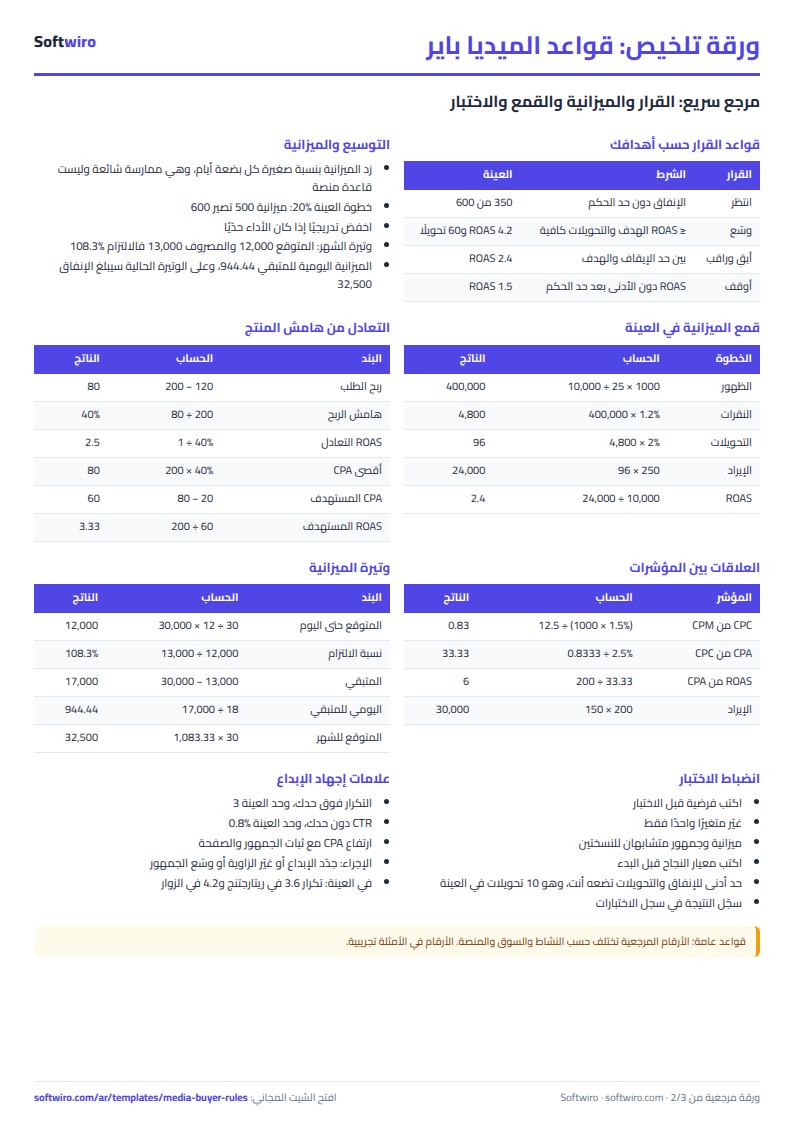
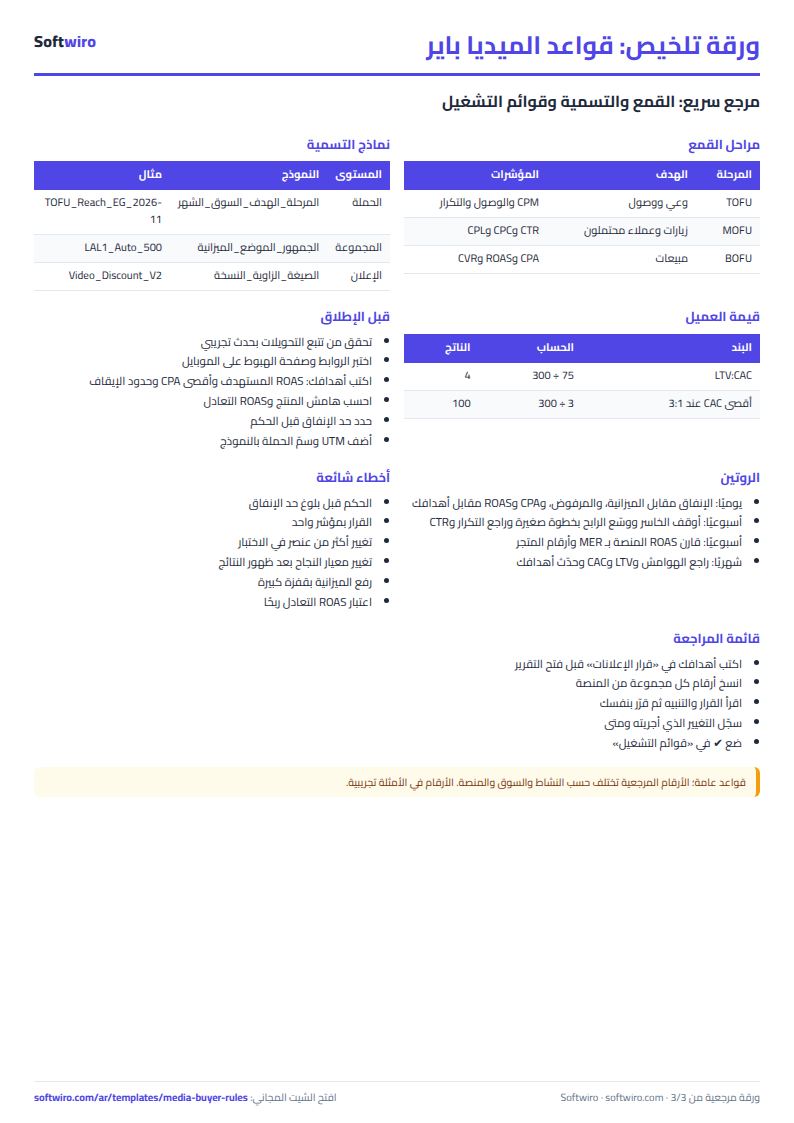
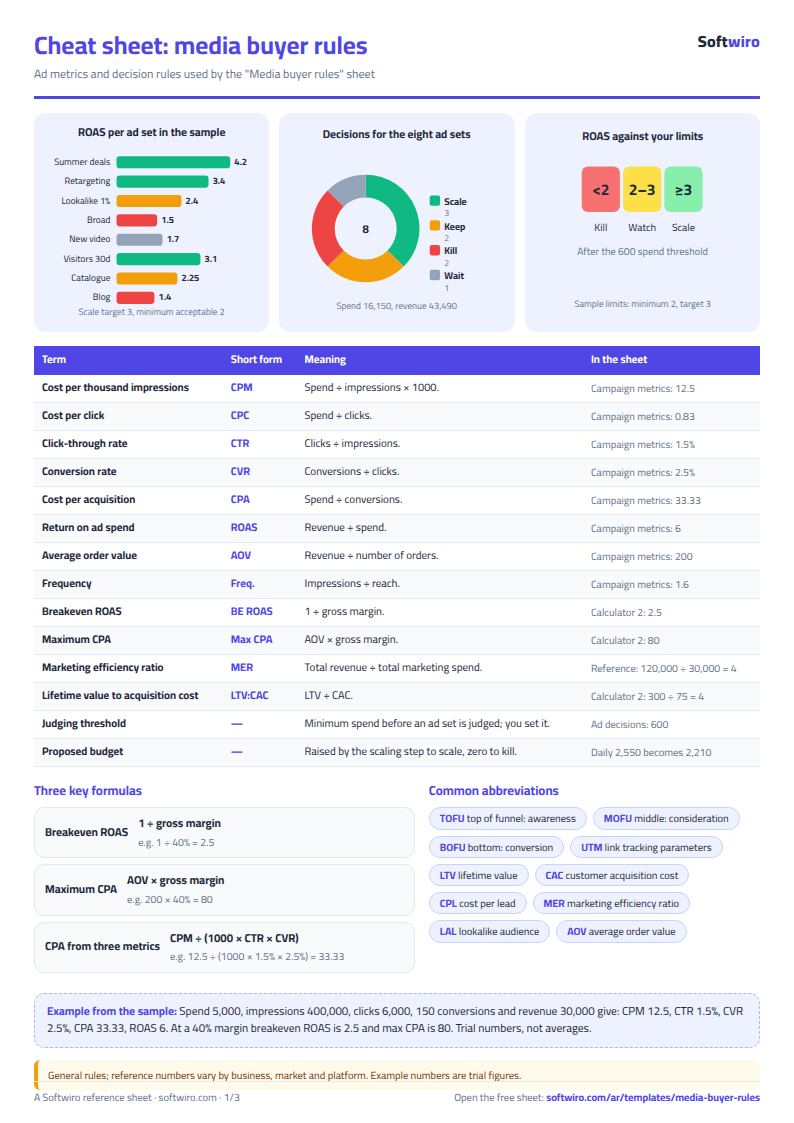
Free cheat sheet for this field
Terms, abbreviations, tables and diagrams over several pages, in Arabic and English. Download it as a PDF or images, including a phone-size version.
Still running this on Excel?
This sheet suits a start and a limited amount of data. If your way of working grows, or you need more than one person working on it at the same time, Softwiro can build you a program that fits the way you work.
| In this sheet | In Custom Software from Softwiro |
|---|---|
| One file that one person edits at a time, and copies reach you on WhatsApp. | A program with a login for each user and permissions you define, and everyone sees the same data. |
| You type everything and check the numbers by hand. | We design the screens around your work steps, so each person records only what concerns them. |
| Columns and formulas are fixed as the sheet was designed. | We build what you need: reports, alerts and screens your way. |
| Backups and security are your own responsibility. | The program runs on a secured server with regular backups. |
Frequently asked questions
Does the sheet include benchmark numbers for CTR, CPM or CPA?
No. These are general rules; reference numbers vary by business, market and platform. All the numbers in the examples are trial figures for illustration, and you enter every decision threshold yourself in the settings.
Are the scaling and kill rules in the sheet rules from the ad platforms?
No. They are general rules built on your written targets, such as scaling gradually by a small percentage every few days, which is a common practice whose step you set yourself. Each platform has its own policies and behaviour.
How do I calculate breakeven ROAS and max CPA?
Breakeven ROAS = 1 / gross profit margin, and max CPA = average order value x margin. Enter AOV and the variable costs per order in the second calculator and both appear. This is breakeven at the ad level, before fixed costs and labour.
How many ad sets can the decision helper hold?
Ten, with eight in the sample. The sheet works out the decision from the spend, conversions, revenue and frequency numbers you enter, which you copy by hand from the platform's reports.
Is the template free?
Yes, with no sign-up and no email address. Use it, edit it and share it as you like.
Does it work in Google Sheets and on mobile?
The sheet uses formulas supported by Excel 2016 and later, Google Sheets and LibreOffice, so you can upload it to Google Drive and open it with Google Sheets on a computer or a phone.
What is the difference between the white and the gray cells?
You type in the white cells; the gray cells are calculated automatically. Don't type in a gray cell, or you will erase its formula.
Can I use the sheet from an AI assistant?
Yes. Add our MCP server (URL https://softwiro.com/api/mcp, no key needed) to your assistant and ask it to do the calculation in this template. The numbers come from the sheet's own formulas, and we do not store your data. The steps and a ready-made prompt are in this article: https://softwiro.com/blog/mcp-excel-templates-ai-agent-guide.html
All the templates in this group: Excel templates for paid ads: budget, performance and reports
More free templates for: Marketing and advertising
More free templates
- Ad budget media plan across platforms
- Ad campaign performance tracker
- Ads A/B test log
- Ads break-even and unit economics sheet
- Ad agency client management and reports
- UTM link builder and campaign naming
- Ad account audit checklist
- Ads creative production calendar
- Ads lead quality tracker
- Gradebook Template for Excel (Weighted Categories, Letter Grades)
- Cash Book Template for Excel
- Invoice Template with Invoice Log (Excel)
- Garment style costing sheet
- Production tracking sheet by stage
- Piece-rate payroll and worker efficiency sheet
- Production tracking sheet for home textiles factories
- Fabric requirements and marker sheet