Try the sheet here, on the example
The sheet is open below with sample numbers. Change any white cell and watch the results update, or press the blank-copy button to type your own data from scratch. Nothing you type leaves your browser.
Example from the sheet
| اسم المادة | المنصة | المقاس | المسؤول | موعد التسليم | موعد الإطلاق | الحالة | الأيام للتسليم | متأخر؟ | جاهز؟ | تنبيه |
|---|---|---|---|---|---|---|---|---|---|---|
| بانر عرض الجمعة البيضاء - فيد | Meta | Meta Feed 1:1 | منى سعيد | 46351 | 46353 | قيد التصميم | 12 | |||
| ريلز تجهيز الطلبات للجمعة البيضاء | Meta | Meta Stories/Reels 9:16 | كريم عادل | 46349 | 46353 | مراجعة | 10 | |||
| ستوري العد التنازلي للعرض | Meta | Meta Stories/Reels 9:16 | منى سعيد | 46347 | 46352 | قيد التصميم | 8 | |||
| بانر عرض الجمعة البيضاء - جوجل | Google Ads | Google Display 1.91:1 | يوسف حسن | 46348 | 46353 | قيد التصميم | 9 | |||
| بانر مربع للشبكة الإعلانية - الجمعة البيضاء | Google Ads | Google Display 1:1 | يوسف حسن | 46348 | 46353 | فكرة | 9 | |||
| فيديو يوتيوب 30 ثانية للعرض | YouTube | YouTube 16:9 | عمر شريف | 46350 | 46354 | قيد التصميم | 11 | |||
| تيك توك: افتح معنا الطلب | TikTok | TikTok 9:16 | كريم عادل | 46346 | 46351 | مراجعة | 7 | |||
| سناب: كود الخصم | Snapchat | Snapchat 9:16 | هبة فتحي | 46349 | 46352 | فكرة | 10 | |||
| لينكدإن: عرض باقات الشركات | LinkedIn 1.91:1 | هبة فتحي | 46342 | 46344 | معتمد | 3 | جاهز | |||
| لينكدإن: دراسة حالة عميل | LinkedIn 1:1 | هبة فتحي | 46341 | 46345 | مراجعة | 2 | ||||
| إعلان فيد: عرض نهاية الأسبوع | Meta | Meta Feed 4:5 | منى سعيد | 46340 | 46341 | معتمد | 1 | جاهز |
Example from the “الإنتاج” tab (Arabic), with the numbers and formulas that are in the file.
What is inside
- الإعدادات (Settings): Business name, today's date and the window for upcoming launches in days, plus the lists of team members (up to 8), the six statuses and the platforms (up to 8), and a table of common ad sizes for reference. The sizes are common ones and may change by platform.
- الإنتاج (Production): One row per item: name, platform, size, owner, due date, launch date, status, link and a results note. Days to due, "overdue?", "ready?", the alert and the upcoming-launch column appear on their own. It holds 600 items.
- اللوحة (Board): Total items, ready, overdue, launching within the window and the number of items with an alert, then counts by status and their percentage, by platform (count, overdue, ready and upcoming launch), and each person's workload (all items, open, overdue, ready and upcoming launch).
The file opens on a start tab (“ابدأ هنا”, Start here) that explains how to use it.
What makes it different
You log each item once, so the team knows what is late, what is ready and what launches soon. You stop tracking in WhatsApp messages and scattered files, and you are not surprised by an ad that went out in the wrong size or without approval.
How to use it
- In the "الإعدادات" (Settings) sheet, enter today's date (or =TODAY() so it updates itself) and the names of your team members and platforms. You will find the table of common sizes there for reference.
- In the "الإنتاج" (Production) sheet, record each item in a row: name, platform, size from the list, owner, due date, launch date and status.
- Update the status as the item moves: idea, in design, review, approved, published or paused, and paste the link to the final file in the link column.
- Leave the grey columns alone: days left, "overdue" for items past their due date, "ready" for approved items that have a link and a launch date, and the alert column.
- Open the "اللوحة" (Board) sheet to see counts by status and platform, each person's workload, and how many items launch in the coming days.
- After the campaign ends, write in "results note" what you learned from its numbers so you can use it in the next campaign.
Before you start:
- The sizes in the Settings table are common sizes and may change by platform, so check the official advertiser help page before exporting.
- An item is overdue if its due date has passed and its status is not approved, published or paused.
- An item is ready if its status is approved and it has a link and a launch date. The sheet does not check that the link works or that the file matches the size.
- A person's open items = all their items except published and paused ones. Do not change the names of the six statuses because the calculations depend on them.
- The sheet does not connect to your ad accounts, publish on your behalf or send alerts. It is a log you maintain by hand.
- The sheet holds 600 items, 8 team members and 8 platforms. Do not delete a row from the middle of the list.
Free cheat sheet for this field
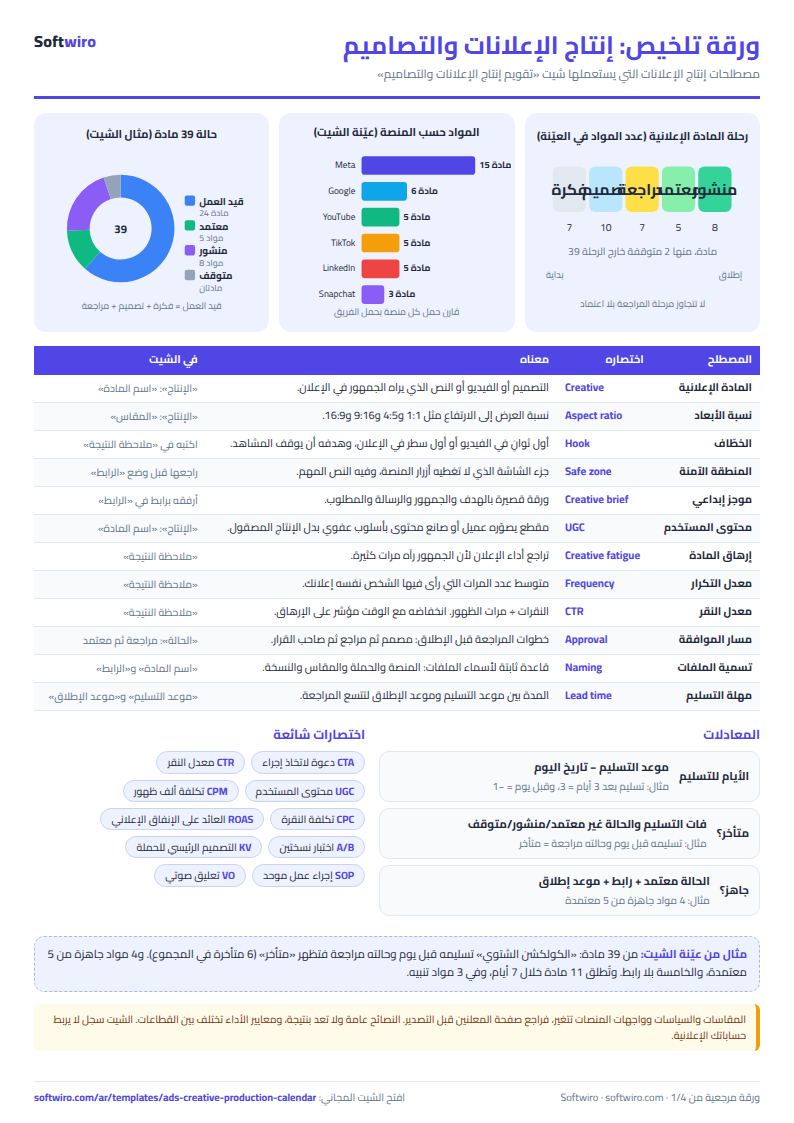
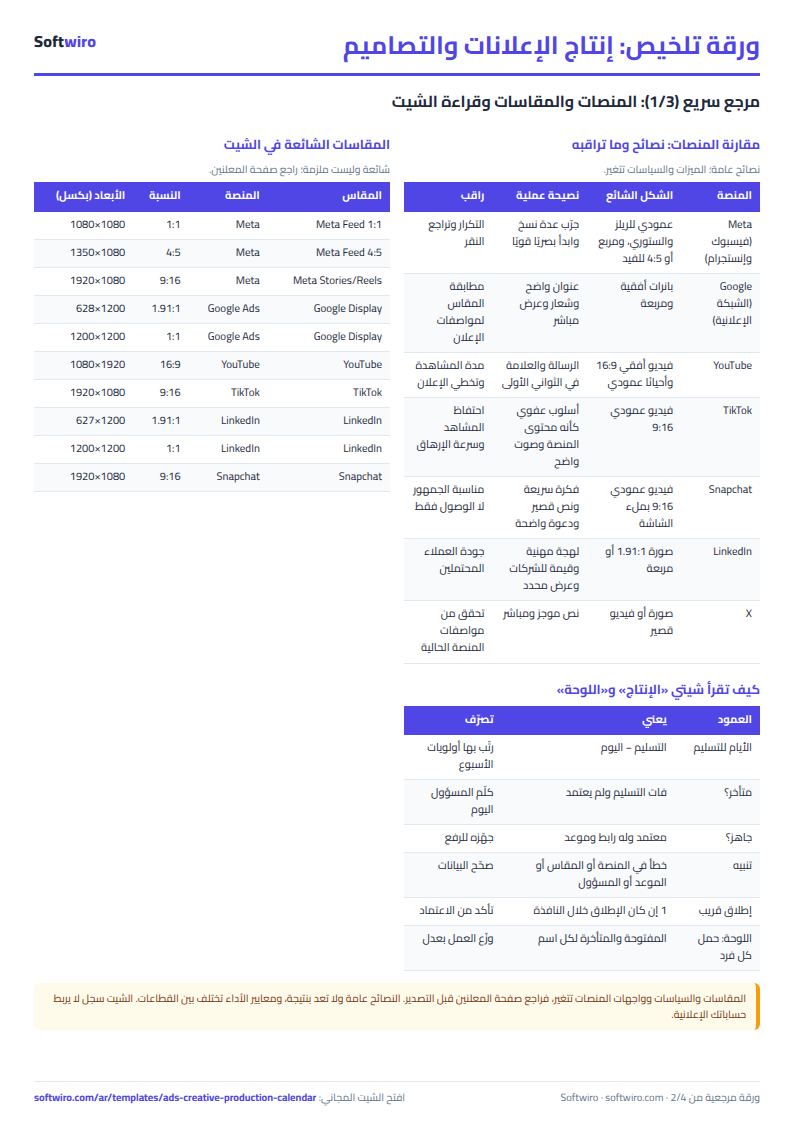
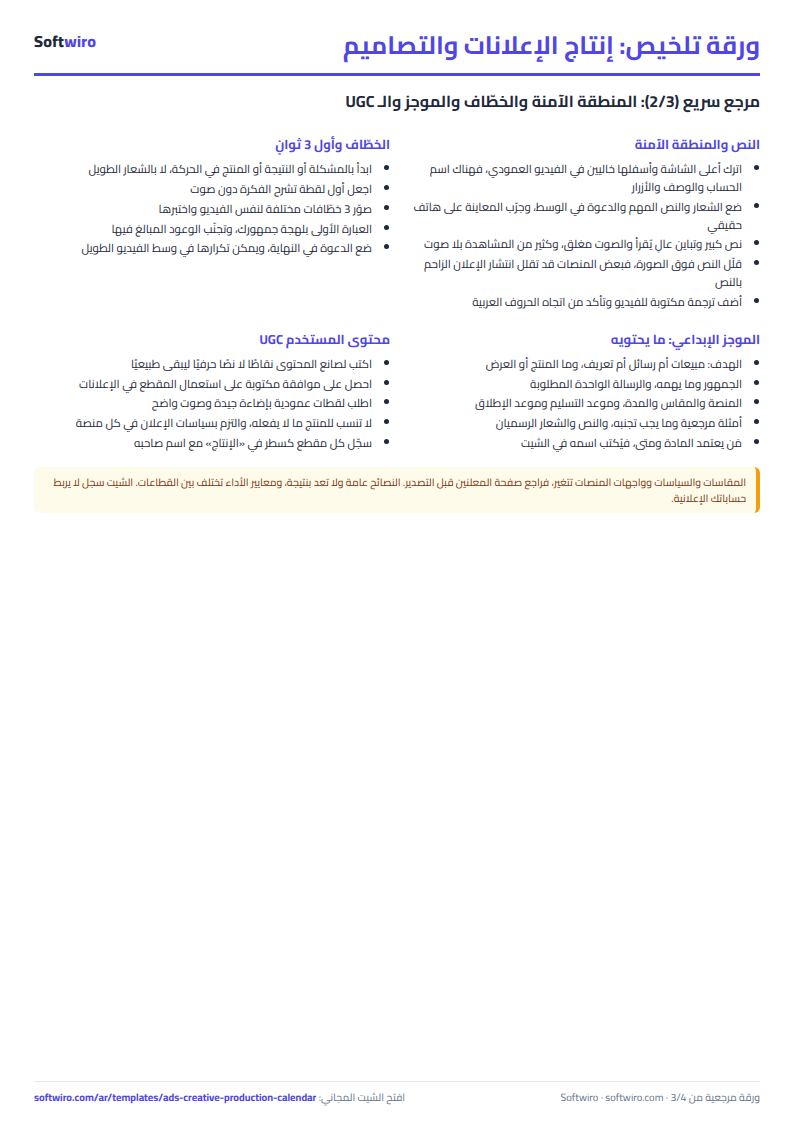
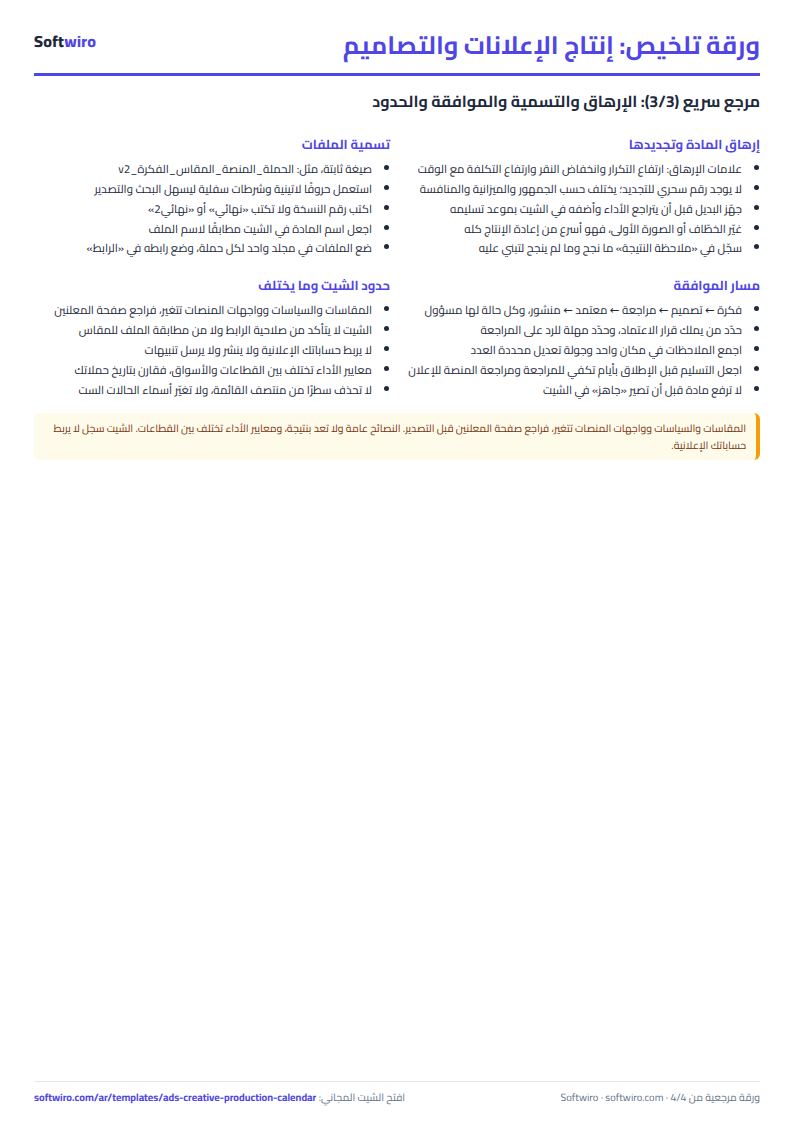
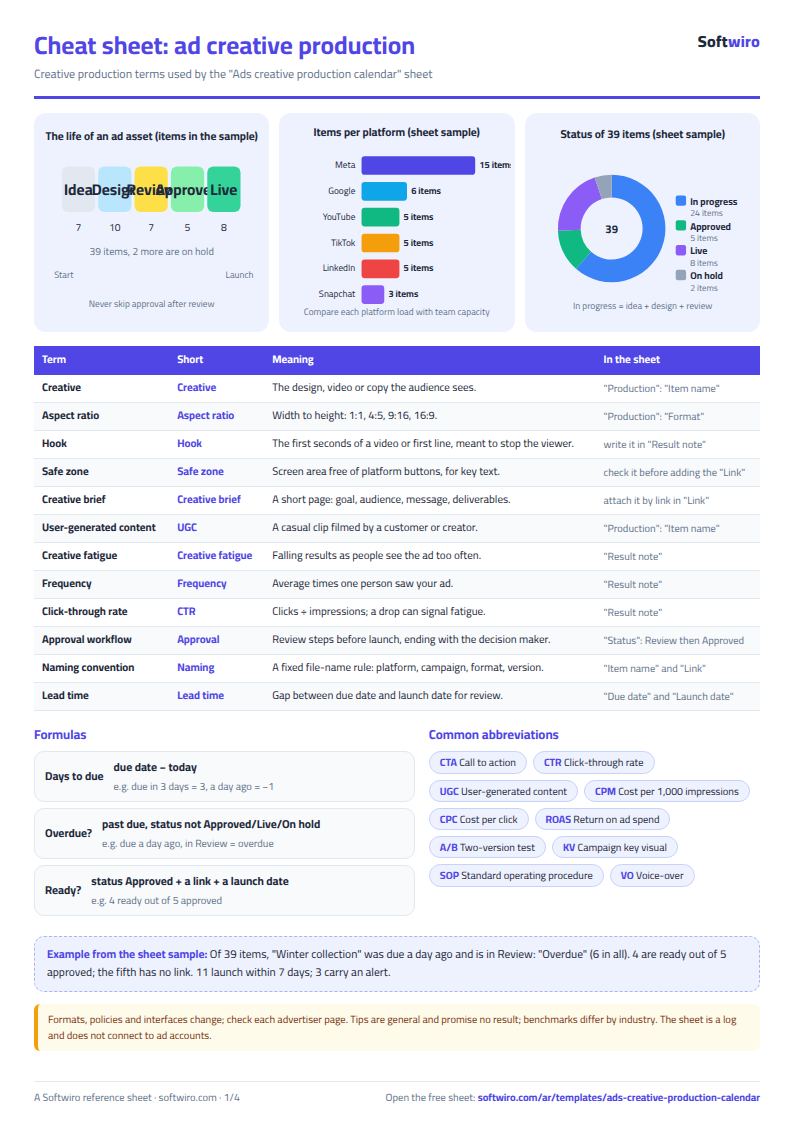
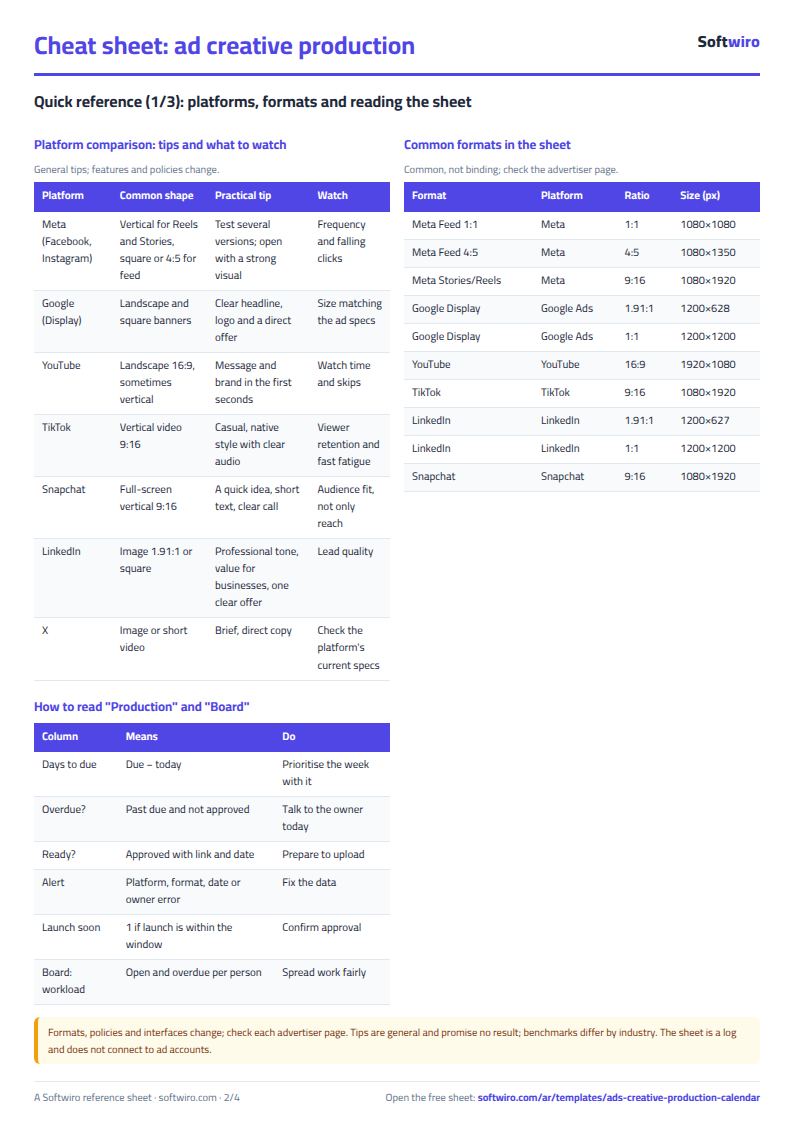
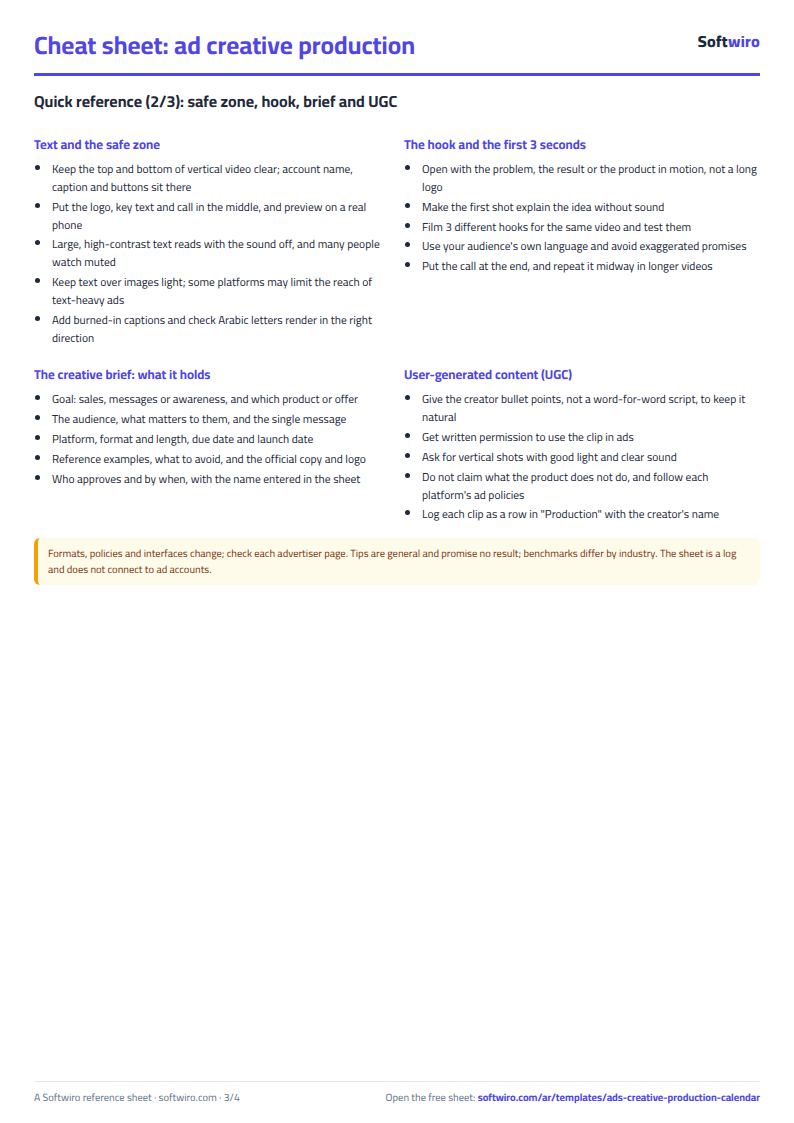
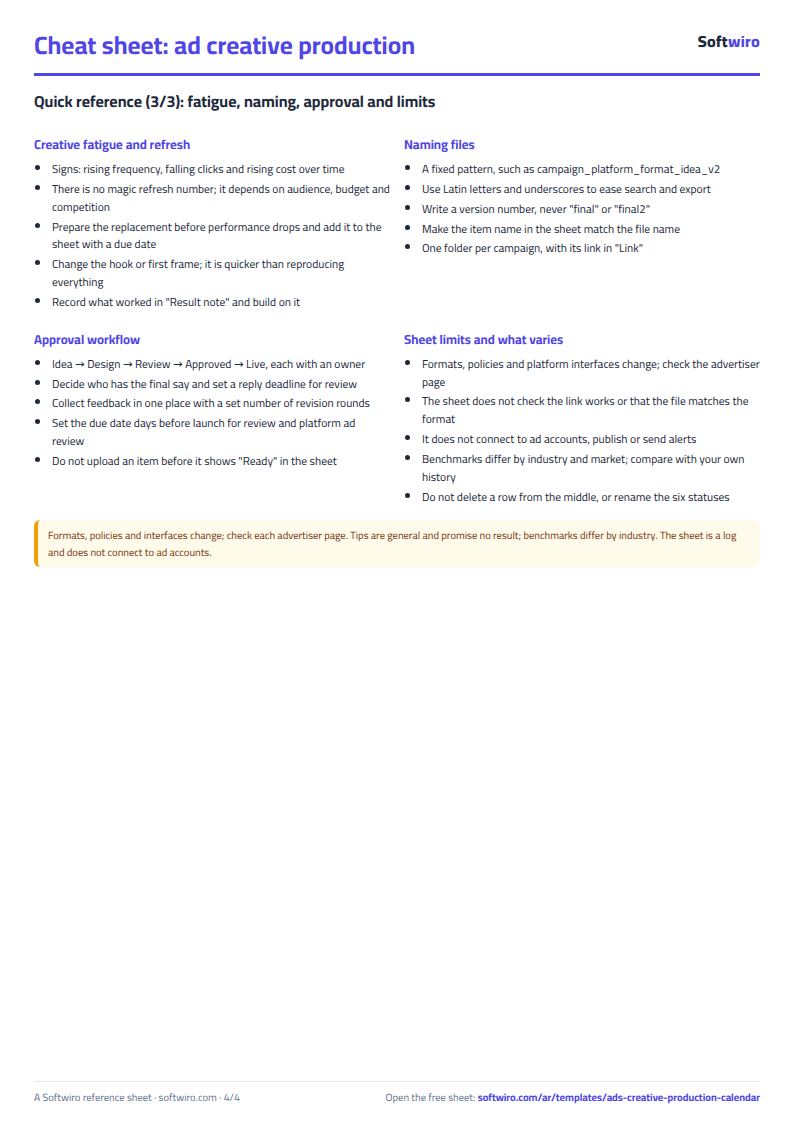
Terms, abbreviations, tables and diagrams over several pages, in Arabic and English. Download it as a PDF or images, including a phone-size version.
Still running this on Excel?
This sheet suits a start and a limited amount of data. If your way of working grows, or you need more than one person working on it at the same time, Softwiro can build you a program that fits the way you work.
| In this sheet | In Custom Software from Softwiro |
|---|---|
| One file that one person edits at a time, and copies reach you on WhatsApp. | A program with a login for each user and permissions you define, and everyone sees the same data. |
| You type everything and check the numbers by hand. | We design the screens around your work steps, so each person records only what concerns them. |
| Columns and formulas are fixed as the sheet was designed. | We build what you need: reports, alerts and screens your way. |
| Backups and security are your own responsibility. | The program runs on a secured server with regular backups. |
Frequently asked questions
How do I organize ad and design production in Excel?
Record each item in a row in the "الإنتاج" (Production) sheet with its platform, size, owner, due date, launch date and status. The sheet calculates days left, what is overdue and what is ready, and the "اللوحة" (Board) shows counts by status and platform and each person's workload.
When does an item show as overdue, and when as ready?
An item is "overdue" if its due date has passed and its status is not approved, published or paused. It is "ready" if its status is approved and it has a link and a launch date. The sheet does not check that the link works or that the file matches the size.
Are the sizes in the sheet official?
No. They are commonly used sizes (such as 1:1, 4:5, 9:16, 16:9 and 1.91:1), not binding specifications, and they change from time to time. Check each platform's advertiser help pages before exporting the final file.
Does the sheet connect to my ad accounts or publish ads?
No. The sheet is a log you maintain by hand. It does not connect to your ad accounts, publish on your behalf or send alerts. If you want a link to the platforms and client approvals, that is what a custom app adds.
Is the template free?
Yes, with no sign-up and no email address. Use it, edit it and share it as you like.
Does it work in Google Sheets and on mobile?
The sheet uses formulas supported by Excel 2016 and later, Google Sheets and LibreOffice, so you can upload it to Google Drive and open it with Google Sheets on a computer or a phone.
What is the difference between the white and the gray cells?
You type in the white cells; the gray cells are calculated automatically. Don't type in a gray cell, or you will erase its formula.
Can I use the sheet from an AI assistant?
Yes. Add our MCP server (URL https://softwiro.com/api/mcp, no key needed) to your assistant and ask it to do the calculation in this template. The numbers come from the sheet's own formulas, and we do not store your data. The steps and a ready-made prompt are in this article: https://softwiro.com/blog/mcp-excel-templates-ai-agent-guide.html
All the templates in this group: Excel templates for paid ads: budget, performance and reports
More free templates for: Marketing and advertising
More free templates
- Ad budget media plan across platforms
- Ad campaign performance tracker
- Ads A/B test log
- Ads break-even and unit economics sheet
- Ad agency client management and reports
- UTM link builder and campaign naming
- Ad account audit checklist
- Ads lead quality tracker
- Media buyer rules sheet: ad formulas, scaling rules and testing discipline
- Cash flow forecast sheet
- Annual budget by department: plan vs actual
- Project budget vs actual sheet
- Simple daily expense sheet (phone-first)
- Multi-warehouse and branch inventory sheet with transfers
- Periodic stock count and count-difference reconciliation sheet
- Restaurant and cafe inventory and waste sheet
- Spare parts inventory sheet