Try the sheet here, on the example
The sheet is open below with sample numbers. Change any white cell and watch the results update, or press the blank-copy button to type your own data from scratch. Nothing you type leaves your browser.
Example from the sheet
| م | الاسم | الأساسي | خصم الغياب | قيمة الإضافي | سلف وخصومات | صافي المرتب |
|---|---|---|---|---|---|---|
| 1 | محمد علي | 9,000.00 | 350.00 | 328.13 | 0.00 | 10,478.13 |
| 2 | هبة سمير | 6,000.00 | 0.00 | 0.00 | 1,000.00 | 5,743.33 |
| 3 | كريم عادل | 7,000.00 | 533.33 | 0.00 | 300.00 | 7,166.67 |
| 4 | نادية فتحي | 5,000.00 | 0.00 | 68.75 | 0.00 | 5,968.75 |
| 5 | عمرو حسني | 4,500.00 | 0.00 | 195.00 | 500.00 | 4,495.00 |
| 6 | ياسر منصور | 4,000.00 | 133.33 | 0.00 | 700.00 | 3,166.67 |
| 7 | دينا ماهر | 5,500.00 | 206.67 | 0.00 | 0.00 | 5,967.50 |
Example from the “كشف المرتبات” tab (Arabic), with the numbers and formulas that are in the file.
What is inside
- "الإعدادات" (Settings): The year and month to calculate, the first and last day of the month (calculated automatically), the days in the month used for calculation, daily working hours, the overtime multiplier and the company name.
- "الموظفون" (Employees): For each employee: code, name, job title, basic pay, allowances and status (active or stopped). The sheet then shows total monthly pay, daily rate and hourly rate.
- "الحضور" (Attendance): A log of exceptions: absence, paid leave, overtime or late arrival, with the date, employee code and hours. It shows the employee's name and a flag showing whether the record falls in the chosen month.
- "السلف والخصومات" (Advances and deductions): Each advance, deduction or bonus with its date, employee code and amount, plus the employee's name and a flag for the chosen month.
- "كشف المرتبات" (Payroll statement): The month's statement for every active employee: basic pay, allowances, absence days and deduction, overtime hours and value, late hours and deduction, bonuses, advances and deductions, total earnings, net salary and a signature column. It has a totals row and a ready print area.
- "الملخص" (Summary): The month's cost: basic pay, allowances, overtime and bonuses; total deductions; net salaries to be paid; average net salary; absence, overtime and late activity; and warnings for employee codes that do not exist.
The file opens on a start tab (“ابدأ هنا”, Start here) that explains how to use it.
What makes it different
Change the month in Settings and the whole payroll statement is recalculated from the records in that month. You do not add up absences, overtime and advances for each employee by hand. You print the statement for signatures and know the month's cost before you pay.
How to use it
- In the "الإعدادات" (Settings) sheet, choose the year and month to calculate, and enter the days in the month used for calculation, daily working hours, the overtime multiplier and the company name.
- In the "الموظفون" (Employees) sheet, enter for each employee: code, name, job title, basic pay and allowances. Type "متوقف" (stopped) in the status cell for anyone who left.
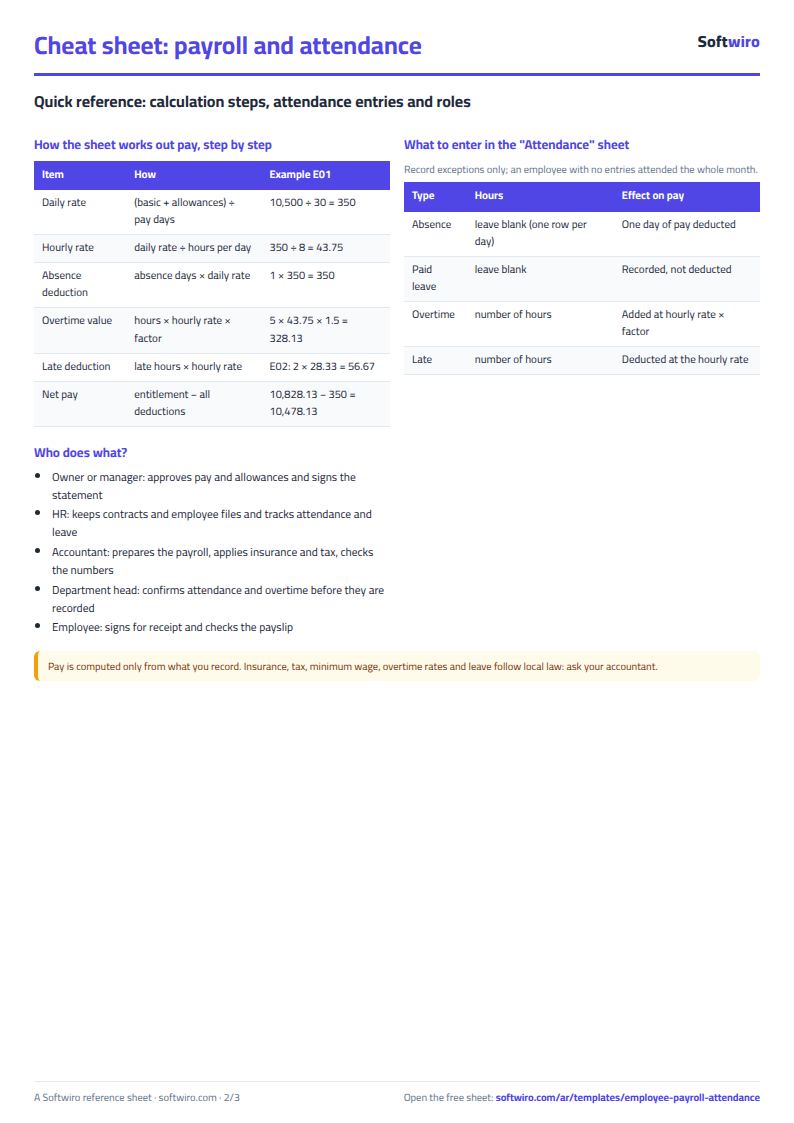
- In the "الحضور" (Attendance) sheet, log exceptions only: absence (one row per day), overtime or late arrival with the number of hours, and paid leave.
- In the "السلف والخصومات" (Advances and deductions) sheet, log each advance, deduction or bonus with its date, employee code and amount.
- Change the month in Settings whenever you like. The statement is calculated only from records dated in that month.
- Open "كشف المرتبات" (Payroll statement) to see each employee's net pay and signature column, and print it. Check "الملخص" (Summary) for the month's cost.
Before you start:
- Daily rate = (basic pay + allowances) / days in the month used for calculation. Hourly rate = daily rate / daily working hours.
- Absence deduction = days absent x daily rate. Paid leave is recorded but not deducted.
- Overtime value = overtime hours x hourly rate x overtime multiplier. Late deduction = late hours x hourly rate.
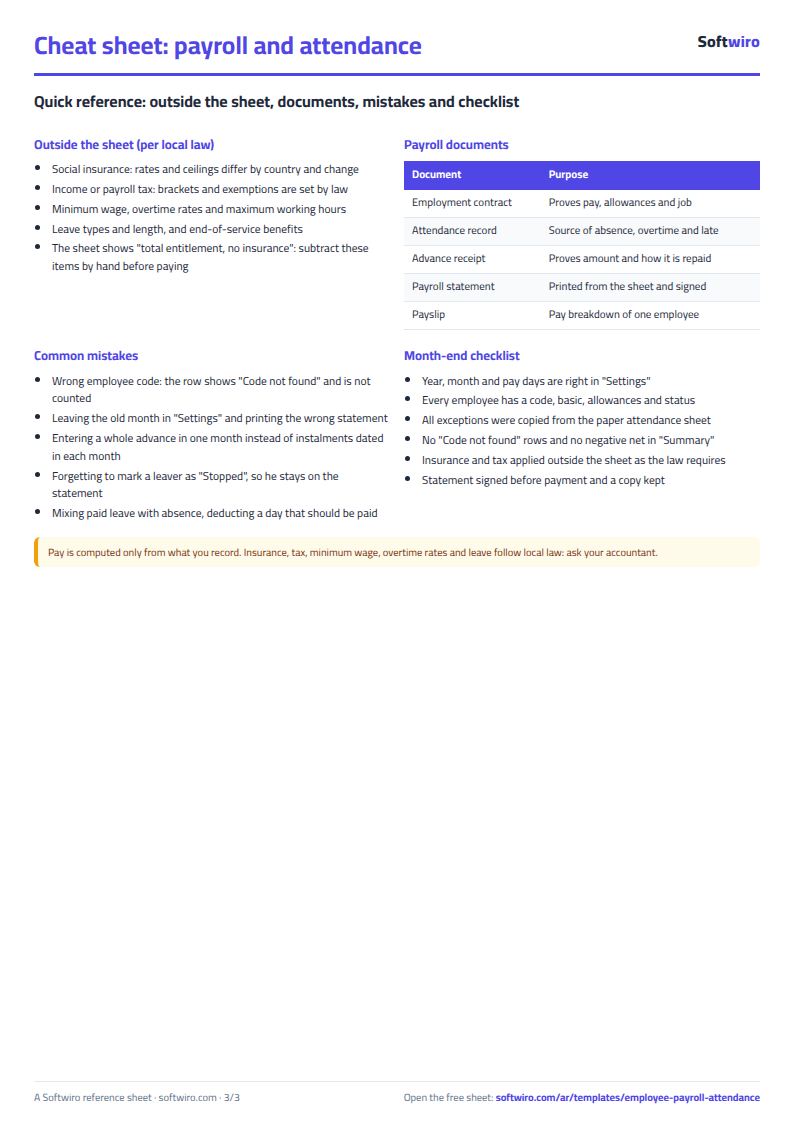
- An advance or deduction is taken in the month of its date, so record each instalment of an advance on a row dated in its month. A bonus is added.
- Net salary = basic pay + allowances + overtime + bonuses - absence deduction - late deduction - advances and deductions.
- The sheet holds up to 200 employees, 2,000 attendance records and 1,000 advance and deduction records. The print area covers the first 55 employees, so change it if you have more.
Free cheat sheet for this field
Terms, abbreviations, tables and diagrams over several pages, in Arabic and English. Download it as a PDF or images, including a phone-size version.
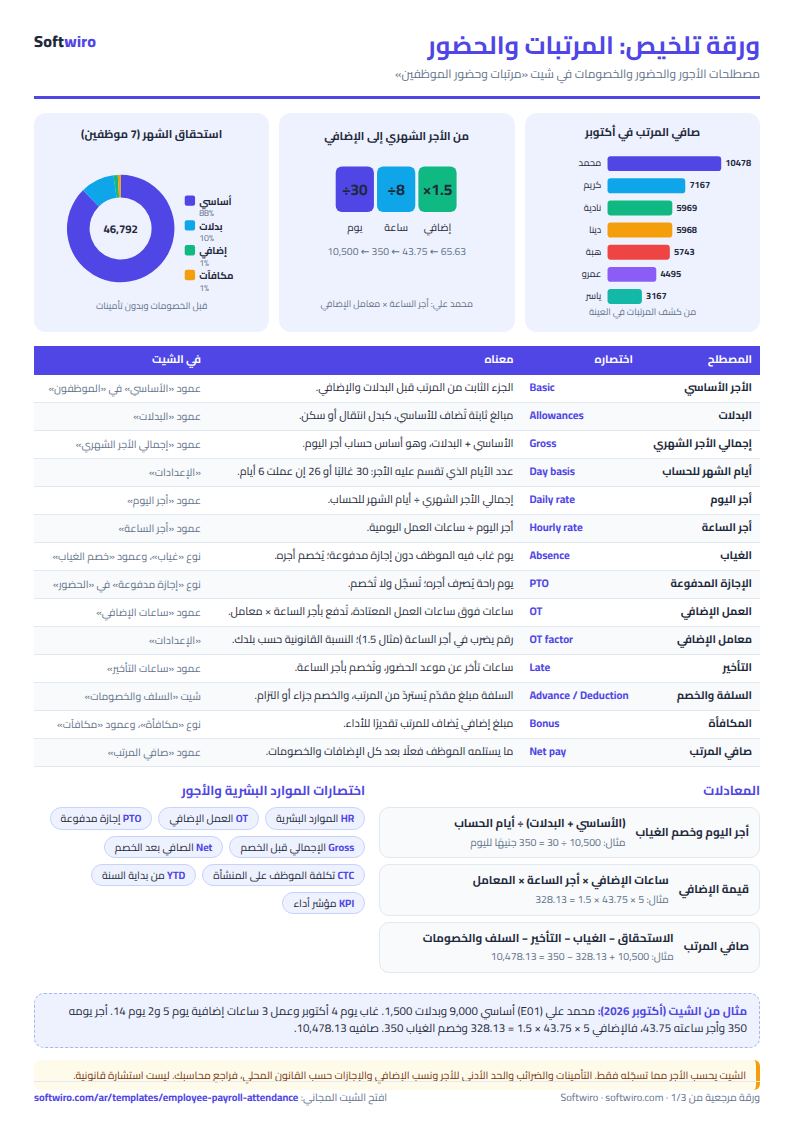
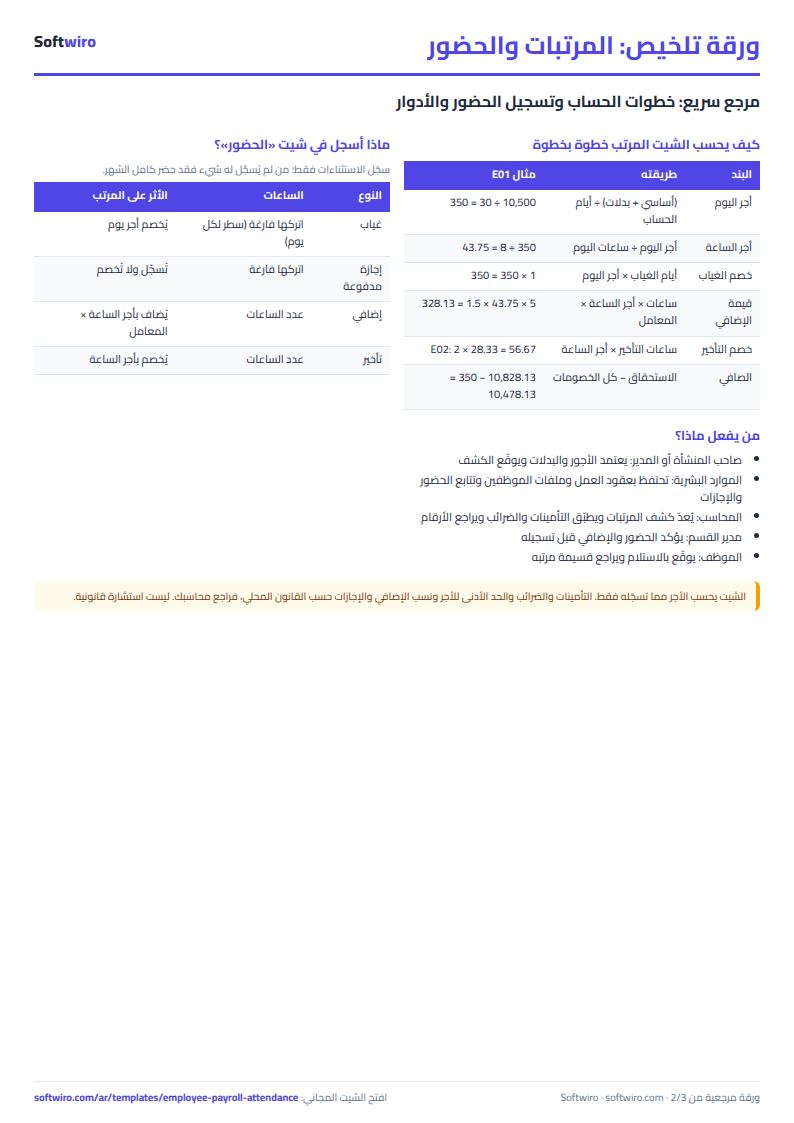
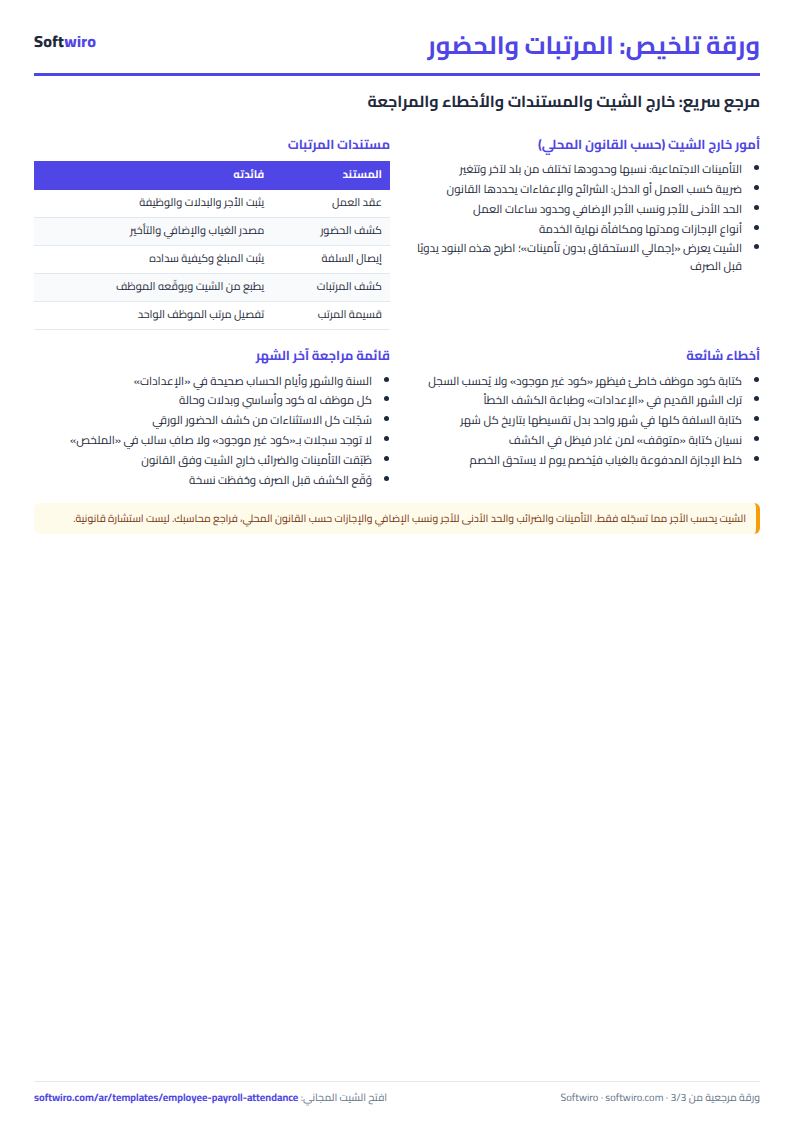
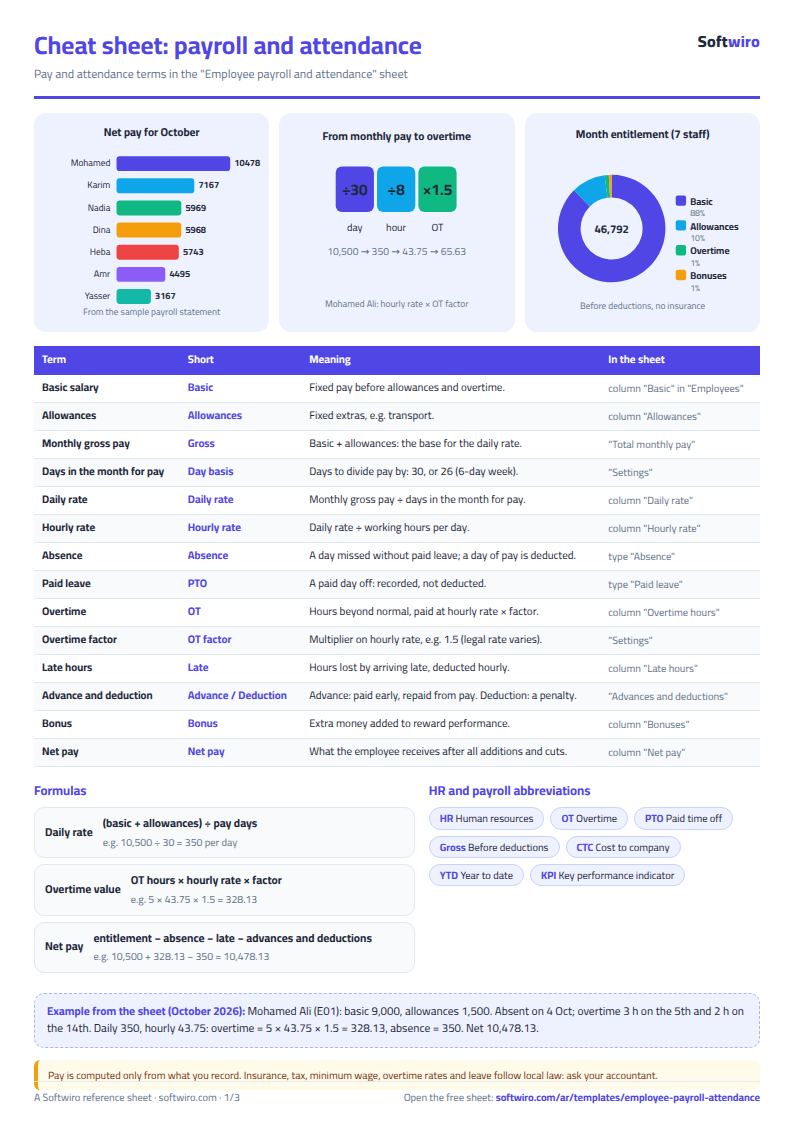
Still running this on Excel?
This sheet suits a start and a limited amount of data. If your way of working grows, or you need more than one person working on it at the same time, Softwiro can build you a program that fits the way you work.
| In this sheet | In Custom Software from Softwiro |
|---|---|
| One file that one person edits at a time, and copies reach you on WhatsApp. | A program with a login for each user and permissions you define, and everyone sees the same data. |
| You type everything and check the numbers by hand. | We design the screens around your work steps, so each person records only what concerns them. |
| Columns and formulas are fixed as the sheet was designed. | We build what you need: reports, alerts and screens your way. |
| Backups and security are your own responsibility. | The program runs on a secured server with regular backups. |
Frequently asked questions
How is net salary calculated?
Net salary = basic pay + allowances + overtime value + bonuses - absence deduction - late deduction - advances and deductions. Daily rate = (basic pay + allowances) / days in the month used for calculation. Hourly rate = daily rate / daily working hours. Overtime value = hours x hourly rate x overtime multiplier.
How do I calculate pay for another month?
Change the year and month in the Settings sheet. The statement counts only records dated within the chosen month, and records outside it appear in grey in the Attendance and Advances sheets.
How do I handle an employee who left?
Type "متوقف" (stopped) in the status cell. They drop out of the statement and summary but stay in the Employees sheet, and their records in Attendance and Advances remain as they are.
How do I record an advance that is repaid in instalments?
Enter each instalment on its own row, dated in the month it will be deducted, with the type "سلفة" (advance). An advance is deducted in the month of its date.
Is the template free?
Yes, with no sign-up and no email address. Use it, edit it and share it as you like.
Does it work in Google Sheets and on mobile?
The sheet uses formulas supported by Excel 2016 and later, Google Sheets and LibreOffice, so you can upload it to Google Drive and open it with Google Sheets on a computer or a phone.
What is the difference between the white and the gray cells?
You type in the white cells; the gray cells are calculated automatically. Don't type in a gray cell, or you will erase its formula.
Can I use the sheet from an AI assistant?
Yes. Add our MCP server (URL https://softwiro.com/api/mcp, no key needed) to your assistant and ask it to do the calculation in this template. The numbers come from the sheet's own formulas, and we do not store your data. The steps and a ready-made prompt are in this article: https://softwiro.com/blog/mcp-excel-templates-ai-agent-guide.html
More free templates for: Human resources
More free templates
- Employee attendance sheet
- General shop inventory tracker (stock in/out, reorder, slow movers)
- Monthly savings circle (gamaeya) tracker
- Clinic appointments tracker (Excel)
- Recipe costing for restaurants and cafes (Excel)
- Finishing and contracting projects tracker
- Household budget and savings sheet
- Owners' association dues collection tracker
- Owners' association budget and expenses sheet