Try the sheet here, on the example
The sheet is open below with sample numbers. Change any white cell and watch the results update, or press the blank-copy button to type your own data from scratch. Nothing you type leaves your browser.
Example from the sheet
| العميل | المرحلة | قيمة الصفقة | الاحتمال | القيمة الموزونة | حالة المتابعة |
|---|---|---|---|---|---|
| مكتب الأمل للمقاولات | جديد | 45,000.00 | 10% | 4,500.00 | اليوم |
| مطعم الواحة | تواصل | 18,000.00 | 25% | 4,500.00 | متأخرة |
| عيادة د. هالة | عرض سعر | 60,000.00 | 50% | 30,000.00 | قادمة |
| شركة البدر للتجارة | تفاوض | 120,000.00 | 75% | 90,000.00 | متأخرة |
| مصنع الندى للبلاستيك | تفاوض | 250,000.00 | 75% | 187,500.00 | قادمة |
| صالون لمسة | جديد | 8,000.00 | 10% | 800.00 | متأخرة |
| مدرسة المستقبل الأهلية | عرض سعر | 90,000.00 | 50% | 45,000.00 | متأخرة |
| متجر السلام | تواصل | 12,000.00 | 25% | 3,000.00 | اليوم |
| مكتب الرشيد للاستشارات | تم | 35,000.00 | 100% | 35,000.00 | مغلقة |
Example from the “الصفقات” tab (Arabic), with the numbers and formulas that are in the file.
What is inside
- "الإعدادات" (Settings): Today's date, the closing probability for each stage (10%, 25%, 50%, 75%, 100% and 0% in the example), and the list of lead sources, up to 10.
- "الصفقات" (Deals): For each customer: source, stage, deal value, next follow-up date, last contact and a note. The sheet then shows probability, weighted value, follow-up status (overdue, today, upcoming, no date or closed), days overdue and days since last contact.
- "المتابعات" (Follow-ups): An automatic list of overdue deals followed by today's follow-ups, oldest date first, with each deal's stage, value, last contact and note, plus the count of overdue and today's follow-ups.
- "ملخص القمع" (Funnel summary): The number, value and weighted value of open deals, closed sales, the win rate and overall conversion rate, the count and value of each stage, then the number of deals for each source, how many were won and its conversion rate.
The file opens on a start tab (“ابدأ هنا”, Start here) that explains how to use it.
What makes it different
Open the "المتابعات" (Follow-ups) sheet each morning to see whose follow-up is overdue, by how many days, and who you need to call today. Then open the "ملخص القمع" (Funnel summary) to see the value of your open deals, how much you can realistically expect from them, and which source brings customers who buy. You do not count or color rows by hand.
How to use it
- In the "الإعدادات" (Settings) sheet, enter today's date (or =TODAY() so it updates by itself), edit the closing probability for each stage, and enter your lead sources.
- In the "الصفقات" (Deals) sheet, enter for each customer: name, source, stage, deal value, next follow-up date and last contact date.
- Move a deal between stages by changing only the stage cell: new, contacted, quote sent, negotiation, won, lost.
- When a deal is won or lost, change its stage to "won" or "lost". Its status becomes "closed" and it leaves the follow-ups. It is best to clear its follow-up date.
- Open the "المتابعات" (Follow-ups) sheet each morning: you see overdue deals first, then today's follow-ups, oldest date first.
- Check the "ملخص القمع" (Funnel summary) sheet for the count and value of each stage, the expected weighted value and the conversion rate for each source.
Before you start:
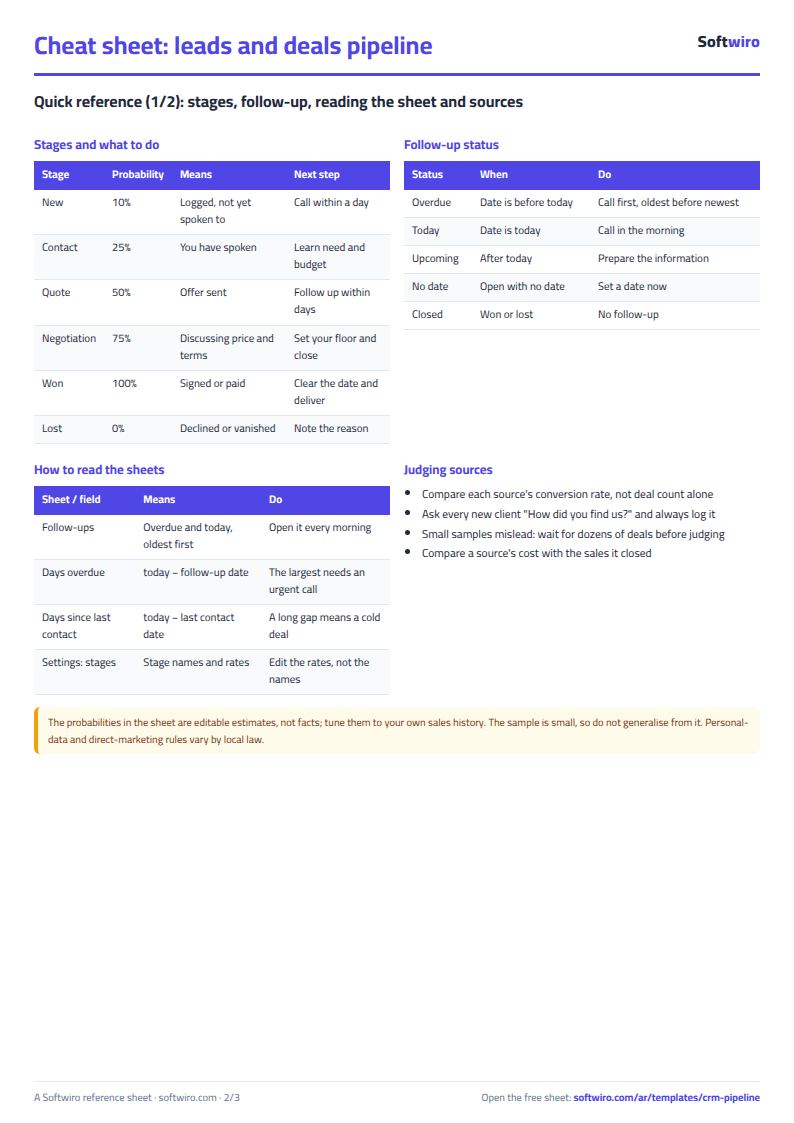
- Weighted value = deal value x the probability of its stage. "Won" is 100% and "lost" is 0%. You can edit the rest in Settings.
- Do not change the stage names in Settings, because the sheet relies on them. Edit only the percentages.
- Follow-up status: "overdue" if the date is before today's date, "today" if it matches, "upcoming" if it is later, "no date" for an open deal without a date, and "closed" for a "won" or "lost" deal.
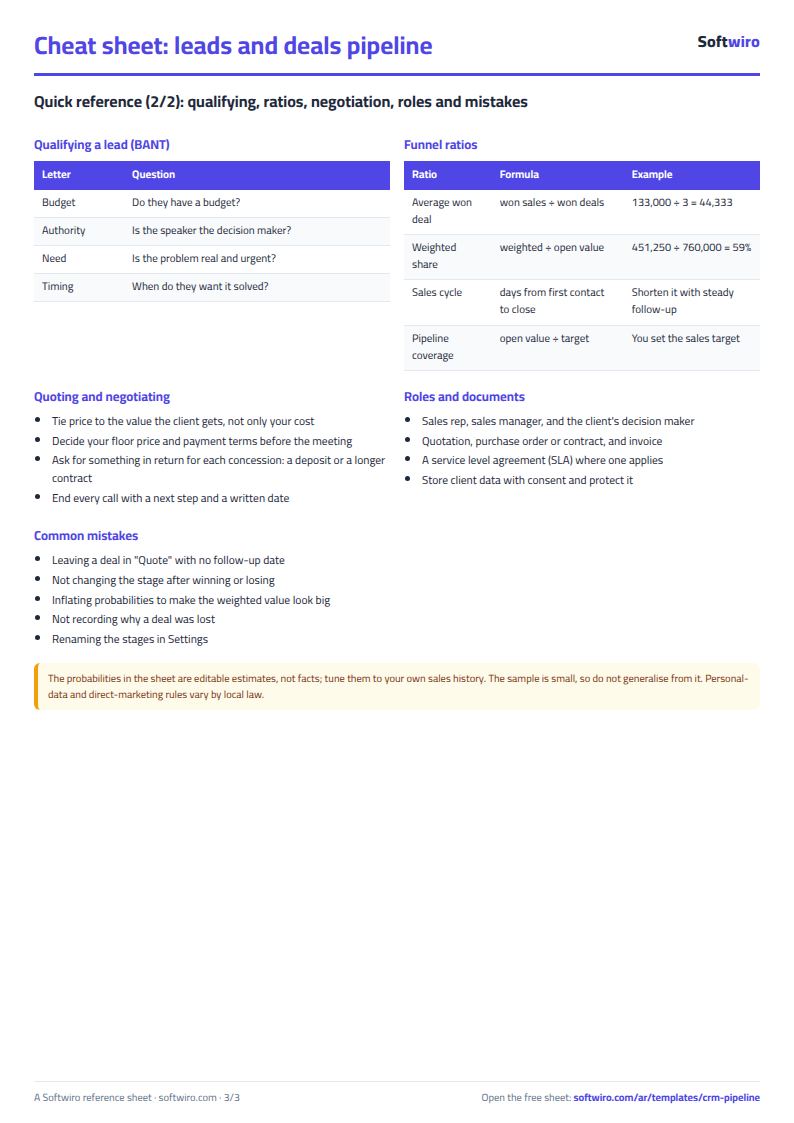
- Win rate = deals won / (won + lost). Overall conversion rate = deals won / all recorded deals.
- Lead sources are entered in Settings (up to 10) and appear as a drop-down list in Deals.
- The sheet holds 500 deals, and Follow-ups shows the first 50 overdue or today's deals.
Free cheat sheet for this field
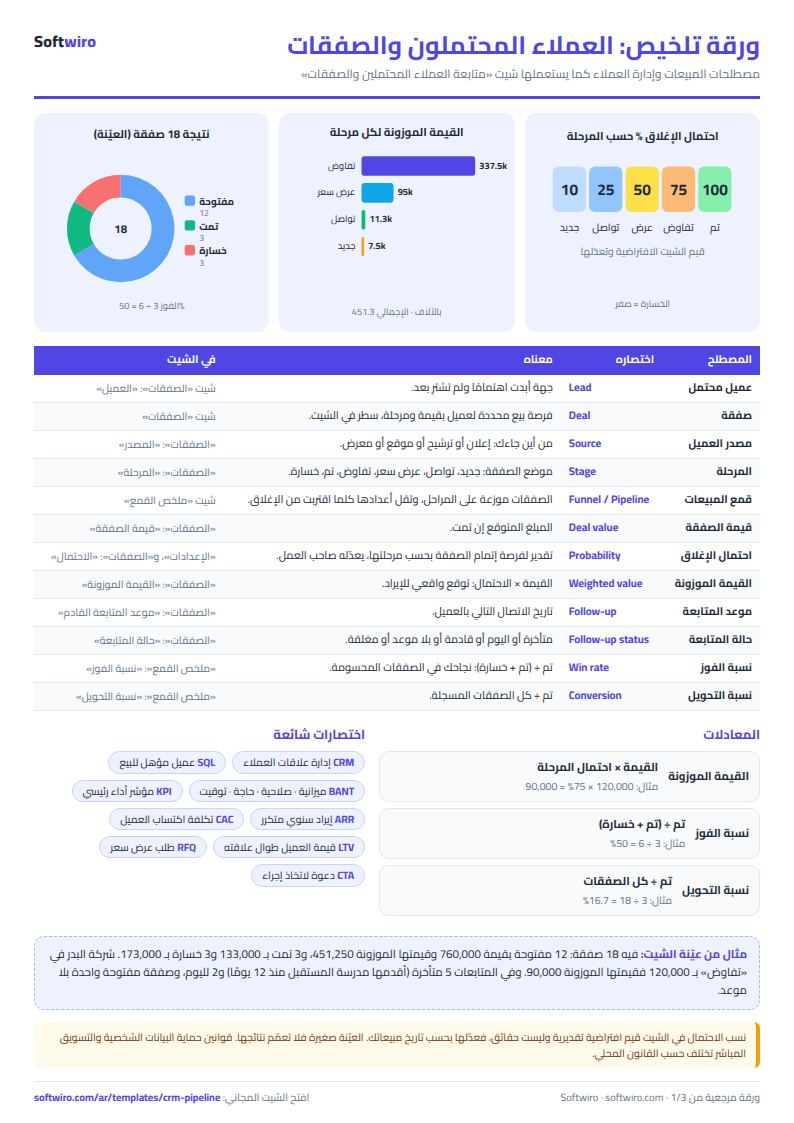
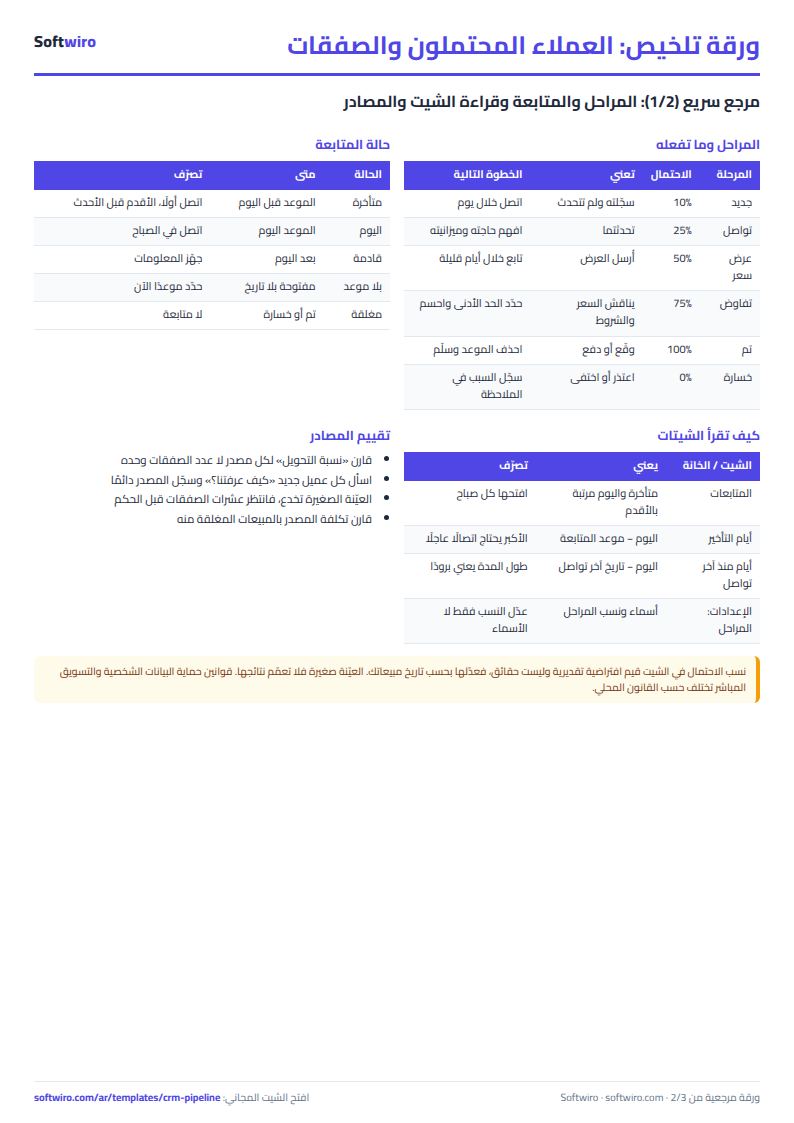
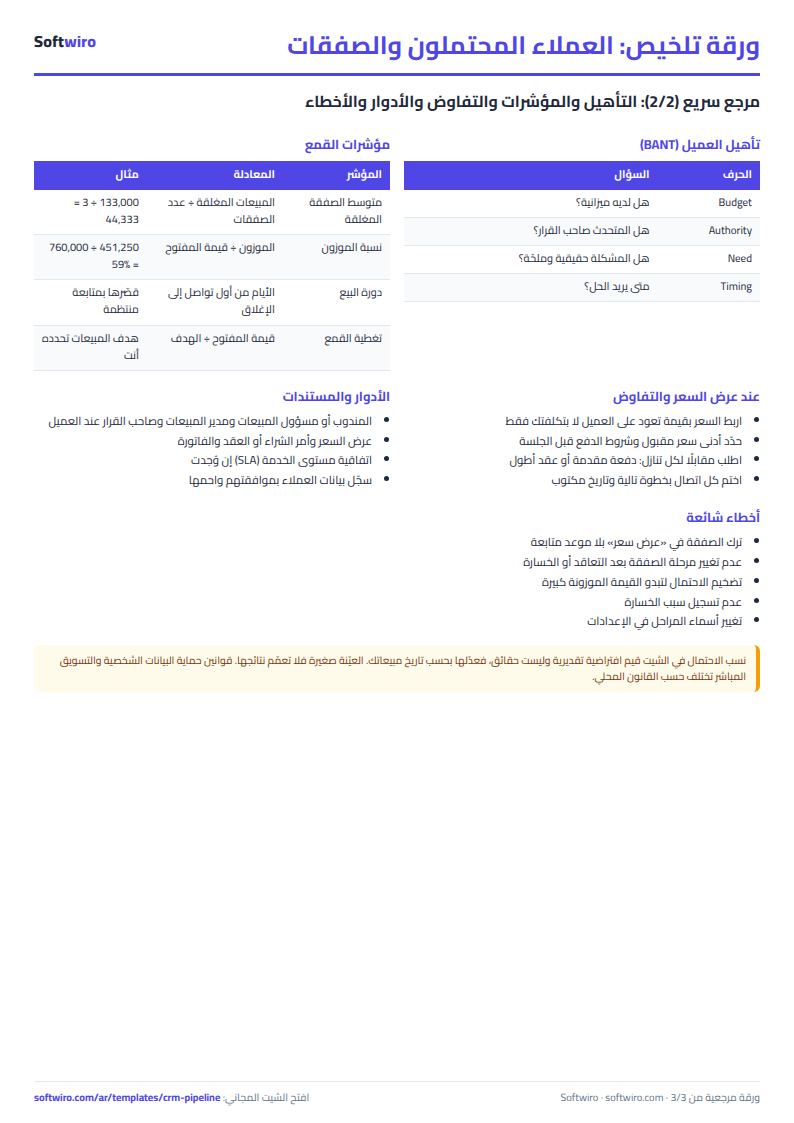
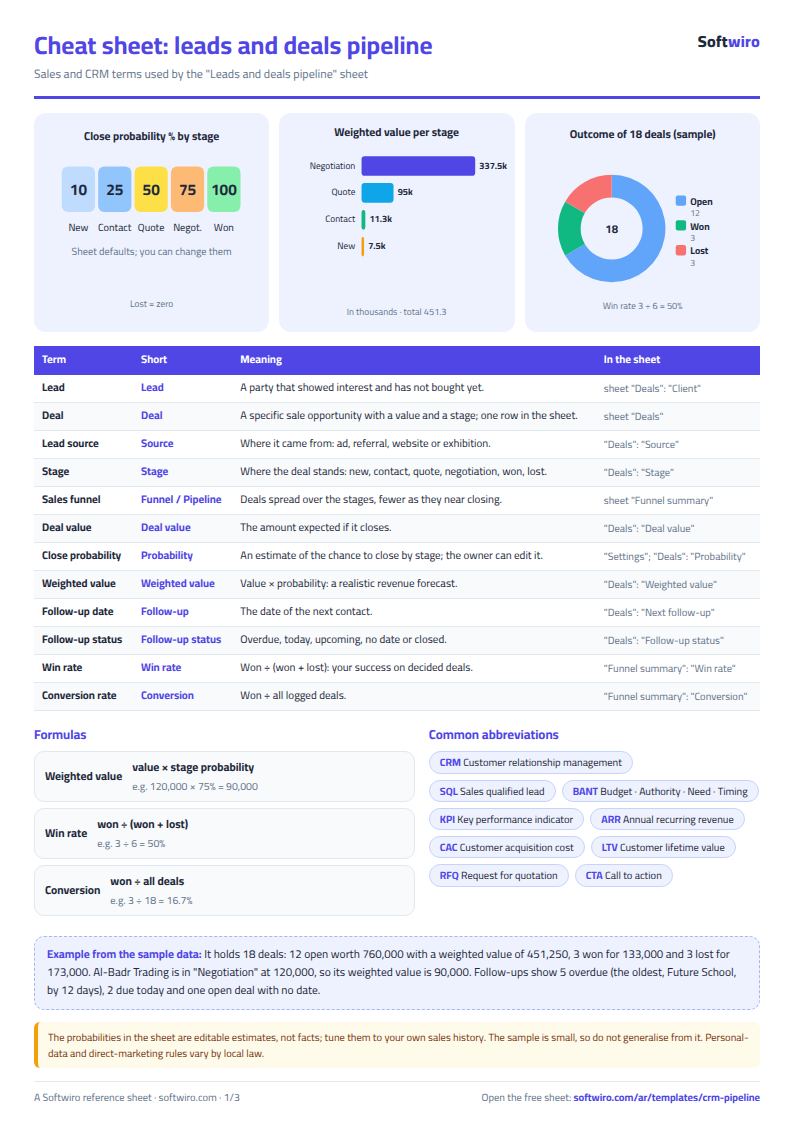
Terms, abbreviations, tables and diagrams over several pages, in Arabic and English. Download it as a PDF or images, including a phone-size version.
Still running this on Excel?
This sheet suits a start and a limited amount of data. If your way of working grows, or you need more than one person working on it at the same time, Softwiro can build you a program that fits the way you work.
| In this sheet | In Custom Software from Softwiro |
|---|---|
| One file that one person edits at a time, and copies reach you on WhatsApp. | A program with a login for each user and permissions you define, and everyone sees the same data. |
| You type everything and check the numbers by hand. | We design the screens around your work steps, so each person records only what concerns them. |
| Columns and formulas are fixed as the sheet was designed. | We build what you need: reports, alerts and screens your way. |
| Backups and security are your own responsibility. | The program runs on a secured server with regular backups. |
Frequently asked questions
How is the weighted value calculated?
Weighted value = deal value x the probability of its stage. In the example, "new" is 10%, "contacted" 25%, "quote sent" 50%, "negotiation" 75%, "won" 100% and "lost" 0%. You can edit these percentages in the Settings sheet to match your own experience. Do not change the stage names themselves, because the sheet relies on them.
When is a deal considered overdue?
An open deal is "overdue" if its follow-up date is before the date written in Settings, "today" if it matches, and "upcoming" if it is later. An open deal with no date shows "no date", and a deal at the "won" or "lost" stage becomes "closed" and does not appear in Follow-ups.
How is the conversion rate calculated?
Win rate = deals won / (won + lost). Overall conversion rate = deals won / all recorded deals. Each source's conversion rate is its won deals / all its deals.
How many deals does the sheet hold?
It holds 500 deals, and the Follow-ups list shows the first 50 overdue or today's deals. You can add a new deal with a form in the online version, or by typing it in the first empty row.
Is the template free?
Yes, with no sign-up and no email address. Use it, edit it and share it as you like.
Does it work in Google Sheets and on mobile?
The sheet uses formulas supported by Excel 2016 and later, Google Sheets and LibreOffice, so you can upload it to Google Drive and open it with Google Sheets on a computer or a phone.
What is the difference between the white and the gray cells?
You type in the white cells; the gray cells are calculated automatically. Don't type in a gray cell, or you will erase its formula.
Can I use the sheet from an AI assistant?
Yes. Add our MCP server (URL https://softwiro.com/api/mcp, no key needed) to your assistant and ask it to do the calculation in this template. The numbers come from the sheet's own formulas, and we do not store your data. The steps and a ready-made prompt are in this article: https://softwiro.com/blog/mcp-excel-templates-ai-agent-guide.html
More free templates for: Services and business
More free templates
- Freelancer projects, hours and invoices tracker
- Laundry orders tracker (Excel)
- Photo studio bookings sheet
- General appointments scheduler sheet
- Car wash management sheet (packages, cards, workers, materials)
- Employee attendance sheet
- Employee payroll and attendance
- General shop inventory tracker (stock in/out, reorder, slow movers)
- Monthly savings circle (gamaeya) tracker
- Clinic appointments tracker (Excel)
- Recipe costing for restaurants and cafes (Excel)
- Finishing and contracting projects tracker
- Household budget and savings sheet