Try the sheet here, on the example
The sheet is open below with sample numbers. Change any white cell and watch the results update, or press the blank-copy button to type your own data from scratch. Nothing you type leaves your browser.
Example from the sheet
| رقم الحلقة | الجنس | النوع | المصدر | الحالة | سعر البيع | العمر (شهور) |
|---|---|---|---|---|---|---|
| EG-26-001 | ذكر | أساسي | شراء | موجود | 31 | |
| EG-26-002 | أنثى | أساسي | شراء | موجود | 31 | |
| EG-26-003 | ذكر | أساسي | شراء | موجود | 43 | |
| EG-26-004 | أنثى | أساسي | شراء | مباع | 3,000.00 | |
| EG-26-101 | ذكر | فرخ | مولود عندنا | موجود | 1 | |
| EG-26-102 | أنثى | فرخ | مولود عندنا | نافق | ||
| EG-26-103 | ذكر | فرخ | مولود عندنا | موجود | 0 |
Example from the “الطيور” tab (Arabic), with the numbers and formulas that are in the file.
What is inside
- "الإعدادات" (Settings): The loft name, today's date for calculating age, and the month you want summarized.
- "الطيور" (Birds): One row per bird: ring number, sex, color, type (base stock or squab), birth date, source, seller, purchase price, sire and dam ring, status (on hand, sold or dead), buyer and sale price. The sheet calculates age and sale profit, and warns about a duplicate ring.
- "المصروفات" (Expenses): Each expense with its date, type (feed, medicine, vaccination, supplies and labor) and amount.
- "الملخص" (Summary): The number of base-stock birds and squabs on hand, sold and dead; the month's activity (hatched, bought, sold, dead and expenses); net for the month and overall; and expenses by type.
The file opens on a start tab (“ابدأ هنا”, Start here) that explains how to use it.
What makes it different
It holds 500 birds. A squab hatched in your loft has an empty purchase price, so its profit is its whole sale price, and a warning appears if you enter a sire or dam ring that is not registered.
How to use it
- In the "الإعدادات" (Settings) sheet, enter the loft name, today's date (for calculating age) and the first day of the month you want summarized.
- In the "الطيور" (Birds) sheet, record each bird in a row: ring number, sex, color, type (base stock or squab), birth date and source. For squabs, enter the sire and dam rings.
- For a bird you bought, enter the seller's name, purchase date and price. When you sell, change the status to "sold" (مباع) and enter the sale date, buyer and sale price. When a bird dies, enter "dead" (نافق) and the date.
- In the "المصروفات" (Expenses) sheet, record each expense with its date, type and amount (feed, medicine, vaccination, supplies and labor).
- Open the "الملخص" (Summary) sheet to see base-stock birds and squabs on hand, sold and dead, the month's activity, the month's net and its expenses by type.
- Change the month date in the settings whenever you like to see the summary of any month.
Before you start:
- Profit in a sold bird's row = sale price - purchase price. A squab hatched in your loft has an empty purchase price, so its profit is its whole sale price.
- Net for the month = the month's sales - the month's purchases - the month's expenses. It does not include the price of birds you bought in other months.
- Age in months appears only for birds "on hand", from the birth date to today's date written in the settings.
- The "تنبيه" (Alert) column tells you about a duplicate ring and about a sire or dam ring that is not registered in the sheet.
- The sheet holds 500 birds and 1000 expenses. The numbers and names in the sheet are examples, so delete them and enter your own data.
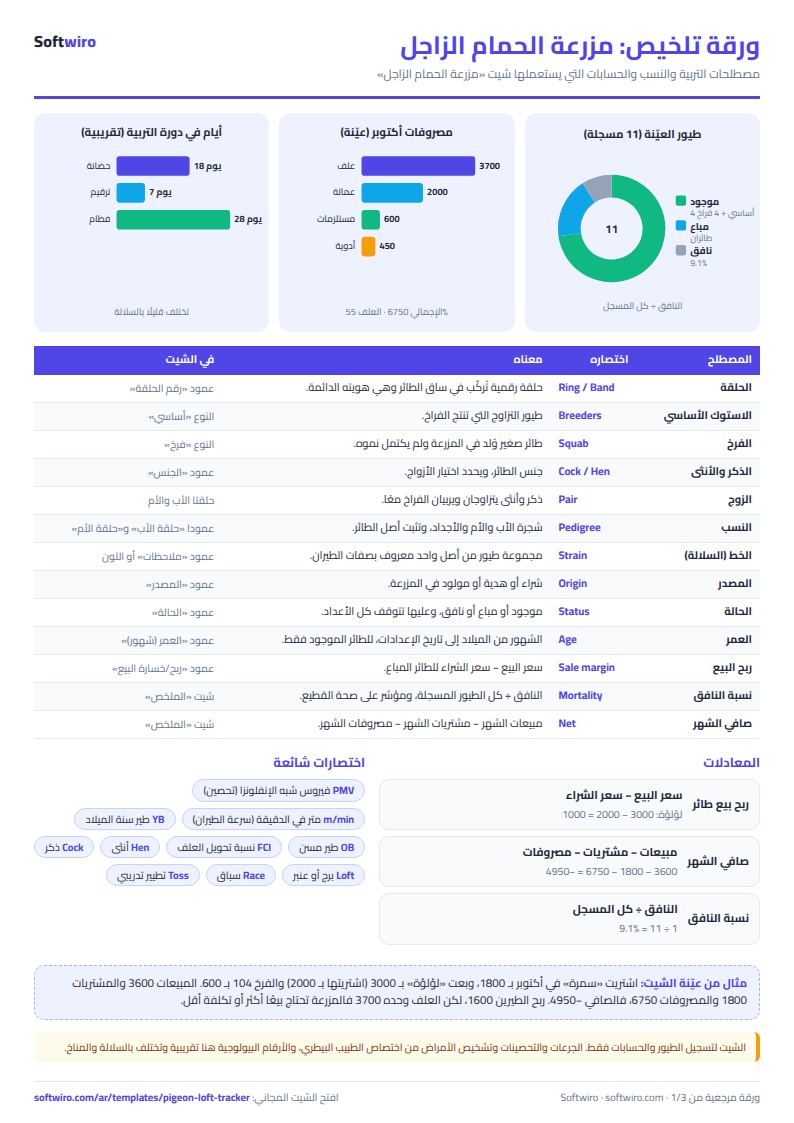
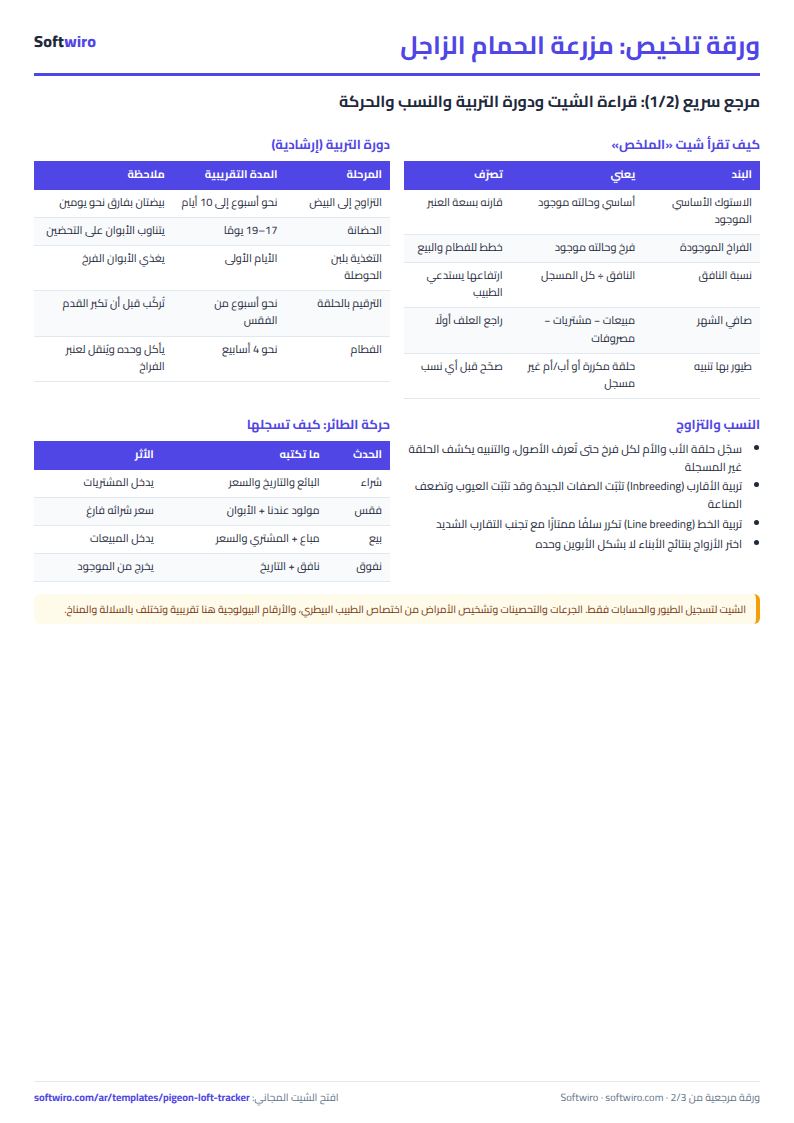
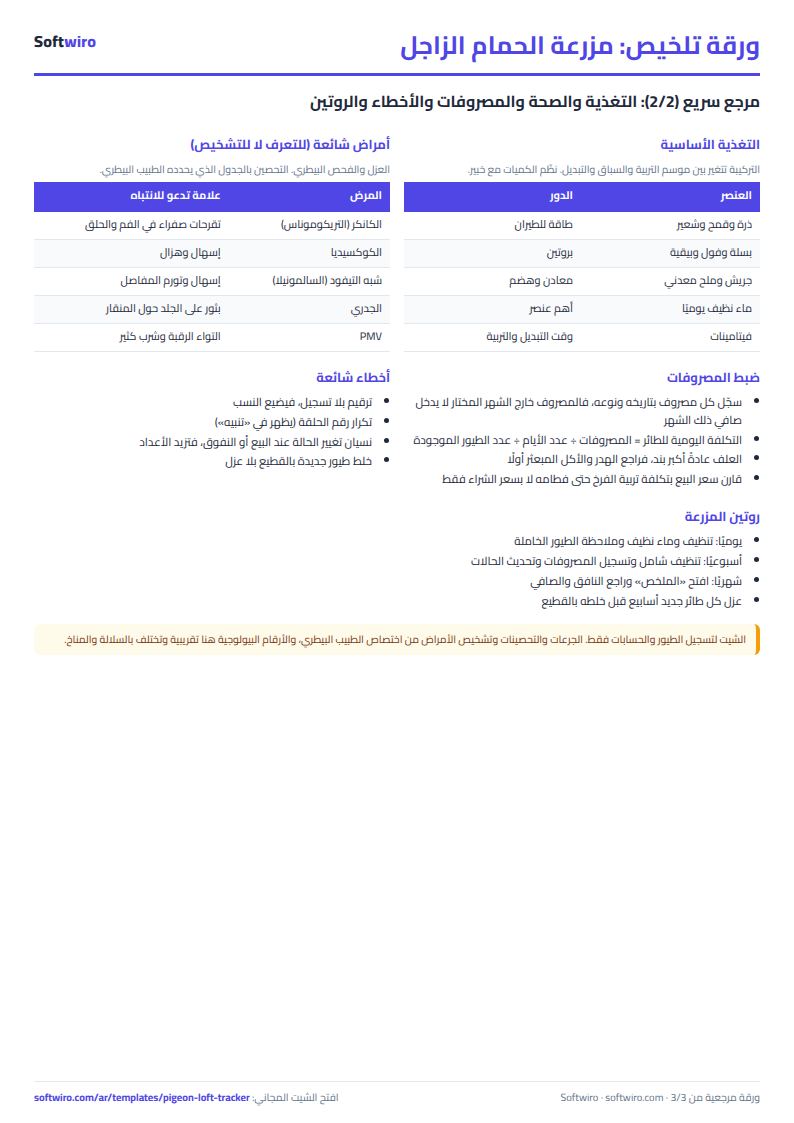
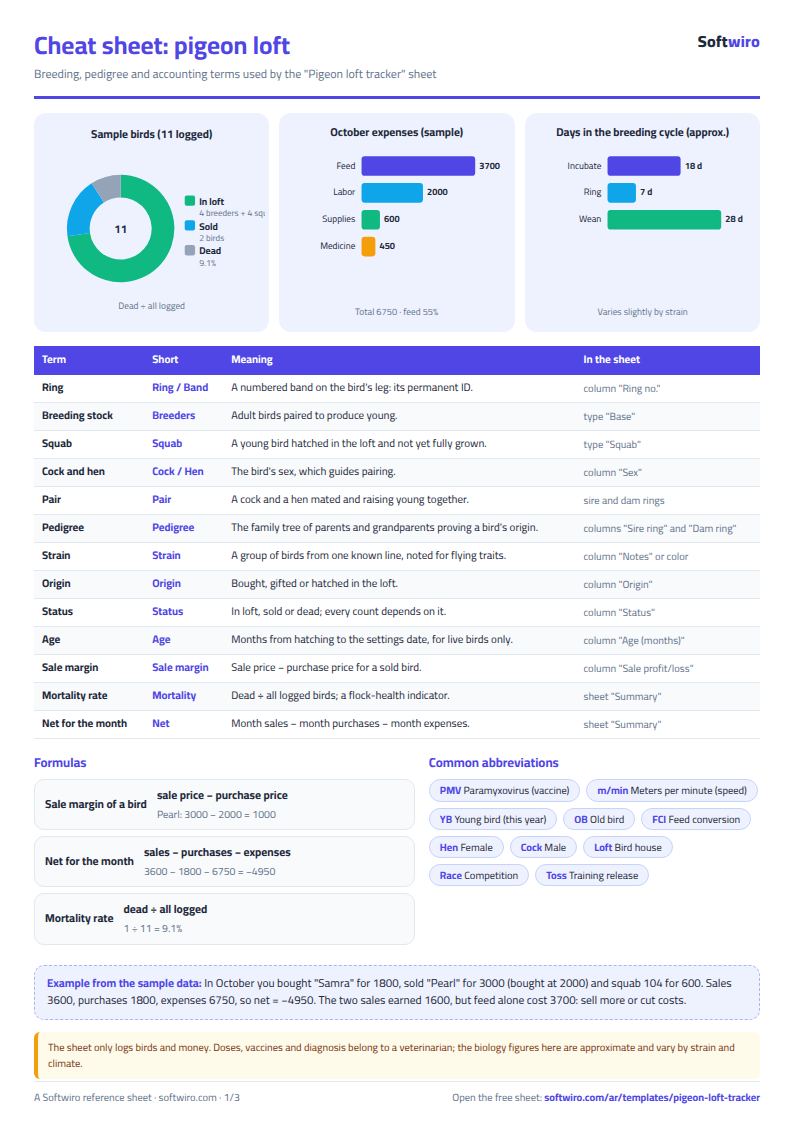
Free cheat sheet for this field
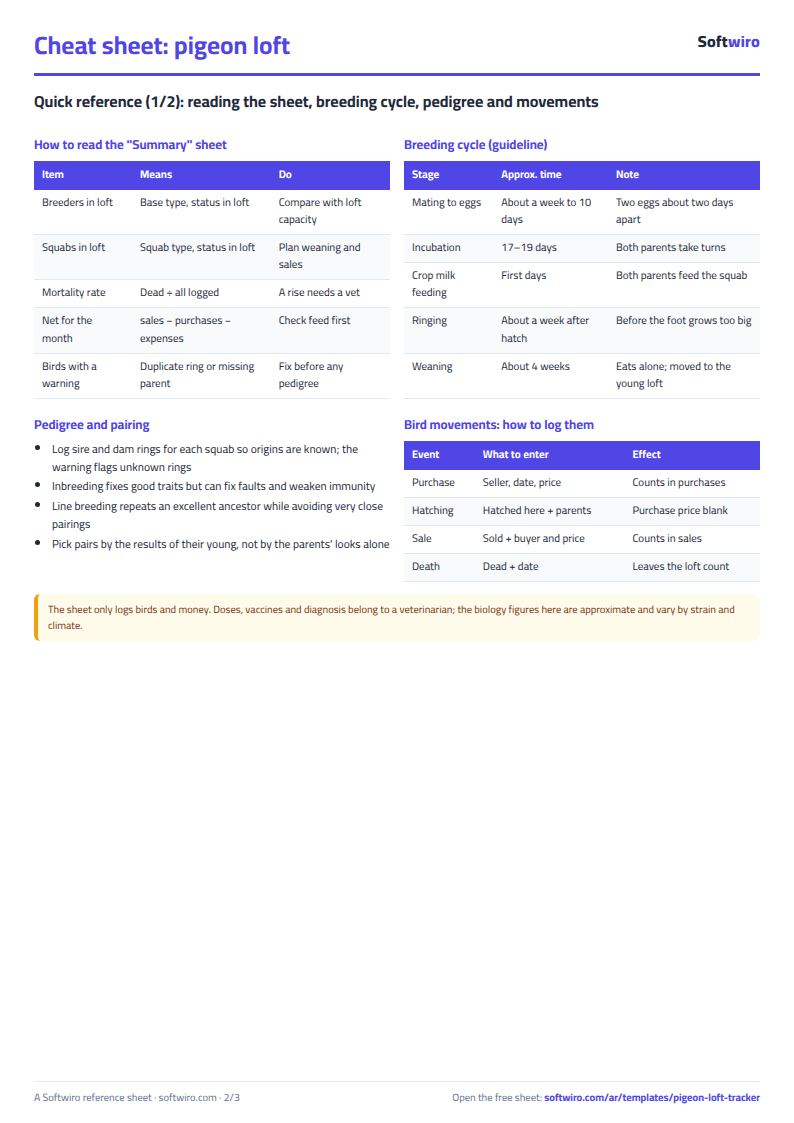
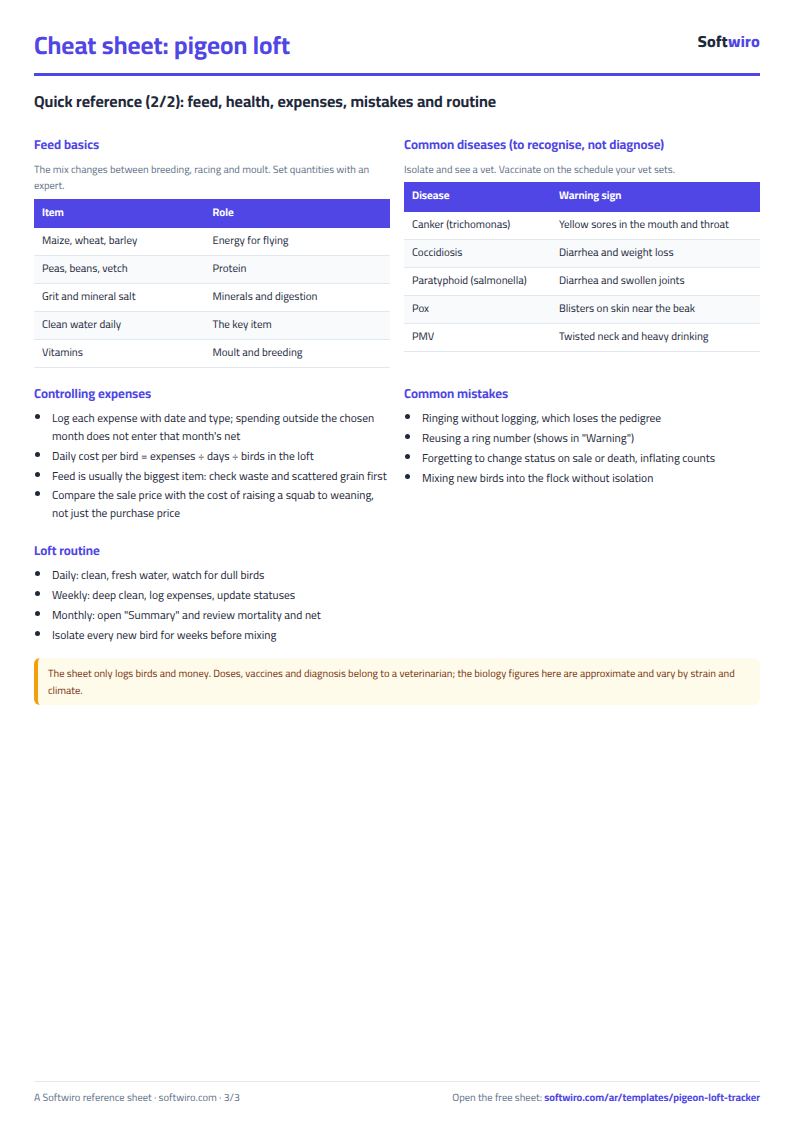
Terms, abbreviations, tables and diagrams over several pages, in Arabic and English. Download it as a PDF or images, including a phone-size version.
Still running this on Excel?
This sheet suits a start and a limited amount of data. If your way of working grows, or you need more than one person working on it at the same time, Softwiro can build you a program that fits the way you work.
| In this sheet | In Custom Software from Softwiro |
|---|---|
| One file that one person edits at a time, and copies reach you on WhatsApp. | A program with a login for each user and permissions you define, and everyone sees the same data. |
| You type everything and check the numbers by hand. | We design the screens around your work steps, so each person records only what concerns them. |
| Columns and formulas are fixed as the sheet was designed. | We build what you need: reports, alerts and screens your way. |
| Backups and security are your own responsibility. | The program runs on a secured server with regular backups. |
Frequently asked questions
How do I record the sale of a bird?
In its row, change the status to "sold" (مباع) and enter the sale date, the buyer's name and the sale price. The sheet calculates the profit and includes it in the month's sales.
How do I record a dead bird?
Change its status to "dead" (نافق) and enter the date. It leaves the birds on hand and is counted in the number of dead birds and their percentage.
How do I trace a squab's lineage?
Enter its sire and dam rings in its row, and the sheet warns you if either one is not registered.
Is the template free?
Yes, with no sign-up and no email address. Use it, edit it and share it as you like.
Does it work in Google Sheets and on mobile?
The sheet uses formulas supported by Excel 2016 and later, Google Sheets and LibreOffice, so you can upload it to Google Drive and open it with Google Sheets on a computer or a phone.
What is the difference between the white and the gray cells?
You type in the white cells; the gray cells are calculated automatically. Don't type in a gray cell, or you will erase its formula.
Can I use the sheet from an AI assistant?
Yes. Add our MCP server (URL https://softwiro.com/api/mcp, no key needed) to your assistant and ask it to do the calculation in this template. The numbers come from the sheet's own formulas, and we do not store your data. The steps and a ready-made prompt are in this article: https://softwiro.com/blog/mcp-excel-templates-ai-agent-guide.html
More free templates for: Farming
More free templates
- Poultry farm cycle tracker (Excel)
- Crop season expenses and revenue tracker (Excel)
- Livestock and dairy farm sheet
- Complete farm management sheet in Excel: plots, workers, crops and sales
- Agricultural waste management sheet: rice straw, residues, compost and recycling
- Wedding and event budget planner (Excel)
- Car rental fleet tracker (Excel)
- Fleet fuel and maintenance tracker (Excel)
- Car showroom accounts sheet
- Freelancer projects, hours and invoices tracker
- Supplier purchase orders and payables tracker
- Charity donations and disbursements tracker
- Travel agency bookings tracker