Try the sheet here, on the example
The sheet is open below with sample numbers. Change any white cell and watch the results update, or press the blank-copy button to type your own data from scratch. Nothing you type leaves your browser.
Example from the sheet
| كود المورد | المورد | الفئة | المتفق عليه | إجمالي المدفوع | المتبقي | أيام حتى السداد | الحالة |
|---|---|---|---|---|---|---|---|
| V01 | قاعة الورد | قاعة | 60,000.00 | 40,000.00 | 20,000.00 | 44 | متبقي |
| V02 | استوديو لمسة | تصوير | 15,000.00 | 5,000.00 | 10,000.00 | 47 | متبقي |
| V03 | ديكور الأحلام | ديكور وكوش | 18,000.00 | 6,000.00 | 12,000.00 | 4 | يقترب السداد |
| V04 | كيترينج السعادة | طعام وضيافة | 45,000.00 | 15,000.00 | 30,000.00 | -7 | متأخر |
| V05 | دي جي ريتم | موسيقى ودي جي | 6,000.00 | 6,000.00 | 0.00 | مسدد | |
| V06 | مطبعة الدعوات | دعوات وتذكارات | 4,000.00 | 0.00 | 4,000.00 | 19 | متبقي |
| V07 | ستوديو التجميل | مكياج وتجميل | 5,000.00 | 1,000.00 | 4,000.00 | متبقي | |
| V08 | سيارات الزفاف | سيارات | 3,000.00 | 3,500.00 | -500.00 | مدفوع زيادة | |
| V09 | بدلة العريس | فستان وبدلة | 0.00 | بدون سعر |
Example from the “الموردون” tab (Arabic), with the numbers and formulas that are in the file.
What is inside
- "الإعدادات" (Settings): Today's date (or =TODAY()), the event budget (150,000 in the example), the event date (18 December 2026 in the example) and the number of days before a due date at which a warning appears (7 in the example).
- "الموردون" (Suppliers): Code, supplier, category, phone, agreed amount and final payment date. The sheet then calculates the deposit paid, total paid, balance, days to the due date and status (paid, balance due, payment approaching, late, overpaid or no price). The example has nine suppliers, and the table has room for 200.
- "الدفعات" (Payments): Every amount you pay, with the date, supplier code, type (deposit, installment or final payment) and a note. The supplier name fills in automatically. Room for 2,000 payments.
- "المدعوون" (Guests): Name, group (groom's family, bride's family, friends, work colleagues, other), number of people, phone, reply status and table number. The sheet then calculates confirmed attendance and the standing of each invitation (confirmed, no table, declined or awaiting reply). Room for 500 invitations.
- "الملخص" (Summary): The budget, the amount agreed, what is left of the budget, the amount paid, the balance still owed to suppliers, overpayments, the percentage paid and the days left to the event. It also shows supplier statuses, the number of invitations, confirmed attendance, declines and replies awaited, the average agreed cost per confirmed guest, a table of suppliers by category and a table of guests by group.
The file opens on a start tab (“ابدأ هنا”, Start here) that explains how to use it.
What makes it different
Open "الموردون" (Suppliers) to see who is late, whose payment date is close and how much is left for each one. Open the "الملخص" (Summary) to see whether your agreements have gone over budget, how much you have paid so far and how many guests have confirmed, without going back through messages and papers.
How to use it
- In the "الإعدادات" (Settings) sheet, enter today's date (or =TODAY() so it updates itself), the event budget, the event date and the number of days before a due date at which you want a warning.
- In the "الموردون" (Suppliers) sheet, enter each supplier's code, name, category, phone, agreed amount and final payment date.
- In the "الدفعات" (Payments) sheet, record every amount you pay: date, supplier code, amount and type (deposit, installment or final payment).
- In the "المدعوون" (Guests) sheet, enter each invitation: name, group, number of people, reply status and table number.
- The "الموردون" (Suppliers) sheet calculates the amount paid, deposit, balance, days to the due date and each supplier's status, and the "المدعوون" (Guests) sheet calculates confirmed attendance.
- Open the "الملخص" (Summary) sheet to compare the budget with what you have agreed and what you have paid, and to see who is late and how many guests are confirmed.
Before you start:
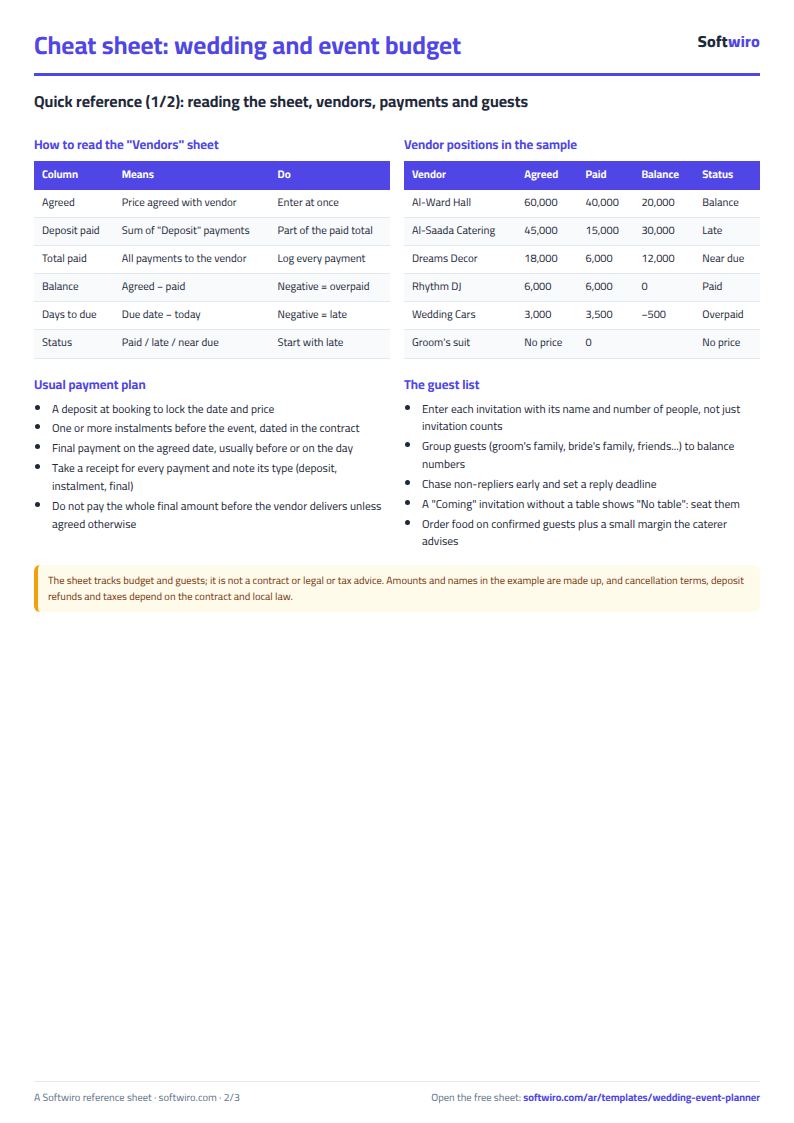
- Supplier balance = agreed amount - total paid to them. A negative figure means you have paid more than agreed, and the status shows "مدفوع زيادة" (overpaid).
- Supplier status: "مسدد" (paid) if nothing is left, "متأخر" (late) if the due date has passed and a balance remains, "يقترب السداد" (payment approaching) if the due date is within the number of days in the "الإعدادات" (Settings) sheet, and "بدون سعر" (no price) if you have not entered the agreed amount.
- Remaining budget = event budget - total of the agreed amounts. If it is negative, your agreements have gone over budget.
- The deposit is the total of the payments marked "عربون" (deposit) for each supplier. It is part of the amount paid, not an extra amount.
- Confirmed attendance is the total number of people in invitations whose reply is "سيحضر" (will attend). An invitation with no reply entered counts as "بانتظار الرد" (awaiting reply).
- The names, figures and amounts in the example are made up. The sheet has room for 200 suppliers, 2,000 payments and 500 invitations.
Free cheat sheet for this field
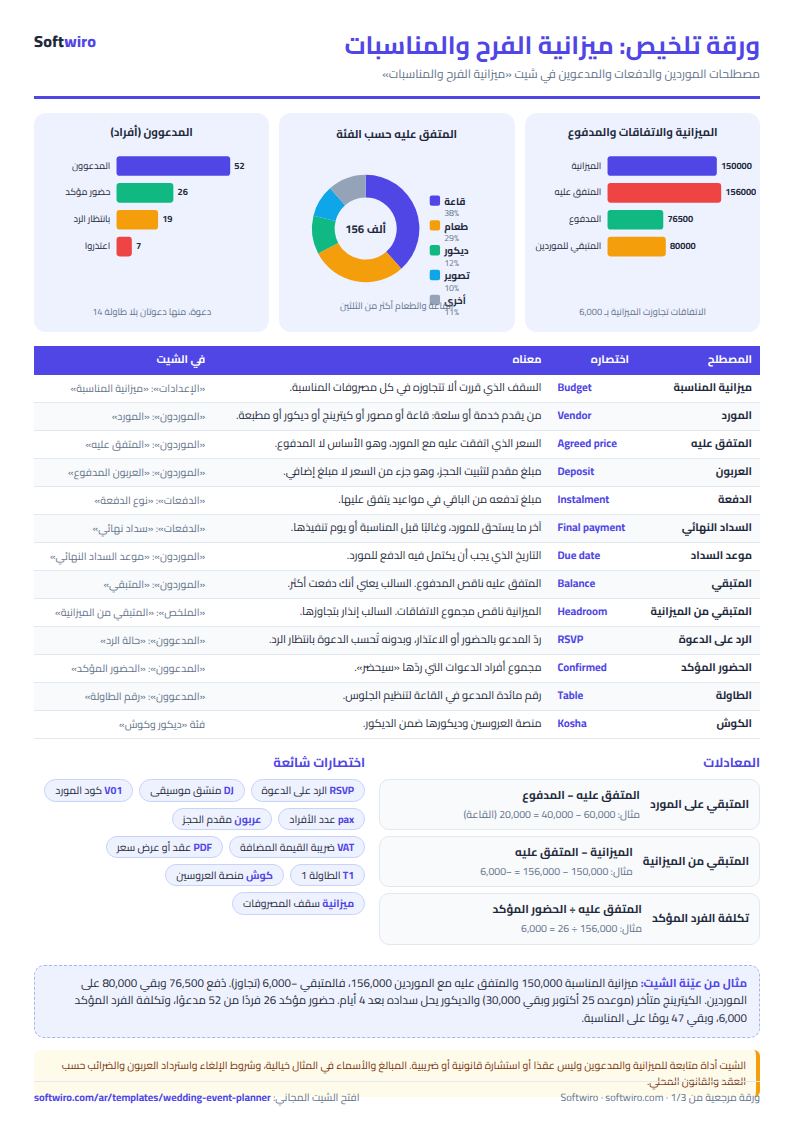
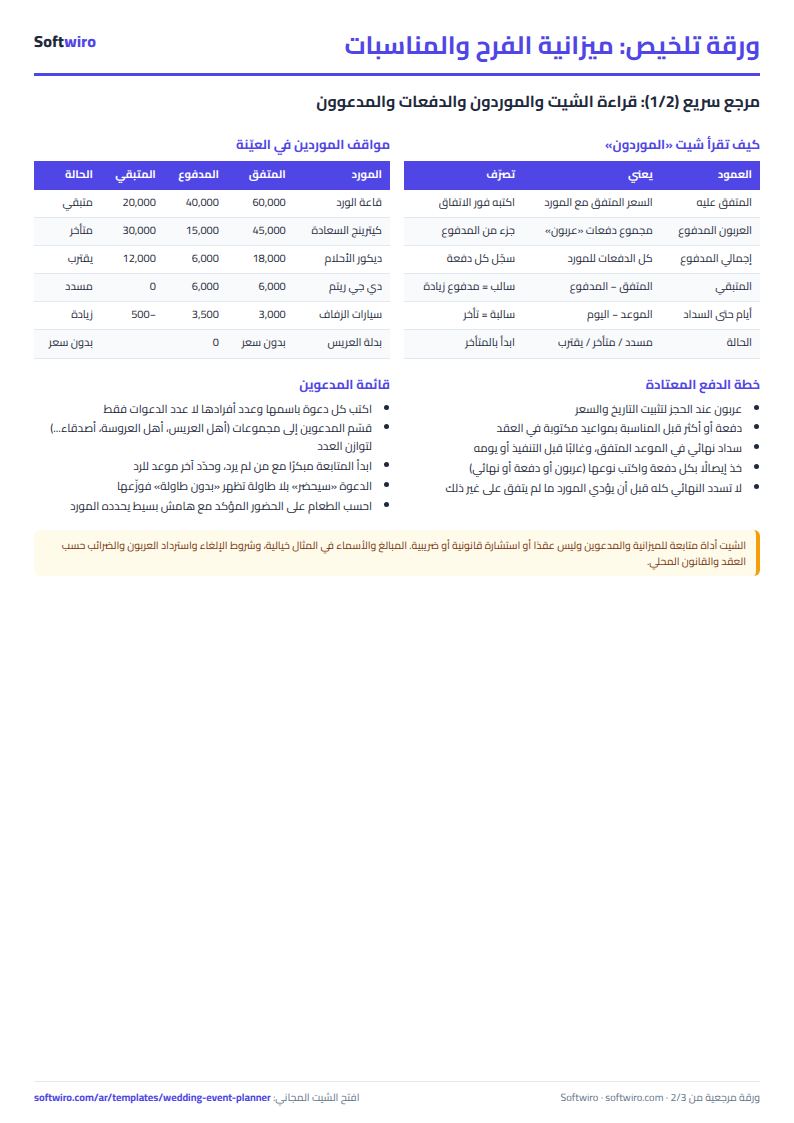
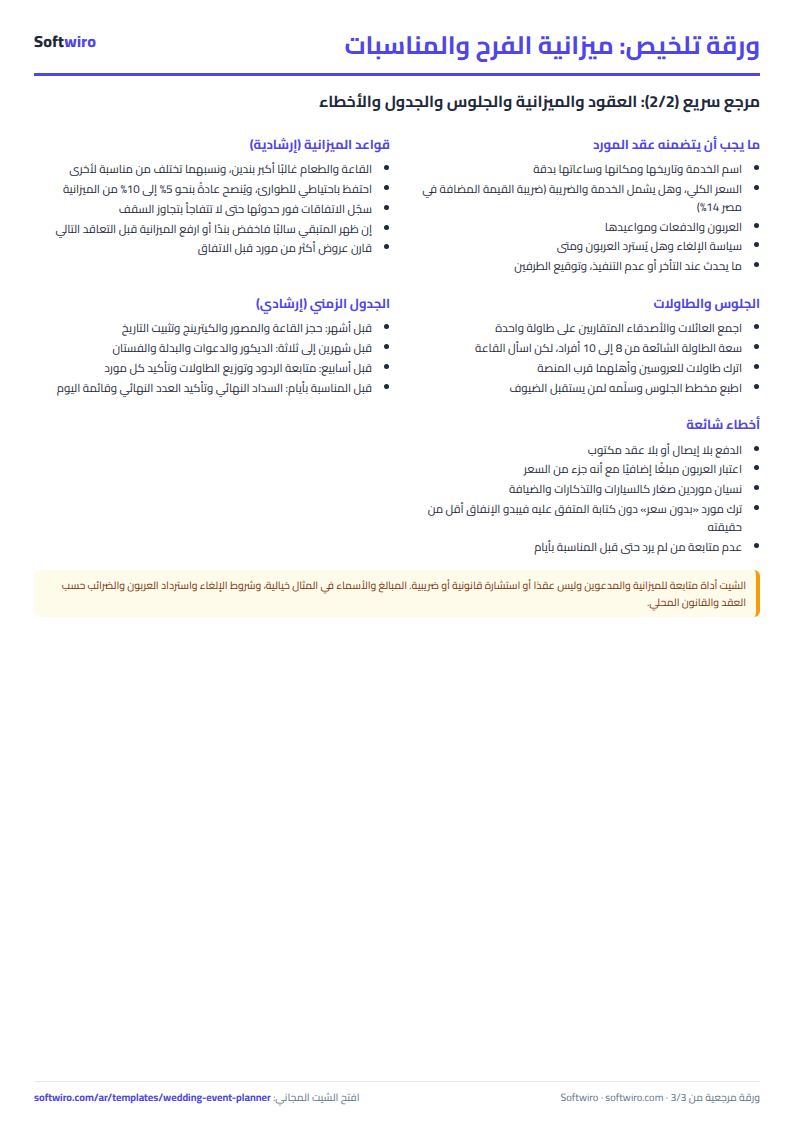
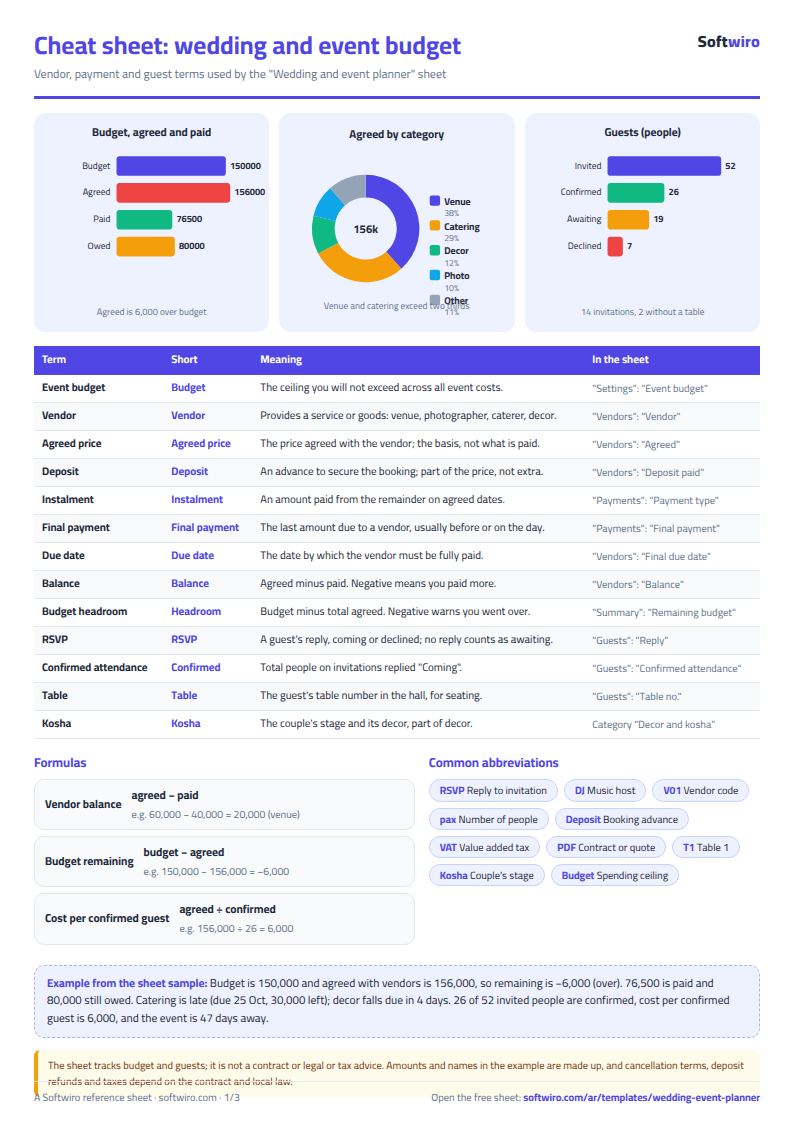
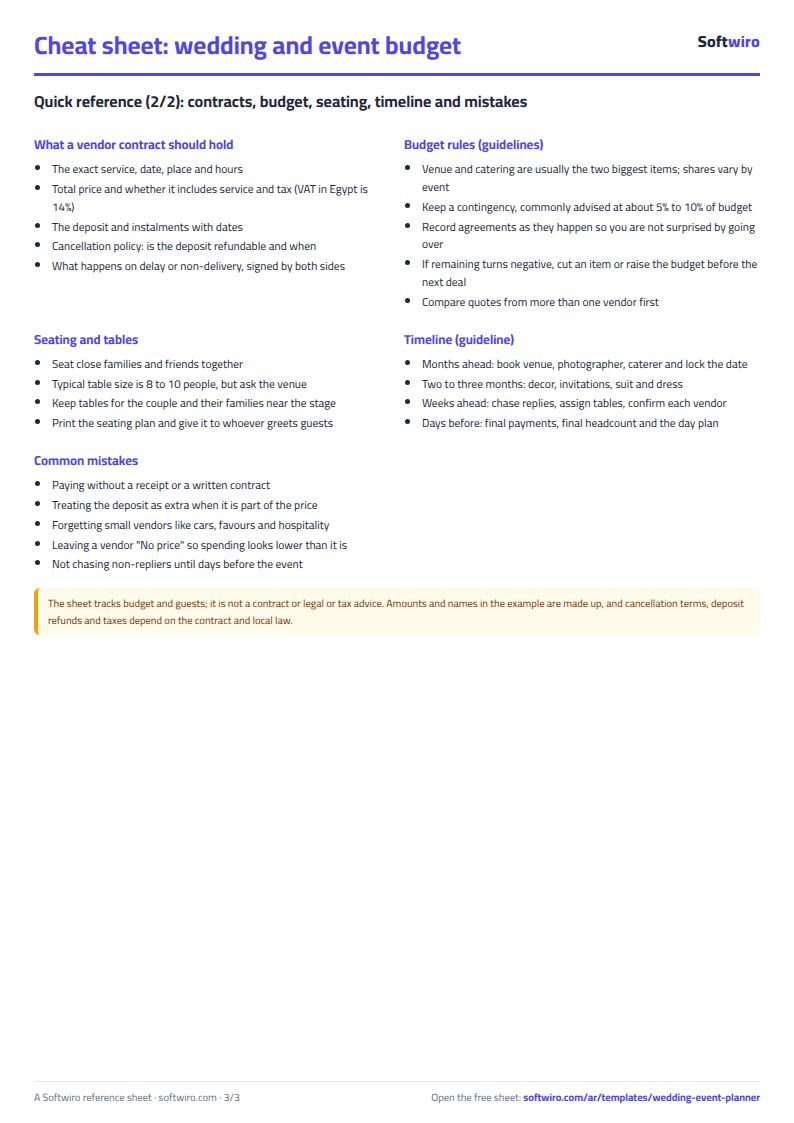
Terms, abbreviations, tables and diagrams over several pages, in Arabic and English. Download it as a PDF or images, including a phone-size version.
Still running this on Excel?
This sheet suits a start and a limited amount of data. If your way of working grows, or you need more than one person working on it at the same time, Softwiro can build you a program that fits the way you work.
| In this sheet | In Custom Software from Softwiro |
|---|---|
| One file that one person edits at a time, and copies reach you on WhatsApp. | A program with a login for each user and permissions you define, and everyone sees the same data. |
| You type everything and check the numbers by hand. | We design the screens around your work steps, so each person records only what concerns them. |
| Columns and formulas are fixed as the sheet was designed. | We build what you need: reports, alerts and screens your way. |
| Backups and security are your own responsibility. | The program runs on a secured server with regular backups. |
Frequently asked questions
How are a supplier's balance and status calculated?
Balance = agreed amount - total of the payments made. If a balance remains and the due date has passed, the status is "متأخر" (late). If the due date is within the number of days set in the "الإعدادات" (Settings) sheet, it is "يقترب السداد" (payment approaching). If nothing remains, it is "مسدد" (paid), and if the amount paid is more than the agreed amount, it is "مدفوع زيادة" (overpaid).
Is the deposit counted on top of the amount paid?
No. The deposit is part of the total paid. It is the total of the payments marked "عربون" (deposit) for each supplier.
What does a negative remaining budget mean?
It means the total agreed with suppliers is more than the budget in the "الإعدادات" (Settings) sheet. In the example the agreed total is 156,000 and the budget is 150,000, so the remaining budget is -6,000.
How is confirmed attendance calculated?
It is the total number of people in the invitations whose reply is "سيحضر" (will attend). An invitation marked "لم يرد" (no reply) or with no reply entered shows "بانتظار الرد" (awaiting reply) and is not counted.
Is the template free?
Yes, with no sign-up and no email address. Use it, edit it and share it as you like.
Does it work in Google Sheets and on mobile?
The sheet uses formulas supported by Excel 2016 and later, Google Sheets and LibreOffice, so you can upload it to Google Drive and open it with Google Sheets on a computer or a phone.
What is the difference between the white and the gray cells?
You type in the white cells; the gray cells are calculated automatically. Don't type in a gray cell, or you will erase its formula.
Can I use the sheet from an AI assistant?
Yes. Add our MCP server (URL https://softwiro.com/api/mcp, no key needed) to your assistant and ask it to do the calculation in this template. The numbers come from the sheet's own formulas, and we do not store your data. The steps and a ready-made prompt are in this article: https://softwiro.com/blog/mcp-excel-templates-ai-agent-guide.html
More free templates for: Events and weddings
More free templates
- Wedding and event hall booking sheet
- Car rental fleet tracker (Excel)
- Fleet fuel and maintenance tracker (Excel)
- Car showroom accounts sheet
- Freelancer projects, hours and invoices tracker
- Supplier purchase orders and payables tracker
- Charity donations and disbursements tracker
- Travel agency bookings tracker
- Laundry orders tracker (Excel)