Try the sheet here, on the example
The sheet is open below with sample numbers. Change any white cell and watch the results update, or press the blank-copy button to type your own data from scratch. Nothing you type leaves your browser.
Example from the sheet
| رقم الفاتورة | تاريخ الفاتورة | المبلغ | المدفوع | الرصيد | الحالة |
|---|---|---|---|---|---|
| INV-001 | 46265 | 7,000.00 | 7,000.00 | 0.00 | مسددة |
| INV-002 | 46275 | 15,000.00 | 10,000.00 | 5,000.00 | متأخرة |
| INV-003 | 46280 | 5,000.00 | 5,000.00 | 0.00 | مسددة |
| INV-004 | 46296 | 2,800.00 | 2,800.00 | 0.00 | مسددة |
| INV-005 | 46307 | 4,000.00 | 0.00 | 4,000.00 | متأخرة |
| INV-006 | 46315 | 7,500.00 | 3,000.00 | 4,500.00 | مدفوعة جزئيًا |
| INV-007 | 46326 | 3,525.00 | 0.00 | 3,525.00 | مستحقة |
| INV-008 | 46327 | 5,300.00 | 0.00 | 5,300.00 | مستحقة |
Example from the “الفواتير” tab (Arabic), with the numbers and formulas that are in the file.
What is inside
- "الإعدادات" (Settings): Today's date (enter =TODAY() so it updates itself) and the year for which the summary shows monthly income.
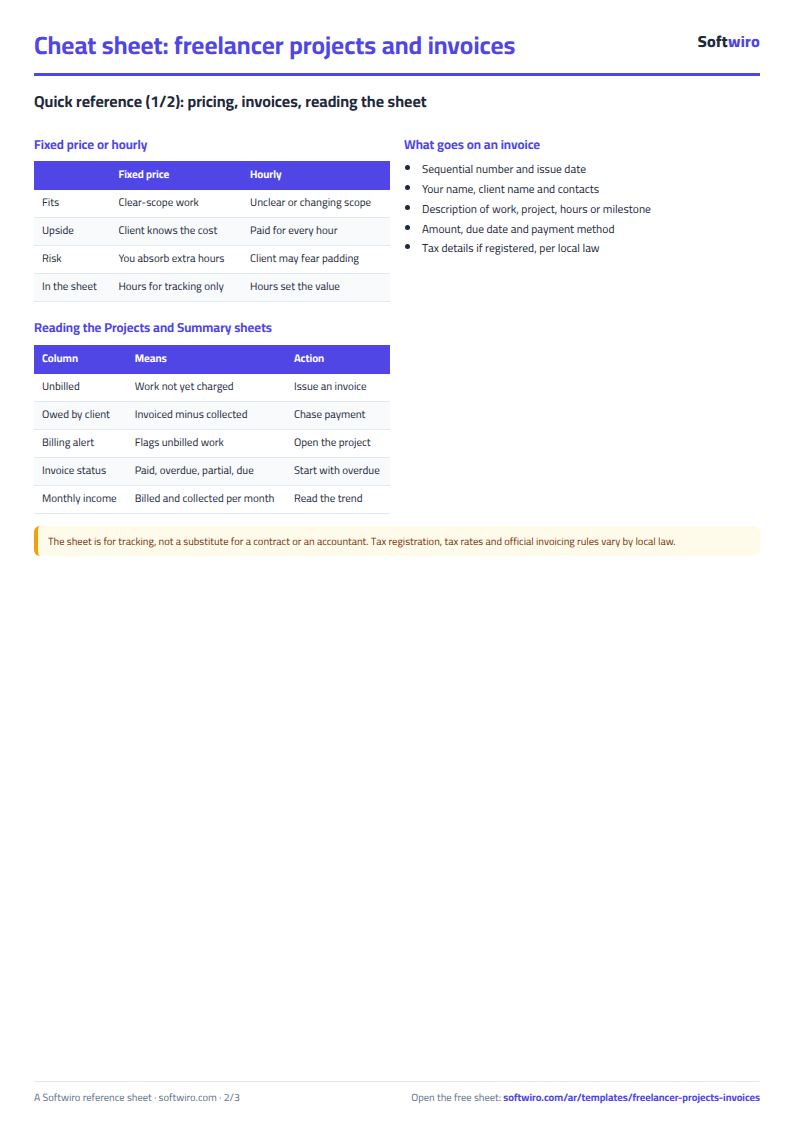
- "المشاريع" (Projects): For each project: code, name, client, pricing type (fixed price or hourly), fixed price, hourly rate, start date and status. The sheet then calculates logged hours, project value, amount invoiced, amount collected, amount not yet invoiced, the amount due from the client and an invoicing warning.
- "الساعات" (Hours): Each work session with its date, project code, number of hours and description. The project name fills in, along with the value of the hours if the project is hourly.
- "الفواتير" (Invoices): Each invoice with its number, date, project code, amount, payment terms in days and a note. The sheet then calculates the project, client, due date, amount paid, balance, status (paid, overdue, partly paid or due) and days overdue.
- "المدفوعات" (Payments): Every amount you receive, with its date, the number of the invoice it pays, the amount, the payment method (cash, bank transfer or e-wallet) and a note. The project and client names fill in.
- "الملخص" (Summary): Total invoiced, total paid, and total due from clients including the overdue part, the longest delay, work you have not yet invoiced, this month's figures, the number of projects by status, and a table of monthly income for the year: invoiced, collected, hours, and the value of hours on hourly projects.
The file opens on a start tab (“ابدأ هنا”, Start here) that explains how to use it.
What makes it different
Open the "الملخص" (Summary) to see how much your clients owe you, how much of it is overdue and how much work you have not yet invoiced, without going through invoices and transfers by hand. In "الفواتير" (Invoices) you can see which invoice is late and by how many days.
How to use it
- In the "الإعدادات" (Settings) sheet, enter today's date (or =TODAY() so it updates itself) and the year whose monthly income you want to see.
- In the "المشاريع" (Projects) sheet, enter each project's code, name, client, pricing type (fixed price or hourly), the fixed price or hourly rate, start date and status.
- In the "الساعات" (Hours) sheet, record every work session: date, project code, number of hours and a short description.
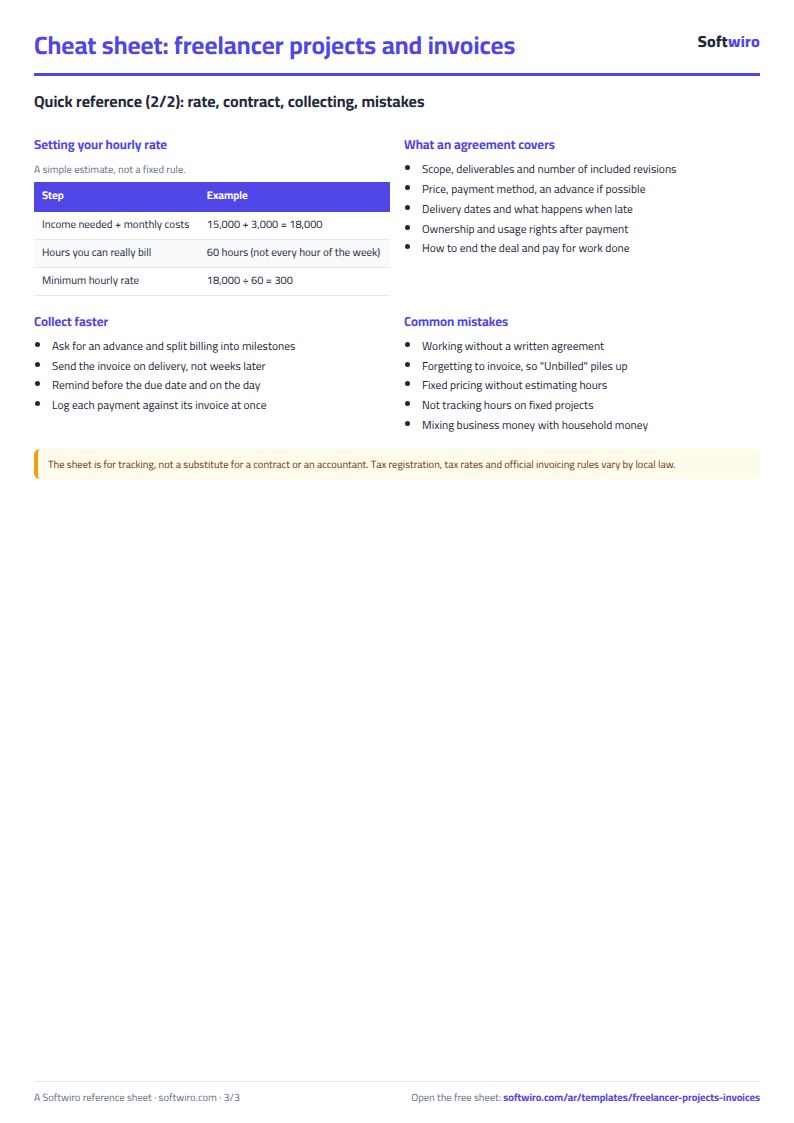
- In the "الفواتير" (Invoices) sheet, record every invoice you issue: its number, date, project code, amount and the payment terms in days you agreed.
- In the "المدفوعات" (Payments) sheet, record every amount you receive with the number of the invoice it pays.
- The sheet calculates each project's value, what has been invoiced, what has been collected and what is not yet invoiced, plus each invoice's status and days overdue.
- Open the "الملخص" (Summary) sheet to see what clients owe you, how much of it is overdue, this month's income and monthly income for the year.
Before you start:
- The value of an hourly project = logged hours x hourly rate. The value of a fixed-price project = the price entered, and hours are logged for tracking only.
- Not yet invoiced = project value - amount invoiced for it. A negative figure means you have invoiced more than the value of the work so far.
- Invoice due date = invoice date + payment terms in days. An invoice becomes "متأخرة" (overdue) when its due date has passed and a balance remains.
- Invoice statuses: paid, overdue, partly paid (not yet due and partly settled), and due (not yet due and nothing paid).
- Record each payment against the number of the invoice it pays. If a client pays several invoices with one transfer, enter one row per invoice.
- The sheet has room for 200 projects, 1,000 invoices, 1,000 payments and 2,000 hours rows.
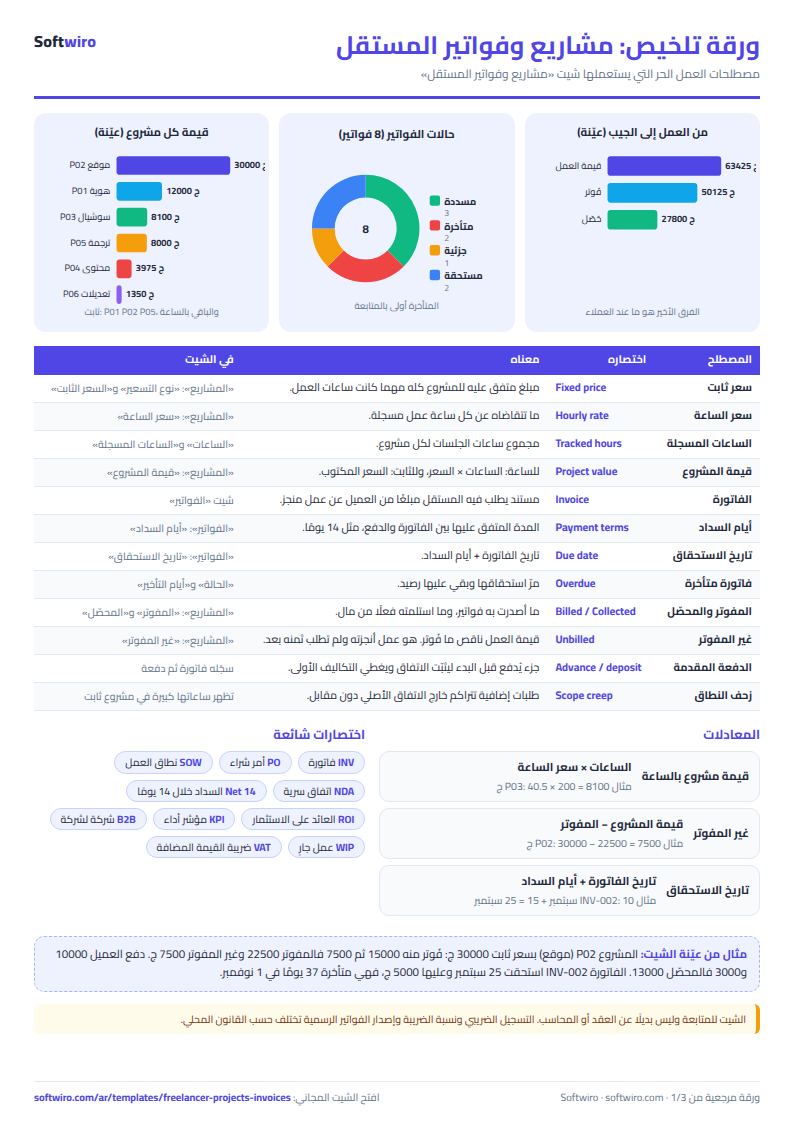
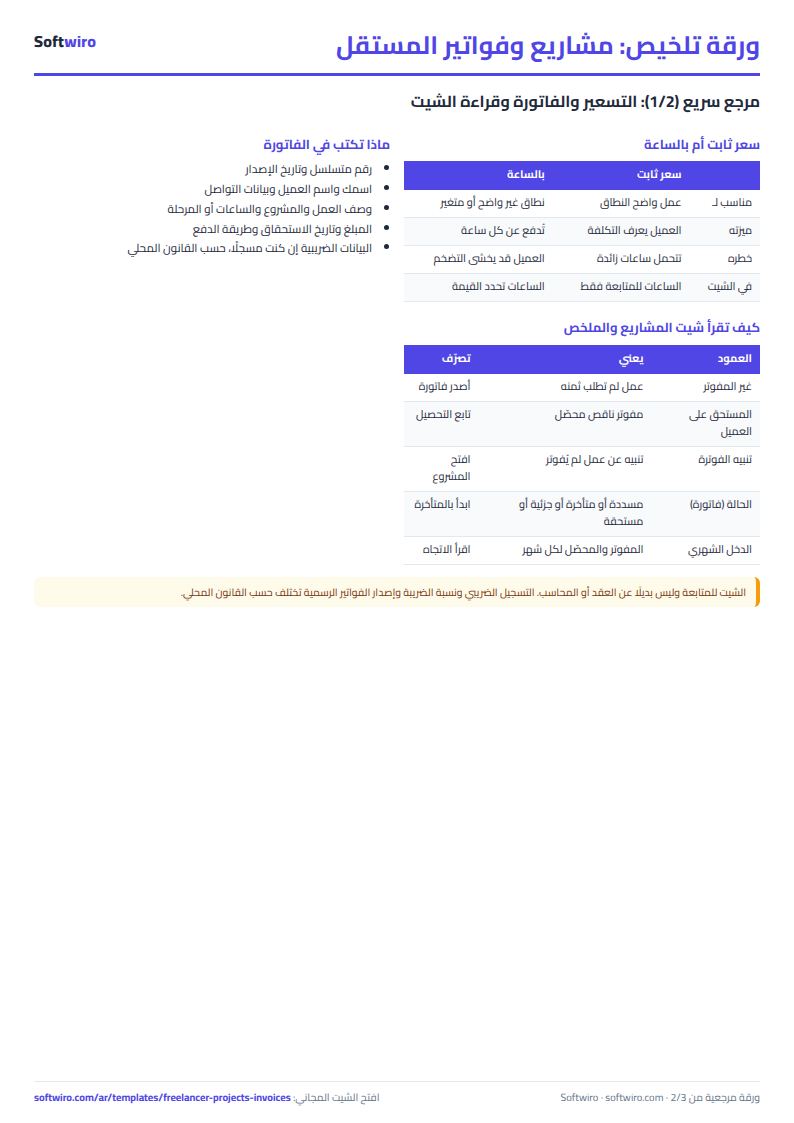
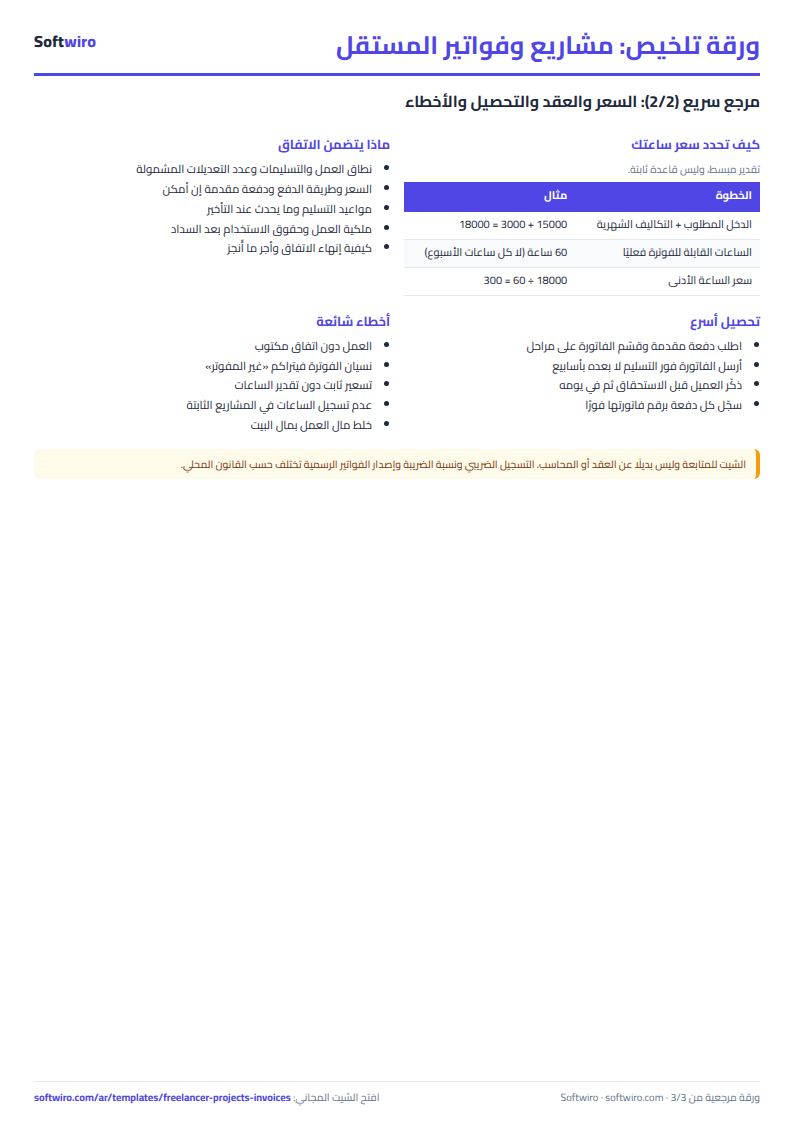
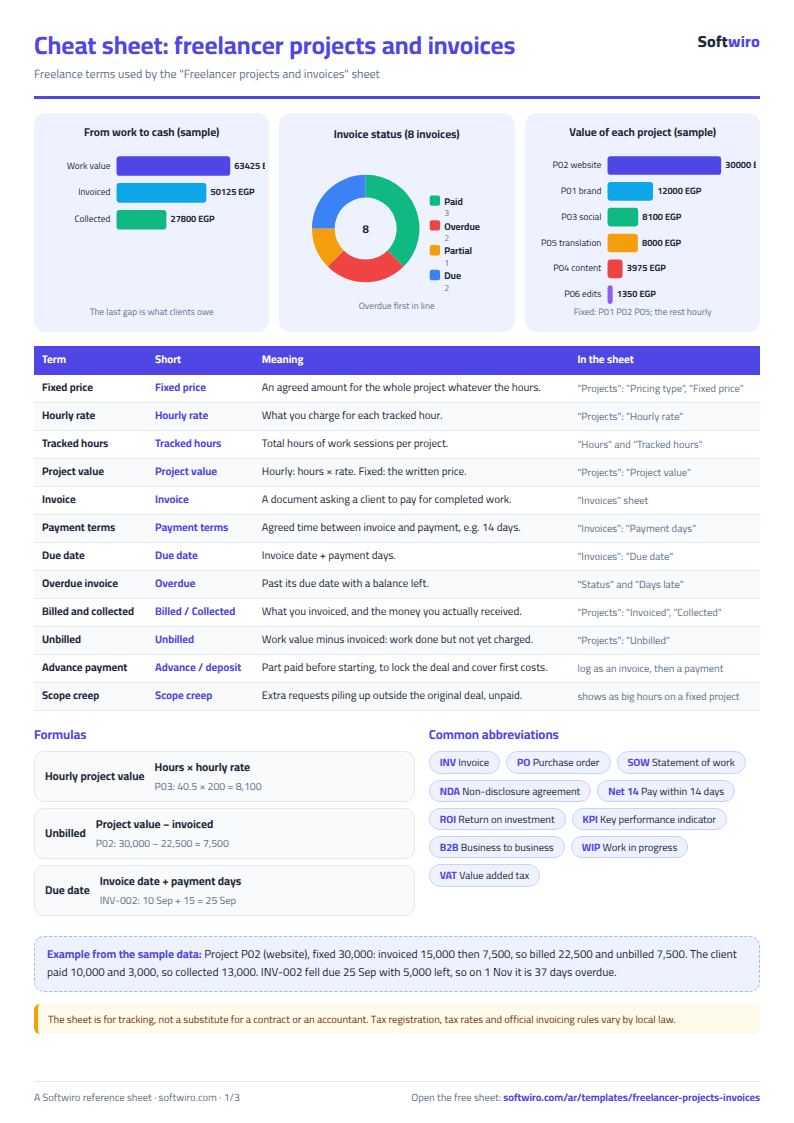
Free cheat sheet for this field
Terms, abbreviations, tables and diagrams over several pages, in Arabic and English. Download it as a PDF or images, including a phone-size version.
Still running this on Excel?
This sheet suits a start and a limited amount of data. If your way of working grows, or you need more than one person working on it at the same time, Softwiro can build you a program that fits the way you work.
| In this sheet | In Custom Software from Softwiro |
|---|---|
| One file that one person edits at a time, and copies reach you on WhatsApp. | A program with a login for each user and permissions you define, and everyone sees the same data. |
| You type everything and check the numbers by hand. | We design the screens around your work steps, so each person records only what concerns them. |
| Columns and formulas are fixed as the sheet was designed. | We build what you need: reports, alerts and screens your way. |
| Backups and security are your own responsibility. | The program runs on a secured server with regular backups. |
Frequently asked questions
How does the sheet calculate a project's value?
For an hourly project: logged hours x hourly rate. For a fixed-price project: the price you entered. Hours are logged on a fixed-price project for tracking only and do not change its value.
When does an invoice become "متأخرة" (overdue)?
Due date = invoice date + payment terms in days. Once that date has passed and the invoice still has a balance, it is overdue and the days overdue are shown. Before that it is "مستحقة" (due) or "مدفوعة جزئيًا" (partly paid), and once it is paid in full it is "مسددة" (paid).
What does "غير المفوتر" (not yet invoiced) mean?
It is the project's value minus what you have invoiced for it. The sheet warns you if a project is complete and part of it has not been invoiced, or if it is an hourly project in progress with hours that have not been invoiced.
What if a client pays several invoices with one transfer?
Enter one row per invoice in "المدفوعات" (Payments), with the portion of the amount that belongs to that invoice, so that each invoice's balance and status come out right.
Is the template free?
Yes, with no sign-up and no email address. Use it, edit it and share it as you like.
Does it work in Google Sheets and on mobile?
The sheet uses formulas supported by Excel 2016 and later, Google Sheets and LibreOffice, so you can upload it to Google Drive and open it with Google Sheets on a computer or a phone.
What is the difference between the white and the gray cells?
You type in the white cells; the gray cells are calculated automatically. Don't type in a gray cell, or you will erase its formula.
Can I use the sheet from an AI assistant?
Yes. Add our MCP server (URL https://softwiro.com/api/mcp, no key needed) to your assistant and ask it to do the calculation in this template. The numbers come from the sheet's own formulas, and we do not store your data. The steps and a ready-made prompt are in this article: https://softwiro.com/blog/mcp-excel-templates-ai-agent-guide.html
More free templates for: Services and business
More free templates
- Lead and deal pipeline tracker
- Laundry orders tracker (Excel)
- Photo studio bookings sheet
- General appointments scheduler sheet
- Car wash management sheet (packages, cards, workers, materials)
- Supplier purchase orders and payables tracker
- Charity donations and disbursements tracker
- Travel agency bookings tracker
- Dental clinic treatment plans tracker (Excel)
- School class timetable (Excel)
- Exam schedule with committees and invigilators (Excel)
- Homework and behavior tracker for teachers (Excel)
- School bus subscriptions tracker (Excel)