Try the sheet here, on the example
The sheet is open below with sample numbers. Change any white cell and watch the results update, or press the blank-copy button to type your own data from scratch. Nothing you type leaves your browser.
Example from the sheet
| كود القطعة | اسم القطعة | المحصول | المساحة (فدان) | إجمالي المصروفات | الإيراد | الربح | تكلفة الفدان | الحالة |
|---|---|---|---|---|---|---|---|---|
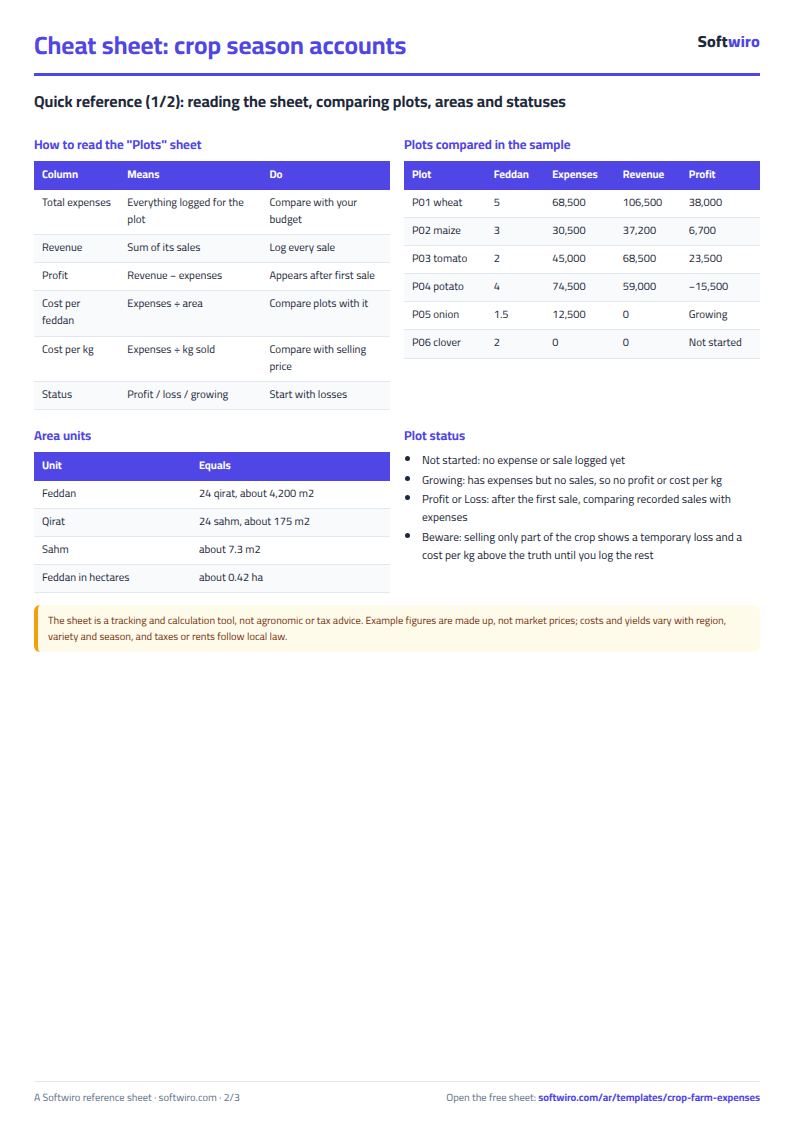
| P01 | قطعة الجنوب | قمح | 5.0 | 68,500.00 | 106,500.00 | 38,000.00 | 13,700.00 | رابح |
| P02 | قطعة الترعة | ذرة | 3.0 | 30,500.00 | 37,200.00 | 6,700.00 | 10,166.67 | رابح |
| P03 | قطعة الشرق | طماطم | 2.0 | 45,000.00 | 68,500.00 | 23,500.00 | 22,500.00 | رابح |
| P04 | قطعة الغرب | بطاطس | 4.0 | 74,500.00 | 59,000.00 | -15,500.00 | 18,625.00 | خاسر |
| P05 | القطعة الصغيرة | بصل | 1.5 | 12,500.00 | 0.00 | 8,333.33 | قيد الزراعة | |
| P06 | القطعة الجديدة | برسيم | 2.0 | 0.00 | 0.00 | 0.00 | لم تبدأ |
Example from the “القطع” tab (Arabic), with the numbers and formulas that are in the file.
What is inside
- "القطع" (Plots): Plot code, name, crop, area in feddans and planting date. The sheet then calculates total expenses and expenses for labor, fertilizer, irrigation, harvest and transport, plus quantity sold, revenue and profit, cost per feddan, profit per feddan, cost per kg and status (profitable, loss-making, growing or not started). The example has six plots covering 17.5 feddans, and the table has room for 200 plots.
- "المصروفات" (Expenses): Record each expense: date, plot code, category (seed and seedlings, labor, fertilizer, pesticides, irrigation, plowing and equipment, harvest and transport, other), amount and a note. The plot name fills in automatically. Room for 2,000 expenses.
- "المبيعات" (Sales): Each sale with its date, plot code, quantity in kg, price per kg and buyer. Revenue is calculated as quantity x price, and the plot name fills in automatically. Room for 1,000 sales.
- "الملخص" (Summary): Number of plots, total area, total expenses, revenue and net result, expenses on plots still growing, profit on plots that have had sales, a table of plots by status, and a table of expenses by category with each category's share of the total.
The file opens on a start tab (“ابدأ هنا”, Start here) that explains how to use it.
What makes it different
From the "القطع" (Plots) sheet you see which plot made you money and which lost it, and what a feddan and a kilo cost you. From the "الملخص" (Summary) you see where the season's expenses went across labor, fertilizer, irrigation and the rest, instead of adding them up from scraps of paper.
How to use it
- In the "القطع" (Plots) sheet, enter each plot's code, name, crop, area in feddans and planting date.
- In the "المصروفات" (Expenses) sheet, record every expense: date, plot code, category (labor, fertilizer, irrigation, harvest and transport, and so on) and amount.
- In the "المبيعات" (Sales) sheet, record every sale of the crop: date, plot code, quantity in kg, price per kg and the buyer's name.
- The "القطع" (Plots) sheet calculates each plot's total expenses, revenue, profit, cost per feddan, profit per feddan, cost per kg and status.
- Open the "الملخص" (Summary) sheet to see the totals, the plots by status and the split of expenses across categories.
Before you start:
- Profit = sales revenue - all of the plot's expenses, and it appears once the first sale from the plot has been recorded. A plot that has expenses but no sales yet has the status "قيد الزراعة" (growing).
- Plot status: "لم تبدأ" (not started) if no expense or sale is recorded, "قيد الزراعة" (growing) if there are expenses only, and "رابح" (profitable) or "خاسر" (loss-making) depending on how recorded sales compare with expenses.
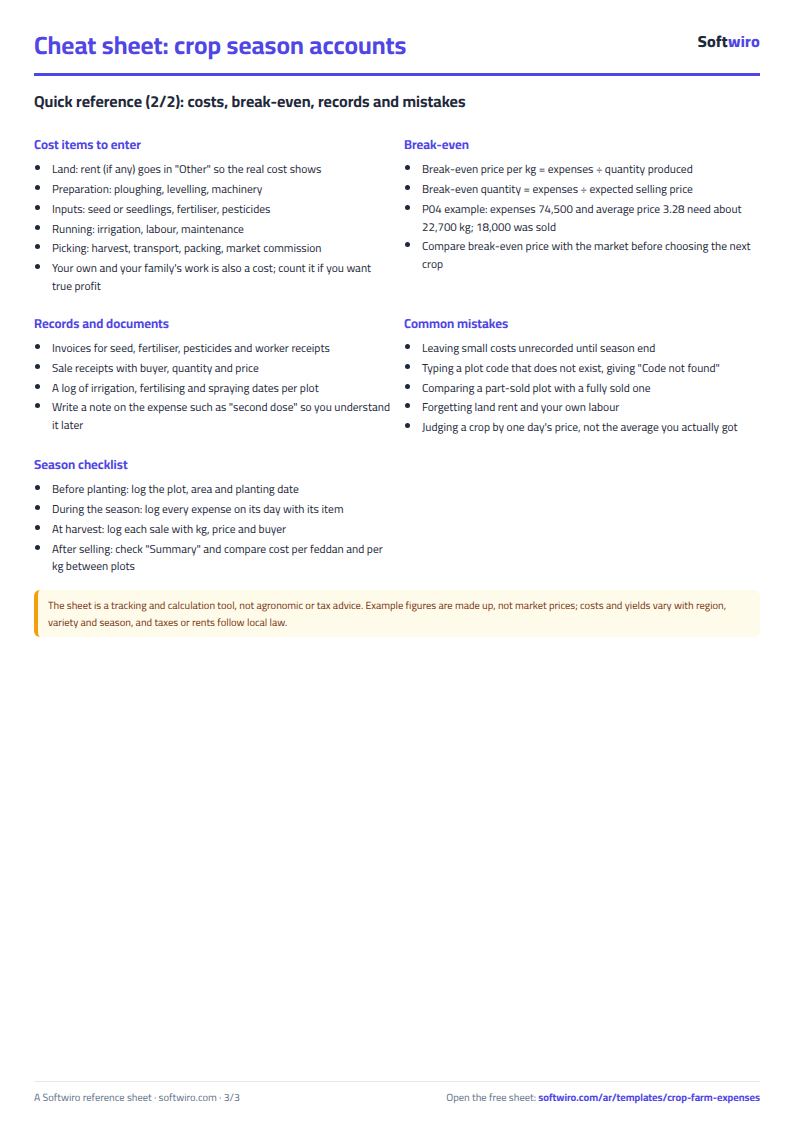
- Cost per feddan = plot expenses / area. Cost per kg = expenses / quantity sold. If you have sold only part of the crop, it will be higher than the true figure until you record the rest.
- If you type a code in expenses or sales that is not in the "القطع" (Plots) sheet, the message "كود غير موجود" (code not found) appears.
- The figures and prices in the example are made up to show the calculation and are not market prices. Clear them and enter your own.
- The sheet has room for 200 plots, 2,000 expenses and 1,000 sales.
Free cheat sheet for this field
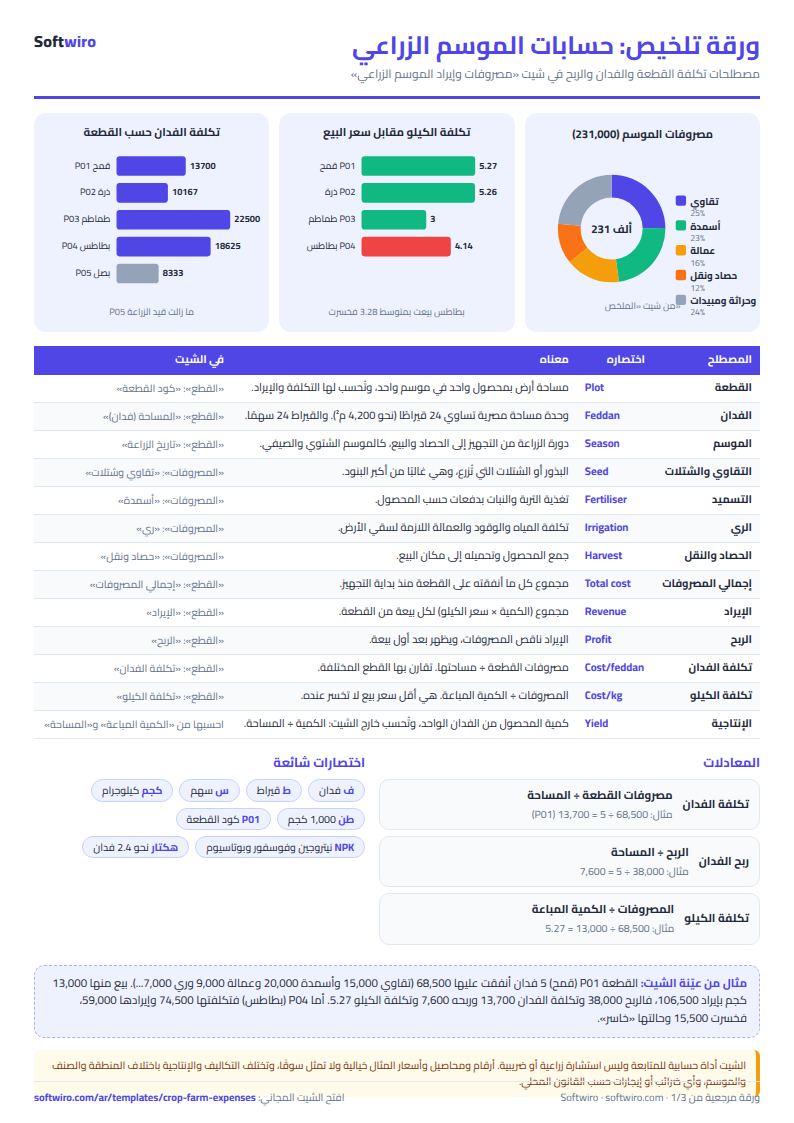
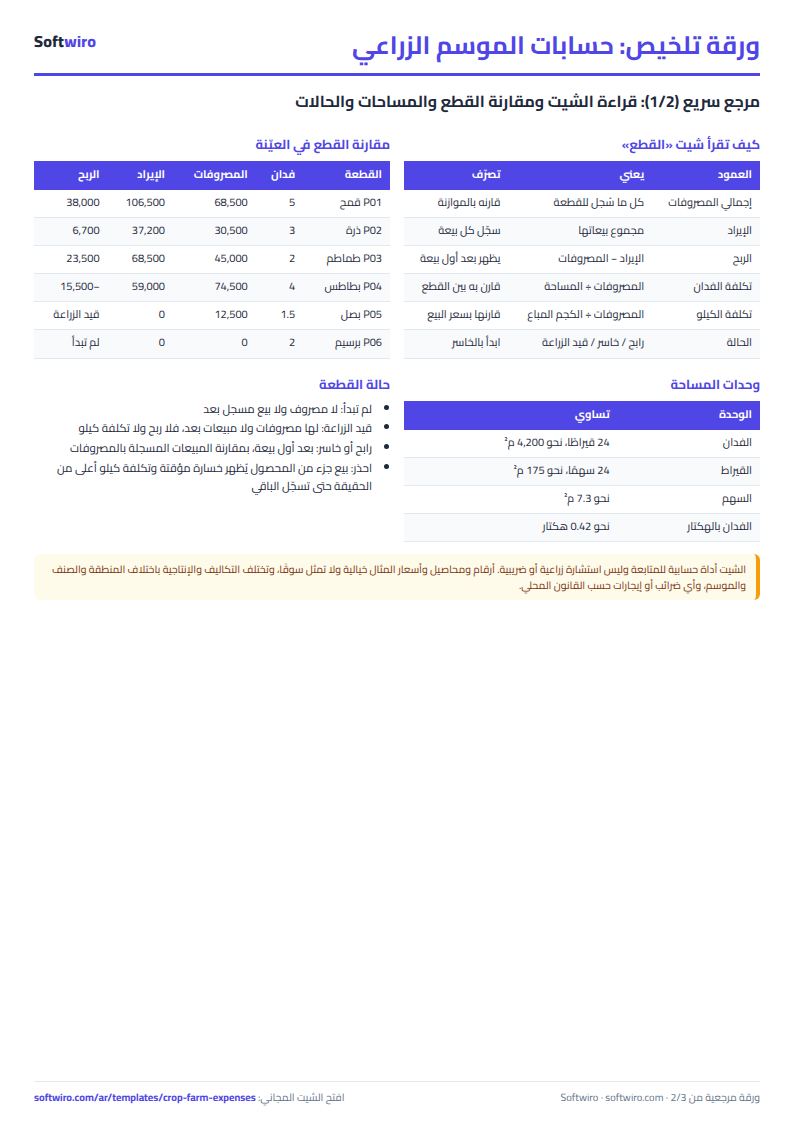
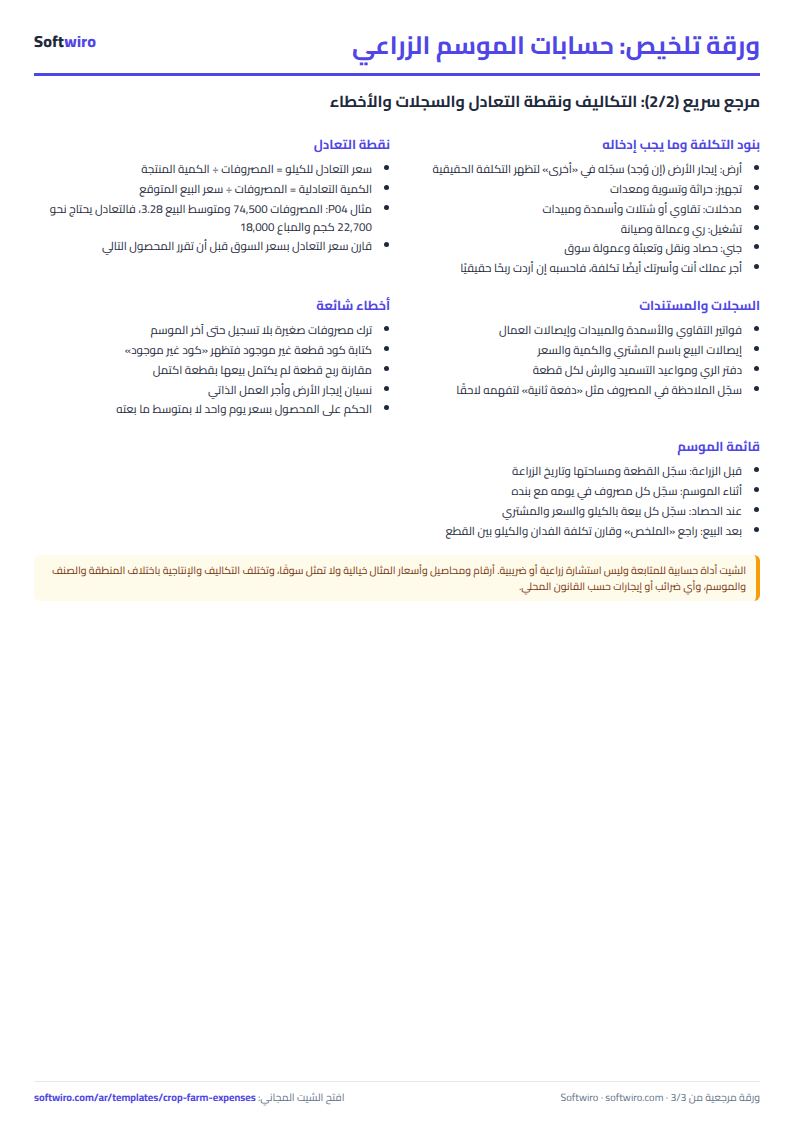
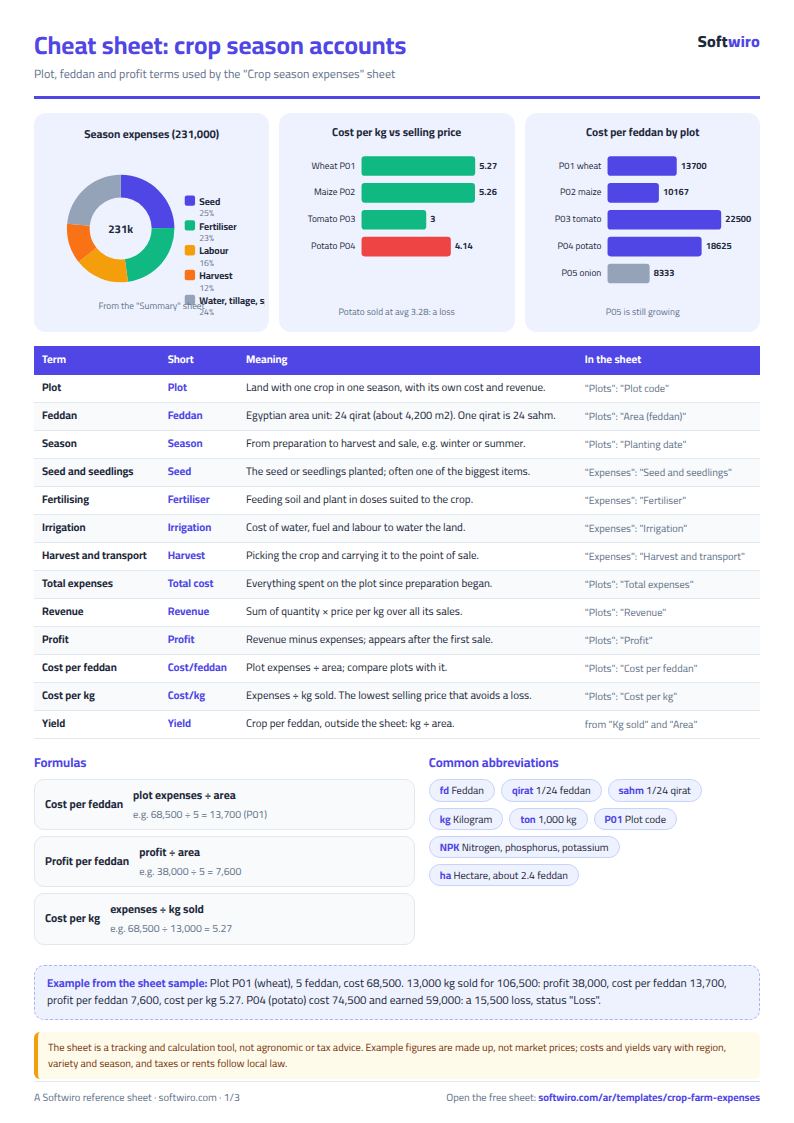
Terms, abbreviations, tables and diagrams over several pages, in Arabic and English. Download it as a PDF or images, including a phone-size version.
Still running this on Excel?
This sheet suits a start and a limited amount of data. If your way of working grows, or you need more than one person working on it at the same time, Softwiro can build you a program that fits the way you work.
| In this sheet | In Custom Software from Softwiro |
|---|---|
| One file that one person edits at a time, and copies reach you on WhatsApp. | A program with a login for each user and permissions you define, and everyone sees the same data. |
| You type everything and check the numbers by hand. | We design the screens around your work steps, so each person records only what concerns them. |
| Columns and formulas are fixed as the sheet was designed. | We build what you need: reports, alerts and screens your way. |
| Backups and security are your own responsibility. | The program runs on a secured server with regular backups. |
Frequently asked questions
How are cost per feddan and profit per feddan calculated?
Cost per feddan = the plot's total expenses / its area in feddans, and profit per feddan = the plot's profit / its area. Profit appears once the first sale from the plot has been recorded.
Why does a plot show "قيد الزراعة" (growing) with no profit?
Because it has expenses but no sales recorded yet. If you have sold only part of a plot's crop, the sheet compares the sales recorded so far with all of the expenses. It may show "خاسر" (loss-making) and the cost per kg will be higher than the true figure until you record the rest.
What happens if I type a plot code that does not exist?
"كود غير موجود" (code not found) appears in the expenses or sales row instead of the plot name. The entry is not counted against any plot in the "القطع" (Plots) sheet, although it is included in the totals of the "الملخص" (Summary).
Are the prices in the example market prices?
No. The names, quantities and prices in the example are made up to show how the calculation works. Clear them and enter your own figures.
Is the template free?
Yes, with no sign-up and no email address. Use it, edit it and share it as you like.
Does it work in Google Sheets and on mobile?
The sheet uses formulas supported by Excel 2016 and later, Google Sheets and LibreOffice, so you can upload it to Google Drive and open it with Google Sheets on a computer or a phone.
What is the difference between the white and the gray cells?
You type in the white cells; the gray cells are calculated automatically. Don't type in a gray cell, or you will erase its formula.
Can I use the sheet from an AI assistant?
Yes. Add our MCP server (URL https://softwiro.com/api/mcp, no key needed) to your assistant and ask it to do the calculation in this template. The numbers come from the sheet's own formulas, and we do not store your data. The steps and a ready-made prompt are in this article: https://softwiro.com/blog/mcp-excel-templates-ai-agent-guide.html
More free templates for: Farming
More free templates
- Poultry farm cycle tracker (Excel)
- Racing pigeon loft sheet
- Livestock and dairy farm sheet
- Complete farm management sheet in Excel: plots, workers, crops and sales
- Agricultural waste management sheet: rice straw, residues, compost and recycling
- Wedding and event budget planner (Excel)
- Car rental fleet tracker (Excel)
- Fleet fuel and maintenance tracker (Excel)
- Car showroom accounts sheet
- Freelancer projects, hours and invoices tracker
- Supplier purchase orders and payables tracker
- Charity donations and disbursements tracker
- Travel agency bookings tracker