Try the sheet here, on the example
The sheet is open below with sample numbers. Change any white cell and watch the results update, or press the blank-copy button to type your own data from scratch. Nothing you type leaves your browser.
Example from the sheet
| الضيف | الوحدة | القناة | الدخول | الخروج | الليالي | سعر الإقامة | الإجمالي | المتبقي | الحالة | ملاحظة |
|---|---|---|---|---|---|---|---|---|---|---|
| محمد عبد الله | النرجس 12 | Airbnb | 46323 | 46329 | 6 | 7,800.00 | 8,050.00 | 0.00 | مغادر | |
| Sarah Miller | النرجس 12 | Booking | 46331 | 46334 | 3 | 4,200.00 | 4,350.00 | 0.00 | مغادر | |
| أحمد سمير | النرجس 12 | مباشر | 46336 | 46339 | 3 | 3,900.00 | 4,150.00 | 0.00 | مغادر | |
| خالد يوسف | النرجس 12 | وسيط | 46339 | 46342 | 3 | 3,900.00 | 4,150.00 | 2,650.00 | مؤكد | |
| Anna Petrova | النرجس 12 | Airbnb | 46346 | 46350 | 4 | 5,100.00 | 5,350.00 | 4,350.00 | مؤكد | |
| هبة مصطفى | النرجس 15 | مباشر | 46328 | 46331 | 3 | 2,550.00 | 2,750.00 | 0.00 | مغادر | |
| عمر فاروق | النرجس 15 | Booking | 46331 | 46335 | 4 | 4,000.00 | 4,200.00 | 0.00 | مغادر | |
| John Smith | النرجس 15 | Airbnb | 46338 | 46341 | 3 | 3,100.00 | 3,300.00 | 0.00 | مؤكد | تعارض |
Example from the “الحجوزات” tab (Arabic), with the numbers and formulas that are in the file.
What is inside
- الإعدادات: The property name, the first day of the month you want summarized, today's date, the number of upcoming days shown in the arrivals and departures list, and the booking channel names.
- الوحدات: Each apartment with its area, number of rooms, regular nightly rate, weekend nightly rate (Thursday and Friday) and cleaning fee. Holds up to 30 units.
- الحجوزات: The bookings log: guest, phone, nationality, unit, channel, check-in and check-out. The number of nights, weekend nights, stay price, total, commission, balance and the overlap alert appear, and a booking that spans two months is split between the two months. Holds up to 600 bookings.
- المصروفات: Each apartment's expenses by date and type (cleaning, utilities, maintenance or other). Holds up to 500 expenses.
- التقويم: The selected month as a grid of apartments by day, showing the guest's name on each occupied night and coloring overlaps red, with the number of occupied units and the occupancy rate for each day.
- القادم: Two lists sorted by date: guests arriving and guests leaving in the coming days, with phone, unit and the balance each guest owes.
- الملخص: The month's available and occupied nights, occupancy rate, stay revenue, ADR, RevPAR, commissions and net profit, a channels table and a units table (occupancy, revenue, expenses and net profit), with three charts.
The file opens on a start tab (“ابدأ هنا”, Start here) that explains how to use it.
What makes it different
A booking that spans two months is split across the nights of each month, so the summary gives correct occupancy and revenue for the selected month. It also shows which channel leaves you more after its commission and which apartment actually makes a profit after its expenses.
How to use it
- In "الإعدادات" (Settings) enter the property name, the date of the first day of the month you want summarized, today's date, the number of days you want to see arrivals and departures for, and your sales channel names.
- In "الوحدات" (Units) enter each apartment: name, area, number of rooms, regular nightly rate, weekend nightly rate (Thursday and Friday) and cleaning fee.
- In "الحجوزات" (Bookings) log each booking: guest, phone, unit, channel, check-in and check-out date. Nights, price, total, commission and balance appear on their own.
- Enter the channel commission rate, any discount and the amount paid, and change the status to checked out or cancelled. If you agreed a different nightly rate with the guest, enter it in the "سعر الليلة المتفق عليه" (agreed nightly rate) column.
- Record every cleaning, utility and maintenance cost in "المصروفات" (Expenses) with the apartment it belongs to.
- Open "التقويم" (Calendar) to see the month by apartment and day, "القادم" (Upcoming) for arrival and departure lists, and "الملخص" (Summary) for occupancy, revenue and net profit.
Before you start:
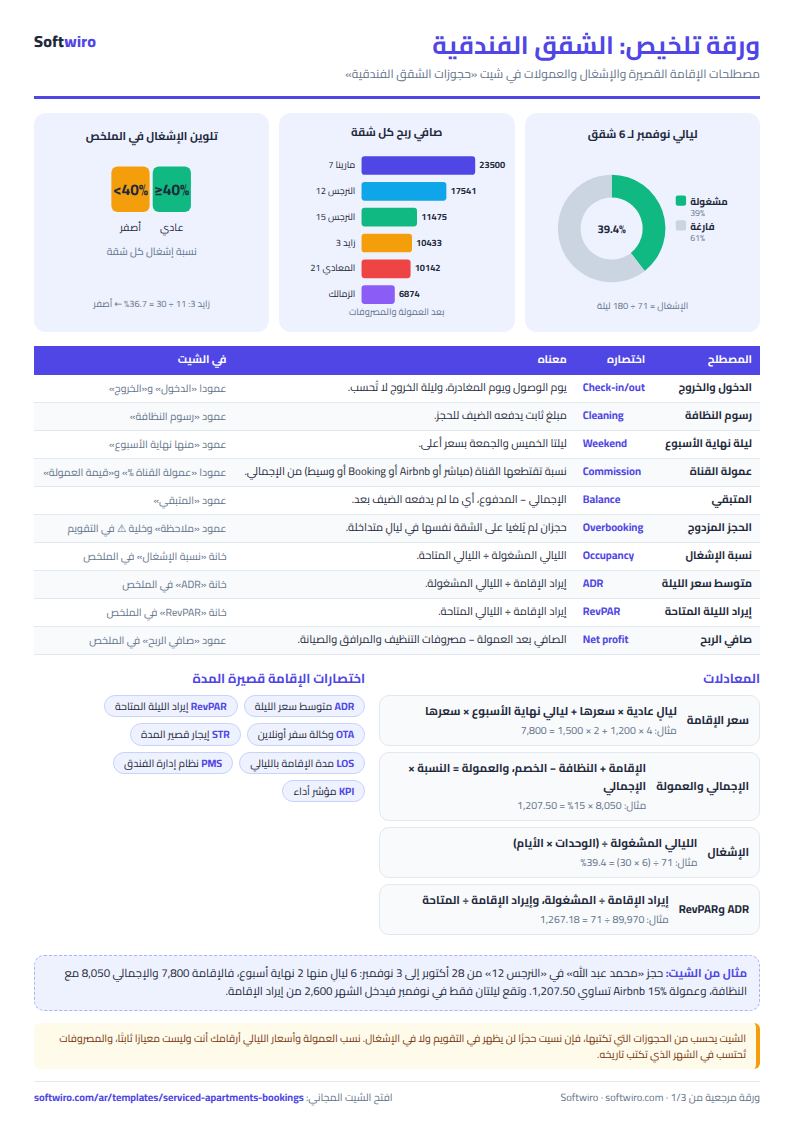
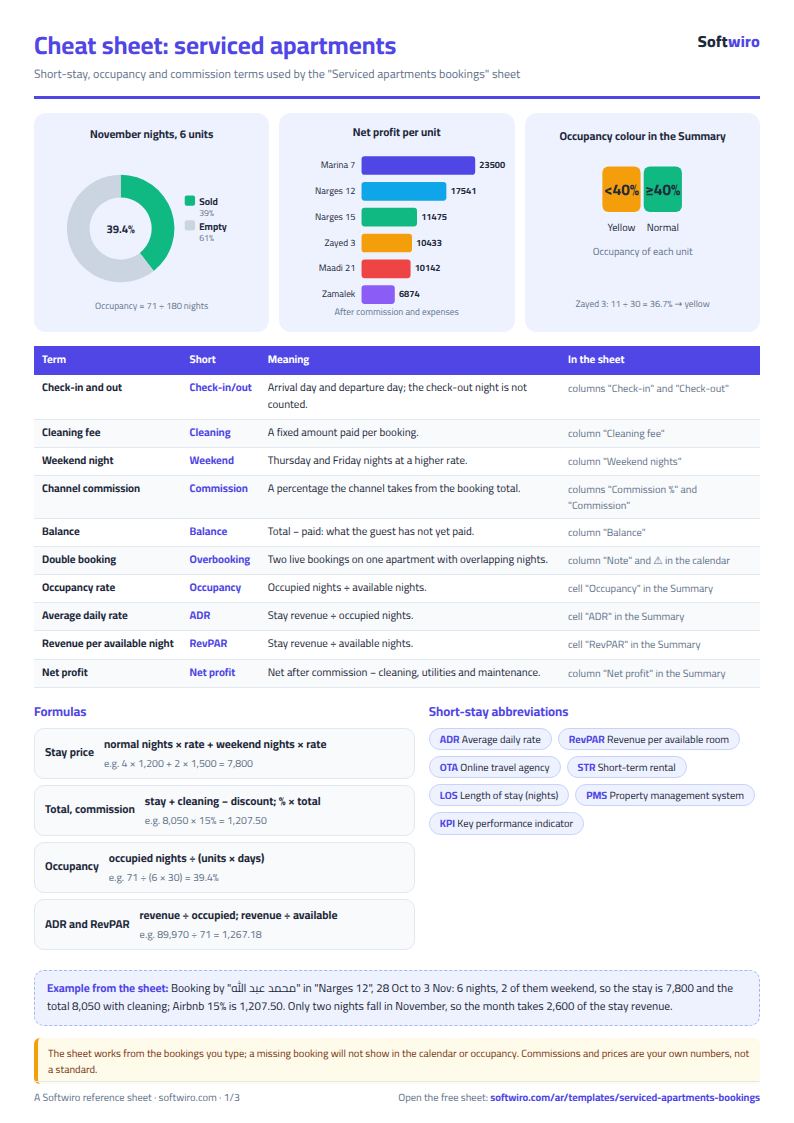
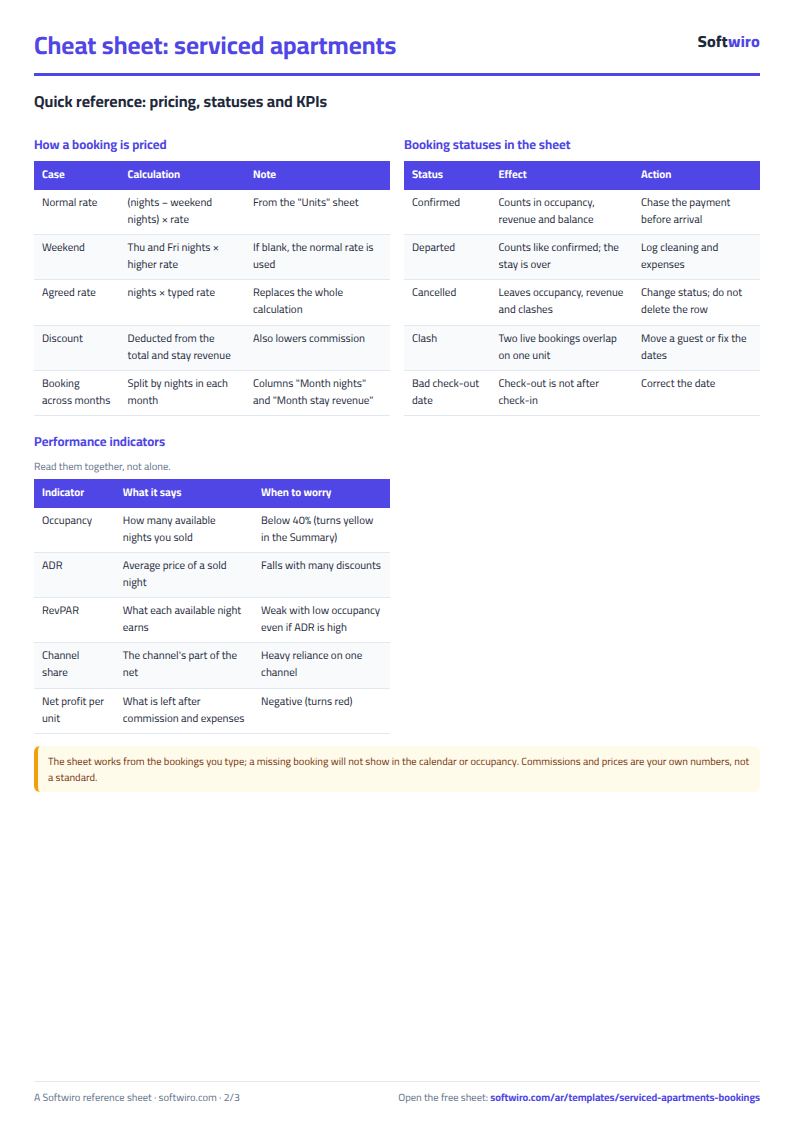
- Nights = check-out date - check-in date. The check-out night is not counted, so a new guest can check in on the previous guest's check-out day without an overlap.
- Stay price = (regular nights x nightly rate) + (weekend nights x weekend rate), where a weekend night is the Thursday night and the Friday night. If you enter an agreed nightly rate, it replaces this for all nights.
- Total = stay price + cleaning fee - discount. Commission = channel rate x total, and balance = total - amount paid.
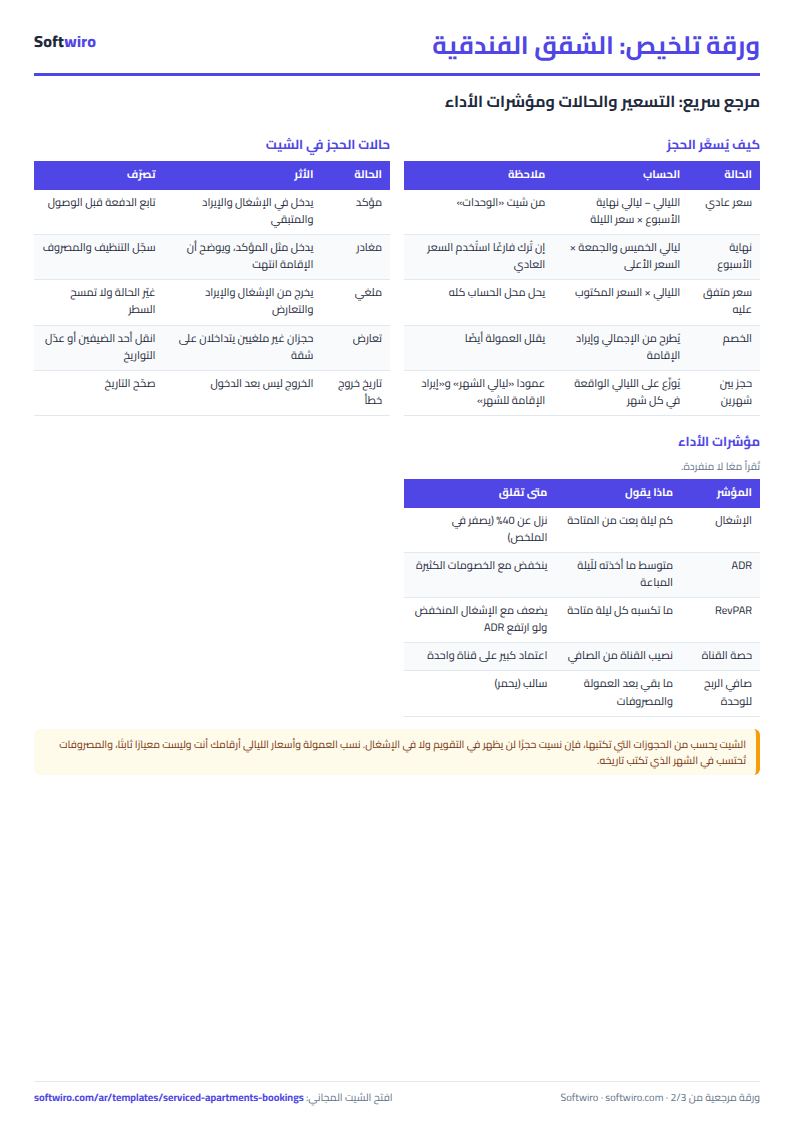
- Overlap: appears when another non-cancelled booking on the same unit overlaps the period. A cancelled booking is not counted.
- A booking that spans two months has its value split across the nights of each month, so the summary includes only the nights falling inside the selected month.
- Occupancy rate = occupied nights / (number of units x days in the month). ADR = stay revenue after discount / occupied nights. RevPAR = stay revenue / available nights.
- Net profit = revenue after commission (including cleaning fees) - the month's expenses. The sheet holds 30 units, 600 bookings and 500 expenses.
Free cheat sheet for this field
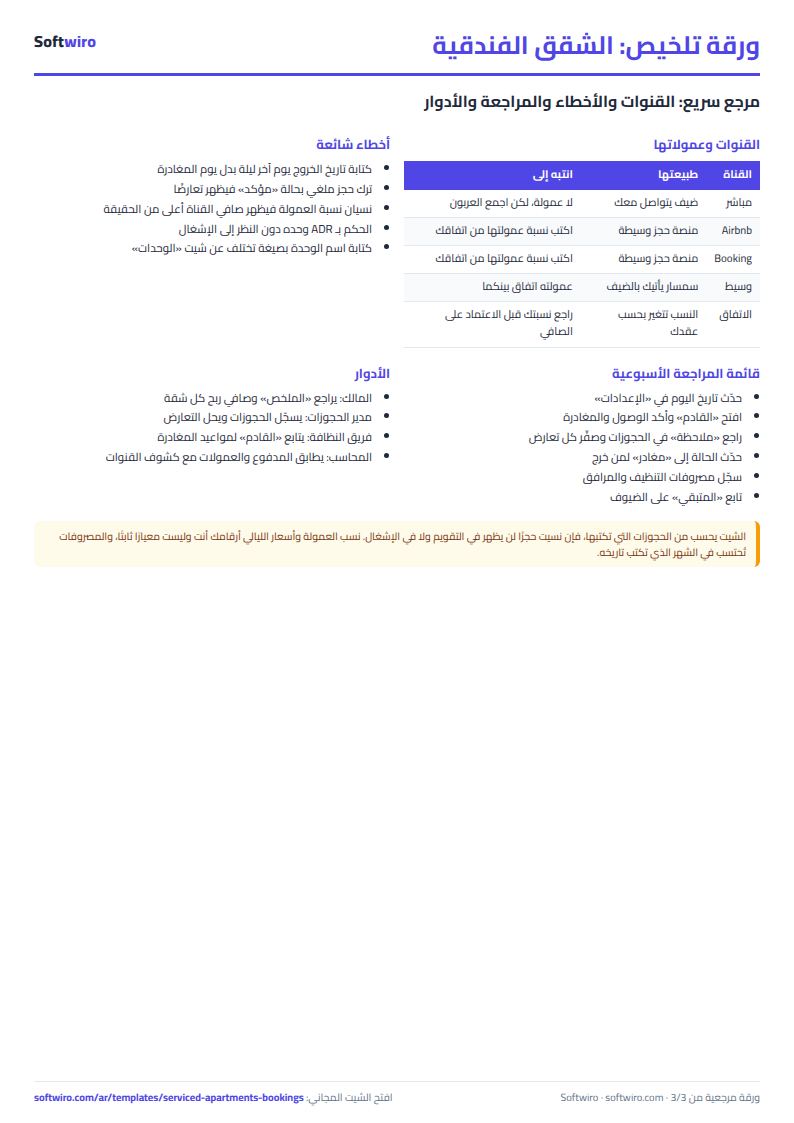
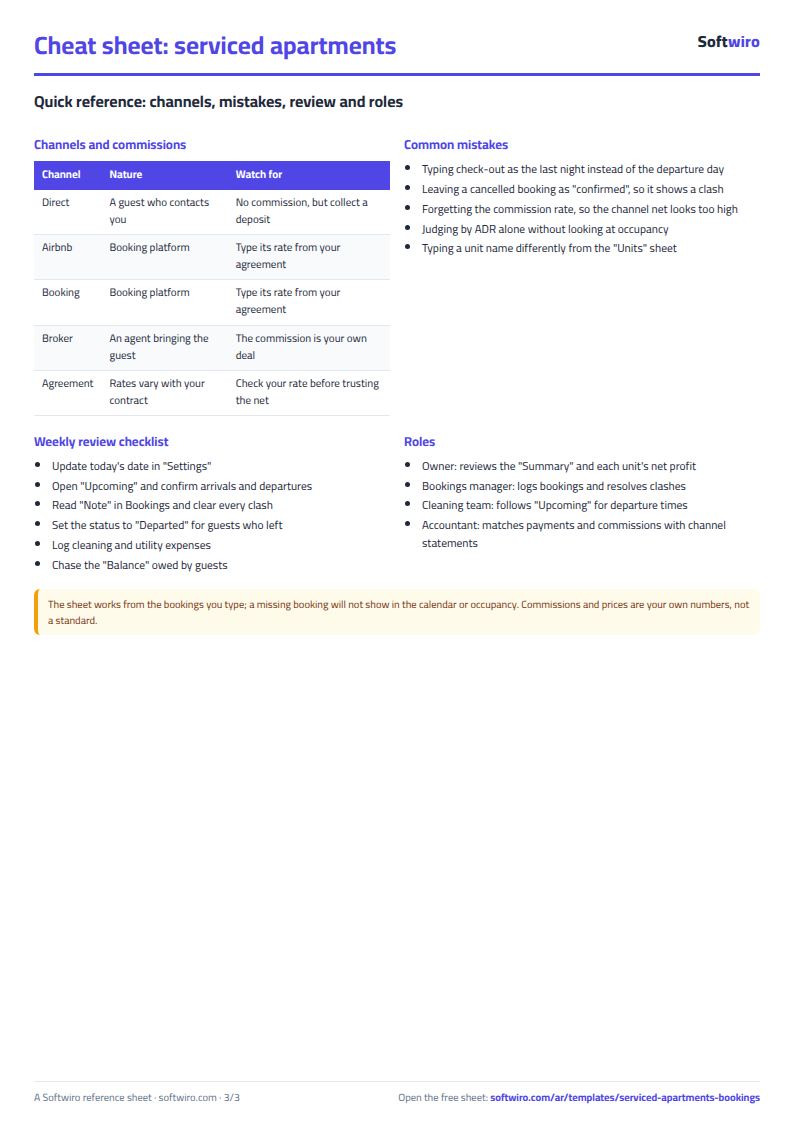
Terms, abbreviations, tables and diagrams over several pages, in Arabic and English. Download it as a PDF or images, including a phone-size version.
Still running this on Excel?
This sheet suits a start and a limited amount of data. If your way of working grows, or you need more than one person working on it at the same time, Softwiro can build you a program that fits the way you work.
| In this sheet | In Custom Software from Softwiro |
|---|---|
| One file that one person edits at a time, and copies reach you on WhatsApp. | A program with a login for each user and permissions you define, and everyone sees the same data. |
| You type everything and check the numbers by hand. | We design the screens around your work steps, so each person records only what concerns them. |
| Columns and formulas are fixed as the sheet was designed. | We build what you need: reports, alerts and screens your way. |
| Backups and security are your own responsibility. | The program runs on a secured server with regular backups. |
Frequently asked questions
How do I calculate the occupancy rate of serviced apartments?
Occupancy rate = occupied nights / available nights, and available nights = number of units x days in the month. The sheet calculates it from the check-in and check-out dates you enter, and also calculates occupancy for each apartment separately.
What is the difference between ADR and RevPAR?
ADR (average daily rate) is the average price of the nights actually sold = stay revenue / occupied nights. RevPAR (revenue per available night) = stay revenue / available nights, so it is also affected by occupancy. ADR can be high while RevPAR is low if the apartments stay empty a lot.
How do I know an apartment has been double-booked?
The "ملاحظة" (Note) column in the bookings writes "تعارض" (overlap) in red for any two non-cancelled bookings on the same unit whose nights overlap, and a warning mark appears in that day's cell in the calendar. If a guest checks in on the previous guest's check-out day, that is not an overlap.
Does the sheet calculate Airbnb and Booking commission?
Enter the channel's commission rate as agreed with it in the "عمولة القناة %" (Channel commission %) column for each booking, and the sheet calculates the commission amount and the net after commission for each channel. The rate is one you enter, not a fixed number in the sheet.
Is the template free?
Yes, with no sign-up and no email address. Use it, edit it and share it as you like.
Does it work in Google Sheets and on mobile?
The sheet uses formulas supported by Excel 2016 and later, Google Sheets and LibreOffice, so you can upload it to Google Drive and open it with Google Sheets on a computer or a phone.
What is the difference between the white and the gray cells?
You type in the white cells; the gray cells are calculated automatically. Don't type in a gray cell, or you will erase its formula.
Can I use the sheet from an AI assistant?
Yes. Add our MCP server (URL https://softwiro.com/api/mcp, no key needed) to your assistant and ask it to do the calculation in this template. The numbers come from the sheet's own formulas, and we do not store your data. The steps and a ready-made prompt are in this article: https://softwiro.com/blog/mcp-excel-templates-ai-agent-guide.html
More free templates for: Real estate
More free templates
- Real estate leads and units tracker
- Rental portfolio tracker: properties, units, tenants and contracts
- Rent collection tracker for properties
- Restaurant and cafe table reservations sheet
- Photo studio bookings sheet
- General appointments scheduler sheet
- Grocery store management sheet
- Stationery shop and photocopy management sheet
- Electronics shop sheet: serials, warranty and repairs
- Electronics factory sheet: BOM, production and quality
- Wholesale clothing trade sheet: traders, stock and collection