Try the sheet here, on the example
The sheet is open below with sample numbers. Change any white cell and watch the results update, or press the blank-copy button to type your own data from scratch. Nothing you type leaves your browser.
Example from the sheet
| رقم | التاريخ | الباقة | المصور | المكان | العميل | الحالة | الإجمالي | المتبقي | موعد التسليم | تنبيه التسليم | تعارض مصور | تعارض مكان |
|---|---|---|---|---|---|---|---|---|---|---|---|---|
| 1 | 46297 | بورتريه شخصي | كريم سعد | ستوديو 1 | هبة محمود | تم التسليم | 1,500.00 | 0.00 | 46302 | |||
| 2 | 46298 | جلسة مولود | مي عادل | ستوديو 2 | دينا وائل | تم التسليم | 4,700.00 | 0.00 | 46308 | سُلّم متأخرًا | ||
| 3 | 46300 | جلسة خطوبة | نورا سمير | حديقة الأورمان | سلمى ومحمد | تم التسليم | 7,300.00 | 0.00 | 46310 | |||
| 4 | 46302 | جلسة عائلية | كريم سعد | ستوديو 1 | أسرة الشريف | تم التسليم | 2,950.00 | 0.00 | 46309 | |||
| 5 | 46304 | تصوير منتجات | أحمد فتحي | ستوديو 2 | متجر زهرة | تم التسليم | 4,000.00 | 0.00 | 46308 | |||
| 6 | 46305 | جلسة مولود | مي عادل | ستوديو 2 | ياسمين طارق | التعديل | 4,700.00 | 3,700.00 | 46315 | متأخر | ||
| 7 | 46307 | بورتريه شخصي | نورا سمير | كورنيش النيل | مروة حسن | اختيار الصور | 1,500.00 | 1,000.00 | 46312 | متأخر | ||
| 8 | 46309 | تغطية مناسبة صغيرة | أحمد فتحي | ستوديو 1 | شركة النور | تم التسليم | 8,000.00 | 0.00 | 46323 | |||
| 9 | 46310 | جلسة عائلية | مي عادل | حديقة الأورمان | أسرة منصور | ملغي | 0.00 | 0.00 | ||||
| 10 | 46312 | بورتريه شخصي | كريم سعد | ستوديو 1 | رنا خالد | تم التسليم | 1,600.00 | 0.00 | 46317 | تعارض |
Example from the “الحجوزات” tab (Arabic), with the numbers and formulas that are in the file.
What is inside
- الإعدادات: Today's date, any date inside the month you want summarized, and the add-ons catalog (prints, albums, frames) with a price for each item. Holds up to 20 items.
- الباقات: Each package with its duration in minutes, price, number of edited photos, prints included and delivery days, plus the number of sessions this month and their value. Holds up to 40 packages.
- المصورون: Each photographer's name and specialty, with this month's sessions, their value, shooting hours and the number of deliveries that are late right now. Holds up to 40 photographers.
- الأماكن: Studios and outdoor locations with the type of each (indoor or outdoor), plus this month's sessions and hours. Holds up to 30 locations.
- الحجوزات: The bookings log: date, start time, package, photographer, location, client, mobile number, occasion, deposit, amount paid, status and actual delivery date. The sheet then shows the end time, package price, add-ons, total, balance due, delivery due date, delivery alert, photographer conflict and location conflict. Holds up to 1000 bookings.
- الإضافات: What you sold to the client: prints, albums, frames and extra photos, entered by booking number and quantity. The price comes from the catalog, the total and client name appear, and the amount is added to that booking's total. Holds up to 500 lines.
- الملخص: The selected month's sessions, their value, amount collected, balance due and average session value, conflict and late alerts, the number of bookings at each stage, and tables for photographers, packages and add-ons sold, with charts for revenue per photographer, workflow stages and each package's share.
The file opens on a start tab (“ابدأ هنا”, Start here) that explains how to use it.
What makes it different
Booking, delivery and collection in one file. You see in red when a photographer or studio is booked twice, you do not forget photos you promised a client, and you do not lose track of what a client still owes.
How to use it
- In "الإعدادات" (Settings) enter today's date (or =TODAY() so it updates itself) and any date inside the month you want summarized, then the price of each add-on you sell (prints, albums, frames).
- In "الباقات" (Packages) enter each package: duration in minutes, price, number of edited photos, prints included and the number of delivery days after the session.
- In "المصورون" (Photographers) and "الأماكن" (Locations) enter the photographers' names, your studios and your outdoor locations.
- In "الحجوزات" (Bookings) log each booking with a sequential number: date, start time, package, photographer, location, client, deposit and amount paid. The end time, price, balance and delivery due date appear on their own.
- Update the status as the session progresses: booked, shot, photo selection, editing, delivered, and enter the actual delivery date. Choose "cancelled" or "no-show" when a client cancels or does not turn up.
- Record everything you sold in prints and albums in "الإضافات" (Add-ons) by booking number, so its value goes into the client's booking total.
- Open "الملخص" (Summary) to see the month's sessions, revenue, balances owed by clients, conflict and late alerts, workflow stages and revenue per photographer and package.
Before you start:
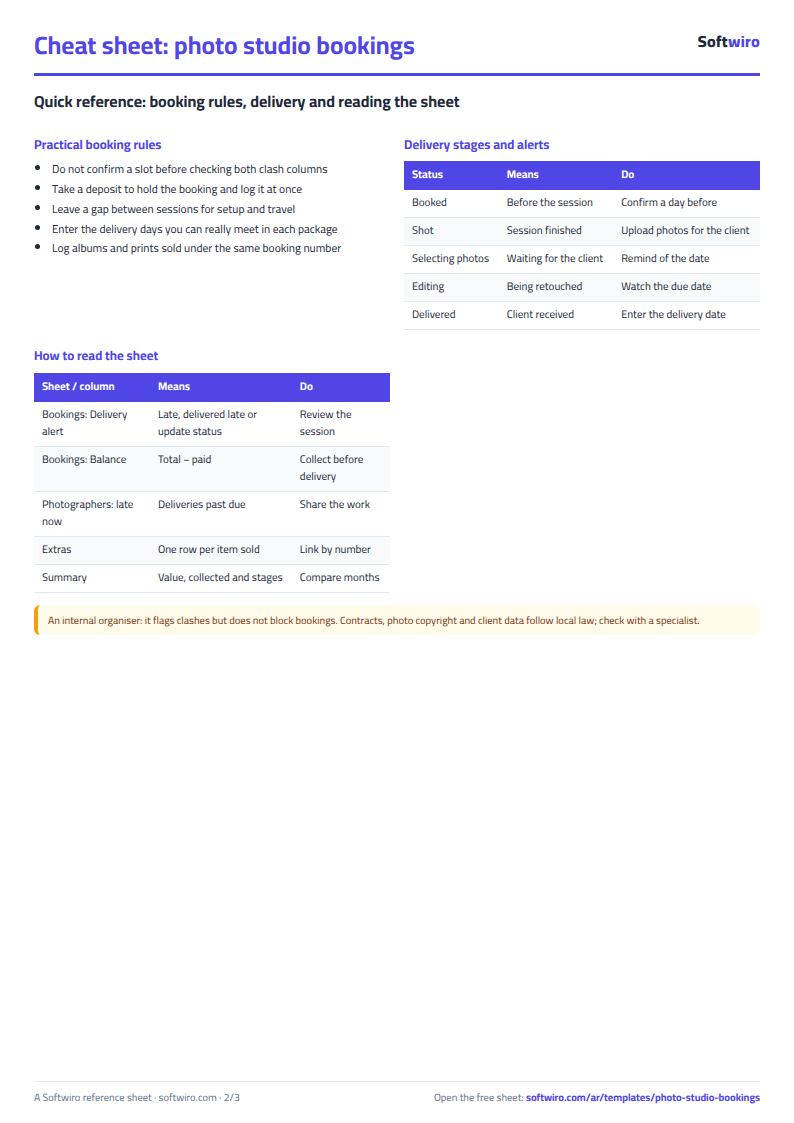
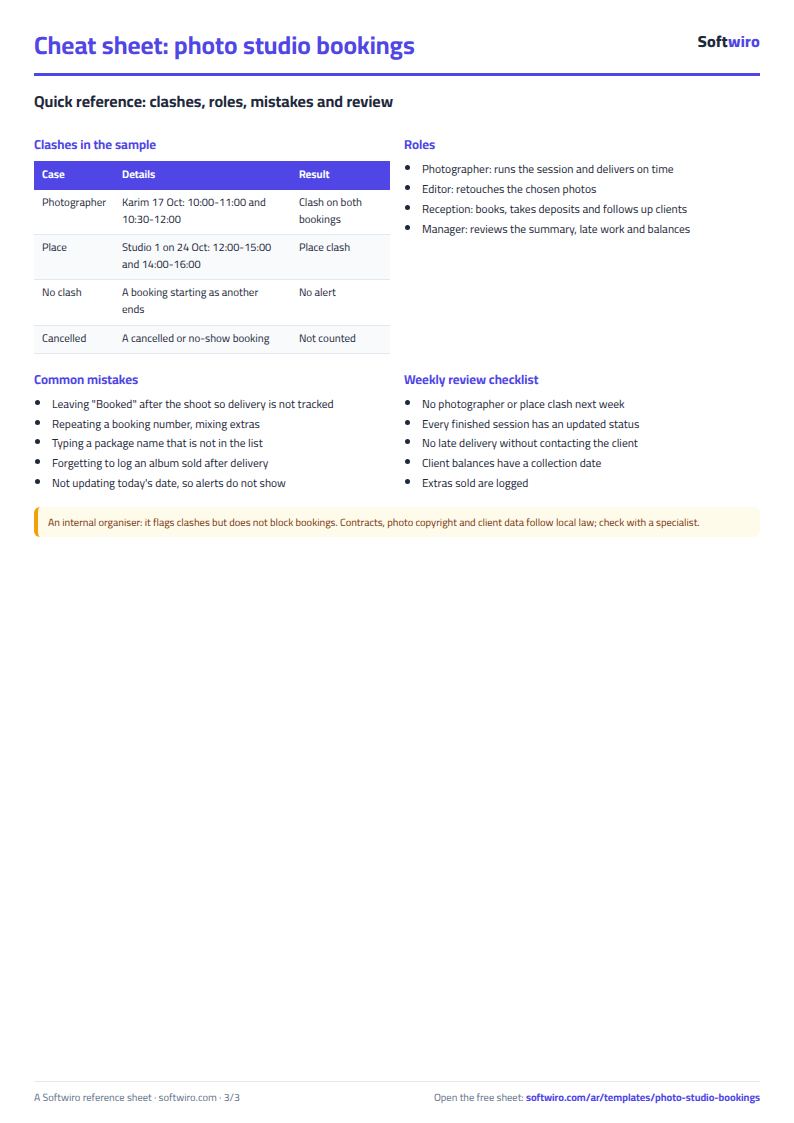
- End time = start time + package duration. Two bookings count as conflicting if their times overlap by even a minute for the same photographer or the same location. A booking that starts exactly when another ends is not a conflict.
- A booking with status "cancelled" or "no-show" is excluded from booking value, conflicts and balance due. A deposit paid by a client who did not show up stays in "collected" if you entered it in the amount paid column.
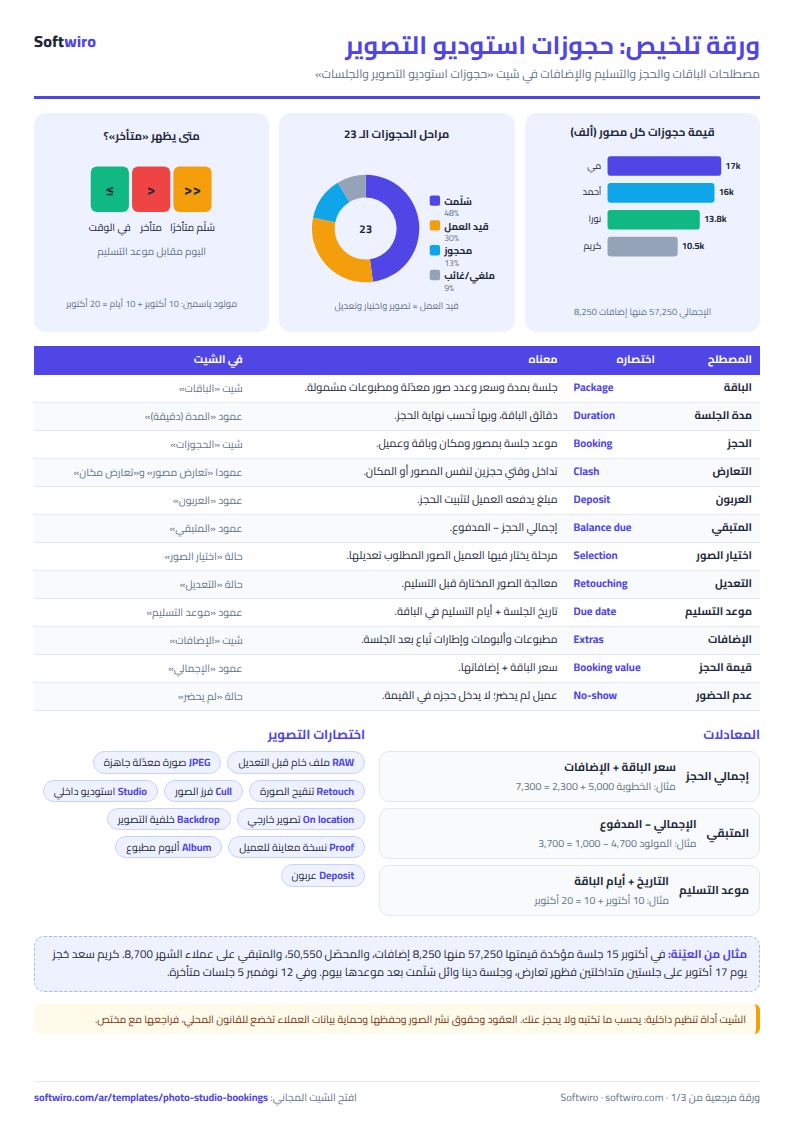
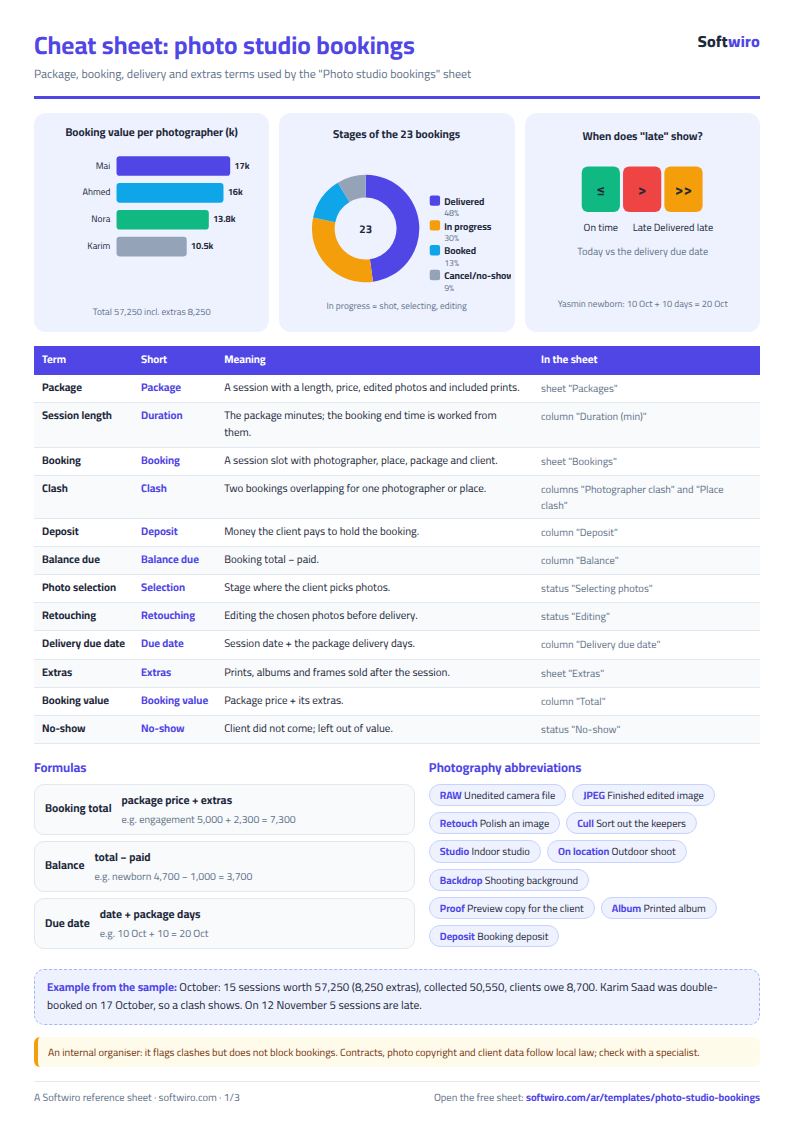
- Booking total = package price + add-ons. Balance due = total - amount paid (amount paid includes the deposit).
- Delivery due date = session date + the package's delivery days. "متأخر" (late) appears for a shot booking that has not been delivered past its due date, "سُلّم متأخرًا" (delivered late) if delivery was logged after the due date, and "حدّث الحالة" (update status) for a booking still marked "booked" whose day has passed.
- Enter times in the format 14:30, and make the booking number a unique number, because the "الإضافات" (Add-ons) sheet links to it.
- The sheet holds 1000 bookings, 40 packages, 40 photographers, 30 locations, 500 add-on lines and 20 items in the add-ons catalog.
Free cheat sheet for this field
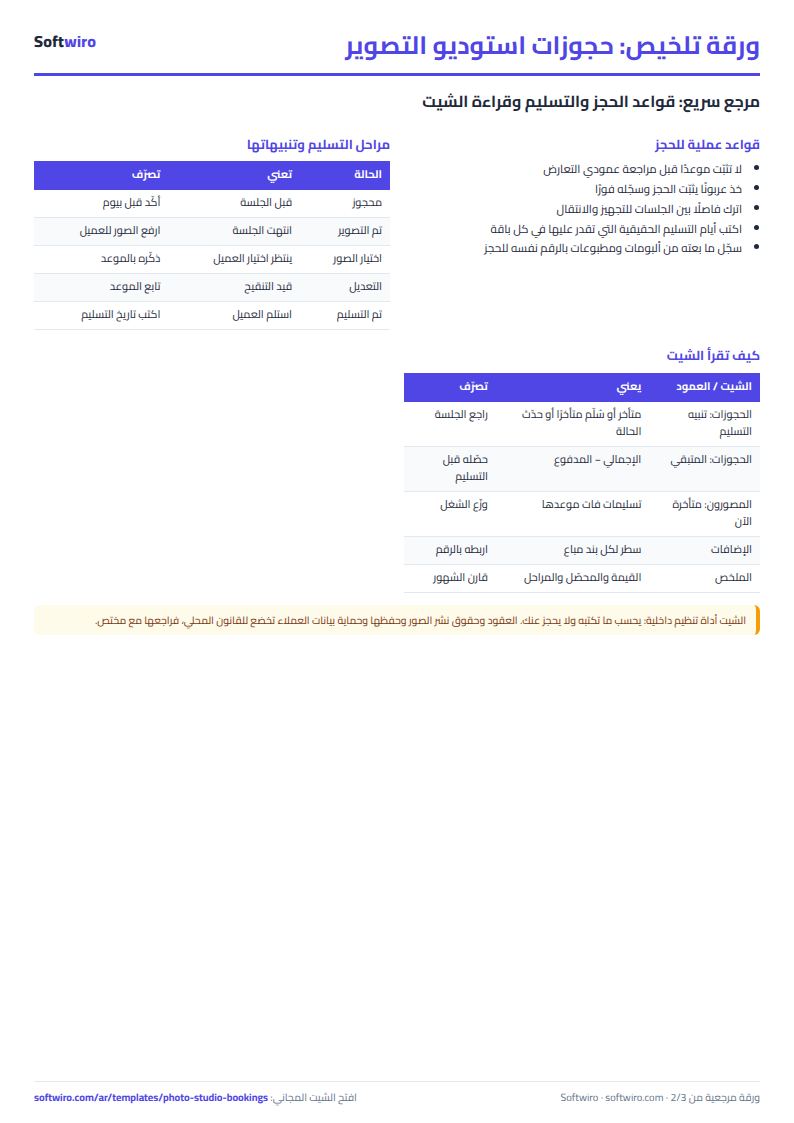
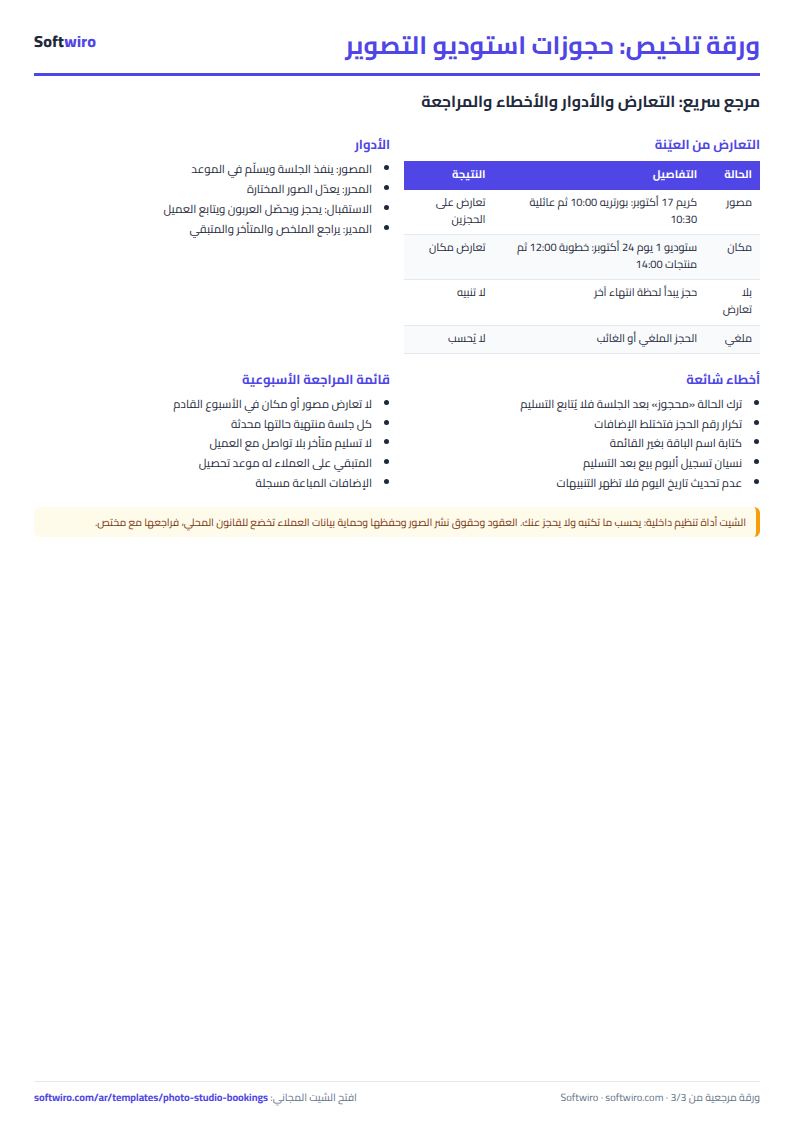
Terms, abbreviations, tables and diagrams over several pages, in Arabic and English. Download it as a PDF or images, including a phone-size version.
Still running this on Excel?
This sheet suits a start and a limited amount of data. If your way of working grows, or you need more than one person working on it at the same time, Softwiro can build you a program that fits the way you work.
| In this sheet | In Custom Software from Softwiro |
|---|---|
| One file that one person edits at a time, and copies reach you on WhatsApp. | A program with a login for each user and permissions you define, and everyone sees the same data. |
| You type everything and check the numbers by hand. | We design the screens around your work steps, so each person records only what concerns them. |
| Columns and formulas are fixed as the sheet was designed. | We build what you need: reports, alerts and screens your way. |
| Backups and security are your own responsibility. | The program runs on a secured server with regular backups. |
Frequently asked questions
How do I stop a photographer or studio being booked twice at the same time?
Enter the booking with its date, start time, package, photographer and location. The sheet calculates the end time from the package duration. If the time overlaps another booking for the same photographer, a red "تعارض" (conflict) appears in the photographer conflict column, and the same happens for the location. A booking that starts exactly when another ends is not counted as a conflict.
How do I find sessions whose photos are late?
Keep the session status in step with your work: shot, photo selection, editing, then delivered. The delivery due date is the session date plus the package's delivery days. If it has passed and the session is still in one of the first three stages, "متأخر" (late) appears, and the summary and the photographers table count it.
Where do I record the prints and albums I sell?
In the "الإضافات" (Add-ons) sheet: enter the booking number, choose the item from the catalog and enter the quantity. The price, total and client name appear, the amount is added to the booking total and balance due, and the summary lists it by item.
Does the sheet calculate photographer commission or team salaries?
No. It calculates each photographer's revenue, sessions and hours. Enter the agreed commission rate outside the sheet and multiply it by the photographer's revenue, or ask for a custom version with commissions.
Is the template free?
Yes, with no sign-up and no email address. Use it, edit it and share it as you like.
Does it work in Google Sheets and on mobile?
The sheet uses formulas supported by Excel 2016 and later, Google Sheets and LibreOffice, so you can upload it to Google Drive and open it with Google Sheets on a computer or a phone.
What is the difference between the white and the gray cells?
You type in the white cells; the gray cells are calculated automatically. Don't type in a gray cell, or you will erase its formula.
Can I use the sheet from an AI assistant?
Yes. Add our MCP server (URL https://softwiro.com/api/mcp, no key needed) to your assistant and ask it to do the calculation in this template. The numbers come from the sheet's own formulas, and we do not store your data. The steps and a ready-made prompt are in this article: https://softwiro.com/blog/mcp-excel-templates-ai-agent-guide.html
More free templates for: Services and business
More free templates
- Lead and deal pipeline tracker
- Freelancer projects, hours and invoices tracker
- Laundry orders tracker (Excel)
- General appointments scheduler sheet
- Car wash management sheet (packages, cards, workers, materials)
- Grocery store management sheet
- Stationery shop and photocopy management sheet
- Electronics shop sheet: serials, warranty and repairs
- Electronics factory sheet: BOM, production and quality
- Wholesale clothing trade sheet: traders, stock and collection
- Food wholesale and distribution sheet in Excel: routes, expiry and collection
- Periodic table in Excel (Arabic names): lookup, molar mass calculator and quiz
- Science formulas cheat sheet: physics, chemistry and biology with examples