Try the sheet here, on the example
The sheet is open below with sample numbers. Change any white cell and watch the results update, or press the blank-copy button to type your own data from scratch. Nothing you type leaves your browser.
Example from the sheet
| الكود | اسم الأصل | تاريخ الشراء | التكلفة | الطريقة | الإهلاك المتراكم | صافي القيمة الدفترية | إهلاك السنة | الحالة |
|---|---|---|---|---|---|---|---|---|
| FA-001 | مكتب مدير خشب | 44630 | 18,000.00 | قسط ثابت | 8,075.00 | 9,925.00 | 1,700.00 | قيد الخدمة |
| FA-002 | لاب توب Dell للمحاسبة | 45540 | 32,000.00 | قسط ثابت | 13,500.00 | 18,500.00 | 6,000.00 | قيد الخدمة |
| FA-003 | سيارة نقل 1.5 طن | 44941 | 450,000.00 | قسط متناقص | 282,708.58 | 167,291.42 | 47,081.32 | قيد الخدمة |
| FA-004 | ماكينة تعبئة وتغليف | 44367 | 280,000.00 | قسط ثابت | 143,000.00 | 137,000.00 | 26,000.00 | قيد الخدمة |
| FA-005 | مولد كهرباء 100 ك.ف.أ | 43497 | 120,000.00 | قسط ثابت | 110,000.00 | 10,000.00 | 0.00 | مهلك بالكامل |
| FA-006 | طابعة ليزر ملونة | 43933 | 8,500.00 | قسط ثابت | 8,000.00 | 500.00 | 0.00 | مهلك بالكامل |
| FA-007 | مكيف سبليت 3 حصان | 45795 | 22,000.00 | قسط ثابت | 3,958.33 | 18,041.67 | 2,500.00 | قيد الخدمة |
| FA-008 | كراسي اجتماعات (12 كرسي) | 45200 | 15,600.00 | قسط متناقص | 7,363.29 | 8,236.71 | 1,809.92 | قيد الخدمة |
| FA-009 | رف تخزين معدني | 45336 | 14,000.00 | قسط ثابت | 3,966.67 | 10,033.33 | 1,400.00 | قيد الخدمة |
| FA-010 | سيرفر ملفات | 45872 | 95,000.00 | قسط متناقص | 39,772.99 | 55,227.01 | 26,801.51 | قيد الخدمة |
| FA-011 | كاميرات مراقبة (8 كاميرات) | 46300 | 12,000.00 | قسط ثابت | 400.00 | 11,600.00 | 600.00 | قيد الخدمة |
| FA-012 | رافعة شوكية | 44885 | 190,000.00 | قسط ثابت | 67,375.00 | 122,625.00 | 16,500.00 | قيد الخدمة |
| FA-013 | لاب توب HP (بيع) | 44256 | 20,000.00 | قسط ثابت | 19,000.00 | 0.00 | 0.00 | مستبعد |
Example from the “الأصول” tab (Arabic), with the numbers and formulas that are in the file.
What is inside
- "الإعدادات" (Settings): Today's date, the year to depreciate, the date to which you want accumulated depreciation, alert days, the declining-balance factor, and the category and location lists (8 each).
- "الأصول" (Assets): The asset register: code, name, category, location, custodian, purchase date, cost, salvage value, life and method, disposal date and sale price, next maintenance and insurance expiry. The sheet calculates the depreciation rate, accumulated depreciation, net book value, the year's depreciation, status and disposal gain or loss. It holds 200 assets.
- "جدول الإهلاك" (Depreciation Schedule): Each asset's depreciation over ten years starting from the selected year, with the total for each year at the top of the table.
- "الاستبعاد" (Disposals): Assets disposed of up to the selected date: cost, accumulated depreciation at disposal, book value, sale price and the gain or loss on each asset, with totals.
- "التنبيهات" (Alerts): Assets with overdue or upcoming maintenance and expired or soon-to-expire insurance, in one list.
- "مهلكة بالكامل" (Fully Depreciated): Assets whose accumulated depreciation has reached their cost less salvage value and which are still in service, with their cost.
- "الملخص" (Summary): Cost, accumulated depreciation, net book value and the year's depreciation, the year's disposals, alerts, and tables by category, location and the ten years, with four charts.
The file opens on a start tab (“ابدأ هنا”, Start here) that explains how to use it.
What makes it different
Depreciation is calculated monthly from the month of purchase instead of being rounded to a full year. Straight-line and declining-balance assets sit in the same register, the year's depreciation is kept separate from accumulated depreciation to a date you choose, and the gain or loss on a sale comes from the book value at disposal. The figures are easy to review with your accountant, and the rates and lives stay in your hands to follow local law and your company's policy.
How to use it
- In the "الإعدادات" (Settings) sheet, enter today's date, the year to depreciate, the date to which you want accumulated depreciation, the number of alert days and the declining-balance factor. Then enter your categories and locations in the two lists.
- In the "الأصول" (Assets) sheet, enter each asset on a line: code, name, category, location, custodian, purchase date, cost, salvage value, useful life in years and depreciation method.
- For a sold or scrapped asset, enter the disposal date and the sale price (leave it empty if the asset was scrapped with no sale). For alerts, enter the next maintenance date and the insurance expiry date.
- The other columns are calculated for you: depreciation rate, accumulated depreciation, net book value, the year's depreciation, asset status and disposal gain or loss.
- The "جدول الإهلاك" (Depreciation Schedule) sheet shows each asset's depreciation over 10 years starting from the selected year, with column totals at the top.
- The "الاستبعاد" (Disposals), "التنبيهات" (Alerts) and "مهلكة بالكامل" (Fully Depreciated) sheets gather the relevant assets in lists, and "الملخص" (Summary) shows totals by category and location, with charts.
Before you start:
- Depreciation is monthly and starts with the full month of purchase (a purchase on any day of the month counts as a full month of depreciation). If your company's policy is different, follow your policy and adjust the purchase date to suit.
- Straight-line: (cost - salvage value) / (life x 12) per month, until the life is complete. Declining balance: an annual rate = factor / life, applied monthly to the remaining book value, and the asset never goes below its salvage value.
- Depreciation rates, asset lives and methods follow local law, your company's policy and your accountant. The figures in the sheet are illustrative examples, not official rates.
- If you leave the "الطريقة" (Method) cell empty, the asset is depreciated straight-line. Enter "قسط متناقص" (Declining balance), from the list, for the other method.
- A disposed asset is depreciated up to the disposal month and then stops. Disposal gain or loss = sale price - book value at disposal.
- Totals for cost, accumulated depreciation and net book value exclude assets disposed of up to the selected date and assets not yet purchased. The year's depreciation includes every asset that was depreciated in it.
- The sheet holds 200 assets, 8 categories and 8 locations, and each list shows 40 lines.
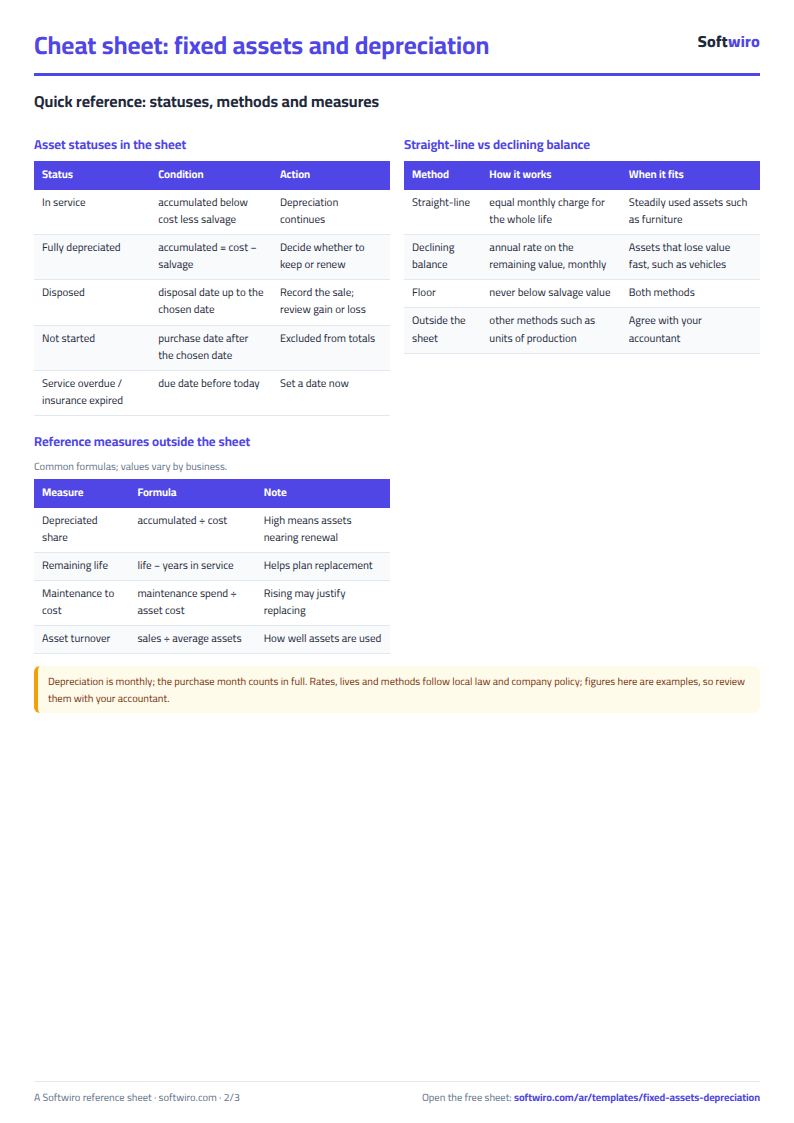
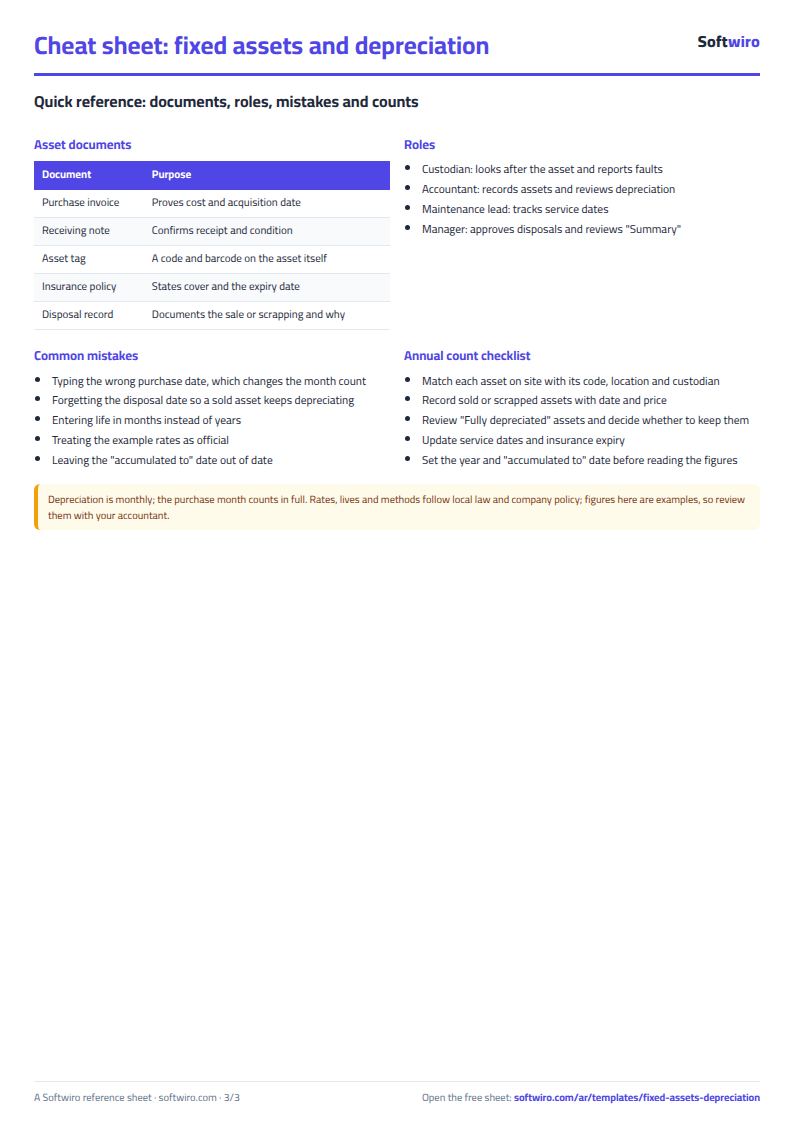
Free cheat sheet for this field
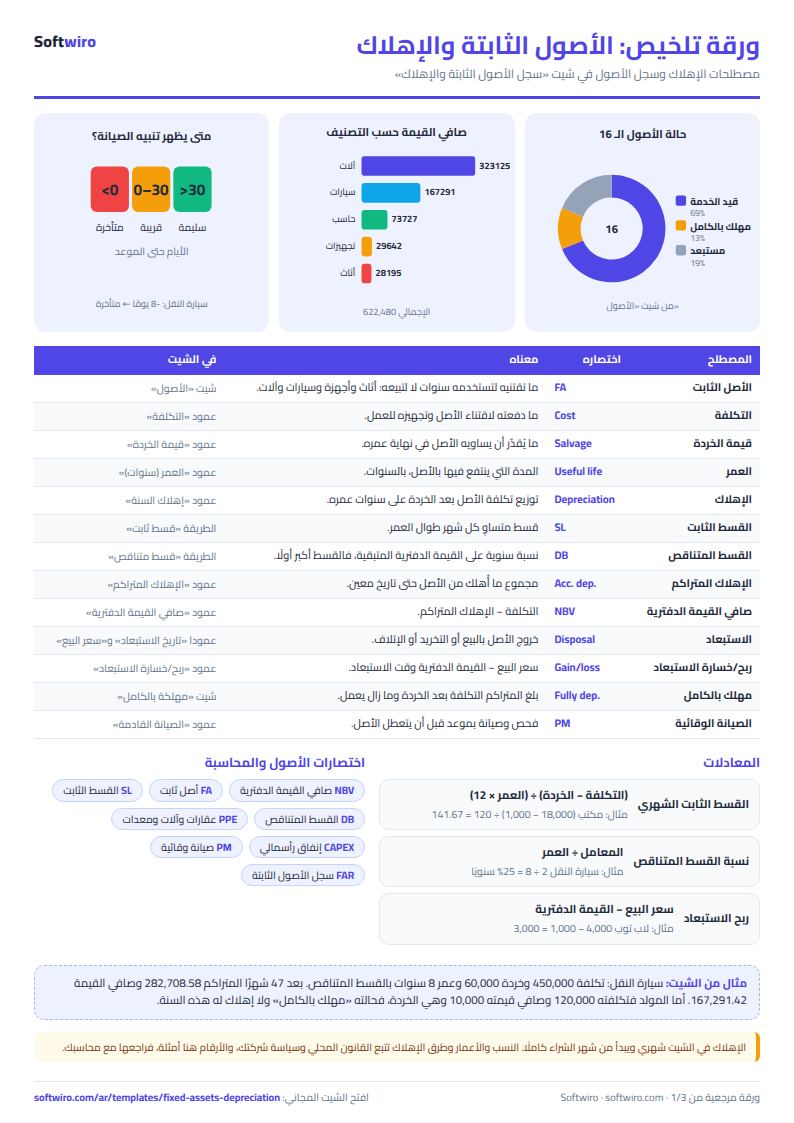
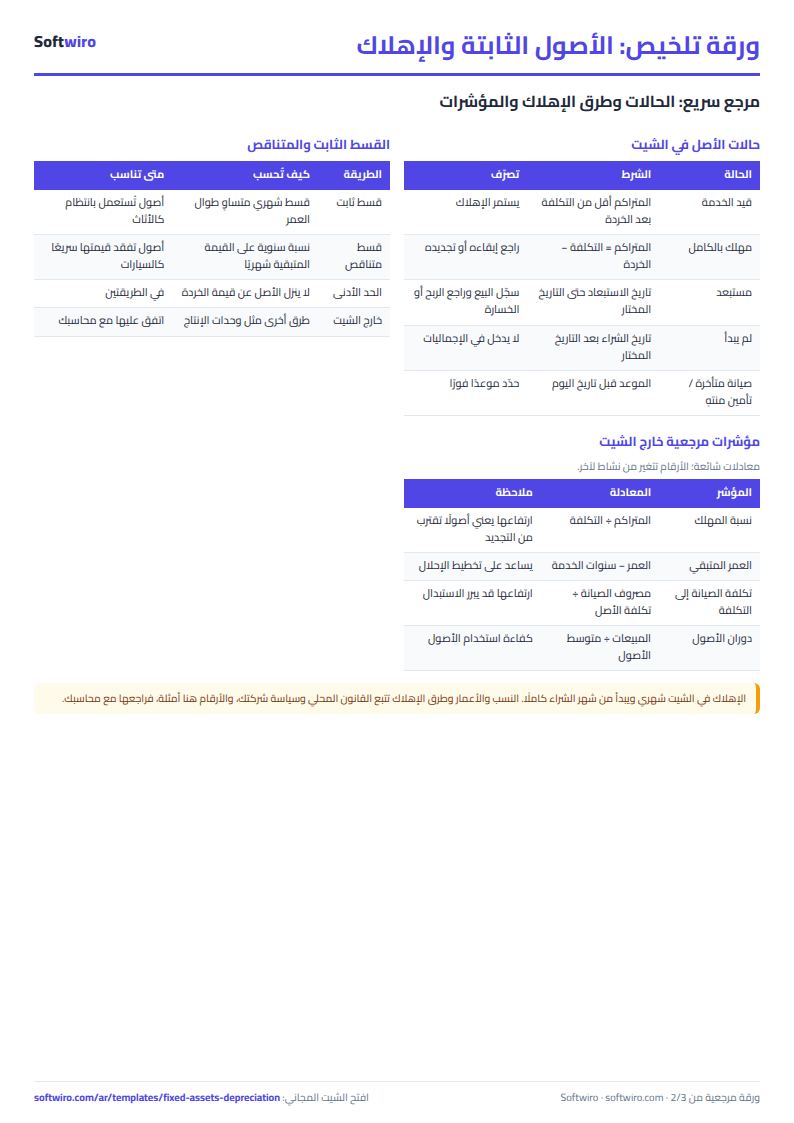
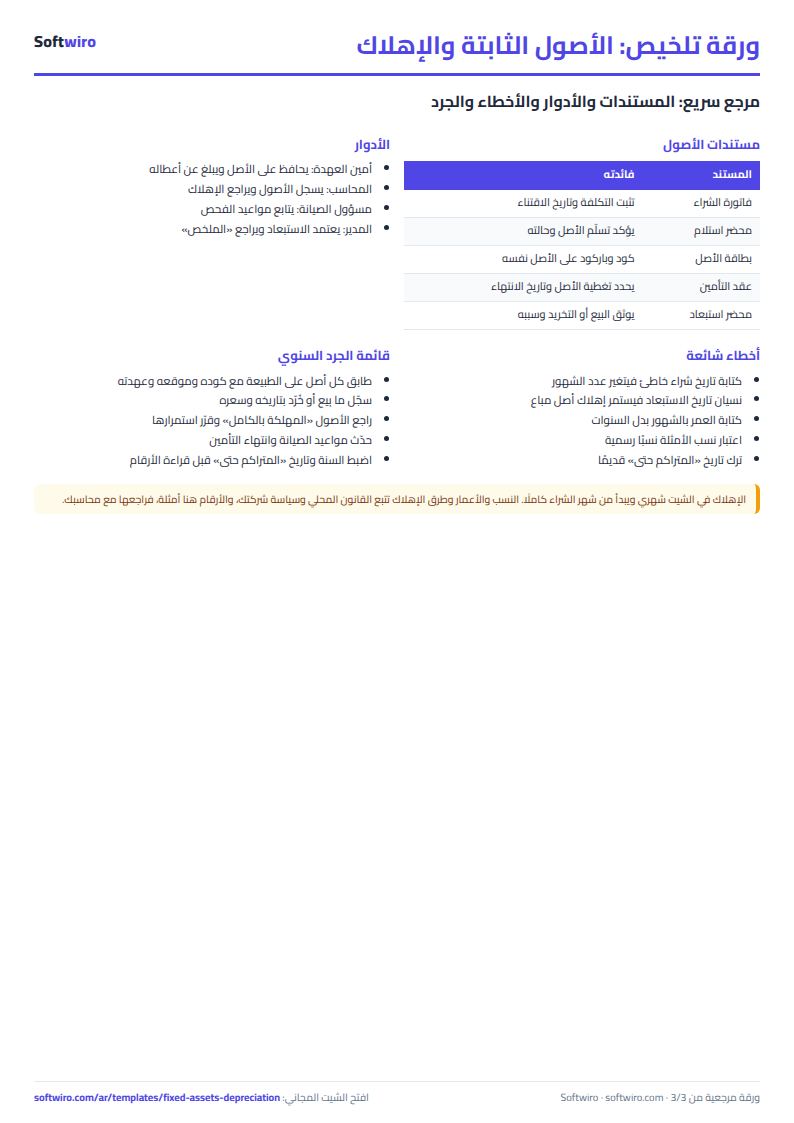
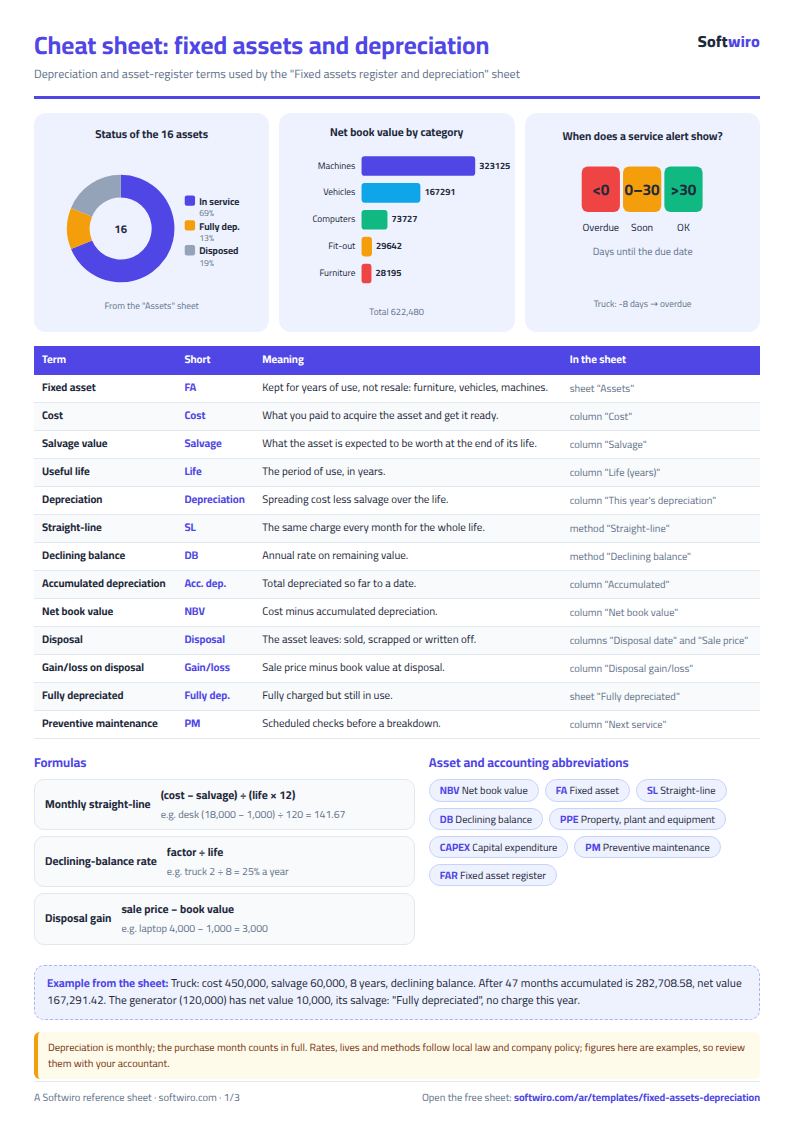
Terms, abbreviations, tables and diagrams over several pages, in Arabic and English. Download it as a PDF or images, including a phone-size version.
Still running this on Excel?
This sheet depends on someone entering journal entries accurately and reviewing them. In ProfAcc, double-entry postings are made automatically, periods are closed, and the financial statements are produced directly from the entries.
| In this sheet | In ProfAcc — Manufacturing Accounts |
|---|---|
| Changing any cell can alter the numbers of a period that has ended. | Correct double-entry from day one, with automatic posting and period closing that locks what has been closed. |
| Tax is calculated in one place and invoices live in another. | Every sales invoice calculates VAT within the journal entry that records it. |
| You only learn the stock balance after the month-end count. | Stock balances are live and move with every posting. |
| One file per company you serve, and the files can get mixed up. | Each company is created from a Google account in about a minute with nothing to install, its data is kept separate, and it is reached through its own link. |
Frequently asked questions
How do I calculate straight-line depreciation in Excel?
Enter the cost, salvage value, useful life in years and purchase date in the "الأصول" (Assets) sheet. The sheet calculates the monthly charge = (cost - salvage value) / (life x 12) and multiplies it by the number of months since purchase, so total depreciation never exceeds cost less salvage value.
What is the difference between straight-line and declining balance in the sheet?
With straight-line, the charge is the same every month. With declining balance, an annual rate (factor / life) is applied monthly to the remaining book value, so the charge is larger in the early years and smaller later, and the asset never goes below its salvage value.
Are the rates in the examples official rates?
No. The lives and rates are illustrative examples. Accepted rates and depreciation methods follow local law and your company's policy, so agree them with your accountant before relying on the figures.
How do I record the sale or scrapping of an asset?
Enter the disposal date on the asset's line, and the sale price if you sold it (leave it empty if you scrapped it). Depreciation stops at the disposal month, the sheet calculates the book value at that point and the gain or loss on the sale, and the asset appears in the "الاستبعاد" (Disposals) sheet.
Is the template free?
Yes, with no sign-up and no email address. Use it, edit it and share it as you like.
Does it work in Google Sheets and on mobile?
The sheet uses formulas supported by Excel 2016 and later, Google Sheets and LibreOffice, so you can upload it to Google Drive and open it with Google Sheets on a computer or a phone.
What is the difference between the white and the gray cells?
You type in the white cells; the gray cells are calculated automatically. Don't type in a gray cell, or you will erase its formula.
Can I use the sheet from an AI assistant?
Yes. Add our MCP server (URL https://softwiro.com/api/mcp, no key needed) to your assistant and ask it to do the calculation in this template. The numbers come from the sheet's own formulas, and we do not store your data. The steps and a ready-made prompt are in this article: https://softwiro.com/blog/mcp-excel-templates-ai-agent-guide.html
More free templates for: Accounting
More free templates
- Journal entries, trial balance and financial statements sheet
- Business expenses and monthly budget sheet
- Cash flow forecast sheet
- Annual budget by department: plan vs actual
- Accounting rules and equations summary sheet: double entry, statements and financial ratios
- Barcode, batch and expiry inventory sheet
- Padel and 5-a-side court booking sheet (hourly)
- Wedding and event hall booking sheet
- Serviced apartments and short-stay bookings sheet
- Restaurant and cafe table reservations sheet
- Photo studio bookings sheet
- General appointments scheduler sheet
- Grocery store management sheet