Try the sheet here, on the example
The sheet is open below with sample numbers. Change any white cell and watch the results update, or press the blank-copy button to type your own data from scratch. Nothing you type leaves your browser.
Example from the sheet
| رقم الحجز | تاريخ المناسبة | القاعة | الفترة | العميل | الضيوف | الإجمالي | المدفوع | المتبقي | تنبيه |
|---|---|---|---|---|---|---|---|---|---|
| H-101 | 46297 | قاعة الماسة | مسائي | محمود عبد الله | 350 | 212,500.00 | 212,500.00 | 0.00 | |
| H-102 | 46304 | قاعة اللؤلؤة | مسائي | إسلام فتحي | 220 | 112,200.00 | 112,200.00 | 0.00 | |
| H-103 | 46305 | قاعة الماسة | صباحي | ياسر منصور | 150 | 71,250.00 | 71,250.00 | 0.00 | |
| H-104 | 46311 | قاعة الياسمين | مسائي | هاني زكريا | 100 | 40,500.00 | 40,500.00 | 0.00 | |
| H-105 | 46318 | قاعة الماسة | مسائي | أيمن شحاتة | 380 | 288,500.00 | 288,500.00 | 0.00 | |
| H-106 | 46325 | قاعة اللؤلؤة | مسائي | مصطفى جمال | 200 | 125,500.00 | 125,500.00 | 0.00 | |
| H-107 | 46332 | قاعة الياسمين | صباحي | سلمى إبراهيم | 60 | 21,000.00 | 21,000.00 | 0.00 | |
| H-108 | 46339 | قاعة الماسة | مسائي | وائل سعيد | 300 | 188,500.00 | 131,950.00 | 56,550.00 | |
| H-109 | 46346 | قاعة اللؤلؤة | مسائي | كريم عصام | 230 | 179,000.00 | 53,700.00 | 125,300.00 | حجز مزدوج |
| H-110 | 46346 | قاعة الماسة | مسائي | رامي فؤاد | 250 | 133,750.00 | 80,250.00 | 53,500.00 | |
| H-111 | 46353 | قاعة الماسة | صباحي | شركة النور للتدريب | 180 | 64,500.00 | 32,250.00 | 32,250.00 |
Example from the “الحجوزات” tab (Arabic), with the numbers and formulas that are in the file.
What is inside
- "الإعدادات" (Settings): Today's date, how many days ahead you want to see upcoming events, the summary year, and the hall and month shown in the calendar.
- "القاعات" (Halls): Each hall's name, capacity and rental for the morning and evening shifts, with its number of events for the year, revenue and occupancy rate beside it.
- "الباقات والإضافات" (Packages and Extras): A table of packages with a per-guest price and what each includes, and a table of extras (buffet, photography, DJ, stage decoration and so on) with the price of each and whether it is charged per guest or as a fixed amount.
- "الحجوزات" (Bookings): One line per booking: its number, event date, hall, shift, client, mobile number, guests, package, three extras, discount and status. The sheet shows the hall rental, package price, extras, total, deposit, amount paid, balance due and the double-booking warning. It holds 1,000 bookings.
- "الدفعات" (Payments): A log of every payment with receipt number, date, booking number, amount, type (deposit, instalment or final payment) and method, with the client's name and hall, and a warning if a receipt number is repeated or the booking does not exist. It holds 2,000 payments.
- "الأقساط" (Instalments): The agreed instalment dates and amounts for each booking. The sheet marks each one "مسدد" (Paid), "قادم" (Upcoming) or "متأخر" (Late) based on what the client has paid and today's date.
- "تقويم القاعة" (Hall Calendar): Pick a hall and a month and the month appears in weeks starting on Saturday, with the morning and evening shifts for each day: green "متاح" (Available), or the client's name and event type, or a red "حجز مزدوج" (Double booking).
- "القادمة" (Upcoming): Events within the number of days you set, sorted by date and shift, with the client, mobile number, total and balance due, plus the number and value of late instalments.
- "الإلغاءات" (Cancellations): Canceled bookings with what the client paid, what was refunded and what was kept, and their totals.
- "الملخص" (Summary): Booking value, amount collected and amount outstanding for a year you choose, a monthly table, breakdowns by package and by hall, and three charts.
The file opens on a start tab (“ابدأ هنا”, Start here) that explains how to use it.
What makes it different
A booking here is more than a date: it is tied to payment receipts, instalments and cancellations. So you know at any moment how much each client still owes, which instalment is late, and which day and shift is booked twice, before two clients find out on the night of the wedding.
How to use it
- In the "الإعدادات" (Settings) sheet, enter today's date, how many days ahead you want to see upcoming events, and the summary year, and choose the hall and month you want in the calendar.
- In the "القاعات" (Halls) sheet, enter each hall with its capacity and its rental for the morning and evening shifts.
- In the "الباقات والإضافات" (Packages and Extras) sheet, enter packages with a per-guest price, and extras with their price and whether they are charged per guest (like the buffet) or as a fixed amount (like photography).
- In the "الحجوزات" (Bookings) sheet, record each booking: its number, event date, hall, shift, client, number of guests, package and up to three extras. The rental, total, amount paid and balance due are calculated for you.
- Record every amount a client pays in the "الدفعات" (Payments) sheet with a receipt number and the booking number, and the deposit, amount paid and balance due update in the booking. If you agreed on instalments, enter their dates and amounts in "الأقساط" (Instalments) so the sheet can flag late ones.
- Check the warning column in Bookings (double booking, more guests than capacity and so on), then open "تقويم القاعة" (Hall Calendar), "القادمة" (Upcoming), "الإلغاءات" (Cancellations) and "الملخص" (Summary).
Before you start:
- Booking total = hall rental for the chosen shift + (package price x number of guests) + extras - discount. A "per guest" extra is multiplied by the number of guests, and a "fixed" extra is counted once.
- A double booking is two non-canceled bookings with the same hall, date and shift, and "حجز مزدوج" (Double booking) shows in red on both.
- The deposit is the sum of payments of type "عربون" (Deposit), the amount paid is the sum of all payments for the booking number, and the balance due = total - amount paid.
- A "ملغي" (Canceled) booking is not counted in the balance due or the total. Its revenue is the amount kept = amount paid - the refund you enter in the "المسترد" (Refunded) column.
- An instalment counts as paid if the booking's payments cover the sum of the instalments up to its date, and becomes "متأخر" (Late) if its date has passed before the today's date in Settings.
- The calendar starts each week on Saturday. Use the same booking number in Bookings, Payments and Instalments.
- The sheet holds 10 halls, 15 packages, 20 extras, 1,000 bookings, 2,000 payments and 1,000 instalments.
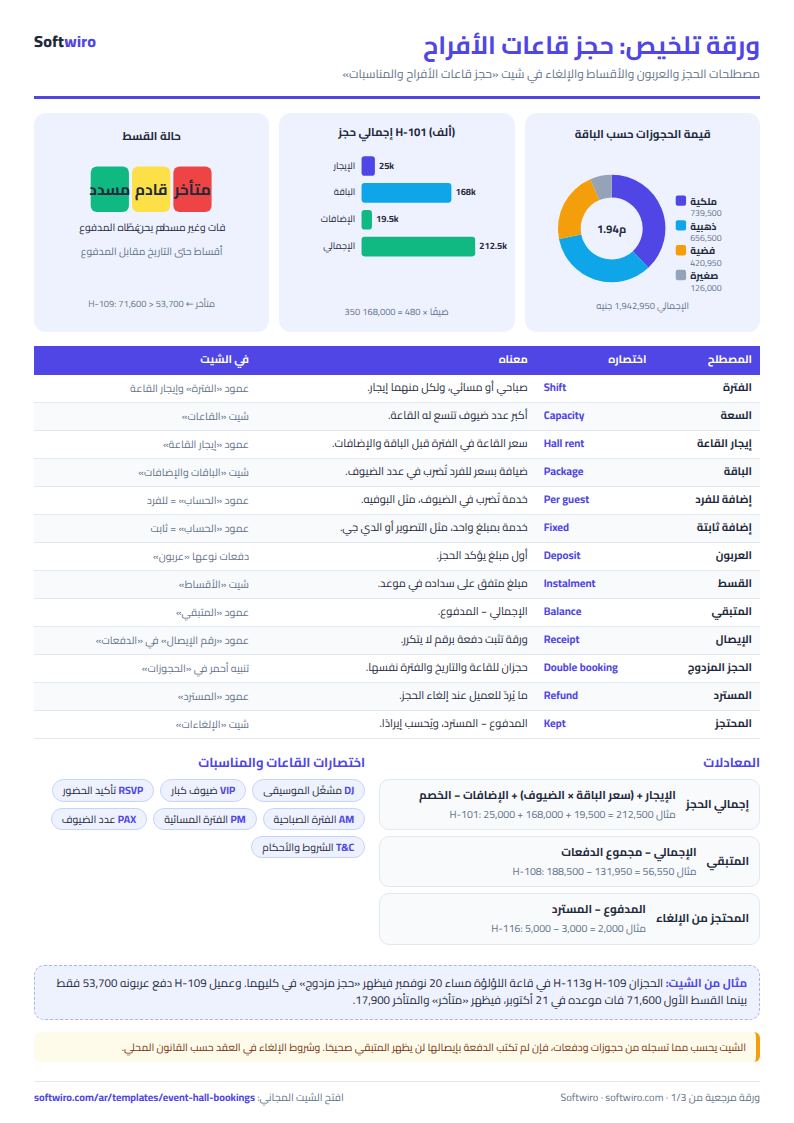
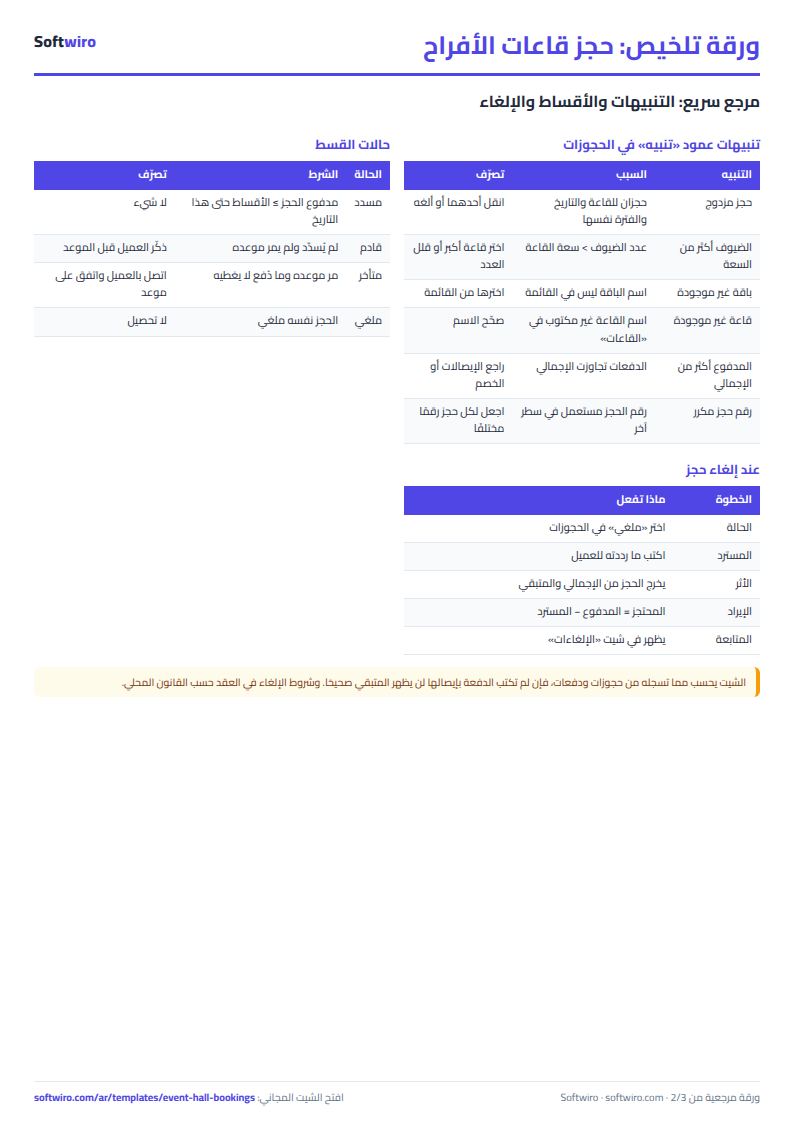
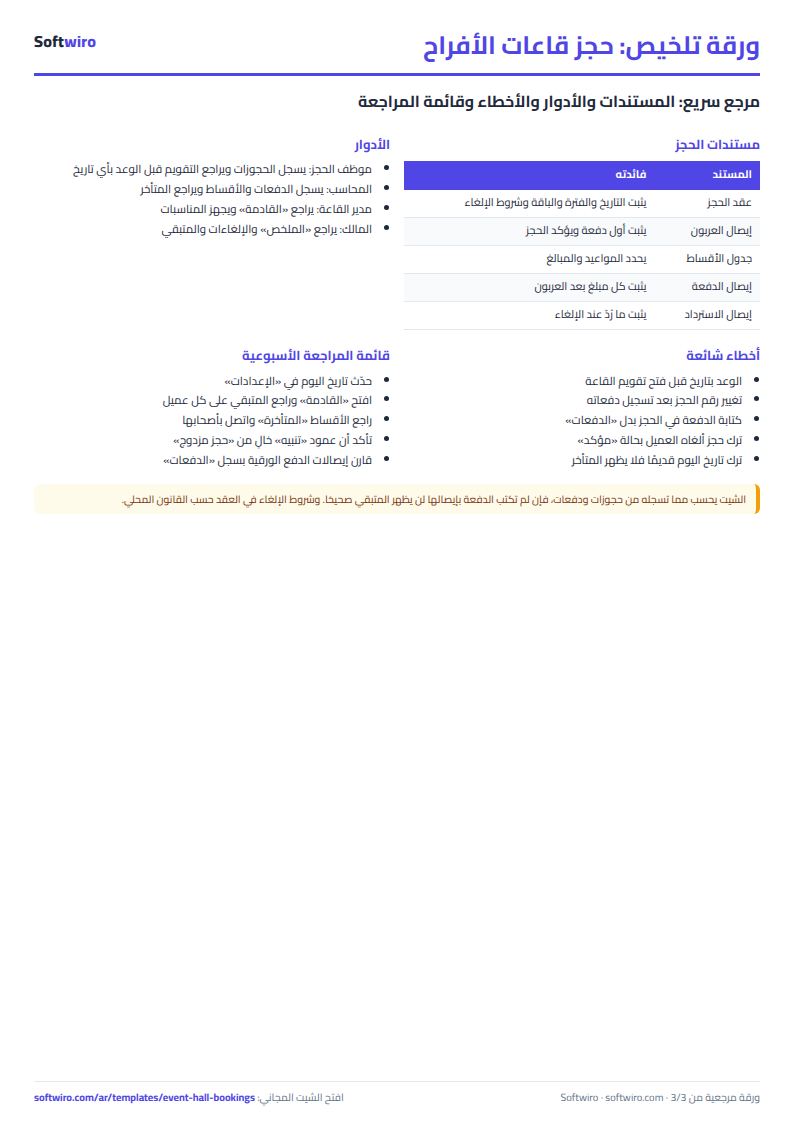
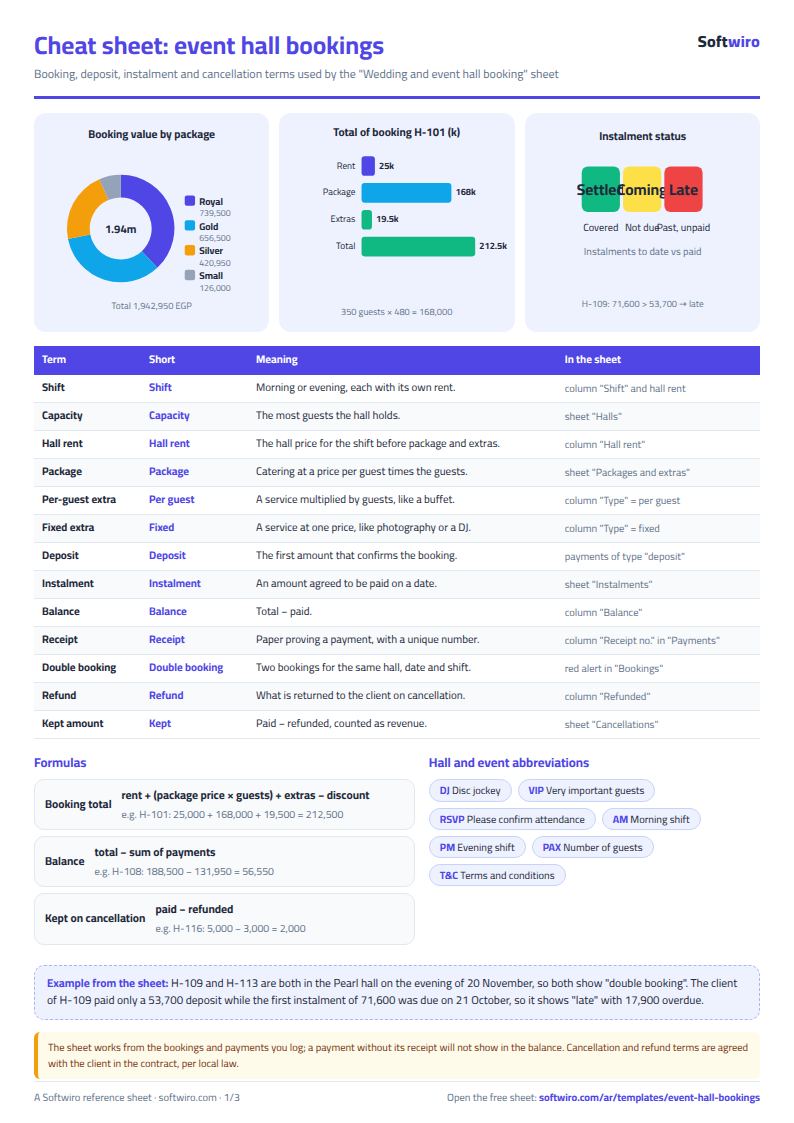
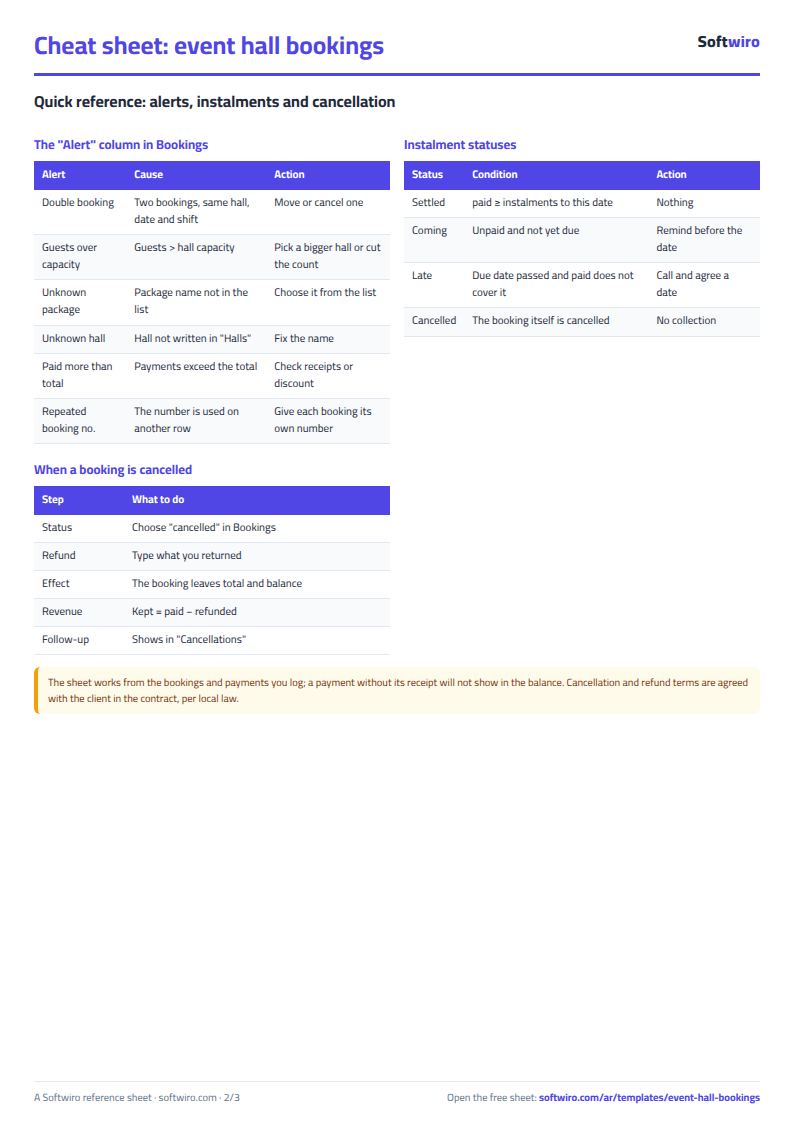
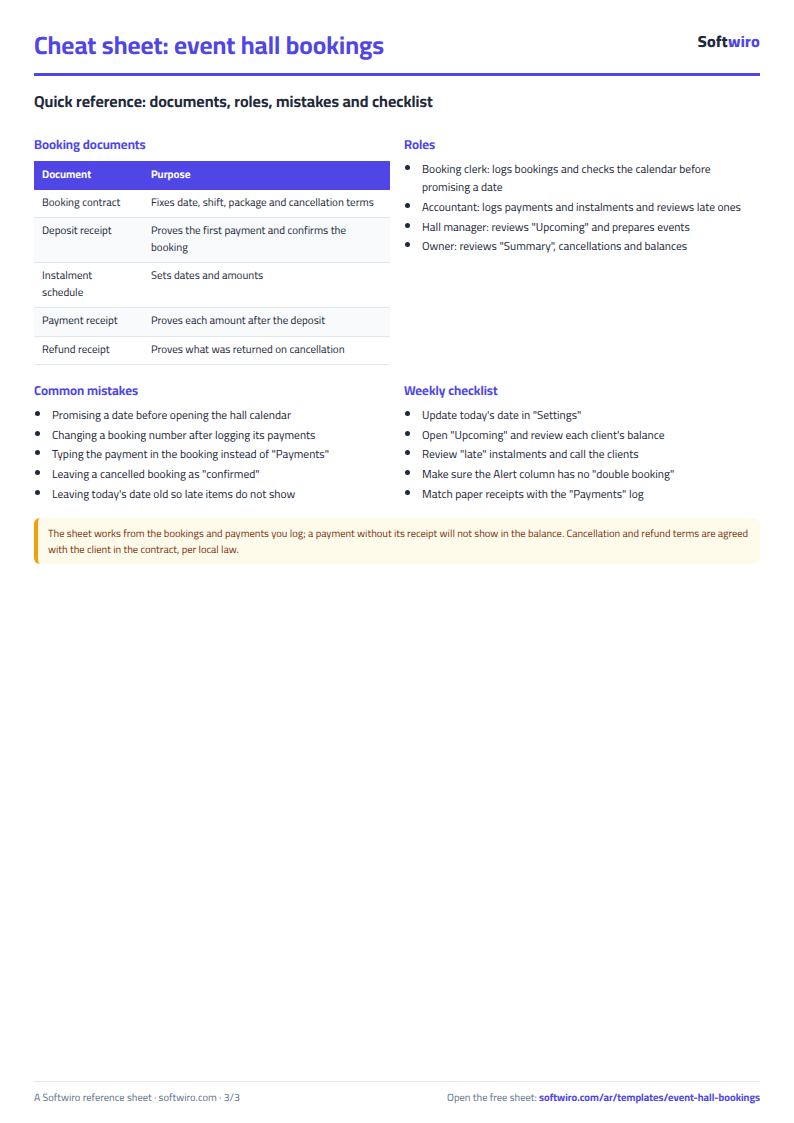
Free cheat sheet for this field
Terms, abbreviations, tables and diagrams over several pages, in Arabic and English. Download it as a PDF or images, including a phone-size version.
Still running this on Excel?
This sheet suits a start and a limited amount of data. If your way of working grows, or you need more than one person working on it at the same time, Softwiro can build you a program that fits the way you work.
| In this sheet | In Custom Software from Softwiro |
|---|---|
| One file that one person edits at a time, and copies reach you on WhatsApp. | A program with a login for each user and permissions you define, and everyone sees the same data. |
| You type everything and check the numbers by hand. | We design the screens around your work steps, so each person records only what concerns them. |
| Columns and formulas are fixed as the sheet was designed. | We build what you need: reports, alerts and screens your way. |
| Backups and security are your own responsibility. | The program runs on a secured server with regular backups. |
Frequently asked questions
How does the sheet catch a double booking in a wedding hall?
It counts the non-canceled bookings with the same date, hall and shift. If there is more than one, it shows a red "حجز مزدوج" (Double booking) on each of them. The conflict also shows in the hall calendar and in the bookings summary.
How is the booking total calculated?
Booking total = hall rental for the chosen shift + (package price x number of guests) + extras - discount. A "per guest" extra such as the buffet is multiplied by the number of guests, and a "fixed" extra such as photography is counted once.
Where do I record the deposit and instalments?
Record each amount the client pays once in the "الدفعات" (Payments) sheet, with a receipt number, the booking number and the payment type. The deposit, amount paid and balance due then show in "الحجوزات" (Bookings). Write the agreed instalment dates in "الأقساط" (Instalments) so late ones show up.
What happens when a booking with a deposit is canceled?
Set the status to "ملغي" (Canceled) and enter what you refunded to the client in the "المسترد" (Refunded) column. The booking drops out of the total and the balance due, and the amount kept (paid - refunded) is counted as cancellation revenue and shown in the "الإلغاءات" (Cancellations) sheet.
Is the template free?
Yes, with no sign-up and no email address. Use it, edit it and share it as you like.
Does it work in Google Sheets and on mobile?
The sheet uses formulas supported by Excel 2016 and later, Google Sheets and LibreOffice, so you can upload it to Google Drive and open it with Google Sheets on a computer or a phone.
What is the difference between the white and the gray cells?
You type in the white cells; the gray cells are calculated automatically. Don't type in a gray cell, or you will erase its formula.
Can I use the sheet from an AI assistant?
Yes. Add our MCP server (URL https://softwiro.com/api/mcp, no key needed) to your assistant and ask it to do the calculation in this template. The numbers come from the sheet's own formulas, and we do not store your data. The steps and a ready-made prompt are in this article: https://softwiro.com/blog/mcp-excel-templates-ai-agent-guide.html
More free templates for: Events and weddings
More free templates
- Wedding and event budget planner (Excel)
- Serviced apartments and short-stay bookings sheet
- Restaurant and cafe table reservations sheet
- Photo studio bookings sheet
- General appointments scheduler sheet
- Grocery store management sheet
- Stationery shop and photocopy management sheet
- Electronics shop sheet: serials, warranty and repairs
- Electronics factory sheet: BOM, production and quality