Try the sheet here, on the example
The sheet is open below with sample numbers. Change any white cell and watch the results update, or press the blank-copy button to type your own data from scratch. Nothing you type leaves your browser.
Example from the sheet
| التاريخ | الوقت | المدة (ساعات) | الضيوف | الترابيزة | العميل | الحالة | المقاعد | السعة | تعارض |
|---|---|---|---|---|---|---|---|---|---|
| 46298 | 1 | 2 | 4 | D3 | عمرو حسين | حضر | 4 | ||
| 46304 | 1 | 2 | 2 | D1 | منى فؤاد | حضر | 2 | ||
| 46311 | 1 | 2 | 6 | D5 | شركة النور | حضر | 6 | ||
| 46318 | 1 | 2 | 2 | O1 | سارة عادل | حضر | 2 | ||
| 46325 | 1 | 2 | 8 | V2 | كريم ممدوح | حضر | 10 | ||
| 46327 | 1 | 2 | 4 | D3 | عمرو حسين | حضر | 4 | ||
| 46328 | 1 | 2 | 2 | D2 | هدى سالم | حضر | 2 | ||
| 46329 | 1 | 2 | 5 | O4 | سارة عادل | لم يحضر | 6 |
Example from the “الحجوزات” tab (Arabic), with the numbers and formulas that are in the file.
What is inside
- الإعدادات: The venue name, the date of the evening you want to schedule, the start of the first slot in the grid, the first day of the month you want summarized, and the minimum number of visits for a customer to count as a repeat customer.
- الترابيزات: Each table's number, area, seats and minimum spend, with the number of reservations on the selected date. Holds up to 30 tables.
- الحجوزات: The reservations log: date, time, duration, guests, table, customer, phone, occasion, deposit and status (confirmed, attended, cancelled or no-show). The end time, seats, area and capacity and clash alerts appear. Holds up to 500 reservations.
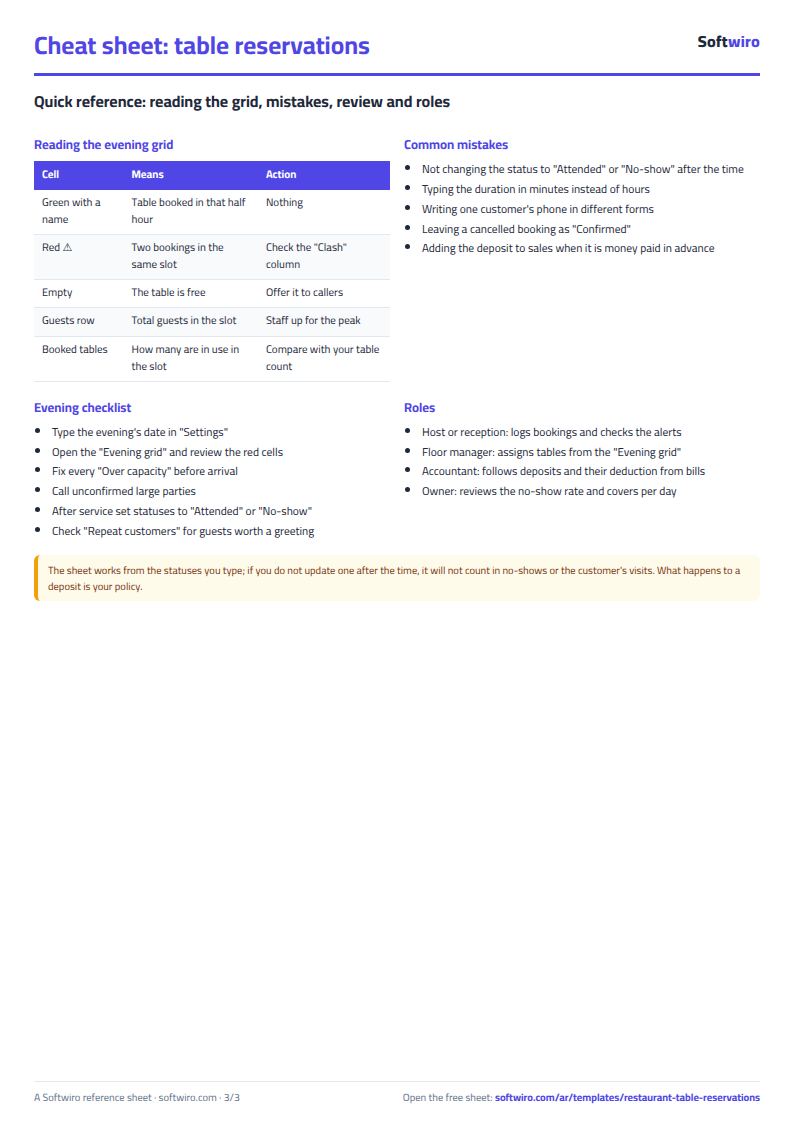
- جدول السهرة: Tables in rows and 12 half-hour slots in columns for the selected date. The customer's name appears in a booked slot and clashes are colored red, with guests and the number of tables booked in each slot below.
- العملاء المتكررون: A list of customers whose visits reached the set minimum, sorted by number of visits and then by latest visit, with each customer's phone and number of no-shows.
- الملخص: The month's reservations by status, no-show rate, cancellation rate and guests who attended, deposits held, deducted, forfeited and refunded, the month's alerts, and guests per day, with three charts.
The file opens on a start tab (“ابدأ هنا”, Start here) that explains how to use it.
What makes it different
The evening grid shows at a glance which table is free in which half hour, the clash and capacity alerts stop a booking that cannot be honored before the customer arrives, and the repeat customers list shows who deserves a call before the busy season.
How to use it
- In "الإعدادات" (Settings) enter the venue name, the date of the evening you want to schedule, the start of the first slot (for example 18:00) and the date of the first day of the month you want summarized.
- In "الترابيزات" (Tables) enter each table: its number, area (indoor, outdoor or VIP), number of seats and minimum spend.
- In "الحجوزات" (Reservations) log each reservation: date, time, sitting length in hours, number of guests, table, customer name, phone, occasion and deposit.
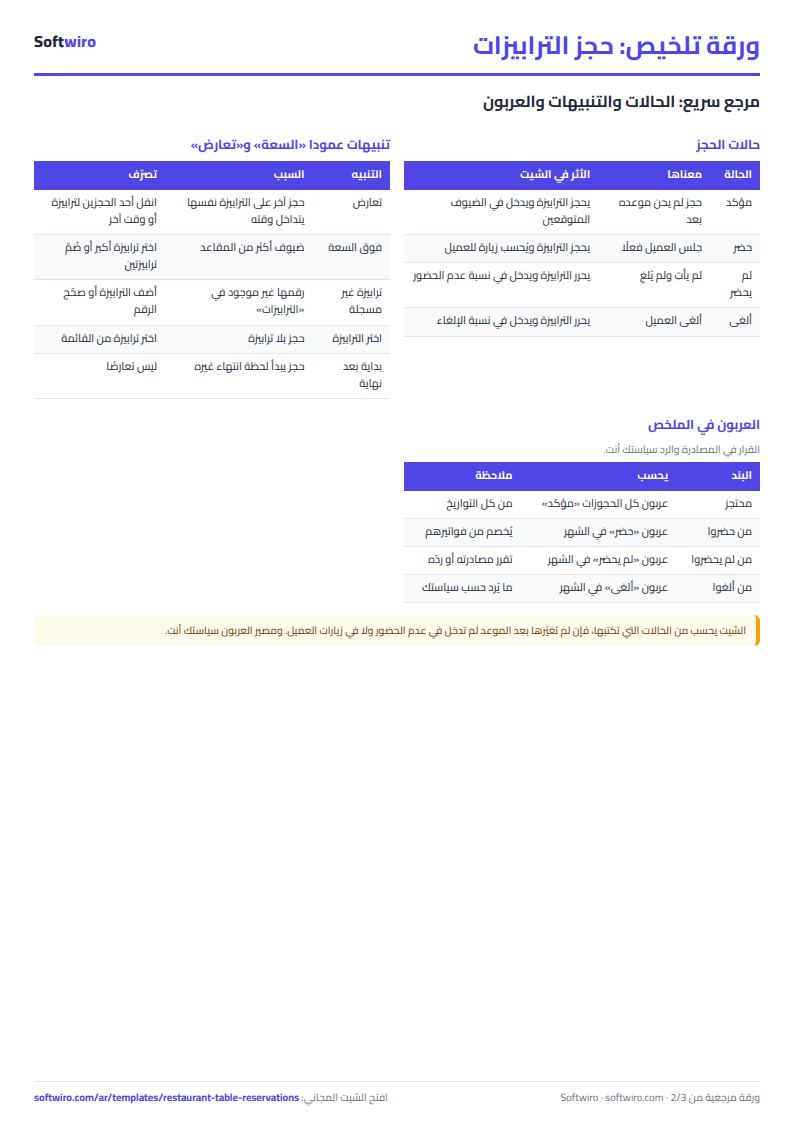
- Change the status after booking: "مؤكد" (confirmed) when booked, "حضر" (attended) or "لم يحضر" (no-show) after the time, and "ألغى" (cancelled) on cancellation.
- Check the capacity and clash columns in the reservations: red means a table booked twice at overlapping times, and yellow means a party larger than the seats.
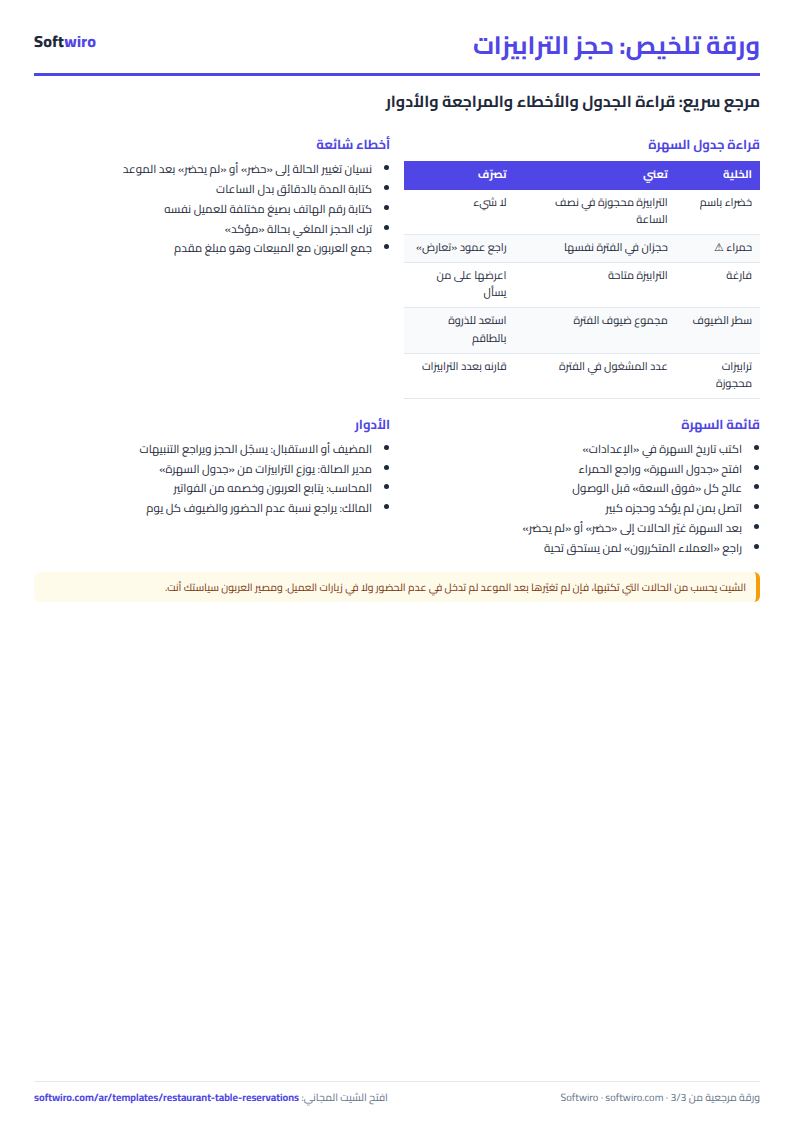
- Open "جدول السهرة" (Evening grid) to see tables by half-hour for the selected date, and "العملاء المتكررون" (Repeat customers) and "الملخص" (Summary) for the month's figures.
Before you start:
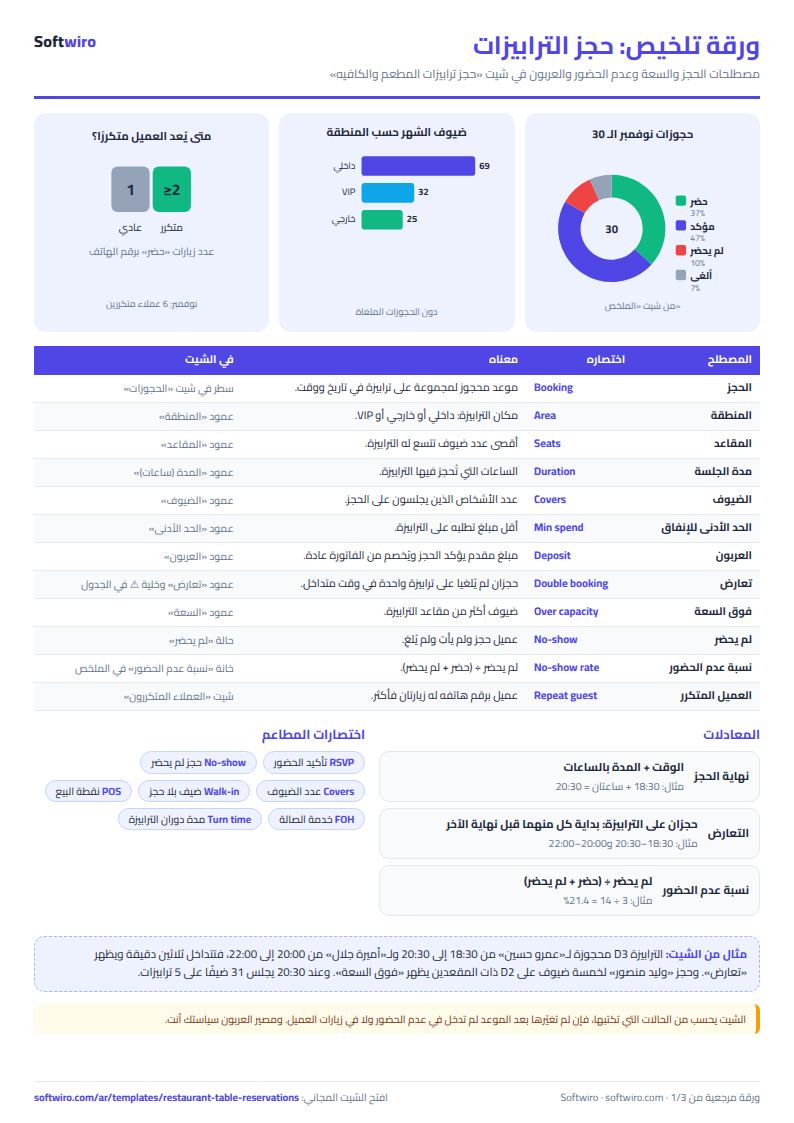
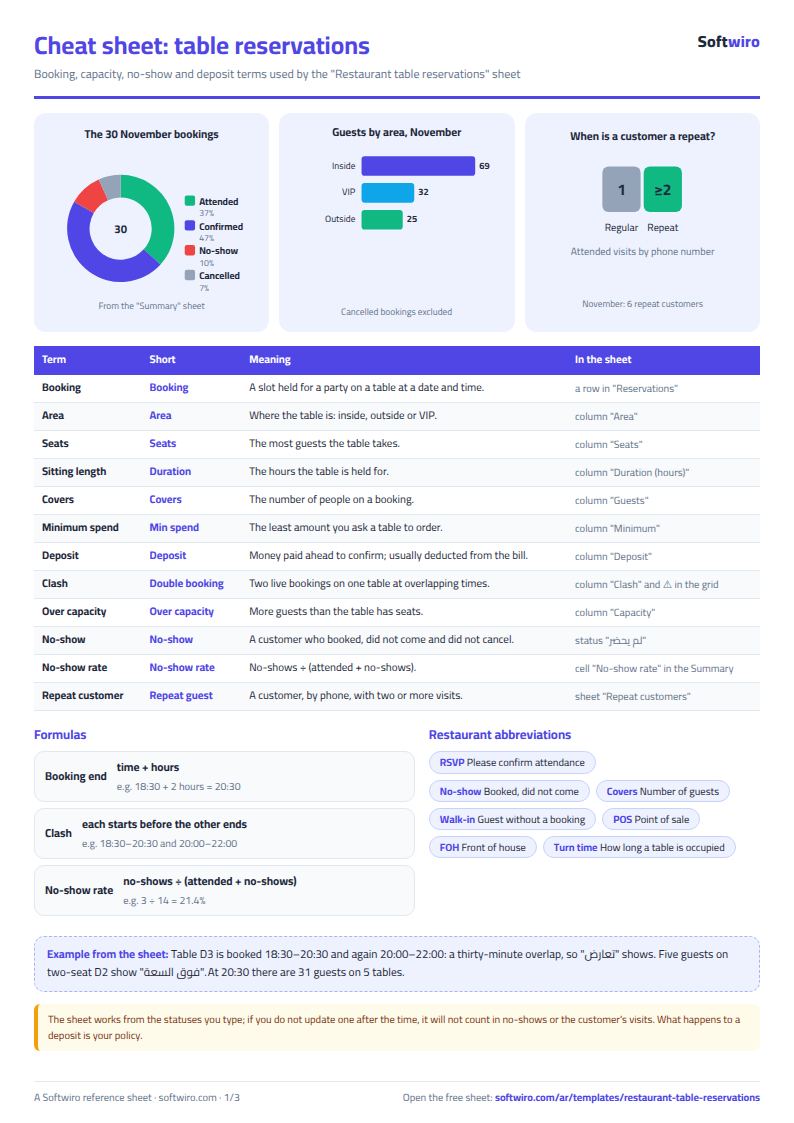
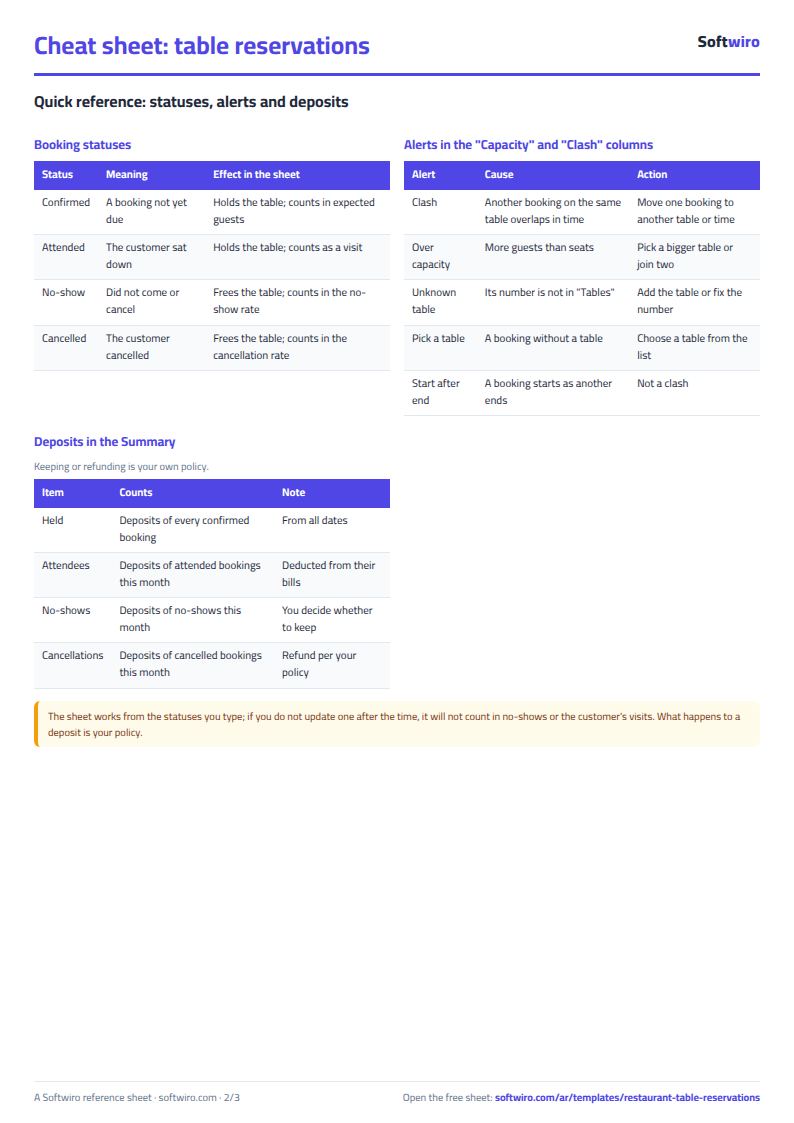
- Sitting length is entered in hours (1.5 means an hour and a half). Reservation end time = start + duration, and a reservation that starts exactly when another ends is not a clash.
- A clash appears when another reservation on the same table overlaps in time on the same day. A reservation with status "ألغى" (cancelled) or "لم يحضر" (no-show) is not counted.
- Capacity: "فوق السعة" (over capacity) appears if the number of guests exceeds the table's seats. If the table is not in the "الترابيزات" (Tables) sheet, "ترابيزة غير مسجلة" (table not registered) appears.
- No-show rate = no-show / (attended + no-show), that is, only those whose time has come. Confirmed reservations whose time has not yet come are not included.
- Deposits held = the deposits of "مؤكد" (confirmed) reservations across all dates. Beside it are the month's deposits: what is deducted from the bill of those who attended, what was forfeited for no-shows and what is refunded to those who cancelled. Whether to forfeit or refund is your restaurant's policy.
- A repeat customer is identified by phone number: anyone with two or more visits (you can change the minimum in Settings), sorted by number of visits and then latest visit. A visit is a reservation with status "حضر" (attended).
- The evening grid shows 12 half-hour slots from the time you set. The sheet holds 30 tables, 500 reservations and 30 repeat customers in the list.
Free cheat sheet for this field
Terms, abbreviations, tables and diagrams over several pages, in Arabic and English. Download it as a PDF or images, including a phone-size version.
Still running this on Excel?
This sheet suits a start and a limited amount of data. If your way of working grows, or you need more than one person working on it at the same time, Softwiro can build you a program that fits the way you work.
| In this sheet | In Custom Software from Softwiro |
|---|---|
| One file that one person edits at a time, and copies reach you on WhatsApp. | A program with a login for each user and permissions you define, and everyone sees the same data. |
| You type everything and check the numbers by hand. | We design the screens around your work steps, so each person records only what concerns them. |
| Columns and formulas are fixed as the sheet was designed. | We build what you need: reports, alerts and screens your way. |
| Backups and security are your own responsibility. | The program runs on a secured server with regular backups. |
Frequently asked questions
How do I stop the same table being booked by two customers at the same time?
Enter the reservation time and sitting length. The sheet calculates the end time and writes "تعارض" (clash) in red for any two non-cancelled reservations on the same table whose times overlap on the same day. If the second reservation starts exactly when the first ends, it is not a clash.
How do I calculate the no-show rate for a restaurant?
No-show rate = reservations marked "لم يحضر" (no-show) / (attended + no-show), that is, only those whose time has come. The sheet calculates it for your selected month. Confirmed reservations whose time has not yet come and cancelled ones are not included.
What happens to the deposit if the customer does not show up or cancels?
The summary shows the deposit held for your confirmed reservations, what is deducted from the bills of those who attended, the deposits of no-shows and the deposits of those who cancelled. Whether it is forfeited or refunded is your own policy with the customer, not a rule in the sheet.
How do I find my repeat customers?
The sheet goes by the customer's phone number: every number with two or more visits (you can change the minimum in Settings) appears in "العملاء المتكررون" (Repeat customers) with its number of visits and last visit date. A visit is a reservation whose status you set to "حضر" (attended).
Is the template free?
Yes, with no sign-up and no email address. Use it, edit it and share it as you like.
Does it work in Google Sheets and on mobile?
The sheet uses formulas supported by Excel 2016 and later, Google Sheets and LibreOffice, so you can upload it to Google Drive and open it with Google Sheets on a computer or a phone.
What is the difference between the white and the gray cells?
You type in the white cells; the gray cells are calculated automatically. Don't type in a gray cell, or you will erase its formula.
Can I use the sheet from an AI assistant?
Yes. Add our MCP server (URL https://softwiro.com/api/mcp, no key needed) to your assistant and ask it to do the calculation in this template. The numbers come from the sheet's own formulas, and we do not store your data. The steps and a ready-made prompt are in this article: https://softwiro.com/blog/mcp-excel-templates-ai-agent-guide.html
More free templates for: Restaurants and cafes
More free templates
- Recipe costing for restaurants and cafes (Excel)
- Restaurant and cafe inventory and waste sheet
- Canteen management sheet
- Photo studio bookings sheet
- General appointments scheduler sheet
- Grocery store management sheet
- Stationery shop and photocopy management sheet
- Electronics shop sheet: serials, warranty and repairs
- Electronics factory sheet: BOM, production and quality
- Wholesale clothing trade sheet: traders, stock and collection
- Food wholesale and distribution sheet in Excel: routes, expiry and collection