Try the sheet here, on the example
The sheet is open below with sample numbers. Change any white cell and watch the results update, or press the blank-copy button to type your own data from scratch. Nothing you type leaves your browser.
Example from the sheet
| 1) المعادلة المحاسبية الموسعة | |
|---|---|
| الخصوم | 28900 |
| رأس المال أول الفترة | 50000 |
| الإيرادات | 17000 |
| المصروفات | 12900 |
| المسحوبات | 1000 |
| صافي الربح = الإيرادات − المصروفات | 4,100.00 |
| حقوق الملكية آخر الفترة | 53,100.00 |
| الأصول = الخصوم + حقوق الملكية | 82,000.00 |
Example from the “حاسبات” tab (Arabic), with the numbers and formulas that are in the file.
What is inside
- المرجع (Reference): 75 rules in 8 sections: the formula, an example from the sample numbers, and a note or common mistake, with a filter on the «القسم» (Section) column.
- بحث عن قاعدة (Rule lookup): Pick a rule name from the list and its formula, example, note and section appear immediately.
- أمثلة القيود (Journal entry examples): 19 common transactions with their debit and credit accounts and a sample amount: cash and credit sales, purchases, paying a supplier, depreciation, accrued and prepaid expenses, unearned and accrued revenue, owner's drawings and bad debts.
- حاسبات (Calculators): Five calculators: the expanded accounting equation, cost of goods sold and margins, cash basis versus accrual basis, break-even with target profit and margin of safety, and 11 financial ratios from your own statement figures.
- الإهلاك والمخزون (Depreciation and inventory): A five-year depreciation table with straight-line and declining-balance side by side, and a FIFO versus weighted-average comparison over five purchase batches: cost of goods sold, ending inventory and gross profit.
- اليومية (Journal): Record entries by choosing the account from a list. The sheet checks that each entry balances and that the account is defined, and shows total debits, total credits and the balance status.
- ميزان المراجعة (Trial balance): The chart of accounts with account types, debit and credit totals per account pulled from the journal, debit and credit balances, a warning for any balance opposite to its normal side, and the trial balance status.
- اختبار ذاتي (Self-test): 40 questions in four branches, answered with a number (no unit) or a choice from a list. A tick or cross appears, your score shows at the top, and the answer key sits in hidden columns.
- المتابعة (Review tracker): Enter the topic, review date and your score. The sheet calculates the next review date from the score and highlights topics that are due, with a chart of your scores.
- الملخص (Summary): Your score, the number of rules per section, your score per branch, and an income statement and balance sheet drawn from your journal, with six charts.
The file opens on a start tab (“ابدأ هنا”, Start here) that explains how to use it.
What makes it different
The sheet does more than state each rule. Every rule has its formula and an example with real numbers from one consistent sample, so the equation, entries, trial balance and statements all agree. You can then record your own entries and have the sheet check that they balance, try the calculators and test yourself. You see how a double entry becomes a trial balance and then an income statement and balance sheet, instead of memorizing rules.
How to use it
- Open «المرجع» (Reference) and go through the rules by section. Each rule has its formula, an example from the sample numbers, and a note or common mistake. You can filter the table by the «القسم» (Section) column.
- In «بحث عن قاعدة» (Rule lookup) pick a rule name from the list and its formula, example and note appear at once. In «أمثلة القيود» (Journal entry examples) you will find 19 transactions with their debit and credit accounts.
- Try «حاسبات» (Calculators): the accounting equation, cost of goods sold and margins, cash versus accrual basis, break-even, and financial ratios from your own statement figures. «الإهلاك والمخزون» (Depreciation and inventory) has a five-year depreciation table and a FIFO versus weighted-average comparison.
- Record your entries in «اليومية» (Journal) by choosing accounts from the list. The sheet posts them to «ميزان المراجعة» (Trial balance) and warns you about an unbalanced entry, an undefined account or a balance opposite to its normal side.
- Take the «اختبار ذاتي» (Self-test) and record your score in «المتابعة» (Review tracker), then open «الملخص» (Summary) to see the income statement and balance sheet from your journal, with the charts.
Before you start:
- A general study summary; standards and taxes follow local law. The treatment of some items (such as doubtful debts and inventory methods) differs between standards and jurisdictions, so check what applies in your country.
- The figures in «المرجع» (Reference) and «أمثلة القيود» (Journal entry examples) are illustrative examples from the sample, not standards. Reference ratios vary by industry, so compare your business with itself over time and with businesses in the same line of work.
- «اليومية» (Journal) holds 80 lines (15 entries in the sample), «ميزان المراجعة» (Trial balance) holds 20 accounts (16 in the sample), the review tracker holds 20 topics, and the self-test holds 45 questions (40 in the sample).
- A balanced trial balance does not prove the entries are correct: it will not reveal an entry left out entirely or a correct amount posted to the wrong account. Enter the type of each account in «ميزان المراجعة» (asset, liability, equity, and so on) so the sheet can build the statements.
- In the self-test, a numeric answer is accepted within a tolerance of 0.01, so type the number as it is (such as 1.33 or 15) with no unit and no % sign. Multiple-choice questions are answered from the drop-down list.
- The depreciation table shows five years. The declining-balance rate is entered by the user (multiplier = 2 ÷ useful life), and declining-balance depreciation never takes book value below salvage value.
Free cheat sheet for this field
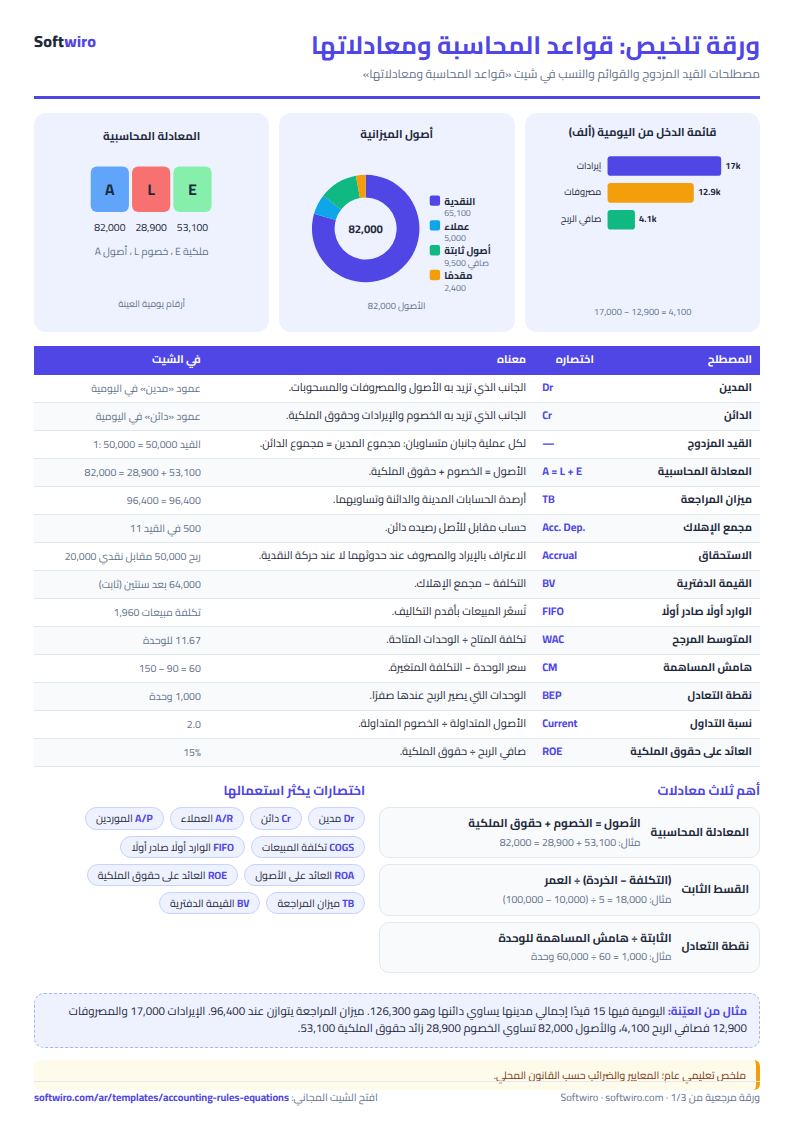
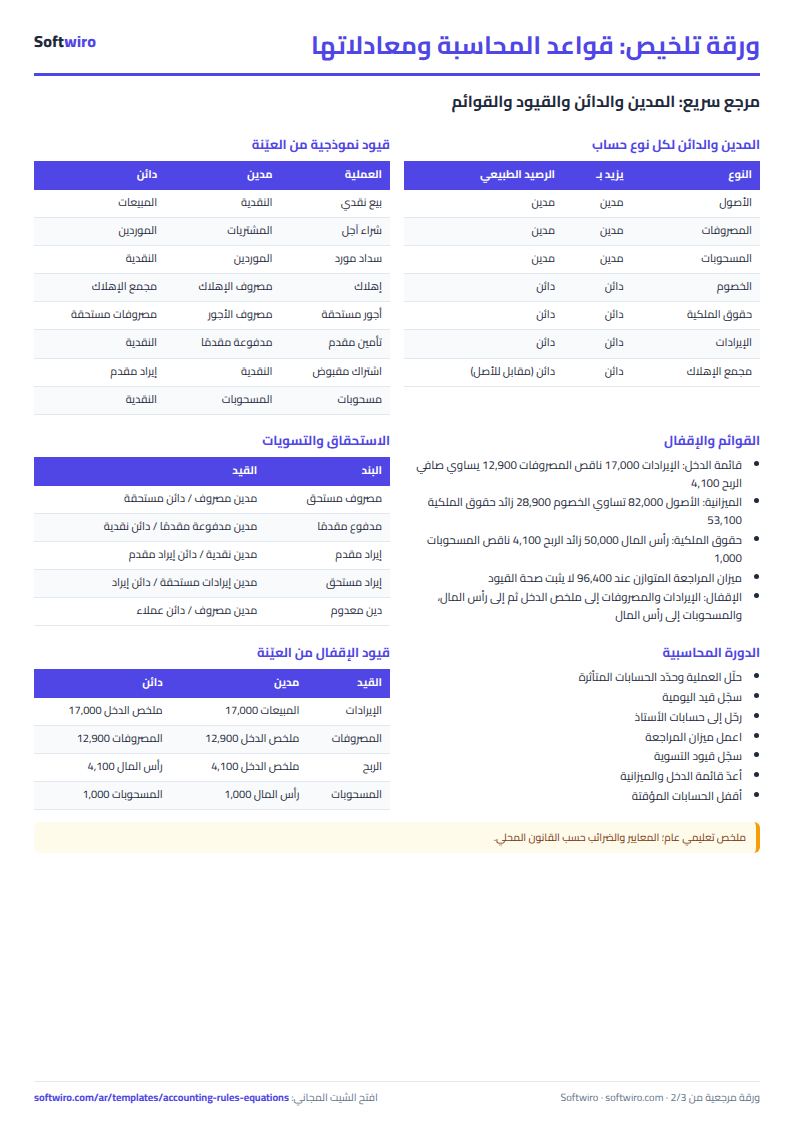
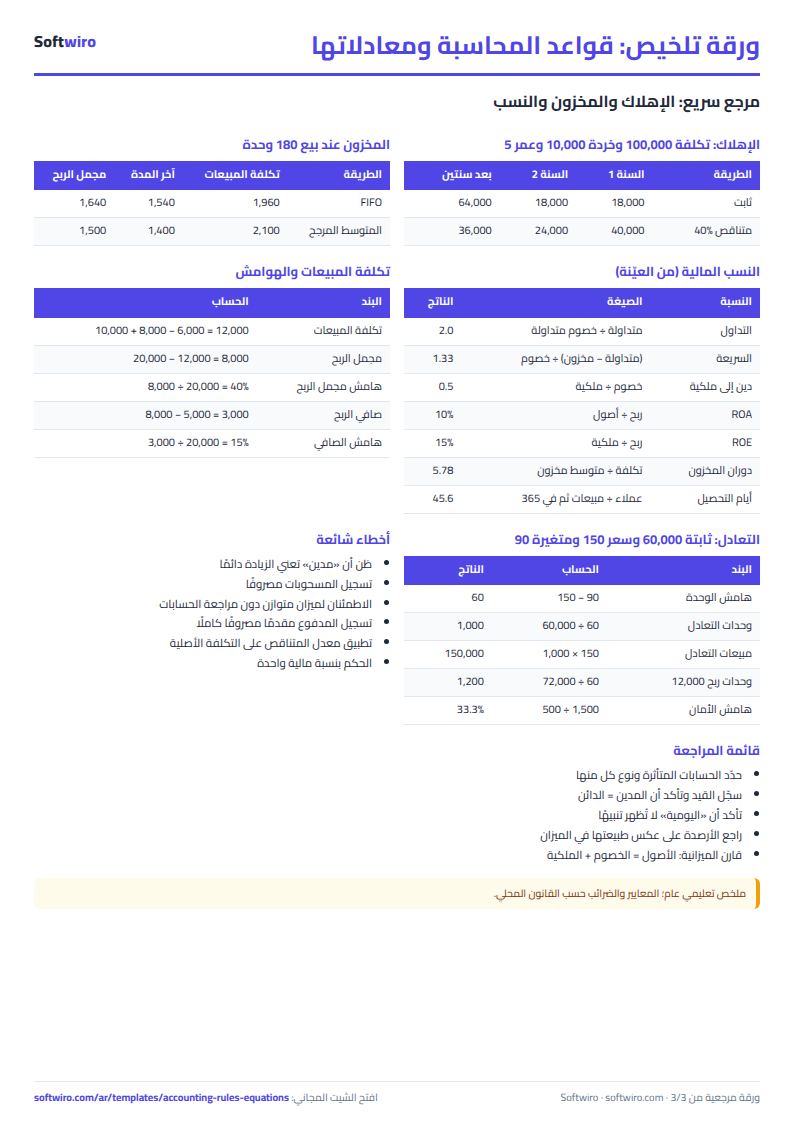
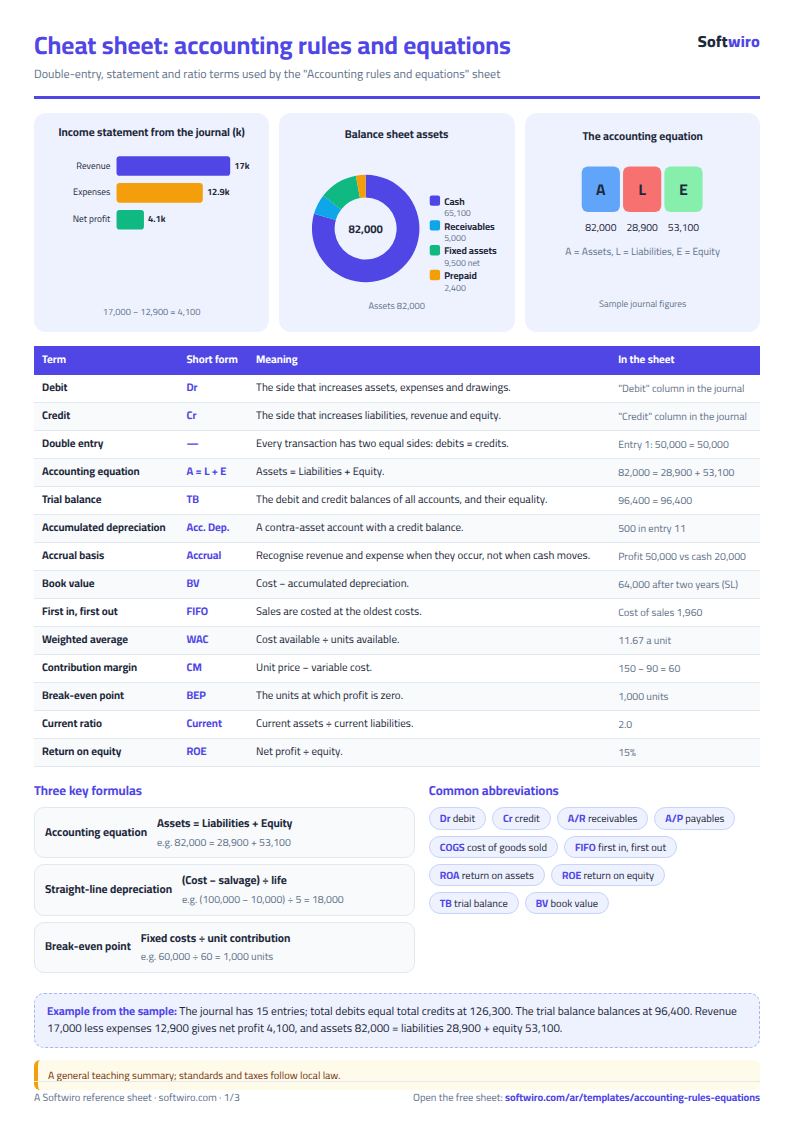
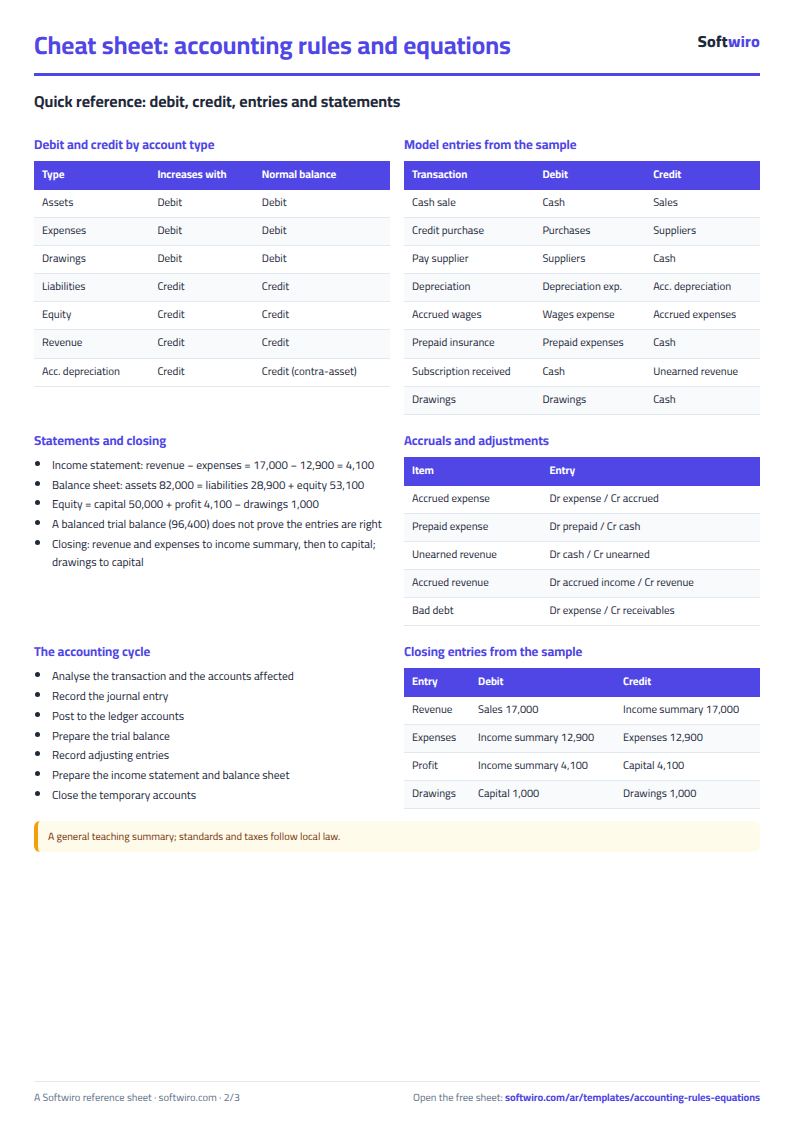
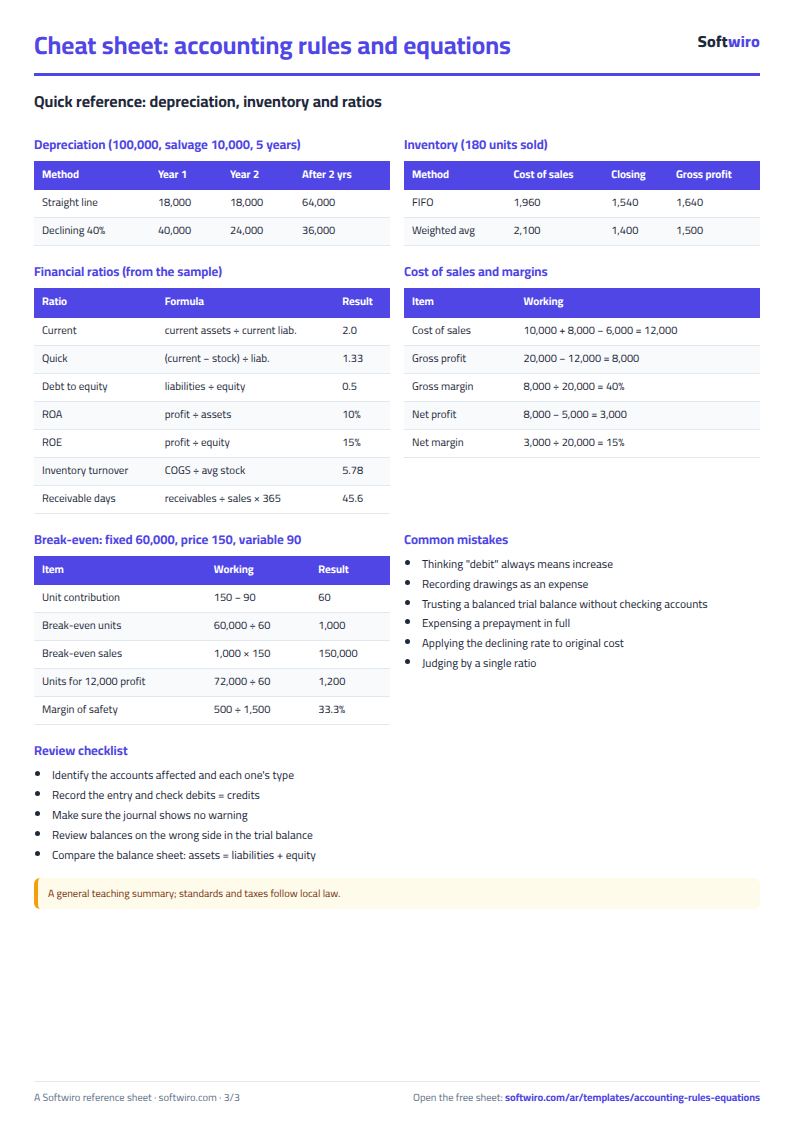
Terms, abbreviations, tables and diagrams over several pages, in Arabic and English. Download it as a PDF or images, including a phone-size version.
Still running this on Excel?
This sheet depends on someone entering journal entries accurately and reviewing them. In ProfAcc, double-entry postings are made automatically, periods are closed, and the financial statements are produced directly from the entries.
| In this sheet | In ProfAcc — Manufacturing Accounts |
|---|---|
| Changing any cell can alter the numbers of a period that has ended. | Correct double-entry from day one, with automatic posting and period closing that locks what has been closed. |
| Tax is calculated in one place and invoices live in another. | Every sales invoice calculates VAT within the journal entry that records it. |
| You only learn the stock balance after the month-end count. | Stock balances are live and move with every posting. |
| One file per company you serve, and the files can get mixed up. | Each company is created from a Google account in about a minute with nothing to install, its data is kept separate, and it is reached through its own link. |
Frequently asked questions
Does the sheet replace an accounting textbook or the standards?
No. It is a general study summary; standards and taxes follow local law. Some treatments (such as doubtful debts and inventory costing methods) differ between standards and jurisdictions, so check what applies in your country with your teacher or accountant.
Does a balanced trial balance mean every entry is correct?
No. A balanced trial balance only proves arithmetic balance. It will not reveal an entry that was left out completely, a correct amount posted to the wrong account, or two errors that cancel each other. That is why the sheet adds an account-type check and a warning for balances opposite to their normal side.
What happens if I record an unbalanced entry?
"قيد غير متوازن" (unbalanced entry) appears in red in the «فحص القيد» (Entry check) column on every line of that entry, and the difference shows in the journal status, the trial balance status and the summary until you correct the amount.
What are the limits of the depreciation and inventory tables?
The depreciation table shows five years, straight-line and declining-balance (at a rate you enter), and declining-balance never takes book value below salvage value. Inventory covers five purchase batches under the periodic system; LIFO is mentioned in the reference for information only.
Is the template free?
Yes, with no sign-up and no email address. Use it, edit it and share it as you like.
Does it work in Google Sheets and on mobile?
The sheet uses formulas supported by Excel 2016 and later, Google Sheets and LibreOffice, so you can upload it to Google Drive and open it with Google Sheets on a computer or a phone.
What is the difference between the white and the gray cells?
You type in the white cells; the gray cells are calculated automatically. Don't type in a gray cell, or you will erase its formula.
Can I use the sheet from an AI assistant?
Yes. Add our MCP server (URL https://softwiro.com/api/mcp, no key needed) to your assistant and ask it to do the calculation in this template. The numbers come from the sheet's own formulas, and we do not store your data. The steps and a ready-made prompt are in this article: https://softwiro.com/blog/mcp-excel-templates-ai-agent-guide.html
More free templates for: Accounting
More free templates
- Journal entries, trial balance and financial statements sheet
- Business expenses and monthly budget sheet
- Cash flow forecast sheet
- Annual budget by department: plan vs actual
- Fixed assets register and depreciation sheet
- Media buyer rules sheet: ad formulas, scaling rules and testing discipline
- Gradebook Template for Excel (Weighted Categories, Letter Grades)
- Cash Book Template for Excel
- Invoice Template with Invoice Log (Excel)
- Garment style costing sheet
- Production tracking sheet by stage
- Piece-rate payroll and worker efficiency sheet
- Production tracking sheet for home textiles factories