Try the sheet here, on the example
The sheet is open below with sample numbers. Change any white cell and watch the results update, or press the blank-copy button to type your own data from scratch. Nothing you type leaves your browser.
Example from the sheet
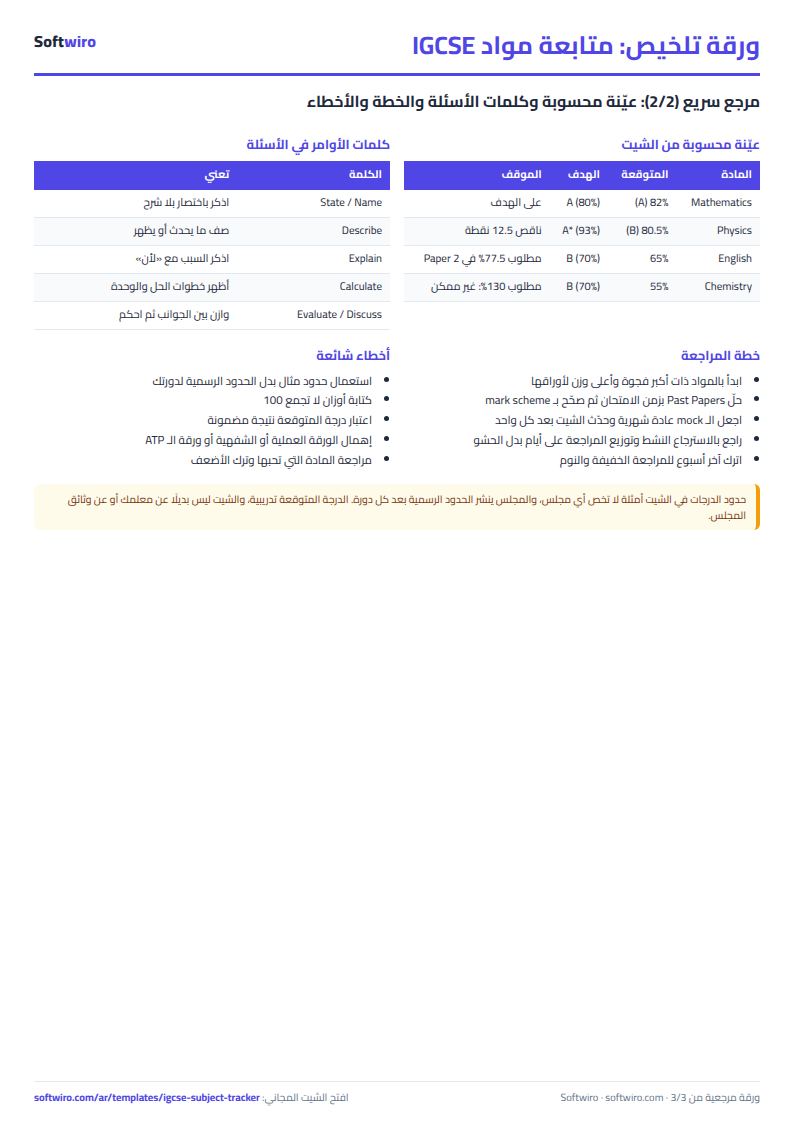
| المادة | الدرجة المستهدفة | النسبة المتوقعة | الدرجة المتوقعة | النسبة المطلوبة للهدف | الفجوة عن الهدف | نقاط ناقصة للهدف | متوسط مطلوب في المتبقي | الموقف |
|---|---|---|---|---|---|---|---|---|
| Mathematics | A | 82.0% | A | 80.0% | -2.0% | 0.00 | 0.0% | على الهدف |
| English Language | B | 65.0% | C | 70.0% | 5.0% | 31.00 | 77.5% | دون الهدف |
| Physics | A* | 80.5% | B | 93.0% | 12.5% | 12.50 | دون الهدف | |
| Chemistry | B | 55.0% | D | 70.0% | 15.0% | 26.00 | 130.0% | دون الهدف |
| Biology | A | 80.0% | 80.00 | 80.0% | لا mock بعد | |||
| Computer Science | B | 67.0% | C | 70.0% | 3.0% | 2.70 | مجموع الأوزان ليس 100 | |
| History | 65.0% | C | بلا درجة مستهدفة |
Example from the “المواد” tab (Arabic), with the numbers and formulas that are in the file.
What is inside
- الإعدادات: Student name and exam session, and a table of grade boundaries from A* to G and U, with a percentage for each grade. The values are editable examples, and a warning tells you if the boundaries are not ordered from highest to lowest.
- المواد: For each subject: the target grade and an optional boundary offset, then the total of the weights, the weight of papers already tried, the points earned, the percentage and the predicted grade. It also shows the percentage needed for the target, the gap, the missing points, the remaining weight and the average needed on what remains, plus the subject's status and its follow-up ranking.
- الأوراق: The paper log: subject, paper name (Paper or Component), weight, maximum mark and mock score. Next to each row the sheet shows the percentage, the points and the row status (calculated, not tried yet, or error).
- الملخص: The number of subjects and how many are on target, below target, without a mock, or need their data checked. Below that is a list of the subjects below target, sorted from the largest gap, with each one's predicted grade, missing points and required average.
The file opens on a start tab (“ابدأ هنا”, Start here) that explains how to use it.
What makes it different
Instead of working out on a calculator what you are missing in each subject before the real exam, you log your papers and mock scores. You then see which subjects are below target and by how much, which ones need more than is possible, and which still have no mock. Check the official grade boundaries for your session and enter them once, and every subject updates.
How to use it
- In the "الإعدادات" (Settings) tab, enter your name and the session, then replace the example grade boundaries with the official ones published by the board for your session.
- In the "المواد" (Subjects) tab, enter each subject and choose your target grade from the list. If a subject's boundaries differ from the general table, enter the percentage difference in the "إزاحة الحدود" (boundary offset) column.
- In the "الأوراق" (Papers) tab, log each subject's papers (Paper or Component): paper name, its weight within the subject, the maximum mark and your mock score.
- Leave the mock score empty for a paper you have not tried yet, and it is counted as a remaining paper.
- Check the Subjects tab to see the grade predicted from your mocks, the gap to your target, the missing points and the average needed in the remaining papers.
- Open "الملخص" (Summary) for the number of subjects on and below target, and a list of the subjects that need attention, sorted by the largest gap.
Before you start:
- The grade boundaries in Settings (A* to G) are example percentages only, not the boundaries of any board or session. Official boundaries change between sessions and subjects, so enter them from their source before relying on the results.
- The weights, maximum marks and paper names in the example are fictional. Enter your subject's weights from the syllabus published by the board.
- The predicted grade is calculated from mock scores only, as the average of your tried papers weighted by their weights. It is a practice estimate, not an official prediction.
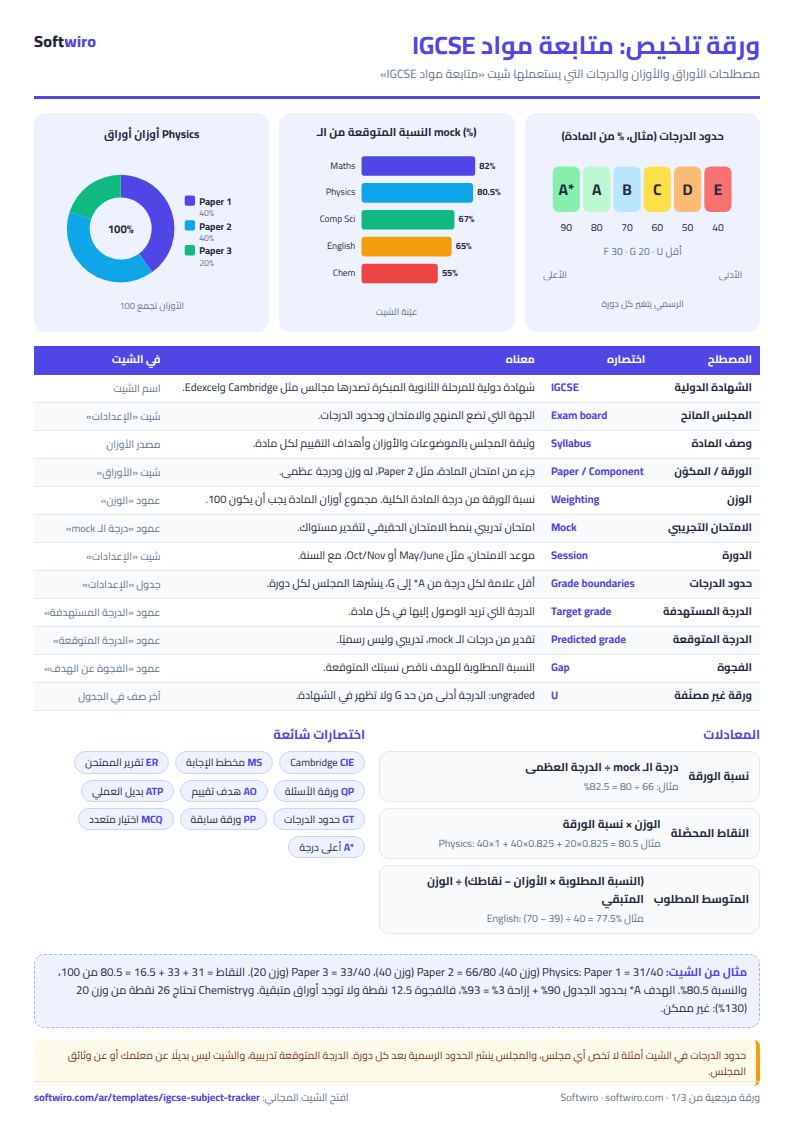
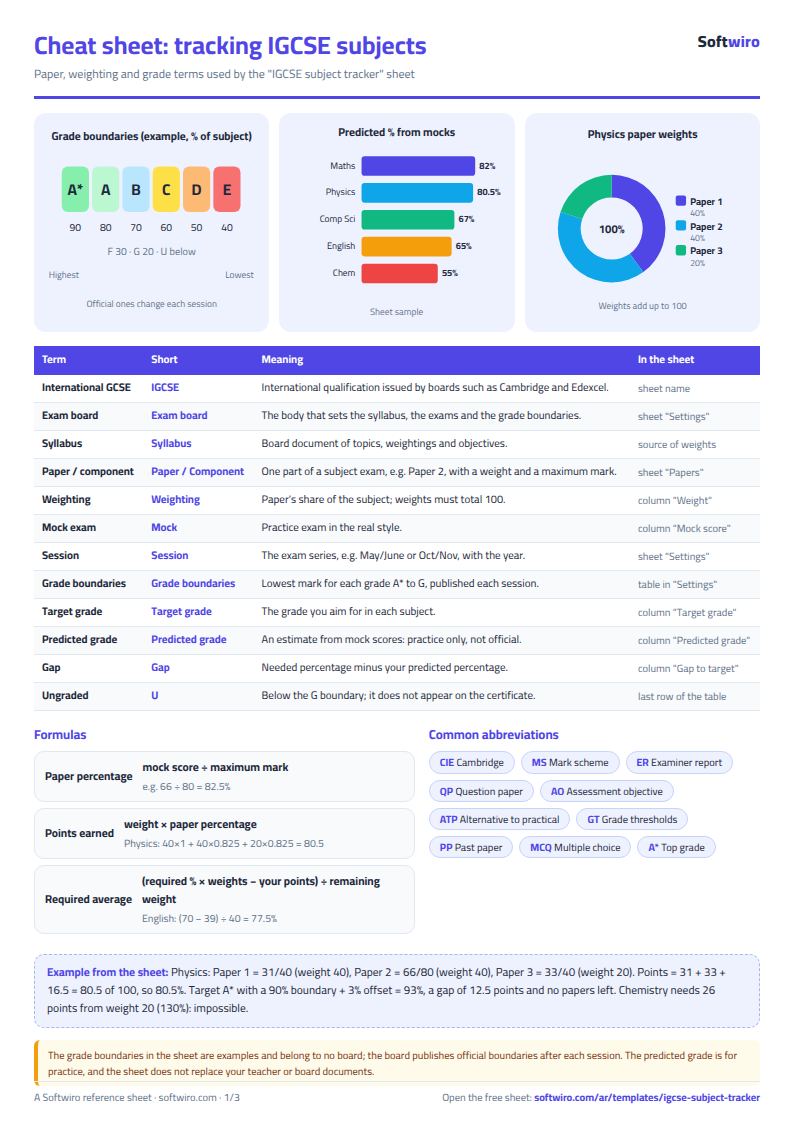
- Missing points = required percentage x total weights - the points you have earned so far. Required average = missing points divided by the weight of the papers not yet tried. If it is above 100%, the target is not possible at your current level.
- The boundary offset is added to all of the subject's boundaries: enter 3% if your subject's boundaries are three percentage points higher than the table, and a negative value if they are lower.
- Keep A* in the first row of the boundary table and order the rows from highest to lowest. Settings warns you if the order is broken. The sheet holds up to 200 subjects and 500 papers.
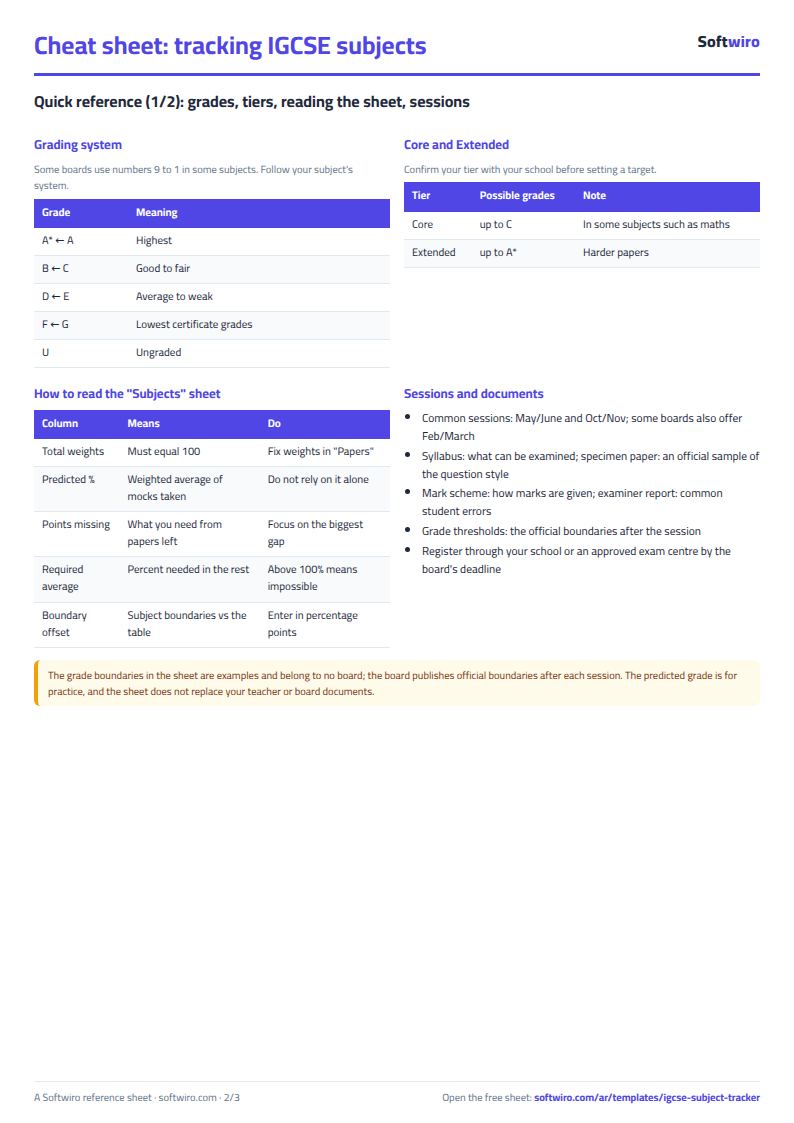
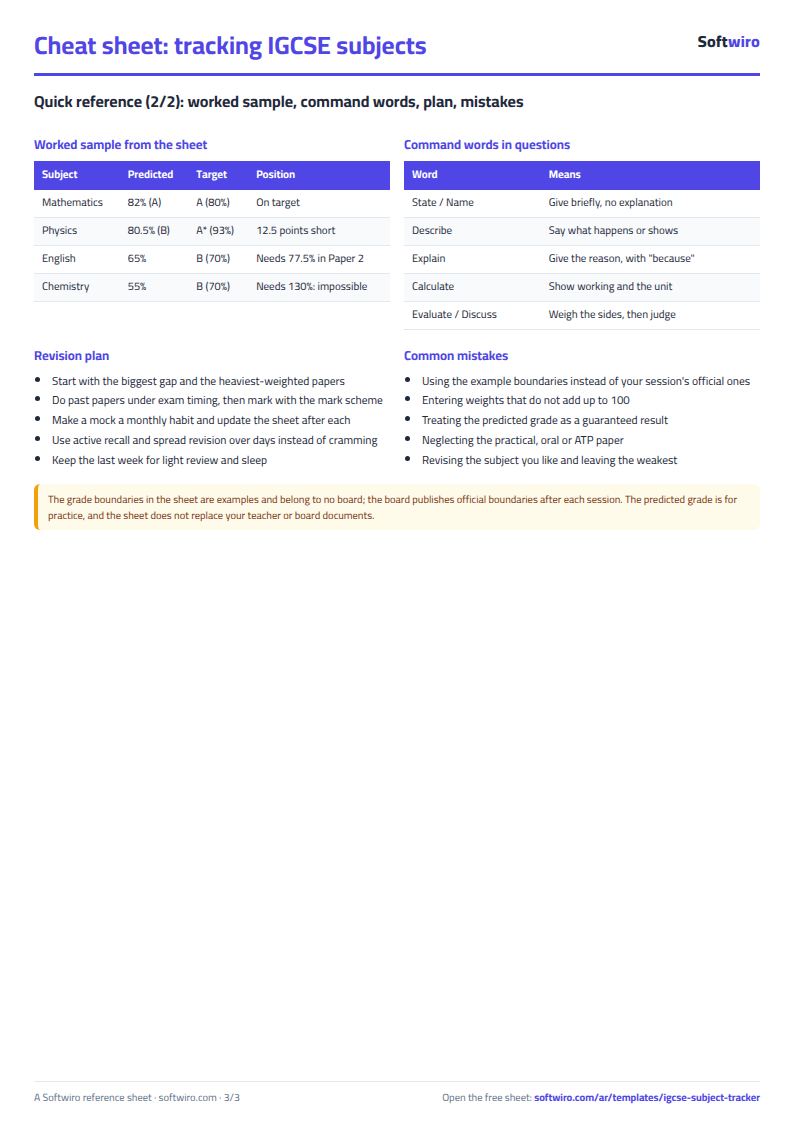
Free cheat sheet for this field
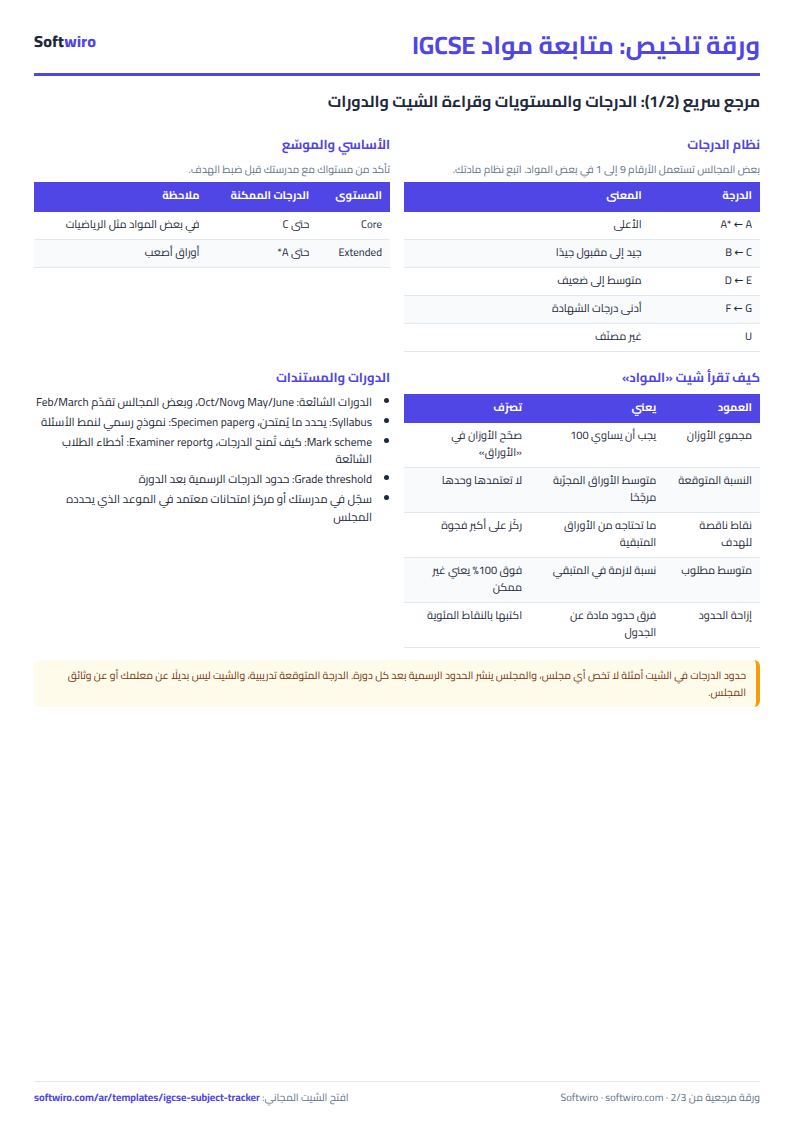
Terms, abbreviations, tables and diagrams over several pages, in Arabic and English. Download it as a PDF or images, including a phone-size version.
Still running this on Excel?
This sheet suits a start and a limited amount of data. If your way of working grows, or you need more than one person working on it at the same time, Softwiro can build you a program that fits the way you work.
| In this sheet | In Custom Software from Softwiro |
|---|---|
| One file that one person edits at a time, and copies reach you on WhatsApp. | A program with a login for each user and permissions you define, and everyone sees the same data. |
| You type everything and check the numbers by hand. | We design the screens around your work steps, so each person records only what concerns them. |
| Columns and formulas are fixed as the sheet was designed. | We build what you need: reports, alerts and screens your way. |
| Backups and security are your own responsibility. | The program runs on a secured server with regular backups. |
Frequently asked questions
Are the grade boundaries in the sheet the exam board's official boundaries?
No. They are example percentages (for instance A* from 90% and A from 80%) included only so you can try the sheet. Official grade boundaries are published by the exam board for each session and subject and change between them, so check them and enter them in the "الإعدادات" (Settings) tab before relying on any result.
How does the sheet calculate the predicted grade?
It takes the mock scores you entered, converts each one to a percentage of its paper's maximum mark, then calculates the average weighted by the weights of the papers you have tried only, and compares it with the boundaries in Settings. It is a practice estimate from your mocks, not an official prediction.
What do "missing points" and "required average on the remainder" mean?
Missing points are the points you still lack (out of the total weights) to reach the percentage needed for your target grade, based on the scores you have entered. The required average is those points divided by the weight of the papers you have not tried yet. If it is above 100%, the target is not possible at your current level.
My subject's boundaries differ from the general table. What should I do?
In the "إزاحة الحدود" (boundary offset) column for that subject, enter the difference in percentage points: positive if its boundaries are higher than the table, negative if lower. All of that subject's boundaries then move by that amount without changing the general table.
Is the template free?
Yes, with no sign-up and no email address. Use it, edit it and share it as you like.
Does it work in Google Sheets and on mobile?
The sheet uses formulas supported by Excel 2016 and later, Google Sheets and LibreOffice, so you can upload it to Google Drive and open it with Google Sheets on a computer or a phone.
What is the difference between the white and the gray cells?
You type in the white cells; the gray cells are calculated automatically. Don't type in a gray cell, or you will erase its formula.
Can I use the sheet from an AI assistant?
Yes. Add our MCP server (URL https://softwiro.com/api/mcp, no key needed) to your assistant and ask it to do the calculation in this template. The numbers come from the sheet's own formulas, and we do not store your data. The steps and a ready-made prompt are in this article: https://softwiro.com/blog/mcp-excel-templates-ai-agent-guide.html
All the templates in this group: Excel templates for IGCSE students
More free templates for: IGCSE
More free templates
- IGCSE past papers log and error tracker (Excel)
- AP, SAT and ACT prep planner (Excel)
- Al-Azhar student grades sheet (Excel)
- Quran memorization and review tracker (Excel)
- University applications tracker (Excel)
- Teacher weighted gradebook (Excel)
- Lesson plan and curriculum coverage tracker for teachers (Excel)
- Parent communication log for teachers (Excel)
- Remedial sessions tracker for teachers (Excel)