Try the sheet here, on the example
The sheet is open below with sample numbers. Change any white cell and watch the results update, or press the blank-copy button to type your own data from scratch. Nothing you type leaves your browser.
Example from the sheet
| رقم الطلب | العميل | النوع | السعر المتفق | الحالة | عدد الألواح | إجمالي التكلفة | الربح | تنبيه |
|---|---|---|---|---|---|---|---|---|
| K001 | أحمد سالم | مطبخ | 18,500.00 | تم التسليم | 5 | 12,615.52 | 5,884.48 | |
| K002 | منى فتحي | دولاب | 9,800.00 | جاهز للتسليم | 4 | 8,342.60 | 1,457.40 | متأخر 10 يوم |
| K003 | هبة رمضان | باب | 4,800.00 | تجميع ودهان | 1 | 3,663.90 | 1,136.10 | متأخر 16 يوم |
| K004 | كريم حسن | مكتب | 4,200.00 | تم التسليم | 1 | 2,997.16 | 1,202.84 | |
| K005 | مصطفى كامل | سرير | 21,500.00 | تجميع ودهان | 6 | 14,544.88 | 6,955.12 | |
| K006 | سمر يوسف | مكتبة | 5,400.00 | قيد التقطيع | 2 | 4,138.80 | 1,261.20 | |
| K007 | محمود عادل | وحدة تلفزيون | 6,300.00 | قيد التقطيع | 1 | 3,387.46 | 2,912.54 | |
| K008 | منى فتحي | مطبخ | 14,000.00 | جديد | 3 | 8,238.20 | 5,761.80 | |
| K009 | أحمد سالم | باب | 6,200.00 | جديد | 2 | 6,035.20 | 164.80 | هامش منخفض |
Example from the “الطلبات” tab (Arabic), with the numbers and formulas that are in the file.
What is inside
- الإعدادات: Today's date, your usual waste percentage, the daily labour rate, the lowest acceptable profit margin and the first month of the summary.
- الخامات: Boards with their length, width and price (the sheet shows board area and price per square metre), edge band by the metre, accessories by the piece and paint by the litre. Holds 60 materials.
- العملاء: Each customer's name and mobile number, with the number of orders, their value, what the customer has paid, the balance and the status, plus a follow-up ranking from the largest balance down. Holds 100 customers.
- الطلبات: One row per order with its type, price, deposit, due date, status, board and edge-band codes, workdays and paint. It calculates area, number of boards, the cost of each item, profit, margin, balance and a late warning. Holds 300 orders.
- التقطيع: The parts of each order: name, length, width, quantity and number of edge-banded sides. It shows the area in square metres and the metres of edge band. Holds 600 parts.
- الاكسسوارات: What each order uses in hinges, drawer runners, handles and locks, priced per unit from "الخامات" (Materials), with the cost of each line. Holds 400 lines.
- الدفعات: Every amount a customer pays after the deposit, with the order number and payment method. Holds 400 payments.
- المتابعة: A list of orders past their delivery date with the days late, and a list of customers who owe a balance, largest first.
- الملخص: Open and late order counts, value, amount collected, balance, cost, profit and margin, the number of boards and metres of edge band, and tables by month, status and cost breakdown, with three charts.
The file opens on a start tab (“ابدأ هنا”, Start here) that explains how to use it.
What makes it different
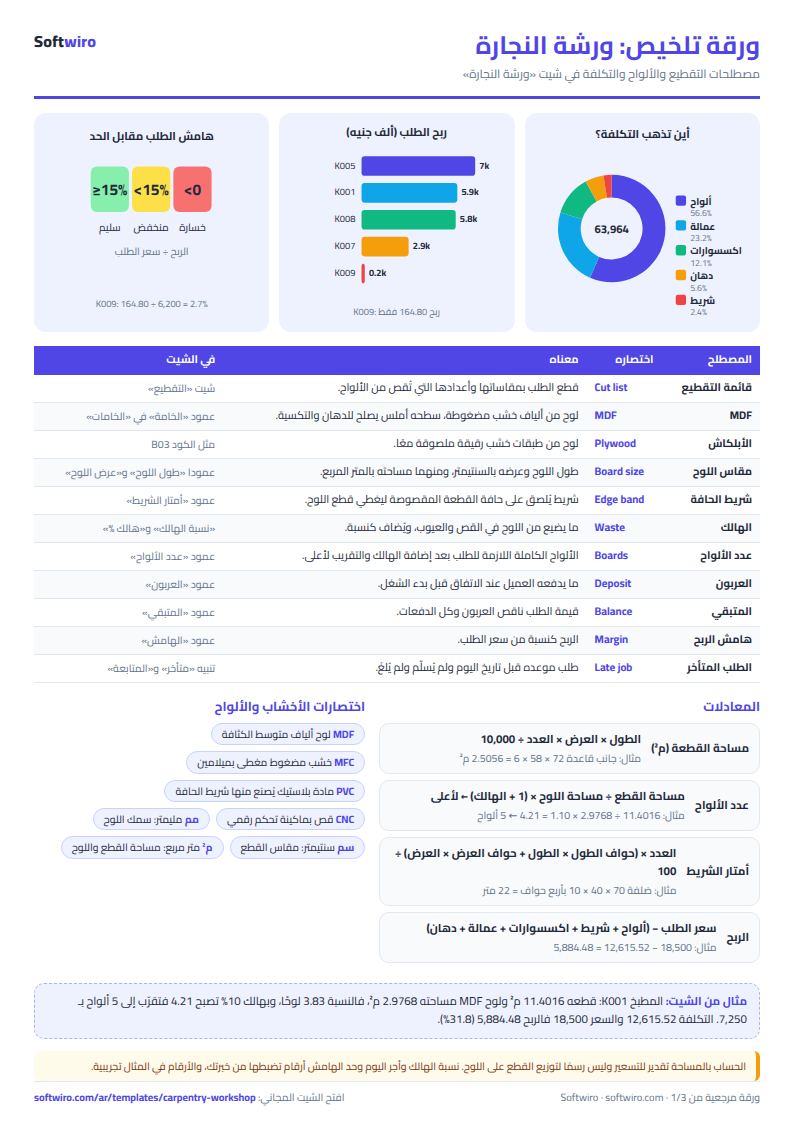
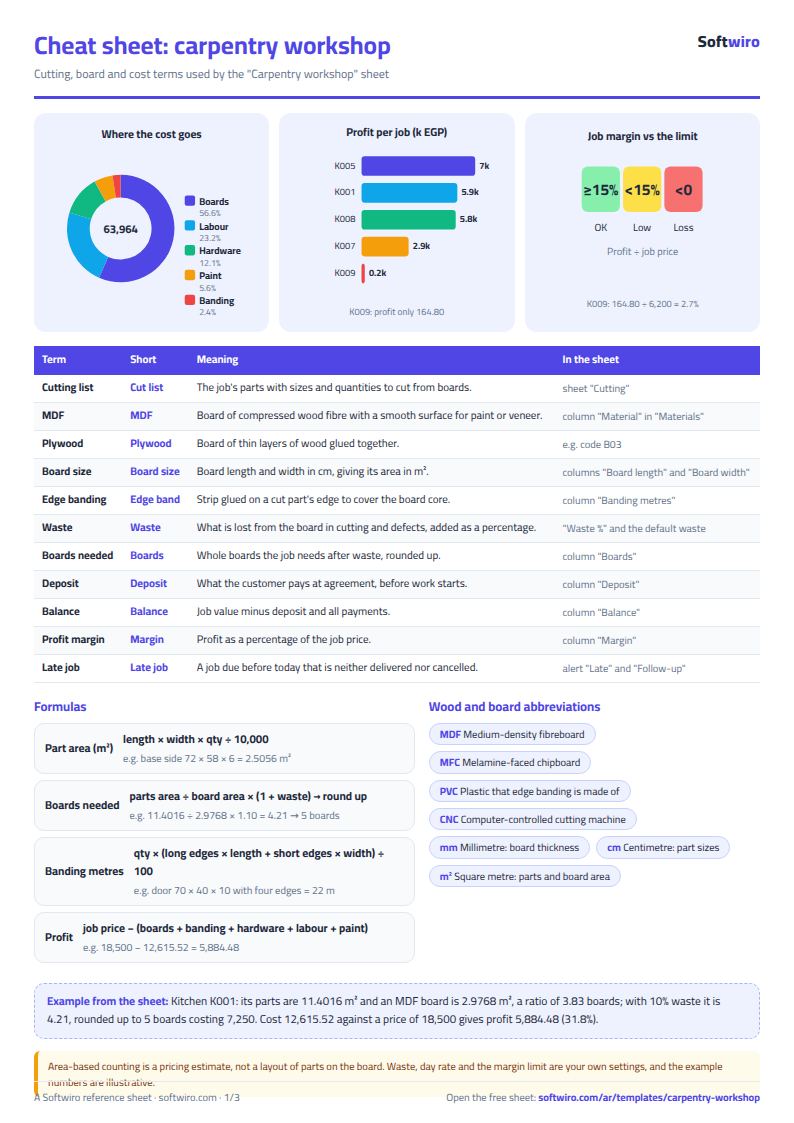
The sheet works out boards from the parts themselves instead of guessing: parts area ÷ board area × (1 + waste), rounded up. You know how many boards you need and what they cost before you buy. It then ties that to labour, accessories and paint, so you see the order's profit and margin before you deliver it, not after you discover a loss.
How to use it
- In the "الإعدادات" (Settings) sheet, enter today's date, your usual waste percentage and the daily labour rate. In "الخامات" (Materials), enter your boards with their sizes and prices, plus edge band, accessories and paint.
- In the "العملاء" (Customers) sheet, enter each customer's name and phone.
- In the "الطلبات" (Orders) sheet, open a row for each order: its number, date, customer, type of work, agreed price, deposit and delivery date, then the board code, edge-band code, workdays and paint.
- In the "التقطيع" (Cutting list) sheet, enter the parts of each order: part name, length and width in centimetres, quantity and number of edge-banded sides. The area in square metres and the metres of edge band appear.
- In "الاكسسوارات" (Accessories), enter what the order uses in hinges, handles and drawer runners, and in "الدفعات" (Payments) any amount the customer pays after the deposit.
- The "الطلبات" (Orders) sheet calculates the boards needed after waste, the order's cost and profit, and the customer's balance. Open "المتابعة" (Follow-up) to see late orders and who owes a balance, and "الملخص" (Summary) for the numbers and charts.
Before you start:
- Number of boards = parts area ÷ board area × (1 + waste percentage), rounded up to a whole board. The general waste percentage is in "الإعدادات" (Settings), and you can enter an order-specific percentage in the "هالك %" (Waste %) column.
- The calculation assumes one main board type per order. If an order uses two different boards (for example MDF for the carcass and thin hardboard for the back), enter it as two rows with two numbers, such as K005-أ and K005-ب, and split the price between them.
- Edge counts: in "حواف الطول" (Length edges) enter how many long sides get edge band (0 to 2), and in "حواف العرض" (Width edges) how many short sides. Metres of edge band = quantity × (length edges × length + width edges × width) ÷ 100.
- Order cost = boards + edge band + accessories + (workdays × daily rate) + paint. A "ملغي" (cancelled) order counts as zero in revenue and cost, and anything paid on it shows as a credit for the customer.
- Profit is an estimate because it counts a whole board for the leftover parts; if you reuse board offcuts, your real cost is lower. This is a pricing and follow-up sheet, not an accounting ledger.
- The sheet holds 60 materials, 100 customers, 300 orders, 600 cutting-list parts, 400 accessory lines and 400 payments. "المتابعة" (Follow-up) shows the first 20 late orders and the first 20 customers with a balance.
Free cheat sheet for this field
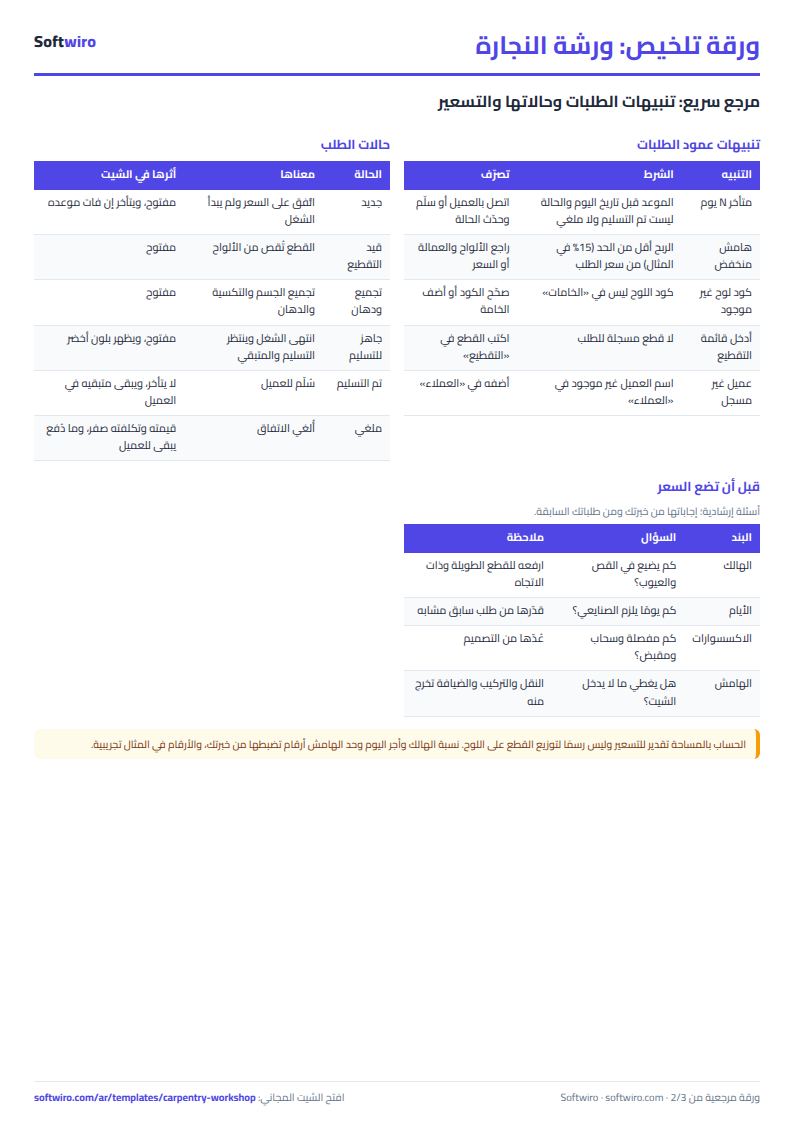
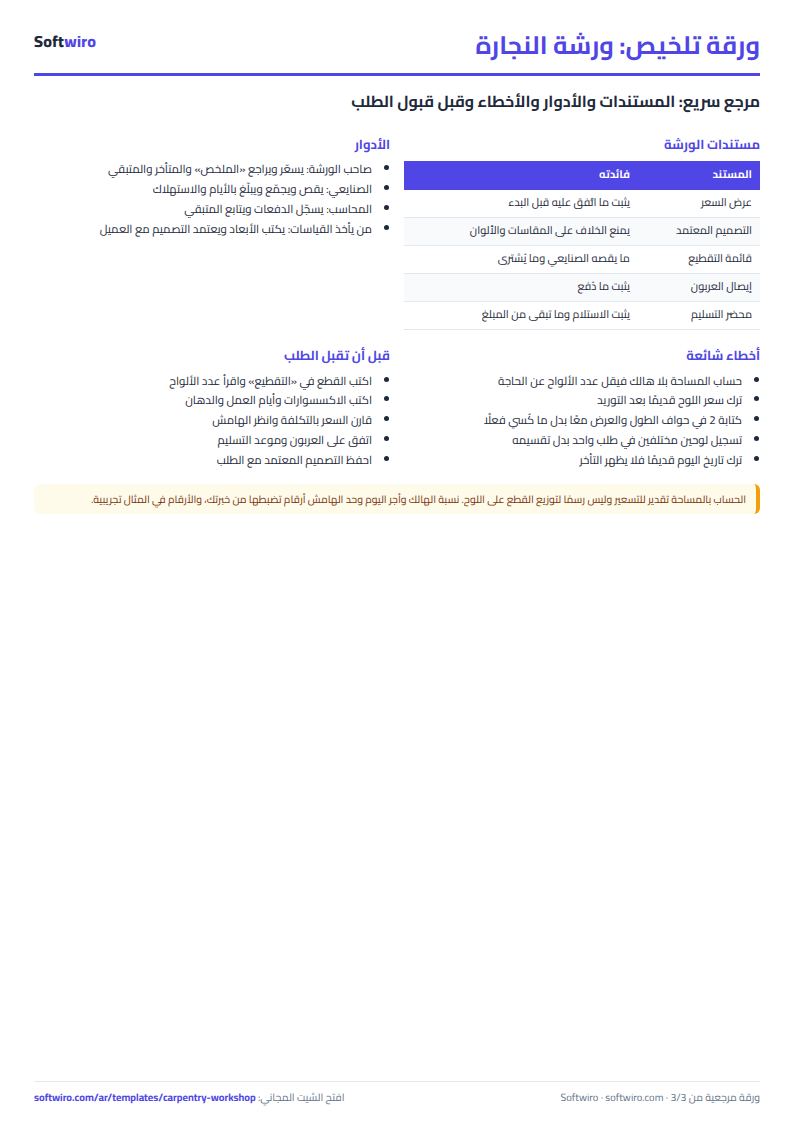
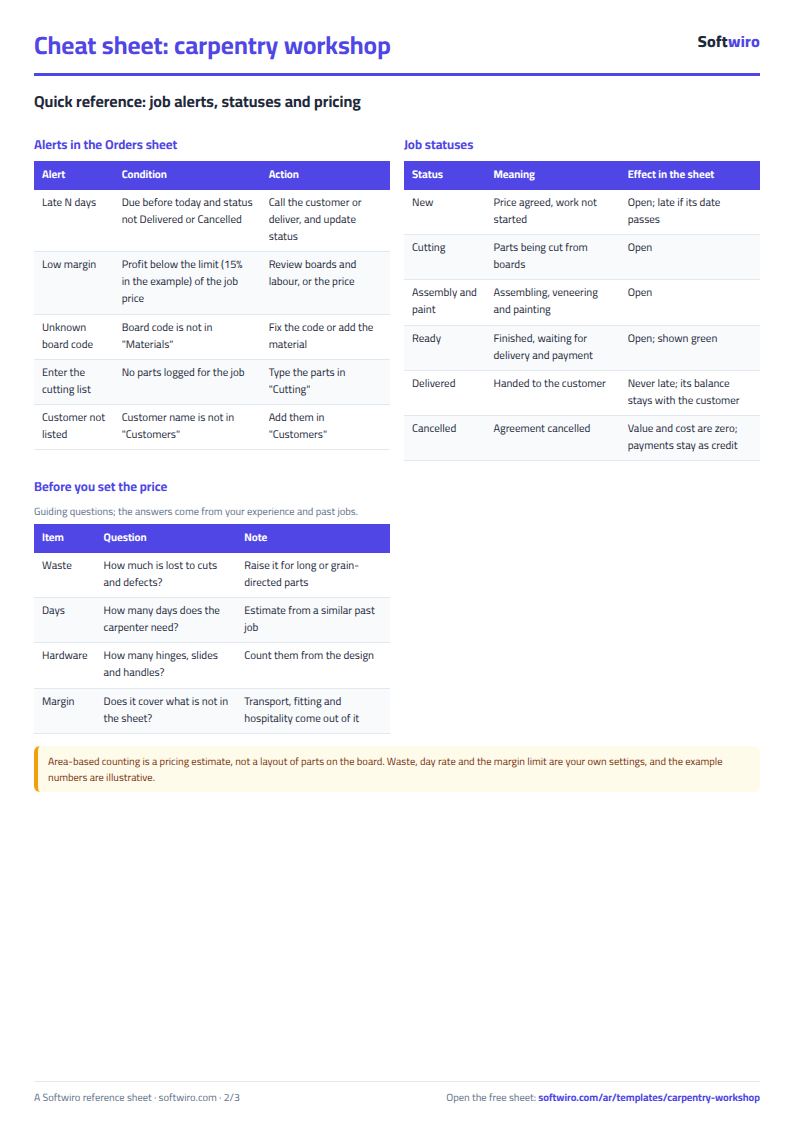
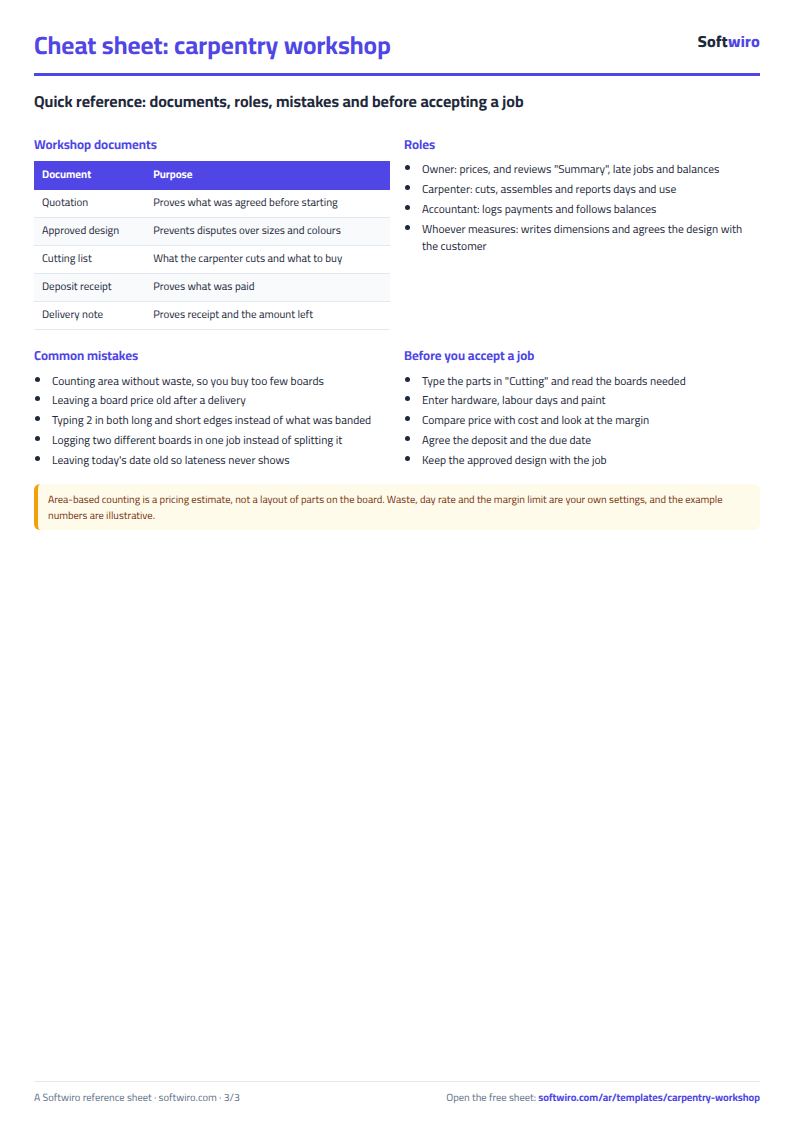
Terms, abbreviations, tables and diagrams over several pages, in Arabic and English. Download it as a PDF or images, including a phone-size version.
Still running this on Excel?
This sheet suits a start and a limited amount of data. If your way of working grows, or you need more than one person working on it at the same time, Softwiro can build you a program that fits the way you work.
| In this sheet | In Custom Software from Softwiro |
|---|---|
| One file that one person edits at a time, and copies reach you on WhatsApp. | A program with a login for each user and permissions you define, and everyone sees the same data. |
| You type everything and check the numbers by hand. | We design the screens around your work steps, so each person records only what concerns them. |
| Columns and formulas are fixed as the sheet was designed. | We build what you need: reports, alerts and screens your way. |
| Backups and security are your own responsibility. | The program runs on a secured server with regular backups. |
Frequently asked questions
How do I calculate the number of MDF boards for a kitchen or wardrobe?
Enter the order's parts (length, width and quantity) in the "التقطيع" (Cutting list) sheet. The sheet adds up their area, divides it by the board area recorded in "الخامات" (Materials), adds the waste percentage and rounds up to a whole board.
Does the sheet work out how to lay the parts on the board (nesting)?
No. It is an estimate by area with a waste percentage that you set from experience, not a layout drawing of the parts on the board. For tight jobs, use a higher waste percentage or set one for that order only.
How do I find the late orders?
Enter today's date in "الإعدادات" (Settings). Any order whose due date is before that date and is not "تم التسليم" (delivered) or "ملغي" (cancelled) shows as "متأخر" (late) with the number of days, and is listed in the "المتابعة" (Follow-up) sheet.
How do I work out the deposit and the balance a customer owes?
Enter the deposit on the order and any later payment in "الدفعات" (Payments). Balance = order value - deposit - payments, and the sheet totals it for each customer in "العملاء" (Customers).
Is the template free?
Yes, with no sign-up and no email address. Use it, edit it and share it as you like.
Does it work in Google Sheets and on mobile?
The sheet uses formulas supported by Excel 2016 and later, Google Sheets and LibreOffice, so you can upload it to Google Drive and open it with Google Sheets on a computer or a phone.
What is the difference between the white and the gray cells?
You type in the white cells; the gray cells are calculated automatically. Don't type in a gray cell, or you will erase its formula.
Can I use the sheet from an AI assistant?
Yes. Add our MCP server (URL https://softwiro.com/api/mcp, no key needed) to your assistant and ask it to do the calculation in this template. The numbers come from the sheet's own formulas, and we do not store your data. The steps and a ready-made prompt are in this article: https://softwiro.com/blog/mcp-excel-templates-ai-agent-guide.html
More free templates for: Workshops and maintenance
More free templates
- Car workshop job orders tracker (Excel)
- Spare parts inventory sheet
- Metal and turning workshop job sheet in Excel: job orders, materials and labor
- Glass and aluminium workshop sheet in Excel: orders by square metre, cutting and waste
- Garment printing shop sheet in Excel: DTF and screen print orders and cost
- Arabic grammar summary sheet: rules, i'rab and a self-test with examples
- English grammar rules sheet in Excel: tenses and structures with examples
- Taxi, Uber and ride-hailing driver income sheet (trips, fuel, commission, daily net)
- Personal car maintenance log (oil and filter dates by kilometre and months)
- Parking garage management sheet (hourly and monthly)
- Car wash management sheet (packages, cards, workers, materials)
- Food factory sheet in Excel: recipes, batches, cost and shelf life