Try the sheet here, on the example
The sheet is open below with sample numbers. Change any white cell and watch the results update, or press the blank-copy button to type your own data from scratch. Nothing you type leaves your browser.
Example from the sheet
| رقم الطلب | التاريخ | المريض | كود التحليل | التحليل | السعر | الصافي | موعد النتيجة | تنبيه |
|---|---|---|---|---|---|---|---|---|
| 1001 | 46315 | عبير سالم | L01 | صورة دم كاملة CBC | 120.00 | 120.00 | 46316 | تم |
| 1001 | 46315 | عبير سالم | L02 | سكر صائم | 50.00 | 50.00 | 46315 | تم |
| 1002 | 46319 | ماجد صلاح | L03 | سكر تراكمي HbA1c | 250.00 | 250.00 | 46320 | تم |
| 1002 | 46319 | ماجد صلاح | L04 | كرياتينين | 70.00 | 70.00 | 46320 | تم |
| 1003 | 46323 | نبيل عوض | L01 | صورة دم كاملة CBC | 120.00 | 102.00 | 46324 | تم |
| 1003 | 46323 | نبيل عوض | L05 | إنزيم ALT | 70.00 | 59.50 | 46324 | تم |
| 1003 | 46323 | نبيل عوض | L06 | دهون ثلاثية | 80.00 | 68.00 | 46324 | تم |
| 1004 | 46327 | سلمى رضا | L08 | هرمون TSH | 200.00 | 200.00 | 46329 | تم |
| 1004 | 46327 | سلمى رضا | L09 | فيتامين د | 650.00 | 600.00 | 46330 | تم |
| 1005 | 46329 | حسام الدين | L10 | تحليل بول كامل | 60.00 | 60.00 | 46329 | تم |
| 1005 | 46329 | حسام الدين | L11 | تحليل براز كامل | 60.00 | 60.00 | 46329 | تم |
Example from the “الطلبات” tab (Arabic), with the numbers and formulas that are in the file.
What is inside
- الإعدادات (Settings): Today's date (written as the example date, and you can enter =TODAY()) and any date within the summary month.
- التحاليل (Tests): Code, name, sample type, turnaround time in days, price and reagent cost, then profit before commission, the month's count and revenue. It holds 200 tests.
- الشركات (Companies): Contract companies with each one's discount percentage and what you have collected from it. The sheet shows its number of tests, the net it owes and the balance.
- المحوِّلون (Referrers): Referring doctors with each doctor's commission percentage (an editable setting), and beside each the month's tests, their net revenue and the commission.
- الطلبات (Orders): One row per test: order number, date, patient, mobile, test code, company, doctor, extra discount, amount paid, sample status and delivery date. The sheet works out the price, company discount, net, result due date, alert, commission, cost, profit and the balance owed by the patient. It holds 1,000 rows.
- المتأخرة (Late): Tests whose result due date has passed and which are not yet ready, oldest due date first, with the patient's mobile and days late, plus the count of ready results not yet delivered.
- المخزون (Stock): Reagent and supply items: minimum level, opening stock, received and used. The sheet shows the balance, status (in stock, order or out) and value. It holds 50 items.
- اليومي (Daily): The days of the chosen month: orders, tests, revenue, amount collected, reagent cost, doctors' commissions and profit.
- الملخص (Summary): The month's figures, amounts owed and alerts, sample status, and revenue of the top eight tests, with four charts: revenue per test, sample status, daily revenue and profit, and each doctor's commission.
The file opens on a start tab (“ابدأ هنا”, Start here) that explains how to use it.
What makes it different
The price list, patient orders and sample status are in one file. The lab enters a row once and the net, commission and profit appear, and the sheet warns you before a patient asks about a result that is late.
How to use it
- In the «الإعدادات» (Settings) tab, enter today's date (or =TODAY() to update itself) and any date within the month you want summarised.
- In «التحاليل» (Tests), enter each test with its code, name, sample type, turnaround time in days, price and reagent cost.
- In «الشركات» (Companies), enter the contract companies and each one's discount percentage, and in «المحوِّلون» (Referrers) enter the doctors and each doctor's commission percentage.
- In «الطلبات» (Orders), write one row for each test ordered. An order with several tests repeats its number and the patient's name on its rows. Pick the company and doctor if there are any, and enter the extra discount and the amount paid.
- Change the sample status as work progresses: collected, then in the lab, then ready, then delivered, and enter the delivery date when the result is handed over.
- Open «المتأخرة» (Late) to see the results that have passed their turnaround time and are not ready, and «المخزون» (Stock) to see which reagents need ordering.
- Review «اليومي» (Daily) for each day's revenue and «الملخص» (Summary) for the month's figures and charts.
Before you start:
- A test's price, reagent cost and turnaround time are taken from the Tests tab by code. The sheet contains no reference values and no interpretation of any result.
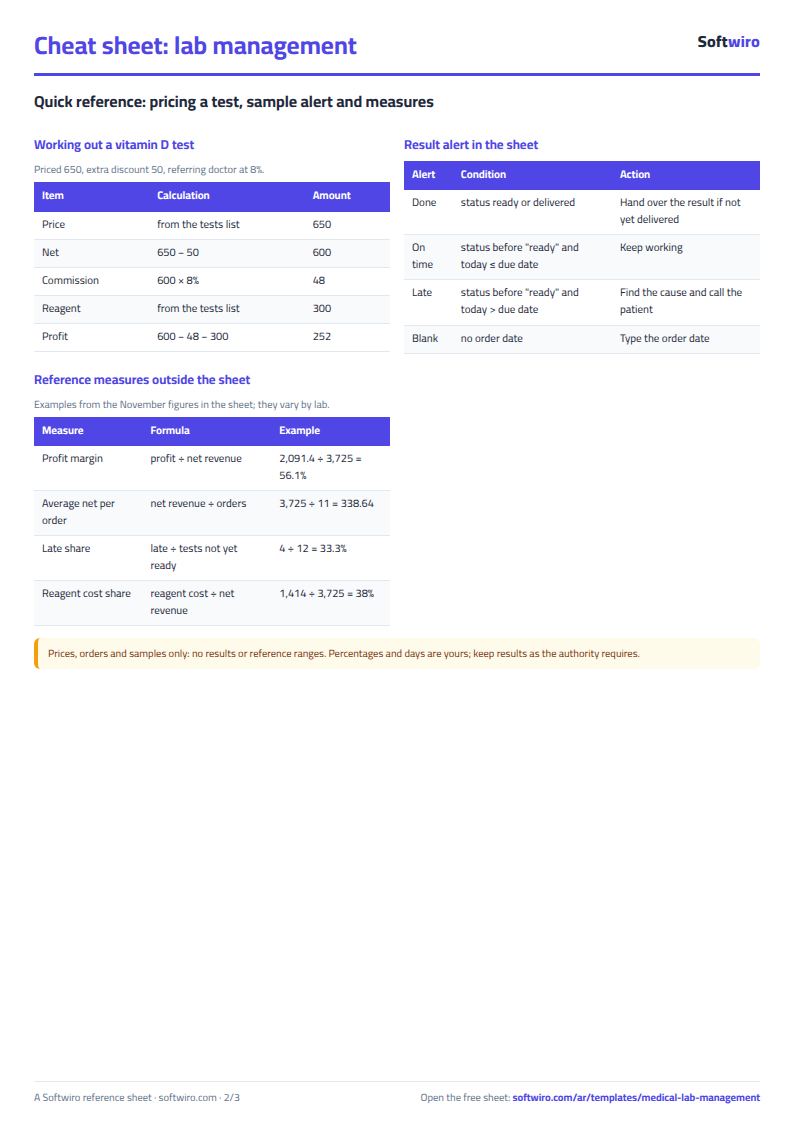
- Company discount = price x the company's discount percentage. Test net = price - company discount - extra discount. A contract company's tests are charged to the company, not the patient.
- The balance owed by the patient appears on the first row of each order = the patient's share of the order's rows - the total they paid on its rows. The balance owed by a company = the total of its net - the "collected from it" figure you enter in the Companies tab.
- Referring doctor's commission = test net x the doctor's percentage. This percentage is an editable setting based on your agreement, and check that this arrangement is permitted under local law.
- Result due date = order date + test turnaround time. If it has passed and the status is not "ready" or "delivered", the test shows as "late" in Orders and in the Late tab.
- Test profit = net - reagent cost - commission. Stock is simplified: you enter the opening quantity, received and used by hand, and the sheet works out the balance and status.
- The sheet holds 200 tests, 30 doctors, 30 companies, 50 reagent items and 1,000 order rows, and Late shows the first 60 tests.
Free cheat sheet for this field
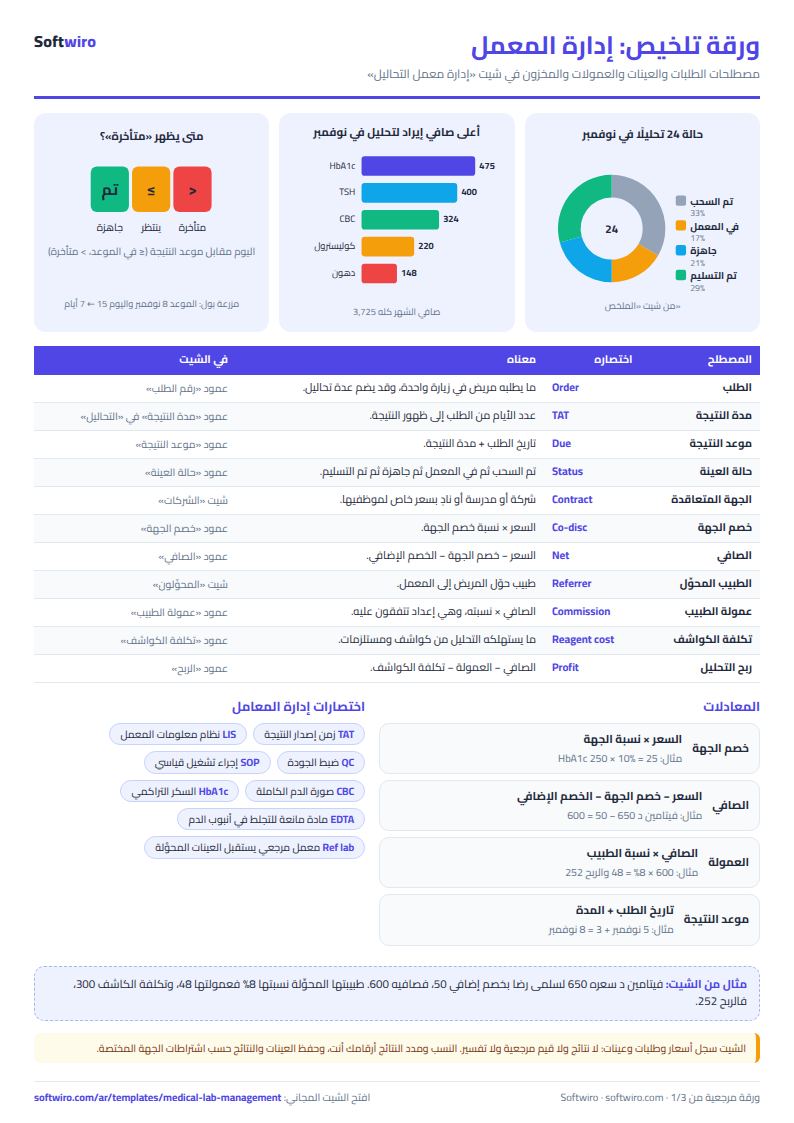
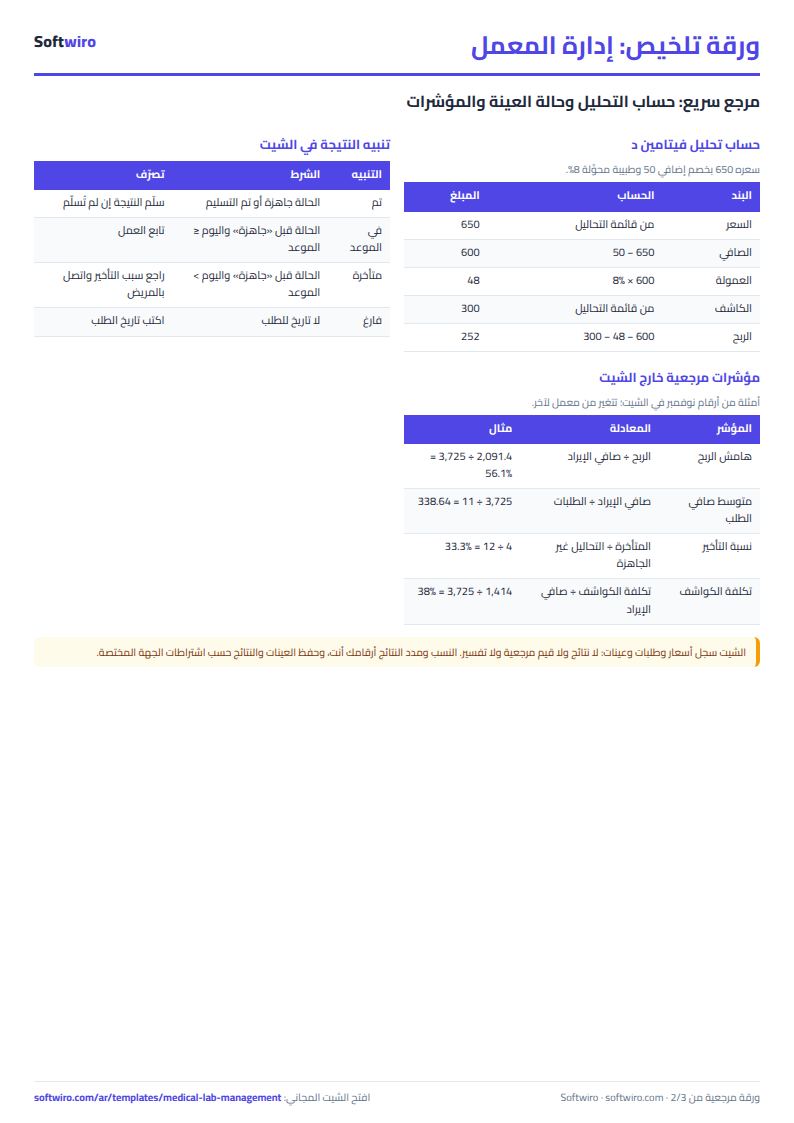
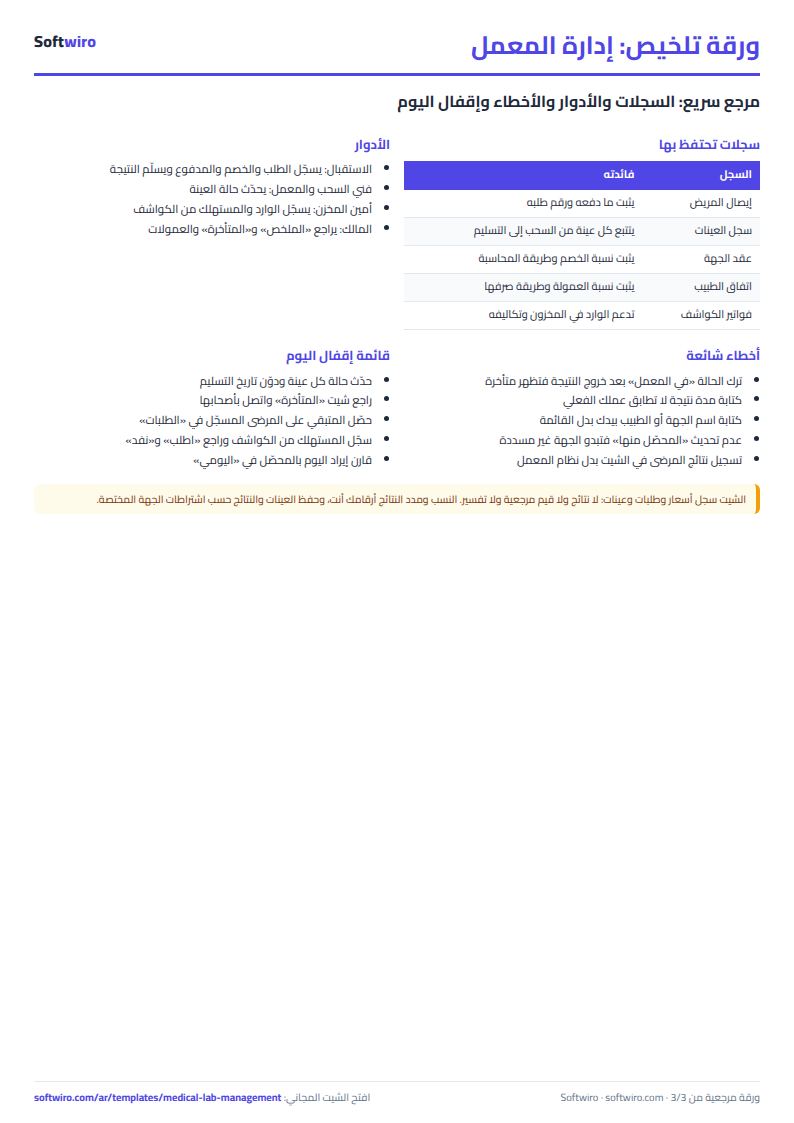
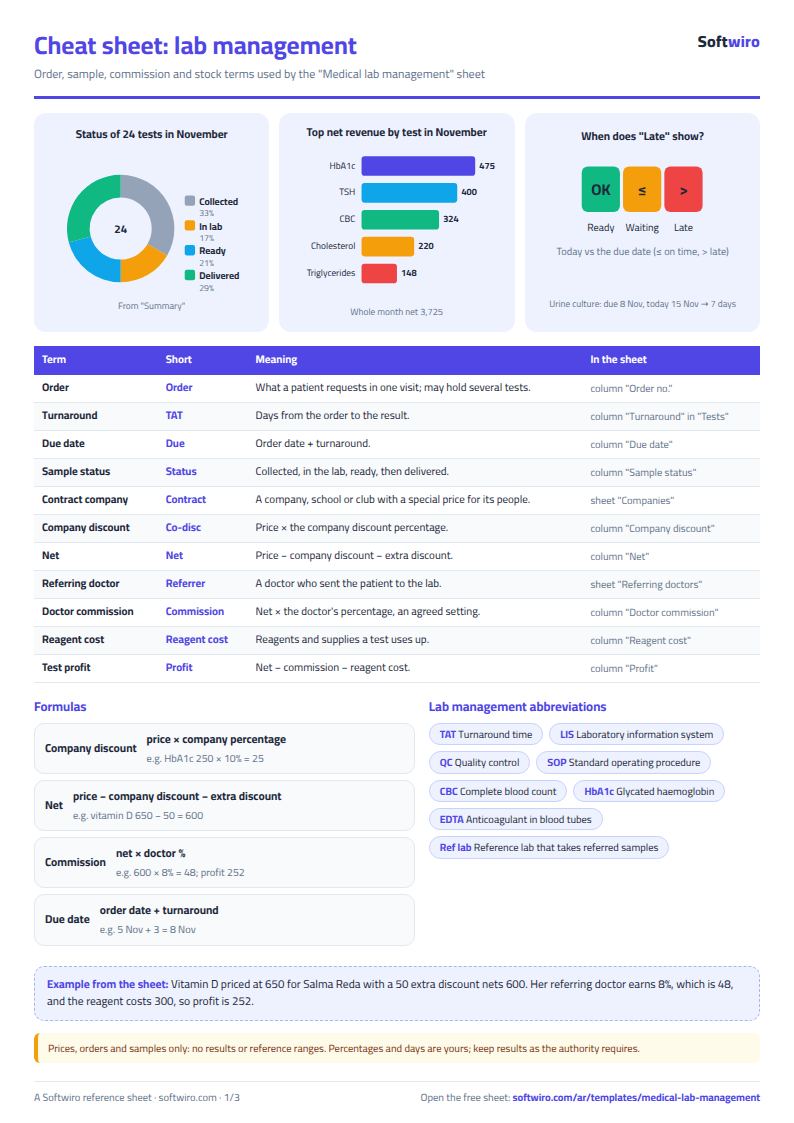
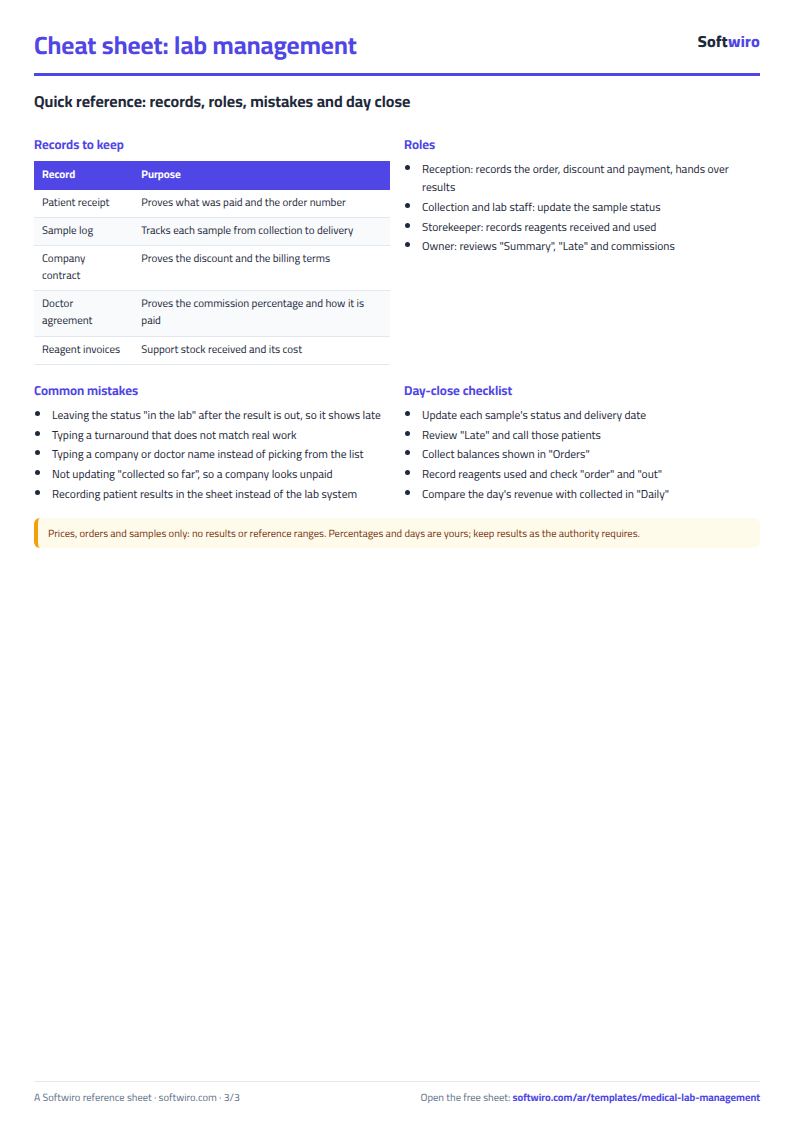
Terms, abbreviations, tables and diagrams over several pages, in Arabic and English. Download it as a PDF or images, including a phone-size version.
Still running this on Excel?
This sheet suits a start and a limited amount of data. If your way of working grows, or you need more than one person working on it at the same time, Softwiro can build you a program that fits the way you work.
| In this sheet | In Custom Software from Softwiro |
|---|---|
| One file that one person edits at a time, and copies reach you on WhatsApp. | A program with a login for each user and permissions you define, and everyone sees the same data. |
| You type everything and check the numbers by hand. | We design the screens around your work steps, so each person records only what concerns them. |
| Columns and formulas are fixed as the sheet was designed. | We build what you need: reports, alerts and screens your way. |
| Backups and security are your own responsibility. | The program runs on a secured server with regular backups. |
Frequently asked questions
How do I know that a test result is late?
Enter each test's turnaround time in days in the «التحاليل» (Tests) tab. Result due date = order date + turnaround time, and if it has passed and the status is not "ready" or "delivered", the test shows as "late" in «الطلبات» (Orders) and «المتأخرة» (Late).
How is the referring doctor's commission calculated?
Commission on a test = its net x the doctor's percentage in the «المحوِّلون» (Referrers) tab. The percentage is a setting you agree and edit, and check that this arrangement is permitted under local law.
How does the sheet handle contract companies?
Enter the company and its discount percentage in «الشركات» (Companies) and pick it on the test row. The discount is taken off the price, the test's net is charged to the company rather than the patient, and you track what you have collected from it and what remains.
Does the sheet store test results or reference ranges?
No. The sheet is for prices, orders, samples and accounts, and contains no results, reference ranges or interpretation. Keep patients' results in your own lab system.
Is the template free?
Yes, with no sign-up and no email address. Use it, edit it and share it as you like.
Does it work in Google Sheets and on mobile?
The sheet uses formulas supported by Excel 2016 and later, Google Sheets and LibreOffice, so you can upload it to Google Drive and open it with Google Sheets on a computer or a phone.
What is the difference between the white and the gray cells?
You type in the white cells; the gray cells are calculated automatically. Don't type in a gray cell, or you will erase its formula.
Can I use the sheet from an AI assistant?
Yes. Add our MCP server (URL https://softwiro.com/api/mcp, no key needed) to your assistant and ask it to do the calculation in this template. The numbers come from the sheet's own formulas, and we do not store your data. The steps and a ready-made prompt are in this article: https://softwiro.com/blog/mcp-excel-templates-ai-agent-guide.html
More free templates for: Pharmacies and clinics
More free templates
- Pharmacy expiry and stock tracking sheet
- Clinic appointments tracker (Excel)
- Dental clinic treatment plans tracker (Excel)
- Complete clinic management sheet
- Pharmacy management sheet: sales, purchases, shortages and suppliers
- Small hospital management sheet: departments, beds, admissions and revenue
- Metal and turning workshop job sheet in Excel: job orders, materials and labor
- Glass and aluminium workshop sheet in Excel: orders by square metre, cutting and waste
- Carpentry workshop sheet: cutting list, boards, cost and delivery
- Garment printing shop sheet in Excel: DTF and screen print orders and cost
- Arabic grammar summary sheet: rules, i'rab and a self-test with examples
- English grammar rules sheet in Excel: tenses and structures with examples
- Taxi, Uber and ride-hailing driver income sheet (trips, fuel, commission, daily net)
- Personal car maintenance log (oil and filter dates by kilometre and months)