Try the sheet here, on the example
The sheet is open below with sample numbers. Change any white cell and watch the results update, or press the blank-copy button to type your own data from scratch. Nothing you type leaves your browser.
Example from the sheet
| الكود | الاسم التجاري | التصنيف | رصيد افتتاحي | المستلم (شامل البونص) | الرصيد الحالي | تكلفة الوحدة الفعلية | قيمة المخزون (تكلفة) | الحالة |
|---|---|---|---|---|---|---|---|---|
| P001 | ألفاكير شريط 10 أقراص | أدوية بدون وصفة | 30 | 198 | 35 | 15.87 | 555.39 | ناقص |
| P002 | بيتازين شراب 100 مل | أدوية بدون وصفة | 15 | 84 | 34 | 29.41 | 1,000.08 | متوفر |
| P003 | كلوريفا كبسولات | أدوية بوصفة | 12 | 58 | 39 | 74.68 | 2,912.46 | متوفر |
| P004 | دلتاميد أقراص | أدوية بوصفة | 8 | 20 | 19 | 130.00 | 2,470.00 | متوفر |
| P005 | زيتافيت فيتامينات 30 قرص | فيتامينات ومكملات | 10 | 30 | 32 | 87.88 | 2,812.00 | متوفر |
| P006 | أوميجا بلس | فيتامينات ومكملات | 6 | 32 | 3 | 145.26 | 435.79 | ناقص |
| P007 | كمامات طبية 50 قطعة | مستلزمات طبية | 25 | 110 | 94 | 37.04 | 3,481.48 | متوفر |
| P008 | شاش معقم | مستلزمات طبية | 40 | 100 | 49 | 12.00 | 588.00 | متوفر |
| P009 | جهاز قياس ضغط | مستلزمات طبية | 4 | 4 | 2 | 650.00 | 1,300.00 | ناقص |
| P010 | كريم ترطيب 50 جم | عناية بالبشرة والشعر | 10 | 52 | 17 | 51.01 | 867.14 | متوفر |
| P011 | شامبو للعناية 200 مل | عناية بالبشرة والشعر | 14 | 26 | 0 | 64.40 | 0.00 | نفد |
| P012 | لبن أطفال مرحلة 1 | أطفال ورضع | 8 | 40 | 14 | 190.00 | 2,660.00 | متوفر |
| P013 | حفاضات أطفال | أطفال ورضع | 10 | 55 | 18 | 110.77 | 1,993.85 | متوفر |
Example from the “الأصناف” tab (Arabic), with the numbers and formulas that are in the file.
What is inside
- الإعدادات: Settings: any date inside the summary month, the first month of the monthly table, the multiplier on the minimum level for order quantity, and the item categories (up to 8).
- الموردون: Suppliers: each supplier's name and mobile, with their number of invoices, net purchases, units received, amount paid, balance owed and status. Holds up to 50 suppliers.
- الأصناف: Items: code, trade name, category, unit, list purchase price, selling price, minimum level, usual supplier and opening balance. It then shows received, bonus, sold, current balance, actual unit cost, stock value, profit margin, status and order quantity. Holds up to 200 items.
- المشتريات: Purchases: one row per item on a supplier invoice with date, invoice number, supplier, code, quantity bought, bonus, unit price and discount percentage. The sheet works out total units, discount value, net row amount, actual unit cost and bonus value. Holds up to 400 rows.
- المبيعات: Sales: one row per sale with date, code, quantity, payment type (cash or contract), discount percentage and the payer's percentage. The sheet works out the selling price, net sale, the payer's share, what the customer pays, cost and gross profit. Holds up to 900 rows.
- دفعات الموردين: Supplier payments: each amount you paid a supplier with its date and payment method, and a warning if the supplier is not registered. Holds up to 250 payments.
- المبيعات اليومية: Daily sales: each day of the summary month with the number of sale rows, net sales, cash, the contract payers' share, cost and gross profit.
- النواقص: Shortages: items that have run out or fallen below their minimum level, sorted by largest quantity needed, with the usual supplier, actual unit cost and order cost. Shows the first 50 items.
- الملخص: Summary: the month's sales, gross profit, purchases, bonus value, stock value, number of shortages and total owed to suppliers, a profit table by category, a six-month table and three charts.
The file opens on a start tab (“ابدأ هنا”, Start here) that explains how to use it.
What makes it different
Enter an invoice once and the sheet knows what each unit really cost you after bonus and discount. From that it works out the gross profit on every sale and every category, tells you what you are short of and how much you owe each supplier, so you do not need to add up figures from notebooks.
How to use it
- In "الإعدادات" (Settings) enter any date inside the month you want summarised, the first month of the monthly table, the multiplier on the minimum level for order quantity, and the item categories.
- In "الموردون" (Suppliers) enter each supplier's name and mobile. In "الأصناف" (Items) enter the code, trade name, category, unit, list purchase price, selling price, minimum level, usual supplier and opening balance.
- In "المشتريات" (Purchases) record each item on a supplier invoice: date, invoice number, supplier, code, quantity bought, bonus quantity, unit price and discount percentage. The sheet works out the invoice net and the actual unit cost after bonus and discount.
- In "المبيعات" (Sales) record each sale: date, code, quantity, payment type (cash or contract), discount percentage and, for a contract sale, the payer's percentage.
- In "دفعات الموردين" (Supplier payments) record every amount you pay a supplier. The balance owed to each supplier then shows in "الموردون" (Suppliers).
- Open "النواقص" (Shortages) to find items that have run out or fallen below the minimum, with a suggested order quantity and its cost. Open "المبيعات اليومية" (Daily sales) and "الملخص" (Summary) for the month's figures and profit by category.
Before you start:
- This sheet is for accounts and stock only. It has no doses or therapeutic information and does not replace review by the competent authority.
- Expiry dates have their own sheet, "متابعة صلاحية وأرصدة أدوية الصيدلية" (pharmacy drug expiry and stock tracker), so do not record them twice here.
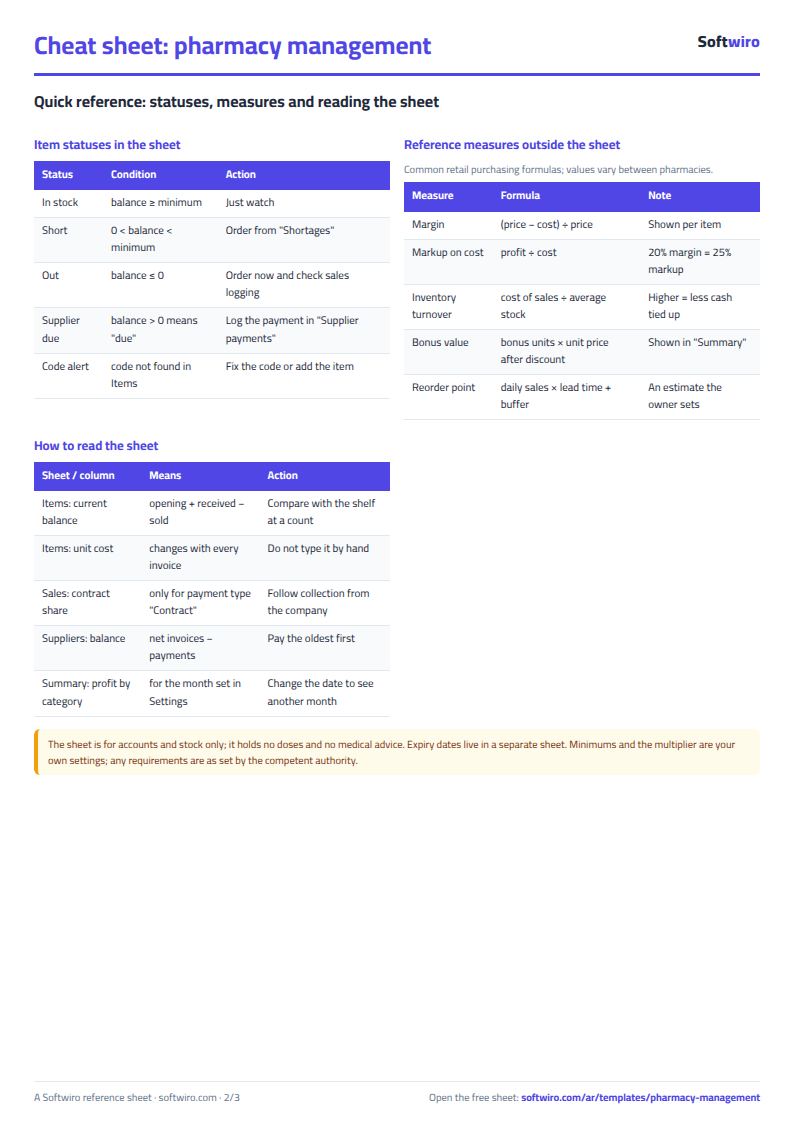
- Balance = opening balance + received (purchased + bonus) - sold. Items shown as short are those with a balance below the minimum level, and "out of stock" means a balance of zero or less.
- Actual unit cost = (opening balance x purchase price + net of the item's invoices) / (opening balance + units received including bonus). So bonus units lower the unit cost.
- Gross profit = net sale - (quantity x actual unit cost). Net sale = quantity x selling price - discount. Payer's share = net x the payer's percentage, and the customer pays the rest.
- Suggested order quantity = minimum level x multiplier - balance, rounded up. The multiplier is a number you set from experience.
- Supplier balance = net invoices - payments. The sheet holds 200 items, 50 suppliers, 400 purchase rows, 900 sales rows and 250 payments, and "النواقص" (Shortages) shows the first 50 items.
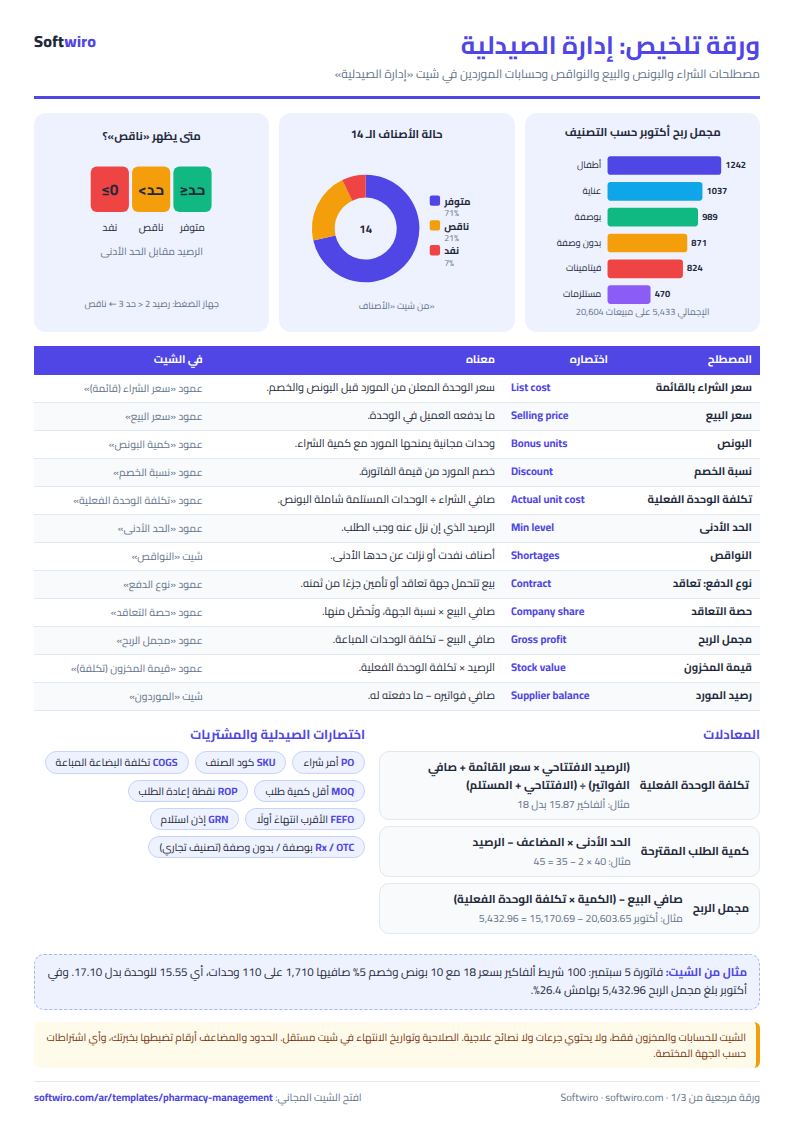
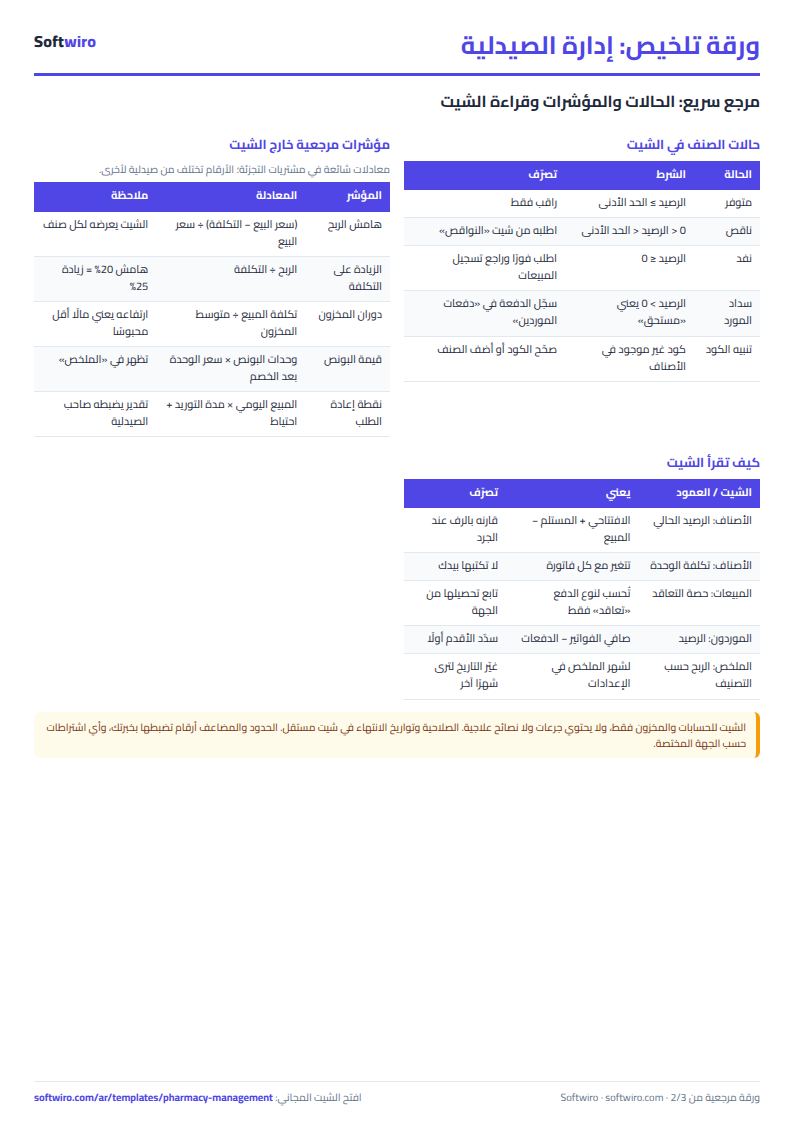
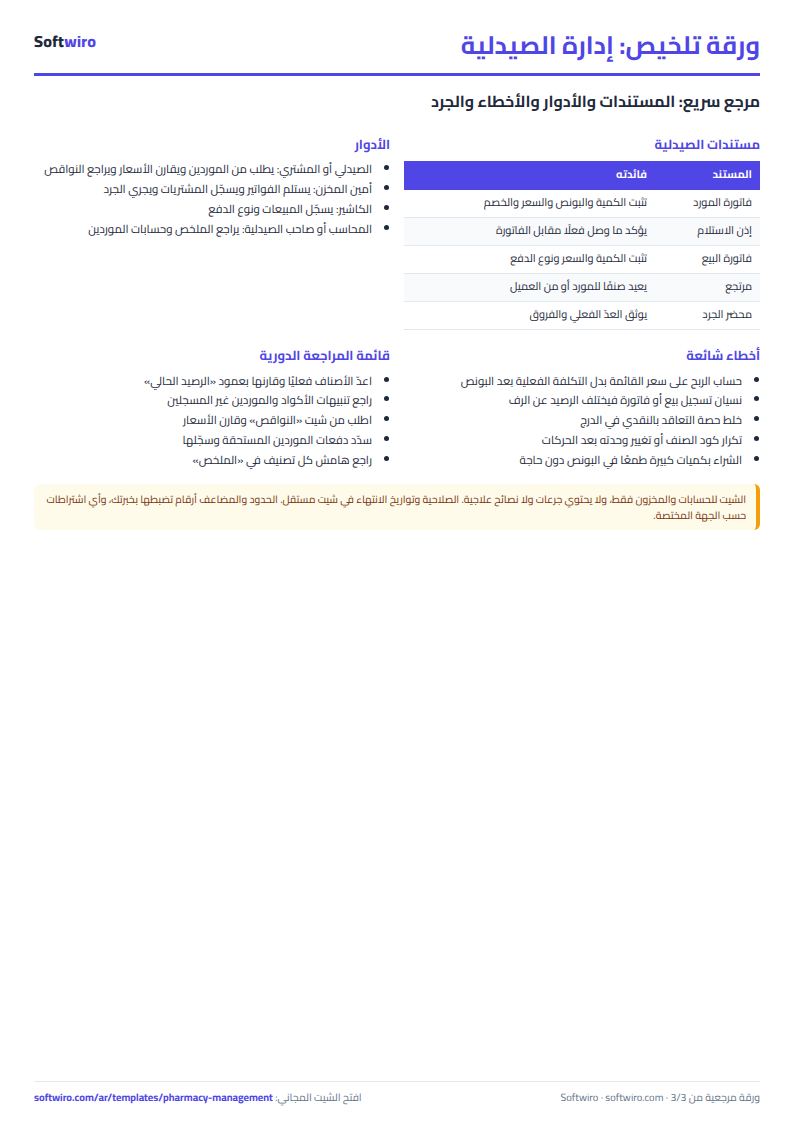
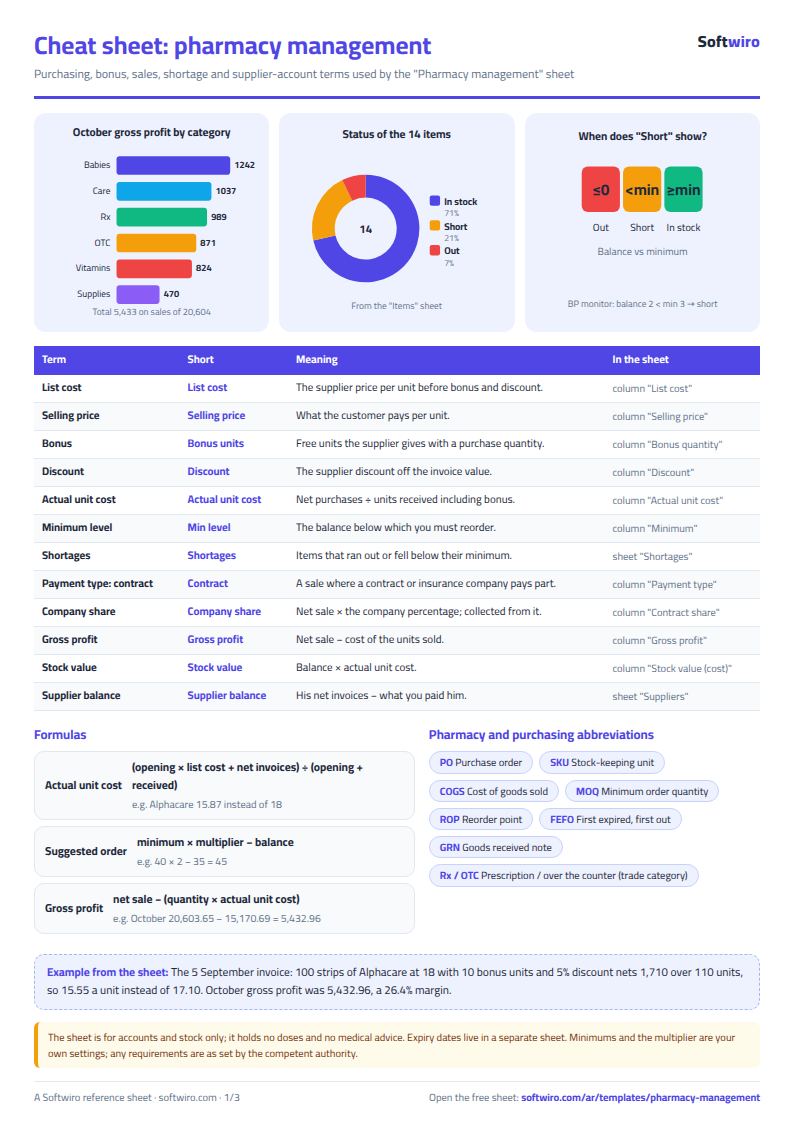
Free cheat sheet for this field
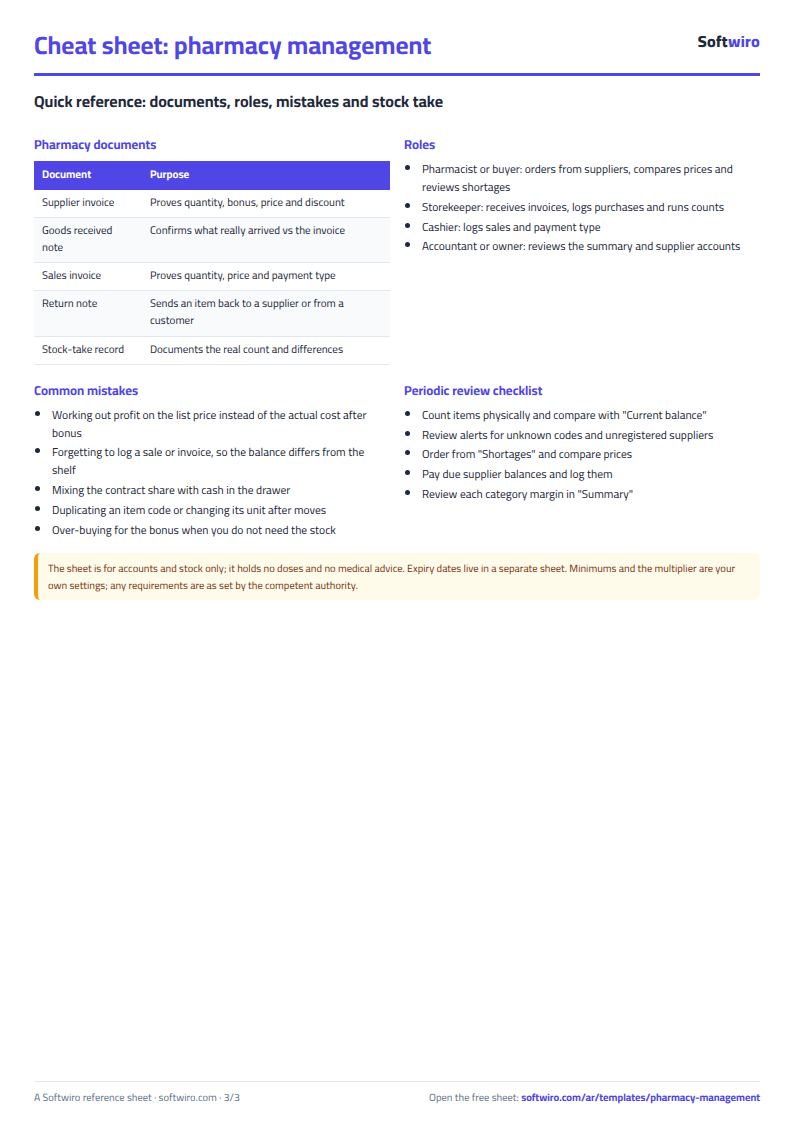
Terms, abbreviations, tables and diagrams over several pages, in Arabic and English. Download it as a PDF or images, including a phone-size version.
Still running this on Excel?
This sheet depends on someone checking the shelves and typing in the items by hand. Sehaty tracks the pharmacy's stock item by item, warns you before an item runs out rather than after, and records dispensing against the e-prescription itself.
| In this sheet | In MyClinic (Sehaty) — Clinic, Pharmacy and Supplier Platform |
|---|---|
| You discover an item is short when a patient asks for it. | Sehaty tracks stock item by item and warns you before an item runs out, not after. |
| The prescription is a paper that can get lost or be hard to read, and no trace of dispensing remains. | The consultation produces an e-prescription in the patient's medical file, and the pharmacy records dispensing against that same prescription. |
| You learn what pharmacies need late, through reports and phone calls. | The supplier sees a digital catalog that reaches pharmacies and warehouses, and sees demand as it comes in. |
| The patient phones several clinics to book. | The patient searches for appointments by specialty and location and books without a phone call. |
See MyClinic (Sehaty) — Clinic, Pharmacy and Supplier Platform · Ask for a demo
Frequently asked questions
How do I calculate actual unit cost when a supplier gives bonus units?
In "المشتريات" (Purchases) enter the quantity bought, bonus quantity, unit price and discount percentage. The sheet calculates net = quantity x price - discount, then divides it by the units received including the bonus. For example, you buy 100 at 18 and get 10 bonus with a 5% discount: net is 1,710 and units are 110, so the unit cost is 15.55 instead of 17.10.
How does the sheet handle sales where an insurer or contracted payer pays a share?
Choose the payment type "تعاقد" (contract) and enter the payer's percentage on the sale row. The payer's share is taken from the net sale and the rest is left for the customer. The summary shows the contract share to be collected for the month. It does not track collection from the payer, so record that in your own ledger.
How is the suggested shortage quantity calculated?
Minimum level x the multiplier in the settings - current balance, rounded up. It appears for items whose balance is below the minimum level or zero. You set the multiplier from experience of how fast each item sells and how quickly the supplier delivers.
Do I record expiry dates in this sheet?
No. Expiry dates and batches have their own sheet, "متابعة صلاحية وأرصدة أدوية الصيدلية" (pharmacy drug expiry and stock tracker). This sheet focuses on buying, selling and suppliers, and has no doses or therapeutic information.
Is the template free?
Yes, with no sign-up and no email address. Use it, edit it and share it as you like.
Does it work in Google Sheets and on mobile?
The sheet uses formulas supported by Excel 2016 and later, Google Sheets and LibreOffice, so you can upload it to Google Drive and open it with Google Sheets on a computer or a phone.
What is the difference between the white and the gray cells?
You type in the white cells; the gray cells are calculated automatically. Don't type in a gray cell, or you will erase its formula.
Can I use the sheet from an AI assistant?
Yes. Add our MCP server (URL https://softwiro.com/api/mcp, no key needed) to your assistant and ask it to do the calculation in this template. The numbers come from the sheet's own formulas, and we do not store your data. The steps and a ready-made prompt are in this article: https://softwiro.com/blog/mcp-excel-templates-ai-agent-guide.html
More free templates for: Pharmacies and clinics
More free templates
- Pharmacy expiry and stock tracking sheet
- Clinic appointments tracker (Excel)
- Dental clinic treatment plans tracker (Excel)
- Complete clinic management sheet
- Medical lab management sheet
- Small hospital management sheet: departments, beds, admissions and revenue
- Metal and turning workshop job sheet in Excel: job orders, materials and labor
- Glass and aluminium workshop sheet in Excel: orders by square metre, cutting and waste
- Carpentry workshop sheet: cutting list, boards, cost and delivery
- Garment printing shop sheet in Excel: DTF and screen print orders and cost
- Arabic grammar summary sheet: rules, i'rab and a self-test with examples
- English grammar rules sheet in Excel: tenses and structures with examples
- Taxi, Uber and ride-hailing driver income sheet (trips, fuel, commission, daily net)
- Personal car maintenance log (oil and filter dates by kilometre and months)