Try the sheet here, on the example
The sheet is open below with sample numbers. Change any white cell and watch the results update, or press the blank-copy button to type your own data from scratch. Nothing you type leaves your browser.
Example from the sheet
| رقم الطلب | العميل | القطعة | الكمية | الحالة | إجمالي الطلب | المدفوع | المتبقي | الربح | تنبيه |
|---|---|---|---|---|---|---|---|---|---|
| P001 | أكاديمية النجوم الرياضية | من الورشة | 40 | تم التسليم | 11,161.60 | 8,000.00 | 3,161.60 | 5,041.60 | |
| P002 | مدرسة الأمل الخاصة | من العميل | 120 | تم التسليم | 1,482.00 | 1,482.00 | 0.00 | 588.00 | |
| P003 | مقهى الجسر | من الورشة | 18 | جاهز | 5,395.50 | 2,200.00 | 3,195.50 | 1,876.50 | متأخر 18 يوم |
| P004 | شركة الندى للدعاية | من الورشة | 60 | قيد الطباعة | 26,323.20 | 14,000.00 | 12,323.20 | 6,691.20 | متأخر 10 يوم |
| P005 | محمد عبد الله | من العميل | 8 | تم التسليم | 672.00 | 672.00 | 0.00 | 412.00 | |
| P006 | مصنع الرواد | من الورشة | 35 | قيد الطباعة | 5,334.20 | 3,000.00 | 2,334.20 | 1,494.70 | |
| P007 | أكاديمية النجوم الرياضية | من الورشة | 25 | تصميم وموافقة | 4,802.50 | 1,500.00 | 3,302.50 | 1,815.00 | |
| P008 | مدرسة الأمل الخاصة | من الورشة | 200 | جديد | 19,160.00 | 2,500.00 | 16,660.00 | 8,360.00 | |
| P009 | ياسر مجدي (دفعة تخرج) | من العميل | 15 | جديد | 1,263.15 | 0.00 | 1,263.15 | 783.75 |
Example from the “الطلبات” tab (Arabic), with the numbers and formulas that are in the file.
What is inside
- "الإعدادات" (Settings): Today's date, the minimum profit margin, the usable film roll width, the roll waste rate and the first month in the summary.
- "قواعد الأسعار" (Price rules): For each print method: the pricing basis (area, colors or thousands of stitches), unit price, minimum price per print, setup fee, and material and labor cost, plus a quantity discount table with thresholds and rates. It holds 8 methods.
- "الملابس" (Garments): The blank garments the shop sells, with cost and selling price. Beside them: received, used in orders, balance, status (available, reorder or out) and stock value. It holds 40 garments.
- "المستهلكات" (Consumables): Film, powder, ink and paper: the balance and the quantity used (calculated from the prints), status and stock value. Beside each consumable is the method it serves and its consumption per meter of film or per color. It holds 30 consumables.
- "الطلبات" (Orders): One line per order with its customer, quantity, due date, status and deposit, and whether the garment comes from the customer or the shop. The sheet works out garment price, print revenue, quantity discount, total, balance owed, cost, profit, margin and a late alert. It holds 200 orders.
- "الطبعات" (Prints): One line per print position in the order: method and size, colors or stitches. It shows the price per piece before and after the discount, the setup fee, the print's revenue and cost, and the meters of film. It holds 500 lines.
- "الدفعات" (Payments): Each amount the customer pays after the deposit, with the order number and payment method. It holds 300 payments.
- "المتابعة" (Follow-up): Orders past their delivery date, with days late, and orders with a balance owed, sorted from the largest.
- "الملخص" (Summary): Open and late orders and pieces, garment value, print revenue, collected, balance owed, cost, profit, margin and quantity discounts, with tables by method, month and status and three charts.
The file opens on a start tab (“ابدأ هنا”, Start here) that explains how to use it.
What makes it different
The price comes from a written rule, not a guess each time. The size, colors or stitches are multiplied by the method's price, then the quantity discount is applied and the setup fee is added once. In the order itself you compare the price with the cost of the garment, materials and labor, so you know the profit before you accept it.
How to use it
- In the "الإعدادات" (Settings) sheet, enter today's date, the minimum profit margin and the usable film roll width. In "قواعد الأسعار" (Price rules), enter the price and cost of each print method and the quantity discount table.
- In the "الملابس" (Garments) sheet, enter the blank garments the shop sells: cost, selling price and balance. In "المستهلكات" (Consumables), enter film, powder and ink and how much a unit of each uses.
- In the "الطلبات" (Orders) sheet, record each order: date, customer, quantity, delivery date and deposit. Choose whether the garment is "من العميل" (from the customer) or "من الورشة" (from the shop) and choose its code.
- In the "الطبعات" (Prints) sheet, enter one line per print position in the order (chest, back or sleeve): order number, method, and the size in centimeters, number of colors or thousands of stitches.
- The sheet works out the price per piece from the method's rule, then the discount by order quantity. It adds up the prints and the price of the blank garment into the order total, and works out the cost, profit and balance owed.
- Open "المتابعة" (Follow-up) to see late orders and who owes a balance, "الملابس" (Garments) and "المستهلكات" (Consumables) to see what to buy, and "الملخص" (Summary) for the figures and charts.
Before you start:
- Price per piece for a print = size in cm² × price per cm² (DTF and sublimation), or number of colors × price per color (screen print), or thousands of stitches × price per thousand (embroidery). The price never goes below the "minimum price per print" in the rules.
- The setup fee is charged once per order, not per piece: in screen printing it is charged per color (screen preparation), and in the other methods it is a fixed amount if there is one. Leave it at zero if you do not charge a fee.
- The quantity discount comes from the "قواعد الأسعار" (Price rules) table. It applies to the print price only, not to the price of the blank garment, at the rate for the largest threshold that does not exceed the order quantity.
- A garment "من الورشة" (from the shop) is counted at its selling price in revenue and at its cost price in cost, and is deducted from its balance in "الملابس" (Garments). A garment "من العميل" (from the customer) counts in neither revenue, cost nor stock.
- Film use in meters = print area × pieces ÷ (roll width × 100), plus the waste rate. The powder and ink consumption rates per meter of film are figures you set from your own experience, and the figures in the example are trial values.
- The materials cost in an order comes from "قواعد الأسعار" (Price rules), while "المستهلكات" (Consumables) tracks only quantities and balances. Capacity: 8 methods, 200 orders, 500 print lines, 40 blank garments, 30 consumables and 300 payments.
Free cheat sheet for this field
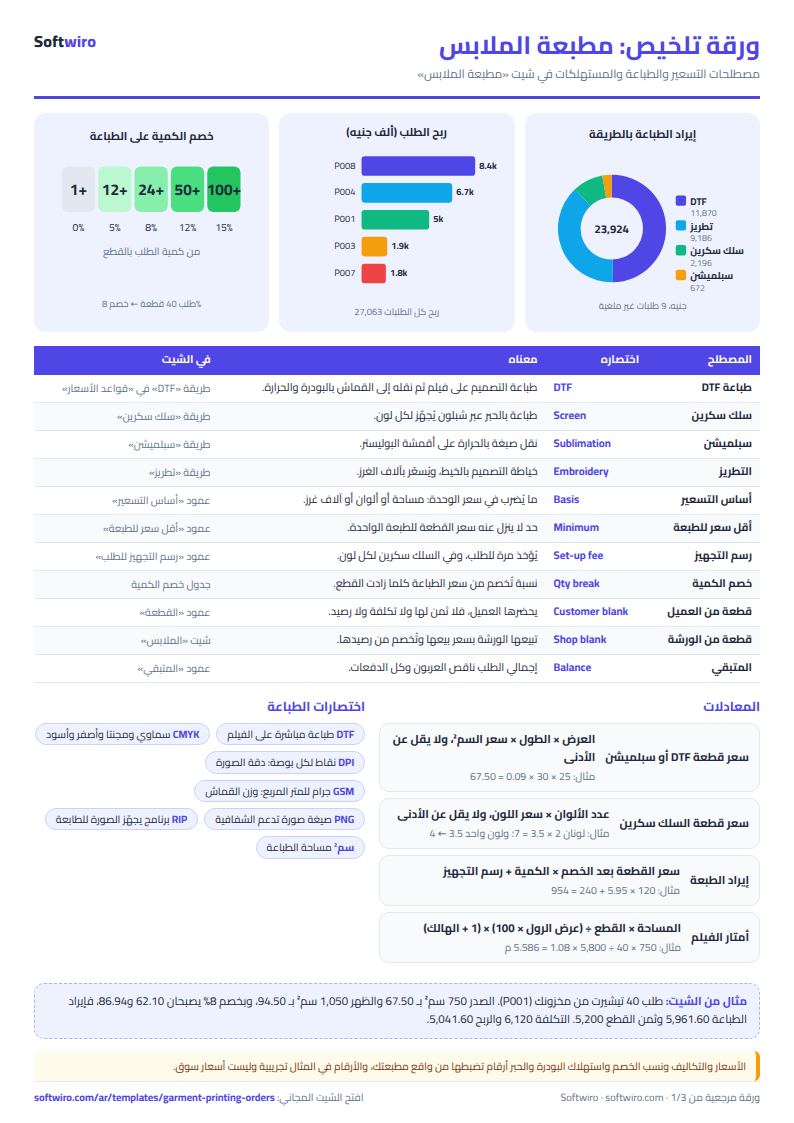
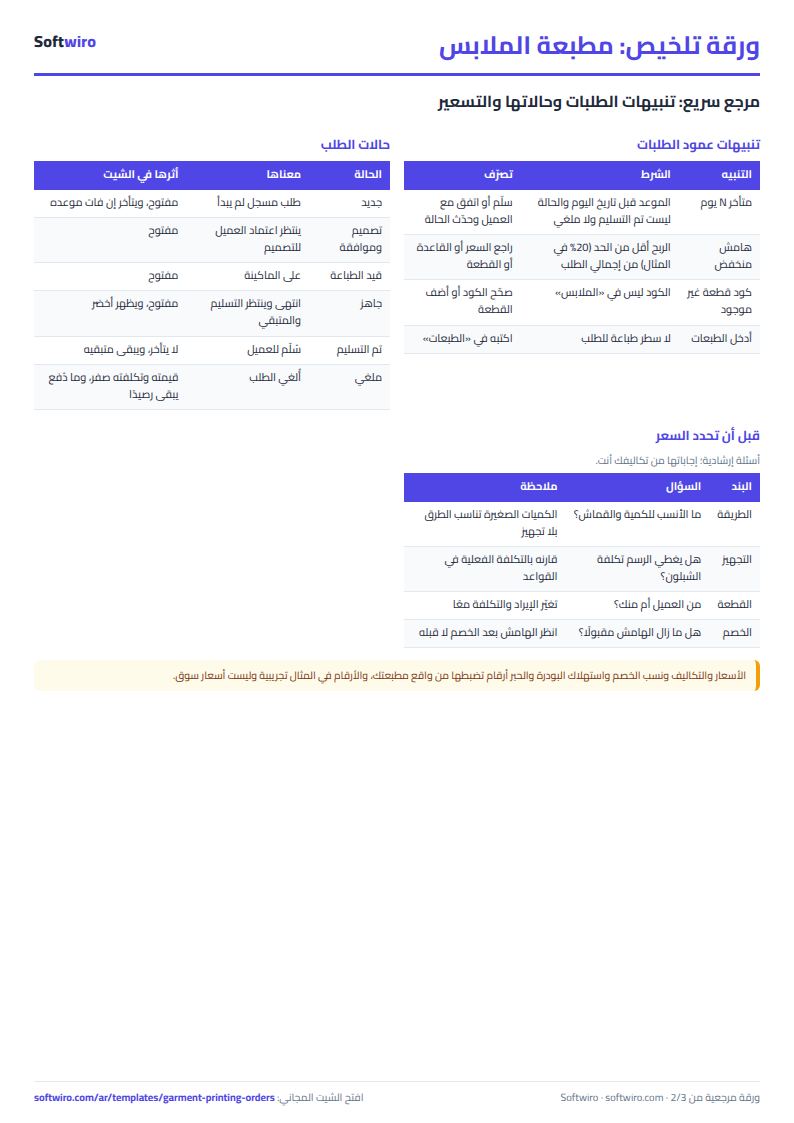
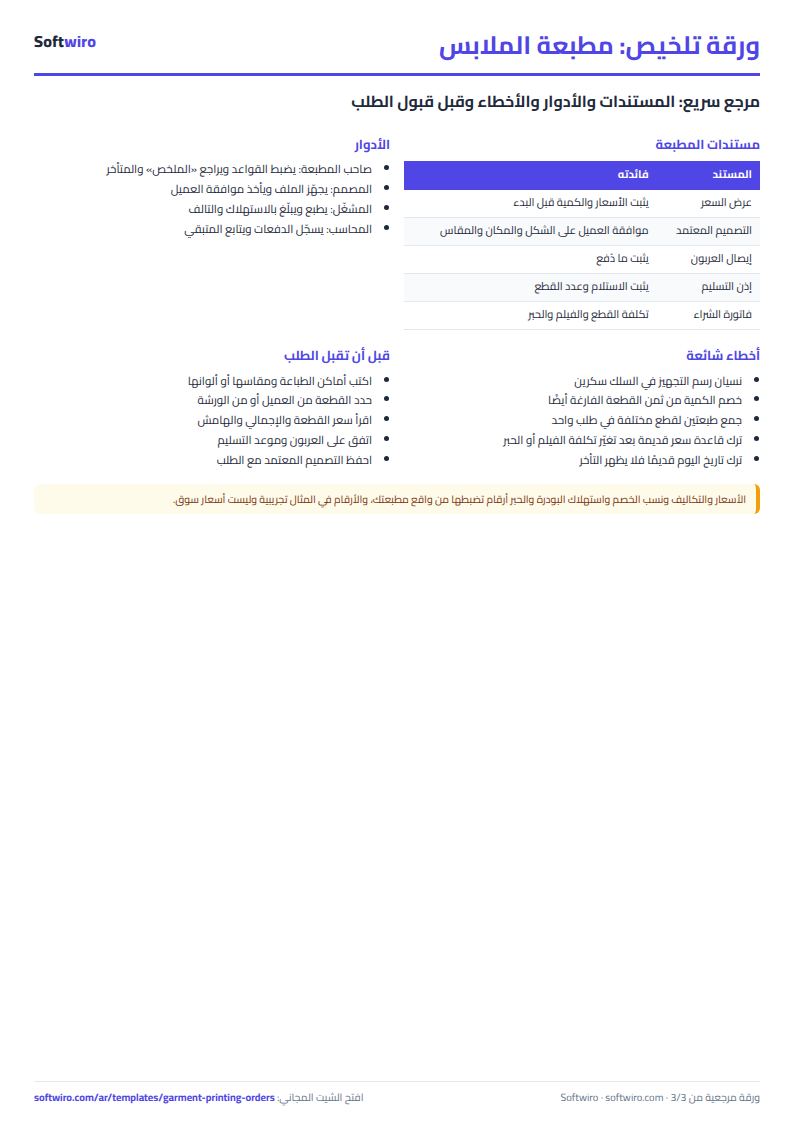
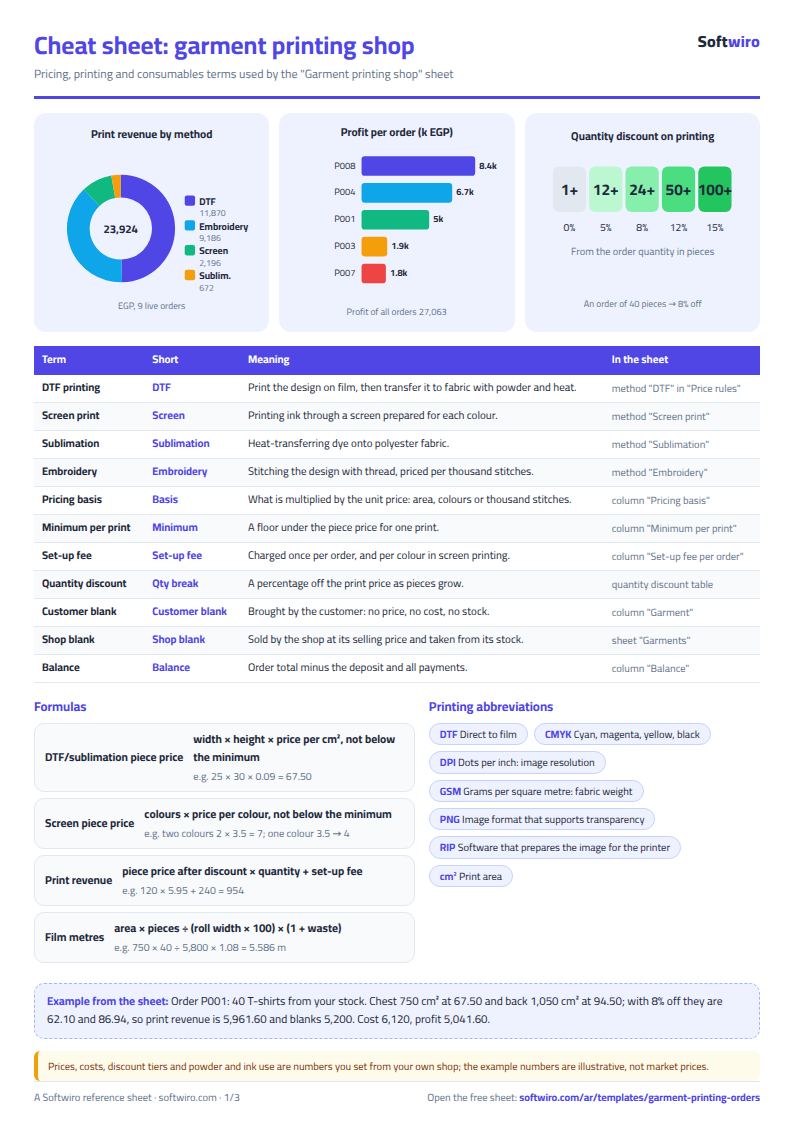
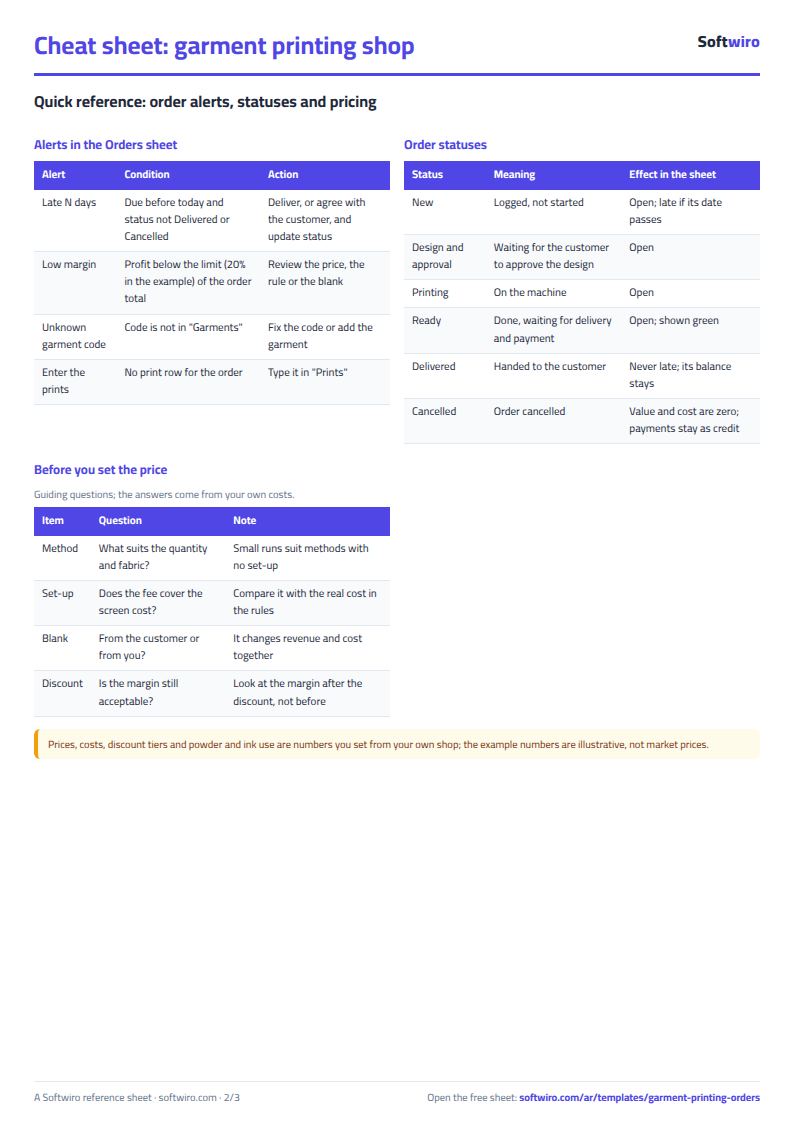
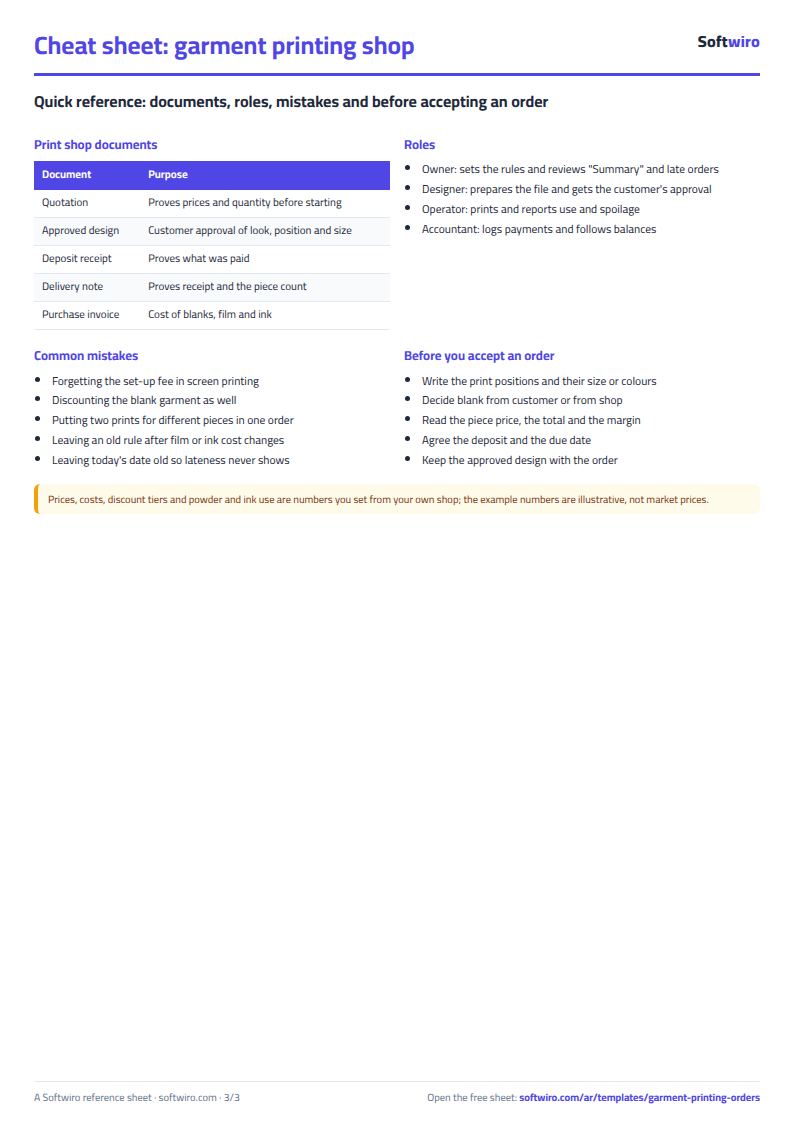
Terms, abbreviations, tables and diagrams over several pages, in Arabic and English. Download it as a PDF or images, including a phone-size version.
Still running this on Excel?
This sheet suits a start and a limited amount of data. If your way of working grows, or you need more than one person working on it at the same time, Softwiro can build you a program that fits the way you work.
| In this sheet | In Custom Software from Softwiro |
|---|---|
| One file that one person edits at a time, and copies reach you on WhatsApp. | A program with a login for each user and permissions you define, and everyone sees the same data. |
| You type everything and check the numbers by hand. | We design the screens around your work steps, so each person records only what concerns them. |
| Columns and formulas are fixed as the sheet was designed. | We build what you need: reports, alerts and screens your way. |
| Backups and security are your own responsibility. | The program runs on a secured server with regular backups. |
Frequently asked questions
How do I price DTF printing by size?
In "قواعد الأسعار" (Price rules), enter the price per cm² and the minimum price per print. Then in "الطبعات" (Prints), enter the design width and length in centimeters. Price per piece = width × length × price per cm², and it never goes below the minimum price.
How does the setup fee work in screen printing?
It is charged once per order, not per piece, and is multiplied by the number of colors because each color needs its own screen. Enter it in the "رسم التجهيز للطلب" (Setup fee per order) column for the screen print method.
Does the quantity discount apply to the price of the blank garment?
No. The discount applies to the print price only, according to the order quantity and the threshold table. The price of a blank garment from your stock is charged at its selling price as it is.
Does the sheet calculate film and ink quantities?
It works out the meters of film from the print area, the number of pieces and the roll width. It then multiplies by the powder and ink consumption per meter that you enter in "المستهلكات" (Consumables), deducts them from the balance and alerts you at the minimum level.
Is the template free?
Yes, with no sign-up and no email address. Use it, edit it and share it as you like.
Does it work in Google Sheets and on mobile?
The sheet uses formulas supported by Excel 2016 and later, Google Sheets and LibreOffice, so you can upload it to Google Drive and open it with Google Sheets on a computer or a phone.
What is the difference between the white and the gray cells?
You type in the white cells; the gray cells are calculated automatically. Don't type in a gray cell, or you will erase its formula.
Can I use the sheet from an AI assistant?
Yes. Add our MCP server (URL https://softwiro.com/api/mcp, no key needed) to your assistant and ask it to do the calculation in this template. The numbers come from the sheet's own formulas, and we do not store your data. The steps and a ready-made prompt are in this article: https://softwiro.com/blog/mcp-excel-templates-ai-agent-guide.html
More free templates for: Garment factories
More free templates
- Garment style costing sheet
- Production tracking sheet by stage
- Piece-rate payroll and worker efficiency sheet
- Fabric requirements and marker sheet
- Arabic grammar summary sheet: rules, i'rab and a self-test with examples
- English grammar rules sheet in Excel: tenses and structures with examples
- Taxi, Uber and ride-hailing driver income sheet (trips, fuel, commission, daily net)
- Personal car maintenance log (oil and filter dates by kilometre and months)
- Parking garage management sheet (hourly and monthly)
- Car wash management sheet (packages, cards, workers, materials)
- Food factory sheet in Excel: recipes, batches, cost and shelf life
- Biscuit factory sheet: dough, lines, packing and scrap