Try the sheet here, on the example
The sheet is open below with sample numbers. Change any white cell and watch the results update, or press the blank-copy button to type your own data from scratch. Nothing you type leaves your browser.
Example from the sheet
| النوع | هذا الشهر | نسبة من الإيراد | الشهر السابق |
|---|---|---|---|
| اشتراكات | 11,700.00 | 80.1% | 11,400.00 |
| تبرع | 500.00 | 3.4% | 0.00 |
| إيجار مساحة مشتركة | 2,000.00 | 13.7% | 2,000.00 |
| أخرى | 400.00 | 2.7% | 0.00 |
| غير مصنف | 0.00 | 0.0% | 0.00 |
| إجمالي الإيرادات | 14,600.00 | 100.0% | 13,400.00 |
Example from the “تقرير الشهر” tab (Arabic), with the numbers and formulas that are in the file.
What is inside
- "الإعدادات" (Settings): The association's name, the year, the month to report (chosen from a list) and the opening balance, with lists of income types and expense categories whose names you can edit.
- "الإيرادات" (Income): A log of every amount received: date, type (subscriptions, donation, rent of a shared space or other), amount and a note.
- "المصروفات" (Expenses): A log of every amount paid out: date, category, payee, amount, invoice number and a note, with a warning on any expense that has no invoice number.
- "بيانات الشهر" (Month data): One row per month: number of units in arrears, total arrears, maintenance fund balance, open and closed maintenance requests, and decisions carried out and pending.
- "تقرير الشهر" (Monthly report): One A4 page for the chosen month: income by type, expenses by category with each category's percentage of spending, the month's net and its opening and closing balance, each figure compared with the previous month with an up or down arrow, arrears, maintenance fund, requests and decisions, a privacy note and committee signature boxes.
- "ملخص السنة" (Year summary): The twelve months in order: income, expenses, net, and opening and closing balance, with arrears and fund balance for each month recorded.
The file opens on a start tab (“ابدأ هنا”, Start here) that explains how to use it.
What makes it different
You open "تقرير الشهر" (Monthly report) and find the whole month's accounts on one page instead of a scattered sheet of paper and separate messages. Owners see where their subscriptions went and how much is left in the fund, which reduces doubt and arguments. The "no invoice number" warning shows which expense lacks a document before anyone asks about it.
How to use it
- In the "الإعدادات" (Settings) sheet, enter the association's name and the year, choose the month to report from the list, and enter the opening balance (the balance on the first day of the first month you record).
- In the "الإيرادات" (Income) sheet, record every amount received: date, type (subscriptions, donation, rent of a shared space or other), amount and a note.
- In the "المصروفات" (Expenses) sheet, record every amount paid: date, category, payee, amount and invoice number. An expense with no invoice number is flagged.
- In the "بيانات الشهر" (Month data) sheet, enter for each month: units in arrears, total arrears, maintenance fund balance, open and closed maintenance requests, and decisions carried out and pending. You can copy these from other association sheets if you use them.
- Open the "تقرير الشهر" (Monthly report) sheet: everything is calculated for the month you chose, with a comparison with the previous month.
- Print the report on a single A4 page (the print area is already set) or export it as PDF, then pin it on the building notice board or send it to the WhatsApp group after the committee signs.
- The "ملخص السنة" (Year summary) sheet shows the months in order: income, expenses, net and closing balance.
Before you start:
- The report shows totals only, with no owners' names or unit numbers, to protect everyone's privacy. The payees of expenses stay in the "المصروفات" (Expenses) sheet and do not enter the report.
- It is recommended to attach photos of the month's invoices to the report or keep them in a file available to anyone who asks. The sheet counts for you the expenses that have no invoice number.
- The opening balance is the association's balance on the first day of the first month you record. After that the balance carries forward on its own: closing balance = opening balance + income − expenses.
- Choose the month from the list in "الإعدادات" (Settings) to see the report of any month. The month before January is not shown because the sheet covers one year; use a new file for each year.
- The income types and expense categories in "الإعدادات" (Settings) can be renamed. Anything recorded under a type not in the list appears in an "uncategorised" line so it is not lost from the total.
- The sheet holds 1000 income rows, 1000 expense rows and 36 months in "بيانات الشهر" (Month data). These figures can be copied from other arrears, fund, maintenance and decisions sheets into "بيانات الشهر" (Month data).
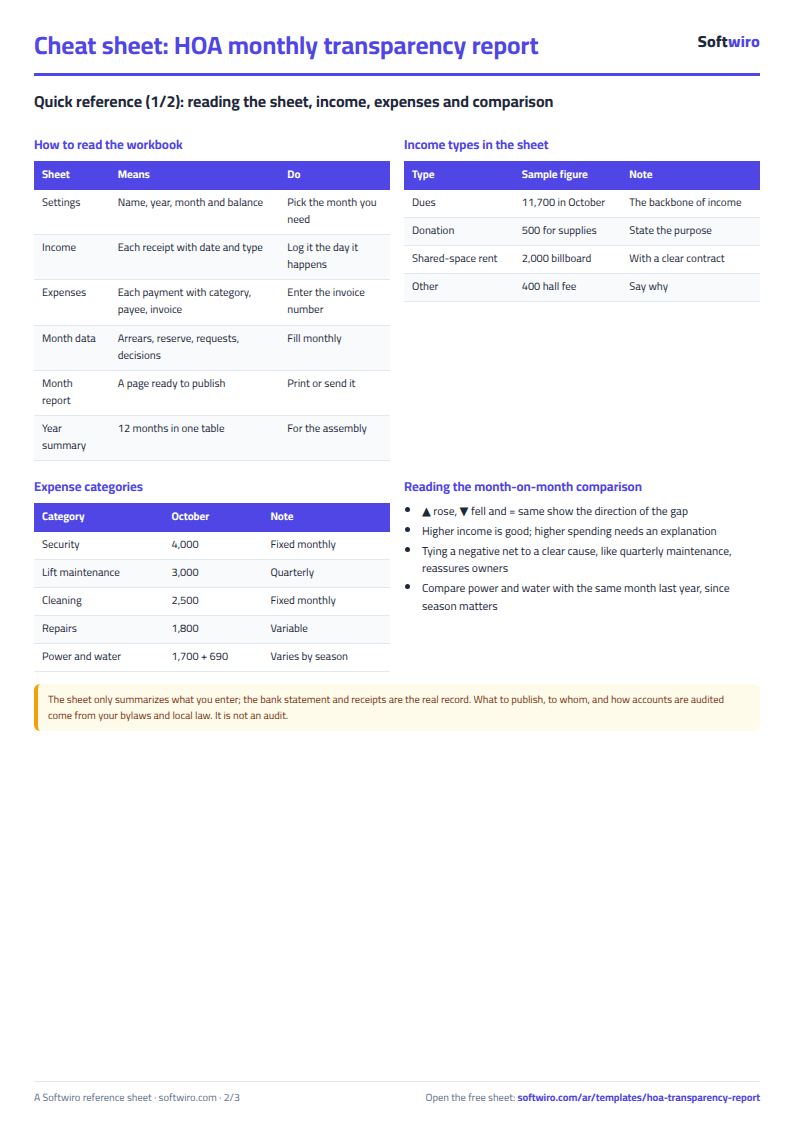
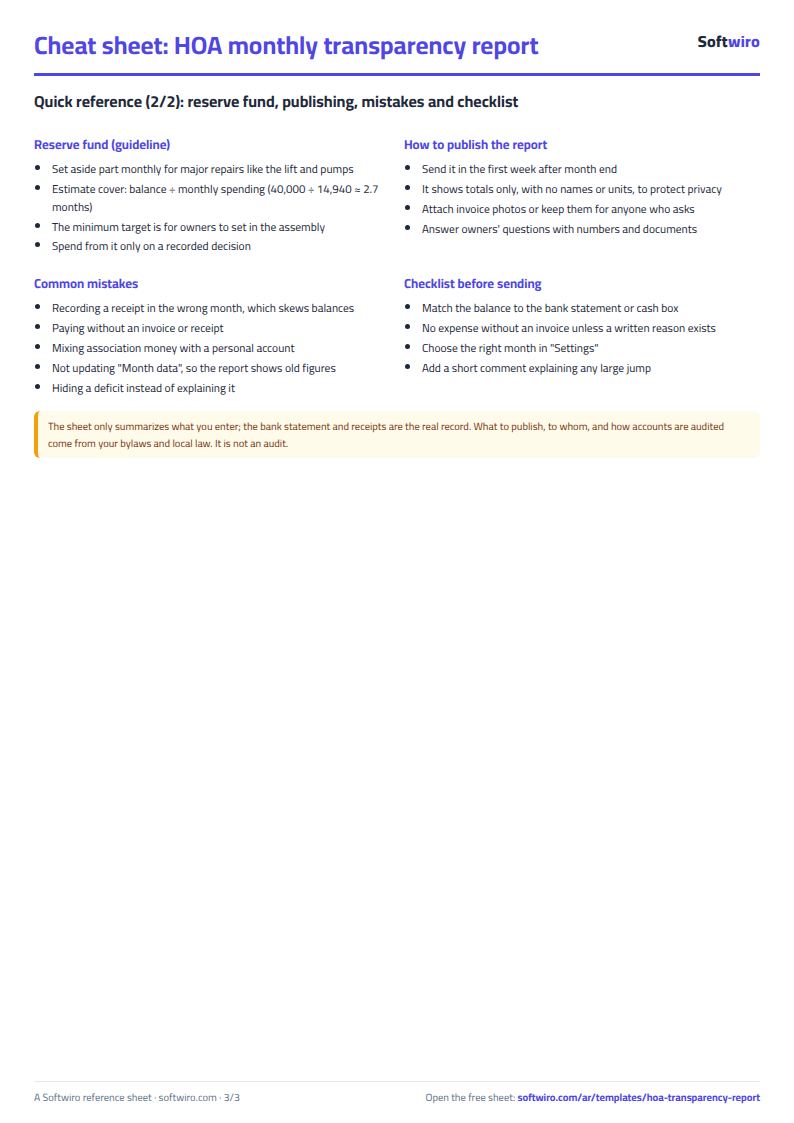
Free cheat sheet for this field
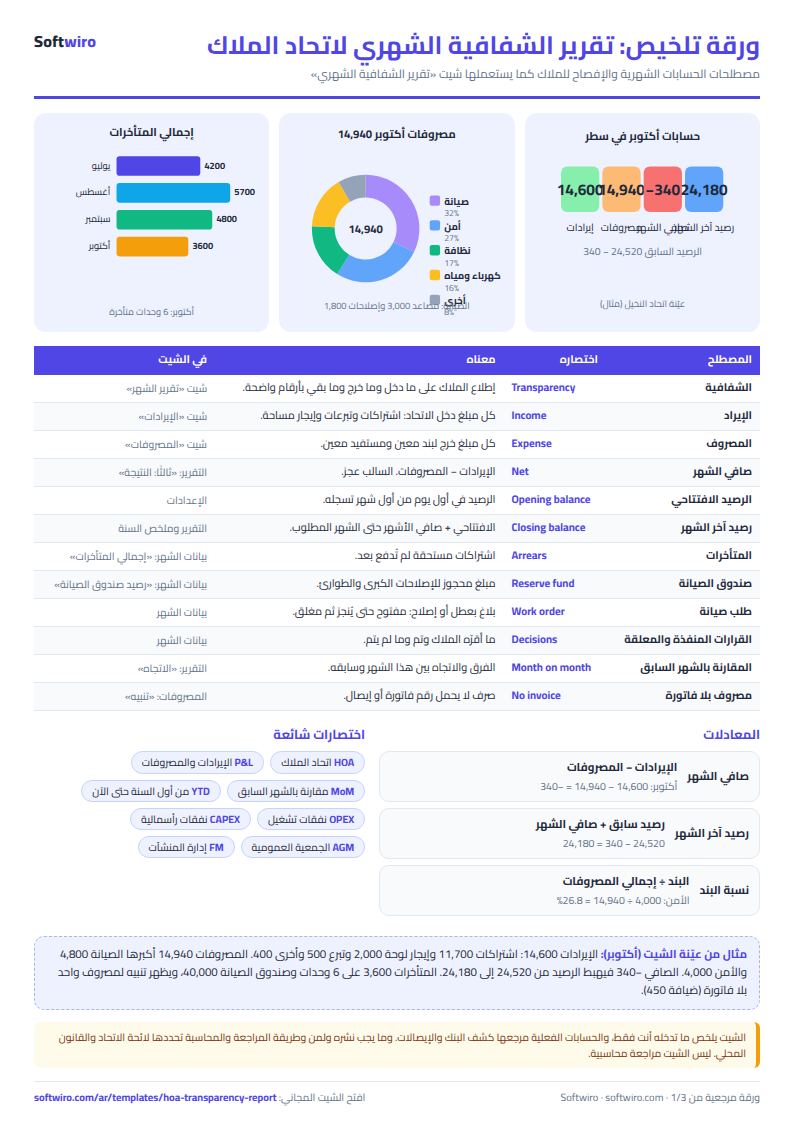
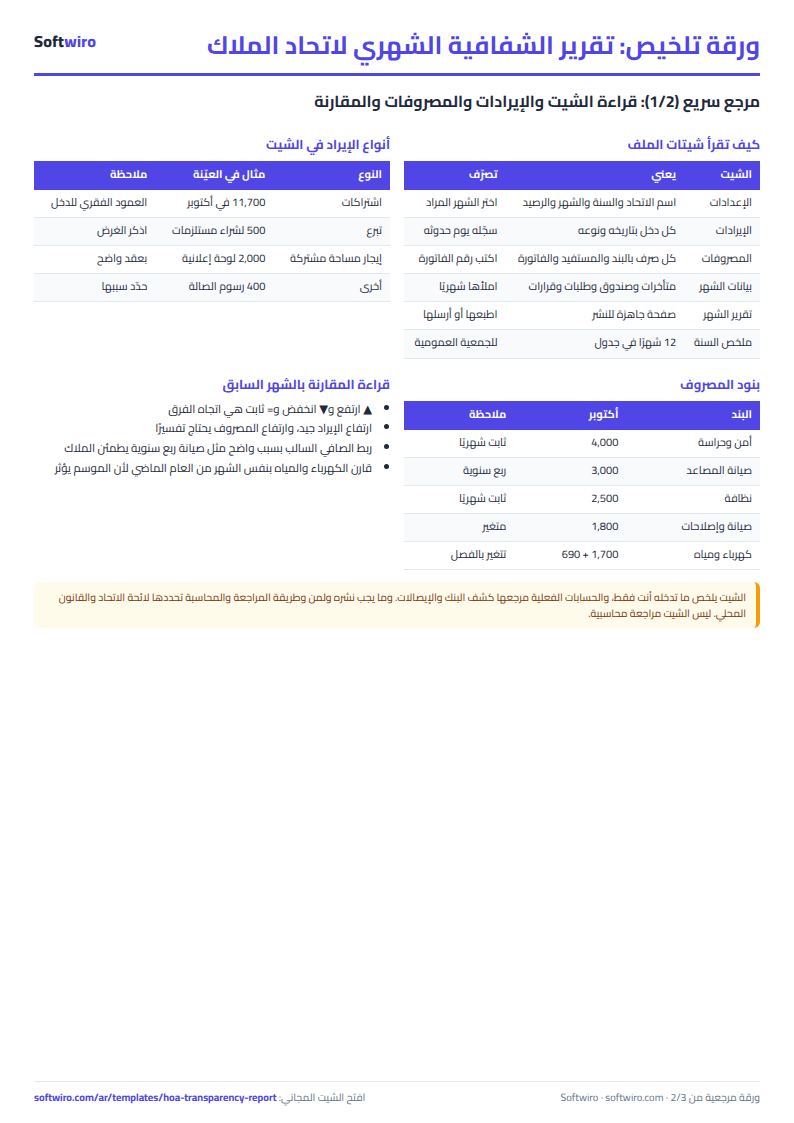
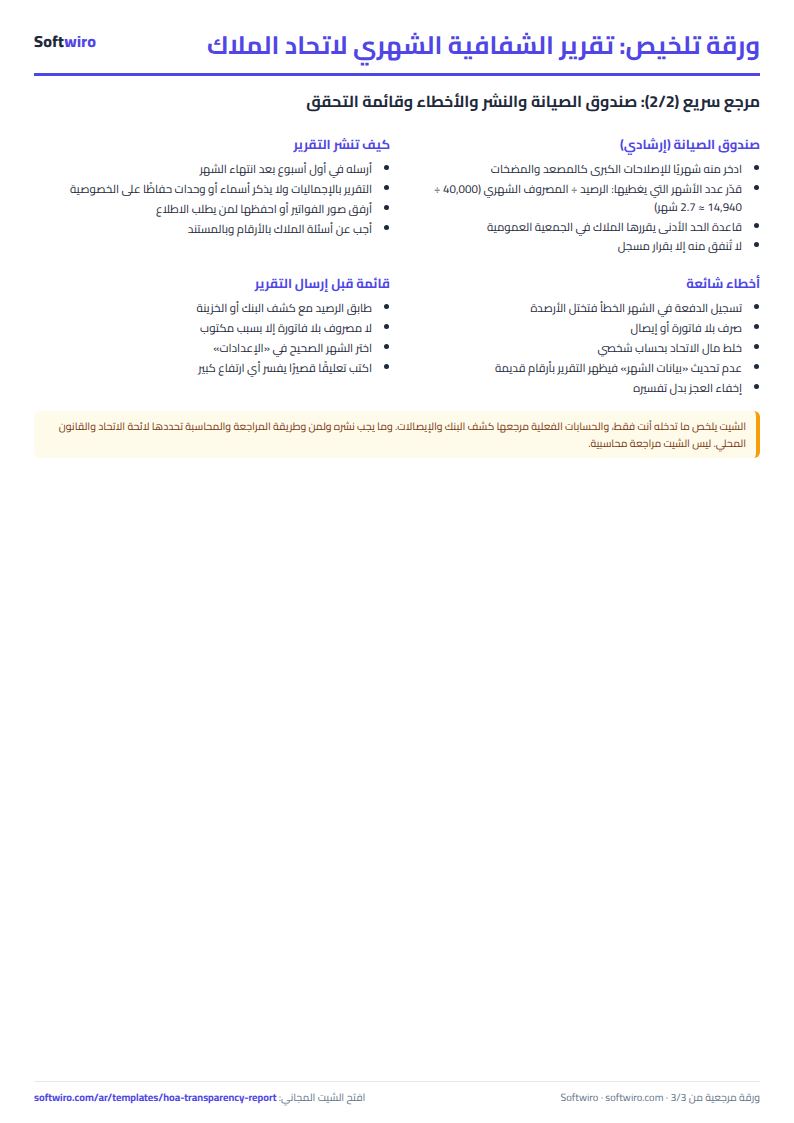
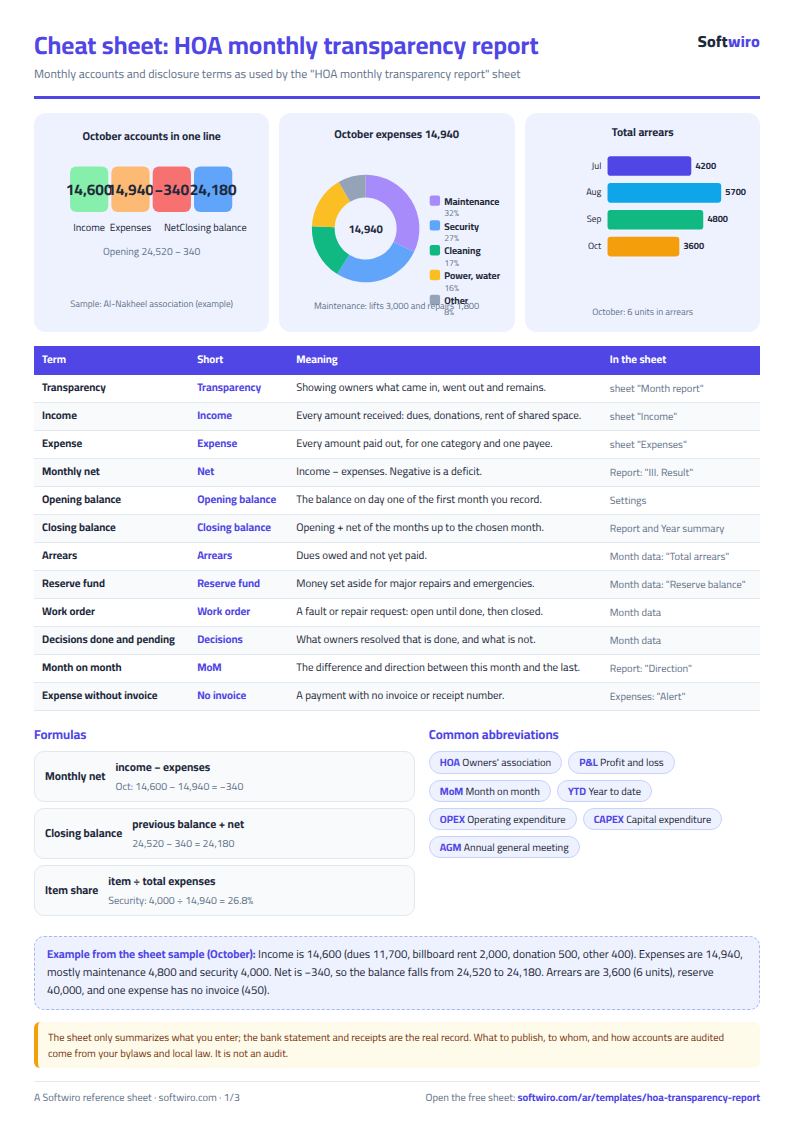
Terms, abbreviations, tables and diagrams over several pages, in Arabic and English. Download it as a PDF or images, including a phone-size version.
Still running this on Excel?
This sheet suits a start and a limited amount of data. If your way of working grows, or you need more than one person working on it at the same time, Softwiro can build you a program that fits the way you work.
| In this sheet | In Custom Software from Softwiro |
|---|---|
| One file that one person edits at a time, and copies reach you on WhatsApp. | A program with a login for each user and permissions you define, and everyone sees the same data. |
| You type everything and check the numbers by hand. | We design the screens around your work steps, so each person records only what concerns them. |
| Columns and formulas are fixed as the sheet was designed. | We build what you need: reports, alerts and screens your way. |
| Backups and security are your own responsibility. | The program runs on a secured server with regular backups. |
Frequently asked questions
Does the report show owners' or units' names?
No. The report contains totals only. The payees of expenses stay in the "المصروفات" (Expenses) sheet and are not carried into the report, and the sheet holds no owners' names at all. It is recommended to attach photos of the invoices to the report or keep them in a file available to anyone who asks.
How are the opening and closing balances calculated?
You enter the opening balance once in "الإعدادات" (Settings), and from then on the balance carries forward month by month: closing balance = opening balance + income − expenses.
How do I get the report for another month?
Choose the month from the list in the "الإعدادات" (Settings) sheet and the whole report changes, comparing itself with the month before. The month before January is not shown because the file is for one year; use a new file for each year.
Where do I get the arrears, maintenance and decisions figures?
Enter them in "بيانات الشهر" (Month data) from whatever source you have. If you use the other owners association sheets from Softwiro, copy the month's totals from them; there is no link between those sheets and this one.
Is the template free?
Yes, with no sign-up and no email address. Use it, edit it and share it as you like.
Does it work in Google Sheets and on mobile?
The sheet uses formulas supported by Excel 2016 and later, Google Sheets and LibreOffice, so you can upload it to Google Drive and open it with Google Sheets on a computer or a phone.
What is the difference between the white and the gray cells?
You type in the white cells; the gray cells are calculated automatically. Don't type in a gray cell, or you will erase its formula.
Can I use the sheet from an AI assistant?
Yes. Add our MCP server (URL https://softwiro.com/api/mcp, no key needed) to your assistant and ask it to do the calculation in this template. The numbers come from the sheet's own formulas, and we do not store your data. The steps and a ready-made prompt are in this article: https://softwiro.com/blog/mcp-excel-templates-ai-agent-guide.html
All the templates in this group: Compound and owners' association sheets: dues, maintenance and property
More free templates for: Owners associations and compounds
More free templates
- Owners' association dues collection tracker
- Owners' association budget and expenses sheet
- Reserve and emergency fund sheet for owners' associations
- Maintenance requests and complaints log for owners' associations
- Service contracts and suppliers tracker for owners' associations
- Owners association meetings and decisions tracker
- Shared electricity and water bill splitter for building units
- Residents, units and vehicles register for an owners' association
- Compound assets and periodic maintenance sheet
- Gate and security sheet
- Compound shared facilities booking sheet
- Building maintenance sheet: flat fees, expenses, elevator and pump
- Gym memberships tracker (Excel)
- Beauty salon bookings tracker (Excel)
- Car workshop job orders tracker (Excel)
- Nursery and school fees tracker (Excel)
- Tutoring center manager (Excel)
- Poultry farm cycle tracker (Excel)
- Crop season expenses and revenue tracker (Excel)
- Racing pigeon loft sheet