Try the sheet here, on the example
The sheet is open below with sample numbers. Change any white cell and watch the results update, or press the blank-copy button to type your own data from scratch. Nothing you type leaves your browser.
Example from the sheet
| الشقة | الساكن | الاشتراك | إجمالي المدفوع | المستحق حتى اليوم | المتأخر | الحالة |
|---|---|---|---|---|---|---|
| 1 | حسن عبد الله | 60.00 | 300 | 300 | 0 | منتظم |
| 2 | سعاد محمود | 100.00 | 400 | 500 | 100 | متأخر |
| 3 | محمد الشريف | 100.00 | 200 | 500 | 300 | متأخر كثيرًا |
| 4 | هدى فتحي | 110.00 | 550 | 550 | 0 | منتظم |
| 5 | أحمد سعيد | 120.00 | 720 | 600 | 0 | مدفوع مقدمًا |
| 6 | نادية رشدي | 120.00 | 540 | 600 | 60 | متأخر |
| 7 | عمرو خليل | 130.00 | 650 | 650 | 0 | منتظم |
| 8 | مها عبد الرحمن | 130.00 | 390 | 650 | 260 | متأخر |
| 9 | إبراهيم نصار | 140.00 | 700 | 700 | 0 | منتظم |
| 10 | شيماء جابر | 140.00 | 560 | 700 | 140 | متأخر |
| 11 | وليد منصور | 150.00 | 750 | 750 | 0 | منتظم |
Example from the “التحصيل” tab (Arabic), with the numbers and formulas that are in the file.
What is inside
- الإعدادات (Settings): Building name, first month of the collection grid, today's date and the statement month, the fee method (equal or by share), the elevator extra per floor, the opening cash box balance, and the list of expense categories.
- الشقق (Flats): Flat number, floor, resident, owner or tenant, phone, share and whether it uses the elevator, plus a special-fee cell for a particular flat. Each flat's fee and actual share are shown. Holds 40 flats.
- التحصيل (Collection): A flat × 12 months grid where you enter the amount paid. A cell turns red if the month is due and not fully paid, and each flat shows paid, due to date, arrears, months overdue and status.
- المتأخرات (Arrears): A sorted list of the flats that owe money, largest amount first, with the resident, phone, number of months and total arrears.
- المصروفات (Expenses): Each expense with its date, category, description and amount, with the big repair number if it is a payment to a contractor, and an alert for an incomplete record or one outside the period. Holds 500 expenses.
- إيرادات أخرى (Other income): Donations, roof or billboard rent, fines, and what you collect from the flats for each big repair, with dates. Holds 200 records.
- الصيانة الدورية (Periodic maintenance): Each task (elevator service, tank cleaning, pump maintenance, pest control and so on), how many months between repeats and the last time done. Its next date, days remaining, status (overdue, soon or on schedule) and yearly cost are shown.
- الإصلاحات الكبرى (Big repairs): Up to 6 repairs with their cost, what was paid to the contractor, what was collected from the flats and what remains, and a table with each flat's share of each repair by its share, what it paid and what it still owes.
- الخزنة (Cash box): For each month: opening balance, fees collected, other income, expenses, closing balance and the number of flats that paid.
- تحليل المصروفات (Expense analysis): Each category in each of the 12 months, its total, its share of all expenses and its monthly average.
- كشف الشفافية (Transparency statement): Choose the month and a print-ready statement appears: opening balance, money in and out by item, closing balance and the number of flats that paid.
- الملخص (Summary): Collection rate, arrears, cash box balance and how many months it covers, overdue maintenance tasks and the remainder of the repairs, with charts of collected versus expenses, cash box balance and the share of each item.
The file opens on a start tab (“ابدأ هنا”, Start here) that explains how to use it.
What makes it different
Fees, expenses, maintenance, big repairs and the neighbors' statement are in one file. A payment is entered once in the collection grid and appears in the arrears, the cash box and the monthly statement together, and an overdue maintenance date shows up before the elevator breaks down or the tank overflows.
How to use it
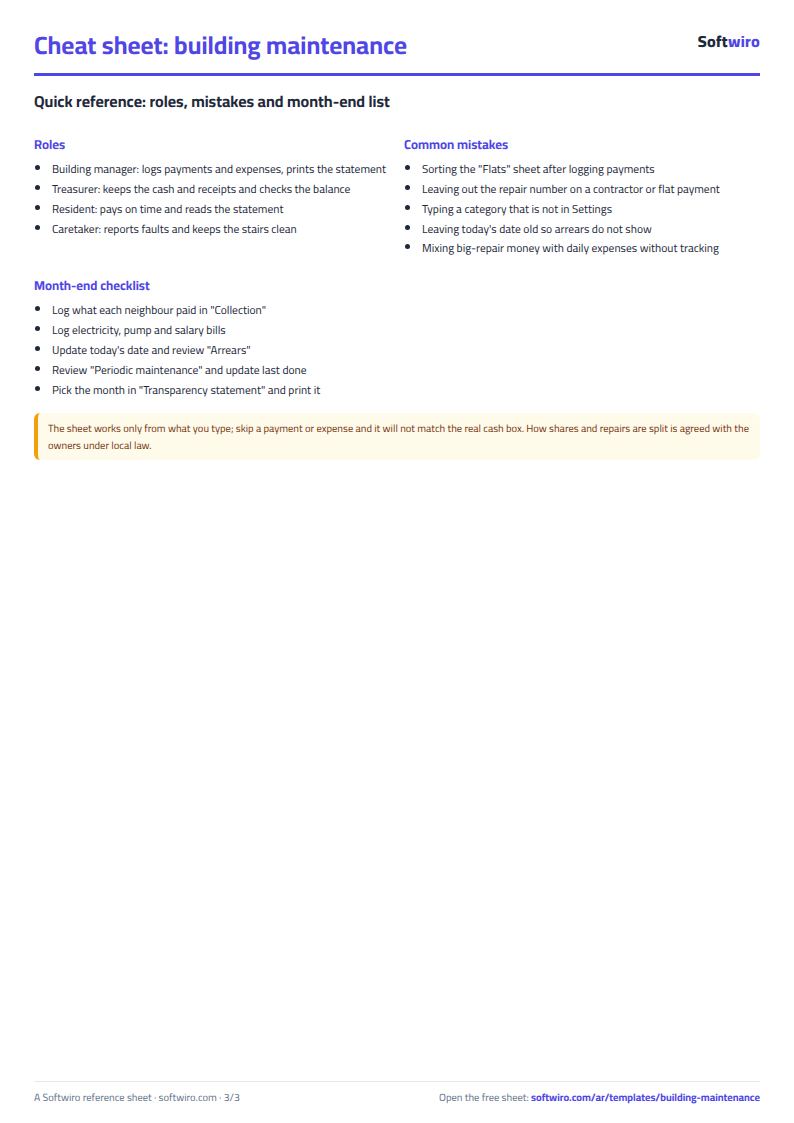
- In «الإعدادات» (Settings) enter the building name, the first month of the collection grid, today's date, the fee method (equal or by share), the elevator extra per floor and the opening cash box balance, then edit the list of expense categories.
- In «الشقق» (Flats) enter for each flat its number, floor, resident name, phone, whether it uses the elevator, and its share (optional). Each flat's monthly fee appears by itself.
- In «التحصيل» (Collection) enter the amount each flat paid in the month cell. A red cell is a due month not fully paid, and the arrears and status appear by themselves.
- In «المصروفات» (Expenses) record each expense with its date, category and amount. In «إيرادات أخرى» (Other income) record donations and what you collect from the flats for big repairs.
- In «الصيانة الدورية» (Periodic maintenance) enter each task, how many months it repeats and the date it was last done, and its next date appears with whether it is overdue or near. In «الإصلاحات الكبرى» (Big repairs) enter the repair and its cost and it is split across the flats by share.
- Open «الخزنة» (Cash box) for each month's balance, «كشف الشفافية» (Transparency statement) to print and post on the staircase, and «الملخص» (Summary) for the figures and charts.
Before you start:
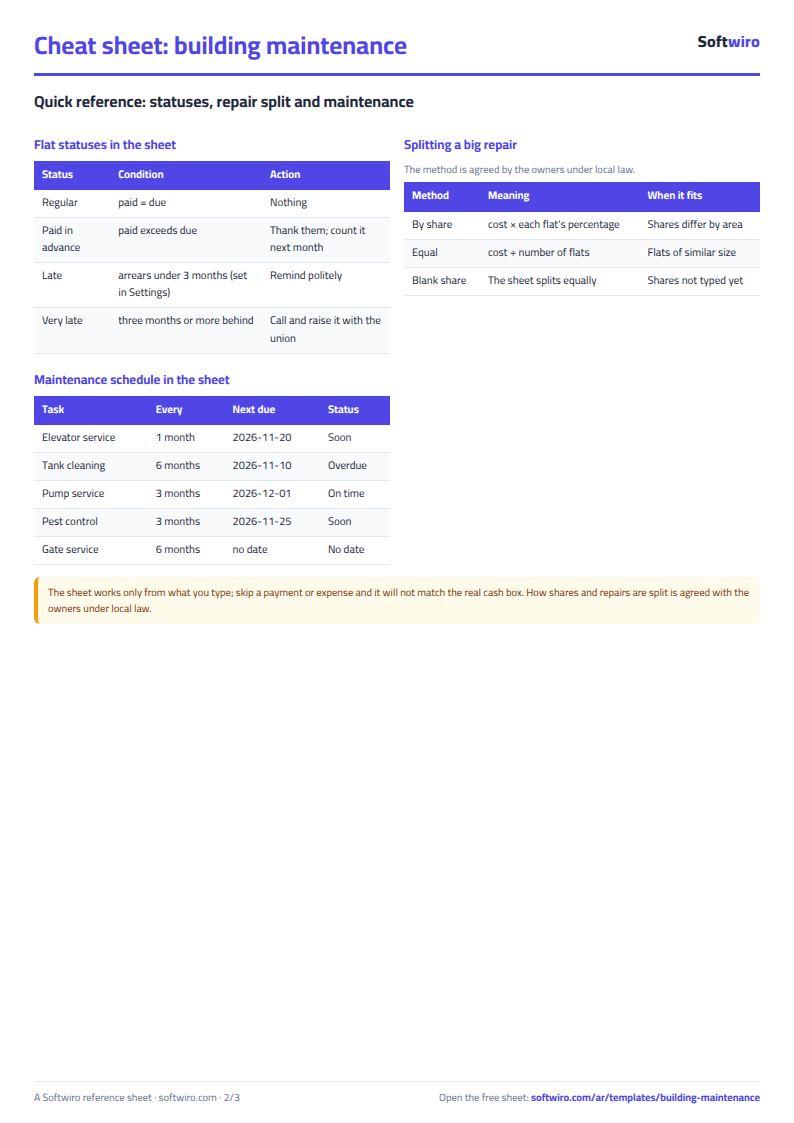
- Flat fee = base fee (or total needed × the flat's share if you choose "by share") + elevator extra × the flat's floor number if it uses the elevator. The ground floor is number 0. The «اشتراك خاص» (special fee) cell overrides this calculation for a particular flat.
- The actual share is the percentage entered in «الشقق» (Flats); if left blank, every flat gets an equal share. Big repairs are split by it.
- Due to date = fee × the number of months from the start of the collection grid to the month of today's date. Arrears = due − paid, and an advance payment does not show as arrears.
- The cash box balance counts fees in the month they fall due, and other income and expenses on their date. The sheet warns about any record dated outside the 12 months.
- Enter the repair number (1 to 6) in «المصروفات» (Expenses) for what is paid to the contractor, and in «إيرادات أخرى» (Other income) for what you collect from the flats, so the remainder shows for each side.
- Do not sort «الشقق» (Flats) after you have recorded collection, because the collection grid follows the order of the rows. The sheet holds 40 flats, 500 expenses, 200 income records, 30 maintenance tasks and 6 big repairs.
- This sheet is for a single building. For a large compound, use the HOA dues collection sheet (hoa-dues-collection) and the HOA budget and expenses sheet (hoa-budget-expenses). The sheet is an organizing tool, not legal advice; matters of the owners' association and the splitting of shares follow local law and the owners' agreement.
Free cheat sheet for this field
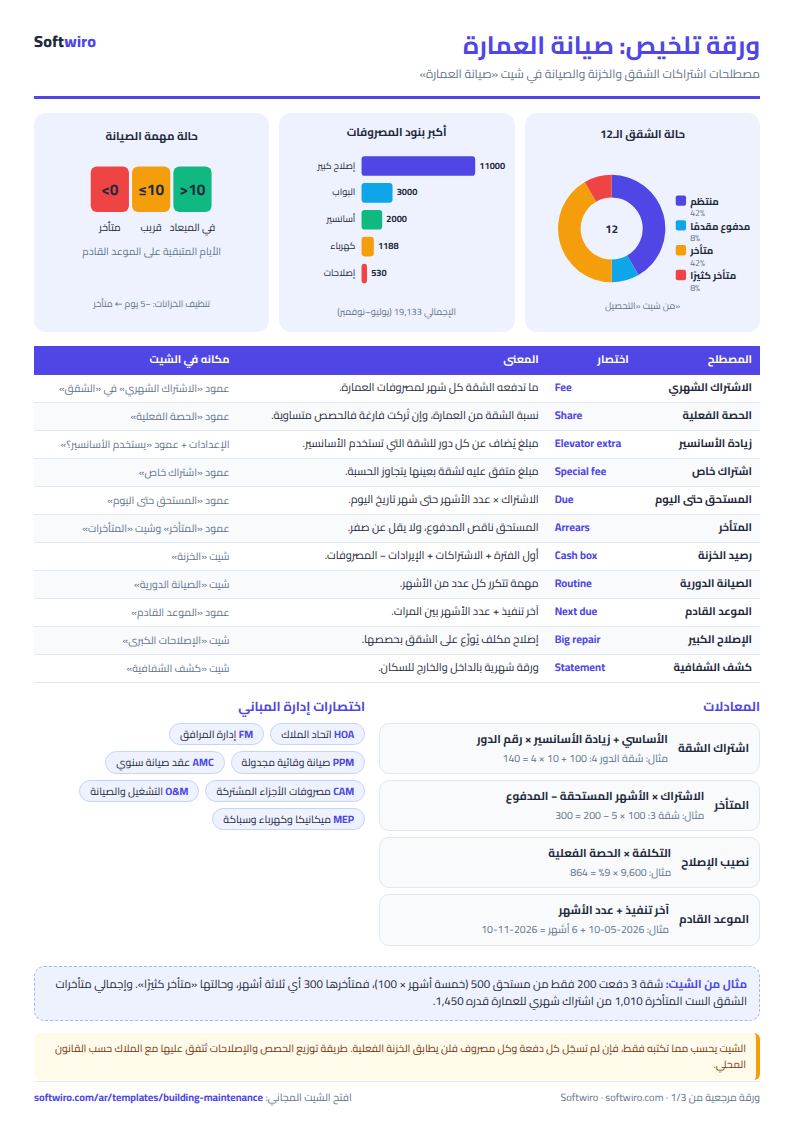
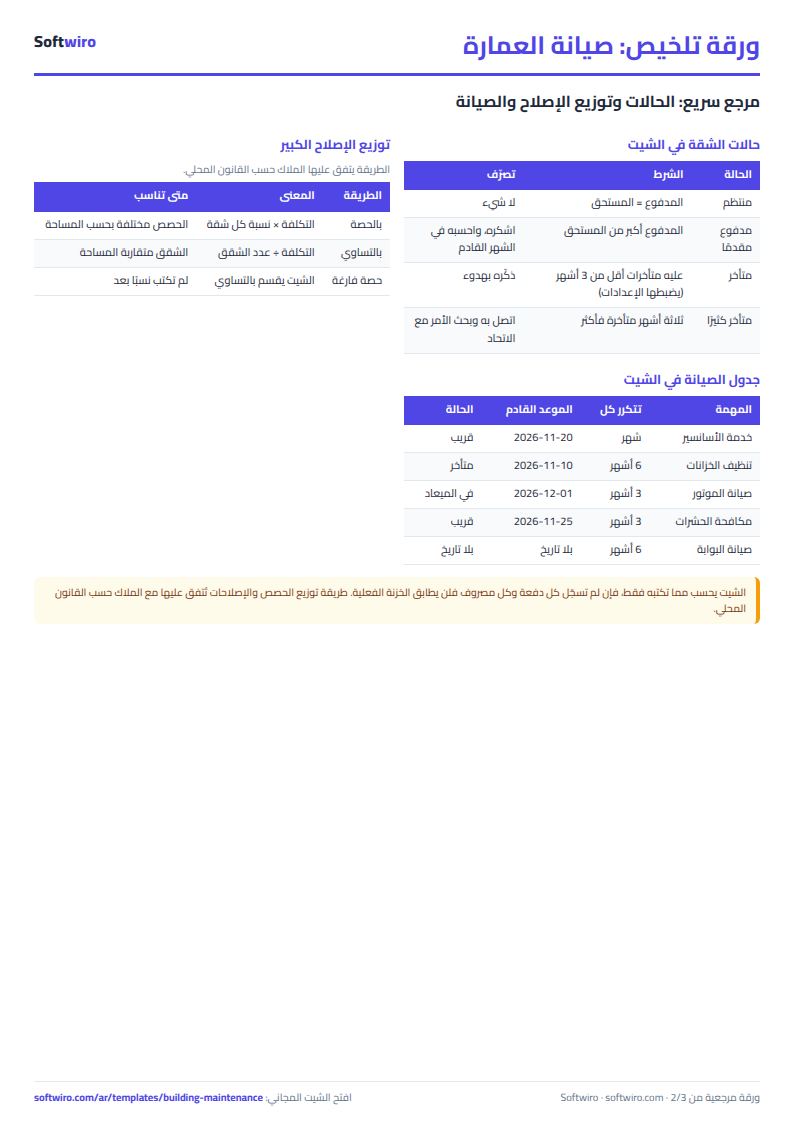
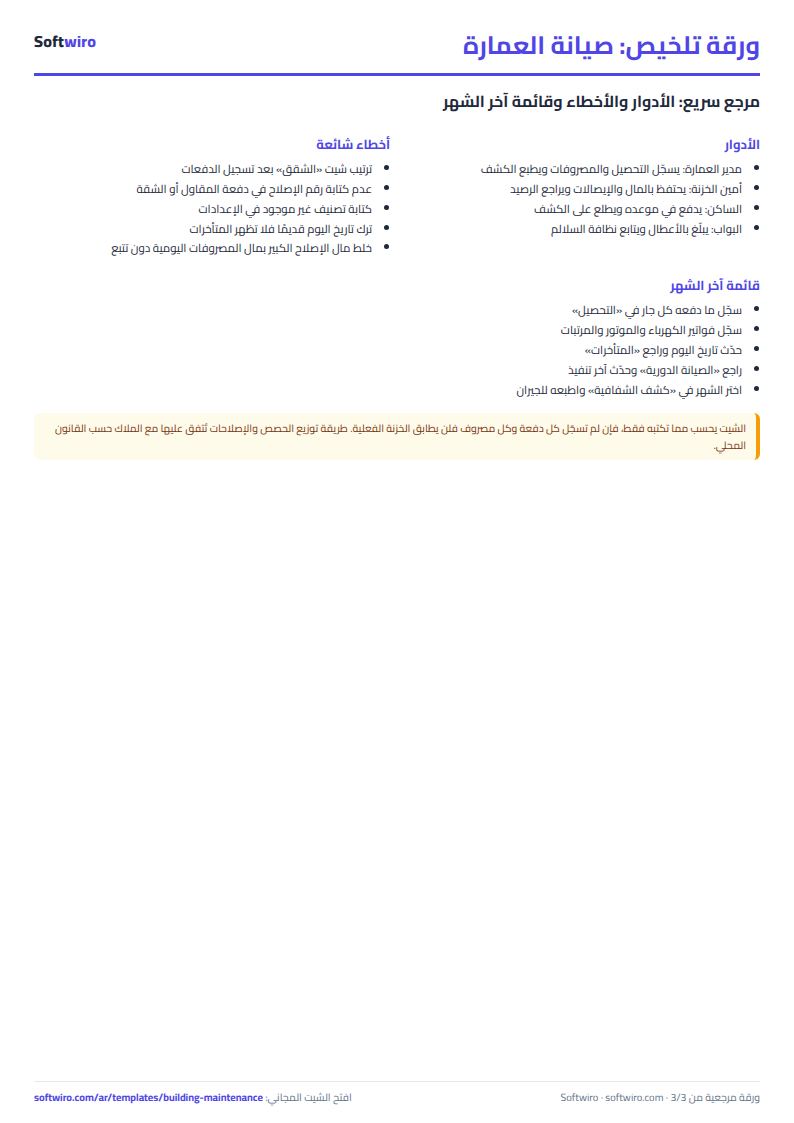
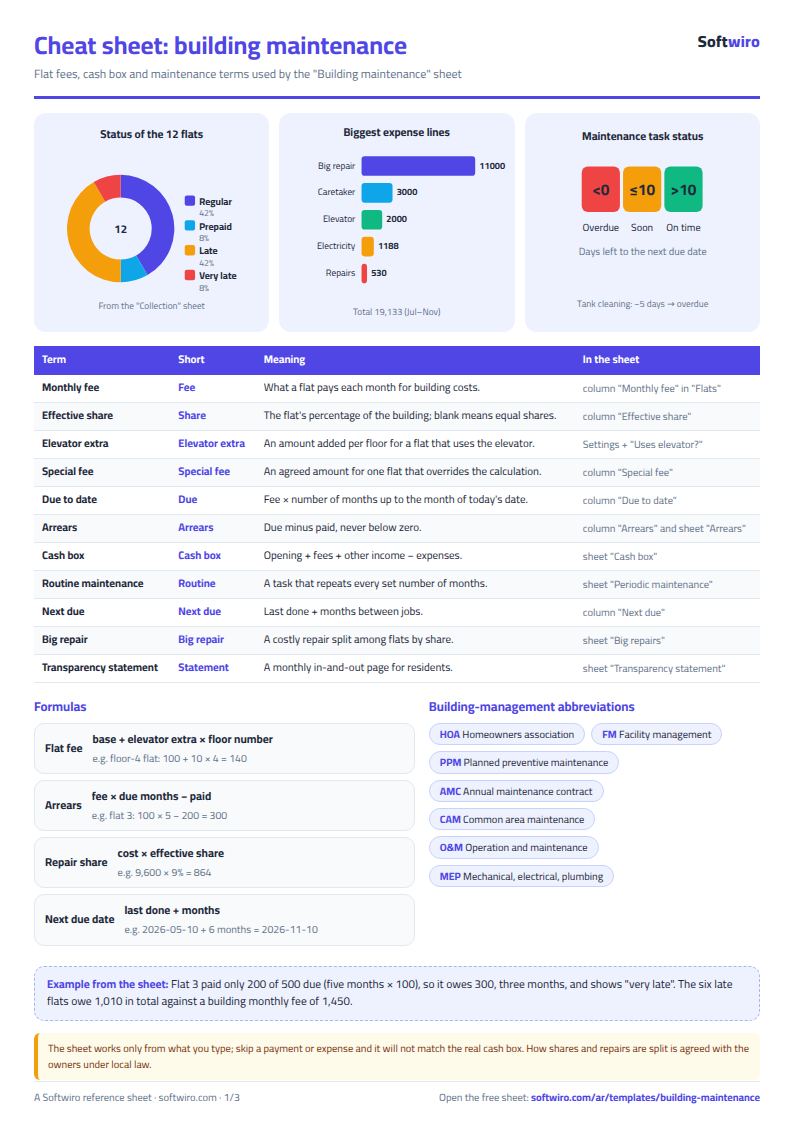
Terms, abbreviations, tables and diagrams over several pages, in Arabic and English. Download it as a PDF or images, including a phone-size version.
Still running this on Excel?
This sheet suits a start and a limited amount of data. If your way of working grows, or you need more than one person working on it at the same time, Softwiro can build you a program that fits the way you work.
| In this sheet | In Custom Software from Softwiro |
|---|---|
| One file that one person edits at a time, and copies reach you on WhatsApp. | A program with a login for each user and permissions you define, and everyone sees the same data. |
| You type everything and check the numbers by hand. | We design the screens around your work steps, so each person records only what concerns them. |
| Columns and formulas are fixed as the sheet was designed. | We build what you need: reports, alerts and screens your way. |
| Backups and security are your own responsibility. | The program runs on a secured server with regular backups. |
Frequently asked questions
How do I calculate each flat's fee if the elevator serves the upper floors more?
Enter each flat's floor and choose whether it uses the elevator, then enter the base fee and the elevator extra per floor in «الإعدادات» (Settings). The sheet calculates flat fee = base + extra × floor number. Alternatively choose "حسب الحصة" (by share) and the monthly amount needed is split by each flat's share.
How do I know who is behind on the fee?
Enter the amount each flat paid in the month cell of the «التحصيل» (Collection) grid. A red cell means a due month that was not fully paid, and the «المتأخرات» (Arrears) list appears sorted by largest amount, with the phone and number of months.
How do I split the cost of a big repair across the flats?
Enter the repair and its cost in «الإصلاحات الكبرى» (Big repairs). Each flat's share = cost × its actual share. Then record what each flat pays in «إيرادات أخرى» (Other income) with the repair number so you know what remains. The method of splitting is agreed with the owners according to local law.
Does the sheet work for a compound with several buildings?
It is designed for a single building. For a larger compound, use the HOA dues collection and the HOA budget and expenses sheets published in the free templates.
Is the template free?
Yes, with no sign-up and no email address. Use it, edit it and share it as you like.
Does it work in Google Sheets and on mobile?
The sheet uses formulas supported by Excel 2016 and later, Google Sheets and LibreOffice, so you can upload it to Google Drive and open it with Google Sheets on a computer or a phone.
What is the difference between the white and the gray cells?
You type in the white cells; the gray cells are calculated automatically. Don't type in a gray cell, or you will erase its formula.
Can I use the sheet from an AI assistant?
Yes. Add our MCP server (URL https://softwiro.com/api/mcp, no key needed) to your assistant and ask it to do the calculation in this template. The numbers come from the sheet's own formulas, and we do not store your data. The steps and a ready-made prompt are in this article: https://softwiro.com/blog/mcp-excel-templates-ai-agent-guide.html
All the templates in this group: Compound and owners' association sheets: dues, maintenance and property
More free templates for: Owners associations and compounds
More free templates
- Owners' association dues collection tracker
- Owners' association budget and expenses sheet
- Reserve and emergency fund sheet for owners' associations
- Maintenance requests and complaints log for owners' associations
- Service contracts and suppliers tracker for owners' associations
- Owners association meetings and decisions tracker
- Shared electricity and water bill splitter for building units
- Residents, units and vehicles register for an owners' association
- Monthly transparency report for owners' associations
- Compound assets and periodic maintenance sheet
- Gate and security sheet
- Compound shared facilities booking sheet
- Canteen management sheet
- Lending library management sheet
- Study groups management sheet for a private teacher
- Graduation project manager sheet: tasks, team, phases and deliverables
- English vocabulary and expressions sheet in Excel: words by topic and spaced review
- Accounting rules and equations summary sheet: double entry, statements and financial ratios
- Media buyer rules sheet: ad formulas, scaling rules and testing discipline
- Gradebook Template for Excel (Weighted Categories, Letter Grades)