Try the sheet here, on the example
The sheet is open below with sample numbers. Change any white cell and watch the results update, or press the blank-copy button to type your own data from scratch. Nothing you type leaves your browser.
Example from the sheet
| التاريخ | الوقت | العميلة | الخدمة | الموظفة | الحالة | السعر | الإيراد | العمولة |
|---|---|---|---|---|---|---|---|---|
| 46298 | 0 | ياسمين | قص شعر | منى | تم | 250.00 | 250.00 | 75.00 |
| 46298 | 1 | سارة | مكياج سهرة | سلمى | تم | 1,200.00 | 1,200.00 | 420.00 |
| 46300 | 0 | مريم | صبغة شعر | منى | تم | 900.00 | 800.00 | 240.00 |
| 46300 | 1 | نادية | مانيكير وباديكير | رنا | تم | 300.00 | 300.00 | 75.00 |
| 46303 | 0 | جيهان | تنظيف بشرة | هالة | تم | 500.00 | 500.00 | 150.00 |
| 46303 | 1 | إيمان | سشوار | منى | ملغي | 150.00 | 0.00 | 0.00 |
| 46305 | 1 | أمل | مكياج سهرة | سلمى | تم | 1,200.00 | 1,000.00 | 350.00 |
| 46305 | 1 | داليا | مانيكير وباديكير | رنا | لم تحضر | 300.00 | 0.00 | 0.00 |
| 46309 | 0 | فريدة | قص شعر | منى | تم | 250.00 | 250.00 | 75.00 |
| 46309 | 1 | غادة | تنظيف بشرة | هالة | تم | 500.00 | 450.00 | 135.00 |
| 46312 | 0 | ياسمين | سشوار | منى | تم | 150.00 | 150.00 | 45.00 |
Example from the “الحجوزات” tab (Arabic), with the numbers and formulas that are in the file.
What is inside
- "الإعدادات" (Settings): Today's date (or =TODAY()), and any date inside the month you want summarised (October 2026 in the example).
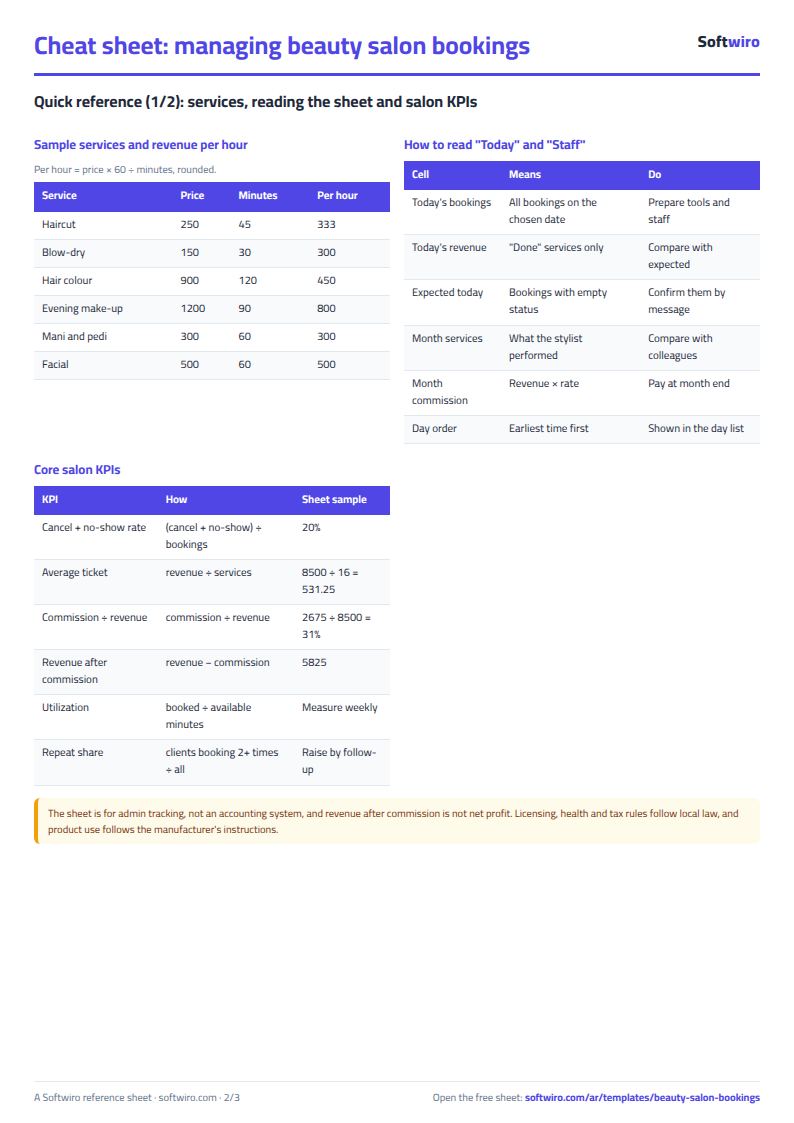
- "الخدمات" (Services): Each service's name, price and duration in minutes. The example has six services, from haircut 250 to evening makeup 1,200, and the table holds 200 services.
- "الموظفات" (Staff): Name, specialty and commission rate, then the sheet calculates the month's completed services, their revenue and commission, and today's bookings and revenue. The example has four staff members, and the table holds 200.
- "الحجوزات" (Bookings): Record each booking: date, time, client, phone, service, staff member, status (done, cancelled or no-show; empty means booked), discount and payment method (cash, card or e-wallet). The price, revenue, commission, booking status and the day's order appear automatically. It holds 2000 bookings.
- "اليوم" (Today): Today's bookings in time order with phone, service, staff member, status and price, and above them the number of today's bookings, the revenue of those done and the expected revenue of those still to come. It shows the first 60 bookings.
- "الملخص" (Summary): Today's bookings (done, booked and cancelled) and revenue, the chosen month's bookings (done, cancelled and no-show), the cancellation and no-show rate, revenue, average per service, commissions and revenue after them, plus a breakdown by service and payment method.
The file opens on a start tab (“ابدأ هنا”, Start here) that explains how to use it.
What makes it different
Open "اليوم" (Today) and you know who is coming, when, and what revenue to expect. Open "الموظفات" (Staff) and each person's commission is calculated from the services actually done. From "الملخص" (Summary) you see the month's revenue and how many bookings were lost to cancellations or no-shows.
How to use it
- In the "الإعدادات" (Settings) sheet, enter today's date (or =TODAY() so it updates itself) and any date inside the month you want summarised.
- In the "الخدمات" (Services) sheet, enter each service with its price and duration in minutes.
- In the "الموظفات" (Staff) sheet, enter each staff member's name, specialty and commission rate on the revenue of the services she performs.
- In the "الحجوزات" (Bookings) sheet, record each booking: date, time, client, phone, service and staff member.
- After the service is done, choose the status "done", and enter the discount and payment method if any. Choose "cancelled" or "no-show" when the client cancels or does not come, and leave the status empty for a booking that is still to come.
- Open "اليوم" (Today) to see today's bookings by time and today's revenue, and check "الموظفات" (Staff) for commissions and "الملخص" (Summary) for the month's figures.
Before you start:
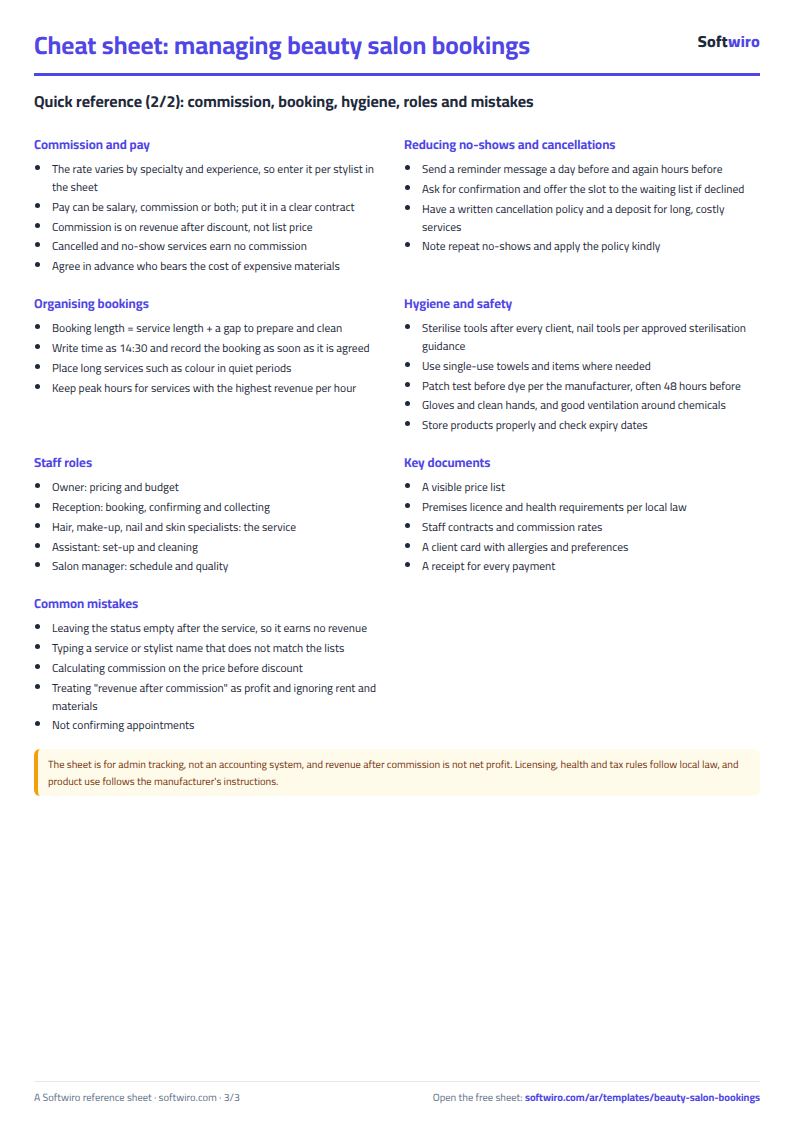
- Revenue is counted only for services whose status is "done": revenue = service price − discount. A cancelled booking, or one the client did not attend, adds nothing to revenue or commission.
- Booking commission = its revenue × the staff member's commission rate written in the "الموظفات" (Staff) sheet.
- A booking with an empty status shows as "booked", and counts toward "expected today", not toward revenue.
- Write the time in the format 14:30. If two bookings in "اليوم" (Today) share the same time, the one entered first appears first.
- Cancellation and no-show rate = (cancelled + no-show) ÷ all bookings in the chosen month.
- The sheet holds 200 services, 200 staff members and 2000 bookings, and "اليوم" (Today) shows the first 60 bookings.
Free cheat sheet for this field
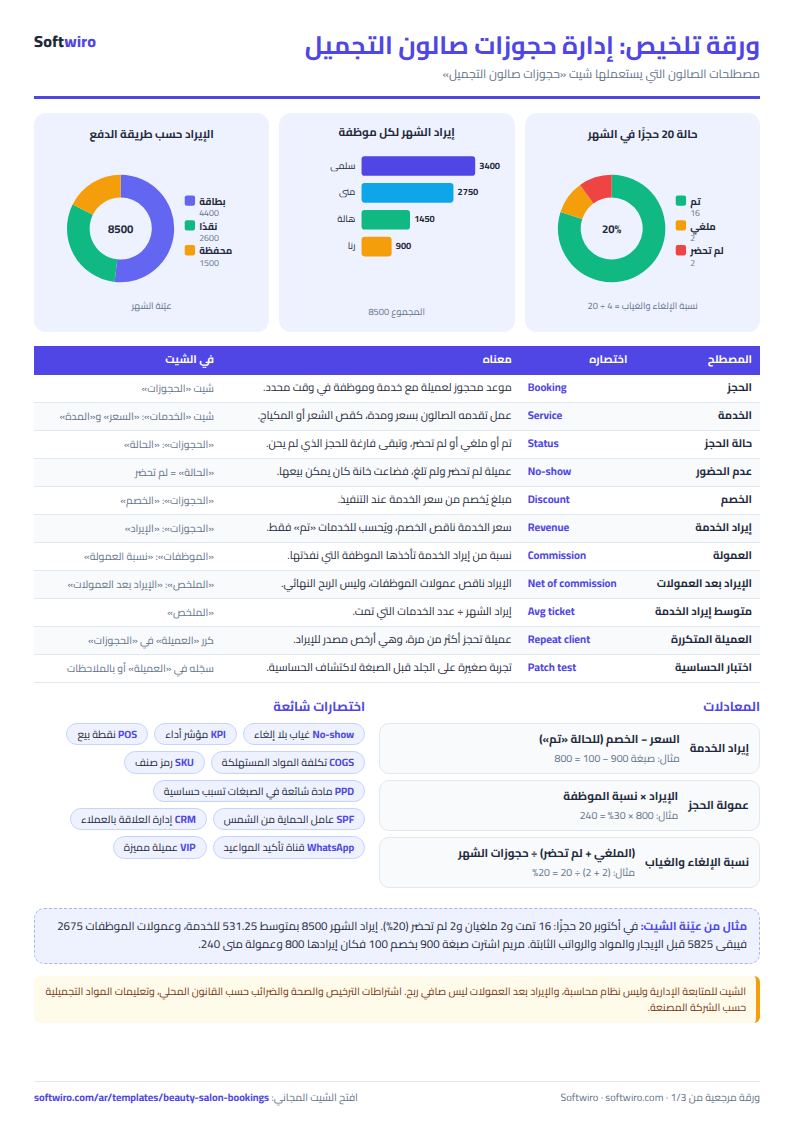
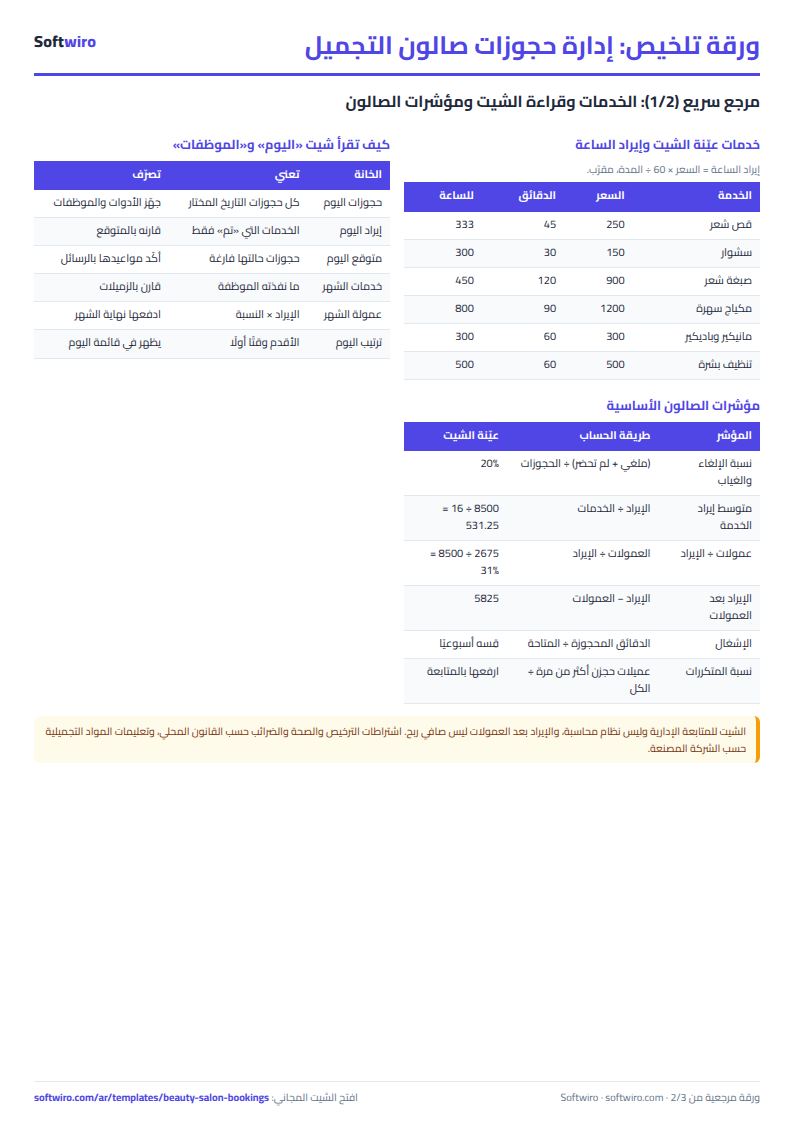
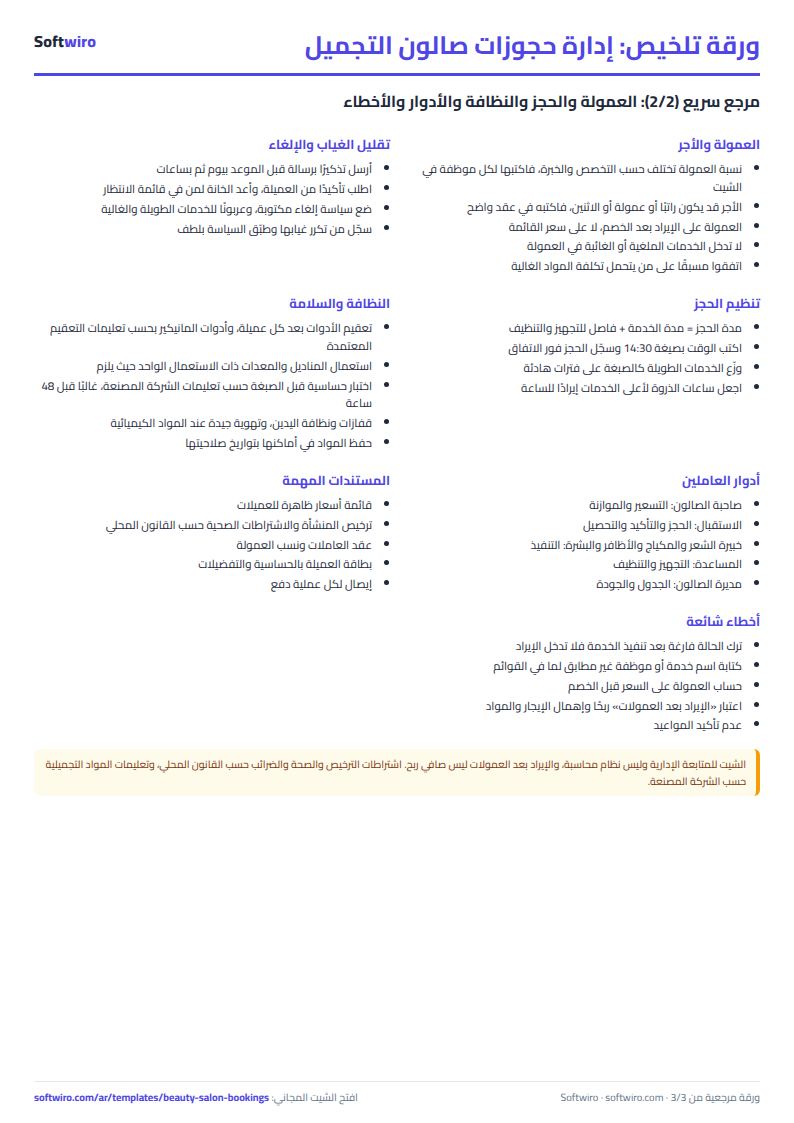
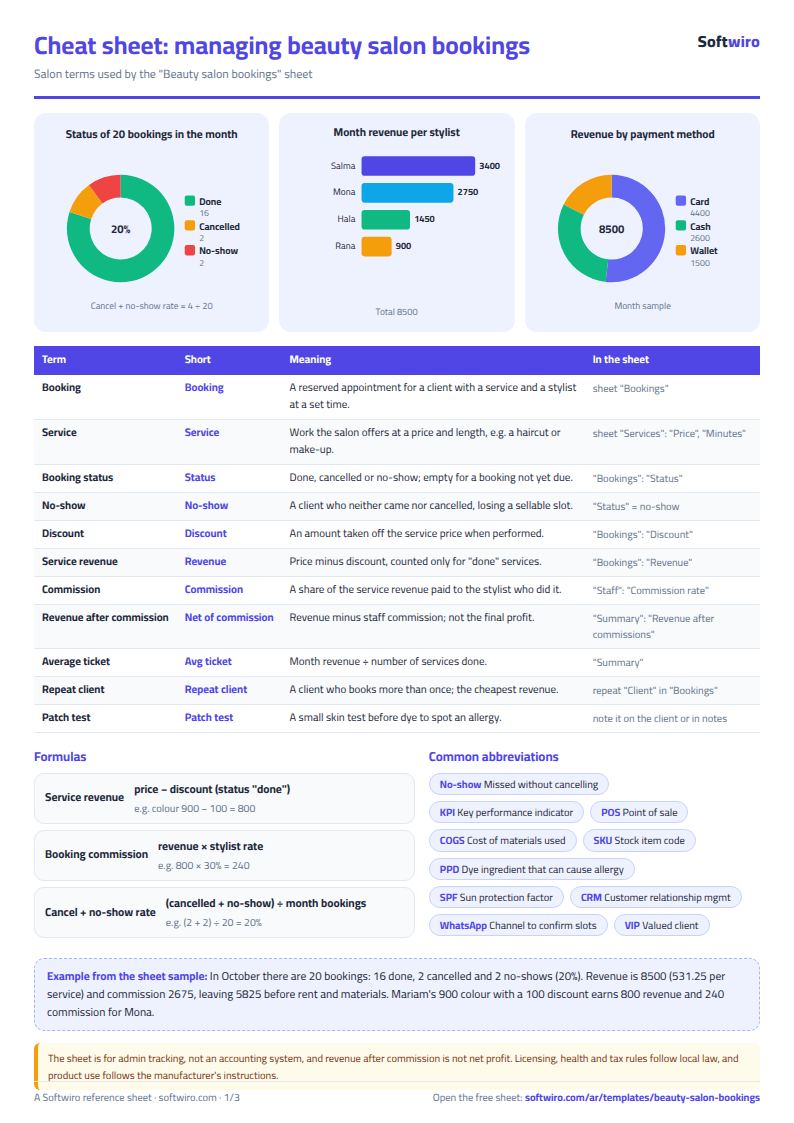
Terms, abbreviations, tables and diagrams over several pages, in Arabic and English. Download it as a PDF or images, including a phone-size version.
Still running this on Excel?
This sheet suits a start and a limited amount of data. If your way of working grows, or you need more than one person working on it at the same time, Softwiro can build you a program that fits the way you work.
| In this sheet | In Custom Software from Softwiro |
|---|---|
| One file that one person edits at a time, and copies reach you on WhatsApp. | A program with a login for each user and permissions you define, and everyone sees the same data. |
| You type everything and check the numbers by hand. | We design the screens around your work steps, so each person records only what concerns them. |
| Columns and formulas are fixed as the sheet was designed. | We build what you need: reports, alerts and screens your way. |
| Backups and security are your own responsibility. | The program runs on a secured server with regular backups. |
Frequently asked questions
How are a booking's revenue and commission calculated?
Revenue = the service price from the "الخدمات" (Services) sheet − the discount, and it is counted only if the booking status is "done". Commission = revenue × the staff member's commission rate in the "الموظفات" (Staff) sheet. A cancelled booking, or one the client did not show up for, has zero revenue and commission.
What does the "booked" status mean?
It is the status of a booking where you left the status cell empty. It does not count toward revenue, but its price after discount appears in "expected today" if it is today's booking.
How is today's list ordered?
By time, earliest first. If two bookings have the same time, the one entered first in the "الحجوزات" (Bookings) sheet appears first. The list shows the first 60 bookings.
How are the cancellation and no-show rates calculated?
(Cancelled bookings + bookings the client did not show up for) ÷ all bookings in the month chosen in the settings.
Is the template free?
Yes, with no sign-up and no email address. Use it, edit it and share it as you like.
Does it work in Google Sheets and on mobile?
The sheet uses formulas supported by Excel 2016 and later, Google Sheets and LibreOffice, so you can upload it to Google Drive and open it with Google Sheets on a computer or a phone.
What is the difference between the white and the gray cells?
You type in the white cells; the gray cells are calculated automatically. Don't type in a gray cell, or you will erase its formula.
Can I use the sheet from an AI assistant?
Yes. Add our MCP server (URL https://softwiro.com/api/mcp, no key needed) to your assistant and ask it to do the calculation in this template. The numbers come from the sheet's own formulas, and we do not store your data. The steps and a ready-made prompt are in this article: https://softwiro.com/blog/mcp-excel-templates-ai-agent-guide.html
More free templates for: Beauty salons