Try the sheet here, on the example
The sheet is open below with sample numbers. Change any white cell and watch the results update, or press the blank-copy button to type your own data from scratch. Nothing you type leaves your browser.
Example from the sheet
| رقم الأمر | كود العميل | الحالة | اسم العميل | إجمالي الأمر | المدفوع | المتبقي |
|---|---|---|---|---|---|---|
| J001 | C01 | سُلّمت | أحمد سالم | 1,850.00 | 1,850.00 | 0.00 |
| J002 | C02 | سُلّمت | محمود عادل | 2,010.00 | 1,500.00 | 510.00 |
| J003 | C01 | سُلّمت | أحمد سالم | 900.00 | 900.00 | 0.00 |
| J004 | C03 | جاهزة | سيد رمضان | 2,800.00 | 1,000.00 | 1,800.00 |
| J005 | C04 | تحت التنفيذ | كريم حسن | 5,170.00 | 2,000.00 | 3,170.00 |
| J006 | C05 | بانتظار قطعة | هاني فؤاد | 1,800.00 | 500.00 | 1,300.00 |
| J007 | C02 | قيد الفحص | محمود عادل | 0.00 | 0.00 | 0.00 |
| J008 | C04 | ملغي | كريم حسن | 0.00 | 0.00 | 0.00 |
| J009 | C05 | سُلّمت | هاني فؤاد | 2,350.00 | 2,350.00 | 0.00 |
Example from the “أوامر الشغل” tab (Arabic), with the numbers and formulas that are in the file.
What is inside
- "العملاء" (Customers): Customer code, name and phone, then the sheet calculates the number of their orders, the total they owe, what they paid, their balance and their status (owes, settled, paid in advance or no orders).
- "أوامر الشغل" (Job orders): One row per order: number, date, customer code, plate number, model, status (under inspection, in progress, waiting for a part, ready, delivered, cancelled), labor fee and discount. The sheet calculates the customer's name, parts sales, the order total, paid and remaining, and a warning for ready or delivered orders that still have a balance.
- "القطع" (Parts): Each spare part on an order: quantity, purchase price and sale price per unit. The sheet calculates the sales total, the cost, the profit on the part and the order's status.
- "الدفعات" (Payments): Each amount the customer pays with its date, order number and payment method; the customer's name appears automatically.
- "المديونيات" (Balances due): Customers who owe, largest balance first, with code, phone, balance and number of orders. It holds the first 50 customers.
- "الملخص" (Summary): The number of orders and of cars in the workshop and ready, labor fees, parts sales, discounts, total of orders, paid and customers' balances, parts cost, profit and margin, and orders broken down by status.
- "ابدأ هنا" (Start here): How to use the sheet, what the colours mean and notes on the calculations.
The file opens on a start tab (“ابدأ هنا”, Start here) that explains how to use it.
What makes it different
Open the job orders and you know where each car stands and how much its owner still owes. Open "المديونيات" (Balances due) and you find who to call first. And the summary tells you how much you made on parts across the orders that were not cancelled, instead of working it out from paper invoices.
What a car workshop job order is and what it contains
A job order is the file for one car in the workshop: who owns it, what was requested, what was used, and how much the customer still owes. In this sheet a job order has four parts:
- A row in "أوامر الشغل" (Job orders): order number, date, customer code, plate number, model, status, labor fee and discount.
- Spare parts in "القطع" (Parts): part name, quantity, its purchase price and the price you sell it to the customer for.
- Amounts paid in "الدفعات" (Payments), with the date and payment method.
- The customer's details and phone in "العملاء" (Customers).
The sheet links these parts by order number and customer code, so write them in the same format on every sheet.
How to track a job order from inspection to delivery
Change the "الحالة" (Status) column as the car moves forward: under inspection, then in progress or waiting for a part, then ready, then delivered. "الملخص" (Summary) shows orders broken down by status and the number of cars in the workshop and ready, and "أوامر الشغل" (Job orders) warns you about any ready or delivered order that still has a balance.
Worked example: labor fee 500, two parts of quantity 1 each with purchase price 300 and sale price 400 per part, and a discount of 50. Parts sales are then 800 and the order total is 1250. If the customer pays 600, the remaining balance is 650, and the profit on parts is 200.
For a printed invoice with VAT, try the sales invoice sheet, and for details see the guide.
How to use it
- In the "العملاء" (Customers) sheet, enter a code, name and phone for each customer.
- In the "أوامر الشغل" (Job orders) sheet, open a row for each car that enters the workshop: order number, date, customer code, plate number and model, then the status, labor fee and any discount.
- In the "القطع" (Parts) sheet, record each spare part on the order: order number, part name, quantity, purchase price and the price you sell it to the customer for.
- In the "الدفعات" (Payments) sheet, record each amount the customer pays with the order number and payment method.
- Change the "الحالة" (Status) column of the job order as the car progresses: under inspection, in progress, waiting for a part, ready, delivered.
- The sheet calculates each order's total and remaining balance and each customer's balance. Open "المديونيات" (Balances due) to see who owes, largest first, and "الملخص" (Summary) for the number of orders, revenue and profit on parts.
Before you start:
- Order total = labor fee + parts sales − discount. An order with the status "cancelled" counts as zero and its parts do not enter revenue.
- Order remaining balance = order total − its payments. A negative number means the customer paid more than the order.
- Customer balance = total of their orders − total they paid on them, so a payment above one order's total is deducted from the balance of another order of the same customer.
- Profit on parts = (sale price − purchase price) × quantity for each part. The labor fee is counted as full revenue with no labor cost, so the profit here is not the workshop's total profit.
- Write the order number and customer code in the same format on every sheet. If you enter a code that is not recorded, "code not found" or "order not found" appears in red.
- The sheet holds 200 customers, 1000 job orders, 2000 parts and 2000 payments, and the "المديونيات" (Balances due) list shows the first 50 customers.
Free cheat sheet for this field
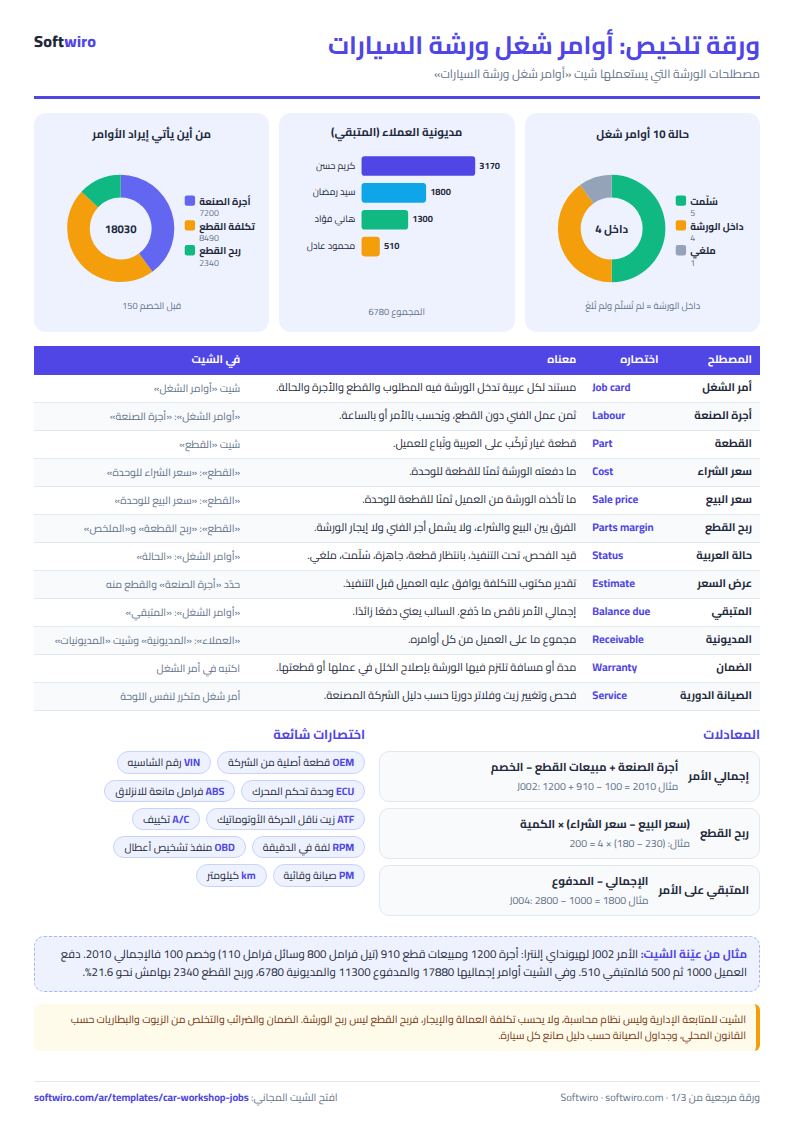
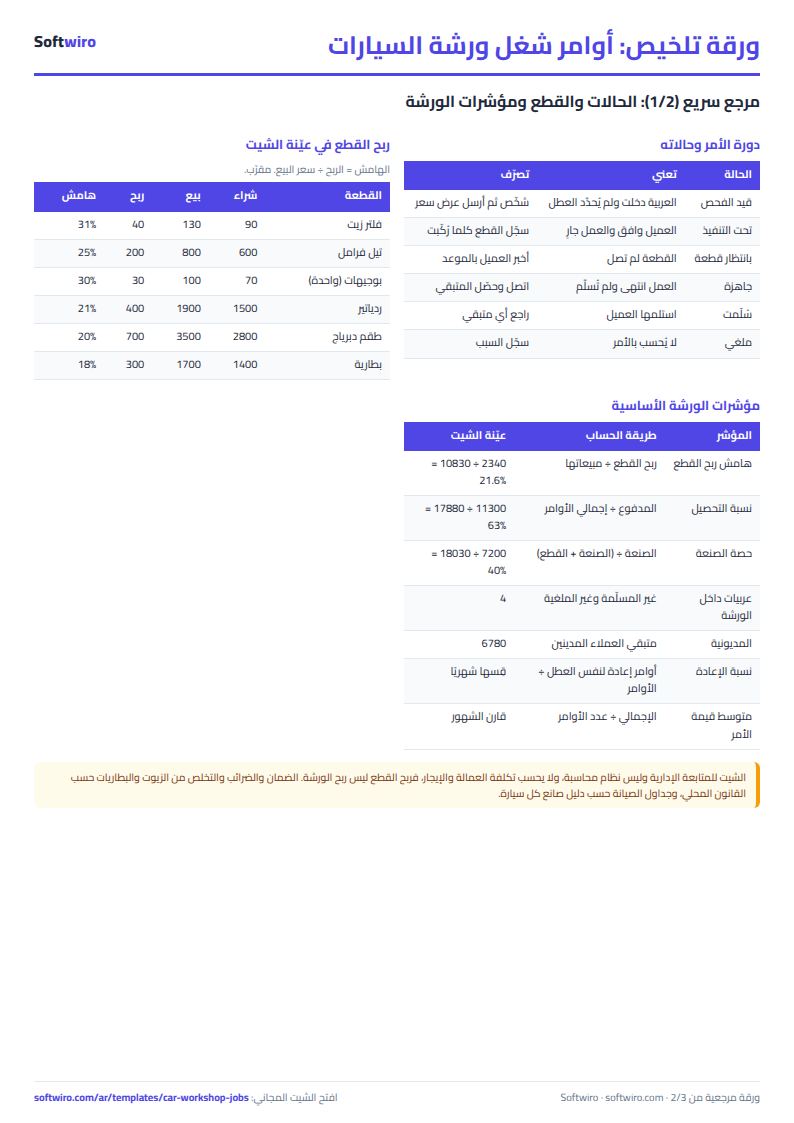
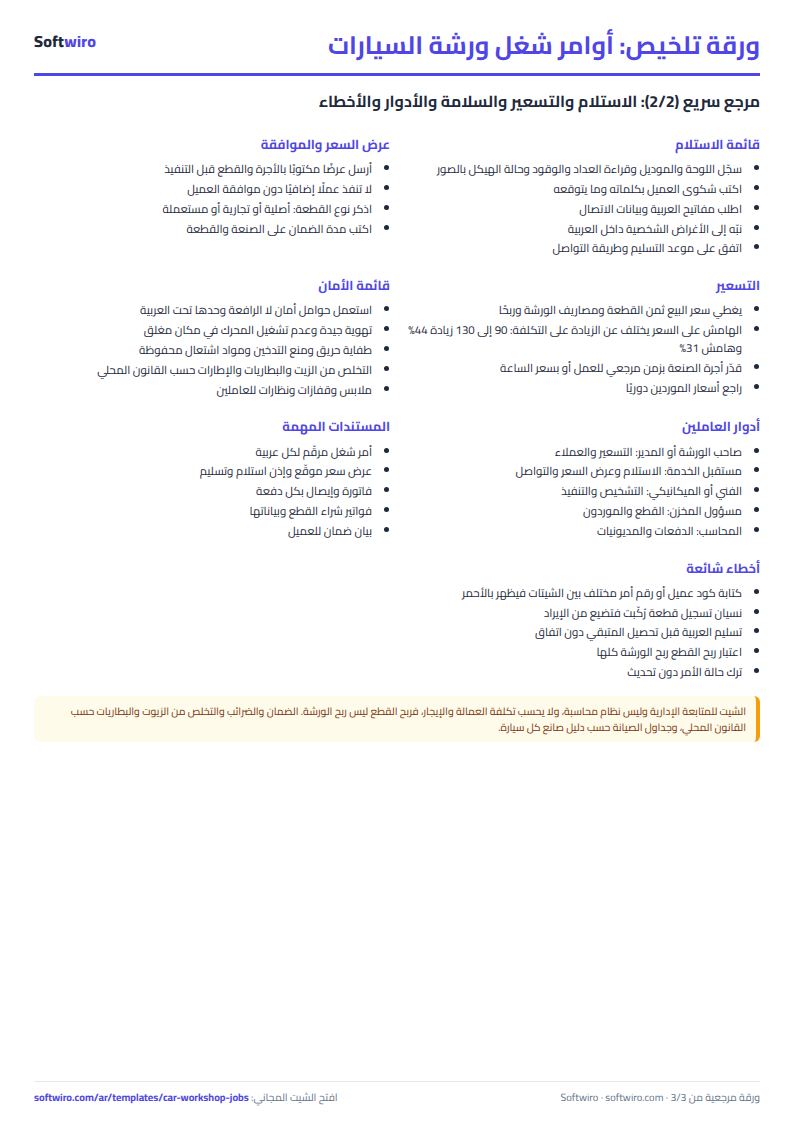
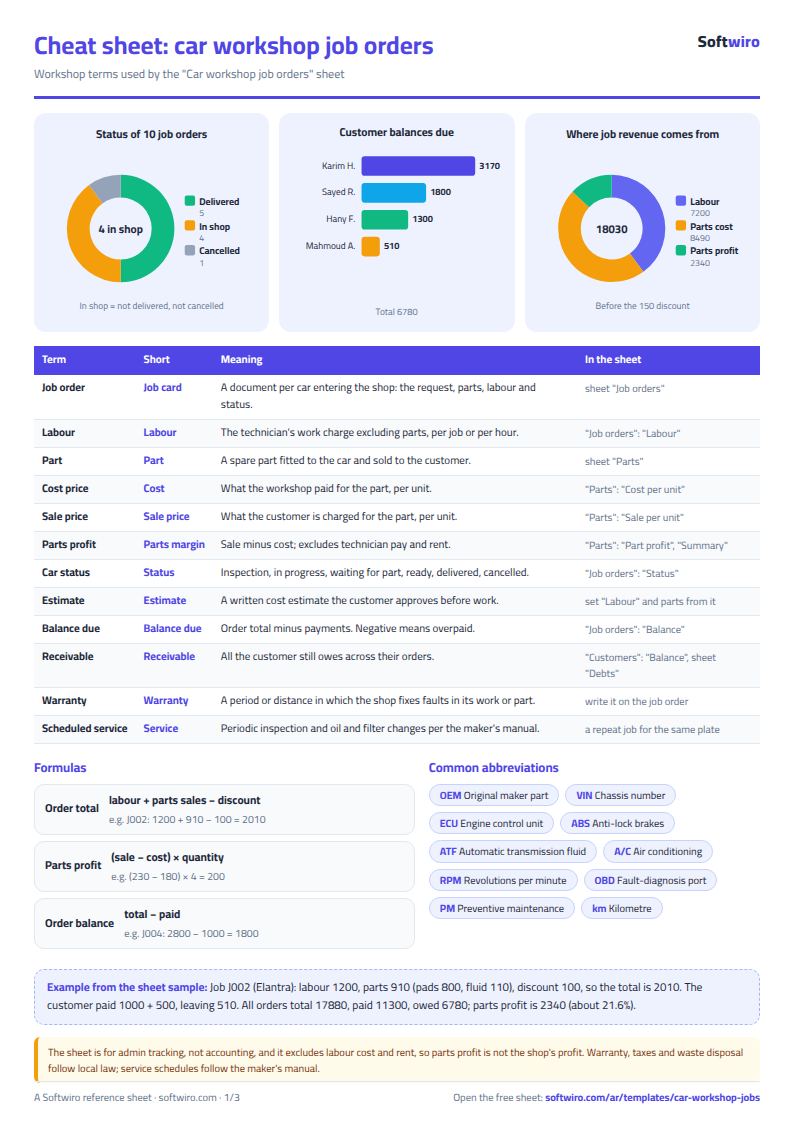
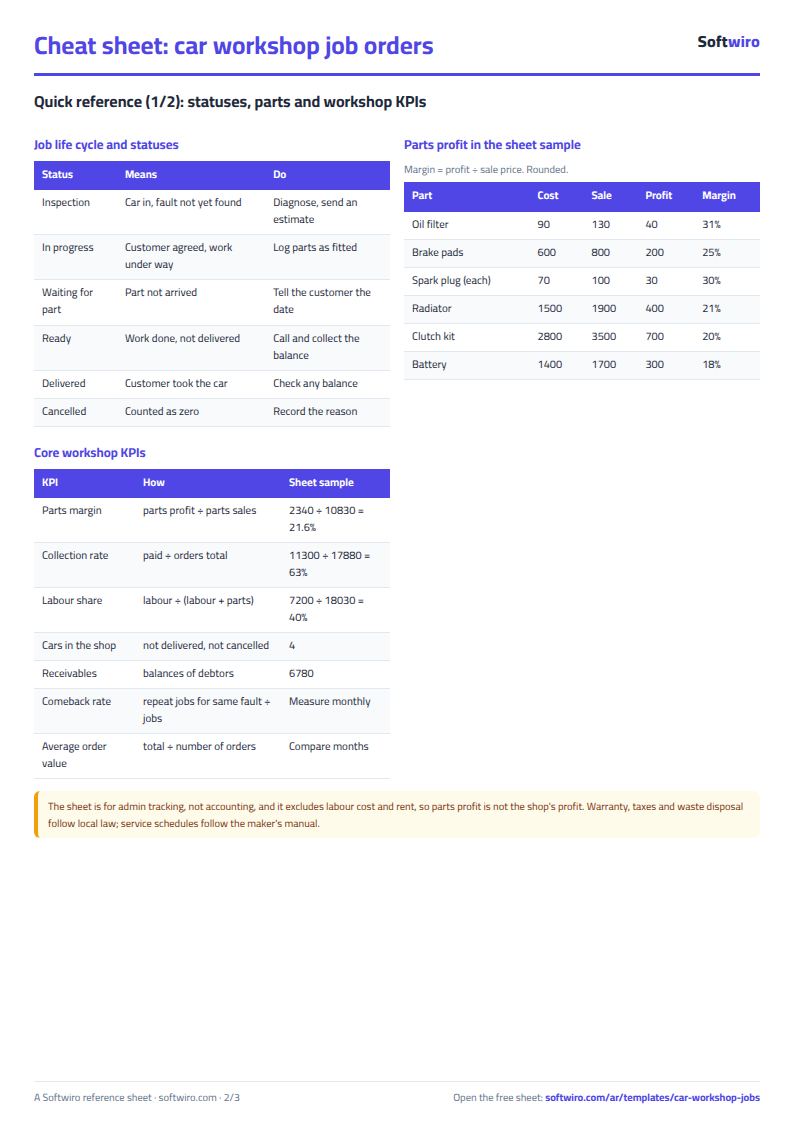
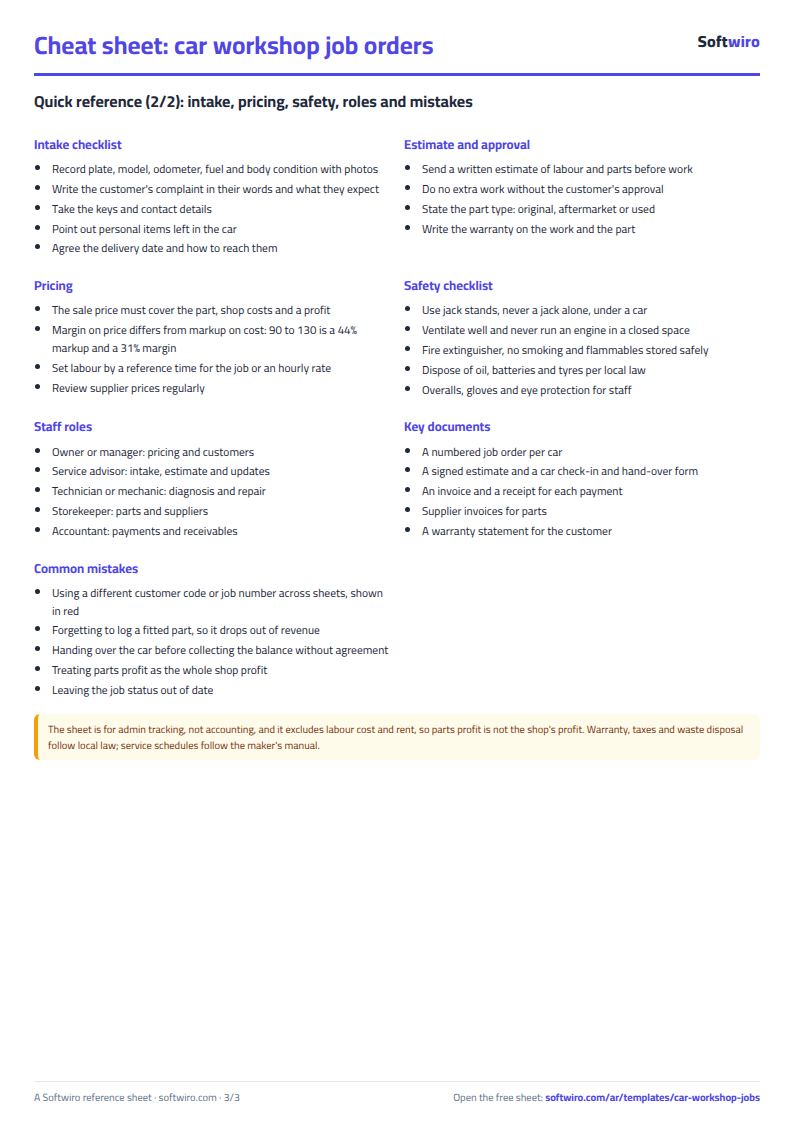
Terms, abbreviations, tables and diagrams over several pages, in Arabic and English. Download it as a PDF or images, including a phone-size version.
Still running this on Excel?
This sheet suits a start and a limited amount of data. If your way of working grows, or you need more than one person working on it at the same time, Softwiro can build you a program that fits the way you work.
| In this sheet | In Custom Software from Softwiro |
|---|---|
| One file that one person edits at a time, and copies reach you on WhatsApp. | A program with a login for each user and permissions you define, and everyone sees the same data. |
| You type everything and check the numbers by hand. | We design the screens around your work steps, so each person records only what concerns them. |
| Columns and formulas are fixed as the sheet was designed. | We build what you need: reports, alerts and screens your way. |
| Backups and security are your own responsibility. | The program runs on a secured server with regular backups. |
Frequently asked questions
How is a job order total calculated?
Order total = labor fee + parts sales recorded on the order − discount. An order with the status "cancelled" counts as zero, and its parts do not enter revenue or cost.
What is the difference between an order's remaining balance and a customer's balance?
The order's remaining balance is its total minus its own payments only. A customer's balance is the total of all their orders minus everything they have paid, so a payment above one order's total is deducted from the balance of another order of the same customer.
Is the profit on parts the workshop's profit?
No. Profit on parts is the sale price minus the purchase price, times the quantity. The labor fee is counted as full revenue without deducting technicians' pay, rent or other costs, so it is not the workshop's net profit.
What happens if I enter a code or order number that is not recorded?
"Code not found" appears in red in the job orders, or "order not found" in parts and payments, so you can correct it before the calculation goes wrong.
Is the template free?
Yes, with no sign-up and no email address. Use it, edit it and share it as you like.
Does it work in Google Sheets and on mobile?
The sheet uses formulas supported by Excel 2016 and later, Google Sheets and LibreOffice, so you can upload it to Google Drive and open it with Google Sheets on a computer or a phone.
What is the difference between the white and the gray cells?
You type in the white cells; the gray cells are calculated automatically. Don't type in a gray cell, or you will erase its formula.
Can I use the sheet from an AI assistant?
Yes. Add our MCP server (URL https://softwiro.com/api/mcp, no key needed) to your assistant and ask it to do the calculation in this template. The numbers come from the sheet's own formulas, and we do not store your data. The steps and a ready-made prompt are in this article: https://softwiro.com/blog/mcp-excel-templates-ai-agent-guide.html
More free templates for: Workshops and maintenance
More free templates
- Spare parts inventory sheet
- Metal and turning workshop job sheet in Excel: job orders, materials and labor
- Glass and aluminium workshop sheet in Excel: orders by square metre, cutting and waste
- Carpentry workshop sheet: cutting list, boards, cost and delivery
- Compound shared facilities booking sheet
- Nursery and school fees tracker (Excel)
- Tutoring center manager (Excel)
- Poultry farm cycle tracker (Excel)
- Crop season expenses and revenue tracker (Excel)
- Racing pigeon loft sheet
- Wedding and event budget planner (Excel)
- Car rental fleet tracker (Excel)