Try the sheet here, on the example
The sheet is open below with sample numbers. Change any white cell and watch the results update, or press the blank-copy button to type your own data from scratch. Nothing you type leaves your browser.
Example from the sheet
| المورد / الشركة | الخدمة | القيمة الشهرية | الأشهر المستحقة | إجمالي المستحق | المدفوع | المتبقي | حالة العقد |
|---|---|---|---|---|---|---|---|
| شركة النظافة المثالية | نظافة | 4,000.00 | 11 | 44,000.00 | 40,000.00 | 4,000.00 | ينتهي قريبًا |
| شركة حراسة (مثال) | حراسة | 9,000.00 | 12 | 108,000.00 | 108,000.00 | 0.00 | منتهي |
| شركة مصاعد (مثال) | صيانة مصعد | 3,500.00 | 9 | 31,500.00 | 28,000.00 | 3,500.00 | ساري |
| حدائق الواحة | حدائق | 2,500.00 | 9 | 22,500.00 | 25,000.00 | -2,500.00 | ينتهي قريبًا |
| مكافحة الحشرات الصحية | مكافحة حشرات | 1,200.00 | 11 | 13,200.00 | 13,200.00 | 0.00 | ينتهي قريبًا |
| شبكة سريع للإنترنت | إنترنت | 800.00 | 7 | 5,600.00 | 3,200.00 | 2,400.00 | ساري |
| شركة المراقبة الذكية | أخرى | 1,500.00 | 0 | 0.00 | 0.00 | 0.00 | لم يبدأ |
Example from the “العقود” tab (Arabic), with the numbers and formulas that are in the file.
What is inside
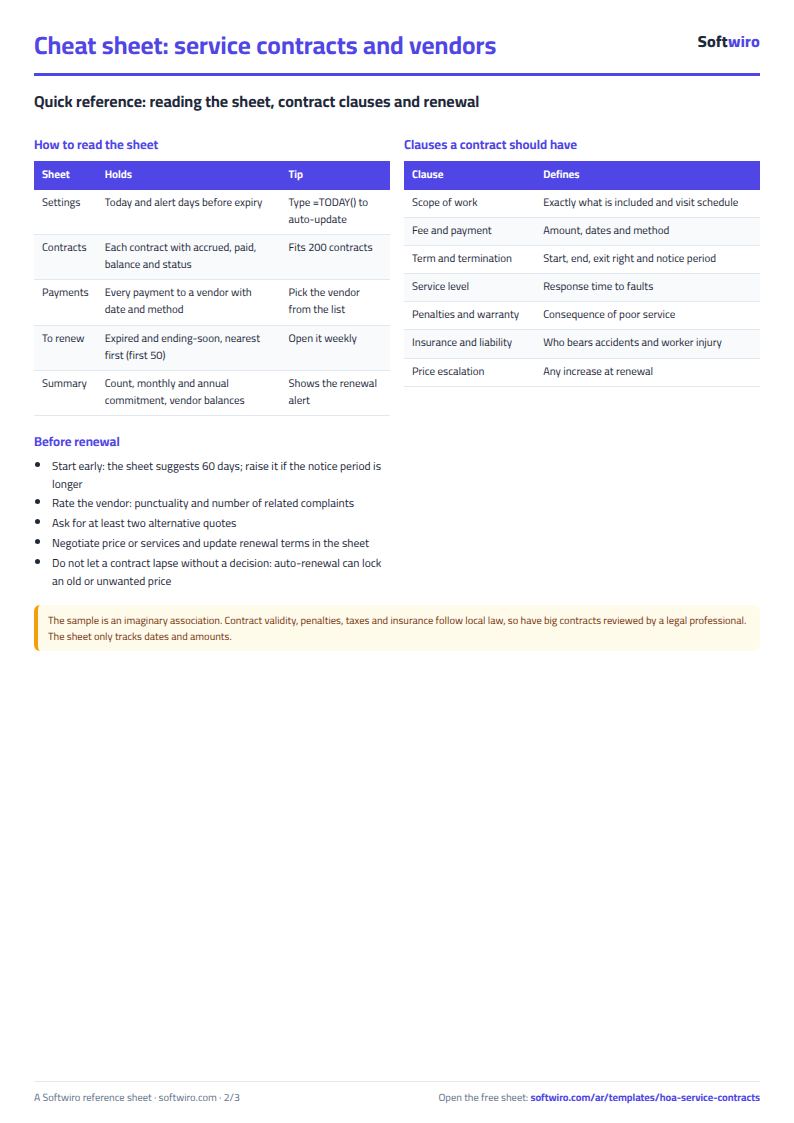
- "الإعدادات" (Settings): Today's date and the number of days before a contract ends at which you want the sheet to warn you (60 days in the example).
- "العقود" (Contracts): For each contract: supplier, type of service, mobile, monthly value, contract start and end dates and renewal terms. Then months due, total due, paid, remaining, days until the end, contract status (active, ending soon, expired or not started), yearly value and renewal rank.
- "الدفعات" (Payments): Each amount you paid a supplier with its date, the supplier name (from the contracts list), amount, payment method and a note. The type of service fills in automatically, and a warning shows if the supplier name is not in the contracts sheet.
- "للتجديد" (Renewals): An automatic list of contracts that have expired or end within the number of days you set, nearest date first, with the supplier's mobile, value, what is still owed and the renewal terms you entered.
- "الملخص" (Summary): The number of contracts by status, the monthly and yearly commitment, the total due, paid and remaining for suppliers, what was paid in the current month, and a table of each service type with its number of contracts, monthly commitment and the amount remaining for it.
The file opens on a start tab (“ابدأ هنا”, Start here) that explains how to use it.
What makes it different
Open the "للتجديد" (Renewals) sheet to see which contract has expired, which is about to expire and what the association commits to each month. Open the "الملخص" (Summary) sheet to see how much is still owed to suppliers, without adding up payments and comparing them with the contracts by hand before every meeting.
How to use it
- In "الإعدادات" (Settings), enter today's date (or =TODAY() so it updates itself) and the number of days before a contract ends at which you want a warning.
- In "العقود" (Contracts), enter for each contract the supplier name (it must not repeat), type of service, mobile, monthly value, contract start and end dates, and renewal terms.
- In "الدفعات" (Payments), log every amount you paid a supplier: date, supplier name (from the list), amount and payment method.
- The contracts sheet automatically calculates months due, total due, paid, remaining and the contract status: active, ending soon, expired or not started.
- Open the "للتجديد" (Renewals) sheet to find contracts that have expired or are close to ending, nearest date first, with the renewal terms you entered.
- Check the "الملخص" (Summary) sheet for the total monthly and yearly commitment, what is still owed to suppliers and the spending on each service type.
Before you start:
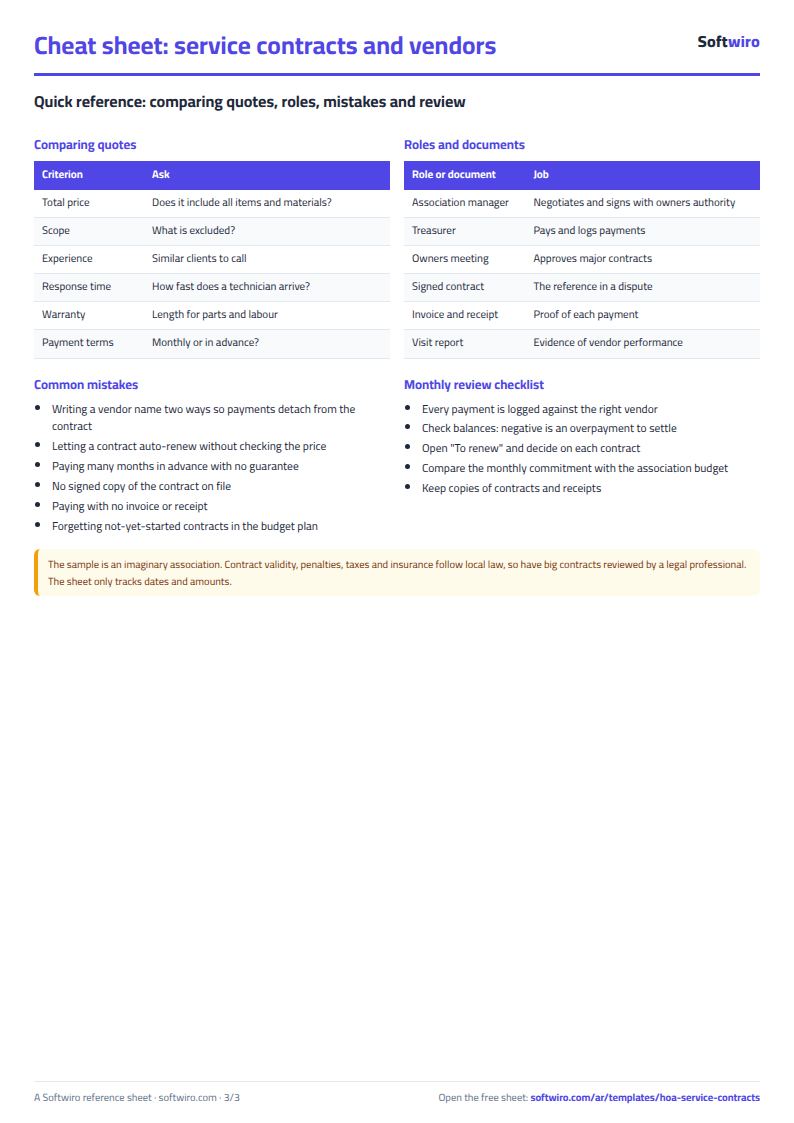
- Write each supplier name in one form that never changes, in both the contracts and payments sheets, because payments are linked to a contract by supplier name.
- Months due are the monthly cycles that have started, from the contract start date to today or the contract end date, whichever is earlier. Each cycle begins on the contract's start day. Amount due = months due × monthly value.
- Remaining = due − paid. A negative remaining amount means you have paid more than is due so far.
- The monthly and yearly commitment in the summary includes only active contracts and those ending soon. Contracts that have not started appear in a separate cell. Yearly value = monthly value × 12.
- An expired contract is not part of the monthly commitment, but whatever is still owed on it stays in the remaining amount until you pay it.
- The sheet holds 200 contracts and 1,000 payments, and the renewals list shows the first 50 contracts.
Free cheat sheet for this field
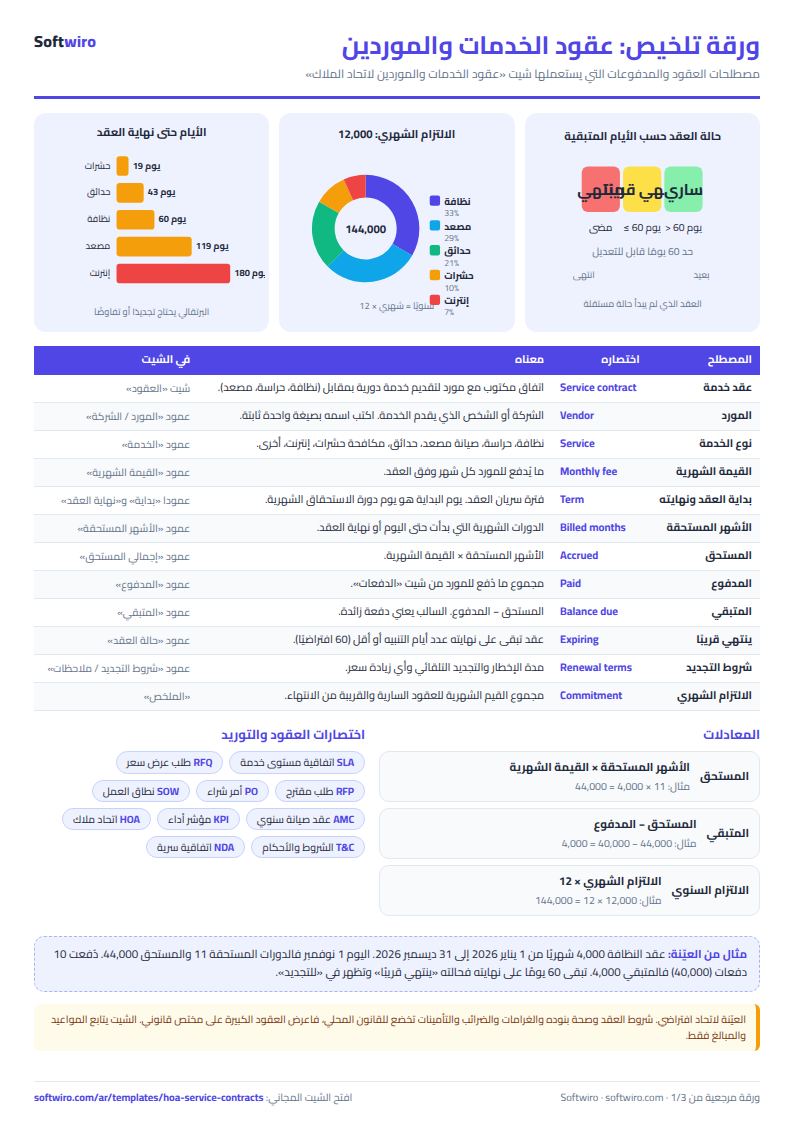
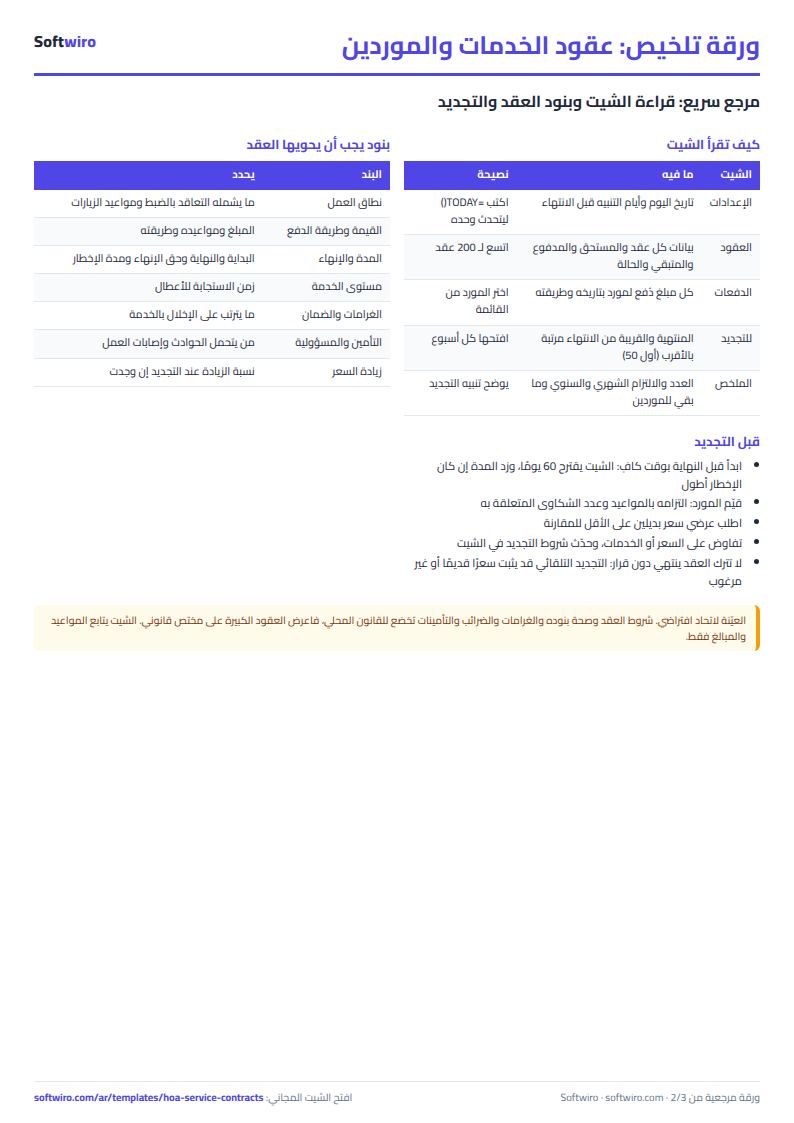
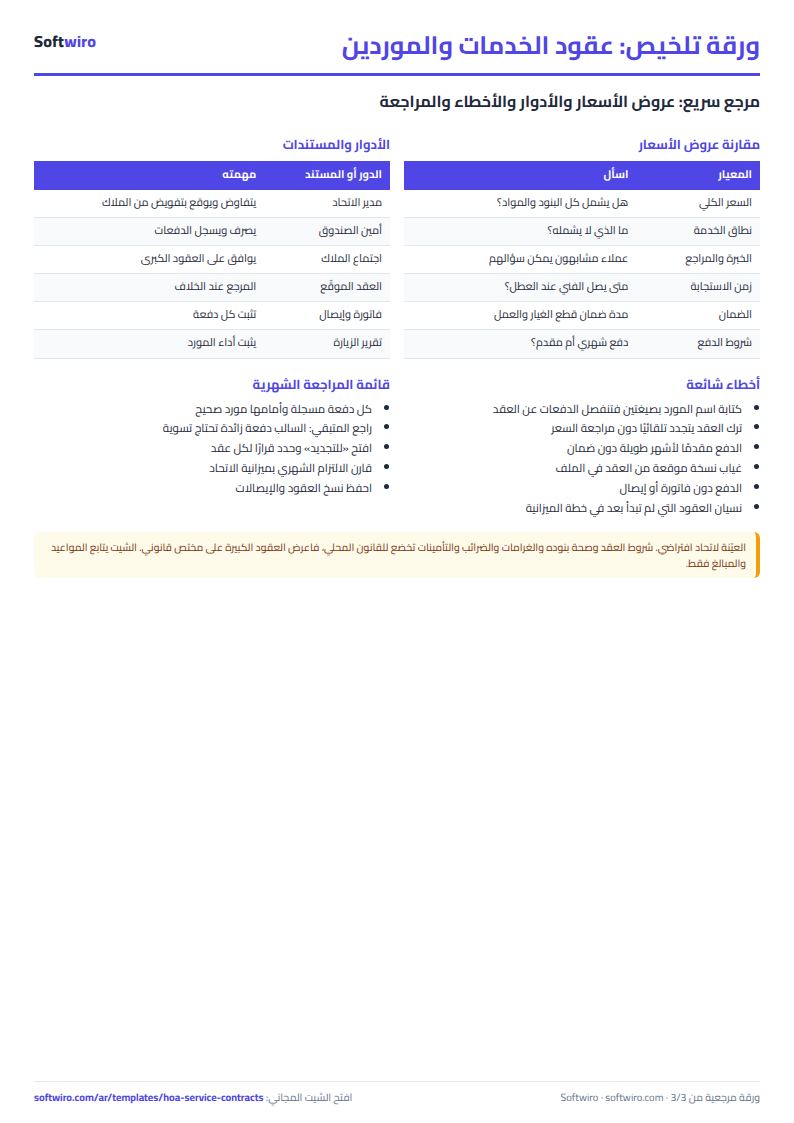
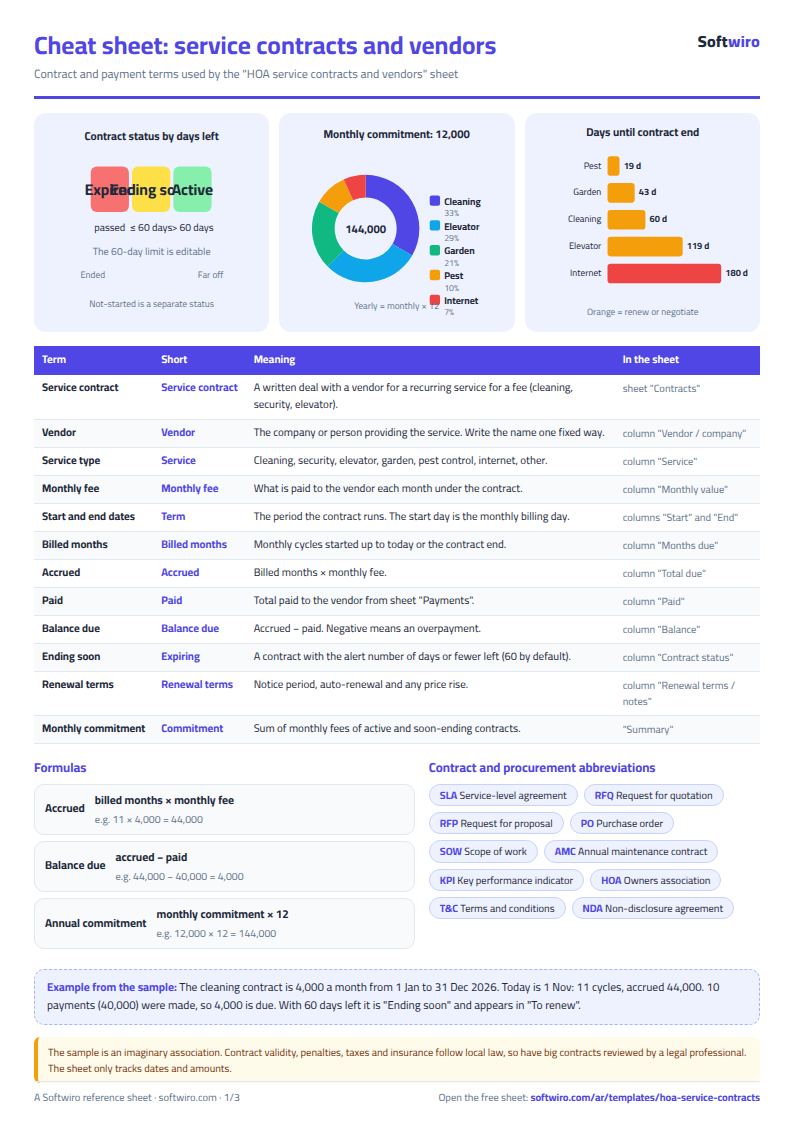
Terms, abbreviations, tables and diagrams over several pages, in Arabic and English. Download it as a PDF or images, including a phone-size version.
Still running this on Excel?
This sheet suits a start and a limited amount of data. If your way of working grows, or you need more than one person working on it at the same time, Softwiro can build you a program that fits the way you work.
| In this sheet | In Custom Software from Softwiro |
|---|---|
| One file that one person edits at a time, and copies reach you on WhatsApp. | A program with a login for each user and permissions you define, and everyone sees the same data. |
| You type everything and check the numbers by hand. | We design the screens around your work steps, so each person records only what concerns them. |
| Columns and formulas are fixed as the sheet was designed. | We build what you need: reports, alerts and screens your way. |
| Backups and security are your own responsibility. | The program runs on a secured server with regular backups. |
Frequently asked questions
How is the amount due to each supplier calculated?
The sheet counts the monthly cycles that have started, from the contract start date to today or the contract end date, whichever is earlier. Each cycle begins on the day of the month the contract started. It multiplies that number by the monthly value. Remaining is the amount due minus the total you logged in "الدفعات" (Payments) under the supplier's name.
What is the difference between active, ending soon and expired?
A contract is "expired" if its end date is before today's date, "ending soon" if its end is within the number of days you entered in the settings, "not started" if its start date is after today, and otherwise "active". Change the number of days in the settings to match the notice period you give suppliers.
Does an expired contract count in the monthly commitment?
No. The monthly and yearly commitment includes only active contracts and those ending soon. But whatever is still owed on an expired contract stays in the remaining amount until you pay it.
What if we have two services with the same supplier?
Payments are linked to a contract by supplier name, so give each contract a distinct name (for example "Company X - elevator" and "Company X - gardens") so that their payments do not mix.
Is the template free?
Yes, with no sign-up and no email address. Use it, edit it and share it as you like.
Does it work in Google Sheets and on mobile?
The sheet uses formulas supported by Excel 2016 and later, Google Sheets and LibreOffice, so you can upload it to Google Drive and open it with Google Sheets on a computer or a phone.
What is the difference between the white and the gray cells?
You type in the white cells; the gray cells are calculated automatically. Don't type in a gray cell, or you will erase its formula.
Can I use the sheet from an AI assistant?
Yes. Add our MCP server (URL https://softwiro.com/api/mcp, no key needed) to your assistant and ask it to do the calculation in this template. The numbers come from the sheet's own formulas, and we do not store your data. The steps and a ready-made prompt are in this article: https://softwiro.com/blog/mcp-excel-templates-ai-agent-guide.html
All the templates in this group: Compound and owners' association sheets: dues, maintenance and property
More free templates for: Owners associations and compounds
More free templates
- Owners' association dues collection tracker
- Owners' association budget and expenses sheet
- Reserve and emergency fund sheet for owners' associations
- Maintenance requests and complaints log for owners' associations
- Owners association meetings and decisions tracker
- Shared electricity and water bill splitter for building units
- Residents, units and vehicles register for an owners' association
- Monthly transparency report for owners' associations
- Compound assets and periodic maintenance sheet
- Gate and security sheet
- Compound shared facilities booking sheet
- Building maintenance sheet: flat fees, expenses, elevator and pump
- Gym memberships tracker (Excel)
- Beauty salon bookings tracker (Excel)
- Car workshop job orders tracker (Excel)
- Nursery and school fees tracker (Excel)
- Tutoring center manager (Excel)
- Poultry farm cycle tracker (Excel)
- Crop season expenses and revenue tracker (Excel)
- Racing pigeon loft sheet