Try the sheet here, on the example
The sheet is open below with sample numbers. Change any white cell and watch the results update, or press the blank-copy button to type your own data from scratch. Nothing you type leaves your browser.
Example from the sheet
| الطبق | سعر البيع الفعلي | تكلفة الطبق | سعر البيع المقترح | هامش الربح | نسبة التكلفة | الحالة |
|---|---|---|---|---|---|---|
| فراخ مشوية بالأرز | 140.00 | 45.90 | 153.00 | 94.10 | 32.8% | فوق المستهدف |
| برجر لحم | 180.00 | 74.60 | 249.00 | 105.40 | 41.4% | فوق المستهدف |
| بيتزا مارجريتا | 150.00 | 42.95 | 144.00 | 107.05 | 28.6% | ضمن المستهدف |
| مكرونة بالصلصة | 70.00 | 15.15 | 51.00 | 54.85 | 21.6% | ضمن المستهدف |
| بطاطس مقلية | 35.00 | 9.00 | 30.00 | 26.00 | 25.7% | ضمن المستهدف |
| كابتشينو | 55.00 | 17.15 | 58.00 | 37.85 | 31.2% | فوق المستهدف |
| أرز باللحمة | 83.40 | 278.00 | بدون سعر | |||
| سلطة خضراء | 40.00 | بدون وصفة |
Example from the “الأطباق” tab (Arabic), with the numbers and formulas that are in the file.
What is inside
- "الإعدادات" (Settings): The target cost percentage (30% in the example), plus the ingredient you want to test a price rise on (mozzarella cheese) and the size of the rise (25%).
- "المكونات" (Ingredients): Ingredient name, unit and price per unit, with the number of dishes each ingredient is used in. Changing a price here updates every dish. Holds up to 300 ingredients.
- "الأطباق" (Dishes): Each dish has its actual selling price, followed by its cost, suggested selling price, profit margin, cost percentage, margin percentage and status (within target, over target, no recipe or no price). It also shows the cost and cost percentage after the expected price rise, and a profitability rank. Holds up to 200 dishes.
- "الوصفات" (Recipes): One row per ingredient in a dish: the dish, the ingredient and the quantity. The unit, its price, the line cost and the line cost after the price rise fill in automatically. Holds up to 1,000 lines.
- "الملخص" (Summary): The number of dishes, the average cost percentage and how many dishes are over target, the top three and bottom three dishes by profit, and the effect of the selected ingredient's price rise: dishes affected, how much cost increases, and which dishes go over target because of it.
The file opens on a start tab (“ابدأ هنا”, Start here) that explains how to use it.
What makes it different
From the "الأطباق" (Dishes) sheet you see which dish costs more than your target percentage, so you can change its price or its recipe. From "الملخص" (Summary) you see which dishes earn the most and the least in pounds. When an ingredient's price goes up, you enter the new price once in "المكونات" (Ingredients) and every dish updates, instead of recalculating each recipe by hand.
How to use it
- In "الإعدادات" (Settings), enter your target cost percentage (for example 30%). If you want to test a price rise, also choose an ingredient and a percentage increase.
- In "المكونات" (Ingredients), enter each ingredient, its unit and the price of one unit (the price per kilo, liter or piece).
- In "الأطباق" (Dishes), enter the name of each dish and its actual selling price.
- In "الوصفات" (Recipes), add one row for each ingredient in a dish: the dish name, the ingredient and the quantity in the same unit as the ingredient (for example 0.150 kg).
- The dishes sheet calculates each dish's cost, suggested price, margin and cost percentage, and shows "فوق المستهدف" (over target) next to any dish that goes over the percentage.
- Change an ingredient's price in the ingredients sheet and the cost of every dish that uses it updates. Check the summary for the most and least profitable dishes and the effect of the rise.
Before you start:
- Enter the recipe quantity in the same unit as the ingredient: if the price is per kilo, enter 0.150 for 150 grams.
- Dish cost = the sum of (quantity × ingredient unit price) for every line in its recipe.
- Suggested price = cost ÷ target cost percentage, rounded up to the next whole pound.
- Cost percentage = cost ÷ actual selling price, and profit margin = selling price − cost. A dish is "over target" when its percentage is higher than the target.
- The sheet calculates ingredient cost only. Rent, salaries, electricity and waste are not included, so allow a margin for them when you set the target percentage.
- A dish without a recipe shows "no recipe", and a dish without a selling price shows "no price" and is left out of the ranking. The sheet holds 300 ingredients, 200 dishes and 1,000 recipe lines.
Free cheat sheet for this field
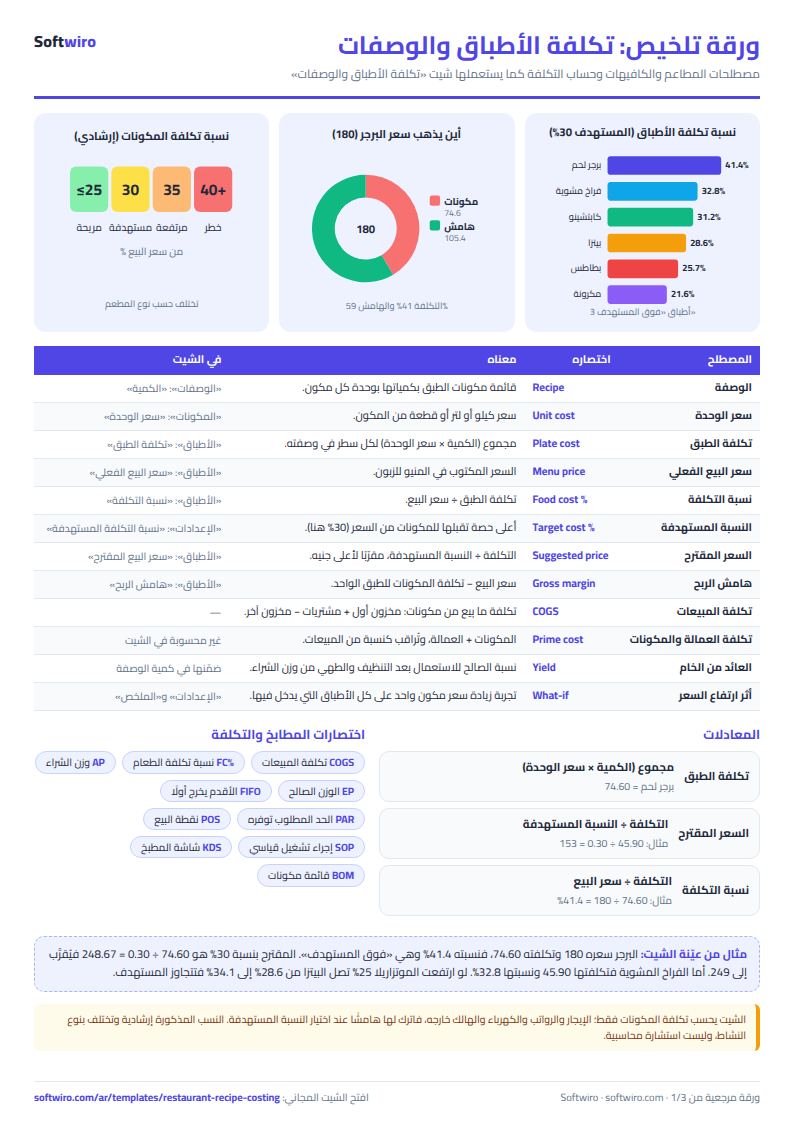
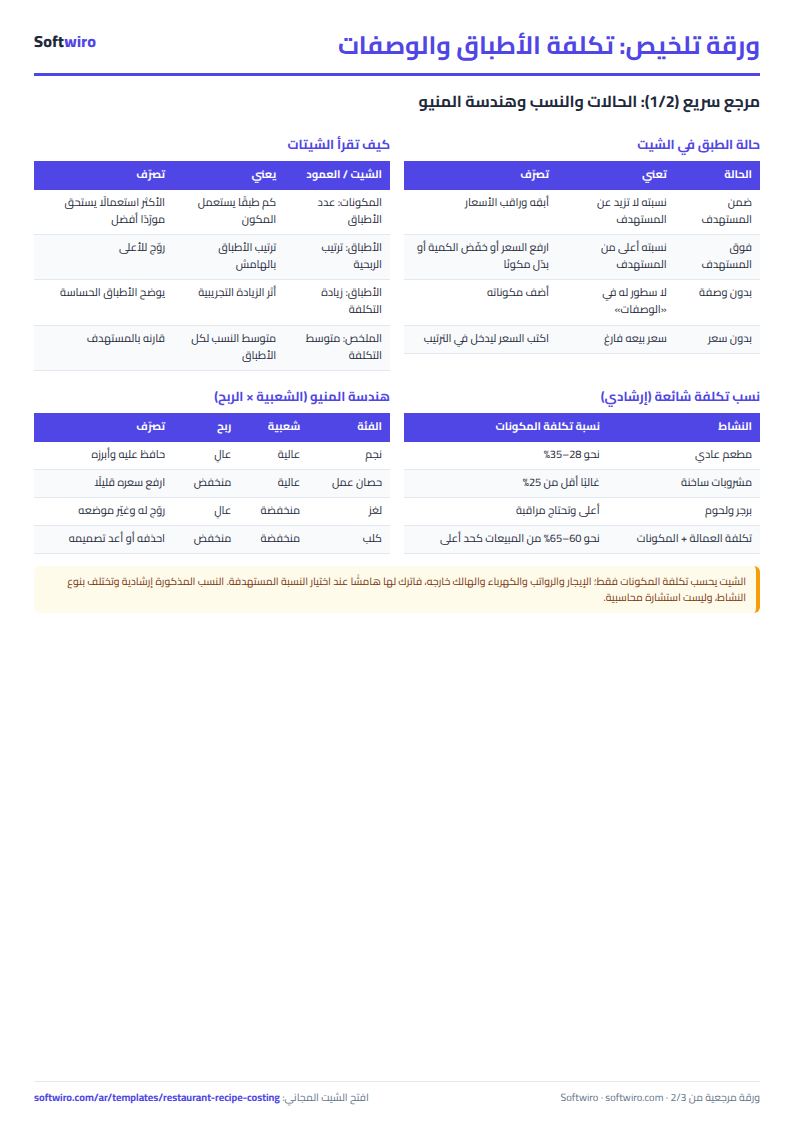
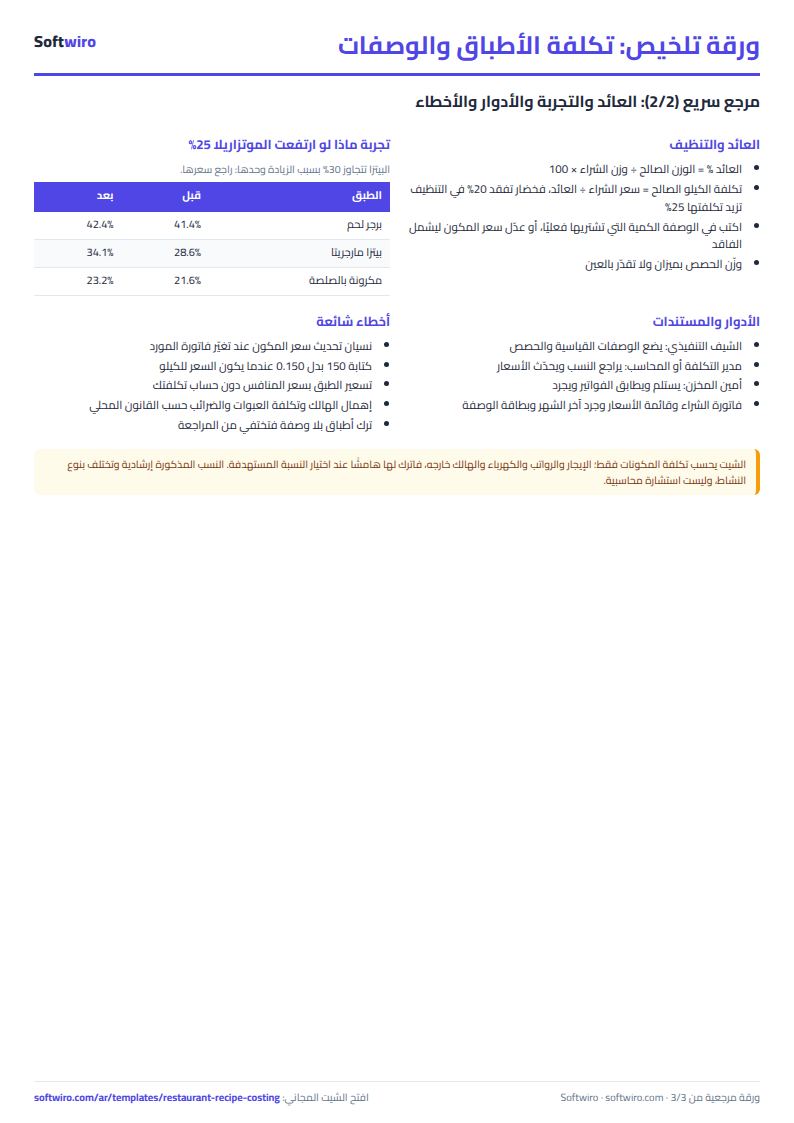
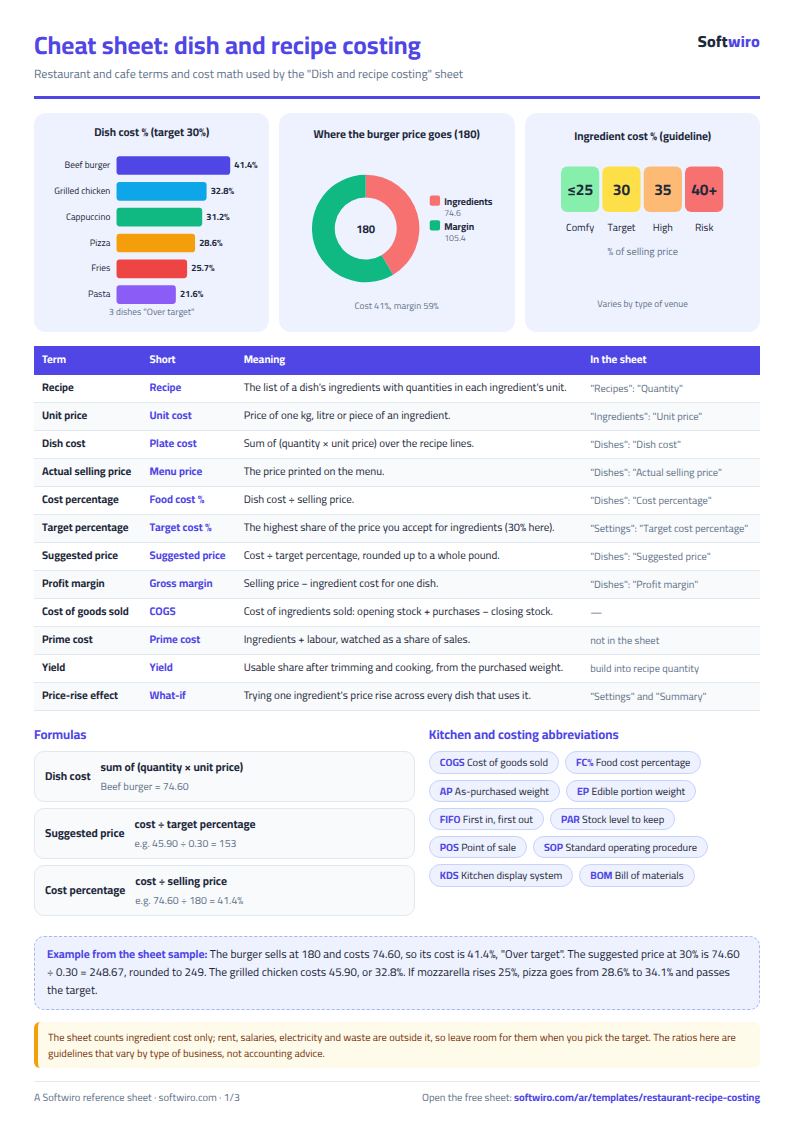
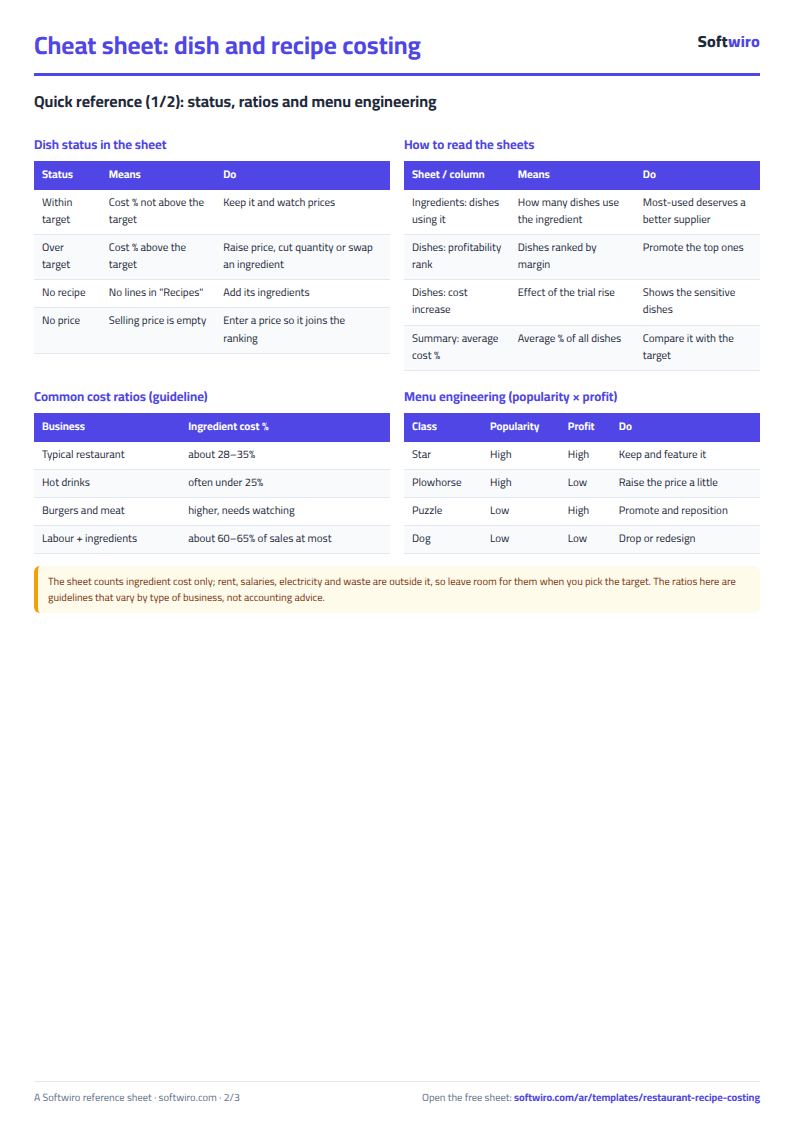
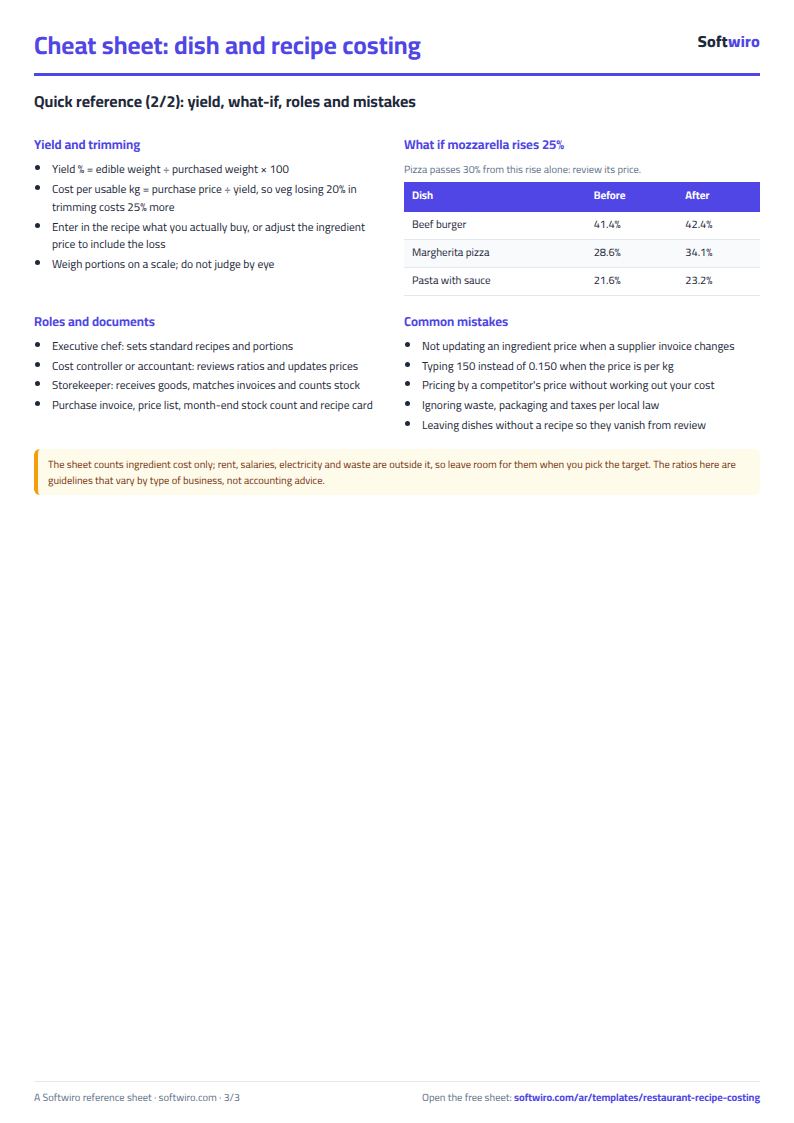
Terms, abbreviations, tables and diagrams over several pages, in Arabic and English. Download it as a PDF or images, including a phone-size version.
Still running this on Excel?
This sheet suits a start and a limited amount of data. If your way of working grows, or you need more than one person working on it at the same time, Softwiro can build you a program that fits the way you work.
| In this sheet | In Custom Software from Softwiro |
|---|---|
| One file that one person edits at a time, and copies reach you on WhatsApp. | A program with a login for each user and permissions you define, and everyone sees the same data. |
| You type everything and check the numbers by hand. | We design the screens around your work steps, so each person records only what concerns them. |
| Columns and formulas are fixed as the sheet was designed. | We build what you need: reports, alerts and screens your way. |
| Backups and security are your own responsibility. | The program runs on a secured server with regular backups. |
Frequently asked questions
How is the suggested selling price calculated?
Suggested price = dish cost ÷ the target cost percentage you entered in the settings, rounded up to the next whole pound. A dish that costs 45.90 with a 30% target gets a suggested price of 153 EGP.
What does "over target" mean?
It appears next to a dish whose actual cost percentage (cost ÷ actual selling price) is higher than the target percentage. This happens when your selling price is below the suggested price or when the cost of its ingredients has gone up.
How do I see the effect of an ingredient price rise?
Choose the ingredient in the settings and enter the percentage increase. The "الأطباق" (Dishes) sheet then shows each dish's cost and cost percentage after the rise, and "الملخص" (Summary) shows the dishes affected and which ones go over target because of it. This is only a test and does not change the actual price. To update the real price, edit it in "المكونات" (Ingredients).
Does it include rent and salaries?
No, it calculates ingredient cost only. Rent, salaries, electricity and waste are outside the sheet, so allow a margin for them when you choose your target cost percentage.
Is the template free?
Yes, with no sign-up and no email address. Use it, edit it and share it as you like.
Does it work in Google Sheets and on mobile?
The sheet uses formulas supported by Excel 2016 and later, Google Sheets and LibreOffice, so you can upload it to Google Drive and open it with Google Sheets on a computer or a phone.
What is the difference between the white and the gray cells?
You type in the white cells; the gray cells are calculated automatically. Don't type in a gray cell, or you will erase its formula.
Can I use the sheet from an AI assistant?
Yes. Add our MCP server (URL https://softwiro.com/api/mcp, no key needed) to your assistant and ask it to do the calculation in this template. The numbers come from the sheet's own formulas, and we do not store your data. The steps and a ready-made prompt are in this article: https://softwiro.com/blog/mcp-excel-templates-ai-agent-guide.html
More free templates for: Restaurants and cafes
More free templates
- Restaurant and cafe inventory and waste sheet
- Restaurant and cafe table reservations sheet
- Canteen management sheet
- Finishing and contracting projects tracker
- Household budget and savings sheet
- Owners' association dues collection tracker
- Owners' association budget and expenses sheet
- Reserve and emergency fund sheet for owners' associations
- Maintenance requests and complaints log for owners' associations
- Service contracts and suppliers tracker for owners' associations
- Owners association meetings and decisions tracker