Try the sheet here, on the example
The sheet is open below with sample numbers. Change any white cell and watch the results update, or press the blank-copy button to type your own data from scratch. Nothing you type leaves your browser.
Example from the sheet
| كود المريض | الاسم | عدد الزيارات | مستحق الكشوفات | المدفوع | المتبقي | موعد المتابعة القادم | حالة المتابعة |
|---|---|---|---|---|---|---|---|
| P001 | نهى عادل | 3 | 600.00 | 600.00 | 0.00 | 46341 | قادمة |
| P002 | كريم فؤاد | 3 | 750.00 | 700.00 | 50.00 | 46328 | قادمة |
| P003 | ليلى منصور | 1 | 300.00 | 300.00 | 0.00 | 46299 | متأخر عن المتابعة |
| P004 | عمرو شريف | 2 | 450.00 | 450.00 | 0.00 | 46311 | تمت |
| P005 | هبة رشدي | 1 | 300.00 | 200.00 | 100.00 | 46317 | متأخر عن المتابعة |
| P006 | سامي نجيب | 1 | 300.00 | 300.00 | 0.00 | 46338 | قادمة |
| P007 | دينا ماهر | 1 | 300.00 | 300.00 | 0.00 | 46329 | قادمة |
| P008 | ياسر عصام | 1 | 300.00 | 0.00 | 300.00 | 46325 | متأخر عن المتابعة |
Example from the “المرضى” tab (Arabic), with the numbers and formulas that are in the file.
What is inside
- "الإعدادات" (Settings): Today's date, and any date within the month you want summarized (October 2026 in the example).
- "الأسعار" (Prices): Visit types and the price of each. In the example: examination 300 and consultation 150. The table holds up to 20 types.
- "المرضى" (Patients): Patient code, name, phone and first visit date. The sheet then calculates the number of visits, amount owed for visits, amount paid, remaining balance, last visit, next follow-up date and its status (upcoming, done or overdue for follow-up).
- "المواعيد" (Appointments): A log of every appointment: date, time, patient code, visit type, amount paid, status (attended, no-show or cancelled) and follow-up date. The patient's name, visit price and amount owed appear automatically.
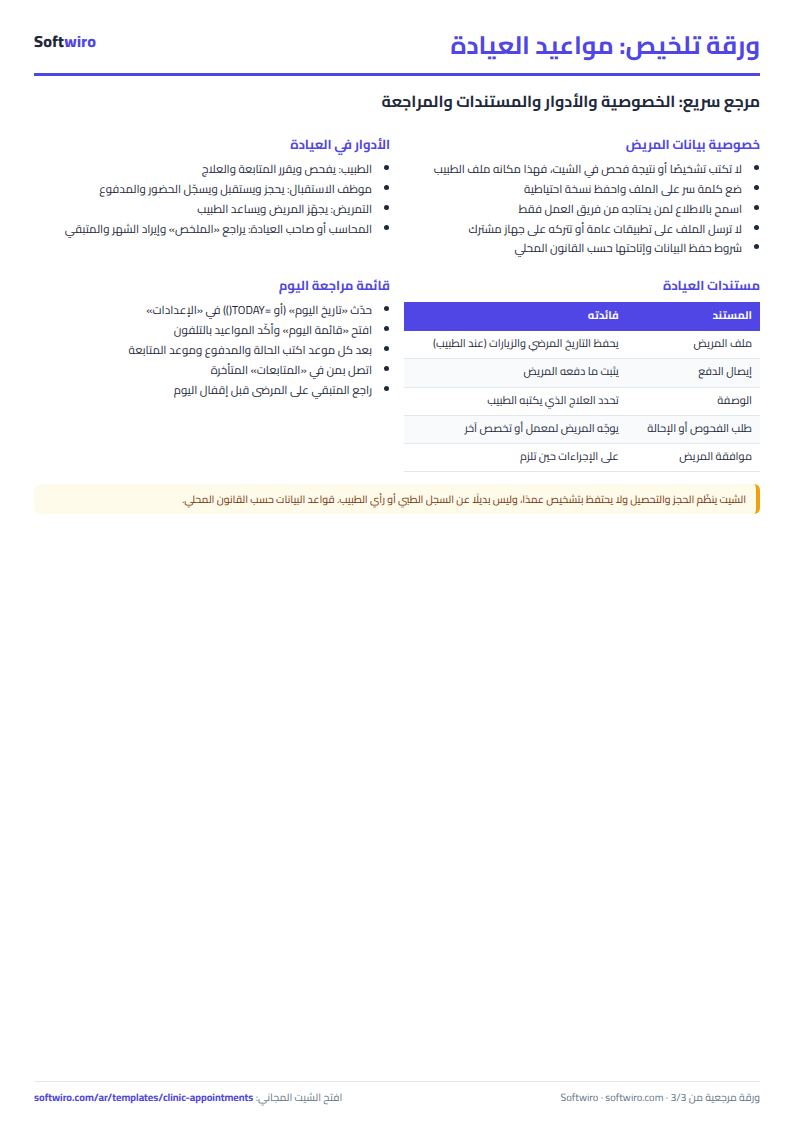
- "قائمة اليوم" (Today's list): Today's appointments sorted by time, with code, patient, phone, visit type, price, amount paid and status ("booked" if no status has been recorded).
- "المتابعات" (Follow-ups): Patients who are overdue for their follow-up, oldest date first, with their phone, days overdue, last visit and remaining balance, plus the number of upcoming follow-ups.
- "الملخص" (Summary): The chosen month's appointments (attended, no-show, cancelled and booked) and the attendance rate; the value of visits and the amount collected in the month; the number of patients with a balance and the total remaining; and a breakdown of attendees by the first 5 visit types.
The file opens on a start tab (“ابدأ هنا”, Start here) that explains how to use it.
What makes it different
Open "قائمة اليوم" (Today's list) to see who is coming and when. Open "المتابعات" (Follow-ups) to find patients the doctor asked to come back who have not, without going through the notebook page by page. The summary shows the attendance rate, the month's revenue and how much patients still owe.
How to use it
- In the "الإعدادات" (Settings) sheet, enter today's date (or =TODAY() so it updates by itself) and any date within the month you want summarized.
- In the "الأسعار" (Prices) sheet, enter your visit types and the price of each (for example examination and consultation).
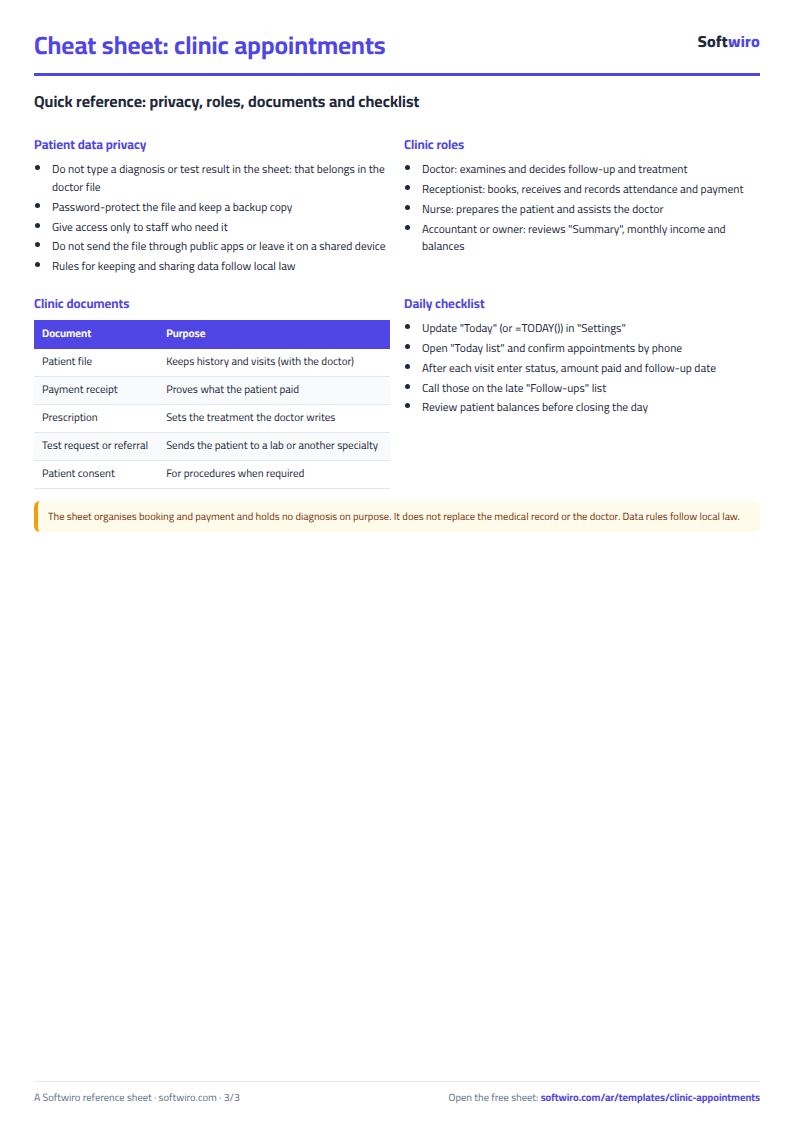
- In the "المرضى" (Patients) sheet, enter for each patient a code, name, phone and first visit date. Do not enter any diagnosis or medical data here.
- In the "المواعيد" (Appointments) sheet, add a row for each appointment: date, time, patient code and visit type, then, after the appointment, the amount paid and the status (attended, no-show or cancelled), and the follow-up date if the doctor sets one.
- Open "قائمة اليوم" (Today's list) to see today's appointments sorted by time, and "المتابعات" (Follow-ups) to see who is overdue for their follow-up.
- Check "الملخص" (Summary) for the month's revenue, attendance rate and the amounts patients still owe.
Before you start:
- The visit price is taken automatically from the "الأسعار" (Prices) sheet according to the visit type, and only an appointment with the status "attended" counts toward what is owed.
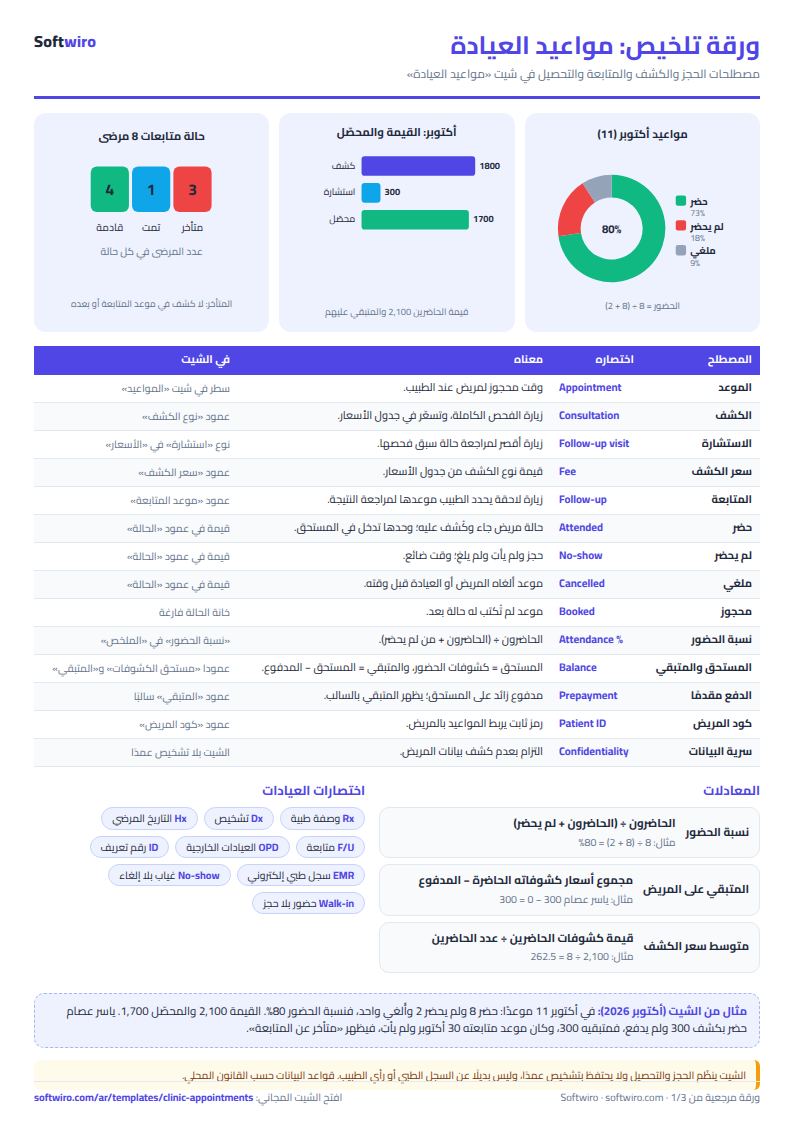
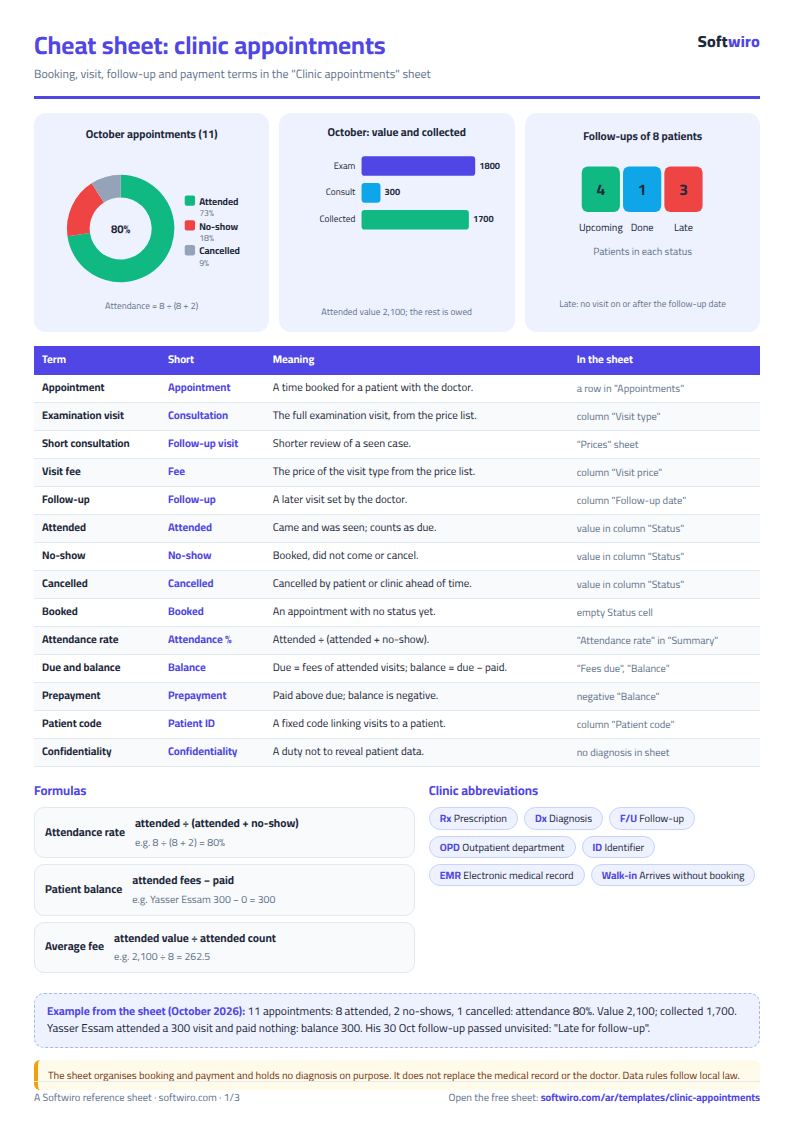
- Remaining per patient = total price of the visits they attended - total they paid. A negative number means they paid in advance.
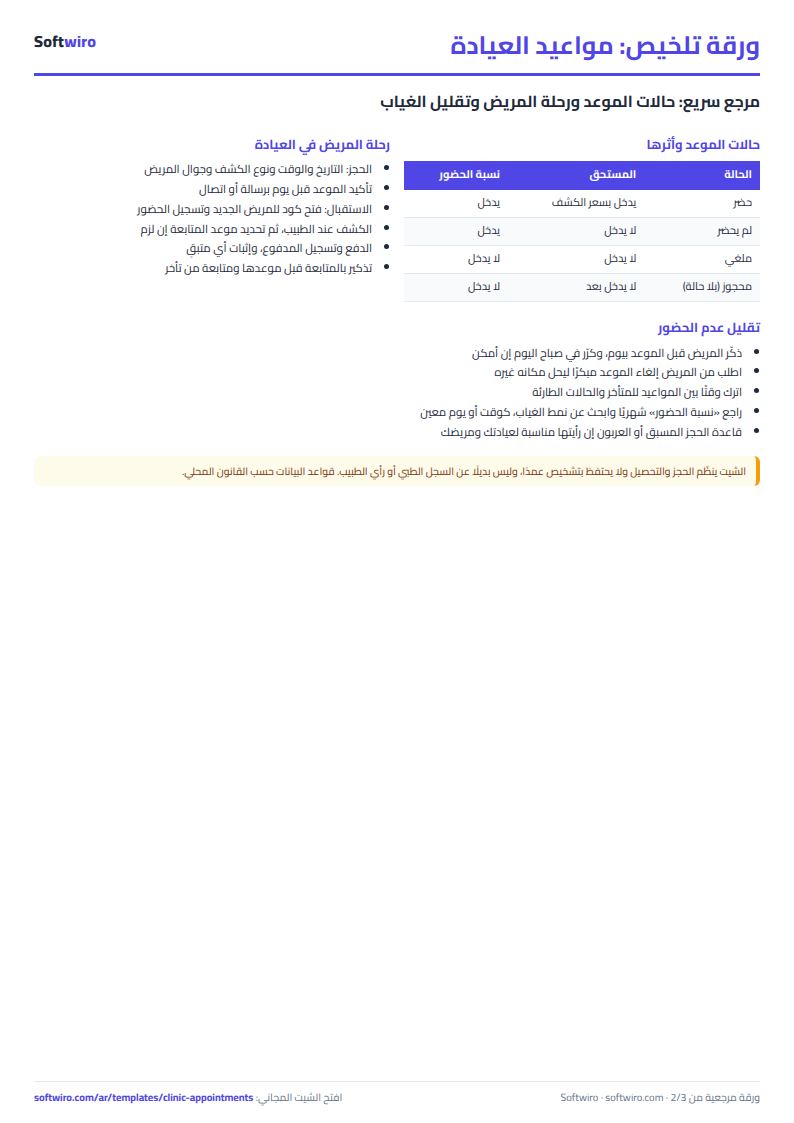
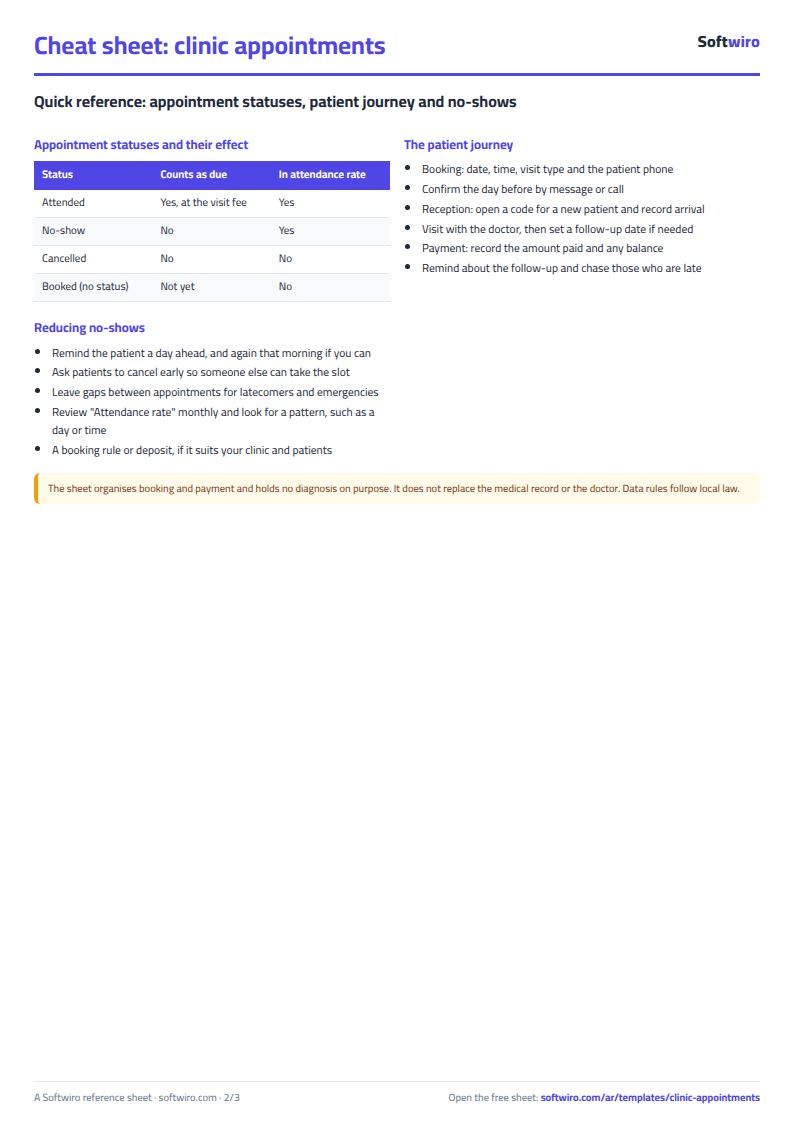
- An appointment with no status yet is treated as "booked" and is not counted in the attendance rate.
- Attendance rate = attended / (attended + no-show). Cancelled and booked appointments are not counted.
- A patient's next follow-up date is the latest follow-up date recorded for them. They are overdue if it has passed and no "attended" visit has been recorded on that day or after it.
- Enter time in the format 10:30. The sheet holds up to 200 patients and 1,000 appointments; Today's list shows the first 50 appointments and Follow-ups shows the first 50 overdue patients.
Free cheat sheet for this field
Terms, abbreviations, tables and diagrams over several pages, in Arabic and English. Download it as a PDF or images, including a phone-size version.
Still running this on Excel?
This sheet depends on someone checking the shelves and typing in the items by hand. Sehaty tracks the pharmacy's stock item by item, warns you before an item runs out rather than after, and records dispensing against the e-prescription itself.
| In this sheet | In MyClinic (Sehaty) — Clinic, Pharmacy and Supplier Platform |
|---|---|
| You discover an item is short when a patient asks for it. | Sehaty tracks stock item by item and warns you before an item runs out, not after. |
| The prescription is a paper that can get lost or be hard to read, and no trace of dispensing remains. | The consultation produces an e-prescription in the patient's medical file, and the pharmacy records dispensing against that same prescription. |
| You learn what pharmacies need late, through reports and phone calls. | The supplier sees a digital catalog that reaches pharmacies and warehouses, and sees demand as it comes in. |
| The patient phones several clinics to book. | The patient searches for appointments by specialty and location and books without a phone call. |
See MyClinic (Sehaty) — Clinic, Pharmacy and Supplier Platform · Ask for a demo
Frequently asked questions
How is a patient's remaining balance calculated?
Remaining = the total price of their visits with the status "attended" (from the Prices sheet) - the total they paid across all their appointments. A negative number means they paid in advance. A cancelled appointment, or one they did not attend, does not charge them its price.
When is a patient considered overdue for follow-up?
The next follow-up date is the latest follow-up date recorded for them in Appointments. If that date has passed and the patient has no appointment with the status "attended" on that day or after it, their status shows "overdue for follow-up" and they appear in the Follow-ups list.
Does the sheet store diagnoses or medical records?
No. Its columns cover only name, phone, appointments and amounts. It was designed that way on purpose to stay light. Do not enter diagnoses or test results in it.
How is the attendance rate calculated?
Attended / (attended + no-show) in the chosen month. Cancelled appointments and booked appointments with no status recorded are not counted in the rate.
Is the template free?
Yes, with no sign-up and no email address. Use it, edit it and share it as you like.
Does it work in Google Sheets and on mobile?
The sheet uses formulas supported by Excel 2016 and later, Google Sheets and LibreOffice, so you can upload it to Google Drive and open it with Google Sheets on a computer or a phone.
What is the difference between the white and the gray cells?
You type in the white cells; the gray cells are calculated automatically. Don't type in a gray cell, or you will erase its formula.
Can I use the sheet from an AI assistant?
Yes. Add our MCP server (URL https://softwiro.com/api/mcp, no key needed) to your assistant and ask it to do the calculation in this template. The numbers come from the sheet's own formulas, and we do not store your data. The steps and a ready-made prompt are in this article: https://softwiro.com/blog/mcp-excel-templates-ai-agent-guide.html
More free templates for: Pharmacies and clinics
More free templates
- Pharmacy expiry and stock tracking sheet
- Dental clinic treatment plans tracker (Excel)
- Complete clinic management sheet
- Medical lab management sheet
- Pharmacy management sheet: sales, purchases, shortages and suppliers
- Small hospital management sheet: departments, beds, admissions and revenue
- Recipe costing for restaurants and cafes (Excel)
- Finishing and contracting projects tracker
- Household budget and savings sheet
- Owners' association dues collection tracker
- Owners' association budget and expenses sheet
- Reserve and emergency fund sheet for owners' associations
- Maintenance requests and complaints log for owners' associations
- Service contracts and suppliers tracker for owners' associations